A Wi-Fi billing gateway is the control layer between guest access points and the internet that authenticates each user or device, takes payment for access, and enforces what that session may do.
A guest is standing at your counter, phone in hand, asking how to get online. You need an answer that's simple for them, manageable for your staff, and safe for your business, whether access comes with a purchase, a room booking, or a paid upgrade.
What a Wi-Fi Billing Gateway Really Is
Your receptionist could hand over a shared password. Your barista could point to a login page. Your hotel could offer complimentary access alongside a premium package. Those choices look similar on a guest's phone, but they require different controls behind the scenes.
Think of a captive portal as a ticket window. It's the page where someone accepts terms, identifies themselves, enters a voucher, or selects an access plan. The gateway is the box office behind that window: it checks the ticket, records the entitlement, and tells the turnstile whether to open.
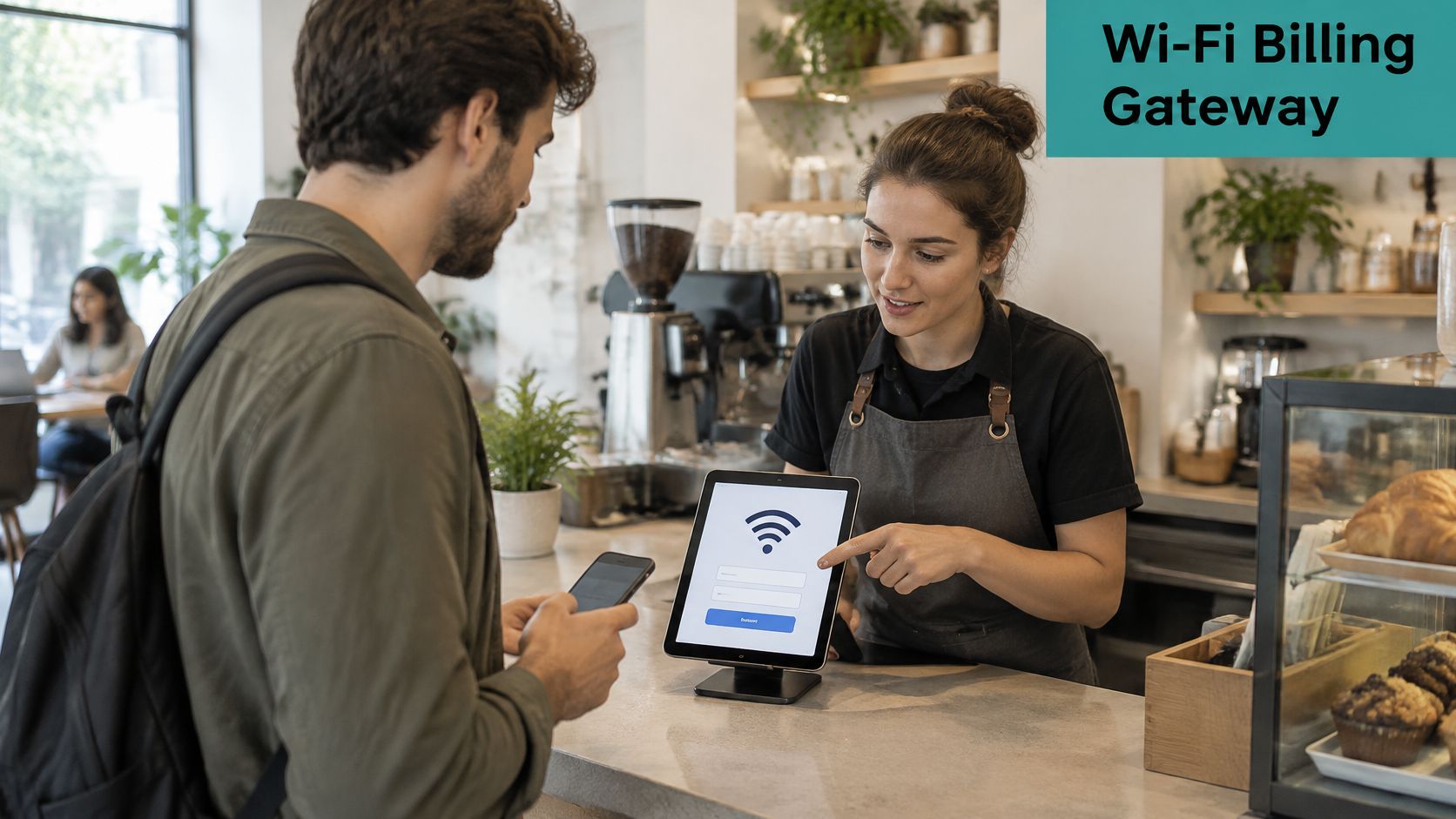
A login page isn't the whole system
A good-looking splash page doesn't prove that paid access works. The network still needs to distinguish a paying guest from someone who hasn't checked out, apply the right limits, and remove access when the entitlement ends.
For example, a cafe might offer basic browsing with a purchase and a paid package for longer visits. Both choices can appear on the same portal, while the gateway assigns different session policies behind it.
The commercial opportunity extends beyond selling minutes. Guest Wi-Fi can support customer onboarding, consent-based marketing, and service analytics. The global captive-portal market was valued at USD 990 million in 2024 and is projected to reach USD 2.755 billion by 2032, according to Data Bridge Market Research.
Practical rule: Evaluate the access decision behind the page, not just the appearance of the page.
That means checking how identities, payments, permissions, and support processes fit together before you enable charging.
How a Wi-Fi Billing Gateway Handles Payment and Authentication
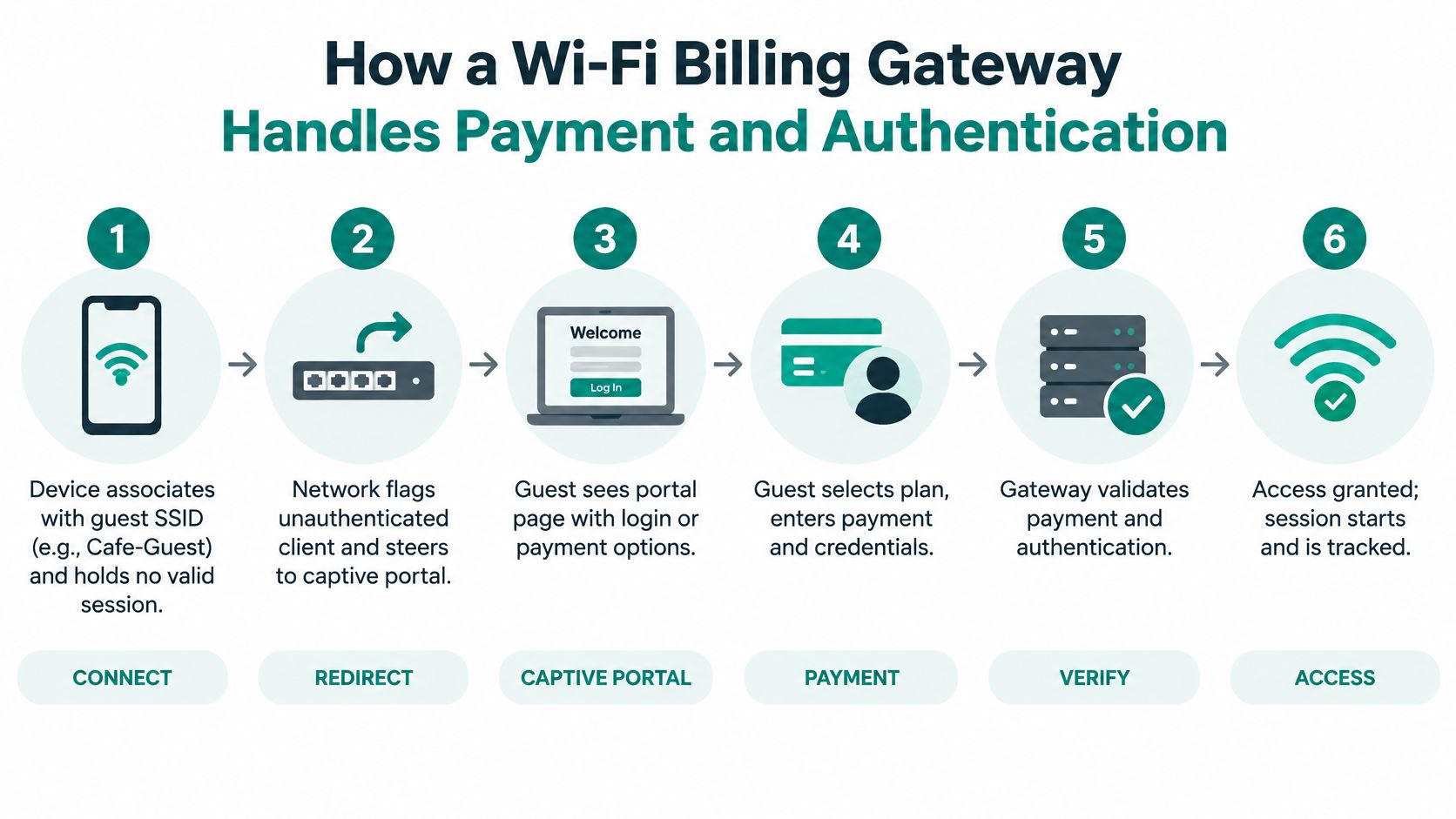
A guest at the counter joins Cafe-Guest, opens the splash page, and pays for two hours. Three systems still have to agree before that phone can browse. The access point only knows a device associated. The identity system knows who is asking. The payment provider knows whether the charge cleared. The billing gateway joins those answers into one authorization decision: paid, identified, and allowed, or still held at the door.
Follow the guest from connection to access
The device joins the guest network.
A guest selects an SSID, the network name shown on their phone, such as Cafe-Guest. The device has a wireless connection but no valid internet-access session, so the network initially permits only the services needed for onboarding.The network identifies the captive portal.
RFC 8910 defines DHCPv4, DHCPv6, and IPv6 Router Advertisement options that give compatible clients the captive-portal API endpoint specified by RFC 8908, rather than relying solely on fragile DNS or HTTP interception. These mechanisms identify the portal service. They do not define the payment transaction, so you still need a fallback onboarding route when a handset ignores the hint.The guest chooses an access route.
The splash page might offer terms acceptance, social login, a voucher field, or a paid plan. Display the package's duration, device allowance, and service limits before checkout so the guest knows what they're buying.The gateway checks identity and payment.
Identity can be validated through RADIUS, a directory, or an application programming interface, usually shortened to API. For paid access, design the checkout around a hosted, tokenized payment page so the payment provider collects the card details and the Wi-Fi platform receives a transaction reference rather than the card number. You lose a direct view of the card. You also keep card data off the venue's Wi-Fi platform, which is the compliance trade-off that makes charging safer to launch.The network receives the authorization.
After verified payment confirmation, the gateway asks the enforcement system to activate the purchased policy. In a Cisco Meraki deployment, the supported integration might use dashboard API operations or RADIUS-based authorization to apply a session duration, bandwidth allowance, or VLAN assignment. An IPSK identity is the same kind of decision: one person gets one pre-shared key, and that key is allowed only after the paid entitlement is confirmed.The session runs and eventually ends.
The gateway tracks the entitlement as the guest connects, renews, or reaches expiry. Record payment references, authorization results, and session events together, while limiting personal information to what operations need.
Keep the commercial and network records connected
The payment gateway integration workflow needs a durable connection between the purchased package and the resulting network entitlement. Your server should validate the provider's confirmation before approving access. A success page in the browser is only a receipt the guest can see.
For venues already managing memberships or bookings, Fitness GM's gym billing guide for studio owners offers useful context for organizing billing operations alongside customer access. A Wi-Fi purchase still needs its own network authorization, even when the customer already has a membership.
If the charge clears and Meraki or RADIUS never receives the accept, leave the device on the onboarding-only path. Retry the authorization, or send the guest back to the portal. Do not open full internet because checkout looked finished.
Guest Wi-Fi Authentication Options Compared
The captive portal is the front door, but you don't need every visitor to present the same kind of identification. A shopper browsing briefly and an employee bringing a personal laptop need different authentication solutions.
Choose the method according to the trust you need, the devices you support, and how quickly you must revoke access.
Guest Wi-Fi authentication options at a glance
| Authentication method | How it works | Best suited to | What the gateway enforces |
|---|---|---|---|
| Click-through portal | Guest accepts terms on the splash page without credentials | Cafes, retail floors, hotel lobbies | Session timer, bandwidth cap, consent log |
| Social login and social wifi | Guest signs in with Facebook, Google, or email on the splash page | Retail and shopping centres seeking marketing opt-ins | Permitted data capture, separate opt-in consent, session policy |
| Voucher or access code | Staff issue a printed or emailed code tied to time or device count | Hotels, events, co-working desks | Validity window, device limit, expiry |
| RADIUS username and password | Credentials are checked through a RADIUS server against an identity store such as Active Directory | Education campuses, corporate offices | Per-user policy, VLAN assignment, revocation |
| IPSK and EasyPSK | Each user or device receives an individual pre-shared key through a supported provisioning workflow | BYOD corporate networks, student dorms, smart devices | Individual-key revocation, configured rotation, VLAN mapping where supported |
| Passpoint, Hotspot 2.0 | Device discovers network capabilities before connecting, then uses enterprise authentication | Airports, city-wide Wi-Fi, managed BYOD fleets | Certificate, SIM, or other supported EAP identity and roaming policy |
Social login isn't marketing consent. Someone authenticating with an account hasn't automatically agreed to promotional messages. Keep the access terms and optional marketing permission distinct, and provide a clear explanation of the information you collect.
Match convenience to accountability
Click-through access suits low-friction retail visits. Vouchers suit stays, bookings, and events where staff already know who should receive access. RADIUS suits organizations with established user directories.
IPSK, or individual pre-shared key, removes the need to give everyone the same wireless password. EasyPSK-style provisioning can make that approach practical for guest and personal devices, but check exactly how keys are issued, withdrawn, and mapped to network policy. A key identifies an access credential, not necessarily the human currently holding the device.
The Wi-Fi Alliance's Passpoint deployment guidelines describe IEEE 802.11u discovery and ANQP, followed by WPA2-Enterprise or WPA3-Enterprise authentication using methods including EAP-TLS, EAP-TTLS, and EAP-SIM/AKA. It's useful for repeat connections and roaming, although enrollment or consent may still involve a portal.
Configure the Cisco Meraki handoff deliberately
For a portal-based Cisco Meraki setup, configure the guest SSID for the appropriate splash-page mode and connect the portal through the supported RADIUS or API workflow. Use a RADIUS server configuration or appropriately restricted API credentials tied to the intended Meraki network.
Meraki Cloud integration doesn't mean every external portal page is hosted by Meraki. Confirm which system serves the page, which validates identity, and which applies policy using a defined guest Wi-Fi authentication workflow.
Billing Gateways in Education, Retail and BYOD Corporate Wi-Fi
The same gateway can support very different venue policies. The useful question isn't just whether you can charge, but which access entitlement makes sense for the person connecting.
Education and corporate devices
Consider a student arriving at a dorm with a laptop, phone, and games console. Students log in to the campus network with their unique SSID credentials through a simple captive portal, using any device. Schedule residential access around the occupancy period, and apply bandwidth fairness so recreational traffic doesn't overwhelm learning activities.
Don't make essential educational access contingent on a successful card checkout. If premium residential packages are offered, keep their entitlements separate from access needed for teaching and safeguarding. Measure onboarding completion and help-desk requests during student arrivals.
In a BYOD corporate scenario, visitors self-register on a separate guest SSID, while employees authenticate through an identity workflow using Azure AD or SAML. Employee-owned devices can receive individual IPSK credentials mapped to the appropriate VLAN, rather than inheriting a shared password that remains valid after someone leaves.
Measure support tickets per hundred guests as an internal service metric, alongside the time needed to revoke a departing user's access. That tests whether the system is manageable, not merely whether the login page works.
Retail and hospitality
A shopping centre can offer free social wifi with an optional email marketing sign-up, then present a paid upgrade for visitors who need a different service package. Geo-fenced coupons can connect an eligible visitor's Wi-Fi journey to an offer, while footfall, dwell-time, and return-visit analytics help managers evaluate the wider visit.
Keep those measurements distinct. An access-point association isn't automatically a confirmed shopper, and an email address isn't automatically a valid marketing opt-in. Evaluate opt-in quality and repeat engagement through a deliberate Wi-Fi monetization strategy, not the size of the contact list alone.
For a hotel or resort, tie a voucher to the stay and offer clearly described upgrades. A PMS or Opera Micros integration can support room-linked workflows, but define how charges reach the folio and what happens when a guest changes rooms or checks out early. Monitor successful activations and billing disputes.
Healthcare and senior living
A resident may need help connecting a device, while a patient may need access to appointments or personal health records. Staff-issued codes, accessible onboarding, and a prepared offline authorization route are more useful here than a mandatory payment screen.
Use supported WPA2 security and appropriate network separation, rather than assuming a captive portal encrypts wireless traffic. Track connection availability and requests for staff assistance, with essential access protected from commercial checkout problems.
Keeping Paid Wi-Fi Payments Secure and Compliant
Integrated billing is a compliance-scope decision, not just a checkout button. The important distinction is whether your Wi-Fi environment can handle or influence cardholder-data collection, not whether the payment form matches your venue's branding.
A fully hosted payment page or redirect can keep card fields outside the Wi-Fi platform and reduce its exposure. Embedded fields and scripts need closer examination because the portal may still affect payment security. Don't assume that outsourcing the transaction removes your assessment responsibilities.
Secure the payment page and its dependencies
The PCI Security Standards Council's payment-page guidance identifies Requirement 6.4.3 for managing payment-page scripts and Requirement 11.6.1 for detecting unauthorized changes or tampering. It also describes browser-direct payment collection, where the customer's browser sends payment data directly to the payment provider.
Build the implementation around these controls:
- Keep card numbers out: Use a PCI-compliant payment service provider with hosted or browser-direct collection. Don't store primary account numbers in the captive-portal platform.
- Control scripts: Maintain an inventory and allowlist of payment-page scripts, with a documented reason for each.
- Detect changes: Monitor unexpected modifications rather than relying only on a deployment approval.
- Protect administration: Restrict administrator permissions, secure authentication, and keep the portal and dependencies patched.
- Verify callbacks: Validate payment notifications and redirects before allowing them to change network entitlements.
A payment provider can process the card securely while an insecure portal still grants the wrong access or exposes guest information.
Ask who owns each responsibility
Before launch, write down the answers to these operational questions:
- Merchant of record: Which organization is selling the access and appearing on the transaction?
- Refunds and chargebacks: Who investigates disputes, authorizes refunds, and keeps supporting records?
- Webhook integrity: How are notifications authenticated, checked for replay, and safely retried?
- Network separation: Are guest, POS, staff, and administrative networks separated and tested?
- Reconciliation: Who investigates a confirmed payment without a matching RADIUS or API session?
Privacy deserves the same attention as checkout. A portal that collects identity, visit history, and marketing preferences creates sensitive records even when it never receives a card number. Use TLS, minimize collection, define retention, and restrict who can export guest information.
A sound secure payment processing design joins those responsibilities together. Have the merchant's payment provider or assessor confirm the applicable assessment scope before you accept live transactions.
What Happens When Payments or Portals Fail
Payment taken, no internet delivered is the failure your reception team will hear about first. Give staff a recovery procedure they can use without asking a guest to pay again.
Paid Wi-Fi failure modes and how to fix them
| Symptom | Likely cause | Operational fix |
|---|---|---|
| Payment captured but access never starts | Webhook or RADIUS update failed after checkout | Reconcile payment logs against session state, retry API calls safely, and issue an immediate fallback voucher |
| Portal page won't load on a guest device | Restrictive mini-browser or blocked redirect | Offer an RFC 8910-aware flow plus a plain fallback URL and QR code |
| Voucher expires before the paid session ends | Clock mismatch or validity starting before activation | Synchronize time sources and calculate validity around the purchased session |
| Paid session drops when roaming between access points | Session state remains tied to an individual AP | Use supported cloud or controller session synchronization so entitlement follows the device |
| Duplicate charge after a retry | Non-idempotent charge request or replayed webhook triggering payment logic | Authenticate and de-duplicate webhooks, use idempotent payment requests, and alert on duplicate authorizations |
| Refund demanded after an outage | Gateway or access-point failure during paid access | Publish an outage policy and calculate appropriate pro-rata refunds from session records |
A duplicate webhook shouldn't itself charge a card. It becomes dangerous when your application treats each delivery as a fresh instruction to create a transaction. Store processed event identifiers and make repeat processing safe.
Preserve access when checkout isn't an option
Captive-portal security and accessibility analysis highlights problems involving restrictive mini-browsers, redirects, privacy, and interrupted access. Treat those as service-design concerns, not reasons to tell the guest to try another phone.
Prepare staff-issued vouchers, time-limited codes, offline authorization, and accessible QR and browser flows. Offline codes only help if the remaining enforcement system can validate them during the outage, so test that dependency explicitly.
Recovery principle: Verify the existing purchase before asking for another payment, and give staff a controlled way to restore legitimate access.
A captive portal troubleshooting process should identify whether the problem lies with page loading, identity verification, checkout, or network authorization. Those require different fixes.
Before launch, test:
- Infrastructure outages: Disconnect the gateway service and an access point.
- Repeated requests: Submit checkout and notification events again.
- Boundary conditions: Try expired vouchers and interrupted sessions.
- Movement: Roam between access points during paid access.
- Guest outcomes: Track abandonment, chargebacks, consent quality, and unnecessary information collection.
Keep essential education, healthcare, and senior-living access available without requiring a card.
Choosing and Launching Your Wi-Fi Billing Gateway
- Confirm controller integration. Verify the complete path between the portal, Cisco Meraki access points, and the authorization system. Test the actual API or RADIUS functions you'll use, including expiry and revocation.
- Choose authentication for your audience. Use low-friction social login where appropriate for retail, directory-backed identity with IPSK or EasyPSK workflows for education and corporate BYOD, and vouchers for booked stays.
- Set payment boundaries. Require hosted or tokenized collection, document who handles card data, and confirm the merchant's compliance responsibilities before checkout goes live.
- Prove recovery works. Give reception or support staff usable fallback credentials and alerts for payments without access. Make the recovery procedure part of staff training.
- Check useful analytics. Confirm that consented marketing exports, session reporting, and visitor analytics answer a defined business question, rather than collecting information without a clear purpose.
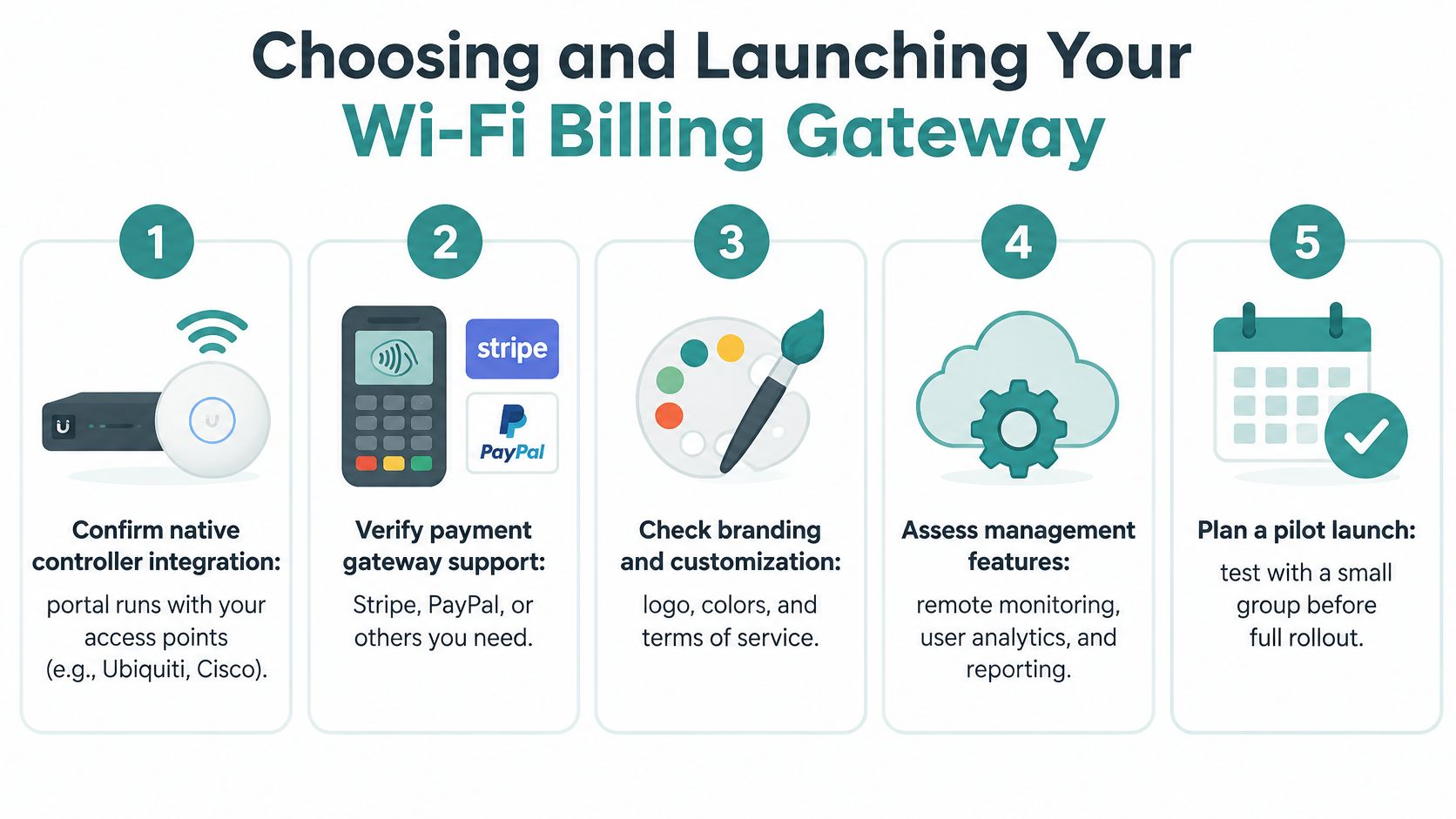
Match the package to the deployment
Our cloud-managed Cisco Meraki platform includes Payment Options, a billing gateway for venues that want to charge guests. Assisted IPSK is priced per 100 access points and includes all IPSK features, CSV bulk upload, and bulk QR code printing; the affordable Coffee Shop pack covers 6 access points and includes all PRO features and a captive portal.
Pilot before you expand
Start with a paid guest SSID for a month as a deliberately limited pilot, not a property-wide commitment. Keep the offer simple enough that your staff can explain it without opening a manual.
Measure purchase conversion, payment abandonment, successful access activation, and support tickets. Review failed sessions individually, then expand only when the checkout, authorization, and recovery records show that guests reliably receive what they purchased.
Splash Access offers Cisco Meraki-integrated captive portals, authentication workflows, and billing options for paid guest Wi-Fi. Visit Splash Access to discuss your access points, guest identity requirements, and payment workflow, then plan a pilot that tests both successful purchases and practical recovery.