A network ID is the part of an IP address that names the network or subnet a device belongs to, not the individual device, and it is calculated by applying the subnet mask to the IP address. Take 10.20.15.1 with the mask 255.255.255.0 and the result is 10.20.15.0, a subnet of 256 addresses with typically 254 you can hand to hosts.
Most guides stop at that subnet maths. That leaves a hole. The same two words also show up as a Wi-Fi name, a VLAN tag, and an IPv6 prefix, and the screens for guest Wi-Fi, schools, shops, and BYOD offices rarely say which one they mean. Attach a portal or a firewall rule to the wrong one and guests land on the staff path, or staff inherit a click-through page. The walk-through below separates the meanings, starting with the IP address and then the name people tap on a phone.
What a Network ID Means in Plain English
Picture a street. Every house shares the street name. Only one house has a given number. In IP addressing, the network ID is that street name. The host ID is the house number, the bits that point at one device rather than the whole block.
A network ID is the part of an IP address that names the network a device belongs to, not the device itself.
The phrase trips people up because it is not one universal identifier. A ticket that says "change the network ID" might mean a subnet, a Wi-Fi name, a switch tag, or an IPv6 prefix. Mix those up and a captive portal, a DHCP scope, or a firewall rule lands on the wrong object. A short pass through computer networking basics makes the four labels easier to keep apart when a school, shop, or office ticket uses them in the same sentence.
Four labels, four jobs
| Term | What It Identifies | Where You Meet It |
|---|---|---|
| IPv4 network ID | The subnet address shared by devices in one subnet | Routing tables, DHCP scopes, firewall rules |
| SSID | The Wi-Fi network name customers select | Wi-Fi settings and captive portal rules |
| VLAN ID | The number tagging one traffic segment on a switch | Switch port and controller configuration |
| IPv6 prefix | The network portion of an IPv6 address | IPv6 routers and DHCPv6 settings |
On Cisco and Meraki Wi-Fi, the words most often mean the SSID. Guest setup screens use that name because splash rules, authentication, and access controls attach to the wireless service guests select.
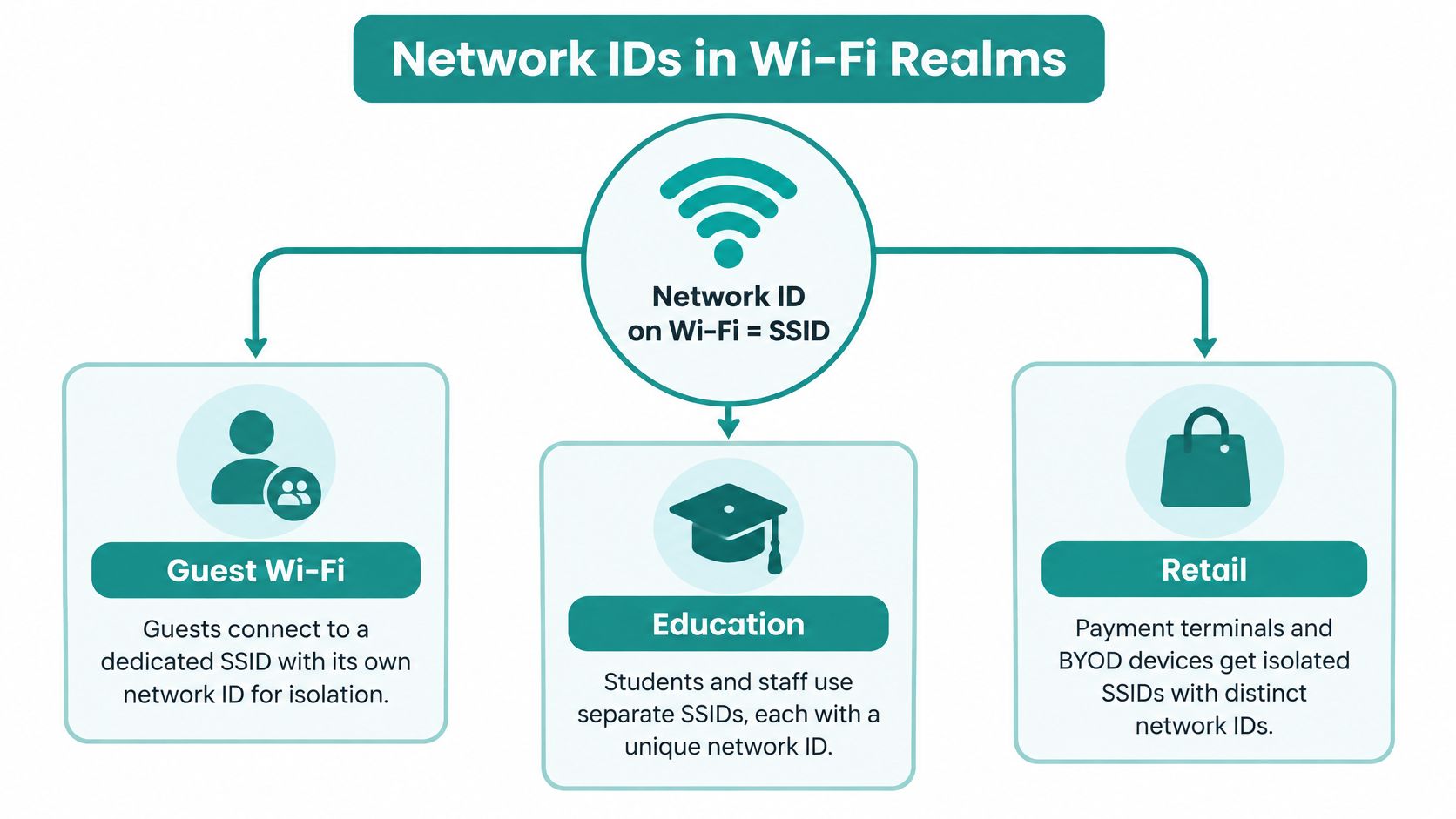
A campus might name the student service Student, so learners sign in on that SSID and nowhere else. A shop might name the customer service Guest WiFi while tills stay on a different name. An office might name personal laptops BYOD so they never share the staff path. Same everyday idea, three different trust lines.
The subnet maths comes next. The Wi-Fi name, and how Cisco Meraki captive portals hang off it, comes after that. Match the word to the screen in front of you before you change anything.
How a Network ID Is Calculated Step by Step
The mask decides which bits name the subnet and which bits name a device. Cisco's subnetting guidance puts it plainly: mask bits set to 1 keep the network bits, and mask bits set to 0 wipe out the host bits. You do that with a bitwise AND, not with subtraction.
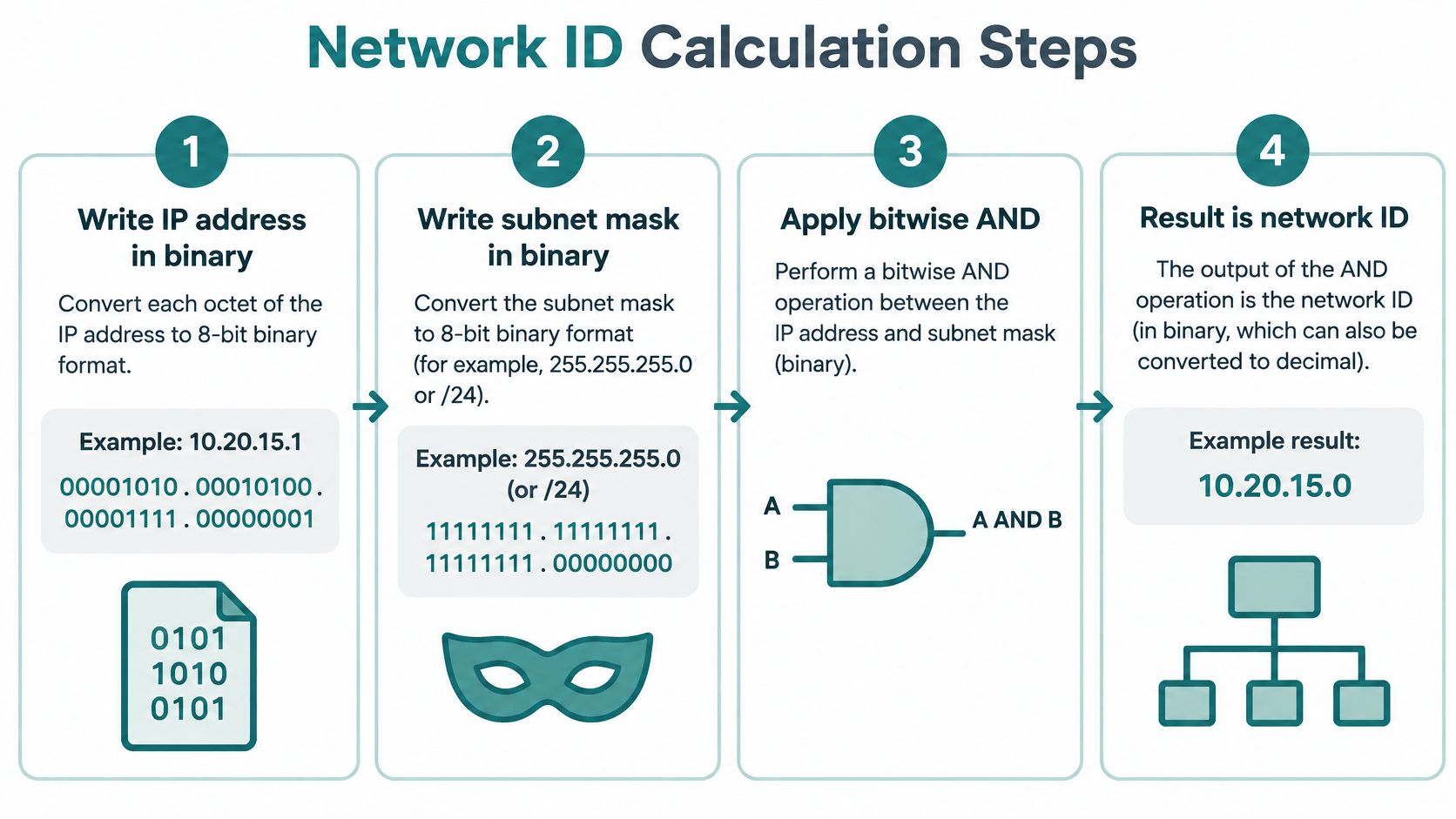
- Write the IP address in binary. For 10.20.15.1, the last octet is 00000001. The first three octets stay as they are.
- Write the subnet mask beside it. 255.255.255.0, also written /24, is twenty-four 1s followed by eight 0s.
- Compare each pair of bits. Where the mask is 1, keep the address bit. Where the mask is 0, force the result to 0. That is the AND.
- Read the result. 10.20.15.1 AND 255.255.255.0 is 10.20.15.0. That address is the network ID. You do not assign it to a laptop.
Where the mask is 1, the bit belongs to the network. Where the mask is 0, the bit belongs to a host.
The leftover 8 bits identify hosts. Two to the power of 8 is 256 total addresses. You reserve the network address and the broadcast address, which leaves 254 assignable hosts on that /24. If the mask still feels abstract, a plain subnet mask walk-through shows the same AND with a different address so the pattern sticks.
What the prefix length changes
A shorter prefix means a larger network. A longer prefix means a smaller one. The same 10.20.15 range illustrates it.
| Prefix | Example Network ID | Total Addresses | Usable Hosts |
|---|---|---|---|
| /24 | 10.20.15.0 | 256 | 254 |
| /26 | 10.20.15.64 | 64 | 62 |
| /23 | 10.20.14.0 | 512 | 510 |
| /30 | 10.20.15.0 | 4 | 2 |
A /26 slices one /24 into four network IDs. Each block holds 64 addresses and normally 62 usable hosts. 10.20.15.64 is the second of those four. A /23 does the opposite. It glues two neighbouring /24s into one network ID, here 10.20.14.0, with 512 addresses and 510 usable after the two reserved ends. A /30 is tiny on purpose: four addresses, two usable, the sort of link you put between two routers rather than under a classroom of tablets.
Guest Wi-Fi is where this stops being a maths exercise. Give guest, staff, payment, and IoT traffic their own network IDs, each tied to its own VLAN. Firewalls can then allow internet from the guest block and refuse that block any path to payment hosts. Internet access can still leave through one central path. The separation is the subnet, not a hope that people pick the right Wi-Fi name.
Network ID, Host ID and MAC Address Compared
Think of an apartment building. The street address is shared by everyone inside. That is the network ID. The apartment number belongs to one home. That is the host ID. The sticker on the network card is different again. That is the MAC address, and it does not name the subnet at all.
NIST describes a wireless MAC address as a 48-bit value tied to a network interface. 802.11 frames carry source and destination MAC addresses so the local radio can decide who gets the frame. That decision happens at Layer 2. The network ID works at Layer 3, where routers decide which subnet a packet belongs to.
| Identifier | Layer | What It Identifies | Example |
|---|---|---|---|
| Network ID | Layer 3 (IP) | The whole subnet | 10.20.15.0/24 |
| Host ID | Layer 3 (IP) | One device inside the subnet | 10.20.15.1 |
| MAC address | Layer 2 | One network interface | 48-bit 802.11 interface address |
Same card, different subnet
A staff laptop can keep the same interface address all day and still receive a new IP address, and a new network ID, when policy moves it from a guest SSID to a staff VLAN. Nothing on the card changed. The subnet did.
The reverse is just as common. A whole classroom of tablets can share one network ID. DHCP still hands each tablet its own host address, and each radio still has its own Layer 2 identifier. They are neighbours on one street, not one device.
That split matters for BYOD corporate laptops and for school tablets. You draw the trust line with the subnet and the route, not with a list of interface addresses. A personal laptop that joins the guest subnet should not be able to reach payroll just because someone once typed its MAC into an allowlist.
What to trust each identifier for
Use network IDs and routing to mark what may talk to what. Use MAC information as a local clue when you are tracing a single radio on one access point. Do not treat a MAC allowlist as a login. It does not prove who is holding the device, and it does not offer cryptographic proof.
Randomised wireless addresses make that clue even weaker over time. If you are checking repeat visits from interface data alone, read how MAC address tracking behaves before you build a report on it.
Network IDs in Guest Wi-Fi, Education and Retail
On Wi-Fi, the network ID a person sees is usually the SSID, the name on the phone. Each SSID can sit on its own VLAN, its own subnet, and its own portal. Cisco Meraki is where that mapping gets configured for a lot of schools, shops, and offices.
A shop, a campus, and an office
Say a retailer creates Guest WiFi. Customers select that name. Point-of-sale terminals stay on a payment SSID, and staff stay on another. The guest subnet can reach the internet. It cannot reach the tills. The VLAN is what keeps those flows apart. If the tag itself is new to you, how VLANs work is the piece to read before you number the ports.
After the phone associates, a browser hits a captive portal, the page shown before full access. Cisco Meraki's captive portal notes split that page into two kinds. A click-through splash asks the guest to accept terms and then opens the network. A sign-on splash asks for a username and password and grants access only after an authentication server says yes. That server can be Meraki-hosted, or it can be your own RADIUS, Active Directory, or LDAP service.
Social login and social WiFi sit on that same page. The guest registers with an account they already have, and the venue can collect a name or email when the person agrees. Retail uses that for enrolment. A campus should not use it as the only check for student records.
On a campus, students log in to the network with their unique SSID credentials through a simple captive portal, using any device. A successful sign-on can place them on a specified student VLAN, while staff who pick a different SSID land on a different subnet. Contractors can get a third path with a shorter lifetime.
In a corporate office, guests might see a click-through or social WiFi page, while employees use 802.1X and never see that page. BYOD phones that are not domain-joined often need something in between.
Keys that are not one shared password
IPSK (Identity Pre-Shared Key) gives a person or a device its own pre-shared key while everyone still associates to the same SSID. You can revoke one key without rotating the password for the whole shop or the whole lab. EasyPSK is the same idea scaled for large deployments, where creating a fresh SSID per device would be unmanageable.
Sensible names stay short and obvious:
- Education: Student, Staff, Guest
- Retail: Guest WiFi, Staff, Payment
- BYOD corporate: BYOD, Corporate, Guest
The name is the network ID guests recognise. The VLAN and the subnet behind it are what your firewall enforces.
What a Network ID Cannot Tell You
A network ID can direct traffic to the right place, but it cannot identify the person carrying the device. A subnet, SSID, VLAN or IPv6 prefix describes a network or connection. None of these is proof of identity or consent.
A MAC address can also expose information about a device's presence on shared wireless networks. RFC 9724 discusses how changing and randomised identifiers can reduce tracking across networks. They do not prevent every form of tracking: probe requests and other device characteristics may still help distinguish or track devices.
What you may use it for
Use a network ID to route traffic, apply subnet policies, or count activity in broad terms, such as how busy a guest subnet was. Treat those counts as network-level information, not a record of named visitors. Randomised MAC addresses also make repeat-visitor charts unreliable when they assume one interface address always represents one person.
When activity must be tied to a person, use an authentication method that checks a credential. Network access control can apply access rules after that check. Teams can also follow these phased zero trust implementation steps when strengthening access controls over time.
- Explain collection clearly. Tell visitors what information the portal collects before they continue.
- Limit retention. Keep records only for as long as they are needed.
- Use credentials for attribution. A per-user login or individual key can associate network activity with an account. A subnet address cannot.
A network ID tells the network where traffic belongs, not who is holding the device.
Set Up Your Network IDs for Guest Wi-Fi
Turn the definitions into a Cisco Meraki checklist. The SSID has to exist and be enabled before any splash rule can attach to it.
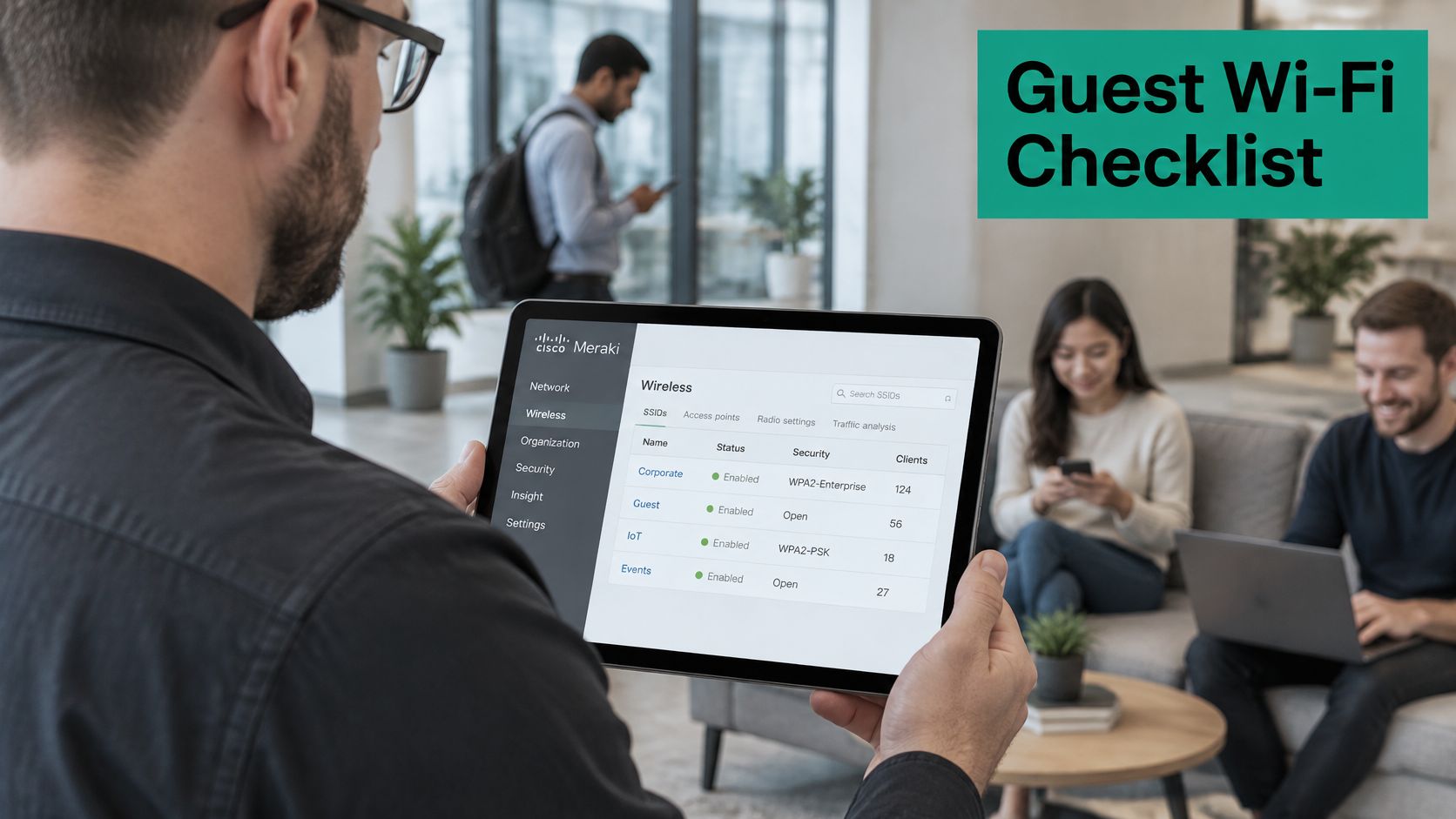
- List every group that needs its own network ID: guests, students, staff, payment terminals, and BYOD devices.
- Give each group an SSID such as Guest WiFi, Student, or BYOD. Map it to its own VLAN and subnet, then enable the SSID in the Meraki dashboard.
- Import that SSID before you build a portal rule. Select the organization and network, choose the enabled SSID, import it into the captive-portal system, then attach the rule. Cisco treats that SSID as the wireless network ID for the splash page, the authentication policy, and the access controls. A guest click-through must not land on the employee SSID by accident.
- Pick the method for that SSID. Click-through terms suit a simple guest path. Sign-on against RADIUS, Active Directory, or LDAP suits students and staff. Social login or social WiFi fits when you collect a name and email with consent. Cisco's wireless design guidance also lists iPSK beside WPA2, 802.1X, MAC Authentication Bypass, and a shared PSK. An individual key can be issued and revoked on the same SSID, which suits labs, scanners, and BYOD without a new name per device. EasyPSK covers the same pattern when the estate is large.
- Test from a phone. Confirm the SSID opens the right portal and drops the client on the right VLAN.
Private IPSK authentication can run as a standalone onboarding portal on that Meraki guest path, including DUO multi-factor, and optional guest access can collect a name and email when you require it. This week, write the group list and the SSID names, then have them reviewed before go-live.
Splash Access builds captive portals and authentication for Cisco Meraki guest Wi-Fi, including social WiFi, IPSK, and EasyPSK for education, retail, and BYOD offices. If you are mapping SSIDs, VLANs, and sign-on rules and want them attached to the right network ID, visit Splash Access and we can walk through the setup with you.