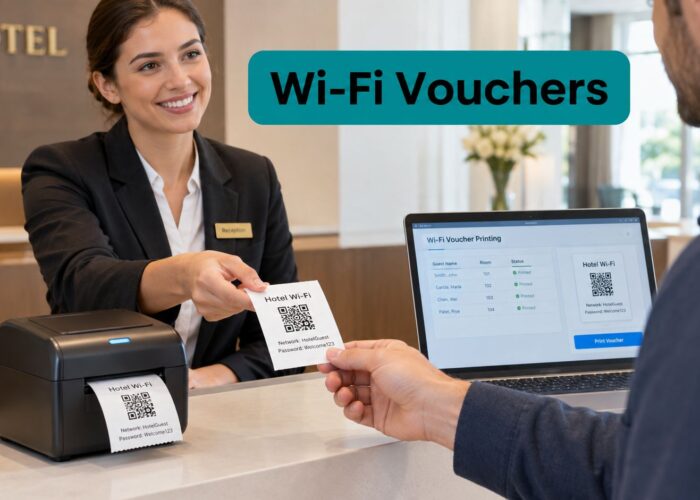
A Friday afternoon rush exposes every weakness in a small-business Wi-Fi network. Customers can see the guest SSID, but the captive portal keeps timing out. Staff lose connection while moving between rooms. Point-of-sale tablets hesitate, cameras drop offline, and someone suggests rebooting the router again. The access point wasn't necessarily defective. In many cases, the core problem is poor capacity planning, weak segmentation, or an authentication flow that was never tested with real devices.
A reliable access point small business deployment treats wireless as operational infrastructure. Coverage matters, but so do concurrent users, roaming, airtime, uplink capacity, security boundaries, onboarding, patching, and support. Cisco Meraki access points can provide a strong management foundation, but the result still depends on how the network is designed and maintained.
Sizing Your Network for Real World Capacity
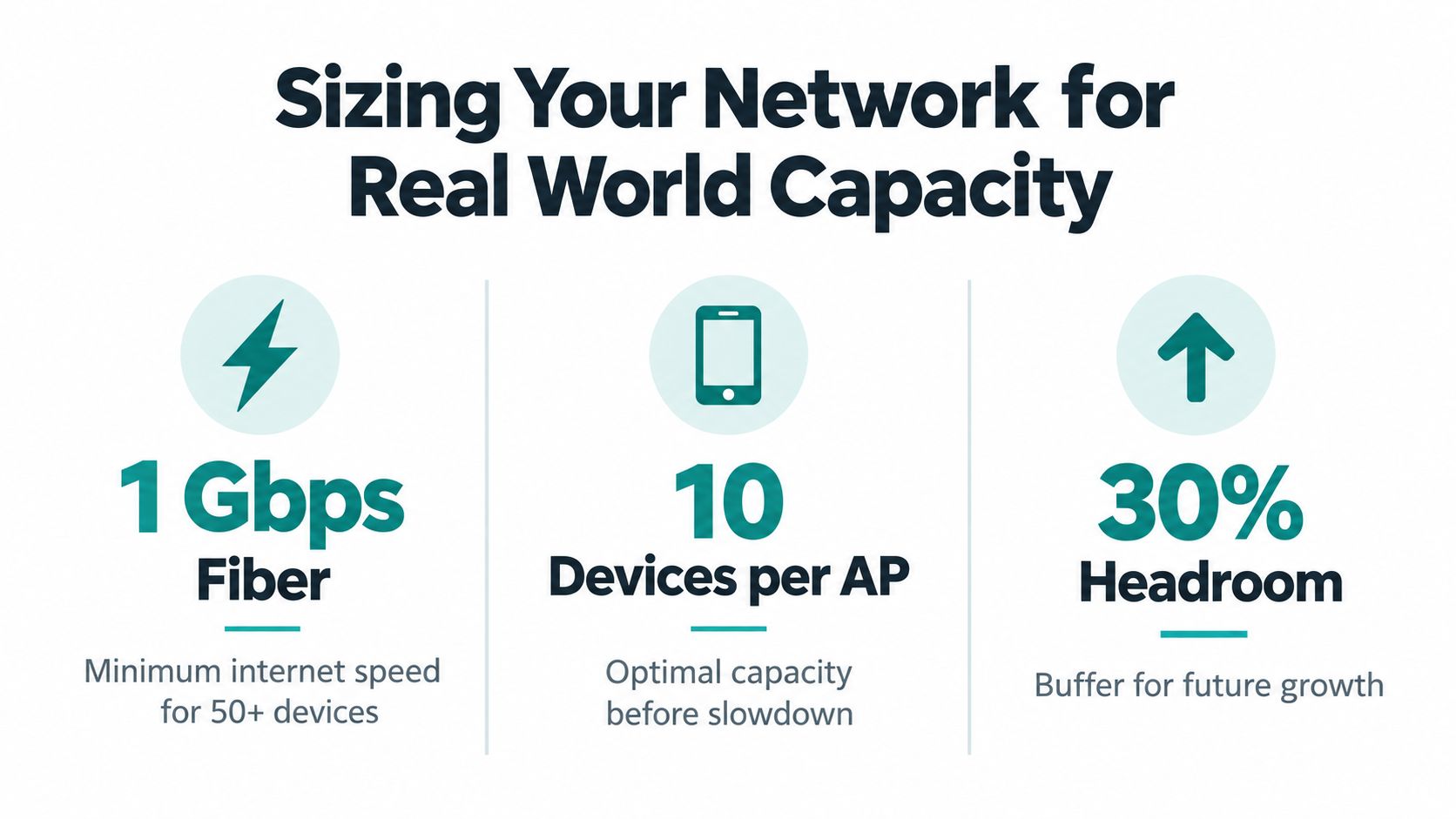
A busy café, retail store, school building, or office can have acceptable Wi-Fi in the morning and unusable Wi-Fi at peak time. The internet connection may be fast, yet every user experiences delay because too many clients compete for airtime through one access point. Buying a newer AP without understanding the demand only moves the bottleneck.
The broadband foundation has improved substantially. In the United States, 83.9% of small-business establishments had access to terrestrial broadband in 2024, compared with 48.1% in 2014, while 74.8% could access at least 250 Mbps download and 25 Mbps upload. The average small business had access to 1.6 terrestrial broadband options in 2024, compared with 0.7 in 2014. These figures describe availability, not actual subscriptions or Wi-Fi quality, but they show why more small businesses can now support centrally managed wireless, cloud authentication, and guest access. The U.S. Small Business Administration broadband analysis provides the underlying context.
Start with demand, not floor area
Square footage is a poor substitute for a capacity model. A quiet office, a classroom, a hotel lobby, and a checkout area may occupy similar space but create very different wireless workloads.
Inventory these inputs before choosing AP locations:
- Concurrent clients: Count staff devices, guest phones, laptops, scanners, tablets, cameras, IoT equipment, and point-of-sale terminals that may be active at the same time.
- Application demand: Voice, video, cloud applications, payment traffic, inventory systems, and ordinary guest browsing place different demands on airtime and latency.
- Building materials: Concrete, metal shelving, glass, lift shafts, insulated walls, and equipment rooms can change signal behavior more than a floor plan suggests.
- Interference sources: Neighboring networks, Bluetooth equipment, wireless cameras, microwave ovens, and poorly configured devices can consume usable airtime.
- Growth and events: A retail promotion, campus registration period, conference, or full restaurant can create a very different peak from an ordinary weekday.
An engineering review cites common planning guidance of approximately one enterprise AP per 25 to 35 concurrent users in standard offices, while high-density environments generally require a more conservative design. The same review reports 37.8% higher throughput from 3D-optimized planning than traditional 2D planning, but those figures are benchmarks, not guarantees. Client capability, channel width, wall attenuation, and interference still determine the outcome. Wi-Fi Alliance performance guidance explains why throughput and user experience need scenario-based testing.
Practical rule: A powerful AP doesn't create more airtime. Several appropriately placed, lower-power APs can outperform one overloaded unit.
Before deploying a Cisco Meraki device, document the expected load and decide how much capacity should remain available during busy periods. For additional practical ideas on handling overloaded office networks, review these office Wi-Fi overload solutions. A detailed access point design process can then turn the inventory into an actual deployment plan.
Planning Coverage and Validating Signal Strength
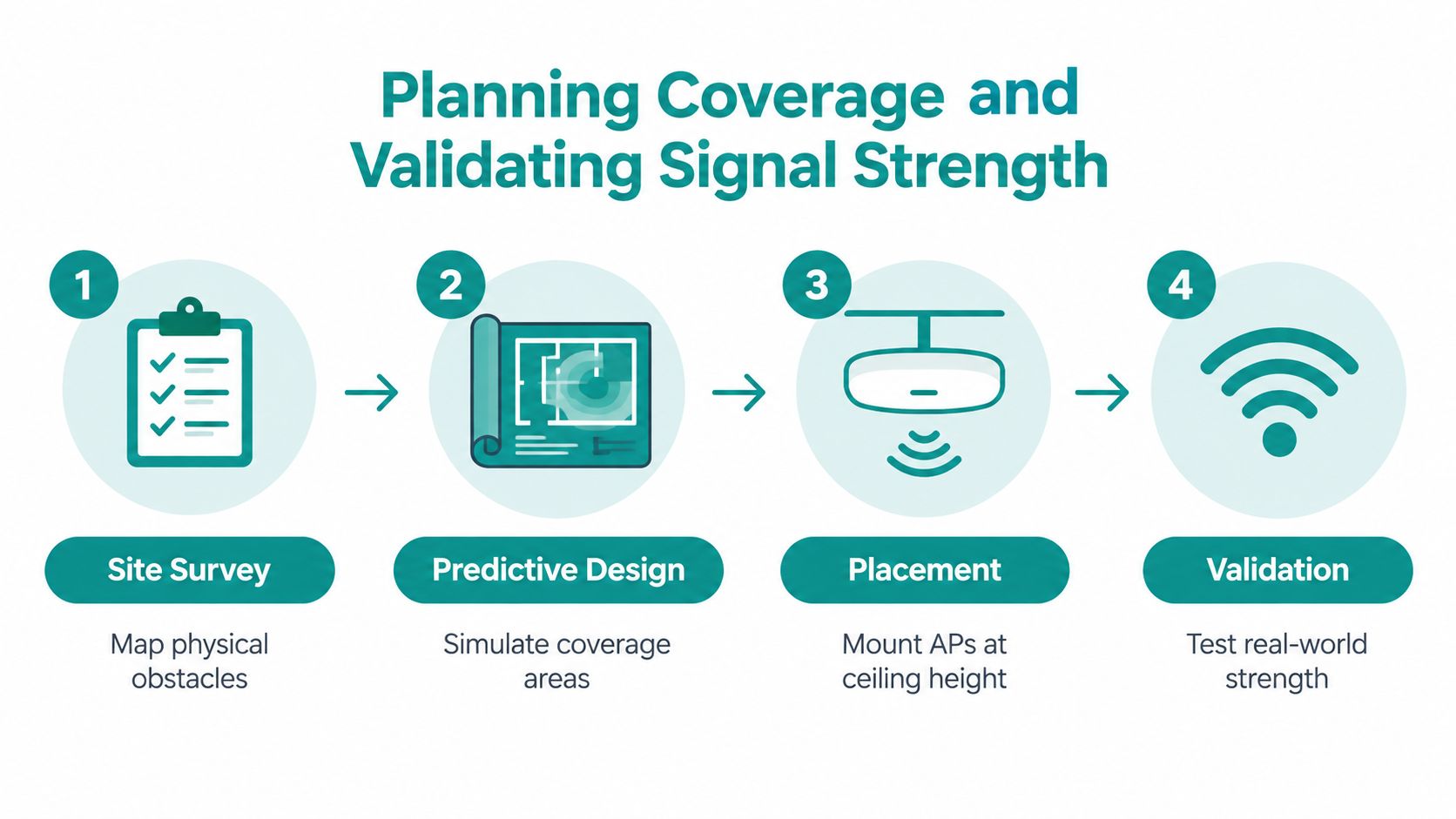
A predictive survey is useful because it identifies likely coverage patterns before installation. It isn't proof that the network will work after the ceiling tiles, shelving, people, equipment, and neighboring networks are present. Treat the design as a model that requires physical validation.
Use a staged survey process
Begin by recording the floor plan, construction materials, expected client density, application requirements, and likely interference. Mark entrances, meeting rooms, checkout lanes, classrooms, hotel rooms, guest seating, corridors, and any location where users will move between APs.
A predictive survey can then estimate placement, channel reuse, transmit power, and coverage boundaries. In a Cisco Meraki environment, the proposed design should account for switch uplinks, power availability, mounting position, and the physical route to the network cabinet. A ceiling-mounted AP isn't automatically better if the cable path, obstruction, or antenna orientation undermines the design.
The on-site validation survey is where assumptions meet reality. Walk representative locations and record:
- Received signal strength: Confirm that the device can maintain a usable connection in the areas that matter operationally.
- Signal-to-noise ratio: A strong signal surrounded by interference can still deliver poor application performance.
- Channel utilization: High utilization indicates airtime contention, even when the internet connection has plenty of capacity.
- Roaming behavior: Test movement between APs with an active voice call, video session, or business application.
- Latency and throughput: Measure application-relevant performance instead of relying on the advertised PHY rate.
The wireless site surveys process should include both quiet and busy conditions. A single laptop standing close to an AP tells you very little about a crowded shop or a lecture room. Acceptance testing should use concurrent clients and realistic traffic, because aggregate airtime, contention, and uplink capacity shape the user experience.
Define pass and fail conditions
Write the acceptance criteria before testing. For example, define the minimum signal and SNR required for voice, the maximum acceptable channel utilization in a point-of-sale area, the maximum roaming interruption that staff can tolerate, and the per-user throughput required for guest browsing or video.
Also test the locations people tend to forget. A user at the entrance may be authenticating while walking. A payment terminal may sit behind a counter. A student may move through a corridor while carrying an active session. A retail worker may scan inventory from a metal aisle. A useful real-world example of wireless considerations in a store environment is this wireless store construction case study.
The final test should record failures, not just averages. Note retries, roaming drops, authentication delays, and performance during peak activity. If the results fail, change placement, power, channels, or AP density before opening the network to customers.
Securing Guest Traffic with True Network Isolation
A separate guest SSID is not the same thing as a secure guest network. The name may be different while the traffic still reaches printers, cameras, management interfaces, payment systems, or other internal devices. That creates false confidence, especially in small businesses where the same person may manage the router, switches, access points, and point-of-sale equipment.

Build boundaries that enforce policy
Separate guest, employee, IoT, and management traffic with distinct VLANs or equivalent policy boundaries. Apply firewall rules that deny unnecessary cross-segment access, restrict administrative interfaces, and allow only the services each device category needs. Enable client isolation where appropriate so visitors can't communicate directly with one another.
Neutral guidance emphasizes that guest isolation requires segmentation, firewall rules, and client isolation. A separate SSID alone may still place visitors on an insufficiently separated subnet. This guidance on guest Wi-Fi security describes the distinction between a visible guest network and genuine isolation.
A practical design might look like this:
- Guest devices: Internet access, captive portal authentication, rate or policy controls, and no access to internal services.
- Employee devices: Authenticated access to approved business applications and shared resources.
- IoT equipment: Restricted communication to the systems that operate or monitor it.
- Point-of-sale systems: A tightly controlled segment with no dependency on guest traffic.
- Network management: Administrative access limited to authorized staff and protected from visitor devices.
Test the network like an attacker
Don't stop after checking that the guest SSID appears. Connect a test phone or laptop to guest Wi-Fi and attempt to reach a printer, router management page, camera interface, and internal service. Confirm that guest devices can't discover or communicate with one another if client isolation is required.
Testing should cover every part of the path, including access points, switches, and firewalls. A correctly configured AP can't compensate for a trunk, rule, or downstream device that bypasses the intended boundary. Repeat the test after firmware changes, network redesigns, and major switch configuration updates.
Isolation also has trade-offs. Blocking guest-to-guest traffic improves privacy, but it may prevent legitimate casting or collaboration in a hotel meeting room, classroom, or conference space. Decide whether those functions belong on a controlled staff or event network rather than weakening the general guest policy.
A guest network security review should document the intended flows and the tests that prove them. Security isn't established by the SSID label. It's established when an unauthorized device cannot reach systems it has no business contacting.
Choosing the Right Authentication and Onboarding Flow
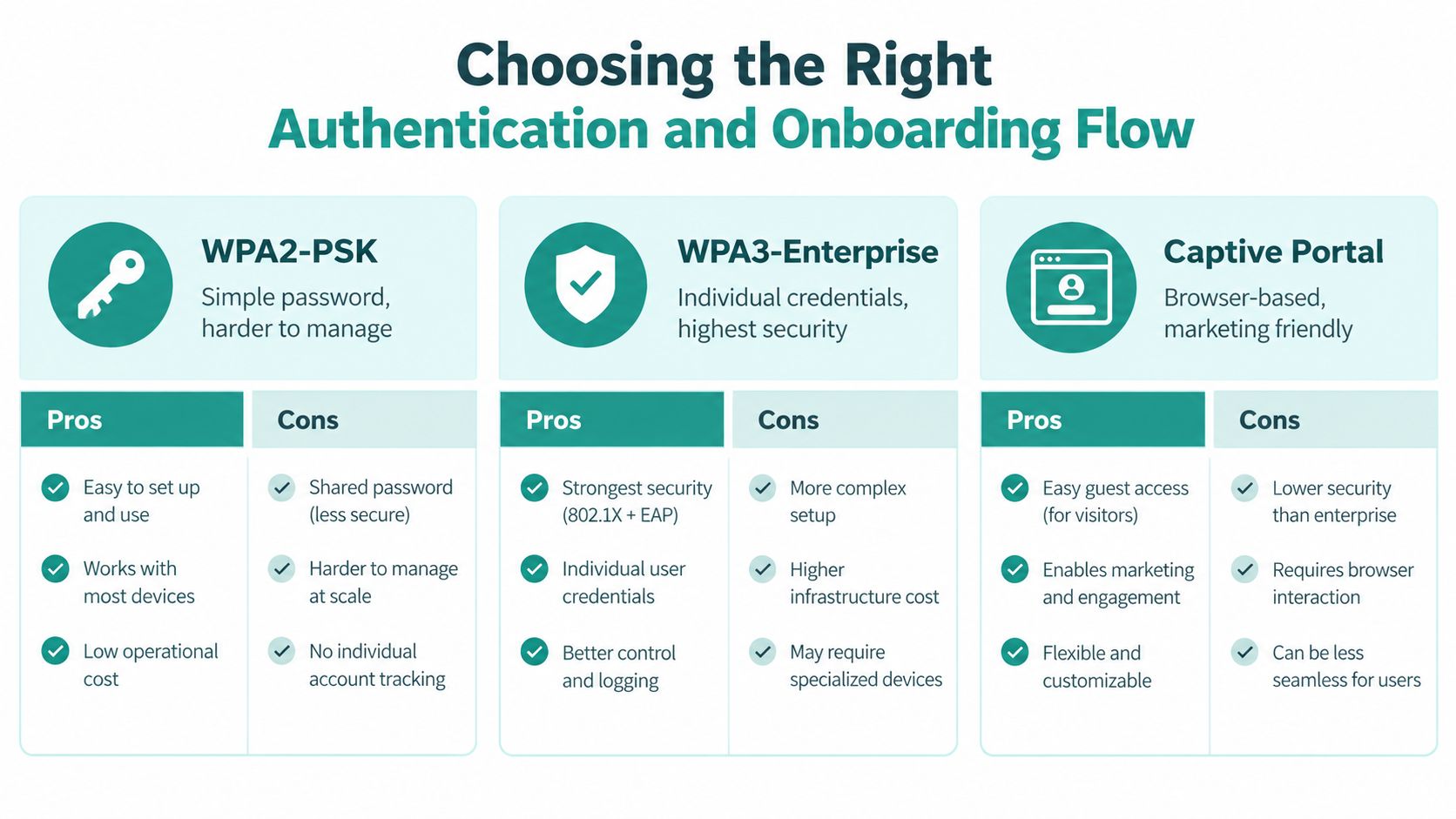
Authentication should match the person or device connecting, not just the brand of access point. A visitor at a café has different needs from a managed laptop in a corporate office, a student device in a dormitory, or a barcode scanner in a retail stockroom.
Match the method to the user
| Authentication method | Best fit | Main trade-off |
|---|---|---|
| WPA2-PSK | Small teams and simple device groups | A shared password is difficult to control when people leave or devices change |
| WPA3-Enterprise | Staff, education, and managed environments requiring individual identity | Deployment and client compatibility need more planning |
| Captive portal | Visitors, guest Wi-Fi, social login, and social WiFi experiences | Browser redirects and device behavior must be tested |
| IPSK or EasyPSK | Individually controlled users or devices on a shared wireless service | Credential issuance and policy management require a defined workflow |
A captive portal works well when a hotel guest, retail visitor, or café customer needs browser-based acceptance, social login, a branded splash page, or a social WiFi marketing flow. It can collect consent and support a guest experience without handing the same permanent password to everyone.
IPSK and EasyPSK are better suited to known users and managed devices. A school can issue controlled access to staff or student groups. A corporate BYOD program can assign individual keys instead of relying on one shared credential. A retailer can separate operational devices from visitor access while keeping onboarding practical. Cisco Meraki access points can support these different network policies when the authentication design, VLAN assignment, and lifecycle process are planned together.
Use QR onboarding for controlled devices
Wi-Fi Easy Connect uses a four-stage process of bootstrapping, authentication, configuration, and network access, with QR codes or NFC available for credential provisioning. The Wi-Fi Alliance overview explains why this approach suits devices that need secure onboarding without manual password entry.
That makes Easy Connect useful for classroom equipment, dormitory devices, retail scanners, IoT hardware, and managed BYOD. The device receives credentials through an encrypted provisioning path, then connects under the policy assigned to its network identity. It isn't a replacement for a captive portal. A portal collects browser-based acceptance or identity information from visitors, while Easy Connect provisions credentials to a known device.
In a Cisco Meraki deployment, captive portals can serve guest marketing flows while IPSK or EasyPSK supports controlled staff, student, corporate, or managed-device access. The Wi-Fi authentication methods should be documented by user type, fallback process, device compatibility, and revocation procedure.
Test onboarding on current iOS, Android, Windows, macOS, and IoT clients. Record authentication success, onboarding time, redirect behavior, certificate or key assignment, policy enforcement, and session expiry. One successful phone doesn't prove that the production flow works.
Managing Hardware Lifecycles and Security Patches
Wireless security doesn't end when the AP is mounted. The gateway, switches, authentication service, cloud management account, and supporting applications all remain part of the attack surface. A device that works reliably today can become a liability when it reaches end of support and stops receiving fixes.
A security analysis found that approximately 30% of observable legacy Cisco RV320 and RV325 routers were compromised within a 37-day period. The finding illustrates how quickly obsolete, internet-facing edge equipment can be exploited. The cited NIST publication provides the source for that figure.
Turn maintenance into a routine
Maintain an asset register that records each access point, router, switch, serial number, software version, physical location, owner, support status, and replacement deadline. Without that record, an alert may arrive for equipment nobody realizes is still connected.
Use a repeatable maintenance cycle:
- Review vendor alerts: Track firmware notices, security advisories, and end-of-support announcements.
- Protect administration: Require strong administrative credentials and MFA where available, and remove unused accounts.
- Back up configurations: Keep tested backups so a failed device can be replaced without rebuilding the network from memory.
- Pilot updates: Apply changes to a controlled device or site before broad deployment, then verify authentication, VLAN assignment, portals, and roaming.
- Inspect logs: Look for rogue APs, repeated authentication failures, unusual portal activity, and unexpected cross-segment traffic.
- Set a replacement date: Don't wait for a hardware failure to discover that a critical device is unsupported.
NIST small-business guidance recommends changing the manufacturer's administrative password and using strong wireless encryption, with WPA2 using AES identified as a baseline in that guidance. For newer deployments, evaluate WPA3-Enterprise or certificate-based authentication where client compatibility allows it. Keep a controlled transition path for legacy devices instead of weakening the whole network.
The patch management process should include monthly log review and a clear owner for every remediation. Treat Wi-Fi as an ongoing service with scheduled checks, not a box that can be forgotten after installation.
Troubleshooting Common Deployment Issues
A useful troubleshooting process starts with the complaint and works backward to the layer that failed. “The Wi-Fi is slow” might mean low signal, excessive channel utilization, high retries, a congested uplink, a failed captive portal redirect, or an authentication policy that assigned the wrong network.
Start by asking when and where the problem occurs. A checkout tablet that fails only during a promotion points toward capacity or airtime contention. A laptop that disconnects while crossing a campus suggests roaming behavior. A visitor who sees the SSID but never reaches the splash page may be dealing with DNS, DHCP, browser, identity-provider, or device compatibility issues.
Use evidence instead of guesswork
Capture the same measurements used during acceptance testing:
- Peak-period throughput: Compare busy and quiet periods by location.
- Retry rates: High retries can indicate interference, weak signal, poor client placement, or excessive cell size.
- Channel utilization: Determine whether the AP is waiting for airtime rather than lacking internet bandwidth.
- Roaming failures: Walk a known route while running an active application and record interruption behavior.
- Authentication success: Measure failures by device type and identify whether the issue begins at the portal, identity provider, certificate, key, or policy stage.
- Segment reachability: Verify that users can reach required services and cannot reach restricted ones.
The network troubleshooting steps should produce a written finding, not just a reboot. Change one variable at a time where possible, then retest from the same location with the same traffic pattern.
Calculate the real cost of Wi-Fi
Hardware price is only one part of the decision. Installation, cable work, monitoring, support, replacement cycles, outage impact, staff time, failed transactions, and recurring customer complaints all affect total cost of ownership. A cheaper AP can become the expensive choice when poor placement or missing visibility creates repeated support work.
Small-business satisfaction depends on network quality as well as cost, support, and service offerings, so equipment selection should include the service model around it. The 2025 U.S. Business Wireless Satisfaction Study supports that broader view.
Before going live, confirm AP placement, switch power, uplink capacity, VLAN enforcement, guest isolation, authentication flows, roaming, firmware status, backup configuration, and monitoring ownership. Then schedule a review after the business experiences a real busy period. Reliable wireless comes from measuring the network under pressure and correcting the causes, not from repeatedly replacing hardware.
Splash Access provides captive portals and guest Wi-Fi onboarding for Cisco Meraki environments, including branded splash pages, social login, vouchers, IPSK, EasyPSK, and analytics workflows. Visit Splash Access to plan a segmented, measurable access point small business deployment that supports guests, staff, education, retail, and corporate BYOD users.