A 280-room hotel is full on a Saturday night. Guests are arriving, the front desk is processing check-ins, mobile keys need to work, and hundreds of visitors are joining guest Wi-Fi. Then the front-desk system, mobile key service, and wireless access disappear together. The access points on the ceilings are still powered. The failure is upstream, inside a data center network with a single point of failure.
Hotels aren't the only organizations exposed to this kind of interruption. A school depends on its network for classroom platforms and identity services. A retailer needs payment terminals and inventory systems to stay reachable. A corporate office needs voice, collaboration, guest access, and business applications to share infrastructure without sharing risk.
Why the Data Center Network Matters More Than Ever
A data center network is the wired fabric that moves traffic between servers, storage, security systems, users, cloud services, and the internet. Its building blocks include switches, routers, firewalls, optical or copper links, and the policies that decide which traffic may communicate.
That definition sounds straightforward, but the network's role has expanded. Applications may run in an on-premises server room, a public cloud, a regional facility, or an edge location near users. The network stitches those places together. When that stitching fails, a wireless problem may only be the visible symptom.
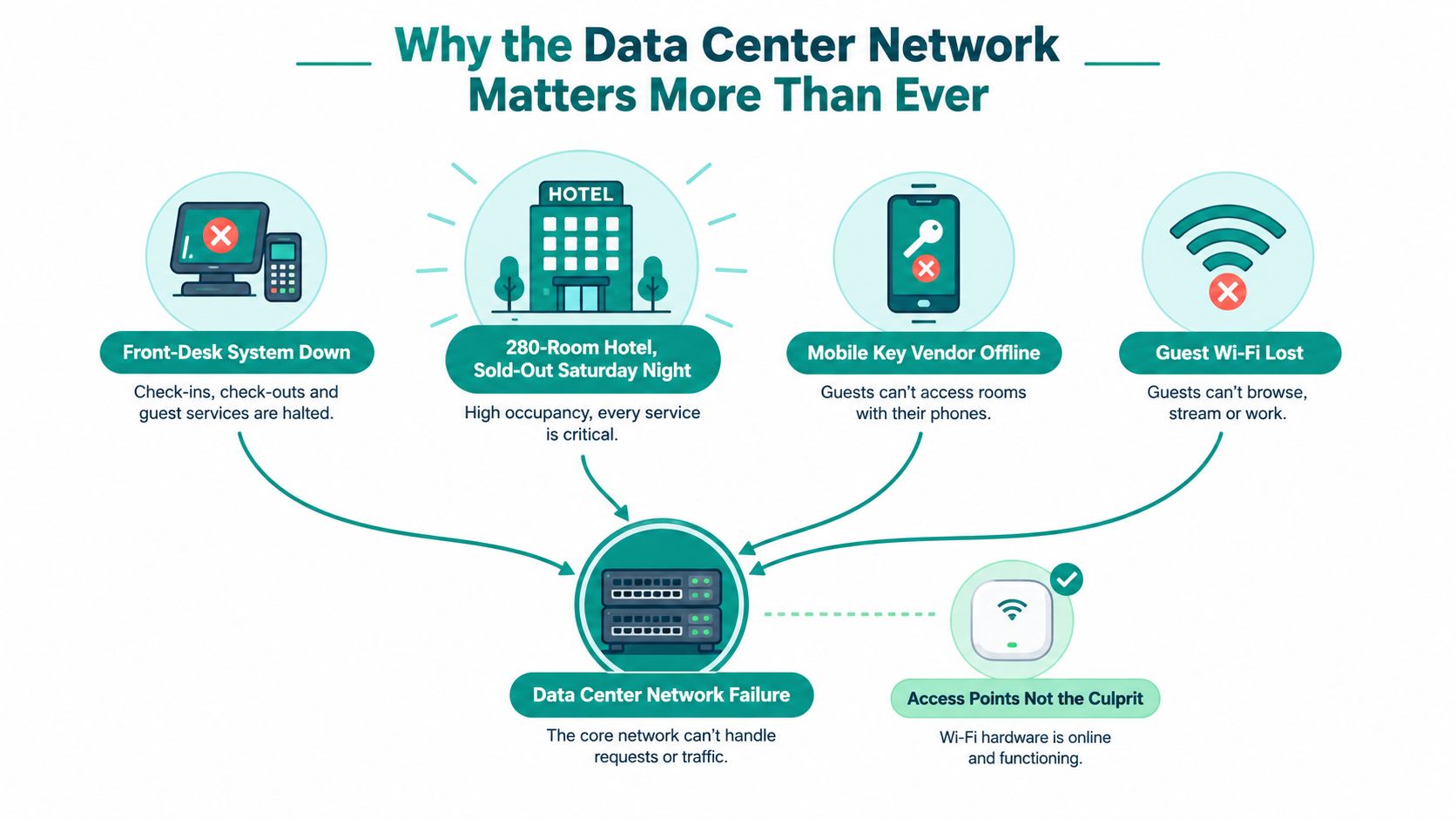
Start the diagnosis at the service path, not at the nearest access point:
- Identify the dependency: Check whether guest Wi-Fi, property-management systems, payment services, identity platforms, and mobile applications share an upstream switch, firewall, link, or power feed.
- Separate the failure domain: A failed access point should affect a limited wireless area. A failed aggregation switch or core path can affect an entire property or campus.
- Test the user transaction: A successful switch ping doesn't prove that check-in, payment authorization, captive-portal login, or mobile-key activation works.
- Document the handoff: Record how Cisco Meraki access networks connect to data center VLANs, routing domains, firewall zones, and cloud services.
Practical rule: If several unrelated services fail at the same time, trace their shared infrastructure before replacing edge devices.
Ethernet became important because it could evolve while preserving a common framing and interoperability model. It originated at Xerox PARC in 1972 as a network for sharing a laser printer among hundreds of workstations, and the early experimental system achieved approximately 3 Mbit/s. Ethernet was commercialized in 1979, IEEE later standardized 10Base5 thick Ethernet at 10 Mbit/s, and the technology continued through 100 Mbit/s, 1 Gbit/s, 10 Gbit/s, 40 Gbit/s, and higher rates, with modern IEEE 802.3 specifications extending to 800GBASE-R, as documented in this history of data center networking technology.
The practical lesson is simple. A data center network isn't background plumbing. It determines whether guest Wi-Fi can reach authentication, whether a payment terminal can reach its processor, and whether an application can reach the database it needs. A useful starting point for hotel teams is this guide to making a data center, especially when the wireless experience depends on services hosted elsewhere.
Spine, Leaf, Aggregation and Core Explained Simply
Think of a large postal system. A leaf switch is the local clerk. It connects nearby servers, firewalls, appliances, or edge uplinks and accepts traffic from those devices. An aggregation switch gathers routes from several local areas. A core switch is the major regional hub that connects broad parts of the organization and external networks.
A spine switch has a different role in a modern fabric. It behaves like a high-speed bus terminal. Every leaf connects to every spine, and the spines provide predictable paths between leaves. The names describe function, not necessarily a particular hardware model.
The old three-tier building
Traditional data center designs commonly used three layers:
- Access: Top-of-rack switches connected servers, often with roughly 20 to 40 servers behind a switch in earlier deployments.
- Aggregation: A middle layer combined traffic from multiple racks and applied services or policies.
- Core: The upper layer connected the facility to other networks, internet edges, and major services.
This arrangement was easy to draw and familiar to many teams. It could also create oversubscription, blocked links under Spanning Tree Protocol, and a small number of high-impact devices. Traffic from one rack to another might travel through several layers, while engineers had to plan around paths that were available in theory but blocked in practice.
The shift toward distributed computing and server consolidation pushed networks toward higher-bandwidth fabrics. By November 2011, more than 42% of systems on the TOP500 list used Gigabit Ethernet, compared with about 40% using InfiniBand. A decade earlier, Ethernet appeared in only 2% of TOP500 systems, according to this guided tour of data center networking.
Why spine and leaf simplify traffic
In a spine-leaf design, a server connects to a leaf. That leaf connects to each spine, and the other destination leaf also connects to each spine. The fabric can then use equal-cost paths, often called ECMP, to distribute traffic across multiple links.
The result is a more consistent path between servers. Any server can typically reach another server through one leaf-to-spine-to-leaf route, rather than navigating a deep hierarchy. If the workload grows, the team can add leaf capacity for more connected devices or spine capacity for more fabric paths.
Aggregation hasn't vanished everywhere. It still makes sense in campus networks, hybrid designs, and environments where a data center connects many buildings or service domains. The important design question is whether each layer has a clear job, a bounded failure domain, and enough independent paths. The logical topology network guide offers a useful way to map those relationships before choosing equipment.
Design Principles That Keep a Data Center Network Healthy
A healthy fabric starts with three questions. What happens if a component fails? How will the design grow? Which traffic is allowed to communicate? Those questions apply equally to a hotel, a school, a retailer, and a corporate office.
Redundancy protects the transaction
A redundant design uses independent paths rather than buying a second copy of the same switch. Dual spines, dual uplinks, separate power supplies, and diverse connections can keep services reachable when one component fails. ECMP can distribute traffic across equal-cost paths, while MLAG can let connected devices use more than one physical uplink where the platform supports it.
For a hotel, the property-management system, minibar gateway, loyalty platform, payment services, and guest access shouldn't all depend on one switch or one power feed. For a school, a classroom VLAN shouldn't disappear because one uplink fails. The design should let the network team identify which service lost connectivity and which paths remain available.
Scalability should be incremental
A spine-leaf fabric supports horizontal growth. The team can add a leaf when more racks, appliances, or service connections are needed, or add spine capacity when the fabric needs more paths. This is easier to manage than replacing a central chassis every time the workload changes.
Scalability also means matching the fabric to the application. Storage, analytics, voice, virtual desktops, and ordinary web traffic create different patterns. Interface capacity matters, but so do queue behavior, path diversity, oversubscription, and the ability to observe congestion.
Segmentation limits the blast radius
Segmentation places traffic into controlled lanes. VLANs separate local broadcast domains. VRFs create independent routing tables. Micro-segmentation applies more specific policy between workloads, devices, or identities.
A compromised guest device shouldn't be able to reach payment systems because both use the same physical fabric. The same principle applies to student devices, retail point-of-sale systems, corporate laptops, building controls, and contractor access. Meraki group policies can help enforce policy at the managed access layer, while data center firewalls and routing domains enforce boundaries deeper in the service path.
| Principle | What It Means in the Data Center | Hotel / Campus Example |
|---|---|---|
| Redundancy | Use independent paths, devices, links, and power feeds where a failure would interrupt a critical service. | Check-in remains available when one uplink or switch fails. |
| Scalability | Add capacity in manageable increments and align it with workload behavior. | A campus can add server or research capacity without redesigning every access connection. |
| Segmentation | Separate traffic with VLANs, VRFs, firewall policy, and workload controls. | Guest Wi-Fi, payment systems, classroom services, and corporate applications stay in distinct security zones. |
Network design should also be judged by operational results, not only diagrams. Teams reviewing data center operations outcomes can use that perspective to connect availability, monitoring, service response, and business impact.
Virtualization, SDN and Security in the Modern Fabric
Physical ports used to be the main place where network policy lived. A server connected to a switch port, that port belonged to a VLAN, and the team built policy around the device's location. Virtualization and container platforms made that model less reliable because workloads move between hosts and may share the same physical interface.
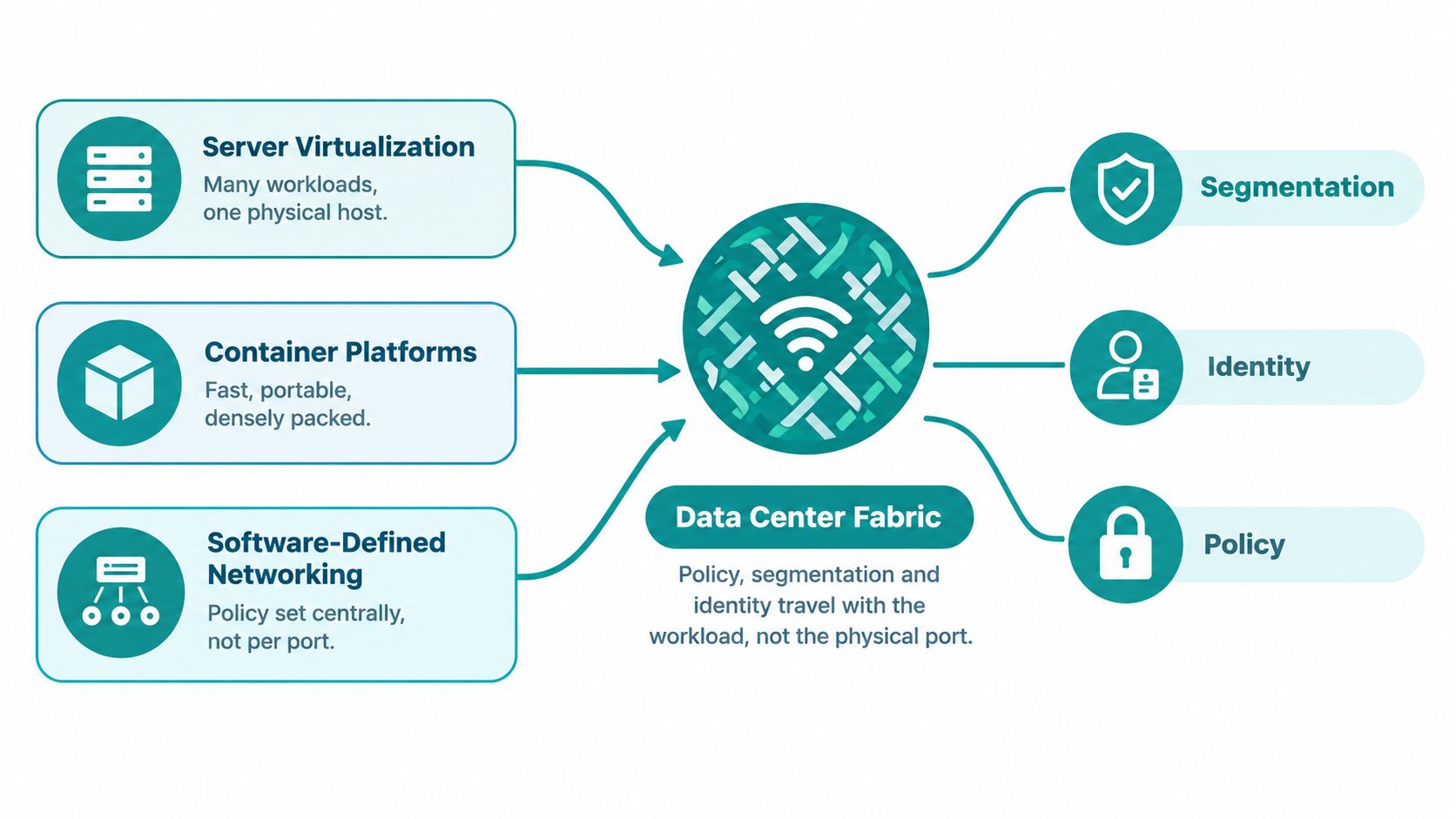
A hypervisor switch can connect multiple virtual machines to the physical network. Container platforms add another layer of interfaces and services. Overlay networks such as VXLAN-EVPN can carry logical segments across an IP underlay, allowing the workload's network identity to follow it between hosts.
Policy moves with the workload
An SDN controller translates intent into configuration. An administrator might define a service group, a permitted application flow, or a security boundary. The controller can then coordinate VLANs, VRFs, tunnel endpoints, access rules, and firewall insertion across the relevant leaf switches.
That doesn't mean the physical network becomes irrelevant. The underlay still needs sound routing, consistent MTU behavior, sufficient capacity, and dependable failure handling. SDN makes the policy easier to express and repeat, but it doesn't remove the need to validate the forwarding path.
Consider three workloads sharing a server cluster:
- Guest check-in services need access to selected property systems.
- Payment services need tightly controlled connections to payment infrastructure.
- Back-office applications may need different identity, database, and management paths.
Micro-segmentation can prevent unrestricted lateral movement between those workloads even when they share the same physical fabric. East-west inspection and zero-trust service insertion make the decision based on identity, application, or policy rather than on the rack where a server sits.
Cloud design uses similar ideas. Teams comparing on-premises fabrics with networking in the cloud should ask where identity is evaluated, how segmentation follows a workload, and how operators will troubleshoot a flow that crosses physical, virtual, and cloud boundaries. A software-defined networking explanation can help non-specialists connect the dashboard policy to the switches and security controls underneath.
Performance Choices That Affect Everyday Users
Network engineers often discuss performance in interface rates. Users experience something else. A hotel guest notices a page that stalls, a student notices a video lesson that freezes, and a cashier notices a payment terminal that waits for authorization.
Start by classifying the traffic:
- East-west traffic: Server-to-server communication inside the data center, including application calls, database queries, storage, analytics, and virtual-machine movement.
- North-south traffic: Traffic entering or leaving the facility, such as a guest reaching the internet or an application reaching a cloud service.
- Management traffic: Monitoring, authentication, backups, orchestration, and administrative access that can compete with production flows if left unprotected.
A traditional network may place many access links behind a smaller uplink. That ratio is oversubscription. It isn't automatically wrong, because not every device transmits at full rate at the same time. It becomes a problem when the traffic pattern, queue depth, and application sensitivity don't match the assumption.
A TPC-W evaluation found that a more flexible network configuration produced up to a 26.7% bandwidth increase, a 54.5% latency reduction, and a 5% improvement in real data center throughput. The study also measured an average 54.4% reduction in intrasystem communication latency against its baseline 10-Gb/s Ethernet configuration, as reported in this published TPC-W network evaluation. The lesson is that topology, traffic placement, path selection, and contention management can change application behavior even when the nominal link rate stays the same.
When lossless Ethernet is appropriate
RoCEv2 carries RDMA traffic over routable UDP/IP Ethernet. RDMA reduces CPU involvement through kernel bypass and direct memory transfer, which can support low-latency, high-throughput workloads. Storage, AI/ML, and demanding east-west applications may benefit from this approach, but the fabric must manage congestion before packet loss occurs.
Operators commonly combine:
- Priority Flow Control, or PFC: Pauses only the affected traffic class.
- Explicit Congestion Notification, or ECN: Signals congestion end to end.
- Enhanced Transmission Selection, or ETS: Reserves bandwidth among service classes.
RoCEv2 isn't a universal replacement for ordinary Ethernet. A hotel office network or a standard classroom application may need consistent QoS and sensible queue management, not a carefully engineered lossless fabric. Poorly bounded PFC can create pause storms that spread congestion across the network, so teams must validate pause behavior and monitor it continuously.
Use application-level tests rather than interface tests alone. Measure representative request sizes, concurrency, median latency, tail latency, and behavior while guest, payment, storage, and analytics workloads run together. Tools such as iperf, iperf3, and service-level telemetry can show whether a change improves the transaction users care about. Guidance on WAN optimization can also help when the delay sits beyond the data center, between the facility and a cloud or regional service.
Connecting Cisco Meraki, Captive Portals, IPSK and BYOD
The wireless edge should be a controlled entry point into the data center, not a shortcut around it. A common Cisco Meraki design places an MX security appliance, MS switches, and MR access points at the campus or property edge. The wireless networks map to VLANs, and those VLANs connect to defined VRFs, firewall zones, or routed interfaces in the data center.
The first step is to name the traffic classes before choosing an onboarding method:
- Guests: Internet access through a captive portal, with no route to internal business systems.
- Employees or managed devices: Authentication through enterprise identity, certificates, or approved device controls.
- Contractors: Limited access to selected applications, often with an expiration or separate policy.
- Residents, students, or tenants: Individual credentials or keys with policy appropriate to the assigned environment.
- Operational devices: Narrow access for scanners, cameras, building systems, or other managed equipment.
A captive portal can provide web-based access without giving visitors a shared network password. Wi-Fi Alliance guidance recognizes captive-portal environments such as hotels, airports, sports arenas, and other public networks, while Wi-Fi Enhanced Open adds encryption to guest traffic without requiring a traditional password, as described in its WPA3 security guidance.
Match identity to the boundary
Cisco Meraki supports splash-page workflows such as sign-on splash and click-through splash. A custom captive portal can connect social login, social Wi-Fi, QR-code onboarding, payment gateways, property-management integrations, and email or SMS authentication to the access process.
For individual access, Identity Pre-Shared Key, or IPSK, and EasyPSK can assign separate credentials or policies without placing every user behind one shared password. That distinction matters in education, retail, hospitality, and corporate BYOD environments. A key can be associated with a person, room, group, device type, or access policy, depending on the deployment.
WPA3-Enterprise is designed for sensitive information and supports a 192-bit security mode. It uses an 802.1X-based security model, while guests can use a captive portal or an individual pre-shared key workflow such as IPSK or EasyPSK, according to this Wi-Fi security overview.
| Method | Identity Source | Segmentation Outcome |
|---|---|---|
| Captive portal | Email, SMS, social login, payment, or click-through consent | Guest device remains in an internet-only zone with client isolation and firewall restrictions. |
| IPSK | Individual pre-shared key tied to a user or group | Different keys can map users or devices to distinct policies and VLANs. |
| EasyPSK | Individualized key workflow for practical onboarding | Staff, residents, students, or contractors can receive separate access without a shared credential. |
| WPA3-Enterprise | Enterprise identity through 802.1X | Managed or employee devices receive authenticated access through corporate policy. |
| BYOD onboarding | Registration, certificate, MDM, or identity workflow | Personal devices can be isolated from corporate, payment, education, and operational resources. |
Log authentication events, policy decisions, and network changes. Forward relevant records through Syslog to a SIEM so the security team can investigate access and provide auditors with evidence. The access point delivers the radio connection, but the data center network determines where that connection can go.
The Biggest Risk Is Change, Not Hardware
A redundant switch can't protect an organization from an incorrect route, an overly broad firewall rule, a mistaken VLAN change, or an update that breaks the path between a captive portal and its authentication service. Uptime Institute's 2025 resiliency survey, based on 507 data-center respondents, found that networking and connectivity issues were the most common cause of IT-service outages over the previous three years, at 29%, ahead of IT and software issues at 22% and power issues at 19%, according to the 2025 resiliency survey report.
A separate 2025 survey of more than 1,000 IT leaders and network engineers across the United States, United Kingdom, France, Germany, and Australia found that 84% had experienced more network outages over the prior two years. Configuration changes were identified as the leading cause by 27% of respondents, followed by server-hardware failure at 26%. Those findings shift the design conversation from “Which switch should we buy?” to “How do we make the next change safe and reversible?”
Two failure paths
| Failure type | Typical response | What good preparation looks like |
|---|---|---|
| Hardware failure | Move traffic to a redundant device or link, replace the failed component, and verify service restoration. | Independent paths, tested failover, spare capacity, and clear fault alerts. |
| Configuration change failure | Stop the change, restore the previous state, and recover access to the affected device or service. | Peer review, dependency mapping, rollback validation, console access, and an out-of-band management path. |
A Meraki policy update might unintentionally place a guest network in the wrong security group. A spine-leaf change might alter ECMP behavior or remove a required route. In both cases, the team needs a defined maintenance window, a pre-change service test, an independent management path, and a rollback that has been tested before production work begins.
Use a release process that treats network policy like software. The release management guidance is relevant here because a change should have an owner, an approval record, a validation plan, and a clear success or failure condition.
Controls worth enforcing
- Before maintenance: Map dependencies between guest Wi-Fi, captive portals, identity services, PMS, POS, cloud applications, and data center zones.
- During maintenance: Keep console or out-of-band access available, monitor authentication and application transactions, and stop when the agreed threshold is exceeded.
- After maintenance: Test real check-in, payment, classroom, BYOD, and guest-login workflows instead of checking only device status.
- After rollback: Record what failed, compare intended and deployed configuration, and update the runbook before the next change.
Out-of-band management deserves particular attention. The same 2025 resiliency survey found that 30% of organizations expected to increase spending on out-of-band management over the next five years. An independent management path won't prevent every mistake, but it can keep the recovery path available when the production network is inaccessible.
A Practical Roadmap for Your Next Network Refresh
A network refresh doesn't have to begin with a forklift replacement. Sequence the work so each quarter produces useful evidence and reduces risk for the next step.
First quarter focuses on discovery
Document every service path. Trace guest Wi-Fi from the Cisco Meraki MR access point through the MS switching layer, MX security appliance, firewall zones, data center fabric, captive portal, identity service, and internet or cloud destination.
Baseline the transactions users care about:
- Hotel check-in and mobile-key activation
- Payment authorization and inventory lookup
- Classroom identity and learning applications
- Corporate BYOD registration and internal application access
- Guest Wi-Fi onboarding through social login or QR code
Record latency, failure behavior, dependencies, and ownership. Don't rely on a diagram that hasn't been checked against the deployed network.
Second quarter improves policy hygiene
Review VLAN names, routing domains, firewall zones, group policies, and unused access rules. Separate guest, contractor, employee, payment, classroom, management, and operational traffic. Confirm that each segment has a business owner and a documented reason to reach another segment.
Test captive-portal workflows and BYOD onboarding in a staging environment. Verify that a guest can reach the internet but not internal services, and that a corporate device receives the policy intended for its identity.
Third quarter introduces controlled automation
Evaluate SDN overlays, configuration templates, compliance checks, and event-driven monitoring. Roll out IPSK or EasyPSK to a defined group first, then verify key assignment, expiration, logging, and policy enforcement before expanding the deployment.
Automation should make the intended state easier to review. It shouldn't hide changes behind an opaque workflow.
Fourth quarter strengthens recovery
Add or validate out-of-band management. Test console access, backup configuration, rollback procedures, and escalation contacts. Run a tabletop exercise in which guest Wi-Fi, payment, identity, or classroom services lose access to a shared network dependency.
Review hardware support and operating-system lifecycle requirements alongside topology. For procurement planning, Veevoo Volgap warranty details can provide a reference point for evaluating warranty coverage and lifecycle obligations.
Small, staged improvements usually give teams better control than a single high-risk cutover. Keep the access layer, spine-leaf fabric, security edge, captive portal, guest Wi-Fi, and BYOD workflows in the same test plan. That is how a data center network becomes more dependable for the people who use it every day.
Splash Access connects Cisco Meraki guest Wi-Fi with captive portals, social login, social Wi-Fi, IPSK, EasyPSK, and BYOD authentication workflows. Visit Splash Access to plan a segmented onboarding experience that hands guest and authenticated traffic into your data center network safely.