WPA is the Wi-Fi security family. WPA-PSK, usually sold as WPA-Personal, is its shared-password login mode, where every device that joins holds the same secret, either a passphrase you choose or a 64-character hexadecimal value that maps to 256 bits.
Ask a campus, shop or office manager one question. If a contractor's last day is Friday, what exactly changes on Monday morning?
Most answer "the Wi-Fi password", then remember the tills, the classroom tablets, the doorbell camera and the card printed for reception, and the plan dies. The label in your wireless settings isn't what protects you. The lifecycle of the credential behind it is. The comparison table below sorts every mode by exactly that, how finely you can revoke access, so keep it in view as you read.
What WPA and WPA-PSK Mean and How the Shared Key Works
Open the wireless security dropdown on a Cisco Meraki network, or on the router in a small shop, and the same short list appears. WPA2-Personal sits one line above WPA2-Enterprise and the two mean completely different things. One hands everybody the same password. The other asks a server who each person is.
WPA is the family name. The Wi-Fi Alliance released it in early 2003 as an interim replacement for WEP, whose weaknesses had become a serious concern, and developed it with the IEEE 802.11 working group while the fuller 802.11i amendment was still being completed. Its main technical step was TKIP, which strengthened per-packet protection and addressed important weaknesses in WEP's static-key design, as NIST's account of WPA and 802.11i sets out.
WPA-PSK is one of the two login models inside that family, alongside 802.1X with EAP for enterprise networks. It uses a shared secret rather than individual certificates or directory accounts. NIST's security policy for WPA2 implementations spells out the shape of that secret: the pre-shared key can be a 64-character hexadecimal value, which corresponds to 256 bits, or a human-readable passphrase from which the system derives cryptographic key material during authentication.
The passphrase is a check-in desk, not a room key
Think about a hotel. The passphrase gets you past the check-in desk. Each stay then gets its own room key, and that room key isn't the passphrase.
The network behaves the same way. The shared secret isn't used as the ordinary traffic-encryption key. The WPA/WPA2 exchange derives transient session keys once a device authenticates, which keeps key reuse down across connections. What the exchange never does is tell the network who walked in. Anybody holding the passphrase can check in, as often as they like, from any device they own.
The distinction that matters: WPA-Personal and WPA-Enterprise aren't older and newer versions of one thing. Personal means one shared passphrase for every device on the SSID. Enterprise means a server checks each user or device separately.
Three checks on the settings page will tell you which one you inherited.
- Find the security setting. In the Meraki dashboard it lives on the SSID's access control page. On a consumer router it's usually under Wireless, then Security.
- Read the label, not the marketing. Personal means one shared passphrase. Enterprise means 802.1X plus an authentication server. A dropdown entry reading "WPA/WPA2 mixed" or "WPA2/WPA3 transition" is a compatibility setting, not a security level.
- Note the cipher. WPA2 pairs the login with AES. The original WPA used TKIP with a message-integrity check. If an SSID still offers TKIP, put a date on retiring it.
One line of history is enough here. The IEEE 802.11i amendment, ratified in 2004, is where WPA2 and AES came from, and it's the baseline any new SSID you build should meet.
The mix-up is understandable, because Personal ships as the default. That's why a stockroom network, a point-of-sale network and a guest network so often end up on the same string, set up years apart by three different people. Choosing Personal is a decision worth making on purpose, not a setting to leave wherever the installer left it.
How WPA and WPA-PSK Differ Side by Side
Seven rows cover almost every network you'll inherit or build. Find yours before reading the notes.
| Mode | Authentication | Data protection | Who shares the secret | Best fit |
|---|---|---|---|---|
| Legacy WPA-Personal (WPA-PSK) | One shared passphrase | TKIP | Every device on the SSID | Do not use for new Wi-Fi |
| WPA-Enterprise | 802.1X with EAP | TKIP | Per user, through an authentication server | Legacy only |
| WPA2-PSK | Shared passphrase plus a four-way handshake | AES-CCMP | Every device on the SSID | Small trusted groups |
| WPA2-Enterprise | 802.1X with EAP | AES-CCMP | Per user or device | Staff and managed devices |
| WPA3-Personal | SAE instead of a classic PSK check | Stronger password exchange than WPA2-PSK | Still one password unless keys are issued per user | Modern personal Wi-Fi |
| WPA3 transition mode | SAE for new clients, WPA2-PSK for old ones | Mixed path | The older shared-password path stays available | Temporary migration only |
| Cisco Meraki IPSK | Many passwords on one SSID, optional RADIUS | WPA2 AES on a Personal SSID | Per group, user or device | IoT, students, tills and guests |
Start with the two legacy rows. WPA-Personal pairs a single passphrase with TKIP, and it earned its keep in the mid-2000s by getting venues off WEP. It shouldn't appear on anything you build now. WPA-Enterprise bolts 802.1X with EAP onto that same TKIP cipher, which makes it a strong identity model sitting on dated encryption. NIST recommends WPA2-based products for new WLAN deployments and advises disabling TKIP once migration is complete, notes HPE Aruba's guide to WPA and WPA-PSK.
WPA2-PSK keeps the shared secret and moves data protection to AES-CCMP. The client and access point then run a four-way handshake that proves both sides hold the secret and derives fresh session keys, without ever transmitting the passphrase itself. That handshake is also what gives an attacker something to test offline.
Why venue names fail as secrets: someone who captures a WPA2 handshake can try candidate passphrases on their own hardware, at their own speed, without touching your access point again. "RiversideHotel2026" and room numbers fall in seconds.
WPA2-Enterprise keeps AES and replaces the shared secret with an account per user or device. WPA3-Personal swaps the classic PSK check for SAE, a stronger password exchange, though the one-password model underneath stays put. WPA3 transition mode lets new clients use SAE while old clients keep WPA2-PSK, which makes it a migration setting rather than a destination. Cisco Meraki IPSK changes who holds a secret: many passwords on one SSID, each able to attach its own group policy.
If you're weighing the two middle rows for a single staff SSID, WPA2-Personal versus Enterprise puts the revocation question at the front instead of the cipher.
A single shared WPA-PSK is fine for a handful of known devices in one room. It's the wrong default the moment guests, students, contractors or seasonal staff come and go.
Many Passwords on One Cisco Meraki SSID
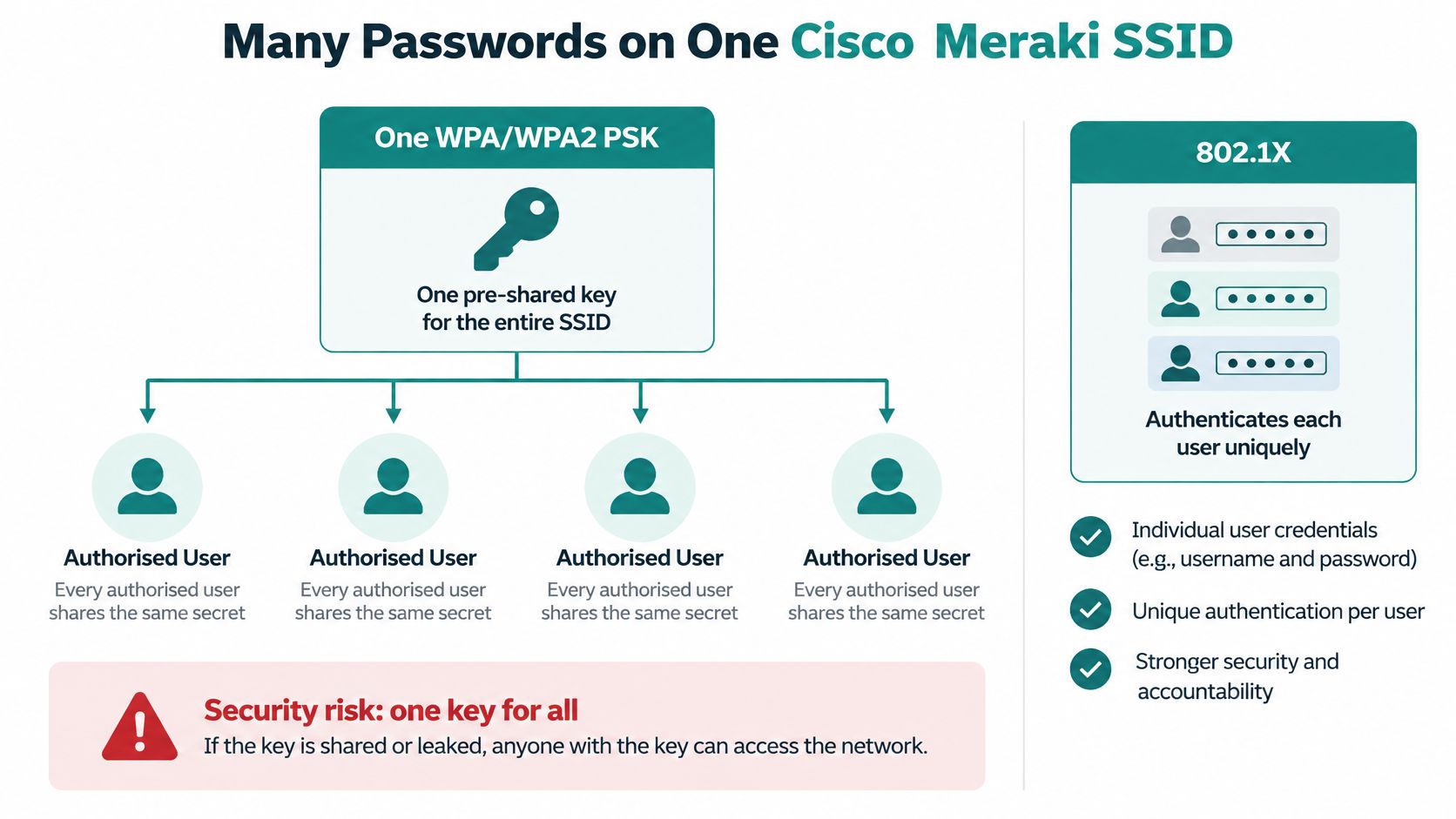
A traditional pre-shared key is one secret for every authorised user of the SSID, and Meraki's wireless encryption overview draws the line plainly: 802.1X checks individual users or devices through a server, while a PSK lets in anyone who knows the string. The lifecycle problem follows directly from that. One shared secret cannot be taken away from one person, so a departing employee or a lost device means re-keying everyone else.
Identity PSK keeps the simple join and drops the single secret. Several passwords live on one SSID, and the password that succeeds can apply its own group policy, which Meraki's group policy configuration guide covers in detail. A till, a handheld scanner, a classroom tablet and a contractor's laptop can each hold a different key, land in a different policy and be cancelled on their own.
Cloakroom tickets, not one cloakroom key
A staffed cloakroom has a single entrance and many claim tickets. The attendant checks your ticket, then walks to a specific rail. Cancel one ticket and every other coat stays exactly where it is.
IPSK works that way. From the device's side nothing changes: pick the SSID, type a password, join. The difference sits behind the join, where the key you cancel belongs to one person, one group or one device while everyone else's keys keep working. The shared-key version of that cloakroom hands every visitor the master key, so a lost coat means changing the locks.
The firmware floor decides which build you can plan for.
| Option | Minimum firmware | Scale | Authentication server |
|---|---|---|---|
| IPSK without RADIUS | MR 29.4.1 or newer | Up to 5,000 IPSKs per SSID | Not required |
| IPSK with RADIUS | MR 30.6 or newer | Set by the RADIUS server | Required |
Both builds come from Meraki's IPSK with RADIUS documentation: the RADIUS-backed build needs MR 30.6 or newer and takes its ceiling from the server, while the locally managed build needs MR 29.4.1 or newer and supports up to 5,000 IPSKs per SSID. A small site can stay on dashboard-managed keys. A campus, a multi-site retailer or a corporate BYOD programme usually wants the server doing the lifecycle work, and estates that outgrow per-SSID limits can look at EasyPSK for Large Deployments or an IPSK MDU solution.
Who benefits is easy to list:
- Devices without an 802.1X supplicant: most IoT endpoints, printers, cameras and sensors will never sign in as a person, so a password they can hold is the only workable credential.
- Student and staff groups that need separate policies on the same SSID rather than two networks to maintain.
- Retail handhelds and tills, where one lost scanner should cost you one key, not a chain-wide rotation.
- Employee and guest paths on a BYOD network, so a personal phone never carries a staff secret.
One caution before you plan the rollout. IPSK still runs on passwords, so each key deserves the discipline a shared PSK never got: unique strings, sensible length, one key per device or group. Where the key lifecycle needs a server behind it, IPSK with RADIUS authentication walks through the set-up.
Guest Wi-Fi Patterns for Schools Shops and Offices
Three venues outgrow one WPA-PSK in different ways, and each one tells you what to build next.
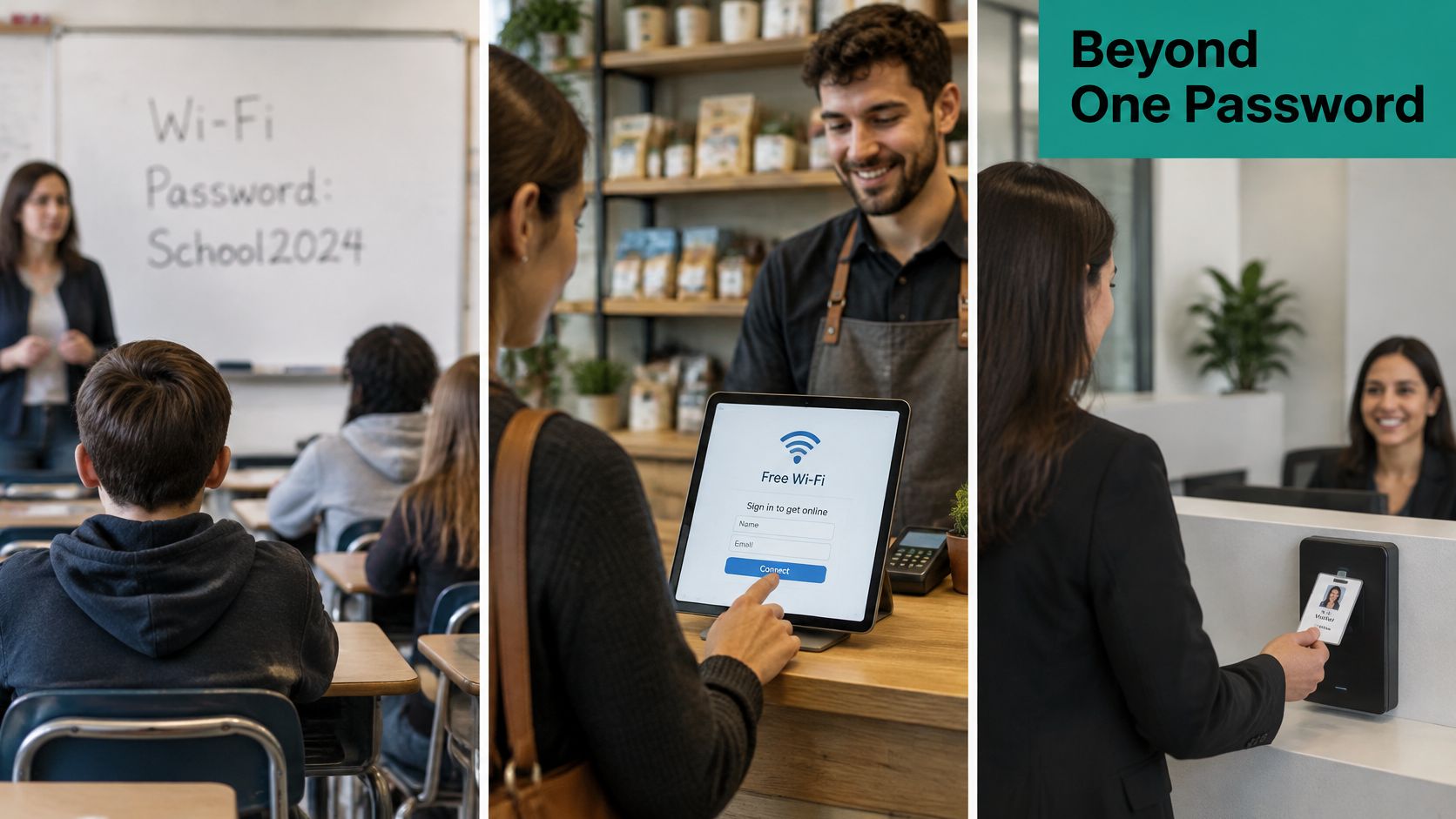
A campus where the password is on the whiteboard
Students and staff sharing one passphrase written on a classroom board is the classic education failure. It survives because it works, briefly. The replacement splits in two: a captive portal that asks for campus credentials on a simple splash page, and IPSK or EasyPSK for the devices that can't sign in as a person, such as lab equipment and building sensors.
Keep parents and visitors on a separate guest SSID with its own policy, so a social login at the front desk never lands anyone on the student network. At the end of term you revoke one student's key. You don't re-key the campus.
A shop floor that never closes
Tills and handheld scanners need a stable key and a tight policy, because a scanner that drops mid-queue costs real money. Shoppers need a different experience entirely: social WiFi and social login on a splash page, with client isolation switched on so a customer's phone can't see the tills or the back office.
When a seasonal cashier finishes in January, you delete one device key and carry on. That's the entire advantage, and it's the one most shared-password networks can't buy at any price.
An office full of contractors
Employees can sign in through a directory-backed captive portal, which keeps access tied to the account you already disable on their last day. Contractors and visitors get a time-boxed individual key instead of the office WPA-PSK, ideally handed over as a QR code that carries that one key, so nobody photographs a password from a whiteboard.
A phone left in a taxi on Tuesday becomes one key to cancel, not a weekend of password resets and support calls.
| Sector | Trusted devices | Guest Wi-Fi | Revoke without a full reset |
|---|---|---|---|
| Education | Campus login or a unique IPSK with a group policy | Separate guest SSID with a captive portal and social login | One student or visitor key |
| Retail | IPSK for tills and handhelds | Social WiFi splash for shoppers, with client isolation | One seasonal device or one visit |
| Corporate BYOD | Directory sign-in through a captive portal | Visitor QR or individual key, not the staff passphrase | One contractor or lost phone |
Three design rules carry across all three sectors. Separate the staff and guest secrets, always, even when they sit on the same access points. Isolate guest traffic with VLANs or firewall policy so one compromised phone can't scan the tills. And stop printing the password on a poster, because a secret on a wall is a secret you can never revoke. If you're rebuilding the guest side from scratch, this guide to setting up guest Wi-Fi covers the portal flow end to end.
Why WPA3 Transition Mode Still Shares Risk
Is WPA3-Personal transition mode as safe as WPA3-only? It isn't, and the gap is easy to miss on a settings page that presents both as "WPA3".
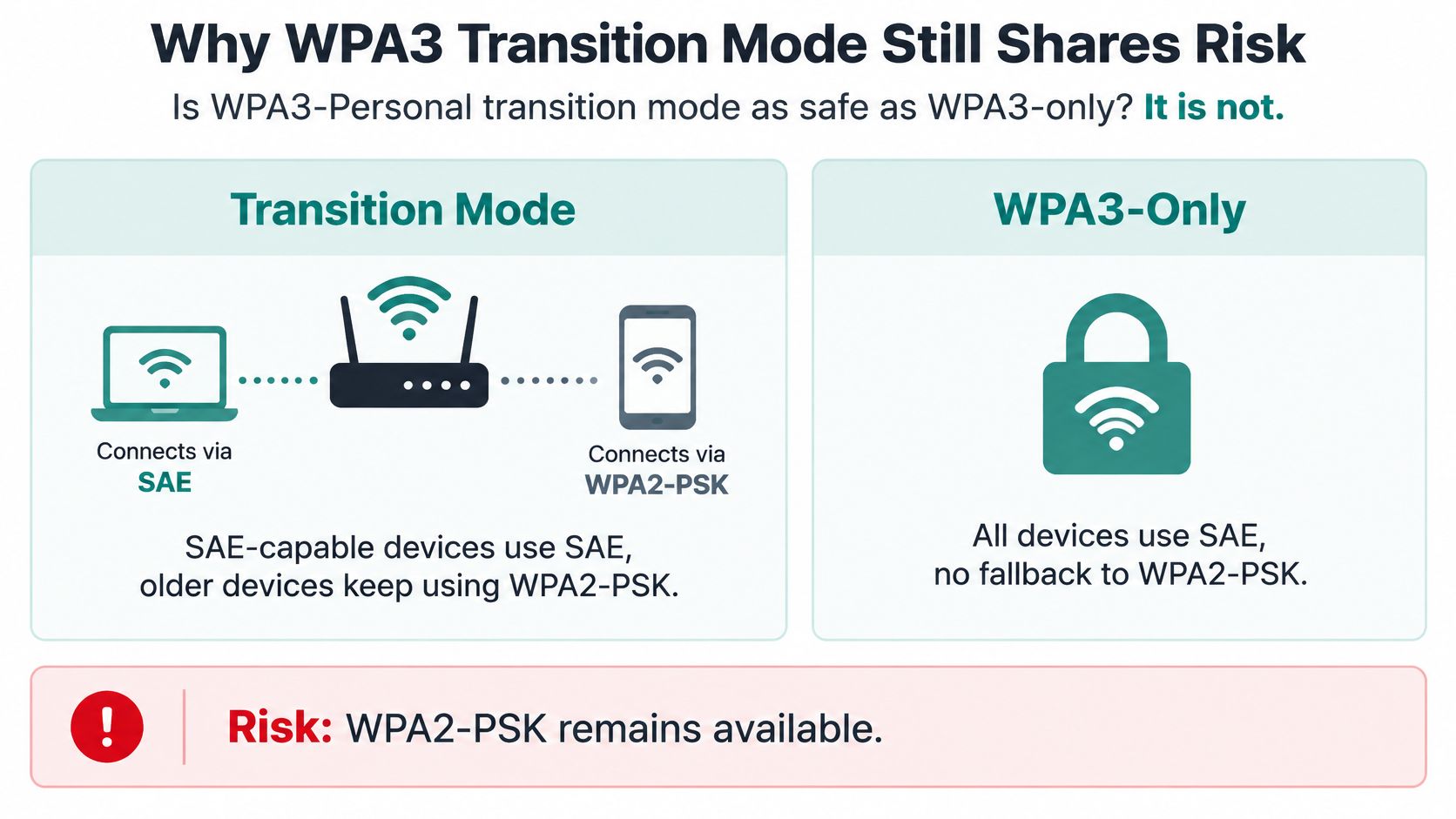
Transition mode runs two doors on the same SSID. Newer devices come in through the SAE door, while older devices keep using the WPA2-PSK door, and management-frame protection stays optional rather than enforced. An attacker never has to beat the new door. They can go after the older PSK path directly, or push a WPA3-capable client down onto a weaker WPA2 connection where the familiar password-guessing attack still applies. The Wi-Fi Alliance describes transition mode as a migration mechanism that preserves interoperability, not as an equivalent replacement for WPA3-only operation, in its WPA3 deployment options guidance.
So how should a venue with a mixed device fleet respond? Three honest choices:
- WPA3-only where you control the device population. Campus-owned laptops, managed handsets, tills you bought yourself and can specify.
- Transition mode with a date on it. Reasonable for a term or a quarter while older stock is replaced. A permanent setting nobody revisits is just a second SSID you forgot to secure.
- Two isolated networks with different credentials when legacy devices must stay. One WPA3 SSID, one WPA2 SSID, separate secrets, so a compromise on the older path doesn't hand over the newer one.
The adoption picture explains why transition mode lingers. A late-2025 WiGLE global snapshot reported roughly 75% of observed networks on WPA2 and 3% on WPA3, per ShiftCTRL's analysis of the snapshot. SecureW2's write-up on downgrade attacks reports WPA3 on only 0.84% of observed global access points, and a 2025 industry estimate from Dataintelo put 47% of enterprise wireless networks globally still on legacy WPA2 configurations. Whichever figure you read, the pattern holds: WPA3 remains a small fraction of the networks a phone meets in the wild, so mixed populations and the older password path are sticking around.
What SAE fixes and what it doesn't: SAE resists offline guessing far better than WPA2-PSK, and that's worth having. It still can't name a student, a shopper or an employee, and it still can't expire one guest on a Friday afternoon.
That's the honest framing. The cryptography improved. The credential model didn't. While the older door stays open, one shared password still can't remove one person without resetting access for everyone, and the label on the settings page changes nothing about that. For the cipher-level detail, WPA2 versus WPA3 Personal sets the two password exchanges side by side.
Pick the Login Path for Your Venue
Four rules cover most buildings, and this comparison of Wi-Fi authentication methods sets them side by side if you want the detail behind each one.
- Known devices plus a directory means WPA2-Enterprise or WPA3 identity login, with TKIP retired. If the laptop belongs to you, the account should too.
- A small, stable, trusted group can keep a long random WPA2-PSK, with a planned change date and nothing about the venue inside the passphrase.
- Guests, students, shoppers or contractors mean you stop sharing one WPA-PSK. A captive portal with social login handles the people. Cisco Meraki IPSK or EasyPSK handles the devices that need a password but can't sign in.
- WPA3-only is the destination for any population you control, with a dated end to transition mode rather than an open-ended one.
Then take one next step this week. Write down everyone who might need revoking alone in the next month, whether that's a departing technician, a graduating student, a seasonal cashier or a lost handset. Match each name to a portal login, an individual key or a directory account. Any name you can't revoke on its own is sitting behind a shared secret you'd have to change for the whole building.
For a Cisco Meraki rollout, Splash Access can map that list onto captive portals, social login and IPSK or EasyPSK set-up without a full network reset.
Splash Access builds captive portals, social login and individual pre-shared key onboarding on Cisco Meraki, so a leaver costs you one key instead of a building-wide reset. If your guest network still runs on a passphrase printed on a card, we can map your SSIDs to portal logins, IPSK and EasyPSK without replacing the access points you already own. Start at Splash Access and see which of your networks should keep a key and which should ask a person to sign in.