Forty percent of public Wi-Fi use was on smartphones, 24% on tablets, and 36% on laptops, according to the JiWire Mobile Audience Insights Report covered by Retail Dive. Retail stores were the most common commercial venue for that mobile use, at 31%.
Guest Wi-Fi can turn a store visit into a useful marketing interaction. On a Cisco Meraki network, the process starts with a guest SSID and a captive portal: shoppers connect, see a clear login page, and can engage with an offer. The challenge is measuring whether that interaction contributes to a sale, rather than counting connections.
What Retail Wi-Fi Marketing Really Means
Say a shopper steps into a running store, opens Wi-Fi, and sees your network name. They tap it because the fitting room kills the cell signal. A branded page loads on their phone, the way a loyalty card used to get handed over at the door. The difference is that the sign-up happens on a device they already trust, and they can walk away in one tap.
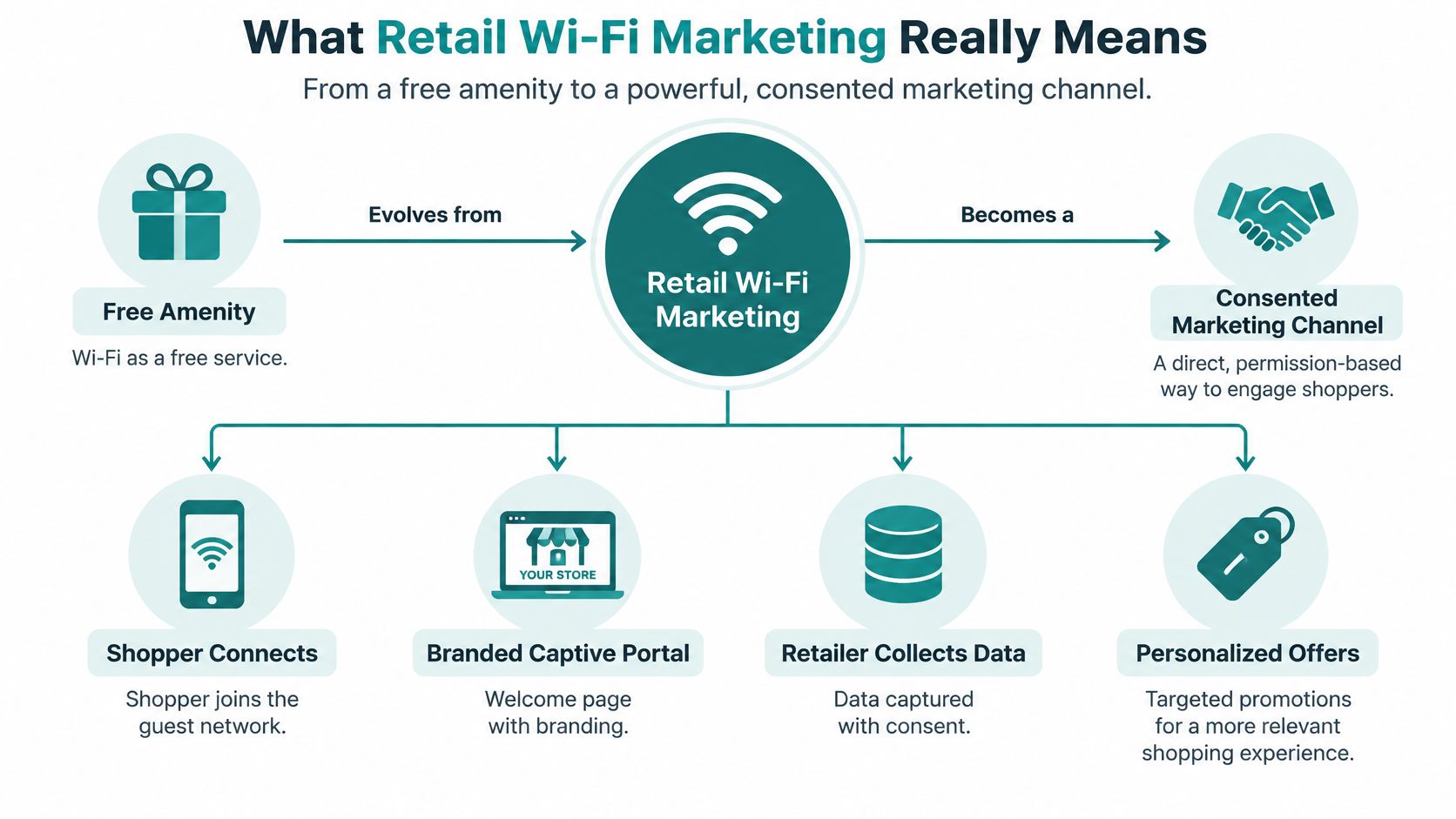
Retail Wi-Fi marketing is the practice of turning that free connection into a consented channel. The shopper joins, a captive portal greets them in your brand, and you earn permission to send a message and to measure what happened next. It isn't a hidden tracker, and it isn't "the internet works in here." If the page is slow, or the password is scribbled on a sign, you've only offered a utility.
The value exchange is unusually direct. An August 2018 Harris Poll of 1,599 U.S. adults aged 18–64, published in a CommScope retail Wi-Fi infographic, found that 70% would give a name and email for personalized offers at a store, and 60% would give those same details for free Wi-Fi. 62% said a good connection matters in retail stores. When advertised Wi-Fi failed, 49% said they'd form a negative impression, and 43% said they'd spend less time in the store.
Four parts carry the whole channel.
- Guest connectivity: a separate SSID that loads on a phone.
- Customer data capture: only the fields a person agreed to share.
- Engagement campaigns: one offer tied to a visit, a zone, or a lapse.
- Measurement: visits, dwell, and redemptions against a control, not a vanity login count.
A captive portal is a front door, not a form to exhaust. If the benefit isn't obvious in the first screen, the opt-in you get won't be worth mailing.
By the end you'll be able to place each of those four parts on a Cisco Meraki network, from the splash page through authentication and into the report you show finance.
How Retail Wi-Fi Marketing Works Step by Step
Before anyone joins, the Meraki organization needs three things in place. You want a dedicated guest SSID, the captive portal turned on for that SSID only, and an identity source ready if you'll use sign-on rather than a simple click-through. RADIUS, Active Directory, and LDAP are the usual backends. Staff and point-of-sale devices stay on their own SSIDs so a marketing test never touches checkout.
The seven moves on the floor
- A shopper joins the guest SSID. Keeping guests off the corporate network is what lets you change the portal without breaking tills, cameras, or a BYOD laptop that shouldn't see store systems.
- The captive portal appears. Cisco's captive portal solution guide describes two Meraki workflows. Click-through asks the person to accept terms or finish a simple access step. Sign-on checks a username and password against Meraki Authentication, RADIUS, Active Directory, or LDAP, with no special setup on the phone. A custom external portal can shape the splash content and the redirect through Meraki's Captive Portal API.
- The shopper picks how to prove who they are. Social login, email or SMS verification, and an individual pre-shared key all sit behind that same splash. Social wifi is the retail-friendly path because the person already has the account open on their phone.
- The network authorizes that device, not the whole store. Internet starts only after the portal finishes its steps. A second phone in the same basket still has to sign in on its own.
- Consented fields move into the stack you already run. A name and email can land in the CRM, a Mailchimp list, or a Twilio SMS program, while the access point keeps the session record for analytics.
- Campaign rules fire from the visit, not from a blast calendar. A welcome voucher can show on the success page. A later rule can send a win-back note after 60 days away, and only to people who opted into messages.
- Measurement closes the loop. Visits, dwell, and redemptions land in one report so a promotion is judged by what the till did, not by how many people saw the splash.
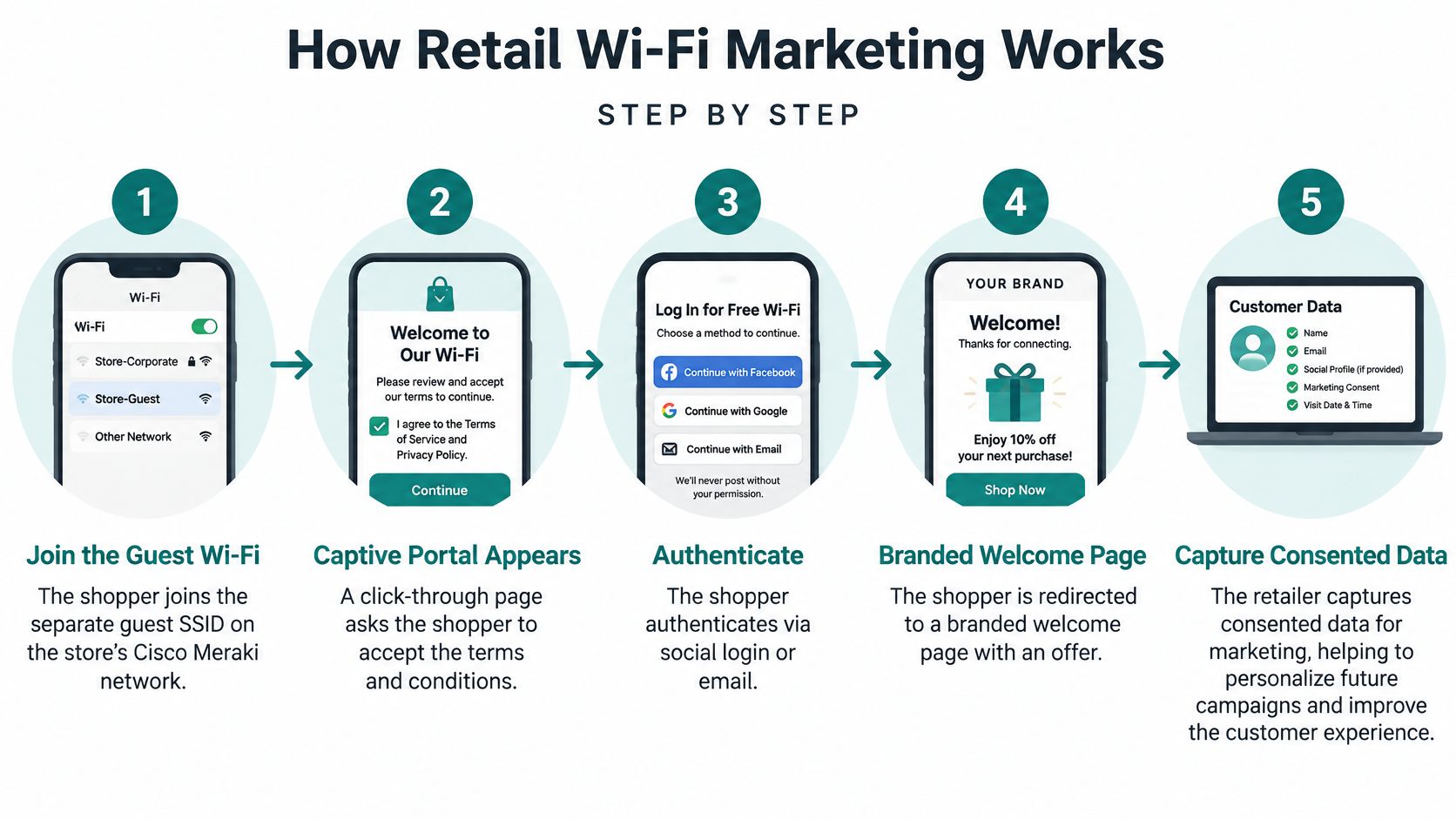
Two edge cases decide whether step 2 even happens. Shoppers on a weak cell signal are your most grateful users, so the portal has to paint fast on a mid-range phone over a busy access point. And that splash is often the first branded moment of the visit, ahead of a staff greeting. A spinning wheel here costs you the email and the impression at the same time.
Guest Wi-Fi Authentication Options Compared
Authentication is the trade between speed, the quality of the contact, and how hard it is for the wrong device to stay on the LAN. A one-tap join fills the store with sessions and almost no names. A heavier check builds a list you can mail, and it also gives education and corporate BYOD teams a key they can revoke.
Cisco documents several guest paths on the splash itself. Cisco Spaces captive portal behavior covers terms acceptance, SMS verification, email verification, and social authentication, with the network provisioning that specific device only after the steps finish. Meraki's guest access paper treats WPA2-Personal as the preferred pre-shared-key method and separates one published guest password from splash login, temporary credentials, and 802.1X. Individual PSKs, called IPSK or EasyPSK in access designs, give each student, employee, or resident device its own private key.
| Authentication method | How it works | Data captured | Best fit |
|---|---|---|---|
| Click-through portal | Shopper accepts terms or taps one button to join | Device details and visit time only | Fast low-friction retail guest access |
| Social login (social wifi) | Shopper signs in with Facebook or Google on the splash page | Name, email, social profile and marketing consent | Retail and shopping centers building CRM lists |
| Email or SMS verification | Portal sends a code or collects a contact before access | Verified email address or phone number | Voucher delivery and loyalty programs |
| IPSK / EasyPSK | Each user or device gets its own private WPA2-Personal pre-shared key | Device identity bound to a personal key | Education campuses and BYOD corporate fleets |
| RADIUS with Azure AD or SAML | Portal validates credentials against a central identity provider | Organizational identity and group policy | Staff, student and corporate guest environments |
How Meraki actually switches the mode
Meraki portals run click-through or sign-on on the SSID. For RADIUS, Cisco's Spaces configuration guide for Meraki has you select the SSID, set association to Open, choose Sign-on with, and point it at the organization's RADIUS server. A separate click-through option uses MAC-based access control without encryption. An external platform behind that portal is what lets Azure AD or SAML sit in the same flow. The phone never needs a supplicant profile, which is why the pattern travels from a shop floor to a lecture hall to a contractor laptop.
One line per sector, so the choice doesn't stall a project:
- Retail CRM: social login, with email or SMS when the offer is a voucher.
- Education and BYOD: IPSK or EasyPSK, so one shared password never circulates in a dorm or an office.
- Corporate guests: Azure AD or SAML, so access follows the directory instead of a lobby whiteboard.
If you want the portal patterns side by side before you pick, the guest Wi-Fi authentication overview lays out social login, vouchers, and private keys on Meraki without mixing guest traffic into the staff LAN.
Collecting Data Without Losing Customer Trust
More fields on the splash don't make better marketing. They make a longer form, a thinner opt-in, and a record you may not be allowed to keep. Location and repeat-visit signals become personal data the moment they attach to a named shopper. A Wi-Fi fingerprinting model trained on seven Seoul flagship stores, described in the KAIST revisit-intention study, reached 67–80% accuracy overall and 64–72% for first-time visitors. Mobility features lifted performance by 4.7–24.3%. That's a strong reason to segment on visit behavior, and an equally strong reason not to warehouse raw movement.
GDPR and the California Consumer Privacy Act already shape how the same store collects, stores, and uses customer data, as the Adobe 2025 retail digital trends report notes around privacy-first personalization. A guest who connected in one city may live under another rule set next week. Design the login for the stricter reading.
A privacy-first checklist
- Split the consents. Wi-Fi access is one choice. Promotional messages are another. Joining the network is not a yes to email.
- Collect fewer fields and say why. Name the purpose on the portal in plain language, and name the venue's privacy policy in that same flow.
- Store coarse zones, not raw coordinates. Keep timestamps only as long as a report still needs them.
- Pseudonymize device identifiers and encrypt data in transit. Aggregate footfall can run with no identity attached. Coupons tied to a person cannot.
- Set a retention clock. Personal data of Wi-Fi users is deleted if the user doesn't log in to one of the Wi-Fi venues for more than 24 months. What the venue configures, and the venue's own privacy policy, governs how that data is used.
- Make opt-out as easy as opt-in. Revocation belongs on the same page family as the original notice, not in a buried mailbox.
Fewer, well-governed fields beat a fat profile nobody trusts. The shopper who understands the trade is the one who opts in, and that record is the one your CRM can actually mail.
Operationally, watch identity-match rate, opt-in rate, dwell by zone, repeat visits, offer exposure, and redemption. Target only people with a valid promotional permission. A consent management explainer is worth reading before the portal copy is locked, because the wording on that screen is the record you'll be asked to produce later.
Engagement Campaigns That Start at the Splash Page
Campaigns work when you know where they run. A portal offer, an in-store nudge, and a message three weeks later are different jobs, and they fail in different ways if you treat them as one blast.
On the portal
The first screen can carry a first-visit welcome, such as a small percent off that expires with the session, plus a social wifi nudge to follow or share after the connection succeeds. That's the cheapest test you have, because everyone who finishes login sees it. Keep it to one action. A page that asks for a follow, a survey, and an app download teaches people to hit skip.
Splash page examples are useful here when you're deciding how much offer to put above the login button versus after it. The button has to stay obvious on a phone held in one hand.
In the aisle and after they leave
In store, a geo-fenced coupon can fire when an opted-in shopper dwells in a department. Vouchers can be printed or dropped into a wallet pass and scanned at the till. A returning-VIP tag can prompt a staff member without showing that person's purchase history on a shared screen.
After the visit, email and SMS through tools such as Mailchimp and Twilio carry the slower work. Win-back notes for lapsed visitors, birthday rewards, and replenishment reminders all belong here, and only for people who accepted messages as a separate choice.
A mall analytics study from Aislelabs reports that a 1% increase in dwell time can correspond to a 1.3% increase in sales. An industry survey in the same write-up found that 21% of retailers reported longer customer dwell after deploying in-store Wi-Fi. Dwell is a clue, not a receipt. If visitor counts fall while dwell holds or rises, you may be seeing fewer trips that are worth more, not a traffic problem to panic over.
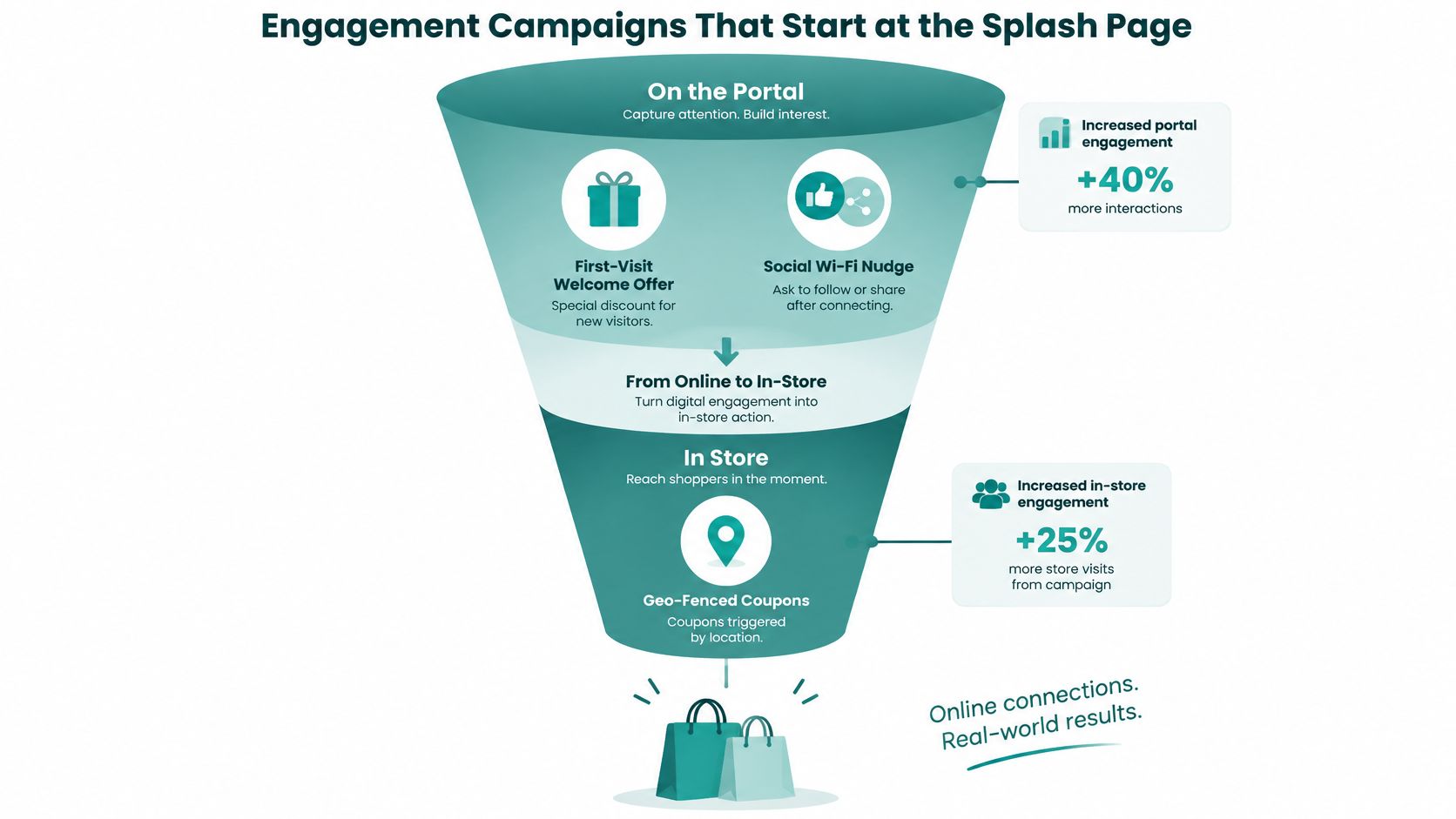
Say a shoe shop sends a 10% voucher, good for two hours, when someone has spent about six minutes in the running section and already opted in. Redemption uses a unique code at the POS, so the offer can't be screenshot-shared all afternoon. The sequence is always the same shape. Identify the opted-in zone or visit segment, deliver one relevant offer, and tie redemption to a unique code.
Collect fewer fields, offer something the shopper wants in that aisle, and map every campaign to one action you can count.
The Metrics That Prove Wi-Fi Marketing Works
A healthy splash-page report does not prove that Wi-Fi marketing increased sales. The commercial test is whether the network changes shopper behavior enough to produce incremental margin. Adobe's retail digital trends report notes that nearly three-quarters of surveyed retailers were considering AI-powered customer insights, alongside tools such as electronic shelf labels, RFID, self-checkout, and scan-and-go. Those investments still need to show whether they affect the basket.
Follow the measurement funnel in order. Each stage checks a different part of the journey, from a working connection to a sales result.
| Funnel stage | Metric | What it tells you | Watch out for |
|---|---|---|---|
| Connect | Connection success rate | Network and portal reliability | Splash pages that fail on mobile |
| Consent | Opt-in rate | How appealing the login offer is | Spikes caused by poor cellular coverage |
| Engage | Dwell time by zone | Which departments hold attention | Long dwell with no purchase |
| Return | Repeat visit rate | Whether visits or campaigns bring shoppers back | Seasonal traffic swings |
| Convert | Offer redemption and basket value | Whether offers are associated with purchases | Redemptions that are not incremental |
| Prove | Incremental margin vs holdout | Commercial impact beyond the comparison group | Comparing unmatched stores |
Why the flattering numbers lie
A high opt-in rate may reflect weak cellular coverage in the store, rather than an appealing offer. Long dwell time could mean shoppers are browsing, waiting in a queue, sitting in a café, or waiting for a ride. Connection, engagement, and purchase are separate steps, so a strong result at one stage cannot stand in for the next.
The comparison that finance will accept
Use a holdout group, matched stores, or matched time periods. Randomly assign eligible shoppers to receive the coupon or serve as a control, then compare post-campaign sales with point-of-sale or loyalty records. Account for seasonality and traffic, and report incremental margin versus the holdout. A simple year-over-year comparison can be misleading when weather, staffing, or promotion schedules differ.
Wi-Fi cannot fix a pricing problem, empty shelves, or a checkout queue. A monthly scorecard based on the funnel keeps the measurement focused: assign an owner to each metric, and include a control group in every campaign comparison. For footfall and repeat-visit measurement, retail Wi-Fi analytics can help retailers examine patterns while keeping the data collected focused and governed. If an offer depends on an outside seller, get in touch with sellers and measure whether the offer produces incremental redemption.
Use Cases Across Retail, Education and Corporate BYOD
The same Wi-Fi tools can serve a boutique, a university residence, or a corporate lobby. The right setup depends on who is connecting and what the venue needs to learn.
The Saturday browser
A shopper joins a boutique's guest Wi-Fi, sees a location-relevant offer, and redeems a code at the counter. The marketer can compare dwell, return visits, and redemptions to understand which areas attract attention and which offers lead to action. Keep the data collection proportionate: a visit pattern and a redeemed offer may be enough to assess a campaign without gathering a detailed profile of every shopper.
A shopping center can extend Wi-Fi across multiple locations, with network roaming letting users connect using the same personal Wi-Fi password. Each retailer should still use data according to its own customer relationships and privacy practices. For the physical shopfront, Main Street permit basics for shopfronts sit outside the Wi-Fi plan. The network can help a boutique learn which bay holds attention, which offer reaches the till, and whether shoppers return.
The student move-in
A university can issue each student an individual pre-shared key through an IPSK or EasyPSK deployment. Students connect phones, laptops, and consoles with their own Wi-Fi key rather than sharing one password posted in a common area. Access can be scheduled around the academic year, and a property manager can reset passwords between lease agreements and schedule the next move-in.
Separate access for residents, guests, and building systems helps keep their connections distinct. Here, the goal is managing access and reducing shared-password maintenance, not measuring coupon sales. A resident's device can be disconnected without changing credentials for the entire hall.
The contractor in the lobby
A visitor connects through a branded portal, while employee-owned devices can authenticate against Azure AD or SAML according to the organization's access policies. Webex guests can receive secure Wi-Fi access without staff reading a password aloud at reception.
For facilities teams, useful measures include guest connections, session duration, and whether guest access remains separate from the corporate network. The portal should collect only the information needed to provide access and evaluate the service. The shopper, student, and contractor need different connection flows and different rules for the data their venues collect.
Launch Your Retail Wi-Fi Marketing Pilot
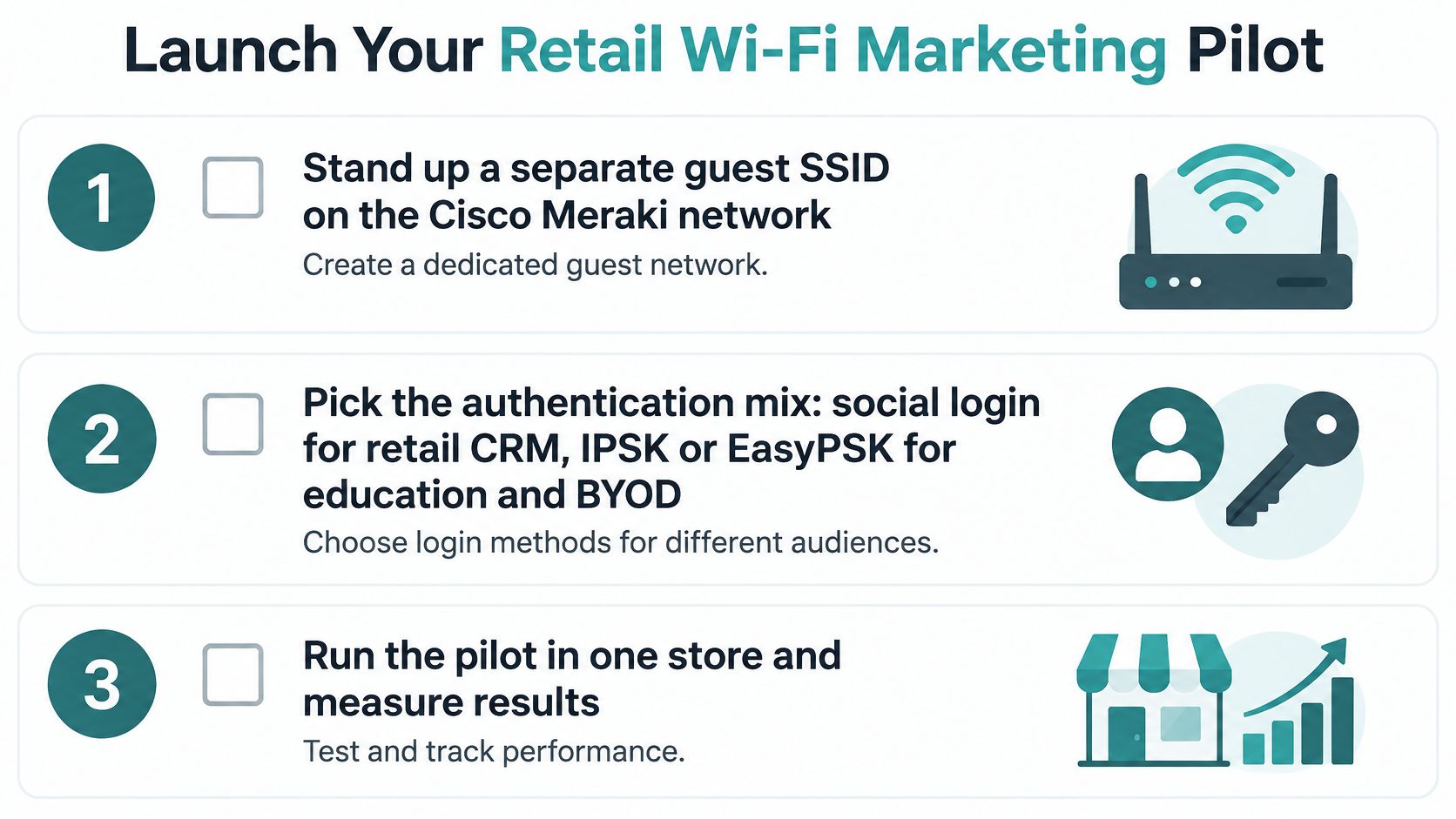
A useful pilot tests one offer in one store against a control. Decide what result would count as incremental sales before you collect a single login. Then follow these seven steps.
- Create a separate guest SSID on the Cisco Meraki network. Keep staff, camera, and payment-device traffic on their existing networks.
- Choose authentication for the audience. A captive portal can support guest access, while IPSK or EasyPSK can give managed devices individual credentials. For corporate guests, consider Azure AD or SAML.
- Build a mobile-friendly portal. Explain access consent separately from consent to receive marketing messages, so shoppers can choose each clearly.
- Connect the tools already in use, such as a CRM, Mailchimp, or Twilio. Send each tool only the information it needs.
- Set up reporting for footfall, dwell time, repeat visits, and offer redemption. Aggregate reporting can show patterns without requiring every visitor to subscribe to messages.
- Run the offer with a holdout store or period. Compare redemption and sales against that control to judge whether Wi-Fi contributed incremental results.
- Review privacy, retention, and opt-out settings before expanding. If a campaign has no clear action to measure, refine it before adding another site.
Splash Access provides captive portals integrated with the Meraki Cloud, along with Wi-Fi Analytics and MV Camera Analytics. For a retail team, the portal is the entry point; the analytics help assess visits and engagement. Keep measurement focused: a smaller set of well-governed data can be more useful than collecting details that do not support the test.
The same pilot structure can fit other visitor settings, but the audience and access setup should match the venue. A campus can time access around move-in, while an office can separate guest access from BYOD sign-on. Before expanding, check that the offer still connects to one measurable action and that the control comparison remains clear. Use a practical implementation timeline to plan the work and keep the pilot's scope defined.
Splash Access supports guest Wi-Fi through Cisco Meraki, including captive portals and IPSK options. To test whether a store network can serve as a measurable marketing channel, start with one SSID, one offer, and a control.