A guest arrives after a long journey, drops a suitcase in the room, and reaches for a phone before taking off a coat. They need directions, a message to family, a work email, or a booking for dinner. If the hotel guest WiFi login fails, takes too long, or delivers a weak signal in the room, the property has created its first service problem before the guest has used the bed, restaurant, or spa.
That moment is also a business opportunity. A reliable connection, branded captive portal, sensible authentication, and carefully managed data flow can support satisfaction, repeat visits, and relevant offers without turning the arrival experience into a marketing form. The practical objective is simple: make access feel effortless while giving the hotel enough control to protect guests and understand how connectivity supports the wider guest journey.
The First Impression of Modern Hospitality
A guest can form an opinion of a hotel before reaching the room. In the lift, at reception, or beside the bed, they search for the property's SSID and expect access without assistance. An unclear network name, a captive portal that fails to load, or a printed password that does not work turns a routine connection into a service complaint.
Industry surveys have consistently placed free WiFi among the amenities guests value when choosing accommodation. A Forrester Consulting study found that 90% of North American hotel guests wanted all hotels to provide wireless Internet in guest rooms. The Forrester study also associated availability with property choice, while connection quality influenced willingness to return or pay. The finding is older, so it should be treated as evidence of a long-running expectation rather than a current market forecast.
The arrival experience is now digital
Hotel guest WiFi should need little explanation. The SSID should be clearly named, the splash page should load quickly, and the guest should understand what information is requested before connecting. On a Cisco Meraki deployment, SSID settings, VLAN policy, captive portal behavior, and authentication should be planned as one guest-access workflow. Treating them as separate configuration tasks often creates gaps between the wireless network and the front-desk experience.
The workflow can still reflect the property. A resort may display a welcome message and restaurant hours. A business hotel may prioritize meeting-room details or corporate access. A free hotel WiFi solution can support branded onboarding and capture consent, but the operating rule remains the same: remove unnecessary steps before adding promotional content.
Practical rule: If reception staff regularly explain how to connect, the guest journey carries too much technical debt.
Utility becomes a loyalty touchpoint
Connectivity does not create loyalty by itself. It supports loyalty when it confirms that the hotel understands how guests travel. A video call that holds in the room, a phone that reconnects between floors, and a login that works on laptops, tablets, and smart TVs all reduce avoidable friction.
Owners should measure more than SSID visibility. Test onboarding with real guest devices, walk rooms during busy periods, review authentication failures, and check whether the portal gives guests a clear remedy when service falls short. Cisco Meraki analytics can help connect access events with operational review, allowing teams to see where connection problems affect the stay. When WiFi works reliably, guests focus on the property rather than its infrastructure. When it fails, the network becomes part of the hotel's story.
Open Networks Versus Secured Environments
An open SSID looks convenient because it removes the shared-password question. Guests can select the network and proceed to a captive portal, or in some cases browse without meaningful authentication at all. The trade-off is that wireless traffic may lack a protective encryption layer, and the hotel has less control over how users and devices are separated.
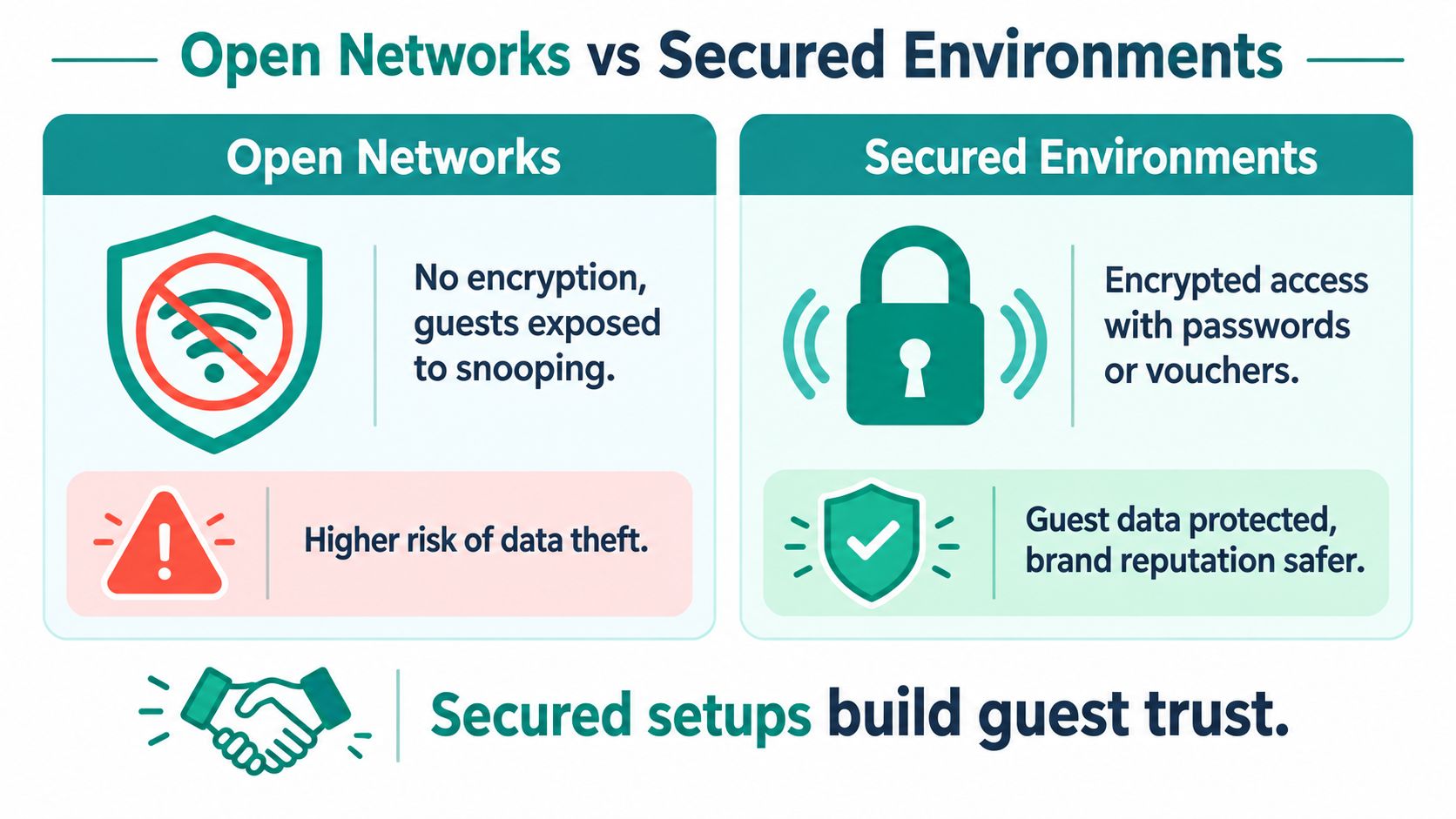
A secured environment doesn't necessarily mean forcing every guest to remember a complicated password. It means applying appropriate controls at the wireless, network, and application layers. Cisco Meraki administrators can combine SSID policies, client isolation, firewall rules, VLAN segmentation, captive portals, and identity-based access so a guest device isn't treated like a trusted office endpoint.
The practical comparison
| Consideration | Open guest network | Secured guest environment |
|---|---|---|
| Guest access | Fast to discover, but may leave users uncertain about protection | Can remain simple with a portal, voucher, QR workflow, or managed credential |
| Wireless privacy | May not encrypt traffic uniquely between each user and the network | Can use protected wireless methods, including Wi-Fi Enhanced Open |
| Network control | Limited identity and policy context | Supports segmentation, device policies, and clearer access records |
| Operational trade-off | Less setup friction, more exposure and ambiguity | More planning, stronger protection, and better policy enforcement |
Wi-Fi Enhanced Open is useful when a hotel wants public-style access without relying on one shared passphrase. It uses Opportunistic Wireless Encryption to create unique encryption for each user's connection, protecting against passive eavesdropping while retaining a practical captive-portal experience. The Wi-Fi Alliance security guidance specifically identifies hotels and other public venues as suitable deployment environments.
Security must include isolation
Encryption doesn't replace segmentation. A guest network should remain separate from property-management systems, staff devices, payment systems, building controls, and operational IoT. In a Meraki deployment, administrators should map each SSID to a deliberate policy, restrict unnecessary lateral traffic, and confirm that guests can't discover or reach neighboring client devices.
The same logic applies beyond hospitality. Education networks separate student and staff access, retail sites isolate customer WiFi from point-of-sale systems, and corporate BYOD environments apply different policies to visitors and managed employees. Hotel guest WiFi deserves that same discipline because convenience at the front desk shouldn't become unrestricted access behind it.
Choosing the Right Authentication Method
Authentication should match the guest journey, the risk level, and the operational team's ability to support it. There isn't one universal login method. A leisure hotel with short stays may prioritize speed, while a conference property may need room-based access, corporate onboarding, or stronger device identity.
Start with the decision rather than the technology:
Define the access context. Is the user a transient guest, a conference attendee, a contractor, a student, a shopper, or an employee using BYOD? Each group needs a different balance of convenience and control.
Choose the lightest method that meets the risk requirement. Social login and social WiFi can reduce typing and provide consent-based profile information. Vouchers work well when reception needs a simple, printable credential tied to a stay or event. Enterprise credentials make more sense when the organization needs stronger identity and policy enforcement.
Separate first-time onboarding from repeat access. A returning guest shouldn't repeatedly fill out the same form if the network can securely recognize the device or provision a recurring profile.
Social login and vouchers
Social login can make arrival quick because guests use an existing account rather than inventing another password. The portal should explain what information is requested, why it's requested, and whether marketing consent is optional. A social WiFi workflow can be useful for engagement, but it shouldn't make promotional consent a hidden condition of basic connectivity.
Voucher access remains practical for reception desks, events, and group bookings. Staff can print or distribute codes, revoke them when necessary, and associate access with a room, booking, or meeting. QR onboarding can reduce manual typing, and operators evaluating secure Wi-Fi QR codes for your venue should still verify that the destination, consent language, and credential lifecycle are controlled by the hotel.
IPSK, EasyPSK, and enterprise access
IPSK, or individual pre-shared keys, gives each user, room, device, or group a distinct credential instead of one password for everyone. That makes revocation and policy assignment more manageable. EasyPSK-style workflows can simplify deployment where staff need to create or assign individual keys without building a full certificate program.
Passpoint takes the model further for recurring users. The Wi-Fi Alliance describes Passpoint as using WPA2-Enterprise security, protected management frames from Release 2, and IEEE 802.1X with EAP for mutual authentication. Once credentials are provisioned, a compatible device can reconnect without repeating the captive-portal process. Hotel WiFi authentication methods should therefore be evaluated as a progression, from open access and portal login to IPSK, EasyPSK, and enterprise identity.
For Cisco Meraki, document how the portal, Azure AD or SAML identity, IPSK credentials, SSIDs, and roaming domains fit together. Don't configure each access point as an isolated island. Consistent identity and policy matter just as much as the login screen.
Turning Connectivity Into a Marketing Tool
A guest arrives, connects to the hotel WiFi, and immediately sees information that helps with the stay. That first interaction can support service and loyalty, provided the hotel explains the exchange and does not make access feel like a sales form.
A practical portal may request an email address with explicit marketing consent, offer restaurant reservations, or show a relevant local experience. Social login can reduce typing, while social WiFi can connect access data with a permission-based engagement workflow. Mailchimp, Facebook, and Twilio can support follow-up messages, but the hotel must define which fields each system receives, why they are needed, and how long they are retained.
Build value into the login
The portal should offer something useful immediately. A welcome page might show breakfast hours, link to room-service ordering, or present a location-based offer after the guest has opted into communications. Keep the offer easy to dismiss. Guests should receive WiFi access whether they accept marketing or decline it.
A structured Wi-Fi marketing workflow can connect portal consent to follow-up campaigns without turning access into a paywall. Analytics can show the commercial team which messages receive attention, but a connection alone does not represent a sale.
Meraki access-point data and MV Sense camera analytics may help operators examine footfall, dwell time, and return behavior where the deployment and privacy framework support that use. Similar applications can support shopper engagement in retail centers, student services on campuses, and visitor management in corporate offices.
A portal should answer the guest's immediate question, “How do I get online?”, before asking the hotel's question, “How can we market to this person?”
Keep operational systems apart
Marketing integration makes network segmentation more important. Guest WiFi should remain separate from property-management systems, room controls, payment devices, and staff applications. A secure IoT deployment approach helps when thermostats, smart TVs, mobile keys, sensors, and other connected devices need access without sharing the same logical segment as guest endpoints.
Cisco Meraki policies can enforce that separation, while a portal platform manages the guest-facing experience. Splash Access, for example, provides a guest portal layer compatible with Meraki, leaving segmentation and access policy to the network design. Treat the platform as part of service delivery, not as a replacement for architecture.
Measure portal completion, authentication failures, consent rates, offer interactions, support contacts, and repeat connections. Link those signals to revenue systems only when the identity match is lawful, transparent, and useful.
Planning for Density and Bandwidth Demand
A fast internet circuit can still produce a slow room. Guest WiFi performance depends on concurrent users, devices per guest, radio airtime, access-point placement, interference, authentication traffic, and the policies that govern shared capacity. For a Cisco Meraki deployment, those inputs should be measured together so connectivity improvements support satisfaction and repeat use, not just higher infrastructure spend.
Guests begin testing the service quickly. A survey cited by Budget Travel's hotel WiFi guide found that 65% of hotel guests go online within seven minutes of checking in. Another survey found that 80% identified Internet access as the most important hotel service among the options presented. These figures are directional benchmarks rather than a worldwide census, but they show why login failures and slow first connections can shape the stay.
Plan for simultaneous use
Begin with occupancy and model concurrent users and devices during the busiest operating periods. Morning checkout brings bursts of messaging, navigation, and payment activity. Evening demand adds streaming, video calls, uploads, and smart-TV traffic. Conference breaks can create a short, intense surge in meeting areas while guest rooms remain relatively quiet.
Cisco's hotel research found that 80% of sampled hotels provided less than 6 Mbps shared across the entire property. Its measured conditions produced a mean of 220 Kbps and a median of approximately 22 Kbps per guest. The Cisco research shows how oversubscription and concurrency can make a large WAN connection feel inadequate.
One planning example uses a 160-room property at 80% occupancy, 2.5 devices per guest, 12 Mbps average streaming demand, and a 6:1 oversubscription ratio, resulting in a requirement of roughly a 500 Mbps dedicated circuit. Use that as a modeling example, not a universal specification. Check peak utilization, latency, packet loss, and retransmissions as well. Throughput alone will not explain every complaint.
Improve airtime, not just headline speed
Wi-Fi 6 supports denser deployments by scheduling clients more efficiently. OFDMA divides a channel into resource units, reducing contention for smaller transactions such as DNS requests, portal exchanges, and messaging. MU-MIMO can handle traffic from up to eight users simultaneously, while 1024-QAM can raise the data rate by 25% compared with 256-QAM under suitable signal conditions. The hotel Wi-Fi 6 planning guide also describes a theoretical maximum of 9.6 Gbps and reports a speed increase of up to 20% when Wi-Fi 5 clients remained in use after an access-point upgrade.
For a deeper technical comparison of 802.11ax, see this Wi-Fi 6 planning resource. The standard helps, but it does not replace RF design. Use capacity-oriented surveys, channel-reuse planning, and measured signal-to-noise ratios.
The Purple hotel Wi-Fi 6 guide recommends an SNR of at least 35 dB and suggests planning high-end access points around 150 associated devices per radio. Treat those figures as design guidance, because application behavior and airtime consumption determine practical capacity.
For properties hosting tours, virtual demonstrations, or media-heavy guest services, guidance on how to optimize bandwidth for tours can support the wider capacity plan. The decision is whether radios, uplinks, policies, and room coverage can deliver acceptable service at the same time. That is the point at which WiFi becomes a managed guest experience rather than a utility line item.
Prioritizing Privacy and Security Compliance
Hotels collect more connectivity data than many guests realize. A captive portal may record an email address, device identifier, consent choice, authentication time, and access location. Integrations can connect WiFi with property-management systems, mobile keys, analytics, marketing tools, and IoT platforms. That creates useful operational context, but it also creates responsibilities around purpose, access, retention, and deletion.
The privacy policy should be understandable at the point of login. Explain what the hotel collects, which fields are required for access, which fields support optional marketing, who receives the information, and how guests can withdraw consent or request action. A guest shouldn't need to interpret technical language to understand whether social login is optional.
Map the data before collecting it
Create a plain-language data map for every portal and integration:
- Identity data: Record whether the workflow uses a room number, email address, social login, voucher, IPSK, EasyPSK, or enterprise credential.
- Device data: Explain whether the system processes device identifiers for session control, troubleshooting, or analytics.
- Usage data: State whether the hotel records connection times, access points, bandwidth policy events, or portal interactions.
- Marketing data: Separate service communications from promotional consent, and pass only the fields each approved tool needs.
- Retention and rights: Define retention periods internally and provide a clear route for requests involving access, correction, deletion, or objection.
The data policy must align with the network design. WPA2 or WPA3 protection, client isolation, segmentation, secure administration, and controlled integrations reduce exposure, but they don't make a vague consent process acceptable. Likewise, a polished splash page can't compensate for weak access controls behind it.
Reliability is part of security
Guests can't assess your segmentation directly. They judge the service through reliability and clarity. Research indicates that 73% of surveyed U.S. hotel guests reported experiencing weak Wi-Fi in their guest room, according to the AHLA emerging trends document. A room connection that repeatedly fails can push guests toward insecure workarounds, personal hotspots, or unknown networks.
Use room-by-room testing, peak-period monitoring, and clear escalation procedures. Ask whether the portal works across current phones and laptops, whether roaming preserves the session, and whether support staff can identify a failing access point without asking guests to repeat irrelevant steps.
For data rights, publish a process that guests can follow. A resource on data subject rights can help teams structure the information needed for access and deletion workflows. In Cisco Meraki environments, document who can view client records, who can change policies, and how logs move into external systems.
Privacy earns trust when the hotel makes fewer promises and keeps them consistently. Secure the wireless layer, isolate guest devices, explain the portal exchange, and collect only what the service or an explicitly accepted benefit requires.
Splash Access provides Cisco Meraki-compatible captive portals, branded splash pages, QR onboarding, social login, voucher access, WPA2 and IPSK authentication, EasyPSK-style guest workflows, and integrations with identity and marketing tools. Visit Splash Access to assess how a managed hotel guest WiFi experience could fit your property's security, onboarding, and engagement requirements.