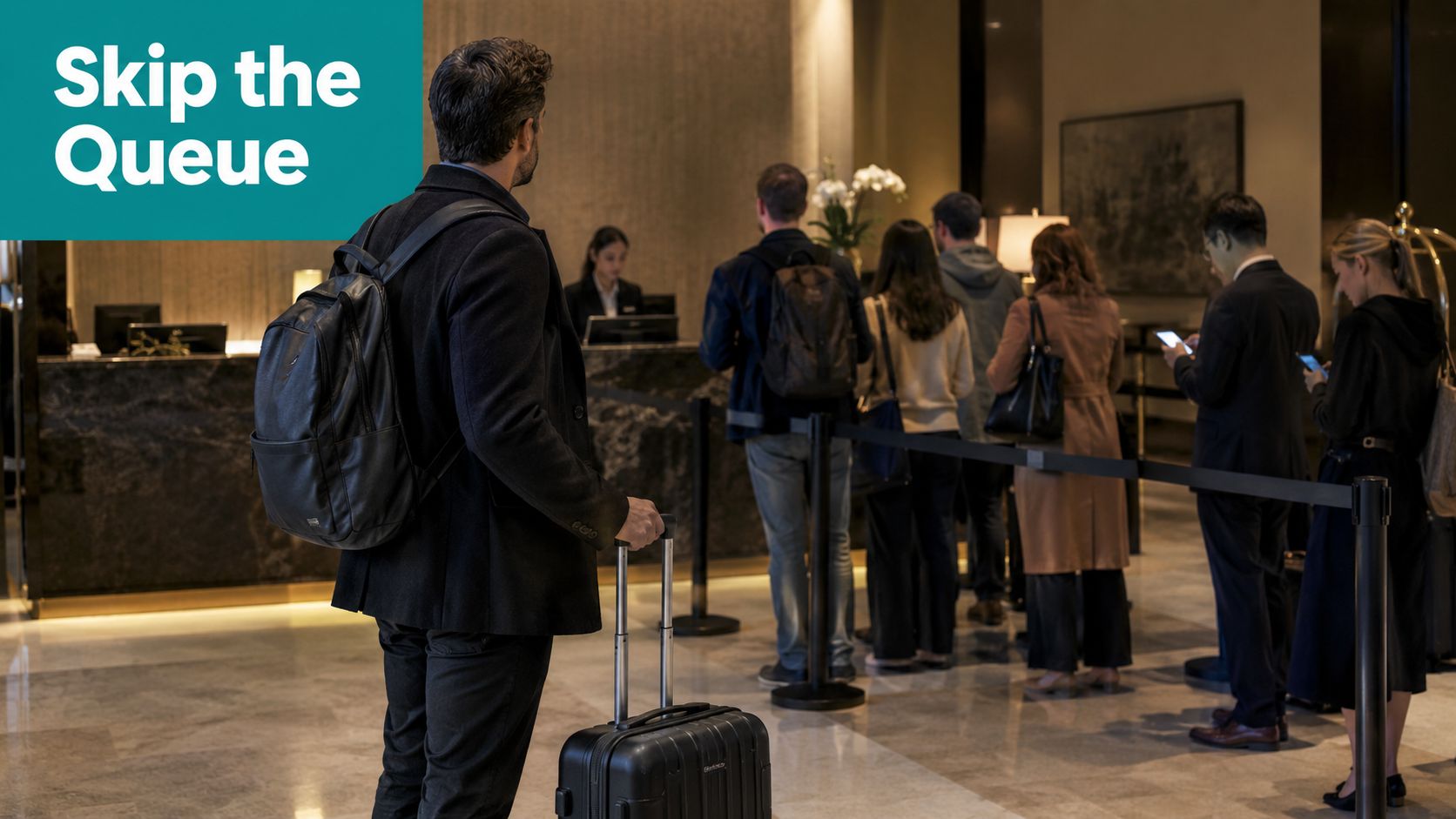
A business traveler arrives at 11:40 p.m. The lobby is full, two front-desk agents are helping a queue of six guests, and three more people are waiting near the elevators with their phones in hand. The traveler has a reservation, a valid ID, and no unusual request, but still has to wait for a manual process designed for a quieter era.
That's the operating problem a hotel check-in kiosk is meant to solve. Done properly, it doesn't replace hospitality. It removes repetitive work, gives guests another arrival path, and connects the front desk to the systems that control identity, payments, room access, and guest Wi-Fi.
Why Hotel Check In Kiosks Are Everywhere Now
A hotel kiosk is more than a touchscreen with a welcome message. In a complete workflow, the guest finds a reservation in the property management system, scans an ID, confirms registration details, accepts required terms, completes payment or a deposit hold, and receives a room number. Depending on the property, the kiosk can encode a key card, trigger a mobile key handoff, or direct the guest to a staffed counter for the final exception.
The value becomes clear when the lobby is busy but the requests aren't complicated. A returning loyalty member shouldn't need an agent to retype information already held in the PMS. A late arrival with a prepaid booking shouldn't occupy the same queue as a guest disputing a rate, requesting an accessible room change, or dealing with a payment failure.
The operator case is broader than labor
Guest preference is pushing adoption as well. A 2026 survey reported that 70% of American travelers are likely to check themselves into a hotel using an app or self-service kiosk, while the same report found that 53.6% of travelers want contactless check-in and check-out to remain standard. Those figures come from HotelFriend's comparison of self-service hotel check-in and point to a clear expectation, especially among mobile-first travelers.
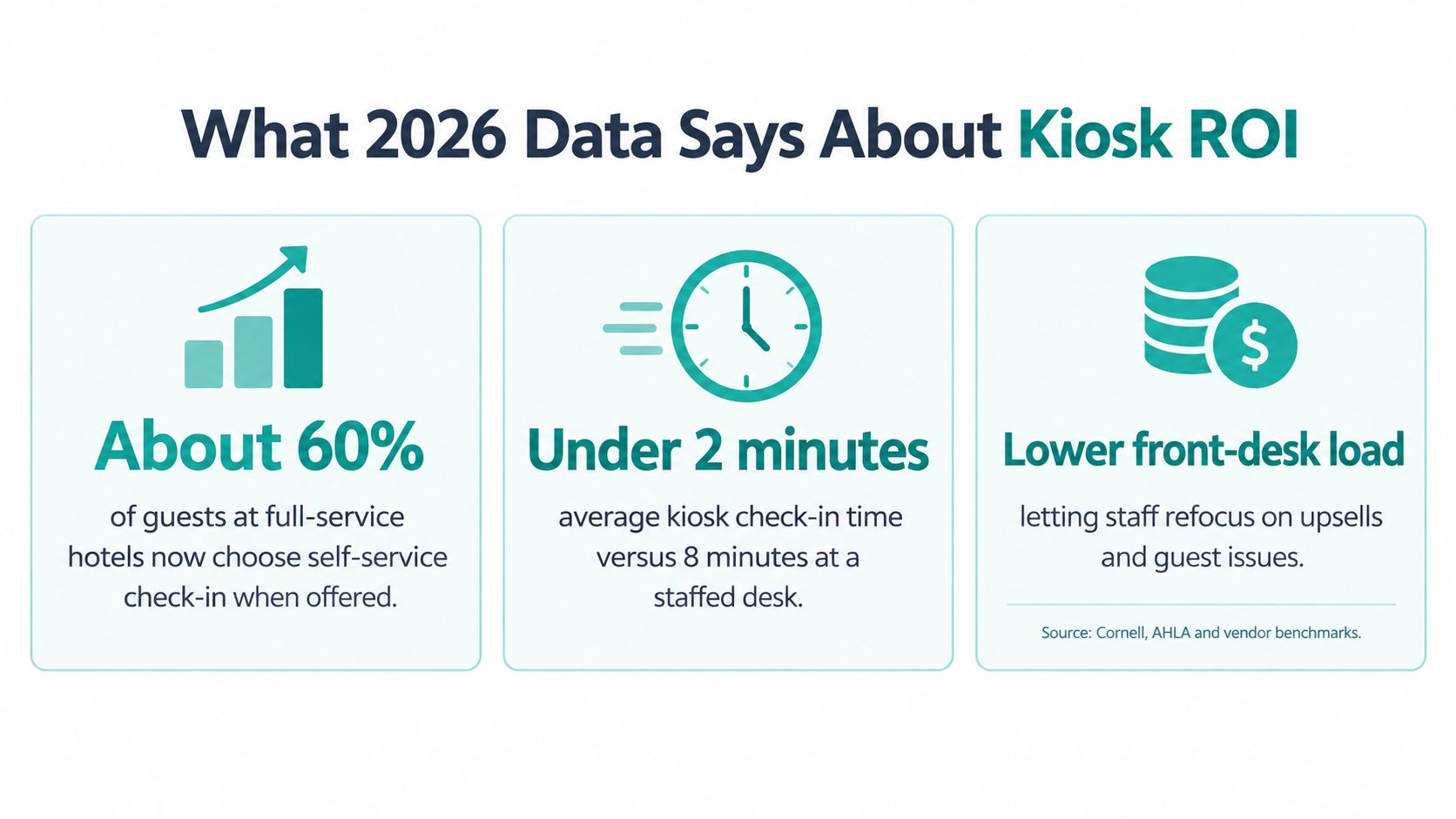
The commercial results are also relevant. The same report says U.S. hotels with kiosks process 30% of reservations through kiosks, compared with a global benchmark of 20%. It also reports that kiosk check-ins cut check-in time by one-third, produced 25% higher upsells, and made kiosk users three times more likely to buy an upsell.
Practical rule: A kiosk should give staff more time for judgment, not simply give guests another place to get stuck.
The strongest deployments treat the kiosk as a front-of-house operating layer. It can become the starting point for mobile keys, digital receipts, loyalty recognition, and guest Wi-Fi. Teams planning the wider stack can also review these hospitality technology trends before selecting hardware.
Identity verification deserves careful design. If facial recognition or automated document checks are part of the workflow, operators should understand the privacy, consent, and exception implications of automated face detection systems rather than treating identity capture as a simple hardware feature.
The Two Main Types of Hotel Check In Kiosks
Operators usually compare two practical formats in an RFP. The first is a freestanding lobby kiosk, a substantial unit with a touchscreen, ID scanner, payment reader, printer, and key-card encoder. The second is a front-desk-assist kiosk, often a tablet or modular display that sits at the counter while an employee remains available.
Freestanding units create a visible self-service lane. They suit high-volume properties, airport hotels, and locations where arrivals continue outside normal front-desk patterns. They also require more planning. Placement must support wheelchair access, clear circulation, privacy during ID scanning, and a reliable connection to power and the hotel network.
Counter units have a smaller footprint and preserve the human welcome. An agent can explain a registration step, handle a name mismatch, or take over when the booking needs attention. The trade-off is queue relief. If every guest still needs an employee to finish the process, the unit supports the desk but doesn't create a fully independent arrival channel.
A practical comparison
| Factor | Freestanding Lobby Kiosk | Front-Desk-Assist Kiosk |
|---|---|---|
| Footprint | Requires dedicated lobby space and accessible circulation | Fits on or beside an existing counter |
| Cost band | Higher hardware and installation commitment | Lower initial commitment, depending on modules |
| Throughput | Better for independent arrivals and visible queue reduction | Better for guided transactions and exceptions |
| Best-fit property type | High-volume, airport, extended-hours, and digitally mature properties | Boutique, mixed-service, and properties retaining strong desk interaction |
A hybrid model often works best. The freestanding unit handles routine arrivals, while the desk manages checkout, concierge requests, group bookings, and identity exceptions. A smaller counter station can then support guests who need assistance without forcing every arrival into the manual lane.
The kiosk's operating system matters as much as its enclosure. Lock the device into a controlled workflow, restrict access to approved applications, and prevent guests from reaching system settings. An Android kiosk mode configuration can help create that controlled surface, but it won't fix a weak PMS integration or an unclear recovery path.
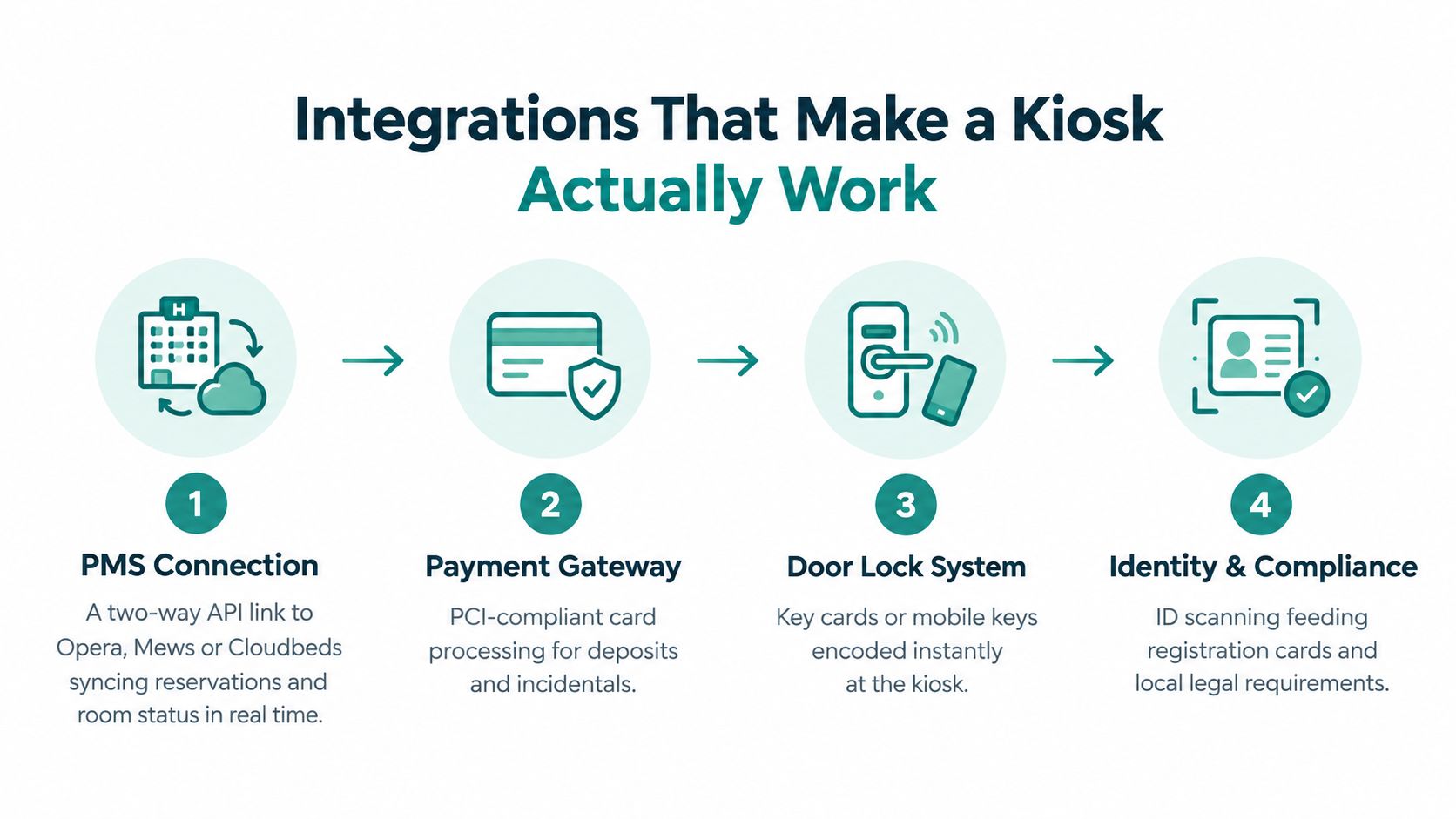
Integrations That Make a Kiosk Actually Work
A kiosk without integrations is an expensive screen. The guest experience depends on a chain of systems that must agree about the reservation, the person, the payment status, the room, and the access rights.
Start with the PMS
The property management system should connect through a documented, two-way API. The kiosk reads the reservation, checks whether the booking is eligible for self-service, and writes back the confirmed room assignment and check-in event. Common environments include Opera, Mews, Cloudbeds, and Protel, but the important question isn't the brand name. It's whether the interface supports the states your front desk handles.
Ask how the integration treats early arrivals, split reservations, room moves, multiple guests, deposits, and bookings with missing contact data. An API that only works for a clean reservation will perform well in a demonstration and fail during a busy evening.
For properties using Oracle environments, confirm the exact data exchange and permissions with the Opera PMS systems integration guidance. The kiosk should never create a parallel guest record when it could update the existing profile.
Keep payment outside the kiosk application
Payment needs a PCI-validated PIN-entry device or a P2PE-validated gateway. The kiosk application shouldn't store primary account number data locally. Deposits, incidental holds, refunds, and failed authorizations also need clear status messages so the guest understands whether the room is ready, the card was declined, or staff intervention is required.
The remaining hardware has a direct operational role:
- ID scanner: Reads a passport machine-readable zone or driver license barcode and populates registration fields.
- Key encoder: Creates a physical key only after the PMS and payment workflow confirm eligibility.
- Mobile-key handoff: Sends the guest into the approved mobile-key process, often using Bluetooth access.
- Loyalty and CRM connection: Recognizes returning members without forcing them through unnecessary data entry.
- Network service: Connects the verified guest identity to the captive portal and Wi-Fi policy.
That last layer is frequently omitted from kiosk planning. A captive portal can authenticate a guest through room number and surname, with a PMS query validating the reservation in real time. The hotel guest Wi-Fi architecture guidance describes this type of PMS connection and reports portal validation within 200 to 500 milliseconds.
For stronger identity binding, the kiosk can initiate an IPSK or EasyPSK credential instead of handing every guest the same password. RADIUS then provides the authentication backbone, applying policy consistently across the kiosk, access points, and guest network.
From Check In to Secure Wi Fi in One Flow
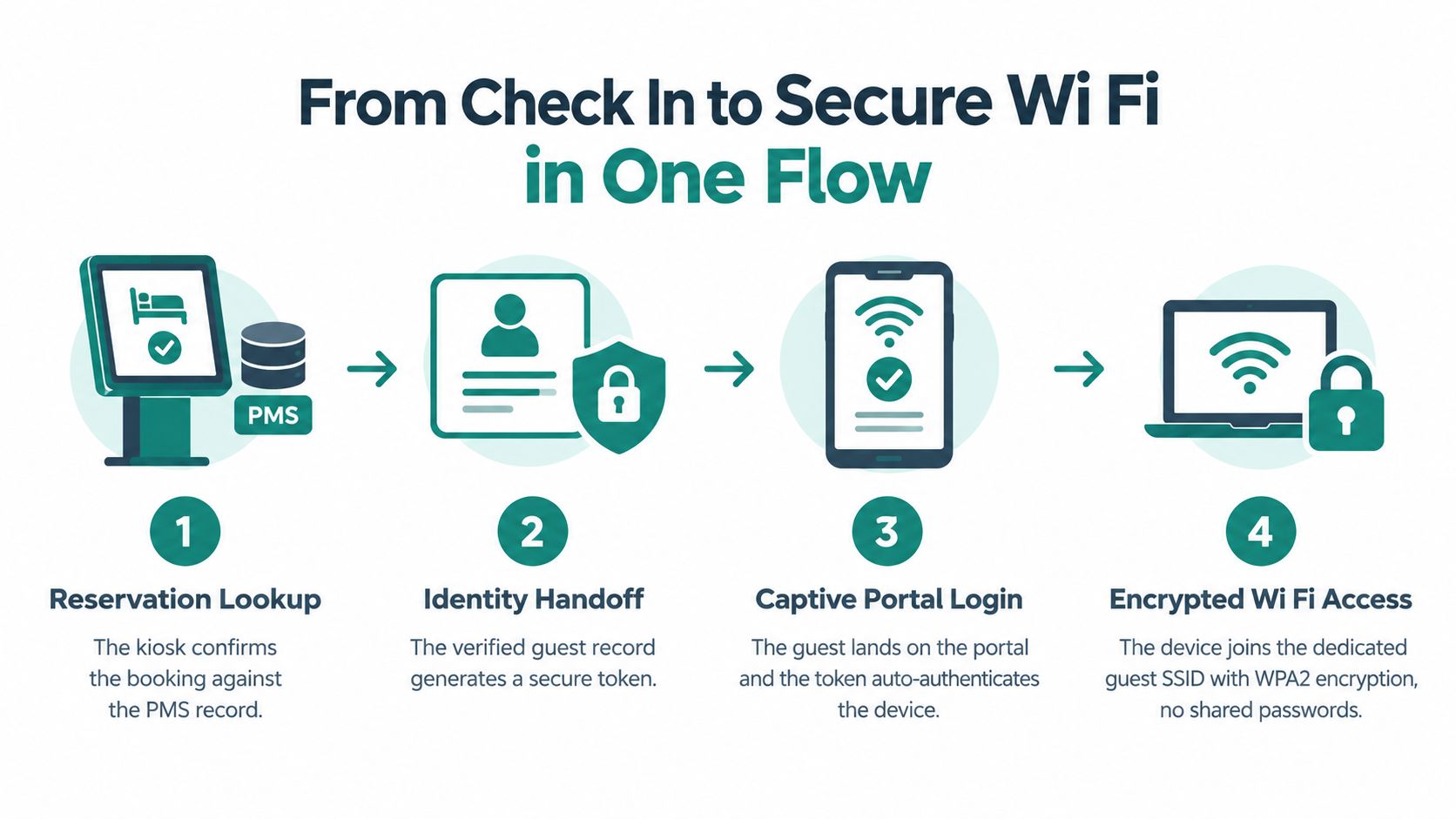
The most useful way to think about kiosk networking is as one identity journey. The guest verifies a reservation at the kiosk, and that verified event should help authorize the services the guest needs next, including Wi-Fi.
The handoff in practice
The kiosk first queries the PMS and confirms that the reservation is valid for arrival. After identity and payment checks pass, the workflow can send a secure token to the captive portal service. The portal uses that token to recognize the stay rather than asking the guest to enter the same information again.
An IPSK or EasyPSK workflow can then issue a unique pre-shared key for a device, user, room, or stay policy. This is different from printing one shared password on every registration card. Individual credentials make it easier to revoke access, separate guest traffic, and investigate misuse without disrupting everyone in the property.
RADIUS, including a deployment built around Cisco ISE or another enterprise authentication service, can enforce the policy behind that access. Cisco and Meraki environments need careful coordination between the wireless configuration, the portal, the authentication service, and the PMS event. The kiosk may be functioning perfectly while the guest still fails to connect because one system has stale reservation data or the wrong authorization state.
The guest experience should feel like one verified arrival, not four unrelated logins.
Where deployments break
The common failures are rarely dramatic. A PMS export is stale. A device certificate or captive portal handoff behaves differently on a particular phone. A DHCP scope lacks the expected room context. A guest changes rooms and the original key remains active. A family booking includes several people, but the workflow only understands one primary guest.
Test these conditions before launch:
- Reservation timing: Confirm how cancellations, extensions, early check-ins, and room changes update access.
- Device behavior: Test current iOS and Android devices, private browsing, captive portal detection, and weak signal areas.
- Credential lifecycle: Revoke keys at checkout and define what happens when a guest adds another device.
- Fallback handling: Give staff a way to issue access without bypassing the audit trail.
- Network separation: Keep guest devices away from operational systems, lock controllers, and payment infrastructure.
A QR code check-in system can support a similar handoff for guests who begin on their phones. The important design principle is continuity. One confirmed identity should lead to one understandable Wi-Fi path, with staff assistance available when the happy path doesn't apply.
Picking the Right Guest Wi Fi Authentication Method
There isn't one correct guest Wi-Fi authentication method for every venue. The right choice depends on how much identity the business needs, how sensitive the network is, and how much friction guests will tolerate at the point of access.
| Method | Security | Guest Friction | Best Fit |
|---|---|---|---|
| Shared rotating password | Basic separation from the internal network, but credentials spread easily | Low once the password is visible | Temporary lobby Wi-Fi and low-risk public access |
| Social or email login through a captive portal | Supports consent, registration, and marketing data collection, but depends on a reliable portal flow | Moderate, especially when guests must switch apps or verify email | Hotels, retail venues, and public spaces that want branded access |
| Per-device IPSK | Stronger identity binding and easier individual revocation than a shared password | Low after provisioning, though initial setup needs careful automation | Hotels, education, healthcare, and corporate BYOD environments |
A shared password is familiar, but it creates weak accountability. Staff print it, guests share it, and former users may retain it until someone rotates the credential. It can be acceptable for best-effort lobby access, provided the guest network is properly isolated, but it's a poor match for a property that wants room-level control or reliable loyalty attribution.
A captive portal with social login, email registration, or SMS verification offers a more branded experience. Guest Wi-Fi platforms commonly support a flow where the user selects an identity provider, authenticates there, and returns to the venue portal. That approach can also pair with RADIUS or IPSK when access needs to be tied to a person, device, group, or private key, as described in this social login and wireless access overview.
Match the method to the environment
Hotels often benefit from combining PMS validation with IPSK for the stay and a polished social WiFi option for visitors. Retail locations can prioritize social login and consent capture, while keeping corporate systems on a separate authentication path. Education environments need to distinguish students, staff, guests, and managed devices. Corporate BYOD networks usually need individual credentials, policy control, and a clear separation between employees and visitors.
For older switching environments that can't support a complete 802.1X rollout, EasyPSK can change the implementation decision. Individual keys still provide identity-based access over PSK, avoiding a shared password without requiring an immediate replacement of the entire network authentication stack. Use the guest Wi-Fi authentication methods guide to map the choice against consent, compliance, device management, and support capacity.
What 2026 Data Says About Kiosk ROI
The strongest kiosk business case combines guest demand with operational reliability. A 2026 market estimate placed the global hotel check-in kiosk market at USD 2.84 billion in 2025, with a projection of USD 6.12 billion by 2033 and a projected 10.2% CAGR from 2026 to 2033. A separate 2026 report projected the hotel self-check-in and check-out kiosk market to reach USD 2.57 billion in 2026 and USD 4.98 billion by 2032, at an 11.39% CAGR. These are market projections, not a guarantee for an individual property. The estimates are available in Verified Market Reports' hotel kiosk market analysis.
What the evidence changes
The regional picture supports a cautious expansion strategy. The same market estimate assigns 42% of global share to North America and identifies Asia-Pacific as the fastest-growing region at a projected 13.8% CAGR. For an operator, that means location, labor conditions, guest mix, and local identity requirements matter more than a generic global adoption narrative.
Guest behavior supports the revenue argument. The 2026 survey cited earlier reports 25% higher upsells through kiosk-enabled check-in, with kiosk users three times more likely to purchase an upsell and generating nearly 70% more upsell revenue per check-in than front-desk guests. Those results justify testing room upgrades, breakfast, parking, late checkout, and other relevant offers, but only if the prompts appear after the kiosk has established trust.
The Cornell-backed study is the necessary counterweight. Across two hotel chains and 163 hotels, self-service kiosks improved financial results with a time lag, but failed check-ins reduced willingness to pay and willingness to return. The study also found that kiosks didn't increase perceived check-in speed. The lesson is direct: ROI comes from dependable routine processing, not from placing a machine in the lobby and assuming guests will prefer it.
Capital decision: Model the kiosk against completed check-ins, recovered staff capacity, successful upsells, support contacts, and failed-flow recovery. Don't use adoption alone as the payback case.
Boutique properties, group arrivals, unusual rooming lists, and complex resort charges need separate testing. The data is more persuasive for standardized reservations than for edge cases where staff still has to intervene.
UX Best Practices and a Quick ROI Checklist
A kiosk succeeds at the point where a guest either completes the process confidently or looks around for help. The screen should sit within an accessible reach range, avoid glare, offer clear language selection, and keep every instruction specific. A guest shouldn't have to guess whether the system is scanning an ID, processing a card, or waiting for the door-lock service.
Design the recovery path before polishing the welcome screen. If the key encoder fails, staff need a clear fallback. If a passport won't scan, the guest needs an alternative verification route. If a booking contains multiple rooms or names don't match, the kiosk should explain the next step without exposing unnecessary personal information.
Design for the exceptions
The 2024 video-based study of 674 check-ins in fully automated self-service hotels found that facial-recognition kiosks shift operational work from employees to guests. That finding makes the interface a control point, not a cosmetic layer. Every extra verification step increases the chance that a guest will abandon the flow or require assistance, especially when identity validation also controls room access.
Use these practical rules:
- Keep the first screen simple: Offer check-in, language selection, and assistance without crowding the display.
- Show progress clearly: Guests should know whether they're confirming a reservation, scanning an ID, signing, paying, or collecting a key.
- Make accessibility visible: Provide reachable controls, readable contrast, audio or staff-assisted alternatives, and a path that doesn't depend on precise touch gestures.
- Separate routine from exception handling: Don't force every guest through a long compliance sequence when the PMS already holds verified information.
- Protect privacy: Angle screens and scanners away from queues, and avoid displaying full personal details where other guests can see them.
- Close the loop with Wi-Fi: After arrival, give the guest a clear way to connect through the captive portal or their individual credential without repeating the entire registration process.
A checklist for the GM
Before approving a rollout, confirm the form factor fits the lobby and the guest mix. Validate the PMS, payment, ID, lock, mobile-key, captive portal, IPSK or EasyPSK, and RADIUS integrations in a realistic pilot. Test late arrivals, failed payments, name mismatches, family bookings, minors, non-standard IDs, multilingual flows, accessibility needs, and room changes.
Track completed self-service arrivals, staff interventions, failed transactions, Wi-Fi onboarding failures, upsell acceptance, guest feedback, and support volume. The Cornell findings show why speed alone isn't enough. A kiosk that processes routine arrivals smoothly but mishandles exceptions can damage the experience it was meant to improve.
Run the pilot with front-desk staff involved from the start. They'll identify the failure modes that a vendor demonstration rarely exposes, and they'll help define when the kiosk should hand a guest to a person. Once the workflow is stable, expand by property type rather than copying the same configuration into every lobby.
Splash Access provides captive portals and guest Wi-Fi authentication workflows that can connect hospitality access to PMS-driven journeys, including social login, IPSK, EasyPSK, and QR-based onboarding across Cisco Meraki environments. Visit Splash Access to discuss a hotel check-in kiosk and guest Wi-Fi flow that your front desk can support in practice.