You're standing in a hotel lobby. Suitcase in one hand, phone in the other. The Wi-Fi name pops up, you tap it, and you're hit with a long form, a tiny password field, and a button that won't load.
That's the moment your guests judge you. Not the room. Not breakfast. That first connection.
Good onboarding best practices fix that moment for hotel guests, students in dorms, shoppers at the till, and staff with their own laptops. The gap is real. Gallup research found only 12% of employees strongly agree that their organization does a great job onboarding new hires, and just 29% say they feel fully prepared and supported after onboarding. Different setting, same lesson. People remember confusion at the start.
This list gives you eight practical Wi-Fi tactics for Cisco and Meraki networks. Each one is tied to a real venue, with a setup step and an honest trade-off. If you're also connecting places with no fixed line at all, Madeira Remote's guide to off-grid internet is a useful companion read.
1. Mobile-First Splash Pages with QR-Code Onboarding
Start in that hotel lobby. A guest shouldn't type anything if you can help it. A QR code at reception, on a table tent, or on a key card wallet gets them to your splash page in one scan.
That page needs one job. One big button. Two or three short lines. Your logo and colours so it feels like yours, not a random login screen. On a Cisco Meraki network, the splash page is where your captive portal greets people, so make it load fast on an old phone with a weak signal.
Why the first screen carries so much weight
A captive portal controls authorisation after a device joins the wireless network. The client associates with the SSID and is redirected to an HTTPS webpage before access is granted, as Wi-Fi Alliance guidance on Enhanced Open explains. If that page stalls, guests think your whole network is broken.
Students feel the same split. In a representative EDUCAUSE study, 68% of students rated the ease of logging in to campus Wi-Fi as good or excellent, while only 58% rated campus Wi-Fi performance that highly, according to the EDUCAUSE student study. Easy login doesn't rescue poor coverage, and good coverage doesn't rescue a clunky login. You need both.
- Put QR codes where people pause: Reception desks, lift lobbies, classroom doors, and café tables beat a poster by the exit.
- Test before you print: Try the flow on a slow connection and an older Android phone, not just your own handset.
- Use high-contrast buttons: A guest holding coffee taps with one thumb. Make that tap easy.
A university common room works well here. Branded page, QR on the wall, students connected before they sit down. The trade-off is simple. QR is fast, but it doesn't identify anyone on its own, so pair it with the right authentication behind the page. Our QR code Wi-Fi access setup does that pairing for you.
Cafés and restaurants often add a thank-you step after connection, such as digital reward cards for restaurant guests. Keep it after they're online, never before. Get them connected first, then invite them to stay in touch.
2. Individual Pre-Shared Keys (IPSK) for Secure WPA2 Access
Now picture a campus dorm at the start of term. Hundreds of students, consoles, TVs, laptops, and one shared password written on a whiteboard. By week two, half the town knows it.
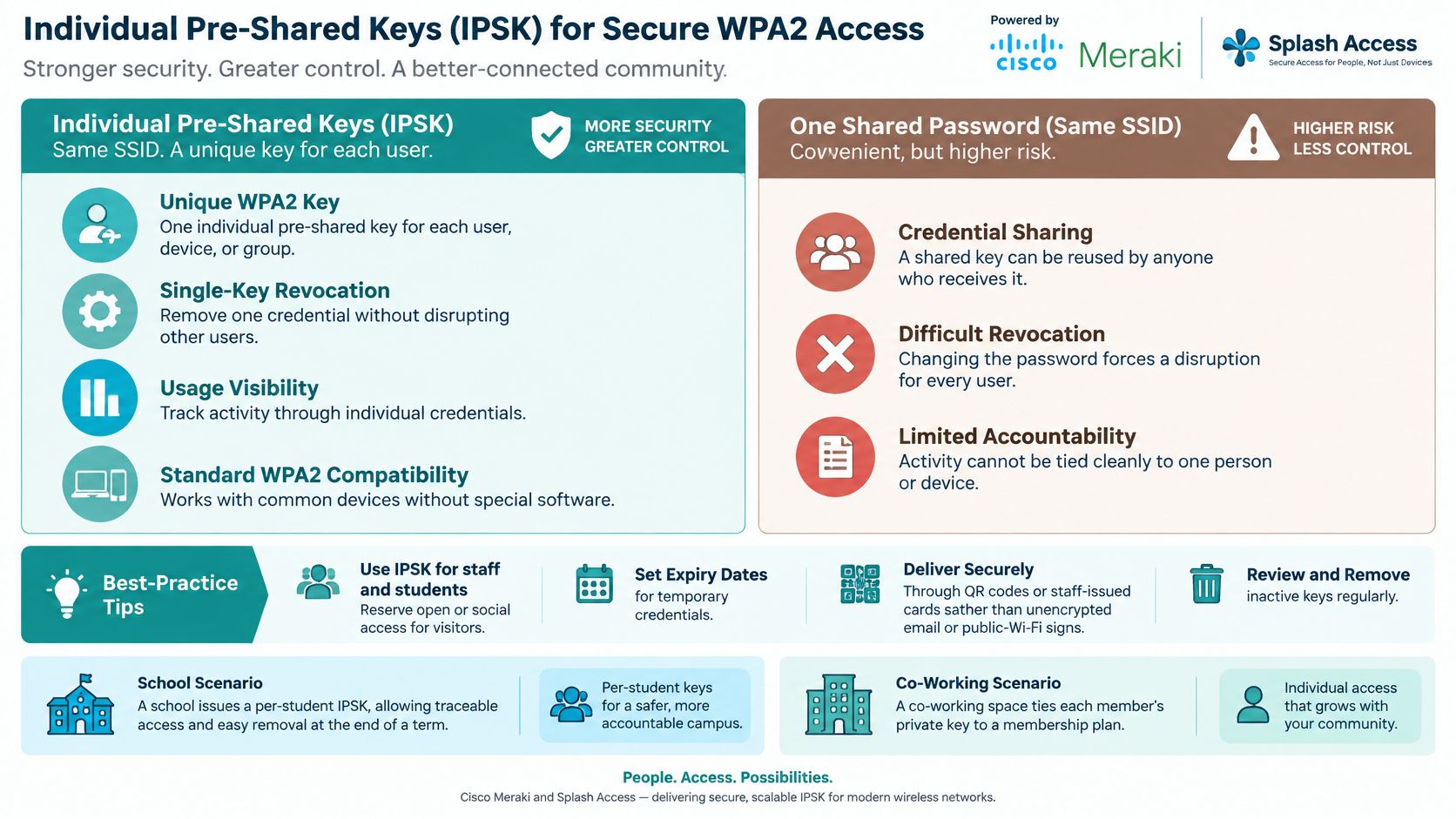
Individual Pre-Shared Keys, or IPSK, fix that. Each person or device gets its own WPA2-PSK key on the same SSID. One student leaves, you revoke one key. Nobody else notices. That's the big win over a shared password you can't change without upsetting everyone.
The infographic below sums up that difference in one glance.
Where IPSK earns its keep
Treat authentication as a security control, not just a convenience. NIST Special Publication 800-124 Revision 2 defines BYOD as employees using personally owned mobile devices to access enterprise data and services, and recommends strong authentication such as multi-factor authentication where supported. IPSK gives you per-user accountability on devices that can't handle full enterprise login.
Students can pre-register and onboard devices weeks before coming to campus, which spreads your helpdesk load across the summer instead of one brutal Monday. Private IPSK Authentication also works as a standalone secure onboarding portal if you don't want a big rebuild.
- Set expiry dates: Term-time keys end with the term. Member keys end with the membership.
- Deliver keys safely: Use a secure channel, never a printed sign in the corridor.
- Review monthly: Remove keys nobody uses. Dormant keys are quiet risks.
The trade-off is admin. Somebody issues and revokes keys, so you need a clean process. That's what IPSK with RADIUS authentication helps you manage. For a co-working space, I'd take that admin every time. One member's key, tied to their plan, beats one password shared by every visitor who's ever bought a coffee there.
3. Easy PSK for Fast, Shared-Key Onboarding
Not every site needs a key per person. A conference centre on a Tuesday doesn't care which delegate streamed what. It cares that three hundred people get online before the keynote, without a queue at the help desk.
That's where EasyPSK, often written Easy PSK, sits nicely. It's a simple, usable shared key you can print on a badge, a receipt, or a table card. Guests read it, type it once, and they're in. Your staff and payment networks stay separate behind the scenes on your Meraki setup.
Say a retail shopping centre prints a rotating key on in-store receipts. Shoppers get a reason to keep the receipt, you get a key that doesn't live forever, and the till team doesn't shout a password across the shop floor. A conference venue can print a fresh key per event and retire it when the chairs are stacked.
Practical rule: If you'd be relaxed seeing the key on a printed badge, EasyPSK fits. If you wouldn't, use IPSK instead.
Keeping a shared key sensible
- Rotate on a schedule: After every major event, or weekly in a busy shop. Put the date in someone's diary.
- Pair it with a splash page: Say hello, show the terms, and remind people where the key is printed.
- Keep staff off it: Staff devices and card machines belong on their own network with individual tracking.
- Print it on something kept: Receipts, wristbands, and room cards survive the day. A whiteboard photo doesn't.
The trade-off is accountability. A shared key tells you a device connected, not who held it. For short-stay guest Wi-Fi that's usually fine. For anything sensitive, it isn't. I recommend EasyPSK for hospitality and events, and I recommend against it for staff access in the same building.
4. Social Login and Social Wi-Fi for Guest Access
Walk into a busy café at lunch. Nobody wants to invent a new password for twenty minutes of Wi-Fi. They'll either use their mobile data or badger your team. Social login removes that choice. One tap with an account they already have, and they're online.
That's the heart of social Wi-Fi. The guest gets speed. You get a friendly, consented way to welcome them back next time. On a Cisco Meraki network, that login sits right inside your splash page, so there's no separate app and no extra hardware at the counter.
Passwordless thinking is already mainstream in IT. In an IDG survey of 300 director-level-or-higher IT and security leaders, 33% of IT departments had already adopted passwordless authentication, and 87% considered passwordless authentication critical or very important to a zero-trust strategy. Your guests aren't running zero trust, but they share the instinct. Fewer passwords, fewer problems.
A retail example that respects the guest
A shopping centre offers free guest Wi-Fi after a quick social sign-in, then shows a welcome coupon once the shopper's online. Order matters. Connect first, reward second. Hunting for a coupon behind a login wall just annoys people who wanted to check a price.
- Ask for the minimum: Name and email is plenty for a loyalty invite. Date of birth on a coffee shop login feels nosy.
- Always offer another route: Email or voucher access covers guests who don't want social login. Never make it the only door.
- Be open about data: Link a short privacy notice from the button area, in plain words.
Done well, wireless social login turns a one-off visit into a relationship the guest chose. The trade-off is trust. Some people won't use a social account for Wi-Fi, and that's their right. Give them the alternative and you'll keep both the connection and the goodwill.
5. Voucher and Time-Limited Access for Guests
Some places shouldn't ask for an account at all. Think of a healthcare waiting room. A family member's been there for hours. They need to message relatives, not join your mailing list. A printed voucher from the visitor desk is kind and practical.
Vouchers give temporary access without a long-term account. You print them in batches, hand them out, and the system expires each one automatically after the hours or days you set. Staff don't reset anything. Yesterday's voucher stops working today.
Hotels use the same trick for conferences. A day pass goes in each registration pack, so delegates aren't queuing at reception between sessions. That small touch supports the service guests want. In Phunware's survey of 780 travelers, 95% of surveyed U.S. travelers said resorts should provide real-time updates about activity and service availability. Guests expect to be reachable and informed. They can't be, if getting online takes ten minutes.
Setting vouchers that match the visit
- Match the clock to the trip: A short waiting-room visit needs a shorter voucher than an overnight hotel stay. Think about when people leave.
- Add a QR code: Print one clear instruction line plus a QR code for quick redemption. Nobody enjoys typing a long code.
- Watch redemption rates: If most vouchers go unused, print fewer or hand them out at a better moment.
Bandwidth limits on vouchers keep things fair when a waiting room fills up. Nobody's video call should freeze because one device is downloading a film.
The trade-off is waste and admin. You'll print vouchers that end up in coat pockets. That's still cheaper than staffing password resets, and it keeps personal data out of places that don't need it.
6. Enterprise and BYOD Onboarding with Single Sign-On
In a corporate office, the question flips. You don't want guests on the staff network, and you don't want staff sharing one password either. People bring their own laptops and phones, and you need to know who's connected. That's BYOD Corporate onboarding done properly.
Single sign-on lets staff and students use the login they already have. They sign in with their work or campus account, and your Cisco Meraki network applies the right policy for their group. Finance sees finance systems. Visitors see the internet and nothing else. No shared password stuck to a monitor.
The image below shows the experience you're aiming for. One familiar sign-in, then straight to work.

Security habits are moving this way fast. Okta's Secure Sign-In Trends Report 2025 reported MFA adoption among its customer base at 70% in January 2025, while phishing-resistant passwordless authentication increased from 8.6% to 14.0% year over year. The strongest method wins when it's also the easiest one.
Making BYOD feel easy for real people
- Map groups to policies: Job role decides network access, not who shouts loudest at IT.
- Write a one-page BYOD guide: Screenshots for the common phones and laptops cut tickets fast.
- Keep a separate guest network: Couriers and interview candidates don't have corporate accounts. Don't force them to ask.
- Remove leavers promptly: Review group membership when people change roles or leave.
A university does this well when students log in with their unique SSID credentials through a simple captive portal on any device. The trade-off is setup effort upfront. Directory groups need care. But once it's running, how to implement single sign-on becomes the flow your team maintains, not a password you whisper.
7. Privacy-Friendly Consent and Terms Acceptance
A hotel lobby can have guests waiting to connect, while a campus clinic may need to explain what information it collects. In either setting, keep the consent message clear on a phone screen. Put the short explanation up front and link to fuller details. A simple screen is easier to understand, but it leaves less room for nuance, so make the full notice easy to find.
Administrative steps can distract people from the purpose of onboarding. IT Brief's coverage of hybrid onboarding reports that 52% of employees felt administrative tasks overshadowed preparation for their actual roles. The same practical concern applies to guest Wi-Fi: put too many fields and notices in front of the connection, and guests may abandon it or accept without reading.
Consent that people can actually follow
A healthcare clinic can use a brief privacy summary, a link to the full notice, and a clear choice to proceed. A retail till should keep marketing permission separate from Wi-Fi access. Joining a mailing list and connecting to the network are different choices, so don't combine them into one checkbox.
- Use unchecked boxes: Ask customers to actively choose marketing messages.
- Keep records tidy: Record who agreed, when, and what they agreed to. Clear processes for tracking opt-in disclosures and timestamps help staff handle withdrawal requests.
- Get wording reviewed: Have a legal or privacy professional check the text before launch.
We ask for explicit consent where processing requires it, and users can opt in or out when their details are submitted. Make the terms and privacy notice clear before asking someone to accept, and link to the terms of service acceptance information where relevant.
Short consent text respects the person reading on a small screen, especially when others are waiting.
There is a trade-off: shorter forms collect less information. For a hotel or shop, fewer contacts who knowingly opted in are more useful than a longer list gathered through unclear choices. Keep each request tied to a specific purpose, and make it easy for guests to see what they are agreeing to.
8. Seamless Re-Authentication and Smart Session Management
The second connection matters as much as the first. A hotel guest walks to the pool, comes back, and their phone just works again. A student moves from the library to a lecture hall without signing in twice. Nobody praises you for it. They'd certainly complain if it failed.
Smart session management on Meraki means you choose how long a session lasts, when idle devices drop off, and when someone sees the splash page again. Guests get a sensible window for their visit. Staff and students get a longer one that matches their day.
Location changes the experience more than people expect. Earlier EDUCAUSE findings in EDUCAUSE research on student technology showed 76% of students rated library Wi-Fi good or excellent, compared with 51% in dormitories and student housing. If roaming between buildings is patchy, students blame your login. Test the walk between access points yourself, phone in hand.
Tuning sessions without annoying people
- Set a fair idle timeout: Public networks suit a shorter window. Managed staff and student networks suit a longer one.
- Plan for MAC randomisation: Modern phones rotate their hardware address, so don't build recognition on that alone.
- Test the awkward spots: Stairwells, lifts, and the far end of the top floor expose weak roaming first.
There's a balance to strike. Sessions that last too long leave old devices authorised after the visit ends. Sessions that end too soon train guests to hate your splash page. Start with the length of a typical visit, watch support tickets for a fortnight, then adjust.
For a retail site, I'd keep it short and forgettable. For Education dorms, I'd keep it long and stable. Same setting, different judgement. That's why copying another venue's timeout rarely works.
How the 8 Onboarding Practices Compare at a Glance
The right setup depends on where people connect and how much accountability you need. A hotel lobby may favour quick QR access, while a campus dorm may need individual credentials. Every option trades convenience against control.
| Item | Best For | Access Method | Individual Accountability |
|---|---|---|---|
| Mobile-First Splash Pages with QR-Code Onboarding | Hotel lobbies and retail entrances where guests need quick access | Scan a QR code and connect through a mobile splash page | Limited; records the connection flow, not necessarily an individual |
| Individual Pre-Shared Keys (IPSK) for Secure WPA2 Access | Campus dorms, co-working spaces, and managed devices | Use a unique WPA2 key for each user, device, or group | High; activity is associated with individual keys |
| Easy PSK for Fast, Shared-Key Onboarding | Events and hospitality venues with temporary crowds | Enter a shared key from a card, receipt, or sign | Low; multiple users share the same key |
| Social Login and Social Wi-Fi for Guest Access | Retail and hospitality venues seeking opt-in engagement | Sign in with a social account or Google | Moderate; access may connect to a profile, depending on consent |
| Voucher and Time-Limited Access for Guests | Hotels, healthcare waiting rooms, and event venues | Redeem a unique voucher with time or data limits | Limited; redemption can be tracked without identifying the user |
| Enterprise and BYOD Onboarding with Single Sign-On | Corporate offices, co-working spaces, and education networks | Authenticate through Azure AD, SAML, or another identity provider | High; access is linked to an organizational account |
| Privacy-Friendly Consent and Terms Acceptance | Organizations that need clear guest terms and consent | Accept terms and select any separate opt-ins on a splash page | Consent can be recorded; identity depends on the sign-in method |
| Seamless Re-Authentication and Smart Session Management | Campuses, hotels, and large venues with returning visitors | Recognise a device and re-authenticate automatically | Device-level; it may not reliably identify a person |
For a retail till, a QR splash page keeps the first connection simple, but offers limited individual accountability. In a campus dorm, IPSK gives administrators more control through unique keys, with more credential management to handle. Shared keys suit short events where speed matters more than tracing each connection.
Choose the method that fits the venue's busiest moment. A hotel can make guest access quick with vouchers, while an office can tie access to organizational accounts. Privacy-focused setups should make terms and opt-ins clear, and social login should remain optional where consent matters.
Turning These Onboarding Practices Into Your Next Steps
For a hotel lobby, the quickest improvement may be a clearer splash page. On a campus, it may be setting up student access before term starts. Choose one recurring complaint and address it first. Rolling out every change together makes it harder to tell what helped.
A 2023 systematic review in PLOS ONE included five studies involving 1,556 new professionals and found the strongest support among the included literature for structured, supported on-the-job training. Apply the same principle to Wi-Fi onboarding: give people clear instructions one step at a time, with help available when they first connect.
Test small, measure honestly
Start with one hotel floor, retail location, or student block. Track how long a first connection takes, how many support requests mention Wi-Fi, and whether returning visitors reconnect without help. These measures show whether the setup is working for guests, not just whether they submitted a form.
A splash page that gathers email addresses but leaves people frustrated is not a good result. Keep the connection steps short, and make any data collection clear.
- Hotel lobby: Put a QR code at check-in and use vouchers for conference guests. Longer sessions are convenient during a stay, but should fit your access policy.
- Campus dorm: Set up IPSK for students and let them pre-register devices before term. Longer sessions make roaming easier, while individual keys give you more control than a shared password.
- Retail till: Offer social login only with a clear alternative. Separate consent from access, and choose session lengths that suit quick visits.
- Corporate office: Use single sign-on for BYOD devices, and consider IPSK for devices that do not fit that flow. Keep visitor access separate from staff access.
Automation can help when it removes repetitive work. Rocketlane's State of Customer Onboarding 2025 reports that approximately 90% of customer-onboarding organizations planned to use artificial intelligence and automation for predictive insights or personalised journeys in 2025. For Wi-Fi, focus on practical tasks such as managing expiring access. Avoid adding steps that guests do not need.
For a Cisco Meraki network, Splash Access offers instantly deployable captive portals integrated directly into the Meraki Cloud. A solution can be up and working in only a few hours. New tenants can be onboarded through email and SMS services, while portal and email branding can include your logo and main accent colours.
Choose one venue and one improvement, then review how it performs before adding another. A gradual rollout makes the trade-offs easier to see and gives you room to adjust the setup for your guests.
Splash Access provides captive portals for Cisco Meraki guest Wi-Fi, with IPSK, social login, voucher printing, and QR-code onboarding. If you want to improve the first connection for your venue, visit Splash Access to learn more.