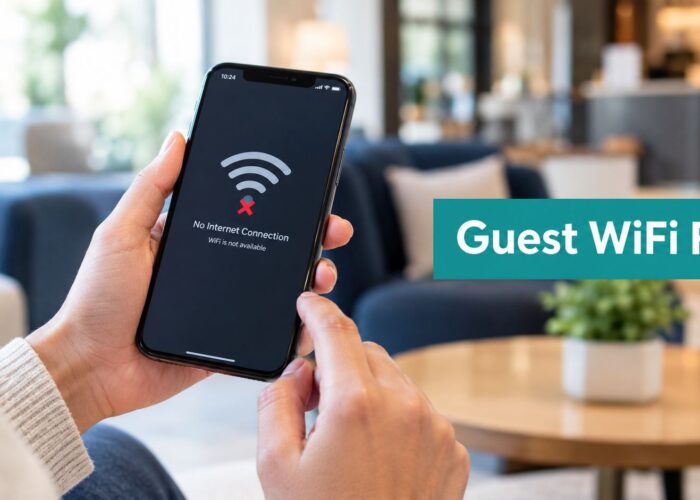
You're sitting in a hotel lobby, coffee shop, or company reception area. Your phone connects to the guest network, but the expected login page doesn't appear. You try opening another website, disconnect and reconnect, and perhaps even ask an employee for the Wi-Fi password. The problem feels simple, yet several network services must cooperate before you can browse.
So, how does guest WiFi work? In simple terms, it gives visitors internet access through a separate wireless network, then uses authentication and traffic controls to keep that access away from internal business systems. The familiar login page is only one part of the process. Behind it are wireless encryption, device detection, a captive portal, a temporary session, and network segmentation.
The Real Experience of Connecting to Guest Networks
A guest arrives at a café and selects the network named “Café Guest.” Their device associates with the access point, receives the information needed to communicate on the network, and attempts to check whether the internet is available. Instead of reaching the requested website immediately, the network sends the browser to a branded splash page.
That page might ask the visitor to accept terms, enter a voucher, provide an email address, or use social login. After the visitor completes the required step, the system authorizes the device and opens internet access. The guest experiences this as a short login sequence, but the business has created a controlled connection rather than handing out the same permanent password used by employees.
Why businesses separate guest access
A visitor's phone, laptop, or tablet is not managed like a company workstation. The owner may not know whether the device has current security updates, what applications are installed, or which other networks it has used. Putting that device on the employee network could expose printers, file services, payment systems, cameras, or other operational equipment.
A dedicated guest SSID gives visitors a useful service while limiting what their devices can reach. In a small business, the same access points may provide both employee and guest connectivity. The separation happens through configuration and policy, not necessarily through separate physical hardware.
Guest WiFi also creates a more flexible experience for people who don't want to use mobile data while travelling. Someone planning an international trip may compare local connectivity options, including prepaid data for international trips, with the convenience of temporary Wi-Fi access at hotels, offices, and public venues.
Guest WiFi is a controlled entitlement
The network operator can define how long a visitor remains authorized, rather than treating access as a permanent credential. Guest systems can record session activity such as configured time and remaining time, then disconnect the device when its permitted session ends. This approach helps a business manage capacity, reduce abuse, and apply its access policy consistently.
Practical rule: A guest network should feel simple to the visitor while remaining deliberately restricted behind the scenes.
The result is a digital handshake. The access point recognizes the wireless connection, the portal verifies the visitor's chosen authentication method, and the network grants only the access that the guest needs.
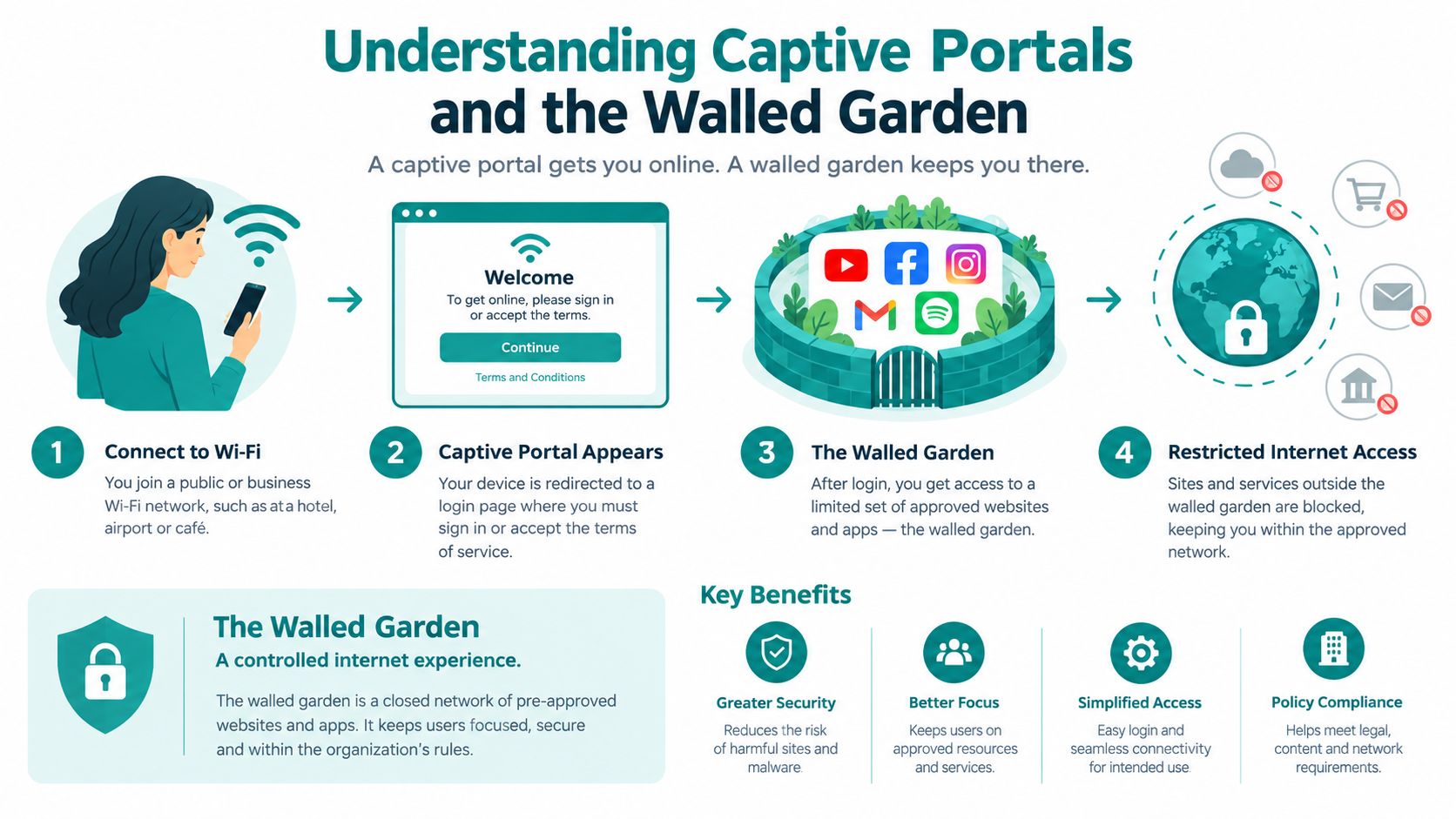
Understanding Captive Portals and the Walled Garden
The captive portal is the web page that appears before a guest receives normal internet access. It acts like a reception desk. The wireless network lets the visitor approach the desk, but it doesn't open every door until the visitor accepts the rules or completes authentication.
A walled garden makes that possible. Before login, the network blocks ordinary internet traffic while allowing a limited set of destinations, such as the portal, DNS services, and required authentication endpoints. The guest can reach the pages needed to sign in, but cannot freely browse until the system approves the session.
The connection sequence
The process usually follows a predictable path:
- The device finds the SSID. The visitor selects the guest network from the available Wi-Fi list.
- The device associates with the access point. Wireless security protects the connection between the device and the network. Guest Wi-Fi commonly combines WPA2 security for the wireless link with a captive portal for the login step. IEEE 802.11i was ratified in 2004, and WPA2 certification became mandatory for all Wi-Fi CERTIFIED equipment in 2006, as described in this overview of guest network security.
- The network applies pre-login restrictions. The device can reach approved portal and authentication services, but general traffic remains blocked.
- The browser is redirected. When the device makes its first web request, the network directs it to the splash page.
- The guest authenticates. They may accept terms, enter a voucher, submit an email address, or complete a social login.
- The controller authorizes the session. Once validation succeeds, the policy changes and normal internet access becomes available.
The wireless password and the portal serve different purposes. WPA2 or WPA3 protects the wireless link, while the captive portal handles onboarding, consent, and session authorization. An open guest SSID can still use a captive portal, but the portal alone doesn't provide the same protection as enterprise wireless authentication.
Why the browser behaves strangely
Before authorization, a browser may appear to load slowly, show a connection warning, or remain on a blank page. The network is intentionally allowing only limited traffic. A device that tries to open a secure website may also behave differently because modern browsers establish encrypted connections before accepting redirects.
For that reason, a guest portal often works most reliably when the device's operating-system connectivity check reaches the network first. If the portal can intercept that check and return the expected response, the phone or laptop knows it needs to display the login screen.
A well-configured captive portal needs a reliable path to its authentication services, clear pre-authentication rules, and a page that works on mobile screens. More detail on the role of the portal is available in this guide to captive portal Wi-Fi access.
Modern Authentication Methods for Every Industry
A shared guest password is easy to explain, but it gives every visitor the same credential. Staff must display it, type it, rotate it, and answer questions when a device refuses to connect. A modern guest system separates the wireless connection from the way the organization identifies or approves each user.
The right choice depends on the visitor, the duration of access, and the organization's security requirements.
Shared passwords and vouchers
A shared password suits a small venue that wants a quick setup. The business can print the password on a sign or provide it at reception. The weakness is control. The same credential may remain in circulation after it should have been changed, and the operator has limited visibility into which individual used it.
Vouchers add more control. A business can issue a code for a particular visit or service period, then allow the system to expire it. This works well for hotels, events, and reception desks where staff need a simple handoff without creating a permanent account.
Social WiFi and social login
Social WiFi uses a portal to let guests sign in with an existing account instead of creating another password. The login typically redirects the visitor into an OAuth 2.0 or OpenID Connect flow, which can support accounts such as Google, Facebook, Apple, or LinkedIn. The business should explain what information it collects and obtain the appropriate consent before using contact details for marketing.
Retail and hospitality operators often choose social login because the portal can connect a convenient access flow with a permission-based customer relationship. The visitor gets online without memorizing a new password, while the business can use consented information in its engagement process.
IPSK and EasyPSK
IPSK, or Individual Pre-Shared Key authentication, gives each user or device a unique key instead of one shared password. If a contractor leaves, a student changes status, or a long-term guest no longer needs access, the organization can revoke that individual key without disrupting everyone else.
EasyPSK-style workflows apply the same principle in a more manageable way for teams that need individual access without issuing full enterprise identities to every temporary user. This model is particularly relevant to education, corporate BYOD, and longer-term guest access, where administrators need clearer control over devices and users.
| Authentication method | Best for | Key benefit |
|---|---|---|
| Shared password | Small offices and simple visitor access | Fast to distribute |
| Voucher | Hotels, events, and reception-led access | Temporary, trackable authorization |
| Social login | Retail, hospitality, and social WiFi campaigns | Convenient sign-in with consent-based engagement |
| IPSK | Education, corporate BYOD, and long-term guests | Unique credentials for users or devices |
| EasyPSK | Managed individual access at practical scale | Easier credential control than a shared password |
A useful reference for comparing these approaches is this guide to Wi-Fi authentication methods. The core decision is straightforward: use the least complicated method that still gives your organization the control, privacy, and accountability the environment requires.
Network Segmentation and Security Best Practices
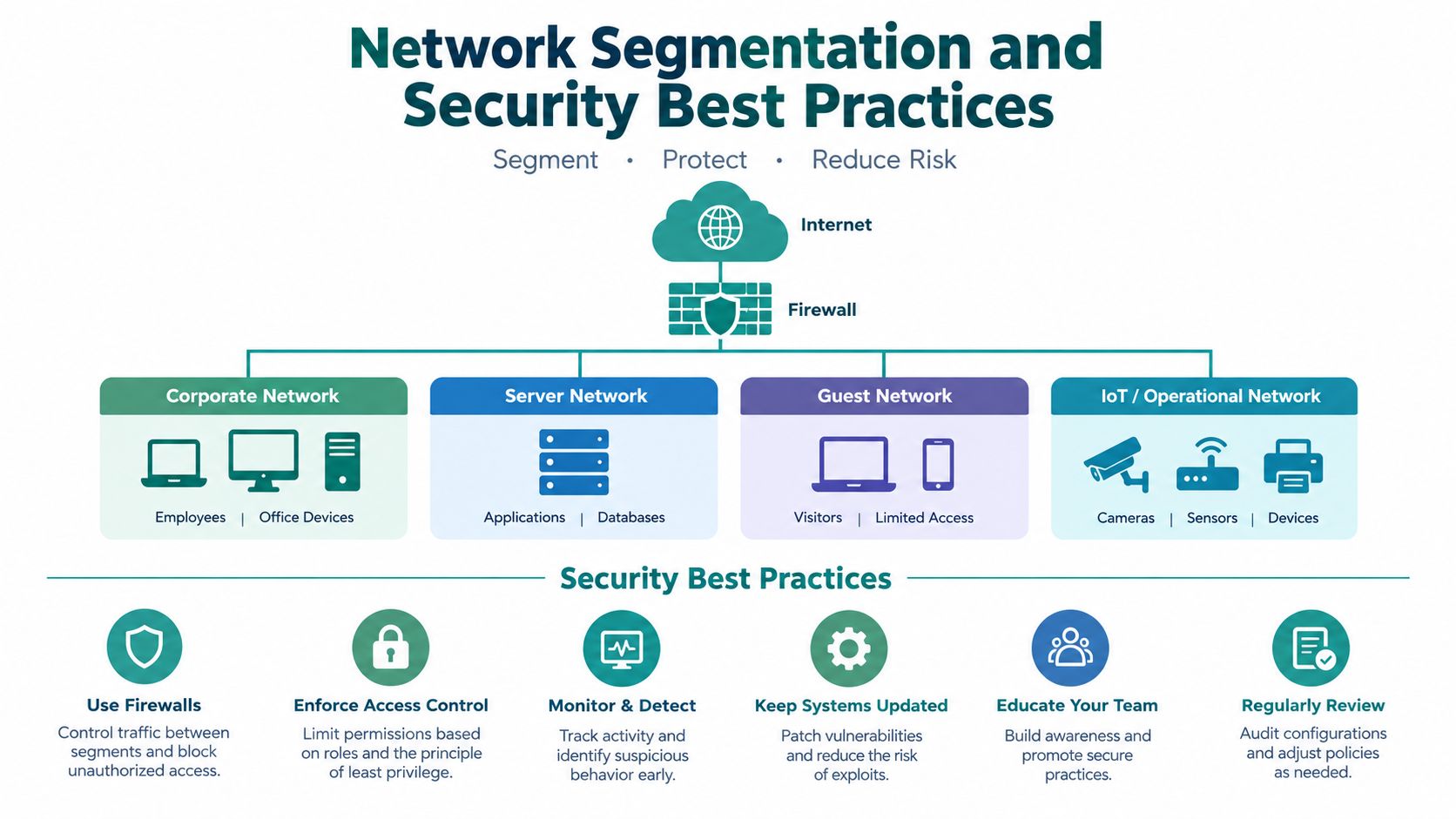
A visitor may pass the captive portal and still have access limited to the public internet. Network segmentation determines what the approved device can reach, while the portal determines whether onboarding is complete. These controls work together, like a reception desk that checks a visitor's pass and locked doors that restrict access to staff areas.
The guest SSID should connect to an isolated guest network, usually through a dedicated VLAN. That segment can route traffic to the internet while blocking employee, payment, server, and operational networks. If a guest device is compromised, these boundaries reduce the attacker's ability to move through the business network.
Separation protects the business
Different devices need different paths. An employee laptop may access internal applications, while a payment terminal may communicate only with approved payment services. An IoT device may need a narrow connection to its management platform. A guest phone generally needs internet access, not a route to any of those systems.
Enterprise guest Wi-Fi commonly places the guest SSID in an isolated network. The captive portal intercepts an initial web request, sends the visitor to authentication, and permits internet access after approval. The guest VLAN should remain separate from employee, payment, and operational networks, as described in this guide to network segmentation best practices. The portal manages admission, while segmentation limits lateral movement if a visitor device is compromised. See this guide to enterprise guest Wi-Fi segmentation.
The security layers to verify
Review the policy behind the SSID, not only its name:
- Wireless protection: Use WPA2-AES or WPA3 when supported by the network equipment and client devices.
- Client isolation: Stop guest devices from communicating with one another unless a specific use case requires it.
- Pre-authentication rules: Permit DNS and approved portal services before login, while blocking ordinary destinations.
- Portal encryption: Serve the splash page over HTTPS with current TLS protection.
- Internal access controls: Block routes from the guest segment to employee, payment, management, and operational resources.
- Session policy: Set a defined session duration and revoke access after it expires.
A branded login page cannot compensate for a guest VLAN that can reach internal systems.
Cisco and Meraki environments can supply the wireless infrastructure and policy controls for this design, but configuration still requires testing. Confirm that an authorized guest device can browse, cannot reach internal resources, and cannot communicate with other guests. A diagram shows the intended boundaries. A real device test shows whether those boundaries hold.
Troubleshooting Onboarding Friction and Device Detection
Many owners assume that a missing login page means the guest SSID or password is wrong. Often, the wireless association succeeded. The failure occurs later, when the device and network fail to recognize that a captive portal should be displayed.
Modern phones and laptops use connectivity checks to determine whether they have unrestricted internet access. They also use randomized device identifiers, which can affect how a controller recognizes a returning device or applies an existing session. Firewall rules, RADIUS settings, DNS behavior, and portal redirects must all align.
Why the page doesn't appear
A large share of captive-portal failures comes from onboarding friction involving randomized identifiers and firewall or RADIUS misconfiguration, rather than from the basic creation of a guest SSID, according to this discussion of why a Wi-Fi captive portal may not show. That explains why users often report a missing or looping login page instead of reporting a password problem.
The device may be connected but unable to reach the portal domain. It may also have an old authorization record tied to a previous identifier, or the network may block the operating system's connectivity-check destination before the redirect can occur.
A practical diagnostic path
Start with the simplest test. Ask the visitor to disconnect from the guest SSID, turn off any active VPN temporarily, reconnect, and open a plain, non-secure web page that doesn't already have a cached session. If the portal appears there, the issue may involve browser behavior or a stale session rather than the wireless network itself.
For administrators, check the following:
- Connectivity checks: Confirm that the operating system's approved check hosts can reach the required response before authentication.
- Walled-garden rules: Verify that DNS, the portal domain, authentication services, and required identity providers are allowed.
- RADIUS communication: Check that authentication requests and responses travel correctly between the controller and the identity service.
- Randomized identifiers: Test current phone operating systems and confirm that session policy doesn't depend on an identifier that changes unexpectedly.
- Redirect behavior: Test both a new device and a returning device, then observe whether the portal loads once or enters a loop.
- Certificate validity: Make sure the portal presents a valid HTTPS certificate and works across common browsers.
Avoid telling users to repeatedly enter the password. That action won't fix a redirect blocked by a firewall or a portal that cannot reach its authentication service. Good onboarding design treats device detection as a first-class part of guest Wi-Fi operations.
Turning Connectivity into Actionable Business Insights
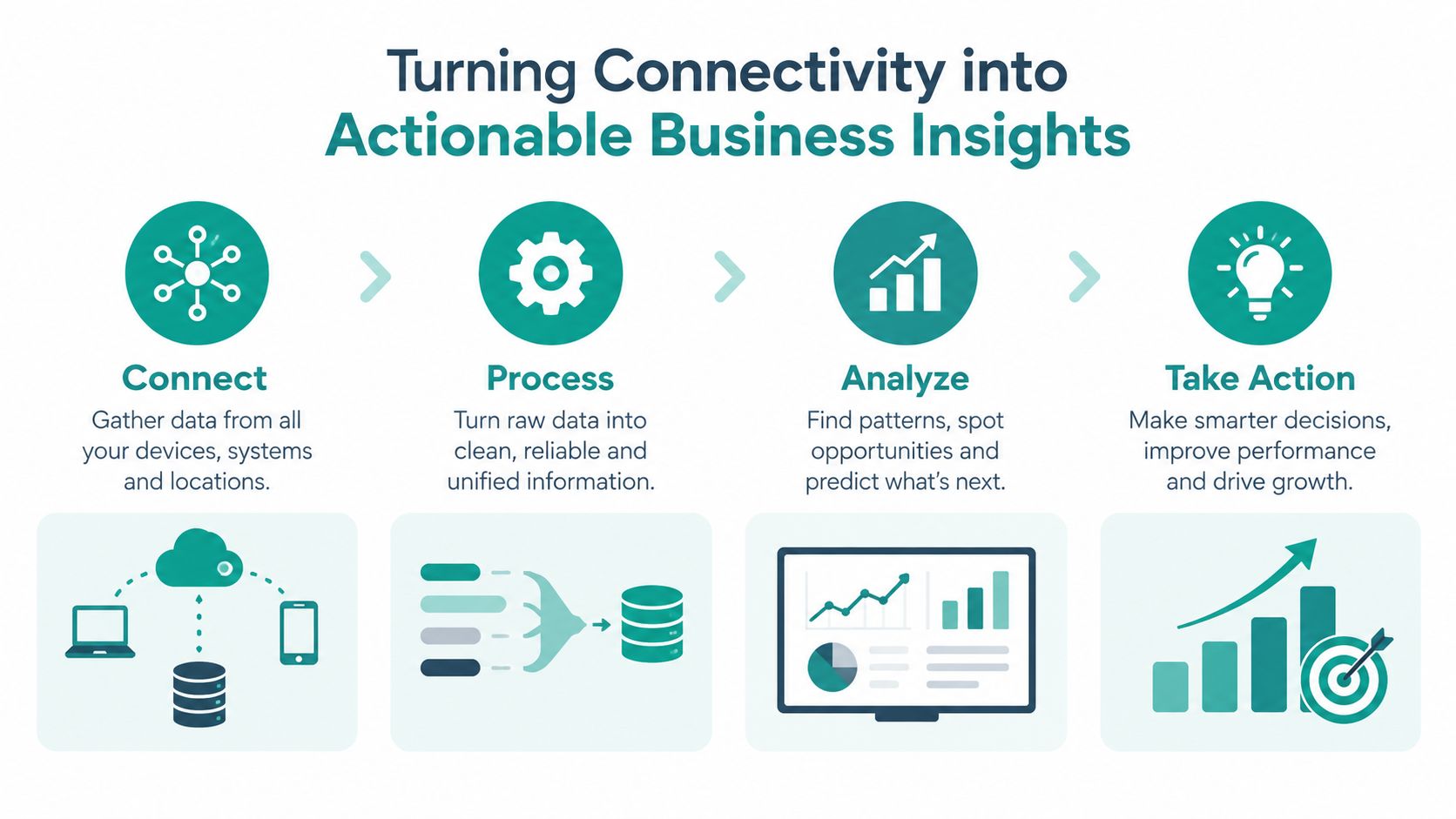
Guest Wi-Fi started as a way to provide internet access in places such as hotels, airports, and coffee shops. Captive portals became widely deployed in the early 2000s as public Wi-Fi expanded, then developed beyond simple policy gates into systems that track session counts, repeat visits, bandwidth use, and login history, as described in this overview of the guest Wi-Fi network.
That history matters because a portal creates a structured interaction. A visitor selects a network, sees the organization's terms, chooses an authentication method, and may provide consented information. The business can then connect a network session with an approved marketing or service workflow, provided it handles consent and privacy responsibly.
From login to useful context
A retail business might invite a customer to use social WiFi, then send an opt-in follow-up through its marketing platform. A hotel may use voucher access to understand session activity without asking a short-term visitor to create a full account. A campus can use individual credentials for students while keeping guest onboarding separate from student access.
Integrations with tools such as Mailchimp, Azure AD, and SAML can connect authentication and engagement workflows. The important distinction is between data that the visitor has consented to share and technical session information needed to operate the network. A business should define that distinction clearly on the splash page.
Session data can inform operations
Network controllers can expose details such as configured session time and remaining time. These values show that guest access is usually a temporary entitlement, not a permanent network credential. Session counts, repeat visits, bandwidth use, and login history can help an operator identify service demand, investigate misuse, and understand how visitors use a location.
Retail and hospitality teams may combine those insights with footfall, dwell-time, and return-rate information from suitable access-point or camera analytics. The output is most useful when it answers a practical question, such as whether visitors return after an offer, whether a space needs more capacity, or whether a reception process causes repeated failed logins.
For a broader view of these use cases, explore guest Wi-Fi analytics. Analytics shouldn't become surveillance by default. Collect only what the organization needs, explain the purpose, and give visitors a clear choice where consent is required.
Building Trust and Delivering a Seamless Experience
A guest network can be technically isolated and still feel untrustworthy. A 2025 survey found that 57% of respondents did not feel safe using public or business Wi-Fi, while 17% felt safe, according to the survey report on consumer trust in public Wi-Fi. Those figures point to a communication problem as much as a security problem. Visitors want to know what the network can see, why the business requests information, and whether the connection protects their activity.
The same source estimates the captive-portal and guest-access market at around USD 1.16 billion to USD 1.21 billion in 2025, with a projection of roughly USD 2.08 billion by 2030. These are market estimates, not a guarantee that every deployment will deliver business value. They do show why organizations are treating guest connectivity as a managed service rather than an informal password-sharing exercise.
What a trustworthy experience looks like
A strong deployment makes the technical controls invisible without hiding the important choices. The splash page should use the business's branding, explain the terms in plain language, identify optional marketing consent, and work well on a phone. The network should provide a clear path for visitors who don't want to use social login.
A practical evaluation should ask:
- Can guests identify the correct SSID? The name should be clear and distinct from employee networks.
- Does onboarding work on current devices? Test phones, tablets, and laptops with randomized identifiers enabled.
- Are internal systems unreachable? Verify separation from employee, payment, server, and operational networks.
- Are credentials appropriate to the audience? Use social WiFi for suitable retail journeys, and consider IPSK or EasyPSK for education and corporate BYOD.
- Can staff understand failures? Logs and session information should help support teams diagnose redirects, authentication, and expiry.
- Does the business explain data use? Consent and privacy information should appear before optional data collection.
- Can the system scale across locations? Cisco and Meraki infrastructure can support centralized wireless operations, while a captive portal and authentication layer can manage the visitor experience.
Splash Access provides external captive portals for Cisco Meraki guest Wi-Fi, with customizable splash pages and workflows that can support social WiFi, vouchers, SAML, Azure AD, and IPSK authentication. It also connects guest access with analytics and marketing workflows, giving organizations an option to evaluate alongside their existing network design.
The useful test: A guest network succeeds when visitors get online without confusion, employees remain protected, and the business can explain every access and data decision.
Review your current guest SSID with a real phone and laptop today. Test the portal, confirm that internal resources stay unreachable, inspect session expiry, and read the splash page as a first-time visitor. If the experience fails at any of those points, visit Splash Access to explore captive portals, authentication solutions, IPSK and EasyPSK workflows, and analytics for your guest Wi-Fi environment.