Hotspot billing software is a centralized platform that manages captive portals, authenticates guests, and processes payments for Wi-Fi access across multiple venues. Public hotspot estimates grew from approximately 4.9 million worldwide in 2012 to projections exceeding 6.3 million by the end of 2013, making centralized access and revenue control an operational necessity rather than a luxury.
You may be dealing with that necessity already. A hotel guest asks why premium Wi-Fi stopped working, a café employee searches for a voucher code, or a retail manager wants to know whether social login is worth the extra privacy risk. Meanwhile, the payment network, staff devices, point-of-sale terminals, and guest phones may all sit too close together.
The right platform does more than put a branded sign-in page in front of the internet. It connects authentication, authorization, session accounting, payment processing, network segmentation, and reporting. Done well, it creates reliable revenue without turning your guest network into an unmanaged path toward sensitive systems.
What is Hotspot Billing Software and Why Venues Need It
A guest checks in, pays for premium Wi-Fi, and still cannot get online. Staff try to fix it with a shared password, a handwritten voucher, or a quick router restart. Meanwhile, guest phones, staff tablets, payment systems, and back-office devices may be sitting too close together on the same network. That is the problem hotspot billing software is meant to solve.
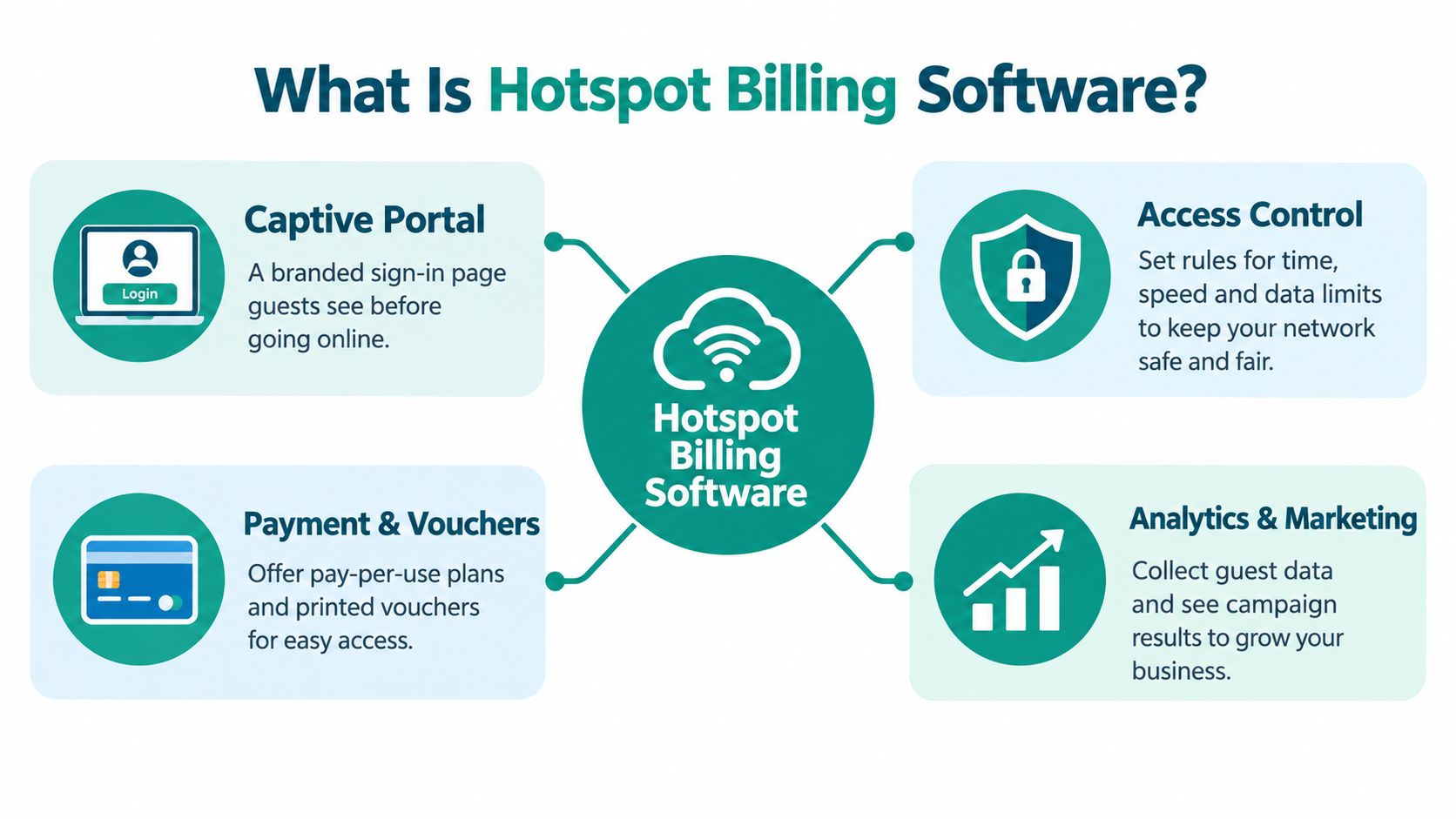
A basic captive portal only controls the first interaction when a device joins Wi-Fi. It might show terms, collect an email address, or ask for a click-through. Hotspot billing software adds the commercial and control layer. It decides who gets access, what plan applies, how long a session lasts, how much data or bandwidth is allowed, whether payment cleared, and when access should stop. For a venue owner, it also creates a record of who was admitted, under what policy, and through which workflow.
That last part is often missed. If guest access is sold or tied to marketing consent, the Wi-Fi system is no longer just a convenience feature. It becomes part of your payment flow, your privacy posture, and your network trust model. The portal is the front desk. The billing engine is the ledger. The policy layer is the lock on the staff-only door.
Public wireless access has been around since early public-access LAN experiments, and This hotspot history helps explain how the model developed from simple access sharing into managed service delivery. As deployments spread across hotels, cafés, retail locations, transport hubs, campuses, and public venues, operators needed one place to authenticate users, apply paid or free plans, enforce limits, and track sessions. Historical counts reached 46 million hotspots globally by December 2014, including more than 22 million roamable hotspots and over 8.5 million branded hotspots in retail businesses, cafés, and hotels. Definitions varied, but the operational lesson stayed the same. Manual credentials do not scale.
The operating cycle
The clearest way to understand the platform is to follow one guest session from start to finish:
- Discovery: The guest joins the venue SSID and is redirected to a branded captive portal.
- Authentication: The portal validates a voucher, password, SMS step, email, social login, or another identity method.
- Authorization: The system assigns a plan with rules for duration, data, speed, location, or device access.
- Accounting: The gateway records session start, stop, location, and traffic usage.
- Settlement: A payment gateway confirms a purchase, refund, or plan change.
- Reporting: The venue reviews usage, revenue, failures, and campaign activity.
This supports several business models. A hotel may include basic access with a room number and sell faster service. A campus may rely on identity-based access without charging students. A retailer may trade Wi-Fi access for marketing consent. A coworking site may issue private credentials to members while keeping guests on a separate policy.
Why venues need more than a login page
The business case is not only convenience. It is risk control with revenue discipline. The industry analysis showed why busy venues could not keep treating public Wi-Fi as an informal add-on. Repeated connections, mobile usage, and paid access workflows all push operators toward automation.
A venue owner usually feels the problem in small failures first. A guest pays twice because staff cannot verify the first transaction. A voucher keeps working after checkout. A marketing login collects data the business cannot govern properly. A flat guest network gives unmanaged devices a path too close to POS or staff systems. Each case hurts either revenue, support time, or liability.
Practical rule: Treat guest Wi-Fi as a managed service with a revenue policy and a security boundary.
That means billing software should sit on top of a network designed with segmented VLANs, narrow trust relationships, and careful payment handling so the guest tier does not expand PCI exposure. A platform such as hotspot management software can connect the guest journey, gateway controls, and payment workflow, but it only delivers safely when access policy, accounting, and segmentation are working together.
Core Features that Drive Conversion and Revenue
Revenue doesn't come from a portal merely existing. It comes from reducing unnecessary friction while enforcing the plan the customer bought. A production-grade platform should connect the visible customer journey to the less visible mechanics of access control.
Vouchers and paid plans
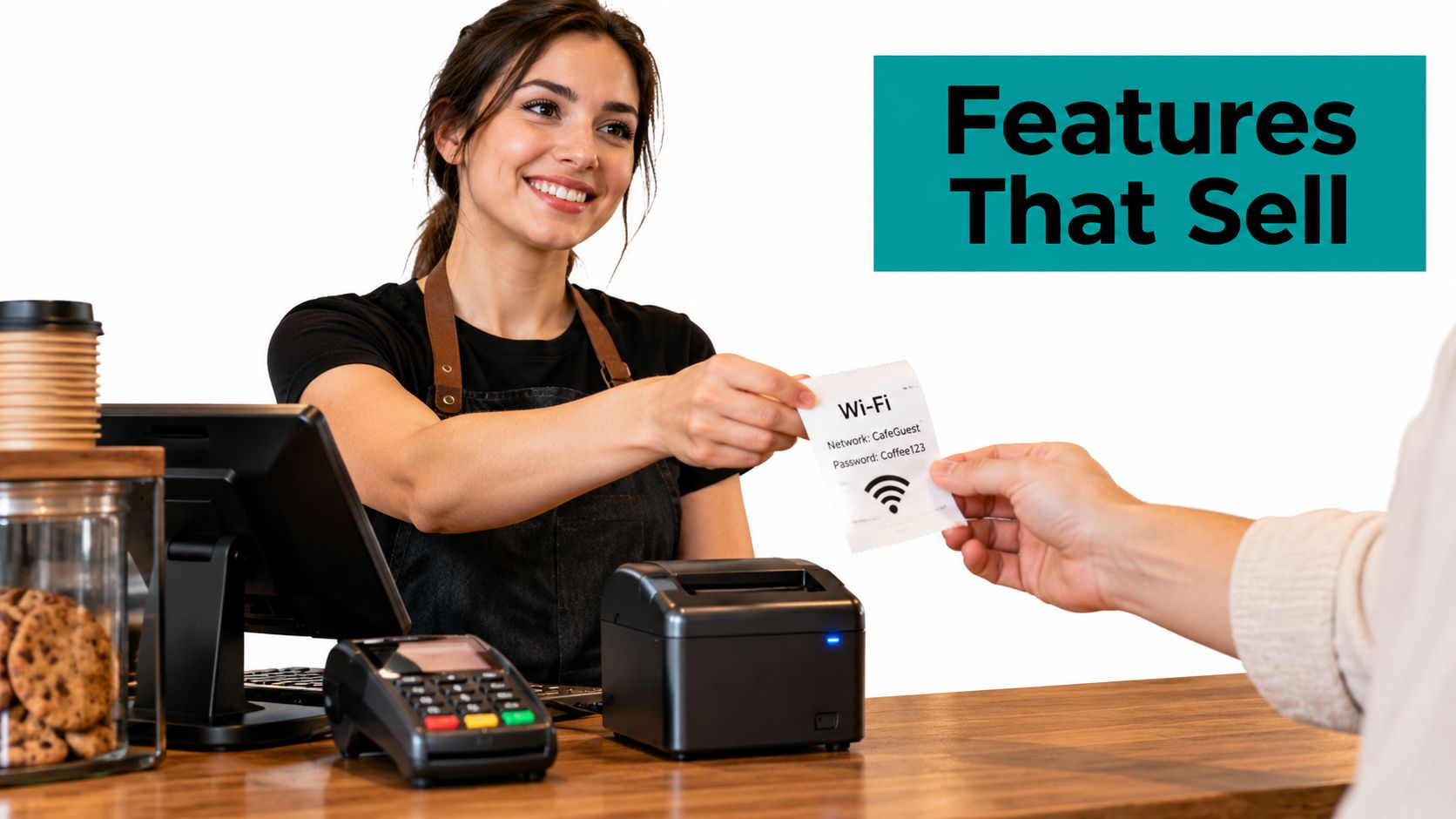
Vouchers work well when staff need a simple handoff. A café can print a code on a receipt, a hotel can issue access during check-in, and an event team can create a batch for a defined audience. The billing engine should attach each code to an entitlement, such as a time allowance, a data allowance, or an expiry rule, rather than treating the code as an informal password.
Payment plans require stronger reconciliation. After a gateway confirms payment, the billing system should provision access only after validating the transaction. A retry must not create duplicate access or duplicate charges. Refunds should also trigger a clear change in entitlement.
Accounting that matches actual usage
RADIUS-style accounting gives the platform measurable events instead of relying only on a successful portal login. A gateway can record start and stop events, connection location, session time, and bytes sent and received. That supports time-based, volume-based, bandwidth-based, prepaid, and subscription plans. The Nomadix hotspot reference describes this separation between authentication, authorization, accounting, and settlement.
A reliable engine should also:
- Reconcile interim updates: Compare periodic usage records with the final stop event.
- Preserve session identity: Use a unique session identifier so retries don't create duplicate charges.
- Handle unreliable networks: Define what happens when an access point, gateway, or payment callback fails.
- Enforce speed at the edge: Apply per-device throughput policies at the gateway or access point, not only in a reporting database.
- Expose integrations: Use APIs or webhooks for vouchers, credentials, refunds, and plan changes.
Social WiFi, IPSK, and EasyPSK
Social WiFi and social login can shorten onboarding by letting guests use a familiar identity provider or provide marketing information during sign-in. Cisco Meraki captive portals support click-through and sign-on workflows, including Meraki Authentication, RADIUS, LDAP, Active Directory, Google OAuth, Facebook, prepaid PIN, SMS, and Cisco ISE. Cisco Meraki's captive portal documentation distinguishes simple splash-page access from identity-based authentication.
The trade-off is important. Every extra field can add marketing value, but it can also increase abandonment and the impact of a compromised portal. IPSK, or individual private pre-shared keys, offers a different model. Each person or device can receive a distinct credential, making it easier to revoke access and connect identity to a defined policy. EasyPSK can simplify that experience where guests need a straightforward passcode without a complex sign-in journey.
Choose based on the environment:
- Social login: Useful for campaigns and customer-data capture, but requires careful consent and trust design.
- IPSK: Better suited to controlled identity, corporate BYOD, education, and member access.
- EasyPSK: Practical when staff need to issue simple credentials while avoiding one shared network password.
- Voucher access: Effective for temporary users, printed receipts, events, and front-desk workflows.
A conversion improvement isn't meaningful if it creates support calls, chargebacks, or security exposure. Evaluate the entire journey, including conversion rate improvement, payment completion, consent quality, and session reliability.
Choosing the Right Authentication and Access Model
Authentication should follow the risk and operating model of the venue. A hotel lobby, a university dormitory, and a corporate BYOD network don't need identical access rules. The fastest sign-in isn't always the safest, and the strongest credential model may be impractical for a visitor who needs internet access for a short stay.
| Method | Security Level | User Friction | Best Use Case |
|---|---|---|---|
| Click-through | Basic | Very low | Low-risk public guest Wi-Fi |
| Social login | Moderate, dependent on identity provider and consent design | Low to moderate | Social WiFi campaigns and retail engagement |
| SMS or email verification | Moderate | Moderate | Guest verification when a contact channel is useful |
| Voucher or prepaid PIN | Moderate | Low when issued in advance | Hotels, cafés, events, and temporary access |
| RADIUS authentication | High when centrally managed | Moderate | Education, corporate, and managed guest access |
| IPSK | High, with individual credentials | Moderate | Corporate BYOD, members, students, and device-level control |
| EasyPSK | Moderate to high, depending on policy | Low | Simple staff-issued access without one shared password |
Cisco Meraki supports click-through and sign-on flows, so a venue can decide whether the primary objective is low friction or identity-based control. A retailer running a short campaign may use a branded splash page with optional social login. A school may use RADIUS or a directory-backed workflow for visitors. A corporate office may use IPSK for BYOD while keeping staff and guest policies distinct.
The right question isn't “Which login looks modern?” It's “What evidence do we need before granting this device access?”
Trust is a separate metric from completion. Research on public Wi-Fi users found that 61% were not concerned about whether a captive portal was authentic. The public Wi-Fi payment-risk discussion highlights the danger of treating low concern as proof of a good user experience. A convincing rogue portal could exploit exactly that lack of scrutiny.
Build trust into the flow. Use HTTPS with certificate validation, identify the venue and payment processor clearly, collect only necessary data, separate marketing consent from required access terms, and show refund and expiry rules before payment. QR-based onboarding can help in some settings, while emergency services should have a practical pass-through path.
For venues evaluating guest Wi-Fi authentication, compare more than sign-in speed. Review credential revocation, device accountability, privacy exposure, payment abandonment, and what happens when a user roams between access points.
Integration and Deployment with Cisco Meraki
A Meraki deployment often starts with a practical question from the venue owner: can the portal look like our brand without forcing the network team to rebuild everything? The answer can be yes when the billing platform uses the Meraki Captive Portal API and the network team defines the access boundaries before launching the payment flow.
An externally hosted portal gives the organization control over branding, authentication logic, consent, and onboarding. Meraki redirects the wireless client to the external page. After validation, the portal returns the device to Meraki's grant URL so the network can authorize that specific client. The Meraki Captive Portal API documentation describes this redirect and grant process.
A hotel deployment
A hotel can place guest devices on a dedicated SSID and use a walled garden for the portal, payment processor, identity resources, and required content-delivery assets. Before sign-on, the client should reach only those approved destinations. After validation, Meraki grants internet access according to the selected plan.
The billing workflow can connect room-based access with premium plans, while a separate identity route can support staff or corporate guests. If the venue uses Azure AD or SAML for internal users, that identity provider should remain separate from the public guest journey. The portal may offer social login or SMS verification to guests, but it shouldn't expose internal directory services to the guest network.
A campus deployment
Education environments create a different challenge. Students may need predictable access across residence halls, visitors may need temporary onboarding, and staff systems must remain isolated. IPSK can provide individual or role-based credentials for controlled BYOD access, while a click-through portal can handle low-risk visitors.
The design should account for roaming. If a student moves between access points, the accounting system needs to preserve the session identity and entitlement rather than treating every association as a new purchase. That prevents access disputes and makes usage records easier to reconcile.
A retail deployment
A shopping center may want social WiFi, campaign consent, and footfall analytics without allowing guest devices to reach store systems. The walled garden should load quickly, but the guest SSID should remain blocked from point-of-sale and administrative networks. Teams planning the surrounding support responsibilities can also review SMB network service models explained for useful context on how managed network operations are structured.
Payment handling belongs in a controlled workflow, not in ad hoc portal code. A venue should document gateway callbacks, refund behavior, failed payments, session expiry, and administrator access before launch. Payment gateway integration is only one component of the deployment. The network policy decides whether a compromised guest device can reach anything valuable.
Application Across Hospitality, Retail, and Education
The common assumption is that a guest Wi-Fi project starts with a marketing question, such as whether to collect an email address or promote a coupon. In practice, the first question should be architectural: which systems must never be reachable from a guest device?
That priority changes how each vertical uses hotspot billing software.
Hospitality
A hotel may combine guest Wi-Fi with front-desk workflows, property-management data, room access systems, and payment terminals. Opera Micros integration can connect the guest experience to hospitality operations, while geo-fenced coupons can present offers relevant to guests who are physically at the venue.
That convenience shouldn't create a flat network. Guest phones belong on a guest segment. Payment terminals and property systems require their own protected paths. The billing portal can authorize a premium plan, but it shouldn't become a bridge into the systems that process room charges or card transactions.
Retail
Retail operators often want more than internet access. They may use social WiFi to support campaign enrollment, connect consent to a marketing platform, and examine footfall analytics or dwell times. Those insights can help a manager understand whether connectivity supports store engagement, but data collection should remain proportionate to the stated purpose.
A portal that asks for a phone number, email, social identity, and demographic details may produce a richer profile, but it also creates more friction and more sensitive information to protect. Use a clear choice. Let a visitor obtain necessary connectivity without bundling marketing consent into the payment or access decision.
Education
A campus needs separation by role and function. Student residence traffic, staff devices, visitor access, learning systems, and administrative services shouldn't share one unrestricted guest path. RADIUS-backed authentication, IPSK, or EasyPSK can support different access models without distributing one permanent password to everyone.
High-density dormitory networks also need disciplined accounting and policy enforcement. The billing platform should know which entitlement belongs to which user or device, while gateway controls apply speed and access rules. A student who changes rooms or roams between access points shouldn't lose valid access because the system created a new, unrelated session.
Convenience belongs at the portal. Security belongs in the network policy.
The compliance-versus-convenience tension appears in every sector. A frictionless sign-in can help conversion, but it can't compensate for weak segmentation. A slightly more deliberate authentication flow may protect payment systems, preserve trust, and reduce the operational cost of investigating suspicious activity.
Security, Compliance, and Maximizing ROI
The most expensive hotspot mistake is often architectural, not commercial. A venue can choose a capable billing engine and still create unacceptable exposure if guest Wi-Fi, point-of-sale terminals, staff systems, and payment infrastructure share an uncontrolled network path.
PCI guidance treats wireless as a public network. Cardholder data transmitted over wireless requires strong cryptography such as TLS, IPsec, or SSH, and stateful inspection should separate in-scope wireless segments from protected systems. The PCI wireless guidance supports a design in which guest devices can't initiate connections to payment terminals, corporate interfaces, or the cardholder-data environment.
PCI DSS v4.0.1 future-dated requirements became mandatory on March 31, 2025, while hospitality security reporting identifies payment and POS systems as a risk for 72% of organizations and guest Wi-Fi as a risk for 56%. The hotel Wi-Fi compliance guidance frames the issue at venue level. The practical task is to map card-data flows, identify which billing components are in scope, and prove that the captive portal can't provide a route into payment systems.
A practical launch checklist
- Segment the network: Use separate VLANs and firewall policies for guests, POS, staff, and administrative systems.
- Protect payment data: Prefer hosted payment pages or tokenized gateways so raw card numbers stay outside the hotspot platform.
- Authenticate callbacks: Validate gateway notifications and prevent replayed events from granting access twice.
- Audit the workflow: Record login, purchase, authorization, refund, and session termination events.
- Measure trust: Review verified-portal recognition, payment abandonment, consent quality, chargebacks, and unnecessary data collection.
- Test failure states: Confirm behavior during gateway outages, access-point failures, duplicate requests, expired vouchers, and roaming.
A useful security review should examine the portal, API behavior, session enforcement, data storage, and administrative controls. DevArmor's step-by-step security assessment provides a helpful framework for evaluating the application layer alongside network controls.
The ROI calculation should include more than paid sessions. Reliable accounting reduces revenue leakage. Segmentation reduces the blast radius of a portal compromise. Clear consent and trusted payment screens protect conversion quality. A secure, understandable guest Wi-Fi experience can support revenue without making the venue choose between convenience and defensible operations. For payment workflows, secure payment processing should be treated as part of the network design, not a final plug-in.
Splash Access provides Cisco Meraki guest Wi-Fi tools for captive portals, paid access, vouchers, IPSK authentication, social WiFi, and payment workflows across hospitality, retail, education, and corporate BYOD environments. Review the platform at Splash Access and ask its team to map your authentication, segmentation, and billing requirements before deployment.