A guest arrives at your hotel lobby, opens the WiFi list, taps the premium option, and expects to be online in under a minute. A student in a dorm wants faster access for gaming and video calls. A shopper scans a QR code in a retail store and lands on a branded guest WiFi page with a paid day pass and a social login option. In each case, the experience feels simple on the surface. Behind it, a lot has to happen cleanly.
That's where gateway billing services come in.
For many teams, billing still gets treated like a separate finance task and guest WiFi gets treated like a network task. In real deployments, those two worlds meet at the captive portal. If the payment step is clunky, people abandon it. If the authentication step is weak, IT gets security headaches. If the data flow is messy, marketing can't use social WiFi insights and operations can't reconcile what was sold.
Introduction to Gateway Billing Services for Modern Guest WiFi
A practical example helps. Say you manage WiFi for a hotel, a university residence, or a retail venue. You want guests to get basic internet for free, but also offer premium access, longer session time, or voucher-based upgrades. You may also want branded onboarding, social login, and segmented access for BYOD devices.

The tricky part isn't just taking a card payment. It's connecting payment, access control, and identity into one flow that feels smooth to the user and manageable to your team. In many environments, that flow starts with a captive portal, continues through a billing gateway, and ends with the guest being placed on the right WiFi policy.
If you've looked into PayLink for paid WiFi access, you've already seen the basic idea. The login page isn't only a welcome screen. It can also be a storefront, an authentication checkpoint, and a handoff point into your Cisco or Meraki network policies.
Why this matters now
Billing gateways aren't a niche side tool anymore. One industry estimate said the payment gateway market reached USD 48.17 billion in 2025 and projected USD 58.77 billion in 2026, with a longer-term projection of USD 245.71 billion by 2033 at a 22.7% CAGR according to this market summary. That growth tells us something important. Payment gateways now sit inside the broader digital infrastructure used for e-commerce, subscriptions, hospitality, and enterprise billing.
Practical rule: If you charge for access, upgrades, vouchers, or repeat services through WiFi, your network onboarding flow and your billing flow should be designed together.
Where teams usually get stuck
Most confusion shows up in three places:
- What the gateway does: Teams often think it only runs a checkout page.
- How it connects to WiFi onboarding: The captive portal and payment screen are usually part of one user journey.
- What “secure” means: Secure billing isn't just encryption. It's also about keeping sensitive data away from the rest of your environment.
For Education, Retail, and BYOD Corporate networks, that combination matters even more. Users expect a fast login. IT wants controlled onboarding. Marketing wants consent-based data capture. Finance wants clean settlement and reporting. A well-designed gateway billing service helps all four groups at once.
What Gateway Billing Services Actually Do
A useful way to think about gateway billing services is this. They act like a digital cashier plus a secure vault.
The cashier takes the payment details, checks where the transaction should go, and asks the right financial systems for approval. The vault keeps sensitive payment information away from the rest of your WiFi stack. That matters when your captive portal is the front door for paid access.
The basic flow in plain language
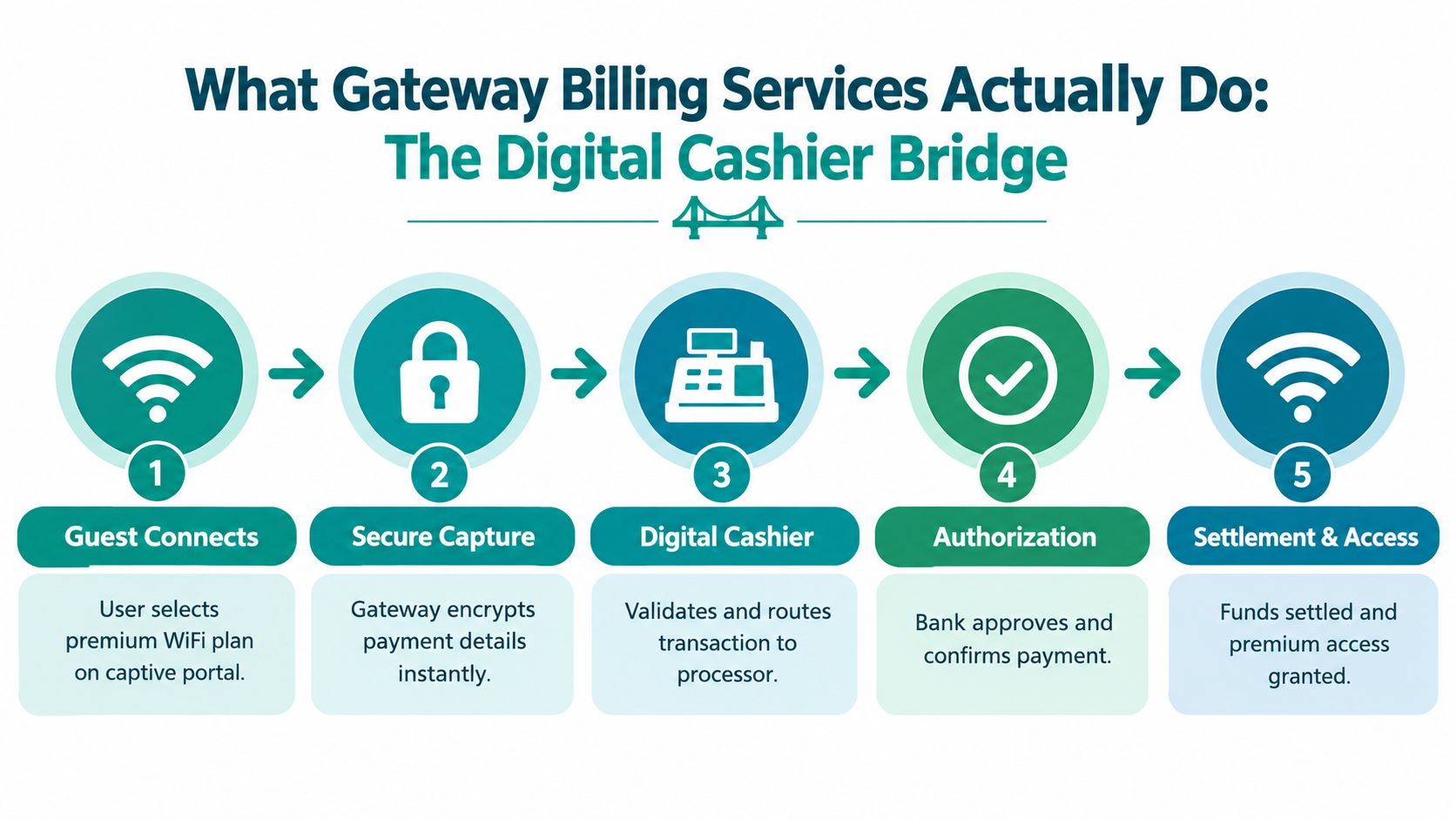
When someone chooses a premium WiFi plan on a captive portal, the process usually looks like this:
- The guest selects a plan on the splash page.
- The gateway captures payment details in a secure hosted flow.
- The payment is sent for authorization through the appropriate processor.
- The result comes back as approved or declined.
- Your WiFi system applies access rules based on that result.
That's why the gateway is not just a passive bridge. It sits in the middle of billing, authorization, and access control.
Where people mix up the terms
A payment gateway handles the secure movement of payment data and authorization requests. A billing gateway service often sits a bit wider than that in practice. It may include plan logic, recurring charges, vouchers, receipts, retries, and reconciliation. Merchant services usually refers to the financial service relationship that enables acceptance and settlement.
If you want a side-by-side explainer, Resolut's take on payment gateways is a useful comparison resource because it helps separate gateway functions from broader payment stack choices.
Why tokenization at capture matters
This is the part many non-payment teams miss. In secure designs, the best pattern is to keep raw card data out of the merchant environment by tokenizing it at the gateway itself. Hospitality security guidance explains that when tokenization happens upstream, later systems can charge deposits, no-show fees, or incidentals without handling live card credentials, which reduces PCI DSS scope for downstream systems like PMS or POS back ends in this payment data compliance explanation.
For WiFi billing, the same logic applies. Your captive portal should trigger a hosted, secure collection method so your internal systems don't become a storage point for sensitive card data.
The cleanest design is simple. Let the gateway handle payment data, let the network handle access, and let tokens connect the two when a follow-up charge or entitlement check is needed.
If you want to explore that hosted approach in the guest access context, secure payment processing for WiFi onboarding shows how the handoff can work without forcing your WiFi stack to become a payment storage system.
Business Benefits and Real World Use Cases
The business case for gateway billing services becomes clearer once you stop viewing guest WiFi as “just connectivity.” In many venues, it's part checkout, part identity workflow, and part loyalty channel.
Revenue and control in one flow
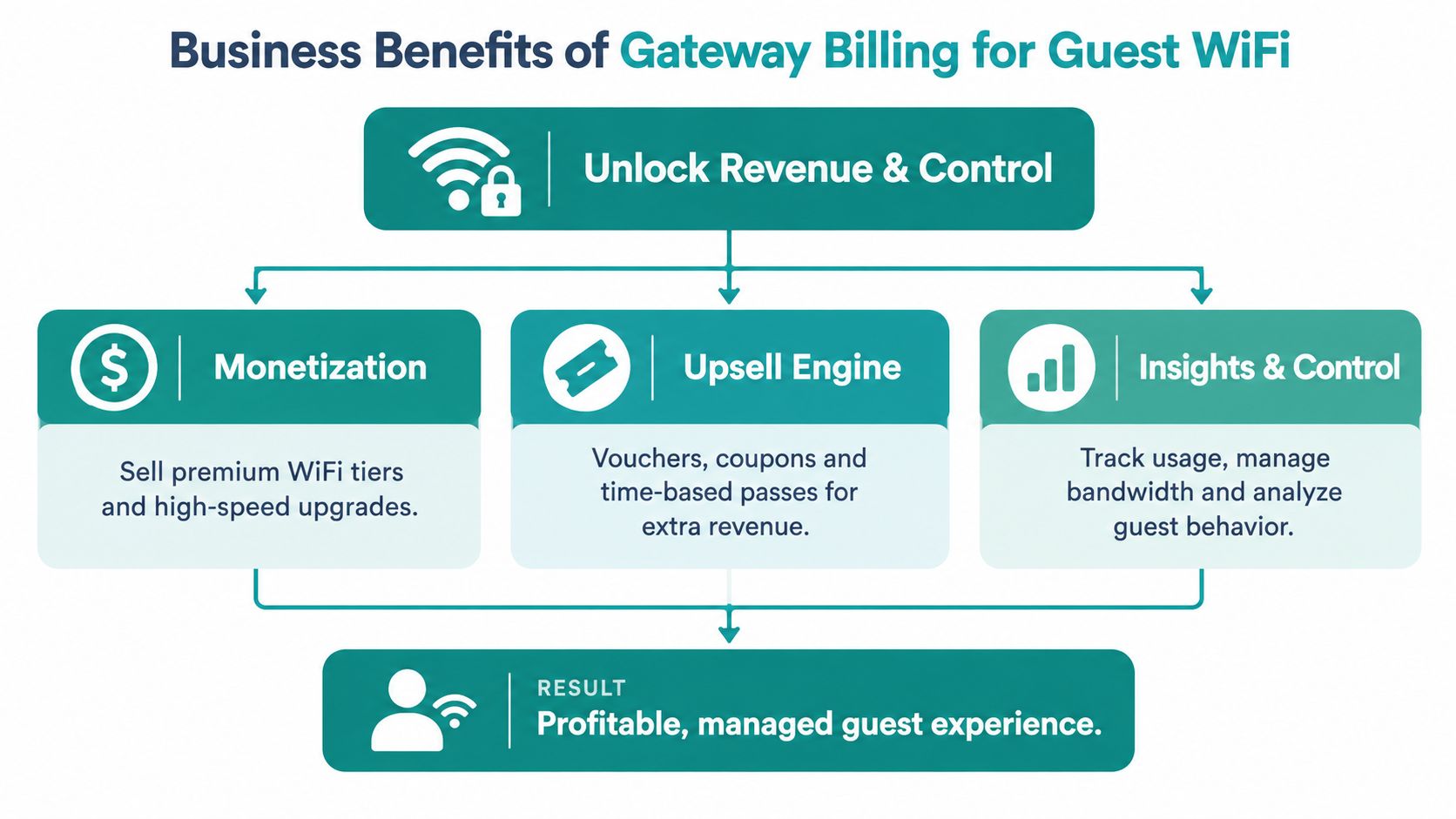
A guest WiFi billing journey can do more than sell access. It can also support:
- Premium tiers: Free basic access, paid higher-speed access, longer duration, or device-based packages.
- Voucher models: Event passes, conference access codes, or front-desk printed vouchers.
- Promotional offers: Coupons tied to in-store campaigns or location-based promotions.
- Social WiFi data capture: Consent-based profile collection through social login.
A captive portal is a web-based authentication page that intercepts the user's first network request and requires identification before internet access is granted, and it's widely used in hotels, airports, retail, universities, and enterprise settings according to this captive portal overview. That's exactly why billing fits naturally here. The portal already controls the first interaction.
Education use case
On a campus, guest WiFi and student dorm access often need different policies. A shared password may be enough for a short-term guest, but it's a poor fit for longer-term student device access. Paid WiFi options can be layered in for visitors, conference attendees, and temporary residents.
Per-device or per-user IPSK and EasyPSK are especially useful in Education because each device gets its own credential instead of sharing one key. That model is specifically positioned for education, corporate BYOD, and longer-term guest access in this guest WiFi and IPSK explanation.
Retail use case
Retail teams often care less about “internet access” and more about what the portal can support around it. A social WiFi flow can ask for login through a social provider, present a limited-time coupon, and grant access based on campaign rules. If the store also sells premium access for lounges or special areas, gateway billing becomes part of the same branded experience.
Social login on guest WiFi typically relies on OAuth 2.0 or OpenID Connect, where the portal redirects the guest to an identity provider, receives a verification token, and then grants access while capturing contact details, as explained in this social login guide.
In retail, the WiFi login page can act like a small digital front desk. It can welcome, verify, promote, and sell, all before the customer opens a browser tab.
BYOD Corporate use case
In corporate offices, the challenge is usually balance. Visitors need access quickly, but internal teams need segmentation, auditability, and policy control. That's where Cisco Meraki, captive portals, and per-user authentication methods fit together well.
Cloud captive portal platforms are described by Cisco's marketplace as suitable for securing guest, BYOD, and IoT access across corporate offices, public hotspots, and retail environments in this Cisco marketplace listing. In practice, that means IT can isolate guests, issue differentiated access, and still connect payment or registration steps when needed.
Essential Features Checklist for Secure and Compliant Billing
When people compare gateway billing services, they often focus on pricing first. That's understandable, but it's not the safest place to start. Start with architecture and operational fit.
Must-have features
Use this as a working filter when you review any payment and guest WiFi stack.
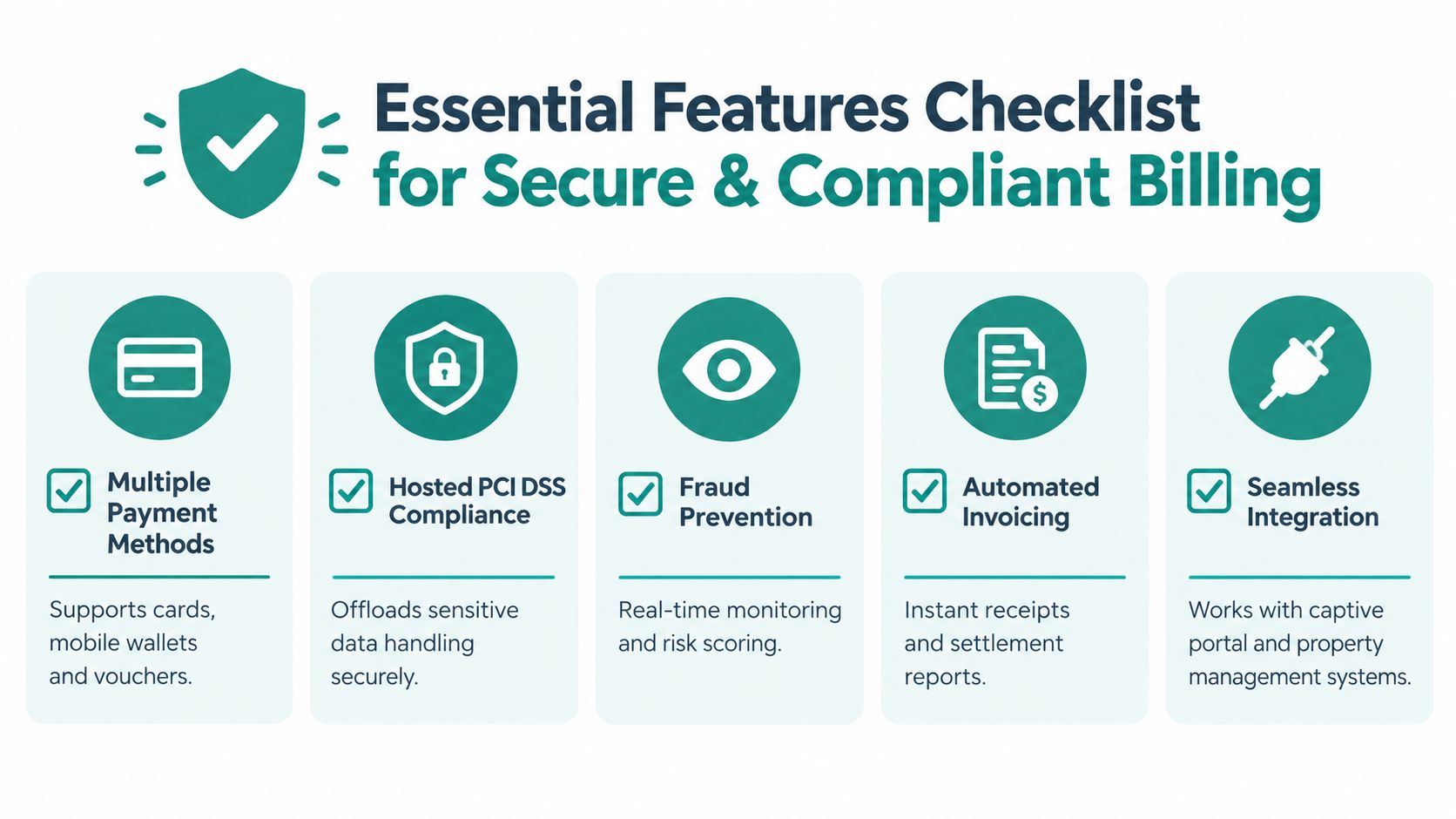
- Hosted payment collection: The safest pattern is a hosted gateway that isolates card entry from your own systems.
- Point-to-point encryption and tokenization: You want card data encrypted at first entry and tokenized before downstream systems see it.
- Support for multiple payment methods: Cards, mobile wallets, and voucher logic matter in real guest environments.
- Fraud and authentication controls: Screening tools and 3-D Secure support matter when abuse or charge disputes are a concern.
- Reporting and reconciliation: Finance teams need receipts, settlement visibility, and searchable transaction records.
Why hosted matters more than teams expect
Independent hospitality security guidance describes the safest pattern as encrypting card data at the first entry point, passing it directly to a PCI-DSS-certified hosted gateway, and using returned tokens for future use. That pattern reduces compliance burden and limits breach impact because internal systems don't store or transmit live card data, as described in this hosted gateway and tokenization reference.
That guidance comes from hospitality, but the lesson is broader. If your captive portal, PMS, POS, or booking-related systems don't touch raw card details, your audit and risk posture improves.
A quick evaluation lens
Here's a simple way to separate must-haves from nice-to-haves:
| Capability | Why it matters | Priority |
|---|---|---|
| Hosted secure checkout | Keeps sensitive card entry out of the WiFi platform back end | Must-have |
| Tokenization | Supports later charges or entitlements without live card data | Must-have |
| Captive portal integration | Connects payment result to network access | Must-have |
| Social login support | Helps with identity capture and marketing workflows | Context-dependent |
| Recurring billing | Useful for long-stay, dorm, or subscription-style access | Context-dependent |
Questions worth asking vendors
- Where is card data captured? If the answer is unclear, keep digging.
- What gets tokenized, and when? Timing matters.
- Can the portal trigger access automatically after approval? Manual handoffs slow everyone down.
- How are declines, retries, and receipts handled? Real operations depend on edge cases.
Field note: The safest billing setup is usually the one that keeps your network systems focused on authentication and policy, while the payment gateway handles the sensitive financial data path.
Integration Essentials for Cisco Meraki Captive Portals and Authentication
A lot of teams buy a gateway, deploy a captive portal, and then discover the challenge is the handoff between the two. The clean rollout happens when billing, authentication, and onboarding are planned as one connected journey.
The flow inside a Cisco Meraki environment
In a Cisco Meraki guest network, the portal usually becomes the control point for first access. A guest joins the SSID, is redirected to a captive portal, chooses how to authenticate, and may also choose whether to pay for a plan or redeem a voucher.
That means your integration questions should sound less like “Does it accept payments?” and more like this:
- Can it trigger WiFi policy changes after payment approval?
- Can it support QR-code onboarding on mobile devices?
- Can it pass user attributes into network or CRM workflows?
- Can it support Cisco and Meraki deployment models without custom glue code everywhere?
Authentication options that affect billing design
A short-stay guest paying for premium access usually needs a fast path. A student with multiple devices in a dorm needs something more durable. A corporate BYOD user needs controlled segmentation with less friction than a shared passphrase.
That's why IPSK and EasyPSK matter. With per-device or per-user credentials, the WiFi policy can stay specific to the user or device instead of relying on one common key. In Education and BYOD Corporate settings, that improves access control and makes offboarding cleaner.
Social WiFi fits a different use case. With social login, the portal can use OAuth 2.0 or OpenID Connect to redirect the guest to an identity provider, receive a verification token, and grant access after identity verification. That's useful when you want low-friction onboarding paired with data capture and consent-driven marketing workflows.
API quality is not a small detail
Modern gateway billing services are moving beyond simple card authorization. Recent market coverage describes gateways expanding into subscription management, fraud tools, settlement, multi-currency support, and automated reconciliation, while API trend reporting also points to demand for ACH, SEPA, Level III data, surcharge support, and clearer SLA documentation in this payment gateway trends analysis.
The big takeaway isn't “more features are always better.” It's that documentation and workflow quality matter. If the gateway exposes the right events and data, your Meraki captive portal, billing rules, and CRM systems can work as one stack instead of three disconnected tools.
For teams evaluating that handoff in practice, payment gateway integration for captive portals is worth reviewing because it shows how payment logic can plug into portal and authentication flows without turning the deployment into a custom development project.
Where identity and loyalty connect
This is also where Azure AD, SAML, and G Suite fit in. Staff, students, members, and contractors may use directory-based authentication, while visitors use social login or paid access. Marketing tools such as Mailchimp or Twilio can then receive opt-in contact data from the same onboarding path.
One practical example in this category is Splash Access, which supports Cisco Meraki guest WiFi workflows with captive portal customization, Social WiFi, QR-code onboarding, and payment gateway integration. For buyers, the key point isn't the brand name. It's that the platform should let payment approval, identity capture, and network access happen in one coordinated sequence.
Pricing Models and Hidden Costs to Watch For
Pricing for gateway billing services often looks simple in a sales conversation and much messier in the contract. The headline rate is only part of the picture.
The common pricing models
Here's a straightforward comparison you can use when reviewing offers.
| Pricing Model | How It Charges | Best For | Watch Out For |
|---|---|---|---|
| Transaction rate | A fee tied to each transaction | Variable guest purchases | Add-on fees may sit outside the headline rate |
| Flat monthly | Fixed platform cost plus possible processing fees | Predictable usage environments | Can still include separate gateway or compliance charges |
| Tiered pricing | Different rates based on transaction bands or package levels | Organizations with multiple service tiers | Harder to compare across vendors |
| Interchange-plus style pricing | Underlying card costs plus processor markup and extras | Finance teams that want transparency | Contracts can become complex fast |
Where the real cost often hides
Recent industry coverage notes that gateways may charge separately for declined transactions, tokenization, fraud screening, 3-D Secure attempts, account updater enrollment, and PCI or compliance line items, with some fees billed per screen or per token rather than per successful payment in this guide to hidden gateway fees.
That matters a lot for guest WiFi because many payments are small, intermittent, or tied to one-time upgrades. A tiny add-on charge can become a large share of the total acceptance cost when the purchase itself is modest.
Don't model only the approved payment. Model the full path of payment acceptance, including declines, retries, fraud checks, and token-related charges.
Hosted gateway pricing needs context
When you're comparing hosted checkout models, it also helps to understand the compliance tradeoff. PCI compliance and hosted gateways is a useful background read because it frames why some merchants accept hosted-flow constraints in exchange for lower compliance exposure.
If you're trying to calculate whether the billing stack is economical, total cost of ownership for guest WiFi payments is a practical place to start. It's the right lens for contracts where the flashy rate doesn't reflect all the moving parts.
How to Choose a Vendor and Roll Out Successfully
A good vendor choice usually becomes obvious when you stop scoring features in isolation and start scoring the full guest journey. For Cisco and Meraki environments, that means asking whether the platform can support captive portals, billing, social WiFi, and authentication methods like IPSK and EasyPSK without extra manual work.
What to shortlist for vendor review
Some criteria are technical. Some are operational.
- Cisco Meraki compatibility: The portal and billing workflow should fit your actual SSID and policy design.
- Captive portal flexibility: You may need paid access, social login, voucher printing, QR codes, or custom branding.
- Authentication options: Look for support that covers guests, students, staff, contractors, and BYOD users differently.
- API and event quality: Clean documentation matters as much as feature count.
- Support for your sector: Education, Retail, and BYOD Corporate each have different onboarding realities.
If you want examples of how buyers compare payment options regionally, Sambapay Singapore best picks can be a useful reference point for how evaluation criteria often get framed in real-world gateway shortlists.
A rollout path that avoids chaos
Most successful deployments move in phases.
- Pilot one SSID or one venue first. Use a limited guest WiFi environment to test captive portal logic and payment routing.
- Test edge cases early. Check declines, voucher redemption, social login fallback, and mobile onboarding.
- Train front-desk or support staff. They need to know what guests will see and how to handle common questions.
- Review analytics after launch. Look at login completion patterns, payment drop-off points, and return-visitor behavior.
- Expand after cleanup. Once the flow feels reliable, extend it to more locations or user groups.
A deployment checklist helps keep IT, operations, and finance aligned. This rollout checklist for guest WiFi deployments is a good example of the kind of implementation document you'll want before launch.
The most reliable rollouts keep one principle in view. Payment should feel invisible when it works. Authentication should feel controlled, not complicated. And every image or portal touchpoint should stay focused on the WiFi experience, not unrelated promotion or clutter.
Splash Access offers Cisco Meraki guest WiFi tools that connect captive portals, social login, IPSK and EasyPSK authentication, vouchers, and built-in billing workflows into one platform. If you're planning paid guest access or want to connect authentication and loyalty more cleanly, visit Splash Access to see how the platform supports Education, Retail, hospitality, and BYOD Corporate environments.