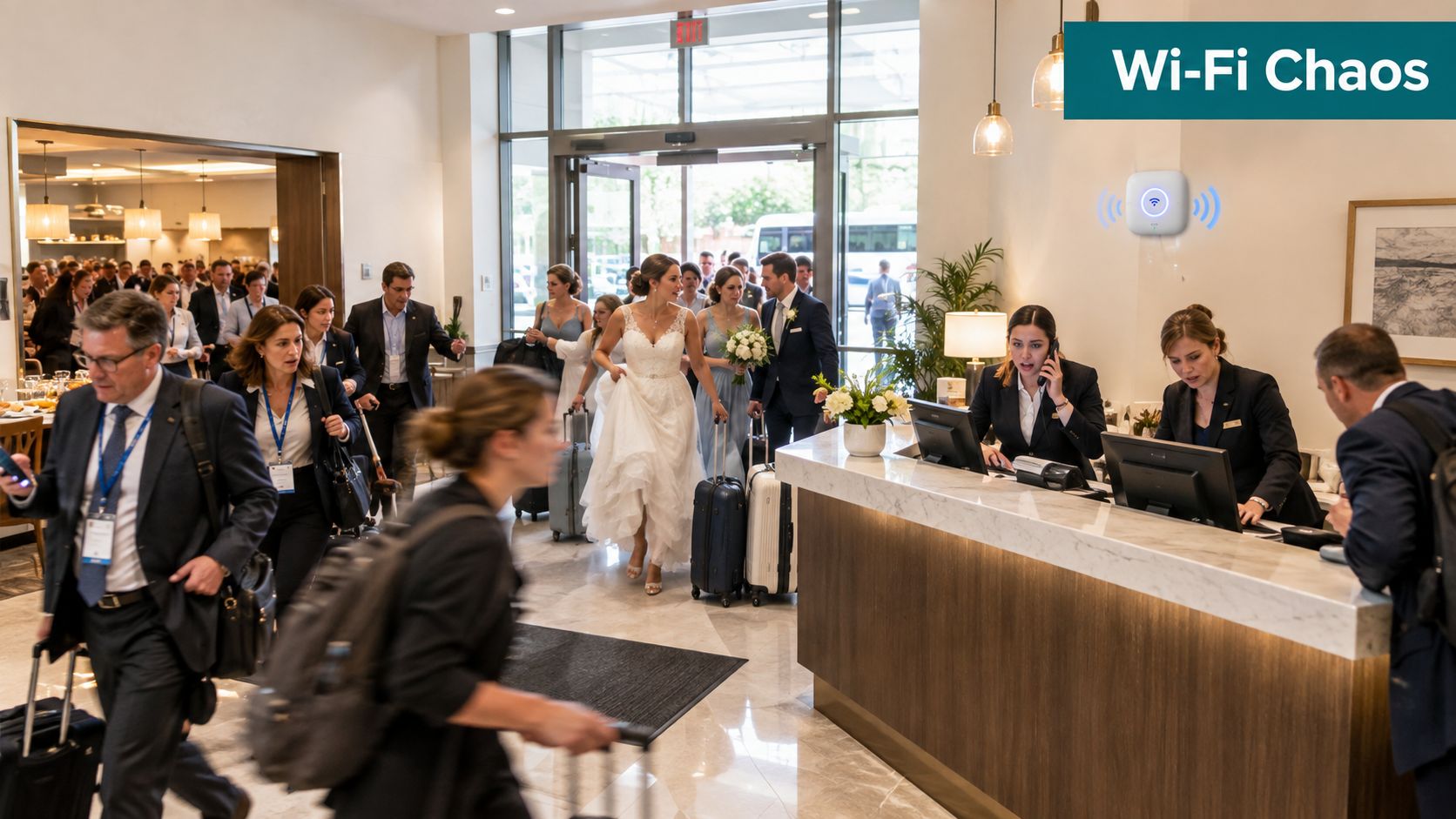
A conference group arrives before breakfast has cleared, a wedding party fills the lobby, and guests across the property reconnect to Wi-Fi after a short network interruption. The front desk needs more hands, housekeeping needs room priorities, banquet staff need access to shared spaces, and IT sees captive portal sessions climbing without knowing whether the demand will last. Everyone is busy, but nobody is working from the same operational picture.
That situation looks like a hospitality problem, yet the same pattern appears on education campuses, in retail stores, and in corporate BYOD environments. Advanced planning and scheduling offers a useful way to think about it. Instead of promising resources that don't exist, teams model real limits, coordinate competing demands, and adjust plans before small disruptions become guest-facing failures. That logic applies to rooms and labor, but it also applies to access points, bandwidth, authentication, and support coverage.
A Day When Everything Goes Sideways
By mid-morning, the hotel's breakfast room is still occupied by a conference group that was meant to leave earlier. A wedding party begins checking in, guests queue at reception, and housekeeping supervisors reshuffle room turnovers because several rooms need attention at the same time. The front desk manager calls for additional support, but two employees are already covering another shift swap.
Then the Wi-Fi dashboard changes color. A brief interruption has pushed many guests back through the captive portal at once. Some need a social login, some have voucher details, and others are trying to use credentials issued for their room or event. The IT team can see sessions rising, but the dashboard doesn't explain how that surge interacts with reception queues, staff availability, or the conference timetable.
The hidden problem is shared capacity
The hotel doesn't have separate, unlimited pools of capacity. It has a fixed number of front desk employees, housekeeping teams, rooms, meeting areas, access points, and support hours. A decision that looks sensible in one department can create a bottleneck somewhere else. Letting a conference group stay longer may protect the event experience, but it can compress room turnover and increase check-in pressure.
Guest Wi-Fi adds another layer. A captive portal works as an access-control gate, showing the splash page before internet access is granted, as described in Meraki captive portal guidance. The portal can support onboarding steps, but those steps still consume attention from guests and staff. If the authentication flow is poorly matched to the moment, the hotel creates another queue precisely when the lobby is already under strain.
Practical rule: A schedule is only useful when it includes the people, spaces, systems, and limits that can make the plan fail.
What APS-style thinking would change
An APS-style approach would connect the event calendar, room status, staffing plan, and network demand assumptions. It could flag that a large arrival wave overlaps with room turnover, or that a portal campaign will create more onboarding activity during an already busy period. The system wouldn't remove every surprise, but it would make tradeoffs visible earlier.
The lesson isn't that a hotel needs to run like a factory. The lesson is that reactive coordination fails when several constrained operations collide. Advanced planning and scheduling gives teams a shared language for those collisions, whether the resource is a machine, a room, a support agent, or a Cisco Meraki access point.
What Advanced Planning and Scheduling Really Means
Advanced planning and scheduling started with a practical manufacturing question: how can an organization plan work when materials, machines, labor, and timing all have limits? Earlier tools such as Gantt charts, operations research, material requirements planning, and closed-loop MRP helped organizations understand what they needed and when they needed it. Historical overviews place the practical emergence of APS in the 1990s, when finite-capacity scheduling exposed the limits of earlier ERP and MRP approaches, particularly around queues, routings, synchronization, and plant capacity, as outlined in this history of APS.
The same progression makes sense in a hotel. A basic forecast might estimate how many guests will arrive. Material requirements planning might resemble preparing the supplies, rooms, and equipment needed for those arrivals. A master schedule could assign housekeeping work and reception coverage. Modern APS goes further by testing whether the complete plan can run under real constraints.
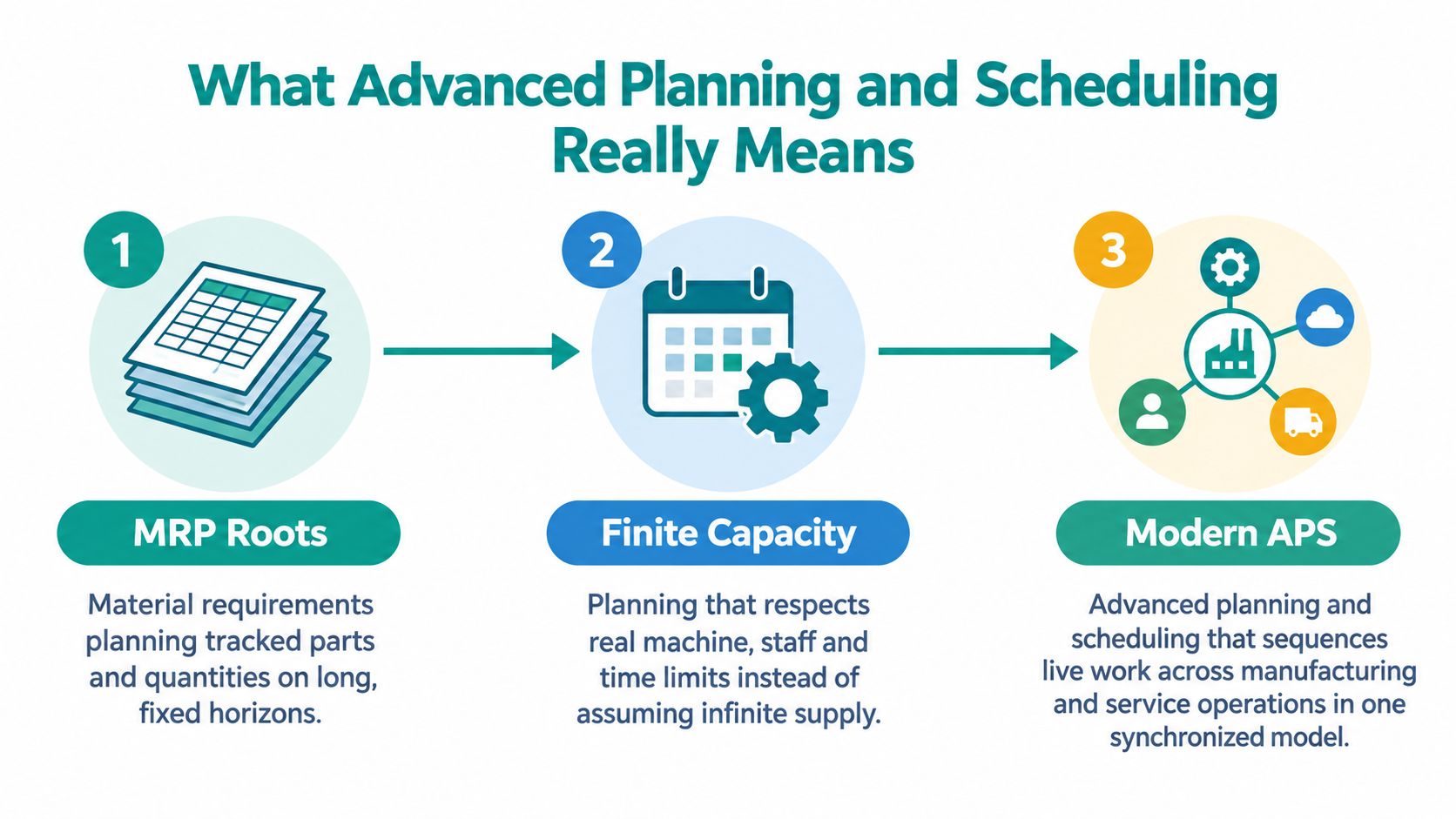
From planning assumptions to finite capacity
Traditional planning often assumes that capacity will be available when required. Finite-capacity APS does the opposite. It asks whether the machines, staff, materials, time windows, and alternative resources can support the proposed sequence. Independent APS literature describes this broader architecture across planning layers such as demand planning, master planning, MRP, production planning, distribution, transportation, and available-to-promise.
For guest operations, replace machines with access points, support teams, meeting rooms, and onboarding queues. A schedule that promises a smooth check-in wave must account for room readiness, front desk coverage, portal rules, and expected connection demand. If any one of those resources is unavailable, the plan may look good in a spreadsheet and still fail in the lobby.
APS is more than a better spreadsheet
A spreadsheet records decisions. An APS approach models relationships between decisions. It can compare scenarios, identify bottlenecks, and suggest a sequence that balances competing objectives, such as due-date adherence and resource utilization.
That distinction matters for service-heavy environments. A campus may need to coordinate move-in support with student device onboarding. A retail site may align a promotion with staff coverage and guest Wi-Fi access. A restaurant or hospitality team that needs a clearer view of staff availability can also track shifts with AnchOps as part of a wider operational process.
For a concise manufacturing-oriented explanation of the planning layer, see production planning and scheduling fundamentals. The central idea is simple: plan demand, capacity, and execution together instead of asking each team to optimize its own corner.
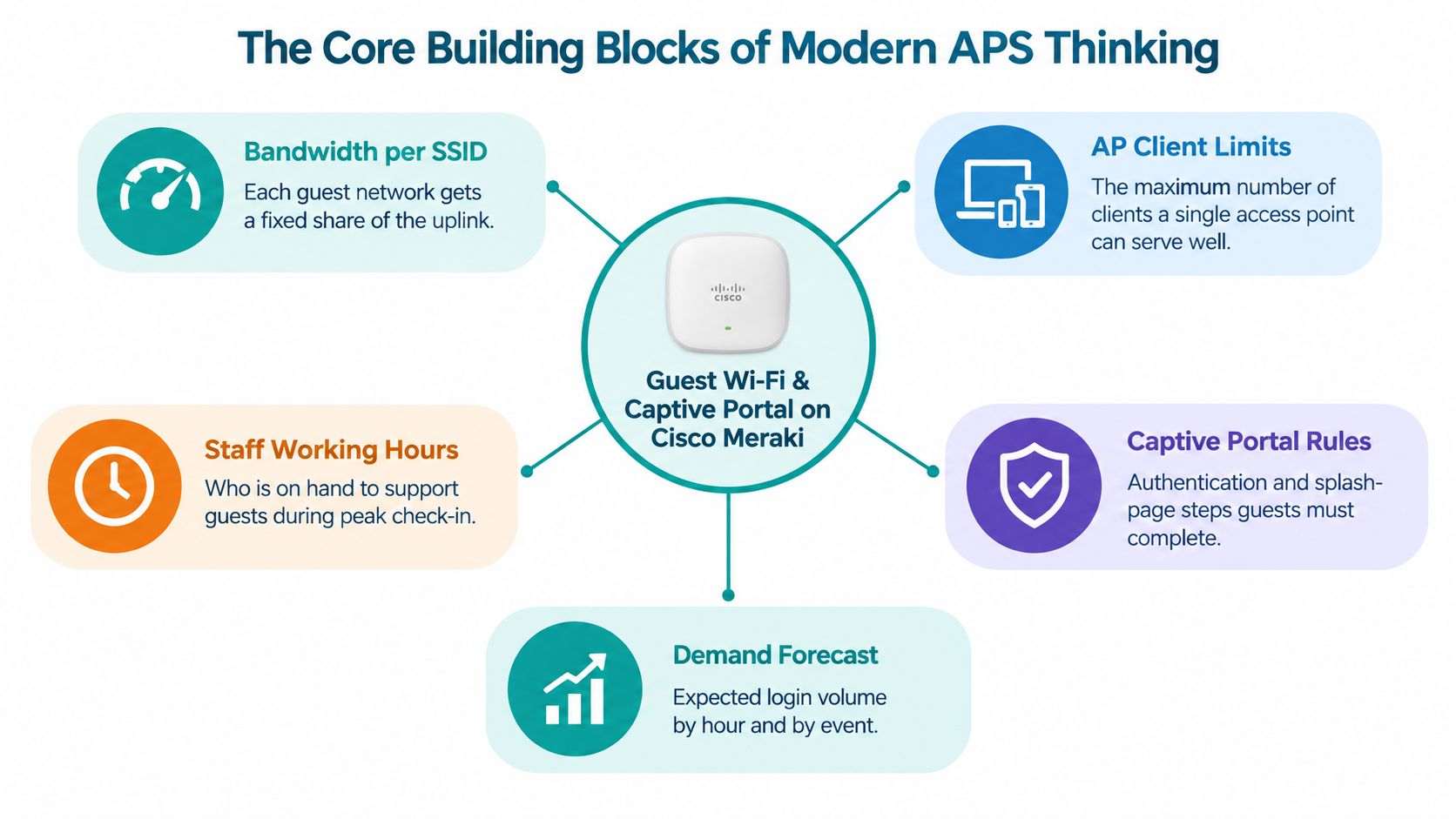
The Core Building Blocks of Modern APS Thinking
Modern APS thinking rests on four connected ideas, constraints, finite capacity, optimization, and synchronization. In guest Wi-Fi operations, those ideas are already visible in Cisco Meraki dashboards and captive portal settings. The technology doesn't automatically create an APS process, but it gives teams places to define the rules that an operational plan depends on.
Start with constraints
A constraint is anything that limits what the operation can promise. For a hotel or campus, that may include bandwidth per SSID, access point client capacity, staff working hours, conference room capacity, VLAN segmentation, or the number of people available to handle support requests. Captive portal rules add another constraint because each user must complete a defined authentication path before access is granted.
Cisco Meraki gives administrators ways to express parts of this model through SSID configuration, group policies, splash page behavior, and dashboard analytics. IPSK and EasyPSK can introduce distinct credentials or bindings for users and devices, helping teams avoid treating every connection as an anonymous shared-password event.
Make capacity finite
Finite capacity means the plan respects what the network and team can deliver at the same time. If a retail store expects a promotion to increase guest Wi-Fi activity, the team shouldn't schedule support as though every access point, uplink, and employee can absorb unlimited demand. The plan should identify which guest group receives which policy, what onboarding route applies, and who responds if the flow breaks.
Bandwidth limits, group policies, and credential rules become operational controls rather than isolated technical settings. They help the team decide what can happen concurrently and what must be separated.
Optimize the tradeoffs
Optimization doesn't always mean maximum throughput. A hotel may favor reliable access for registered guests over a broad social Wi-Fi campaign during a busy arrival period. A campus may prioritize student and staff onboarding while keeping visitor access simple. A corporate office may choose stronger identity controls for contractors, even if that adds an approval step.
Synchronize the moving parts
Synchronization aligns check-in waves, shift starts, event schedules, portal authentication windows, and network policies. A captive portal can be configured correctly and still create friction if staff aren't ready to explain it or if the selected flow doesn't match the audience.
Operational insight: The strongest plan is the one that a front desk agent, store manager, or junior network administrator can understand without relying on private notes.
Finite Scheduling, Full APS, and the Captive Portal Decision
Finite scheduling is narrower than full APS. It assigns operations to specific resources while respecting bounded capacity. APS usually covers a wider decision space, connecting demand, materials, routings, alternative resources, and sometimes multiple sites. The distinction matters because a team may only need to prevent access-point or staffing overload, or it may need to coordinate demand, identity, support, and policy decisions across the entire operation.
A captive portal creates a similar spectrum. A basic click-through splash page keeps onboarding simple, but it provides limited control over who connects and under which conditions. Social login, email, vouchers, QR onboarding, SAML-backed sign-in, IPSK, and EasyPSK add structure. The right choice depends on whether the operation values speed, identity certainty, revocability, data capture, or segmentation.
| Approach | What It Optimizes | Captive Portal Equivalent | Best Fit |
|---|---|---|---|
| Basic planning | A simple expected sequence | Click-through splash page | Low-friction visitor access where identity requirements are limited |
| Finite scheduling | Resource limits and feasible assignments | Voucher or time-bound access | Events, retail campaigns, and guest groups with defined access rules |
| Integrated APS | Demand, capacity, people, and dependencies | Social login, email, or QR onboarding with policies | Hospitality, education, and retail teams coordinating guest experience with operations |
| Identity-aware optimization | Multiple user types and revocable access | Cisco Meraki IPSK or EasyPSK | Corporate BYOD, campuses, and environments needing per-device or per-user control |
The comparison isn't about making every portal complex. It's about matching complexity to operational risk. A hotel may use a simple flow for transient visitors and a more controlled one for conference attendees. A campus may need separate paths for students, staff, and guests. A corporate BYOD team may require credentials that can be revoked without changing access for everyone else.
Teams that coordinate people and appointments can also use a focused resource such as Tutorbase scheduling to organize availability before connecting that information to network operations. For the portal layer itself, captive portal functionality provides the relevant vocabulary around onboarding, access rules, and guest experience.
Cisco-focused guidance presents WPA2 with iPSK as a supported pattern for per-device or per-user access on a single SSID, according to this Cisco Live reference. That approach can be useful when a shared password would make access revocation and accountability difficult.
How Education, Retail, and BYOD Teams Put APS Into Practice
The value of APS-style thinking becomes easier to see when the resource is a connection flow rather than a machine. Each sector has different demand patterns, but all three need to coordinate users, credentials, support capacity, and policy rules.
Education campus
At the start of a term, a campus can expect a concentrated onboarding wave. The network team may prepare separate paths for students, staff, visitors, and residence services, then align those flows with move-in support and help-desk coverage. Social login and EasyPSK can serve different audiences, provided the credential and policy rules are documented before the rush begins.
The planning question isn't just whether the SSID is available. It's whether students can complete onboarding, whether support staff can resolve failed connections, and whether device identities map to the right access policy. An education team that wants to refine its guest network workflow can review this guest Wi-Fi setup guidance while mapping technical and service responsibilities.
Retail store
A store preparing for a promotion may see guest activity rise around particular shopping periods. The manager can align scheduled support with the campaign, use vouchers or social Wi-Fi for selected audiences, and apply group policies that separate guest access from staff systems. The portal becomes part of the customer journey, not an isolated network screen.
The finite-capacity question is practical: can employees explain the flow while serving customers, and can the network support the expected mix of devices and applications? Planning the answer in advance is more reliable than asking a cashier to troubleshoot authentication during a queue.
Corporate BYOD
A corporate office has a different concern. Contractors, visitors, employees, and personal devices may arrive at the same time, but they shouldn't all receive the same access. IPSK or EasyPSK can provide a more controlled model than one shared password, especially when credentials need to be tied to users or devices and removed later.
SAML-backed enterprise sign-in can connect the portal experience to established identity processes. The result is similar to finite scheduling in manufacturing: the organization assigns access within defined rules instead of assuming unlimited, anonymous capacity. Cisco Meraki supplies the network control layer, while the identity and portal design determines how consistently the plan works.
Rolling Out an APS-Style Approach on Cisco Meraki
A successful rollout starts with information, not configuration. Before changing SSIDs or splash pages, inventory the current environment. Record user groups, device types, identity sources, portal owners, support contacts, and the policies attached to each access path. If the team can't explain who uses an SSID and why, optimization will only make an unclear process run faster.
Build a constraint map
Write down the limits that affect the guest experience:
- Network capacity: Document bandwidth expectations, SSID roles, access point placement, and relevant group policies.
- Authentication capacity: Identify which users need social login, email, vouchers, QR onboarding, SAML, IPSK, or EasyPSK.
- Operational coverage: Match onboarding demand to front desk, retail, campus, or IT support availability.
- Access duration: Define when vouchers, guest accounts, or individual keys begin and end.
- Ownership: Name the person responsible for portal content, identity integration, policy changes, and incident response.
Meraki's splash-page and access-control settings provide the access gate, while Cisco guidance supports security models such as WPA2 with iPSK. For shared-password scenarios, guest Wi-Fi security guidance emphasizes WPA2-PSK with AES as a practical baseline and recommends a long pre-shared key when shared access remains necessary.
Configure authentication tiers
Don't force every audience through one flow. A hotel guest may need a fast social login or voucher. A campus visitor may receive time-bound access. A corporate contractor may need an individual key or identity-backed sign-in. The portal should reflect the operational distinction.
Guest portals can support social login, SMS, email, vouchers, QR onboarding, and SAML-backed enterprise sign-in. The mapping between audience and authentication method should be explicit, so a policy change doesn't depend on one administrator's memory.
Connect identity and measurement
Azure AD, SAML, and external RADIUS can connect authentication to existing identity processes. Marketing tools can support consent-based email capture and campaign follow-up, while dashboard analytics can help teams review connection behavior and support demand. The objective isn't to collect every possible field. It's to capture the information that helps the operation serve guests and improve the next planning cycle.
Before procurement or scheduling, document coverage expectations, authentication paths, VLAN and policy segmentation, portal ownership, and pilot success criteria in an implementation timeline. That sequence keeps the technical build aligned with the people who will operate it.
Why the Real Win Is Replacing the Missing Planner
The most valuable result of advanced planning and scheduling may not be a perfect sequence. It may be preserving the rules that disappear when an experienced planner leaves.
A hotel administrator might know which splash page belongs to conference guests, which voucher policy applies to a wedding group, and when the front desk needs a simpler flow. A campus network lead may understand how student residence access differs from visitor access. A corporate administrator may know which EasyPSK binding belongs to contractors and which policy protects internal resources. Those decisions often live in private notes, memory, or habits.
Turn tribal knowledge into visible rules
A Cisco Meraki dashboard with clearly named SSIDs, group policies, and EasyPSK bindings can make those relationships easier to inspect. The configuration won't replace judgment, but it can show a junior administrator what each access path is designed to do. That reduces the risk of a handover turning into a complete redesign.
The same principle applies to vouchers. If only one employee knows how they are created, timed, distributed, and revoked, that person remains the scheduling system. Documented policies create repeatability across shifts and locations.
The business case is consistency under staffing change, not a promise of perfect optimization.
This is especially relevant while planning and scheduling roles remain difficult to fill. Recent neutral reporting cites 46% to 48% of manufacturers reporting moderate-to-significant difficulty hiring planning and scheduling staff, as summarized by APS software statistics and staffing context. The same source discusses Gartner's projection that up to 60% of supply-chain disruptions could be resolved without human intervention by 2031, a future estimate rather than a current result.
For hospitality, education, retail, and BYOD teams, the immediate lesson is more grounded. Build flows that remain understandable when the expert is away, and let automation handle repeatable decisions while people manage exceptions.
Your 30-Day Plan for Smarter Operations
A month is enough to create a disciplined starting point, provided the team keeps the scope focused. The aim isn't to redesign every network setting. It's to make demand, constraints, authentication, and ownership visible.
Week one, inventory the operation
List every SSID, splash page, group policy, identity source, voucher process, and integration point in Cisco Meraki. Add the people behind each flow, including reception staff, store managers, campus support, IT administrators, vendors, and shift leads.
Mark where users experience friction. Look for repeated logins, unclear credentials, handoff gaps, and policies that nobody can explain. This inventory becomes the baseline for the pilot.
Week two, standardize the rules
Replace informal instructions with named policies. Document voucher creation and expiry, define when social login or email capture applies, and map IPSK or EasyPSK roles to identity sources such as Azure AD and SAML.
Write the rule in language a new team member can follow. For example, identify the audience, the authentication method, the policy, the owner, and the escalation route. If a rule can't fit into that explanation, it probably needs clarification.
Week three, run a controlled pilot
Choose one site, event type, store area, campus zone, or corporate visitor group. Track operational measures such as connection time, repeat-login behavior, and help-desk tickets. Review the results with both network staff and front-line employees, because a technically successful flow can still be awkward at reception or checkout.
Use the guest Wi-Fi deployment checklist to keep coverage, authentication, segmentation, ownership, and acceptance criteria together.
Week four, review and extend
Adjust thresholds, simplify unclear steps, and confirm that each policy still matches its audience. Then extend the approach to social login, email capture, QR onboarding, and marketing automation only where those additions support a clear business or service objective.
Save this short checklist:
- Inventory: SSIDs, portals, policies, identities, owners.
- Constrain: Bandwidth, devices, staff, time windows, support capacity.
- Segment: Students, guests, shoppers, employees, contractors.
- Authenticate: Choose social login, vouchers, IPSK, EasyPSK, or SAML by use case.
- Pilot: Test one controlled flow and record operational feedback.
- Review: Update rules, ownership, and documentation on a regular cadence.
Splash Access helps teams build Cisco Meraki guest Wi-Fi experiences with captive portals, social WiFi, vouchers, Azure AD and SAML integrations, and IPSK authentication options. If you're ready to turn disconnected portal settings into a coordinated access plan for hospitality, education, retail, or corporate BYOD, visit Splash Access and map your first pilot.