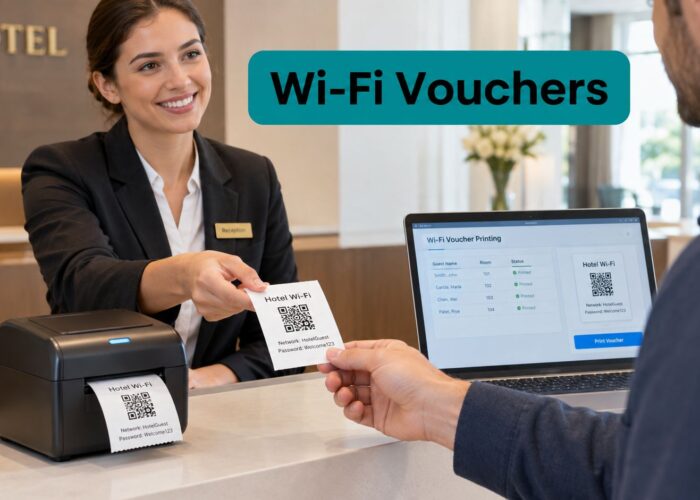
A hotel guest arrives after a long journey, opens a phone, and expects Wi-Fi to work immediately. Instead, they face a login page, an unfamiliar access process, and no clear answer about whether to use a room number, email address, QR code, or printed pass. At a retail counter, a customer may have the same problem, while a campus visitor might not have an institutional account at all.
Voucher printing services solve a practical part of that problem. A physical voucher gives staff and visitors a clear access credential, while a captive portal and authentication platform handle validation, policy enforcement, and session control in the background. The result is a bridge between a familiar printed handout and modern Wi-Fi security, including Cisco Meraki, IPSK, EasyPSK, social login, and social Wi-Fi.
Why Voucher Printing Still Matters for Modern Wi-Fi Access
Printed vouchers aren't just paper coupons. In a well-designed guest Wi-Fi system, the voucher is the physical representation of a controlled digital identity. A receptionist, event coordinator, retail associate, or campus administrator can hand someone a code that maps to a defined access policy without exposing the shared network password.
That distinction matters in hotels and venues where visitors need immediate help. A guest may not want to create an account, connect a social profile, or troubleshoot a portal on a small phone screen. A printed card with a short code and a QR option gives them a straightforward fallback. Staff can explain what the credential does, where to enter it, and what to do if the device doesn't connect.

The model has a longer history than many IT teams assume. Printed voucher systems have been used in commercial printing for at least three decades, and in 1998, OPTYS reported printing Sodexo allowance vouchers among its “most important jobs,” demonstrating that voucher production was already part of large-scale business form and secure-document work. The OPTYS historical milestones also show how this area developed toward secure printing and controlled production.
Physical access credentials in a digital-first environment
Digital issuance has expanded, but it hasn't eliminated the need for printed access. UK market reporting from the Gift Card and Voucher Association found that digital gift cards represented 42.7% of sales in 2023 H2, compared with 18.7% in 2019 H2, while in-store channels still represented 54.0% of B2C voucher and gift-card sales in 2024 H1. Those figures come from the association's voucher and gift-card market reporting.
For Wi-Fi operators, the lesson isn't to choose print over digital. It's to support both. A portal can offer social login, SMS, SAML, QR codes, payment access, and voucher redemption, while staff retain a printed option for guests who need assistance or arrive without a convenient digital identity.
A venue may also use printed vouchers for premium access, conference registration, temporary contractor connectivity, or a retail promotion. The code can be issued locally, printed through a connected workflow, and validated by the same authentication service that handles digital users.
Practical rule: Treat the printed voucher as a controlled credential, not as generic promotional material.
Operators who need a deeper explanation of the underlying model can review this overview of a voucher system for guest access. The important design question is whether the printed item connects cleanly to authentication, expiry, policy assignment, and redemption records.
How Voucher Printing Integrates with Captive Portals and IPSK
The simplest way to understand the workflow is to compare a voucher with a hotel room key. The key doesn't make the entire building open to the guest. It grants a defined type of access, and the property can deactivate or replace it when necessary. A Wi-Fi voucher should work the same way.
A typical workflow looks like this:
- Generate a credential. The access platform creates a unique voucher code and assigns its intended duration, bandwidth policy, user category, or network role.
- Print the credential. The code appears on a card, receipt, ticket, or booklet, often alongside a QR code and basic instructions.
- Present the captive portal. The guest joins the guest SSID and is redirected to a branded login page.
- Validate the code. The portal checks the voucher against the authentication service and confirms whether it is active, unused, expired, or already redeemed.
- Apply the network policy. The system authorizes the session and can associate the user or device with the appropriate access controls.

Where IPSK fits
Identity PSK, also called Dynamic PSK, Private PSK, or Multi-PSK, gives each user or device a unique Wi-Fi password on the same SSID. A RADIUS server can dynamically assign user-specific policies, bandwidth limits, and Layer 2 VLAN tags, as described in this overview of identity-based Wi-Fi security.
That allows an operator to keep a shared guest SSID while avoiding one universal password for every visitor. A voucher can act as the initial enrollment or authorization mechanism, after which the platform provisions or associates the appropriate individual pre-shared key.
The distinction between IPSK and EasyPSK matters operationally. EasyPSK is often used as a simpler way to distribute individual credentials, while IPSK commonly refers to identity-aware policy assignment through an authentication service. The right choice depends on the network controller, RADIUS design, device support, and the degree of segmentation the venue needs.
Cisco's guidance describes Identity PSK as a process where the WPA pre-shared key changes according to the connecting client's identity and the AAA server returns the specific key after authentication. It also warns operators not to enable captive portal bypass and to use valid certificates on the portal page. Those details are covered in Cisco's Identity PSK guidance.
For teams planning this architecture, IPSK with RADIUS authentication provides useful terminology for mapping the printed credential to the live authorization process. The portal should remain part of the control path, not an optional screen that devices can bypass.
Choosing Between On-Premise Cloud and Hybrid Voucher Workflows
The right printing workflow depends less on fashion and more on how your staff issue access. A hotel with a busy front desk may need local printing during check-in. A retailer with many locations may prefer centralized generation and reporting. A university may combine centrally managed policies with local output for conferences, visitors, and temporary events.
| Deployment Model | Best For | Latency | Security Control | Scalability |
|---|---|---|---|---|
| On-premise | Hotels, event venues, and sites issuing credentials at a service desk | Low when local systems are available | Strong local control, with more responsibility for device and stock management | Suitable for individual sites and controlled local operations |
| Cloud | Multi-site retail, distributed teams, and centrally governed programs | Depends on internet availability | Centralized policy, templates, and audit access | Well suited to consistent management across locations |
| Hybrid | Campuses, hotel groups, and organizations needing central policy with local printing | Low at the point of issue when local printing is available | Central governance with venue-level operational control | Flexible for mixed environments |
On-premise printing
Local printing is useful when staff need to issue a credential immediately. It can reduce dependence on a remote fulfillment process, but the venue must secure the printer, control blank stock, maintain templates, and train employees. If a printer jams or a local workstation fails, the front desk needs a fallback process.
Cloud generation
Cloud-managed voucher creation makes it easier to standardize branding, expiry rules, role mapping, and reporting across sites. It also supports remote administration, which is valuable for retail groups and education networks. The trade-off is that staff depend on internet connectivity and a reliable connection to the service at the moment they generate or print a pass.
Organizations that mail printed materials or need centralized print fulfillment can also evaluate a PostalForm print and mail service as part of a broader distribution process. That type of service addresses physical delivery, while the Wi-Fi platform still needs to manage credential status and redemption.
Hybrid operations
Hybrid designs usually work best when the IT team manages policy centrally but local staff handle the guest interaction. A campus network, for example, can define visitor roles centrally while a department prints event vouchers locally. A hotel group can maintain consistent authentication rules across properties while allowing each property to use its own printer and branded instructions.
Use cloud versus server deployment guidance to test the decision against network reliability, staff ownership, printer access, and reporting requirements. Don't choose cloud or on-premise based only on infrastructure preference. Match the design to the person who must issue access at the busiest point in the guest journey.
Integration Requirements for Cisco Meraki and Splash Access
A printed voucher becomes useful only when the surrounding systems agree about identity, policy, and status. In a Cisco Meraki environment, the integration normally includes the wireless dashboard, captive portal configuration, authentication services, the voucher-generation process, and the operational system that records the transaction.
The portal should present a clear redemption form, support the venue's branding, and provide a QR path for mobile users. It may also offer social login or social Wi-Fi for visitors who prefer a digital sign-in, while retaining vouchers for guests, contractors, and campaign-specific access.

Core integration points
- Meraki dashboard access: Establish the appropriate administrative and API workflow for synchronizing voucher records, provisioning users, and retrieving usage information.
- Captive portal fields: Configure the splash page so a guest can enter a voucher code without confusing it with a room number, loyalty ID, or social-login credential.
- IPSK or EasyPSK policy: Confirm that the selected SSID and authentication service support the intended per-user or per-device credential model.
- Print template design: Include the access code, QR option, expiry guidance, support instructions, and any restrictions that staff must explain.
- Role mapping: Associate voucher categories with appropriate bandwidth limits, VLAN assignments, or access duration.
- Reporting: Send redemption and session records into the systems used by IT, operations, marketing, or customer support.
Sector-specific connections
Retail operators may connect voucher issuance to a POS workflow, loyalty program, coupon campaign, or payment gateway. A paid Wi-Fi service needs the portal, billing process, and network authorization to agree on whether payment completed successfully before access is granted.
Corporate BYOD and education environments often need a different onboarding path. Guest Wi-Fi captive portals can support SAML integration, and SAML is identified as a fit for corporate BYOD and education use cases in this captive portal terminology guide. That lets staff or students use an existing identity system, while visitors can use sponsorship, QR, SMS, or printed vouchers.
Cisco's security guidance is especially relevant during testing. The AAA server must return the correct identity-specific key, the portal certificate must be valid, and captive portal bypass shouldn't be enabled. A polished splash page doesn't compensate for an authentication path that devices can avoid.
Teams evaluating the specific workflow can review the Cisco Meraki voucher system. Check the complete path, from code creation and printing to portal redemption, policy assignment, logging, and revocation, before rolling it out to guests.
Vertical-Specific Strategies for Hotels Retail Education and Healthcare
The same printed credential can serve very different purposes depending on who issues it and who redeems it. A hotel needs fast service and clear separation between rooms, staff, and visitors. A retailer may want Wi-Fi to support engagement and loyalty. A campus needs identity federation and guest sponsorship. Healthcare operators need especially careful separation between public connectivity and sensitive systems.
Hotels and resorts
At a hotel front desk, the printed voucher can support guest Wi-Fi, conference access, or a premium connectivity tier. Staff can issue a credential during check-in and include a QR code for guests who want faster mobile entry. The network should keep guest traffic separate from property systems, staff devices, payment terminals, and building equipment.
Opera Micros integration may help hospitality teams connect access issuance with existing guest-service workflows, but the operational test is simple: can a receptionist issue, explain, replace, and revoke access without calling the network team?
Retail and shopping centers
Retail Wi-Fi can combine voucher access with social login, social Wi-Fi, loyalty enrollment, or a location-specific offer. A printed card may be handed out at a service desk, included with a purchase, or used for a defined campaign. The business should make the consent and marketing steps clear instead of hiding them behind a mandatory Wi-Fi login.
Geo-fenced coupons can add value, but only if redemption rules are easy for staff to verify. POS integration should identify whether a voucher grants connectivity, a promotion, or both, because those credentials may require different expiry and audit rules.
Education and corporate BYOD
Universities often need separate workflows for students, employees, contractors, parents, conference attendees, and campus visitors. SAML-based authentication can serve staff and student identities, while printed vouchers and sponsorship approval cover guests who don't have an institutional account. Dormitory networks may also use individual credentials to reduce the impact of password sharing.
Corporate BYOD environments face a similar split. Employees may authenticate through an identity provider, while visitors receive a voucher or sponsor-approved access. A single guest SSID can still support differentiated policies when the authentication service and network controller apply the right role.
Healthcare and senior living
Healthcare and senior living operators should keep visitor Wi-Fi away from clinical, administrative, building-management, and patient-care systems. Printed vouchers can help reception teams provide controlled access without sharing a permanent password, while portal messaging can direct patients and visitors to approved services.
The same principle applies to patient portal access. The Wi-Fi credential must not be treated as proof of clinical identity, and the network should not imply that connecting to guest Wi-Fi authorizes access to health information. Segmentation, careful portal wording, staff training, and clear escalation procedures matter more than decorative voucher design.
Security Features and Fraud Prevention in Voucher Production
A professional voucher-printing program needs two security layers. The first protects the physical credential from copying or alteration. The second controls what happens when someone presents that credential to the captive portal.
Plain paper is often the wrong choice for a program exposed to public distribution. Security-oriented providers use options such as coated card stock, security paper, synthetic paper, anti-counterfeiting paper, watermarked stock, and tear-apparent materials, as described in this security voucher printing overview. The material affects durability, handling, and the difficulty of creating a convincing duplicate.
Physical controls
A tear-apparent stock can reveal a colored center when ripped, making alteration visible. Security paper can support additional features such as invisible UV inks, microtext, holograms, and serial numbering. These features don't replace digital validation, but they give staff a way to identify suspicious stock before a code reaches the network.
A print vendor should also explain how it controls blank inventory, rejects, reprints, and delivery records. If an unused batch can disappear without an accountable record, the authentication system may be technically sound while the issuance process remains exposed.
Digital controls
Every code should have a defined state, such as issued, active, redeemed, expired, revoked, or replaced. Barcode and QR tracking can speed up entry, but the portal must still validate the underlying credential. A copied QR code should not create unlimited access if the original voucher was already consumed or assigned to a specific policy.
Security principle: A serial number identifies a voucher. It doesn't, by itself, prove that the voucher is legitimate or unused.
Reconciliation connects issuance to redemption. Operations teams should compare what staff printed, what guests redeemed, and what the authentication platform recorded. This helps expose duplication, misuse, stock leakage, and channel leakage. Expiry handling also needs a clear owner. An expired credential should fail predictably, with a support message that tells the user how to obtain valid access.
Use this unauthorized access prevention guidance when reviewing the complete control model. Ask vendors how they handle revocation, audit trails, role changes, failed redemption attempts, and portal security, not just whether they can print a logo and a QR code.
Frequently Asked Questions About Voucher Printing Services
Can printed vouchers coexist with social login and EasyPSK?
Yes. A captive portal can offer voucher redemption, social login, social Wi-Fi, SMS, or sponsored access as separate paths. EasyPSK or IPSK can then provide the network credential and policy appropriate to the authenticated user or device.
What should happen when a voucher expires?
The authentication service should reject the credential and display a clear message. Staff need a defined replacement process, especially in hotels, campuses, and event venues where a guest may have a legitimate reason for needing renewed access.
What happens if someone shares or copies a code?
The system should enforce the voucher's status and policy rather than trusting the printed code alone. Redemption records, device association, expiry rules, and revocation allow the operator to investigate or disable suspicious use.
How do teams reconcile vouchers with billing or CRM systems?
Connect issuance and redemption records to the relevant operational system. Retailers may associate access with POS or loyalty activity, while hotels may connect it to guest-service workflows. Keep marketing consent separate from basic network authorization.
Is a QR code enough?
No. A QR code improves convenience, but it doesn't provide security by itself. The portal still needs server-side validation, expiry handling, role assignment, logging, and a secure certificate configuration.
Splash Access provides Cisco Meraki guest Wi-Fi workflows that support captive portals, voucher printing, IPSK authentication, QR-code onboarding, social Wi-Fi, and integrations for hospitality, retail, education, and corporate BYOD environments. Review the available Splash Access options and map the voucher, portal, authentication, and reporting requirements before choosing your deployment model.