Option 150 is the DHCP option that gives IP phones one or more IPv4 TFTP server addresses so they can download their configuration.
Why can a phone get a perfectly usable IP address and still fail to start? Because receiving an address and finding the right provisioning server are separate jobs. A successful lease proves that DHCP worked, but it doesn't prove the phone can retrieve its files.
That distinction matters on Cisco and Meraki networks where desk phones, staff devices and guest Wi-Fi share infrastructure. The reliable approach is to follow the phone's boot path, test each dependency, and keep provisioning separate from captive portals and authentication.
Option 150 at a Glance
DHCP option 150 provides the TFTP server addresses that Cisco IP phones and other compatible VoIP endpoints use during startup. The important detail is its format: it carries addresses, not a website or configuration filename.
RFC 5859 defines option 150, its four-octet IPv4 address format, the request mechanism through option 55, and its preferred use over option 66 when both are supplied.
Option 150 key attributes
| Attribute | Value | Why It Matters |
|---|---|---|
| Option code | 150 | Identifies the TFTP server list in the DHCP reply |
| Standard | Standardized IPv4 TFTP server address option, RFC 5859 | Gives vendors and admins one shared definition |
| Payload | One or more IPv4 addresses, four octets each | Length must be a multiple of four |
| IP version | DHCPv4 only | IPv6 phones need another provisioning method |
| Client request | Code 150 listed in option 55 | Phones should ask for it at boot |
| Typical devices | Cisco IP phones and other VoIP endpoints | Phones use it to fetch configuration and firmware |
| Precedence | Preferred ahead of option 66 when both are present | Avoids conflicting TFTP settings |
Read the payload row carefully. A hostname won't fit this field, and neither will a guest login URL. The server should list addresses in preference order, although the endpoint's implementation determines how it attempts them.
The request direction also causes confusion. The phone normally asks for the option through its Parameter Request List, rather than sending a populated TFTP address list itself.
On voice VLANs in offices, campuses, hotels and healthcare sites, check both the request and the returned payload before investigating configuration files. For IPv6 endpoints, plan a separate supported provisioning method.
How a Phone Boots and Where to Test Each Stage
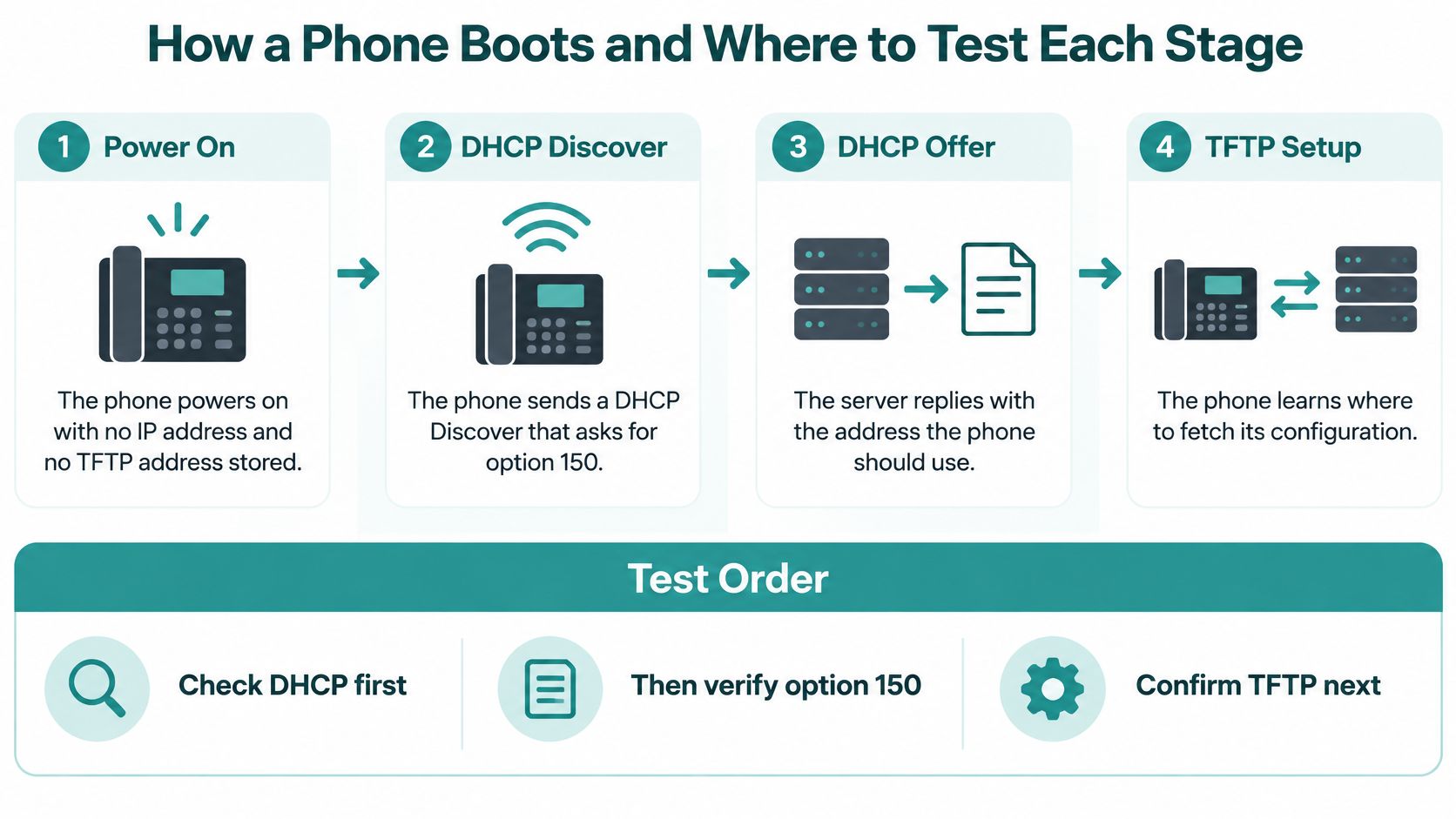
What must happen between powering on a phone and seeing it register? The phone follows a chain of network and provisioning steps, and each one depends on the previous stage working.
Cisco's DHCP options documentation explains that an unconfigured Cisco IP phone can request TFTP information through option 150 or 66, then use the response to retrieve its configuration.
- Power on. The phone starts without a usable IP address or stored TFTP destination.
- Discover DHCP. It broadcasts a request for network settings and the relevant provisioning option.
- Accept the lease. The DHCP exchange provides an address, gateway and TFTP information. Without a successful reply, the phone has no usable lease.
- Retrieve configuration. The phone contacts an advertised TFTP server. If it cannot reach that destination, configuration retrieval stops.
- Check firmware. If the configuration calls for different firmware, the phone retrieves it. Missing or incompatible files can lead to repeated startup attempts.
- Register. After loading the required files, the phone contacts its call-control system.
Match each test to a dependency
Start with a packet capture of the DHCP exchange. Check that the phone requests the provisioning option and that the reply supplies the expected information. Then inspect the voice VLAN's routing table and gateway, followed by firewall or ACL rules that govern traffic to the provisioning server.
Test TFTP retrieval from the voice VLAN. A ping from an administrator's workstation does not confirm that the phone's network can retrieve files. Check that the expected configuration filename exists, confirm the firmware matches the endpoint, and inspect call-control registration status only after the earlier stages pass.
Stop at the first failed dependency. Changing a later setting cannot repair an earlier failure.
If the phone receives an address but has no configuration, focus on the handoff from DHCP settings to file retrieval. After a move to another building, repeat the DHCP discovery, lease and TFTP checks from the phone's new location.
Option 150 Versus Option 66
When you have a primary and backup TFTP server, option 150 is the natural fit. Option 66 identifies a single destination and can use a hostname, which makes DNS part of the provisioning path.
The comparison below separates the protocol format from a particular platform's limit. The address limit shown for ASA is an implementation constraint, not the definition of every possible option 150 payload.
Option 150 and option 66 side by side
| Feature | Option 150 | Option 66 |
|---|---|---|
| Servers supported | A list of addresses, primary and secondary | One server address or hostname |
| Address format | IPv4 addresses only | IP address or hostname |
| Best fit | Sites with primary and backup TFTP servers | Single TFTP server deployments |
| Precedence | Preferred when both options are present | Fallback when option 150 is absent |
| Maximum addresses per option | Two in the Cisco ASA implementation | One |
| Sample line | option 150 ip 192.168.10.1 |
option 66 ascii 192.168.10.1 |
The sample lines are IOS-style syntax, not interchangeable commands for every DHCP platform. A Windows field, Meraki dashboard entry and ASA command each need their own input format.
Use option 66 as a fallback only where endpoint compatibility calls for it. Don't add it automatically with a different destination just because the configuration interface allows both.
A particularly misleading mistake is entering a captive-portal address into a TFTP field. Neither a portal URL nor a firmware filename belongs in an IPv4 address list.
Before choosing an option, make three checks: count the provisioning servers, confirm the accepted address format, and establish which setting the phone prefers. If both options remain enabled, keep their intended destinations consistent.
Configuring Option 150 on Cisco IOS and ASA
Start with the DHCP pool that serves the phones. A correct command in the wrong pool won't help an endpoint.
Cisco IOS voice pool
For a representative voice subnet, enter these commands in order:
- Create the pool:
ip dhcp pool VOICEopens the voice DHCP pool. - Set the subnet:
network 192.168.10.0 255.255.255.0identifies the addresses this pool serves. - Provide the gateway:
default-router 192.168.10.1tells phones where to send off-subnet traffic. - Advertise TFTP:
option 150 ip 192.168.10.1supplies the provisioning destination.
In global configuration, use ip dhcp excluded-address 192.168.10.1 to protect the gateway address. Exclude other static infrastructure addresses too, then save with copy running-config startup-config.
For a primary-and-backup deployment, keep the same pool and replace the single-server entry with option 150 ip <primary-TFTP-address> <secondary-TFTP-address>. Substitute actual server addresses and put the preferred destination first.
Don't infer that the gateway must also run TFTP just because this example uses the same address. The router and provisioning server perform different jobs, even when they happen to share an address in a design.
Cisco ASA interface DHCP
On ASA, dhcpd address <first-client-address>-<last-client-address> <voice-interface> defines the lease range, while dhcpd enable <voice-interface> enables DHCP service there. The command dhcpd option 150 ip <primary-TFTP-address> <secondary-TFTP-address> supplies the TFTP destinations.
Cisco's ASA DHCP guide specifies a maximum of two TFTP addresses for this implementation and distinguishes that information from the default gateway supplied through option 3.
Confirm the command's scope and interface behavior on your ASA release before applying it. Finally, check the lease table, inspect a phone's DHCP reply and test each advertised server from the voice VLAN.
Configuring Option 150 on Windows, Linux and Meraki
The server interface changes, but the placement rule doesn't: attach provisioning settings to the voice scope or subnet. A server-wide default makes it harder to control which devices receive them.
Windows and Linux DHCP services
In Windows DHCP Server, create a predefined custom option using the TFTP address-list format. Select an IP-address data type with array support, then populate it under the voice scope's options rather than the server-wide options.
For ISC dhcpd, define the field with option tftp-server-address code 150 = array of ip-address;. Inside the phone subnet declaration, add option tftp-server-address <primary-TFTP-address>, <secondary-TFTP-address>;, replacing the placeholders with real addresses.
For dnsmasq, associate the voice range with a tag and apply dhcp-option=tag:voice,150,<primary-TFTP-address>,<secondary-TFTP-address>. The tag is important: it prevents a setting intended for phones from becoming an accidental default for unrelated ranges.
Meraki dashboard configuration
On a Cisco Meraki MX, open Security & SD-WAN > Configure > DHCP, select the voice VLAN and add a custom DHCP option. Choose the IP-address type, enter the TFTP address list in the format supported by the dashboard, and save.
If the appliance relays DHCP instead of serving leases, configure the option on the upstream DHCP server. Adding a setting to a DHCP service that phones never contact won't change their replies.
Use this deployment routine alongside the DHCP server configuration guide:
- Locate the voice scope and identify the server answering its requests.
- Create the address-list option, using IP data rather than text.
- Enter destinations in preference order.
- Save and renew a test phone's lease.
- Inspect its DHCP ACK before expanding the change.
Laptops may ignore unfamiliar provisioning fields, but that isn't a reason to send phone settings across every scope.
Voice VLANs and DHCP Relay Design
A segmented network introduces another dependency: the phone's broadcast may need help reaching its DHCP server.
Cisco's multiple-network DHCP guidance describes voice VLAN 110 and the need for a pool matching the relay-agent address; its representative voice network uses 192.168.10.0/24, gateway and TFTP address 192.168.10.1, separately from the data network 10.10.10.0/24.
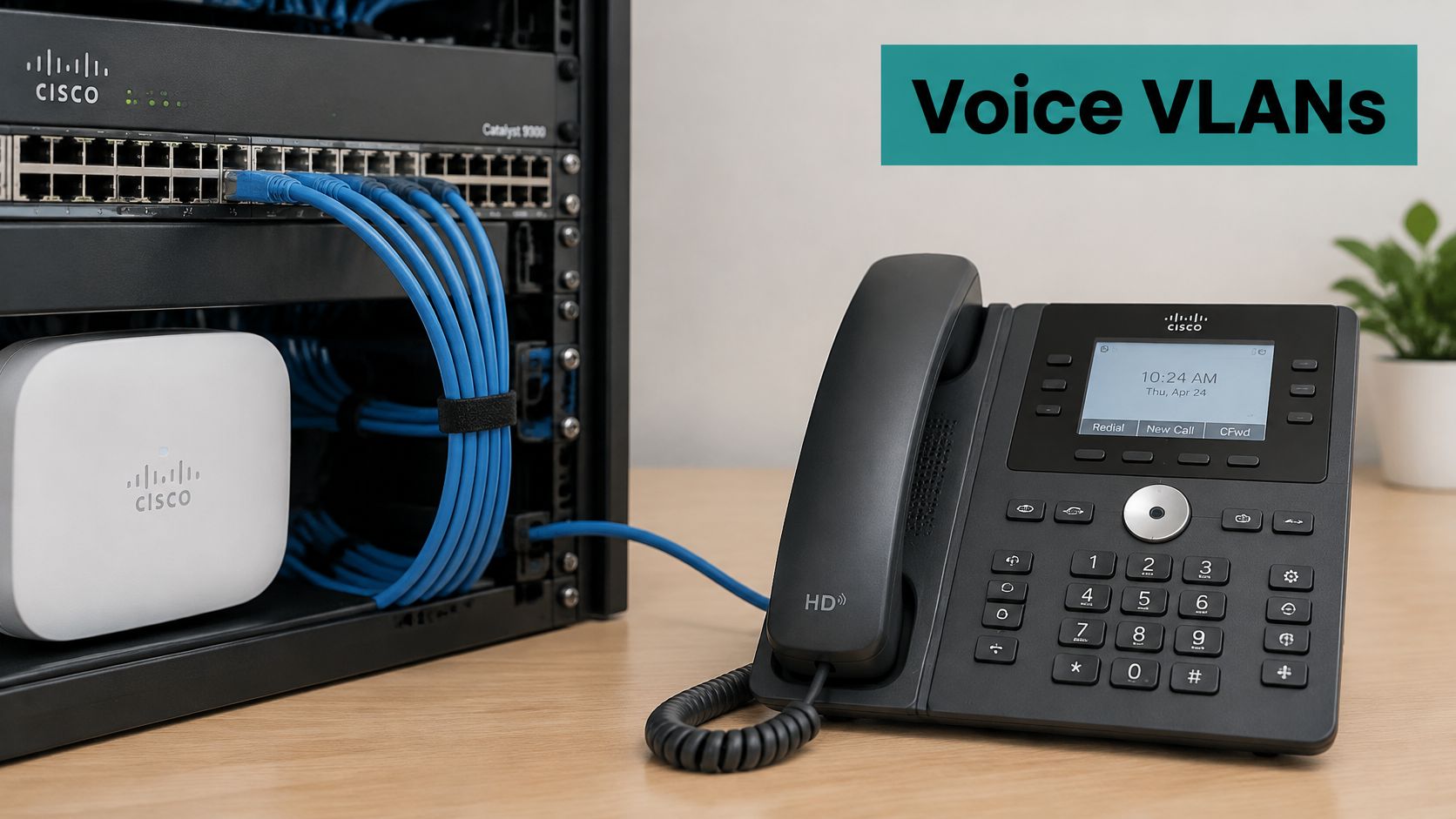
The phone broadcasts on its voice VLAN. The first-hop router or switch forwards that request using ip helper-address, and the DHCP server uses the relay information to choose the appropriate pool.
The reply returns through the relay. Only then does the phone attempt to reach its provisioning destination.
| Where to inspect | Design mistake |
|---|---|
| Voice DHCP scope | Lease settings exist, but the TFTP option is missing |
| First-hop relay | Helper points to the wrong DHCP server |
| Routed provisioning path | TFTP server is on another LAN without usable routing or permitted traffic |
Use the Cisco IP helper configuration guide when checking the forwarding path. Don't add a helper because TFTP is remote; DHCP relay forwards DHCP traffic, not the subsequent file transfer.
In corporate BYOD designs, place personal devices on their own scope and keep guests on a VLAN with its own portal policy. A correct DHCP definition is ineffective if requests and replies can't traverse the voice path.
Reading the DHCP ACK in a Packet Capture
Before editing a scope, prove what the phone received. Capture traffic on the phone VLAN or a suitable relay observation point, then select the completed exchange for that phone.
Use Wireshark's DHCP protocol filter and follow the client identity through discovery, offer, request and acknowledgement. The Wireshark packet capture guide helps you choose an observation point that can see the exchange.
Inspect the returned option
Expand the DHCP ACK, locate the TFTP address-list option and compare its decoded destinations with the approved provisioning plan. Each encoded IPv4 address occupies a complete address-sized group, so a malformed length or unexpected text deserves investigation.
Also inspect the phone's Parameter Request List. The request explains what the client asked for; the ACK establishes what the server supplied.
| Capture finding | What to investigate |
|---|---|
| TFTP option absent from ACK | Missing scope setting, request-dependent behavior or the wrong responding server |
| Option returned but not requested | Server policy and whether the phone accepts unsolicited options |
| Unexpected TFTP destination | Stale scope value, wrong pool selection or an unintended DHCP responder |
| Correct destination returned | Routing, access rules, TFTP service and file availability |
An absent option doesn't prove that the scope lacks it. The server may be using another pool or may omit options the client didn't request.
A correct ACK proves delivery of the setting. It doesn't prove delivery of the configuration file.
Once the reply is correct, stop changing DHCP and test the next dependency.
Fixing Phones That Get an IP but No Configuration
A phone with a lease but no configuration needs a focused investigation, not a wholesale DHCP rebuild. Match its behavior to a likely cause, then verify that cause before changing anything.
Cisco's DHCP troubleshooting guidance supports checking the actual returned options, the relevant scope and gateway, relay forwarding, and access to the advertised TFTP destinations.
Phone symptoms, causes and fixes
| Symptom | Likely Cause | Fix |
|---|---|---|
| Phone gets an IP address but no configuration | Option 150 missing from the voice scope | Add primary and secondary TFTP addresses on the DHCP server |
| Phone loads config from an old server after moving | Stale TFTP address in option 150 | Point the new site's scope at its intended provisioning servers |
| TFTP hostname never resolves | DNS cannot resolve the TFTP name | Repair DNS or use an IP address in the supported provisioning setting |
| Requests reach DHCP but no reply returns | Relay, helper or return-path problem | Correct ip helper-address and verify routing on the phone VLAN |
| Phone never asks for option 150 | Code 150 absent from option 55 | Check the phone's provisioning mode and support for code 150 or 66 |
| Two TFTP settings disagree | Option 66 and option 150 identify different servers | Remove the unused option or align their destinations |
Apply the change at the right device
Change missing or stale values on the DHCP server. Correct relay forwarding on the router or Layer 3 switch, and investigate missing requests on the phone, including its firmware and provisioning configuration.
A hostname failure belongs to a hostname-based setting, not the address-only TFTP list. Keep that distinction clear when reading the phone's status screen.
After a scope change, renew the lease or reboot the test phone so it receives fresh settings. Routing or ACL changes can be tested immediately with a new transfer attempt, although the phone may need a restart to retry.
If the lease exchange itself fails, use the DHCP server not responding checklist. Otherwise, test every advertised TFTP destination from the voice VLAN before investigating registration.
Keeping Option 150 Apart from Guest Wi-Fi Portals
Does changing a phone's DHCP provisioning setting change the guest splash page? No. Captive portals and phone provisioning solve different problems.
The Meraki captive portal solution guide distinguishes click-through access from sign-on access and identifies authentication backends including RADIUS, Active Directory and LDAP.
In click-through mode, guests might accept terms, see branding or complete a survey. In sign-on mode, an authentication service validates credentials before the network grants the appropriate access.
An integrated external portal can support social login or social WiFi journeys for retail and hospitality guests. Corporate BYOD and education users can instead follow directory-based authentication where the deployment supports it.
Where IPSK and EasyPSK belong
IPSK and EasyPSK sit on the wireless access-control side. Where supported, individual or device-specific pre-shared keys provide an alternative to handing everyone the same wireless password.
They don't populate a phone's TFTP field, and the TFTP field doesn't issue a private wireless key. Document the supported wireless platform and authentication workflow independently from the voice provisioning plan.
- Keep phones off the guest SSID. Use a dedicated voice network with the access rules the endpoints require.
- Choose the portal through guest access policy. Don't expect a phone provisioning option to control which splash page appears.
- Maintain separate operational records. Record DHCP and TFTP ownership separately from portal, identity and key-management ownership.
This separation makes fault reports more useful. A guest who can't sign in and a phone that can't fetch firmware may share an access point, but they need different tests.
Option 150 in Education, Retail and BYOD Networks
The option's meaning stays the same across sectors. What changes is which devices need it and which access policy surrounds them.
For an education campus, a practical design places desk phones on a managed voice scope with resilient provisioning. Student, dorm and staff devices use their own access policies rather than inheriting telephone settings.
Option 150 by sector and network type
| Environment | Option 150 Needed? | Where Access Control Lives | Typical Setting |
|---|---|---|---|
| Education campus with IP phones | Yes, for compatible phones on the voice VLAN | Student and staff VLANs with IPSK where supported | Voice scope with primary and backup TFTP servers |
| Retail store with counter phones | Only if the phones use this provisioning method | Guest captive portal with social login or social WiFi | Separate voice scope per store |
| BYOD corporate office | Only for compatible desk phones | Directory login or EasyPSK for personal devices | Desk phone voice scope, BYOD on its own scope |
Apply separation to each environment
In retail, a counter phone needs a dependable path to call control, while a shopper needs a clear guest onboarding journey. A portal campaign should not require changing the phone scope.
In a BYOD corporate office, an employee's personal device belongs under the organization's personal-device policy. Don't classify it as a voice endpoint merely because the employee also has a desk phone.
For education, make the distinction explicit in network documentation: classroom and administrative phones have provisioning dependencies, while student access depends on identity, keys and VLAN assignment. The VLAN setup guide can help organize those boundaries.
Avoid a shared scope that pushes the same provisioning settings to unrelated devices. Many clients will ignore them, but administrators then lose a clean boundary for troubleshooting and change control.
Confirm Your Voice and Guest Wi-Fi Design Before You Deploy
Validate a complete phone boot before expanding the deployment. Write down the voice scope, gateway, primary and backup TFTP destinations, relay path and the team responsible for the configuration files.
Confirm that the provisioning option applies to the intended voice scope on Cisco or Meraki. Keep staff, BYOD and guest networks under their own access policies rather than treating one shared DHCP configuration as a universal onboarding solution.
Make authentication choices separately
Our EASYPSK for Large Deployments and Cisco Meraki IPSK Solution address deployments that need individual-key management. Our product range also includes IPSK MDU Solution and DUO secure multi-factor authentication for Meraki WiFi, giving administrators distinct choices for residential access and stronger staff sign-in.
Optional guest access can quickly authorize users onto the Meraki network and collect a name and email address where required. Choose that collection deliberately, according to the venue's onboarding requirements, rather than mixing it into telephone provisioning.
Before rollout, complete these checks:
- Check the scope's format. Compare the configured field with the key-attributes table and confirm that the server sends address data.
- Test a real endpoint. Capture its DHCP exchange, retrieve its configuration from the voice VLAN and confirm registration.
- Validate guest onboarding separately. Only then add social login or social WiFi to the guest journey and test the resulting access policy.
Treat the TFTP destination as provisioning metadata, not a security control. Restrict who can change DHCP settings and which networks can reach the provisioning service.
Splash Access offers Cisco Meraki captive portals and authentication solutions for guest, staff and personal-device access. Visit Splash Access to discuss a design that keeps phone provisioning separate from guest onboarding, individual keys and stronger staff authentication.