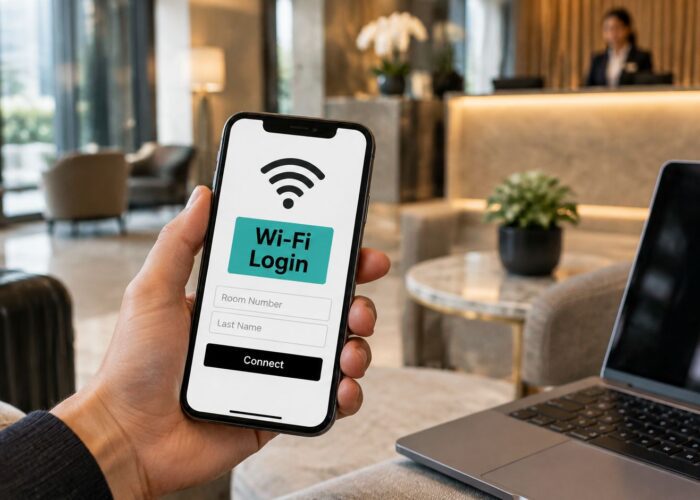
A guest is standing in your hotel lobby with a laptop open and a phone in hand. They've found the guest Wi-Fi, entered their mobile number, and they're waiting for a text that hasn't arrived. Reception wants to help, but nobody knows whether the problem is the wireless network, the portal, or the mobile carrier.
Captive portal SMS authentication works well when you treat it as a guest onboarding step, not your entire security strategy. The useful design question isn't just how to send a code. It's how to grant appropriate access, handle failed delivery, and choose a better login method for people who return every day.
How SMS Sign-In Works on a Captive Portal
Guests get online only after the portal validates their SMS code and the gateway authorizes their session. Joining the wireless network alone shouldn't grant unrestricted internet access.
Say a hotel guest selects your guest SSID on their phone. In a Cisco Meraki deployment, the WLAN infrastructure directs them to the Splash Access portal while keeping their device in a short pre-authentication session. The mobile messaging service sends the text, but it doesn't decide whether the device is captive.
That separation matters. The IETF captive-portal architecture separates portal discovery, user interaction, and network enforcement, allowing the network to maintain control while an external verification service completes its job.
The guest journey should look straightforward even though several systems participate.
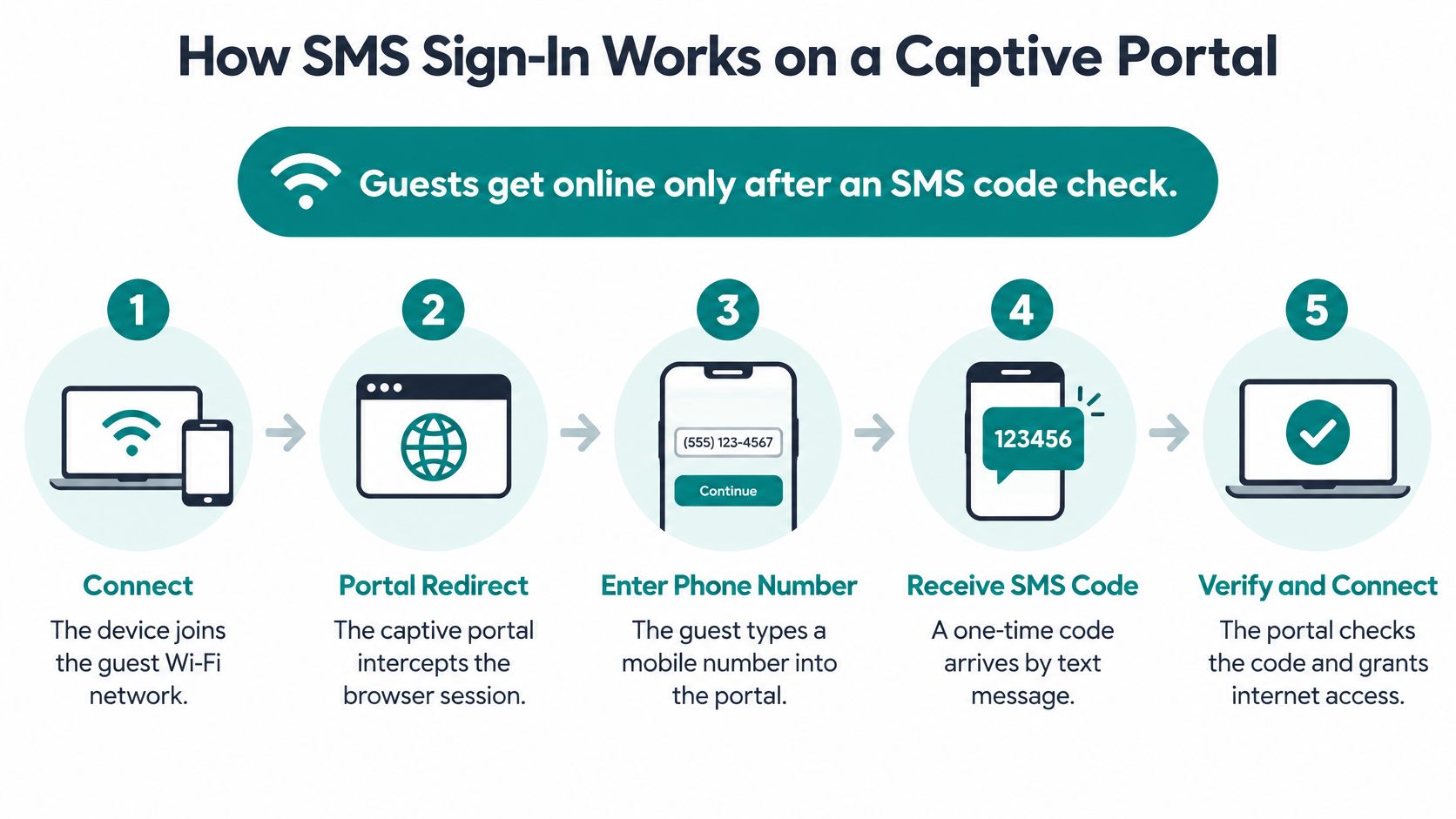
From joining the SSID to opening internet access
The visitor enters their number using a country-code selector. The backend normalizes it to E.164 format, checks issuance limits, and creates a verification transaction associated with that guest's current session.
The code must be random and single-use. Store its issuance time, expiry, attempt counter, and completion state server-side, rather than trusting values passed back by the browser.
Captive portal SMS sign-in flow by stage
| Stage | What the guest sees | What the system checks |
|---|---|---|
| 1. Connect | Guest joins the SSID and is redirected to the portal | Device is held in a short pre-authentication session |
| 2. Enter number | Guest types a mobile number | Number normalized to E.164 and checked against issuance limits |
| 3. Receive code | One-time code arrives by text message | Code is random, single-use and bound to this session |
| 4. Verify | Guest types the code into the portal | Attempt counter and expiry checked; repeated failures trigger backoff |
| 5. Authorize | Internet opens, usually with a time limit | Gateway revalidates authorization before unrestricted traffic is released |
On success, show a clear connected message and any relevant session limit. Don't leave the visitor staring at the code-entry form after authorization, wondering whether they should submit again.
Make failed delivery a supported journey
A delayed message mustn't create an indefinitely pending or accidentally authorized session. Keep resend controls visible, explain when another request is allowed, and offer a reception voucher or QR-based access route for roaming visitors, landline users, and guests without cellular service.
Practical rule: A guest who can't receive a text needs another legitimate way online, not instructions to borrow somebody else's number.
SMS remains widely used, but it's not a reason to neglect alternatives. Juniper Research forecast global SMS authentication traffic growth of 4% in 2024, compared with average annual growth of 10% during the preceding five years.
For the broader distinction between a guest verification step and stronger account protection, CloudOrbis Inc.'s CloudOrbis MFA guide for SMBs is useful context. Keep that distinction explicit when documenting your authentication solutions.
What an SMS Code Proves and What It Does Not
A correct code tells you that someone can receive messages sent to a number at that moment. It doesn't establish their full identity, prove they own the handset, or make their device trustworthy.
NIST's explanation of SMS authentication describes it as stronger than passwords alone, but vulnerable to interception, redirection, phone theft, and large-scale attacks. Don't confuse a successful text exchange with phishing-resistant authentication.
Match the control to the consequence
A SIM swap or unauthorized number port can transfer the ability to receive codes to somebody else. An industry summary of FBI SIM-swap reporting records 971 U.S. complaints and approximately $17.4 million in reported losses in 2025. The practical concern is that a valid telephone number can remain valid while its controller changes.
Use a risk-tiered design rather than declaring SMS either universally safe or universally unsuitable.
| Risk tier | Example | Appropriate control |
|---|---|---|
| Low | Guest internet and separately recorded consent | SMS possession check with isolated, time-limited guest access |
| Medium | Returning members with limited resources | Individual credentials and a restricted policy, with stronger verification where needed |
| High | Staff networks, administration, healthcare systems, payment workflows or customer accounts | Enterprise identity, passkeys or other stronger authentication appropriate to the resource |
For low-risk guest access, apply least-privilege VLANs, firewall isolation, session time caps, and issuance rate limits. SMS can discourage casual abuse, validate a contact point, and support repeat-visit analysis, but a phone number isn't a reliable count of individual people.
Protect the verification endpoint too
Throttle requests per number and originating IP, back off after repeated incorrect submissions, and detect request patterns spanning locations. Error messages shouldn't reveal whether a number belongs to an existing user.
For a plain-language explanation of the code exchange, SMS Activate's guide to text verification provides background. Our explanation of multi-factor authentication helps distinguish that exchange from a properly designed multi-factor login.
A text code can support a guest access decision. It shouldn't be the only thing standing between an unknown device and sensitive systems.
Before choosing the login screen, ask: what risk is this portal meant to control?
Choosing Guest Login for Education Retail and BYOD
Choose the method around the visit, not around the portal's feature list. One-off visitors may suit SMS, email, or social login. A personally assigned device that returns daily usually deserves recurring credentials such as IPSK or EasyPSK.
Shared phones need extra care. An SMS code may help somebody connect, but the number shouldn't automatically become that person's permanent identity.
A 2019 study of public Wi-Fi captive portals examined 67 hotspots and found that 27, or 40.3%, used social login or a registration page to collect personal information; 19 required registration before internet access. That's a useful historical example of data collection in public Wi-Fi, not a target your venue needs to copy.
Recommended guest login by venue type
| Venue | Primary login | Why it fits | Fallback |
|---|---|---|---|
| Hotel lobby | SMS code for visitors | Guests roam and carry their own phones | Reception voucher or social login |
| Retail store | Social login or email with a separate marketing opt-in | Low risk and high volume of short visits | QR voucher at checkout |
| Campus guest network | SMS code for visitors, device registration for students | Students need recurring, personal access | Device Registration Portal or IPSK |
| Corporate BYOD | IPSK or EasyPSK for staff devices, portal for visitors | Staff keys can be revoked one at a time | Passkey or enterprise single sign-on |
| Healthcare or senior living | Staff-issued voucher, SMS only for low-risk guests | Sensitive systems and residents who may lack a phone | Non-SMS route at reception |
Education needs separate visitor and student journeys
A visiting researcher can receive an SMS code and a time-limited session on a Cisco Meraki campus guest SSID. That doesn't mean students should repeat the same process whenever they arrive for lectures or return to their accommodation.
Students log in to the campus network with their unique SSID credentials through a simple captive portal, using any device. Students can also self-register their own devices through the Device Registration Portal using their student credentials.
For recurring access, assign credentials that follow the institution's enrollment and departure processes. A student leaving campus shouldn't trigger a password change for everybody else.
Make the helpdesk route obvious for devices that can't complete an interactive browser login. Device registration or individually issued keys are more manageable than asking students to improvise with shared credentials.
Retail should prioritize connectivity before offers
A shopper may already have a social account available on their phone, making social login a convenient option. Email can provide another route without demanding a mobile number.
Let the customer connect before presenting an optional offer. Keep the marketing box unticked, and don't make a social WiFi promotion look like a mandatory connectivity step.
A checkout QR voucher is useful when a customer doesn't want to use a social account or can't retrieve a verification message. Give store staff a repeatable issuing process rather than a shared password written beside the till.
For the wireless and portal setup decisions behind that experience, use our guide to setting up guest Wi-Fi.
Corporate BYOD needs lifecycle control
A contractor's laptop can receive an EasyPSK with access scheduled to end when the project does. Staff phones can use IPSK, while visitors remain on the captive portal.
Those are different populations with different access needs. Don't grant a visitor the staff policy because both devices passed a login screen.
Where enterprise single sign-on or passkeys provide an alternative identity route, connect that route to the intended network policy. A stronger login doesn't automatically configure the correct VLAN, firewall rules, or device permissions.
Hospitality and care settings need a human fallback
A hotel visitor may have a working phone but no usable roaming service. A healthcare visitor or senior living resident may have no mobile phone at all.
Reception-issued vouchers give staff a practical answer without collecting a number that isn't needed. Keep low-risk guest internet separate from clinical, administrative, and resident service systems.
Test alternatives under real conditions, not just beside the access point. The 12 network conditions to test from 99tests provide a useful starting point for checking how onboarding behaves when connectivity is imperfect.
Your fallback should cover more than a messaging outage:
- Roaming or poor signal: Offer a reception code or QR voucher without requiring another text.
- Shared or recycled numbers: Avoid using number possession as permanent proof of membership.
- Guests unable to use SMS: Provide an accessible staff-assisted route or another suitable login.
- Email and social alternatives: Confirm the necessary verification pages work before full authorization.
A weak deployment demands a number solely to build a promotions list. A workable one gives each visitor an appropriate, supported way to connect.
Where IPSK and EasyPSK Fit Beside the Portal
A captive portal is the front desk where visitors check in. IPSK is a personal key card for people who come back every day.
IPSK, also called Private Pre-Shared Key or EasyPSK in this access model, gives each user or device a distinct Wi-Fi key on a shared SSID. Administrators can associate that identity with an appropriate policy or VLAN instead of treating everybody who knows a communal password alike.
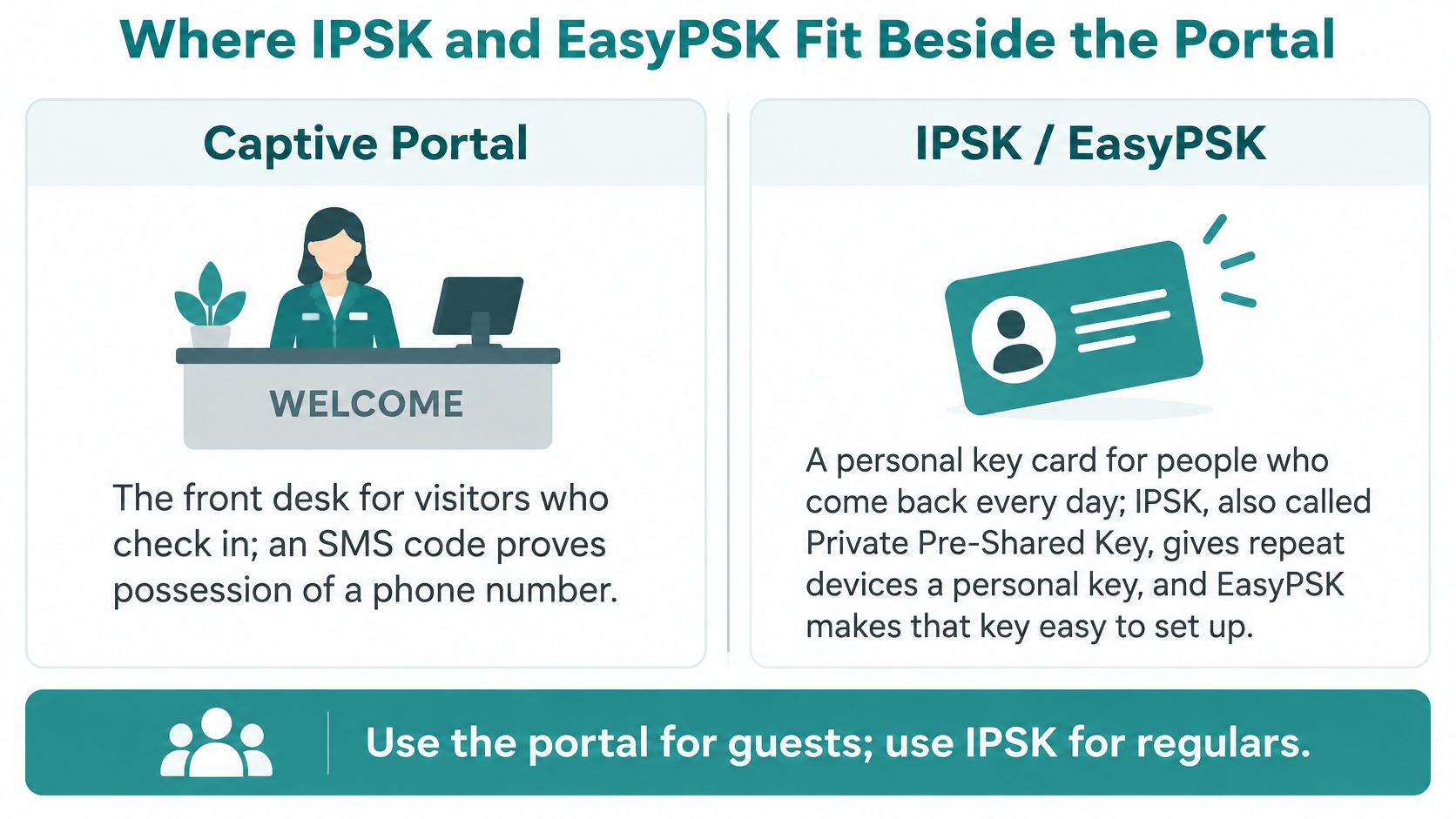
Compare credentials rather than login screens
The key distinction is what happens after somebody leaves. With an individual key, you remove that person's credential while everyone else's connection remains intact.
Our Wi-Fi security explanation distinguishes shared-password WPA2 Personal from WPA2 Enterprise, which uses 802.1X and a central authentication service such as RADIUS. Individual pre-shared keys provide another option for mixed-device environments where a full enterprise credential deployment isn't the right fit.
Wi-Fi access models compared
| Model | Key per person or device | Revoking one user | Best fit |
|---|---|---|---|
| WPA2 Personal | No, one shared password | Password changes for everyone | Small, low-stakes networks |
| WPA2 Enterprise (802.1X) | Yes, individual credentials checked through RADIUS, rather than a personal PSK | Revoked centrally | Managed corporate laptops |
| IPSK or EasyPSK | Yes, one key per user or device on one SSID | Only that key is removed | BYOD, student and contractor devices |
| Captive portal with SMS code | No, session access per guest | Session expires or is blocked | Visitors and short stays |
| Captive portal with social login | No, identity comes from a social account | Session expires or is blocked | Retail and hospitality guests |
Use each layer for its own job
WPA2 protects the wireless link. Individual keys reduce the operational exposure of shared passwords, while a captive portal handles guest registration, social login, or SMS verification. A portal login by itself doesn't encrypt an otherwise open wireless connection.
In Cisco Meraki deployments, that distinction supports corporate BYOD, student networks, retail staff devices, and temporary contractors without forcing all users through the same daily onboarding process. Plan policies around what each group needs, not merely which credentials their devices support.
The Cisco EasyPSK and IPSK management overview is a useful reference when evaluating that arrangement. Check credential issuance, expiry, and removal as carefully as the initial connection.
Decision test: If one person's access must end without changing anyone else's password, choose per-identity credentials rather than a shared password.
Privacy, Consent and Data Rules for Guest Login
Collect a number only when you've established why you need it and how you'll handle it. SMS verification creates a personal-data responsibility because your venue and its service providers process the visitor's number.
For GDPR-oriented deployments, establish a lawful basis, collect only what's necessary, use information for the stated purpose, protect it, and delete it when it's no longer needed. Don't assume that choosing an authentication method settles your privacy obligations.
Keep access, terms and marketing distinct
A practical portal can require the SMS code for its chosen access route while keeping newsletters, social WiFi promotions, and retail offers on a separate, unticked opt-in. Acceptance of Wi-Fi terms should be distinguishable from both verification and promotional permission.
Successful authentication isn't evidence of marketing consent. Record the visitor's actual choice and the wording they saw, rather than inferring permission from a completed login.
Our explanation of consent management is useful when mapping those separate records. Apply the same discipline to social login information; receiving profile details doesn't mean you can use them for any purpose you choose.
Put the answers beside the form
Before launch, make sure your notice answers these questions in language a guest can understand:
- Purpose: Why are you collecting the number, and is another access route available?
- Use: Is it used only for authentication, or also for analytics and communications?
- Retention: How long will each category of information remain, including verification logs?
- Recipients: Which service providers or connected systems receive personal data?
- Contact: How can the guest ask a privacy question or exercise applicable rights?
Map the actual integrations rather than naming technologies indiscriminately. If the portal connects to Azure AD, a SAML identity service, or a marketing platform, document which fields move to each destination and why.
Education and corporate BYOD networks should explicitly state whether numbers stay within authentication workflows or become part of wider analytics and messaging. Limit access to logs, avoid unnecessary copies in exports, and make the retention policy operational through deletion procedures.
A short notice won't replace a complete privacy policy, but it can explain the immediate decision clearly. Guests shouldn't have to search through a long form to discover whether requesting a code also subscribes them to offers.
Confirm Your Login Method Before You Launch
Start with a two-week pilot on one site or one floor, rather than changing every guest network at once. Treat that duration as a practical trial plan, not a guarantee that every carrier or device combination will appear.
Choose the primary method and fallback from the venue table, then write down what counts as a successful connection. A completed SMS delivery isn't enough if the gateway never opens access.
Give the pilot a clear acceptance checklist
- Name the risk. Identify whether you're controlling low-risk guest internet, restricted member access, or a sensitive staff workflow.
- Assign the method. Use the appropriate visitor login, and include IPSK or EasyPSK where people return daily.
- Approve the wording. Explain number collection and keep social WiFi or retail promotions on a separate unticked opt-in.
- Confirm enforcement. On Cisco Meraki, place guests on an isolated VLAN, cap sessions, and keep authentication texts transactional.
- Exercise failure paths. Test on a phone and laptop with late texts, a roaming number, no cellular signal, and successful QR or reception-voucher access.
We offer an SMS Authentication system, onboarding for new tenants using email and SMS services, and Visitor IPSK QR Management, which gives guests secure access by scanning a QR code carrying an individual key.
Use our deployment checklist to assign responsibility for portal, wireless, privacy, and reception checks. At the end of the pilot, review failed deliveries and abandoned logins by country and carrier where that information is available and appropriate to process.
Expand only when staff can explain the fallback and guests can complete it. Otherwise, fix the failed step before copying it across the estate.
Splash Access offers SMS authentication and individual-key QR access for Cisco Meraki guest Wi-Fi, so you can match onboarding to visitors and returning users. Visit Splash Access to explore a captive portal setup with a clear primary login, a usable non-SMS fallback, and appropriate access policies.