A guest is unpacking in a hotel room and already hunting for the network name. A student is trying to access a dorm SSID before class. A visitor at reception is scanning a QR code and hoping the page loads before the meeting. Same hour, same need, and three logins that should not be identical.
Rooms with WiFi became a booking decision early. In a 2013 Forrester Consulting study commissioned by Motorola Solutions, 90% of 500 North American hotel guests wished every hotel offered wireless internet in guest rooms, and 34% of business travelers would refuse a hotel without in-room Wi-Fi, the Forrester study on hotel Wi-Fi found. If the bed or the desk is a dead zone, I would not call that room connected.
Pick the authentication before you boast about speed. A shared password is easy to print and hard to revoke. A captive portal fits a one-time visitor. Room number and surname fit a checked-in guest. A voucher fits a short visit. IPSK and EasyPSK fit people who return, each with a private passphrase. Social login and social WiFi fit a shop or café, where consent can carry an offer.
Cisco Meraki supplies the access points, the SSIDs, and the segmentation. The portal and the key lifetime sit on top. This guide walks through eight rooms with WiFi and shows how each one matches its access method to the people using it. Reuse four checks: who is here, how long they stay, which devices they carry, and when access must stop.
1. Hotel Guest Rooms and Lobbies
A bad login in a hotel shows up in a review, not in a helpdesk ticket three days later. High-speed Wi-Fi is one of the top things travelers consider when choosing accommodation. Guests judge it at the desk during a video call and again at the bed during a film.
Judge each hotel space by its authentication choice. A short captive portal with one action fits a lobby visitor who leaves in twenty minutes. A room-number login fits a checked-in guest. An individual key fits a room with phones, tablets and laptops that return every evening. Shared passwords are easy to print and hard to revoke. Splash Access has a solution for the hospitality industry that integrates Opera Micros with Cisco Meraki. Free hotel Wi-Fi still has to pass real work, so a portal that blocks a VPN or a meeting will frustrate the guests who chose you for connectivity. The VPN setup tips from SwiftNet Wifi are worth a front-desk card for business travelers.
Keep the splash page boring on purpose
- Match expiry to checkout: Access should close when the folio closes, not when someone remembers to delete a password.
- One button, one terms link: A long form is where phone users give up.
- Design for the phone first: Most guests never open a laptop for the portal.
- Put a QR code at the desk: WPA2 Guest Wi-Fi lets users scan a QR code to get access through a simple, secure onboarding system. Scanning beats spelling a 16-character key across a noisy lobby.
Say a couple checks in at 4 p.m., joins with a room-number login, then moves phones and a tablet onto the room key. At departure the key dies. The next guests never inherit their devices.
2. University Residence Halls and Student Dorm Networks
Move-in week is not a guest network with nicer furniture. One student arrives with a laptop, a phone, a tablet, a console, and a TV, and the roommate does the same before dinner.
Ohio State University keeps that mess apart. Its WiFi@OSU network is an open guest network with a captive portal, while students, faculty, and staff are steered to eduroam or Registered4OSU, as the Ohio State guest and visitor device guide explains. I would copy that split on Cisco Meraki. Residents authenticate as themselves. Family at orientation gets a voucher, not the student's key.
A captive portal is a welcome mat. It is a poor place to leave a student for the whole year.
Guilford Technical Community College shows a concrete cap. Faculty, staff, and students sign in with an institutional username and password, non-affiliated guests use a private email or SMS, and guest accounts are restricted to five devices, according to the TitanNet FAQ. That is the right shape for education, whether you deliver it as a portal login or as IPSK and EasyPSK.
What to hand out at the housing desk
Publish a one-page console guide, because smart TVs hate captive portals. Issue EasyPSK codes during move-in so a student can type one passphrase into the TV and the console. Set a device limit on each IPSK so a single key cannot become a floor-wide hotspot. Parent vouchers should die on their own, 48 hours is plenty for orientation weekend. Glance at the dashboard in week one of term, while you can still add an access point, not during finals.
A housing office that prints EasyPSK slips with the key packet will get fewer Sunday-night calls than one that tells students to "just use the guest Wi-Fi."
3. Co-Working Spaces and Corporate Guest Lounges
Members, employees, contractors, and a client who will leave at noon do not belong on one password. In a BYOD corporate lounge, the personal laptop is the awkward object. It needs the internet, and it must not see payroll, printers on the finance VLAN, or the file server.
NIST's BYOD guidance says organizations have to secure both organization-issued and personally owned devices on enterprise networks, for employees, contractors, partners, and vendors, in SP 800-46 Rev. 2. Segmentation is the practical reading. Cisco Meraki SSIDs and VLANs do that job. Staff can sign in with Azure AD or SAML. Visitors get a voucher or an IPSK that never routes to corporate resources.
Picture a 20-person hub. Members buy an hourly pass through a billing step on the captive portal. The client at reception gets a code printed with the visitor badge. Employees on personal phones use the work login, and that traffic stays off the guest VLAN. A QR code on the reception stand opens the splash page so nobody is spelling a password over a glass partition.
- Guest VLAN, BYOD VLAN, corporate VLAN: Three paths, three policies.
- Identity for staff, keys for visitors: Do not hand a client the SAML button and hope.
- Read the guest log once a month: You are checking that yesterday's voucher is dead.
Co-working venues can also place members on a personal business VLAN so a freelancer's laptop is not browsing the neighbor's shares. Roaming with the same personal passphrase across two floors is fine. Roaming into the finance network is not.
4. Retail Stores and Shopping Centers
Retail guest Wi-Fi is a perk and a consent moment, and those are not the same job. Shoppers want a connection while they compare a price or wait in a food court. You want a name or an email only if they agreed, in words they can read on a phone.
A captive portal with social WiFi sign-in can do that in two steps. Social login should never pretend to be encryption. The Federal Trade Commission advises that you cannot assume a public Wi-Fi network is encrypted, and that real encryption shows up when the network asks for a WPA or WPA2 password, in its public Wi-Fi security guidance. I treat the splash page as onboarding. Pair it with WPA2 or stronger, and use IPSK or EasyPSK where staff devices share the building but must not share one store password.
Consent first: Say what you collect, why you collect it, and how long it lives, on the page where they tap agree.
A shopping center can offer free Wi-Fi, a social login, and a welcome coupon at the entrance. A chain can send a geo-fenced offer only to people who opted in, and only after you have tested that the coupon fires in the aisle rather than in the car park. Dwell-time and foot-fall patterns, including MV Sense camera analytics on Cisco Meraki, tell you which endcap is busy. They do not give you a reason to hide the data terms.
Keep sign-in to two steps. Park QR codes at the door, the checkout, and the food court. If the offer feels like a trap, people will use their mobile data and you will have bought access points for an empty SSID.
5. Campus Libraries and Study Lounges
Libraries mix three populations that argue with each other on a single SSID. Enrolled students already have credentials. Visiting scholars need a day. Alumni want something better than the café password taped to the printer.
Give each group its own door on the captive portal. Students use campus identity. A visiting scholar gets a day voucher or an EasyPSK printed on a table card. Alumni get a voucher that lasts the week of a reunion, not a permanent key. Cisco Meraki copes with dense reading rooms if you design for seats, not for the empty square footage on the floor plan. Librarians should not become the helpdesk, so pre-build the passes and leave a staffed desk for the person whose phone will not open the portal.
Signs people will actually follow
- One sign at the entrance: Student login, day pass, alumni voucher, in that order.
- Voucher length equals the visit: A community guest researching for an afternoon does not need a semester key.
- Capacity check before finals: Add airtime before the reading room fills, not after complaints.
- A human at a side desk: Assistive devices and first-time visitors still need a person.
Say a visiting researcher arrives at 9 a.m. The desk issues a one-day voucher, the portal accepts it, and campus file shares stay on the authenticated student network. At midnight the voucher is gone. That is a cleaner library than an open SSID with a password from 2019.
6. Healthcare Waiting Rooms and Senior Living Common Areas
People sit in these rooms for a long time, often trying to reach family. A working guest network lowers the temperature of a hard day. It also sits next to systems you cannot expose.
I would not run a shared clinic password. A waiting-room voucher, entered at reception and dead when the appointment window ends, is enough for most visitors. Residents in senior living are different. They live there. An IPSK per resident lets a tablet and a phone join a private bubble, and staff can reset that key between stays or when a device is replaced. Each trust and each care setting is different, so the portal should follow the building, not a generic hotel template.
Clinical and guest traffic belong on separate VLANs. Monitoring on Cisco Meraki tells you when the waiting-room radio is saturated at 8 a.m. It should not be a path into records, imaging, or nurse-call systems. Patients may use a dedicated healthcare SSID for appointments, prescriptions, and personal health records. That SSID is not the family guest network, and the splash page should say so.
Large type and high-contrast buttons matter here more than brand photography. Put large-print steps beside the QR code. Offer a staff-assisted setup when a resident moves in, once, with their own key, rather than a laminated password that every visitor learns. If a voucher is still valid the next morning, it was set too long.
7. Conference Rooms and Event Meeting Spaces
A conference room can go from quiet to crowded as soon as a session starts. Plan Wi-Fi capacity for the people and devices expected in the room, not just its floor area. Phones, laptops, and presentation equipment all compete for airtime, so access point placement and capacity should account for where attendees sit.
Choose authentication to fit the event. A voucher printed on each badge works for guests who attend once. For a ballroom, a dedicated event SSID and splash page can keep event access separate from hotel guest-room credentials. A time-limited IPSK suits a training group that returns after a break, because attendees can reconnect without re-entering a shared code.
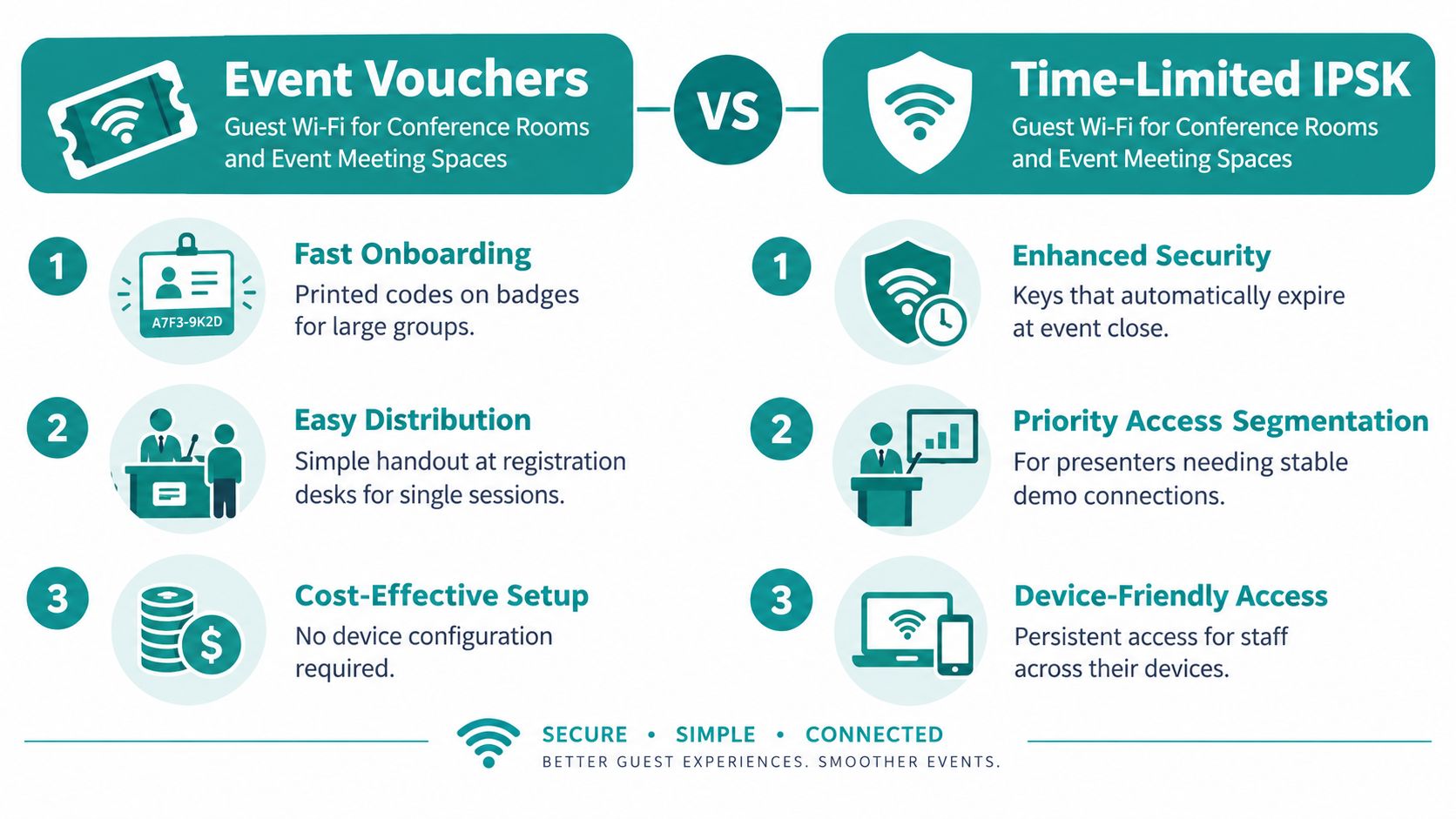
Vouchers suit one-time attendance. Time-limited IPSK suits a returning group that needs to reconnect on multiple devices.
Give registration staff a short troubleshooting card with the SSID, where attendees can find their access code, and who can help if they cannot connect. Set access to expire when the event ends, so unused credentials do not remain active afterward.
8. Cafés, Restaurants, and Quick-Service Dining Spaces
A café network is a session, not a tenancy. People connect to work through one coffee, share a photo, and leave. Free Wi-Fi that loads in seconds will keep some of them for a second drink. A portal that spins will send them back to mobile data.
Social login and social WiFi fit this room if the splash page is light and the offer is obvious. A coffee shop can trade a loyalty reward for an email. A restaurant can print a QR code on the table tent so nobody asks the server for the password during the rush. Multi-site owners should run those SSIDs from one Cisco Meraki dashboard, with the same captive portal pattern, not a different password taped up in each shop.
- QR codes on the table and at the counter: The guest should be online before the order lands.
- A fair session, then an easy renew: Sixty minutes is a reasonable default for a laptop table. A quick-service line can be shorter.
- One welcome offer: A cluttered splash page feels like a ad wall and loads slowly on a weak signal.
- Staff devices on their own key: EasyPSK for the till-side tablet, guest social login for the dining room.
Say the lunch rush hits a six-table café. Guests scan, accept a short consent line, and land on a 60-minute session. The loyalty offer is one sentence. When they stay for a meeting, they renew. You are not trying to be their home network, and you should not leave yesterday's session alive all weekend.
How the eight rooms with WiFi compare on access and setup
The right login depends on who uses the room and how long they need access. Match the authentication method to that visit, then set up the network to keep each group's access separate where needed.
| Room type | Typical authentication | Best for | Key Splash Access feature |
|---|---|---|---|
| Hotel Guest Rooms and Lobbies | Room number, voucher, social login, or IPSK | Guest access during a hotel stay | Private individual pre-shared keys (IPSK) |
| University Residence Halls and Student Dorm Networks | Student login, IPSK, or voucher | Resident access and time-limited visitor access | QR-code onboarding with IPSK |
| Co-Working Spaces and Corporate Guest Lounges | Azure AD, SAML, G Suite, IPSK, or voucher | Separating member, visitor, and corporate access | Access controls and personal Business VLANs |
| Retail Stores and Shopping Centers | Social login or QR-code sign-in | Customer connectivity and consent-based marketing | Geo-fenced coupons and Wi-Fi analytics |
| Campus Libraries and Study Lounges | Campus sign-in, IPSK, or voucher | Secure access for students, researchers, and visitors | Captive portals for student sign-in |
| Healthcare Waiting Rooms and Senior Living Common Areas | Simple portal sign-in, IPSK, or voucher | Guest and resident connectivity | Healthcare Wi-Fi solution |
| Conference Rooms and Event Meeting Spaces | Event voucher or time-limited IPSK | Temporary access for event attendees and presenters | Voucher printing and IPSK authentication |
| Cafés, Restaurants, and Quick-Service Dining Spaces | QR code or social login | Customer Wi-Fi and loyalty engagement | QR-code onboarding and marketing integrations |
Use the table as a starting point, not a fixed template. Choose the login that suits the visit, then decide how access will be issued and separated. Splash Access runs these Wi-Fi features through a cloud-managed dashboard.
Turning Guest WiFi Into Your Next Upgrade
Start with the room your guests complain about. Match the authentication to the people in it, and set the expiry before you print a single card. A hotel room wants checkout-dated IPSK. A dorm wants identity for residents and a short voucher for family. A corporate lounge wants SAML for staff and a dead-on-departure key for visitors. Retail and dining want a two-step social login with an honest consent line. Clinics and libraries want vouchers that match the visit. Event rooms want badges and keys that die with the agenda.
Then measure, or you will only remember the loud complaint. One hospitality deployment across 80 rooms, with 40 Wi-Fi 6 access points, saw front-desk Wi-Fi calls fall by 75% within weeks, guest Wi-Fi tickets near zero within 30 days, and Internet Quality scores on online travel sites up by 30 points, reaching the top quartile among comparable Italian hotels, as described in this hospitality Wi-Fi deployment write-up. Watch tickets, reviews, and the hour the network is full. Thirty days is long enough to see whether the change stuck.
Splash Access is one way to run that pattern on Cisco Meraki. IPSK, QR-code onboarding, and a single cloud dashboard let you pilot one room type, read the result, and copy what worked. We can schedule resident Wi-Fi so it turns on for a move-in date and shuts off on a set day, and a property manager can reset passwords between leases. Visitor IPSK QR management hands a guest a code that already contains an individual key. Personal data of Wi-Fi users is deleted if they do not log in at one of the venues for more than 24 months, and the venue's own privacy policy governs how customer-configured data is used.
Pick one room this week. Set the authentication, the VLAN, and the expiry. Sit in the seat your guest uses, on the phone they carry, and connect once before you roll the same pattern to the next room.
Splash Access builds Cisco Meraki captive portals for rooms with WiFi, including WPA2 and IPSK sign-in, social WiFi, vouchers, and QR-code onboarding for hotels, education, retail, healthcare, and corporate guests. You can run those access choices from one dashboard and match the login to the room instead of sharing one building password. See how it fits your rooms at Splash Access.