If WPA3 is stronger, why does turning it on sometimes leave your network no safer than before? That's the question that catches a lot of venues out. The answer usually isn't the password or the access point. It's transition mode, running in the background while older devices keep using WPA2.
If you're weighing up WPA2 vs WPA3 Personal for a hotel, school, shop or office, don't think of it as a simple on or off switch. Think of it as a migration. You'll get the best result when you measure how much WPA2 you're still carrying, isolate it, and give it a retirement date.
WPA2 vs WPA3 Personal at a Glance
WPA3 Personal is the security target, but transition mode is a bridge, not a finish line. That's the short verdict, and the table below shows why.
WPA2-Personal vs WPA3-Personal on the Criteria That Matter
| Criterion | WPA2-Personal | WPA3-Personal | What It Means in Practice |
|---|---|---|---|
| Password authentication | Pre-shared key (PSK), one shared password | SAE, password-authenticated key exchange | SAE changes how the password is checked |
| Offline guessing of captured handshakes | Possible | Not practical, each guess needs live interaction | The biggest practical security gain |
| Forward secrecy | Not provided | Provided, fresh session keys | Old captured traffic stays protected if the password leaks later |
| Protected Management Frames | Optional in many deployments | Mandatory | Helps block spoofed disconnects |
| Legacy client support | Broad | Needs transition mode for older devices | Compatibility is the main trade-off |
| Raw throughput | Baseline | No inherent increase | Do not expect a speed boost |
| Share of networks observed | About 75% in late 2025 | About 3% in late 2025 | Adoption is still early |
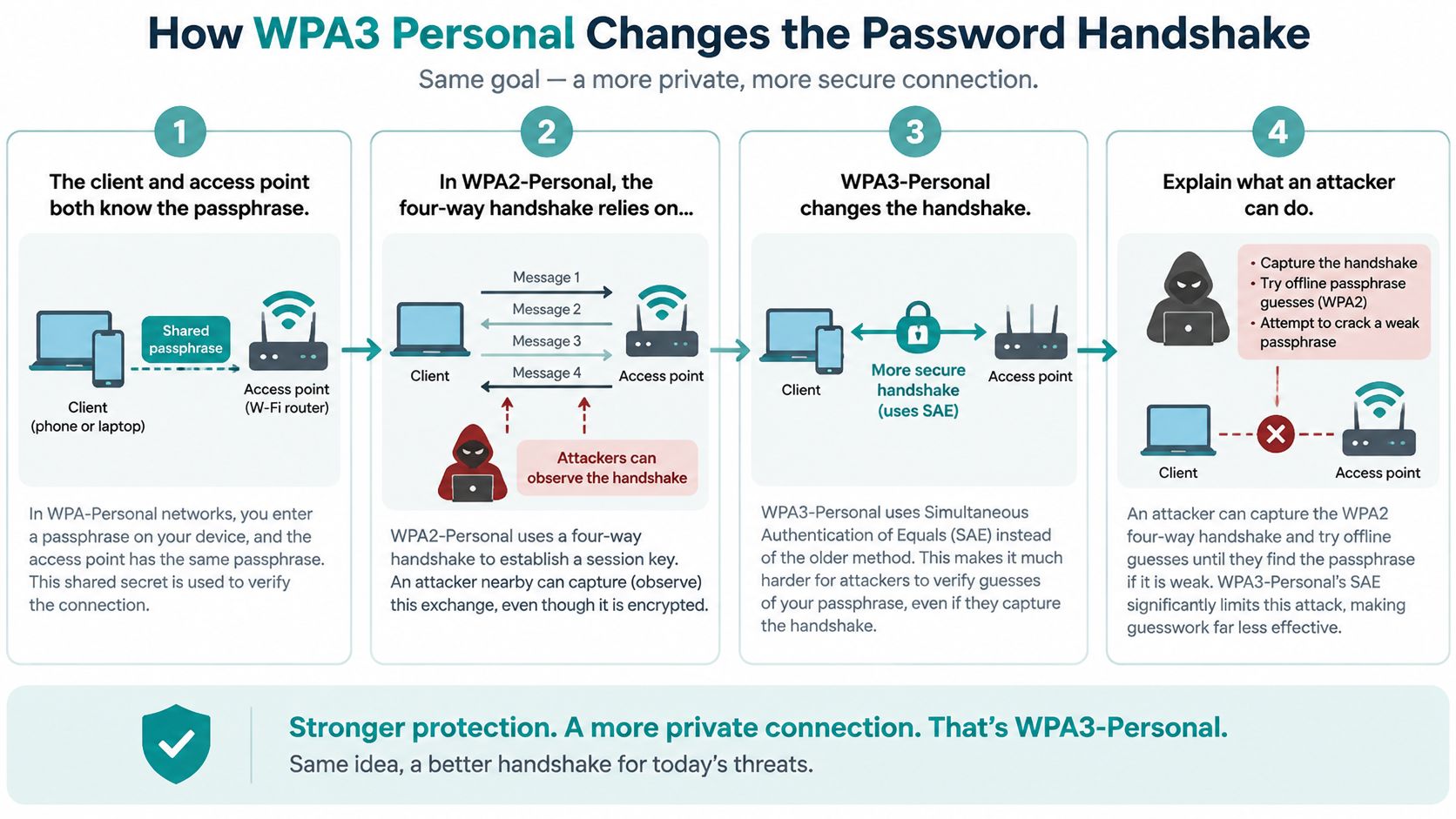
The Wi-Fi Alliance announcement introducing WPA3 presented WPA3-Personal in 2018 as the successor to WPA2-Personal. WPA2-Personal relies on a Pre-Shared Key (PSK) and the traditional four-way handshake. WPA3-Personal replaces that method with Simultaneous Authentication of Equals (SAE), so an attacker who wants to test a guess has to interact with the live network each time.
Adoption still has a long way to go. WiGLE's late-2025 global network snapshot reported by ShiftCTRL contained roughly 75% WPA2 networks and 3% WPA3 networks. That gap explains why most real venues can't flip to WPA3-only overnight.
For a broader view of layered wireless defences, Wi-Fi protection with Finchum Fixes IT is a useful companion read. If you're also comparing shared passwords with per-user logins, our guide to WPA2 Personal versus Enterprise authentication helps you decide where Personal mode still fits.
How WPA3 Personal Changes the Password Handshake
The friendly way to think about this is simple. Both protocols check that a device knows the password. They just check it in very different ways, and that changes what an attacker can do from the car park.
The Handshake in Four Steps
- Both sides know the passphrase. The phone, laptop or tablet and the access point start with the same network password. Nothing has been proven yet.
- WPA2 checks it with PSK. The four-way handshake relies on that pre-shared key to build session keys. If someone captures that handshake, they can take it away and test password guesses offline, at their own speed.
- WPA3 checks it with SAE. Client and access point derive a fresh Pairwise Master Key for each authentication. Every guess now needs live interaction, so the access point can observe, rate-limit or reject repeated attempts.
- Session keys follow as normal. The familiar four-way handshake then generates the session keys for that connection. Your users won't notice this step, which is exactly how it should be.
The Wi-Fi Alliance WPA3 technology overview describes SAE as designed to resist offline dictionary attacks, with forward secrecy built in. Say your guest password leaks onto a review site next year. With WPA3, that leak doesn't expose traffic someone captured today, because earlier sessions used independently derived keys.
The key difference: WPA2 lets an attacker guess your password offline, in private, as many times as they like. WPA3 forces every guess to happen live, in front of your access point.
Be honest about the limits, though. WPA3 doesn't fix a weak passphrase like your venue name plus 123. It doesn't stop a rogue access point in the lobby, and it won't clean an infected laptop. Use a long, unique passphrase, and prefer per-user or per-device credentials where your platform supports them. Our notes on protecting your network from WPA1 and WPA2 PSK vulnerabilities cover the older risks you may still be carrying.
Performance and Management Frames in Practice
Let's clear up a common myth first. WPA3 won't make your Wi-Fi faster. It doesn't raise the radio data rate, channel capacity or application bandwidth. If a supplier promises a speed boost from WPA3 alone, ask them to show you where it comes from.
Where Performance Actually Moves
Slowdowns, when they appear, come from side effects. Older devices may fail to join at all, which looks like a performance problem to the user holding the phone. Transition mode runs two authentication paths on one SSID, adding work at association time. Some low-power clients also handle SAE slowly, so onboarding feels sluggish even though throughput is fine once connected.
The quieter win is Protected Management Frames (PMF). WPA3 requires PMF, which protects deauthentication, disassociation and certain action frames. That cuts down spoofed disconnect attacks, where someone fakes a goodbye message to kick your guests offline. WPA2 deployments often leave PMF optional because older clients struggle with it. If you're reviewing cipher choices alongside this, our explainer on AES versus TKIP encryption shows why legacy options should already be switched off.
Test Before You Enforce
Run the same short test plan before and after any change, using the same time window and the same client set.
- Roaming: Walk between access points on a voice or video call and note any drop or stall at handoff.
- Onboarding: Time the captive portal sign-in on current iOS, Android, Windows and macOS devices.
- IoT joins: Record join success for printers, TVs and sensors, not just phones.
- Peak load: Load test at your expected peak, for example 100 phones associated to one access point in a conference room scenario.
If those four checks match your WPA2 baseline, WPA3 isn't your bottleneck.
Compatibility Gaps Across Real Device Fleets
Here's the failure your helpdesk will hear about first. A guest types the correct password, the device thinks for a moment, and then nothing. The password isn't wrong. The device cannot negotiate SAE, so the connection never gets started, and the guest reports that the Wi-Fi is broken.
Transition mode exists for exactly this moment. WPA3-capable clients use SAE while WPA2-only devices use WPA2-Personal with AES on the same SSID. On Cisco and Meraki networks, mixed-mode access points advertise both authentication methods, which keeps older kit online. The trade-off is that the SSID stays only as strong as its WPA2 side.
Device Classes and How to Handle Them During Migration
| Device Class | Typical WPA3 Support | Migration Risk | Recommended Approach |
|---|---|---|---|
| Modern phones and laptops | WPA3-capable on current OS releases | Low | Keep on the main SSID in transition mode |
| Older phones and tablets | Often WPA2 only | Medium | Track by OS version and retire on a set date |
| Hotel room TVs and streaming boxes | Firmware dependent, often WPA2 only | High | Move to a separate SSID if firmware cannot be updated |
| Printers and scanners | Often WPA2 only | Medium | Use IPSK or a dedicated SSID with a fixed key |
| Payment terminals | Set by vendor certification | High | Isolate on a locked-down network, never on guest Wi-Fi |
| Medical and lab equipment | Often cannot be updated | High | Keep on its own segment with a retirement plan |
| Legacy IoT sensors | Usually WPA2 only | High | Isolate now and replace at end of life |
Don't forget the captive portal in your compatibility testing. Sign-in pop-ups behave differently across operating system versions, and a portal that opens cleanly on a new phone may stall on an older tablet. Test social login and voucher flows on the oldest OS versions you still plan to support.
So here's your real decision. Do incompatible devices stay on one mixed SSID for now, which is convenient but keeps WPA2 alive for everyone? Or do they move to a separate, isolated WPA2 SSID with its own credentials and VLAN? For anything in the high-risk rows above, I'd isolate first and ask questions later.
Guest Wi-Fi Setups for Education, Retail and BYOD
One rule keeps every sector design honest. The captive portal handles onboarding, wireless encryption protects the link. CISA guidance on secure Wi-Fi encryption identifies WPA3 Personal and WPA2 using AES as secure choices and warns against weaker or obsolete configurations. A portal, voucher flow, social login or social wifi form should sit on top of a properly secured service, never replace it.
IPSK deserves a plain-English moment. Instead of one shared password for everybody, each user or device gets its own private pre-shared key on a single SSID. You can revoke one person's access without changing the password for the whole building. EasyPSK is the option built for large deployments where you're issuing keys at serious scale.
How Each Sector Uses It
In education, per-device IPSK with a captive portal lets students and visitors onboard without a shared password doing the rounds on group chats. Lab and classroom hardware stays on its own SSID. Our Education IPSK is priced per 100 access points and includes all IPSK features, WPN virtual networks, and IDPs, Azure and SAML.
In retail, a shopper scans a QR code at the entrance and signs in through a social login or social wifi form. WPA2 Guest Wi-Fi lets users scan a QR code to get access through a simple, secure onboarding system, and the shopper can receive a voucher or geo-fenced offer. Payment terminals never join this network.
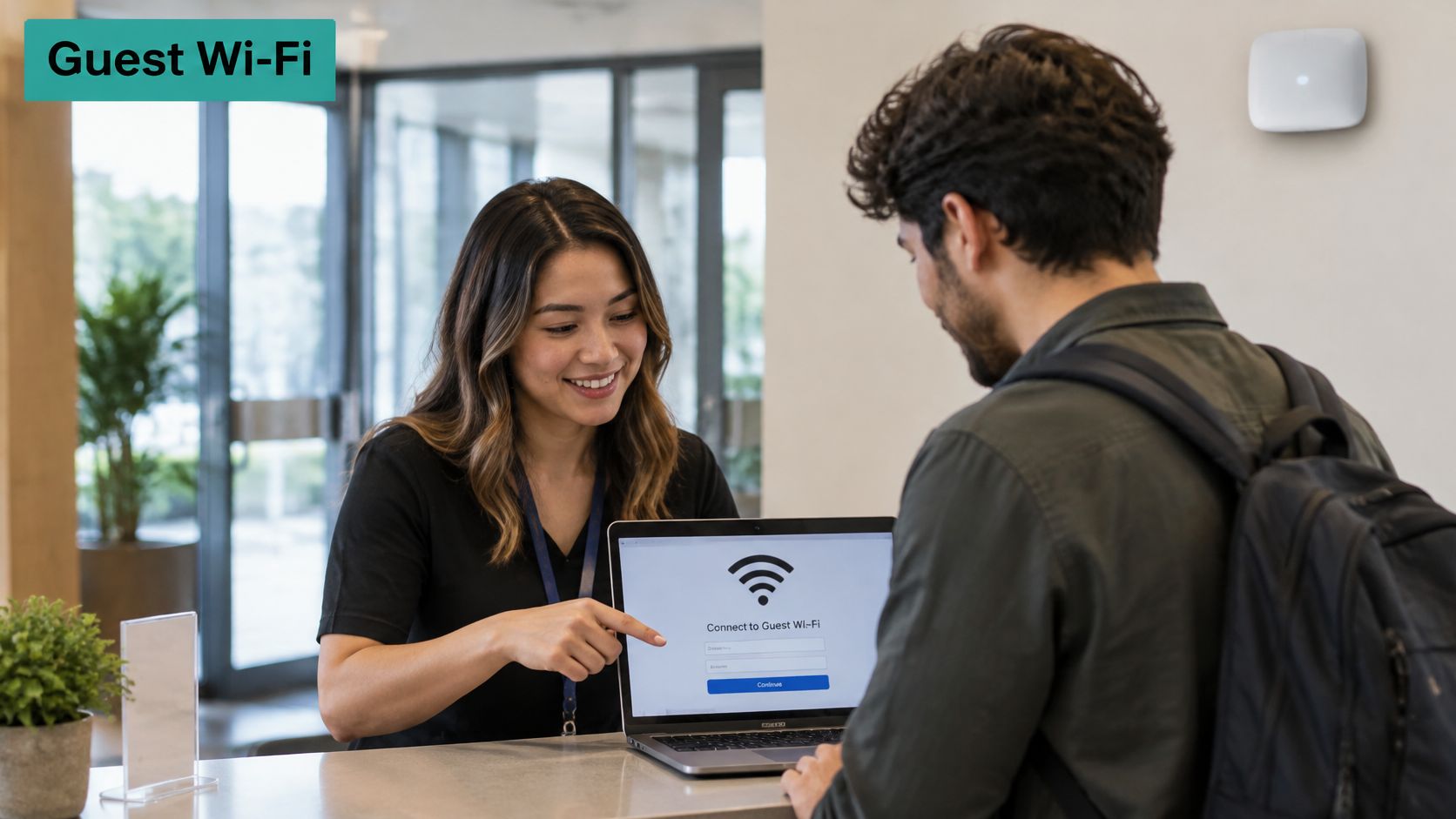
For corporate BYOD and co-working, personal VLANs keep employee phones and laptops away from internal resources. Co-Working Office lets venues control access and allocate personal Business VLANs, while visitors get an isolated guest VLAN. Hospitality and healthcare follow the same pattern, with room TVs or clinical gear kept off guest credentials.
Guest Wi-Fi Authentication Choices by Sector
| Sector | Typical Clients | Suggested Authentication | Main Watch-Out |
|---|---|---|---|
| Education | Students, staff and visitors on many personal devices | Per-device IPSK with captive portal | Keep lab and classroom hardware on its own SSID |
| Retail and shopping centres | Shoppers, staff tablets and payment devices | Captive portal with social login or QR onboarding | Keep payment terminals off guest Wi-Fi |
| Corporate BYOD and co-working | Employee phones, laptops and visitors | Per-user IPSK or personal VLAN | Give visitors an isolated guest VLAN |
| Hospitality | Guests, room TVs and staff devices | Mixed-mode guest SSID with captive portal | Move room TVs to a separate SSID if they cannot update |
| Healthcare and senior living | Patients, visitors and clinical equipment | Separate guest and clinical networks | Clinical gear never shares guest credentials |
On Cisco Meraki networks, this layering is where Splash Access fits, pairing the encryption choice with portal onboarding and authentication workflows. Our walkthrough on how to set up guest WiFi shows the build order. Every venue's mix of clients differs, so treat the table as a starting point, not a template.
How to Migrate From WPA2 to WPA3 Safely
Treat transition mode as a bridge with a demolition date. Every step below exists to shrink your WPA2 footprint until there's nothing left to bridge.
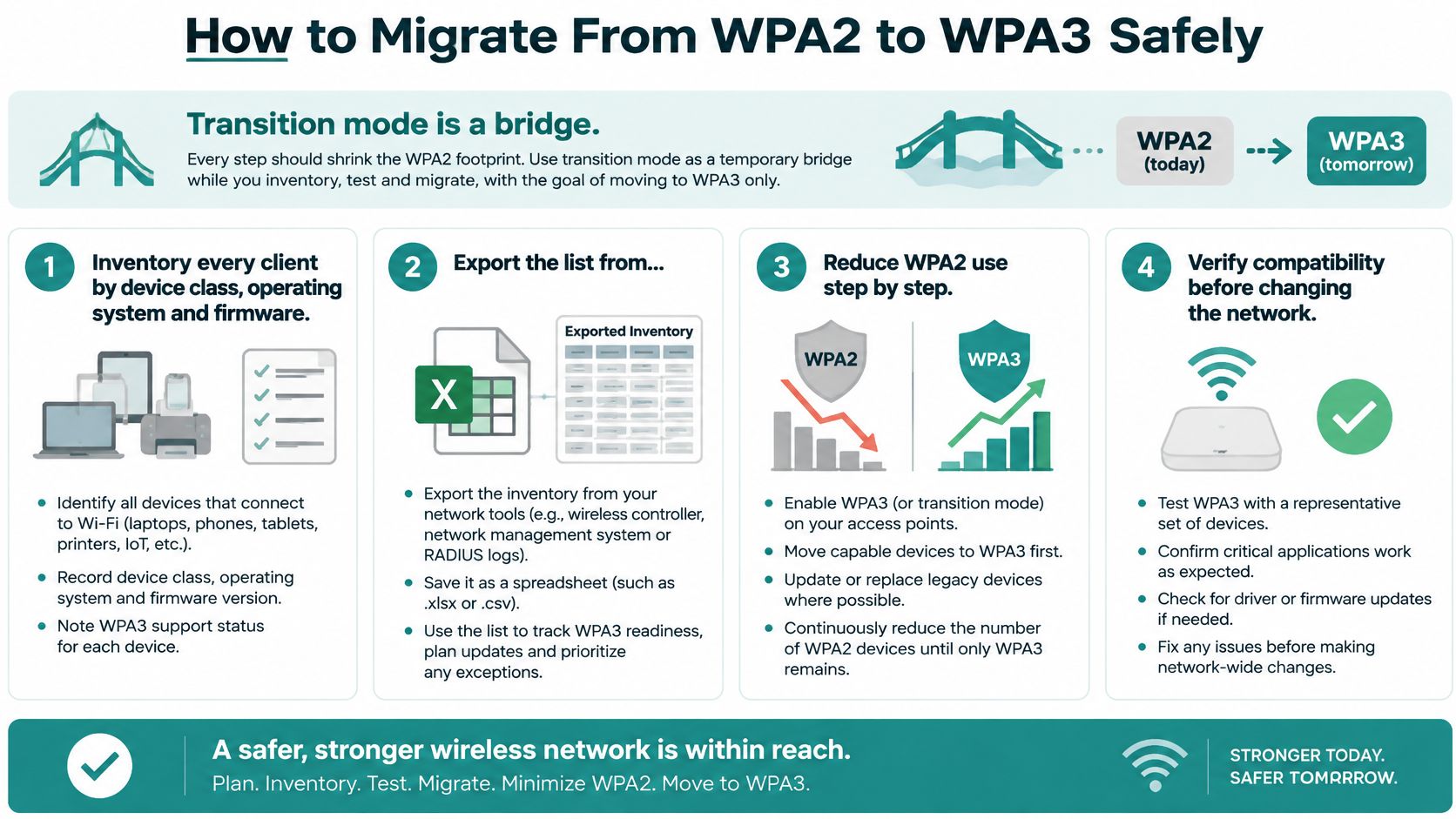
The Seven Steps
- Inventory every client. Export the client list from your Cisco Meraki dashboard or controller, then sort by device class, operating system and firmware. You can't retire what you can't see.
- Measure the WPA2-only share for two weeks. Inventory guesses, logs don't. Two weeks of connection data shows what really connects, including the forgotten scanner in the stockroom.
- Pick a WPA2 retirement date. Announce it 60 to 90 days ahead so departments can budget for replacements. A date turns a vague intention into a plan.
- Move legacy devices to a separate WPA2 SSID. Give it its own credentials and VLAN, not the shared guest password. If that password leaks, the blast radius stays small.
- Enable WPA2/WPA3 transition mode on the main SSID. Keep PMF optional only while legacy clients still need it. Remember, a mixed SSID stays exposed to WPA2-side weaknesses, since anyone who recovers the shared password can join and downgrade attacks toward WPA2 remain possible.
- Pilot on one floor or site. Test captive portal onboarding, social login and IPSK enrolment on each operating system your users bring. Fix the surprises while they're small.
- Switch the main SSID to WPA3-only. Do this once remaining WPA2 devices are retired or isolated, then review connection logs for a week to catch stragglers.
The Apple support guide to recommended Wi-Fi settings describes WPA2/WPA3 Transitional as the mode where newer clients use WPA3 while older clients use WPA2 AES, which is exactly why it should be temporary. Pair this sequence with our broader advice on how to secure a WiFi network and your cutover checklist stays short. Inventory, measure, announce, isolate, pilot, switch.
Choose Your Transition Strategy This Year
Your right answer in the WPA2 vs WPA3 Personal debate depends on what's on your network, so let's match strategy to the situation.
Mostly modern clients, no legacy gear. Go WPA3-only and use IPSK for guest and staff access. Private IPSK Authentication is a standalone, easy-to-use secure onboarding portal, and for Meraki estates that need stronger sign-in, we also offer DUO, secure multi-factor authentication for Meraki Wi-Fi.
A few legacy devices remain. Run transition mode for a fixed period, then retire WPA2 on the date you announced. For large estates issuing keys at scale during that window, Splash Access offers EASYPSK for Large Deployments.
Legacy IoT that can't be updated. Keep WPA2 on an isolated SSID and run WPA3 for staff and guests. Hotel room systems and healthcare equipment belong here until they're replaced.
Transition mode is a migration tool, not proof of WPA3 protection.
Judge any provider against your own device inventory, not their feature list. Splash Access fits Cisco Meraki networks that need captive portal onboarding with IPSK or EASYPSK authentication across education, retail and BYOD corporate sites. Start this week with the inventory export. It takes an afternoon, and every decision after it gets easier.
Ready to turn your transition plan into a working network? We build captive portal and authentication solutions for Cisco Meraki, including IPSK and EasyPSK onboarding, social login guest wifi, and per-sector setups for education, retail and corporate BYOD. Visit Splash Access to see how your WPA2 to WPA3 migration can keep guests happy and legacy devices safely contained.