A visitor sits down, opens a laptop, and asks the question you hear every day. What's the Wi-Fi password? If your answer is the same password staff use for tills, printers, and files, you've got a problem. If your answer is a long form that demands personal details, you've got a different problem. Good Guest WiFi for Business sits in the middle. It's easy to join, hard to misuse, and clear about what happens to a guest's data.
Why Your Business Needs Guest WiFi
Think of a parent in a school reception, a shopper comparing prices in store, or a contractor waiting for a meeting. Each person pulls out a phone and looks for your network name. If they can't connect quickly, they ask staff, use patchy mobile data, or leave sooner than planned. That small moment shapes how professional your venue feels.
Trust is the catch. A 2025 survey of 436 consumers across 18 U.S. states found that 57% felt unsafe using public or business Wi-Fi, while only 17% felt safe, and 67% said they were more cautious with personal data than previously. Those numbers explain why a pushy login page can backfire. People want connectivity, but they don't want to feel watched or trapped into marketing.
What guests actually judge you on
Guests rarely praise Wi-Fi when it works. They notice friction. A password on a sticky note, a portal that won't load, or a session that drops when they move rooms creates work for your front desk and doubt in the visitor's mind.
- Speed of joining: Can someone connect without asking for help?
- Clarity: Do they know what data you're asking for and why?
- Reliability: Does the connection hold up when the room fills?
For you, the value goes beyond courtesy. A dedicated guest network lets you present terms of use, show useful local information, and, with genuine consent, invite people to hear from you again. In retail, that supports return visits. In corporate offices, it keeps contractors productive without handing them internal access. In education, it gives visiting families and speakers a route online that doesn't touch student systems.
Treat guest Wi-Fi like your front door. It should welcome people in, show them where they can go, and keep private rooms locked without making anyone feel unwelcome.
That's the balance this guide builds toward. Convenience at the surface, firm boundaries underneath, and privacy choices that a guest can understand in seconds.
Understanding Guest WiFi Security Fundamentals
Your building already explains the core idea. Visitors use reception. Staff use offices, stock rooms, and admin areas. Nobody would give a delivery driver a master key because they need to wait inside. Network segmentation applies that same logic to Wi-Fi.
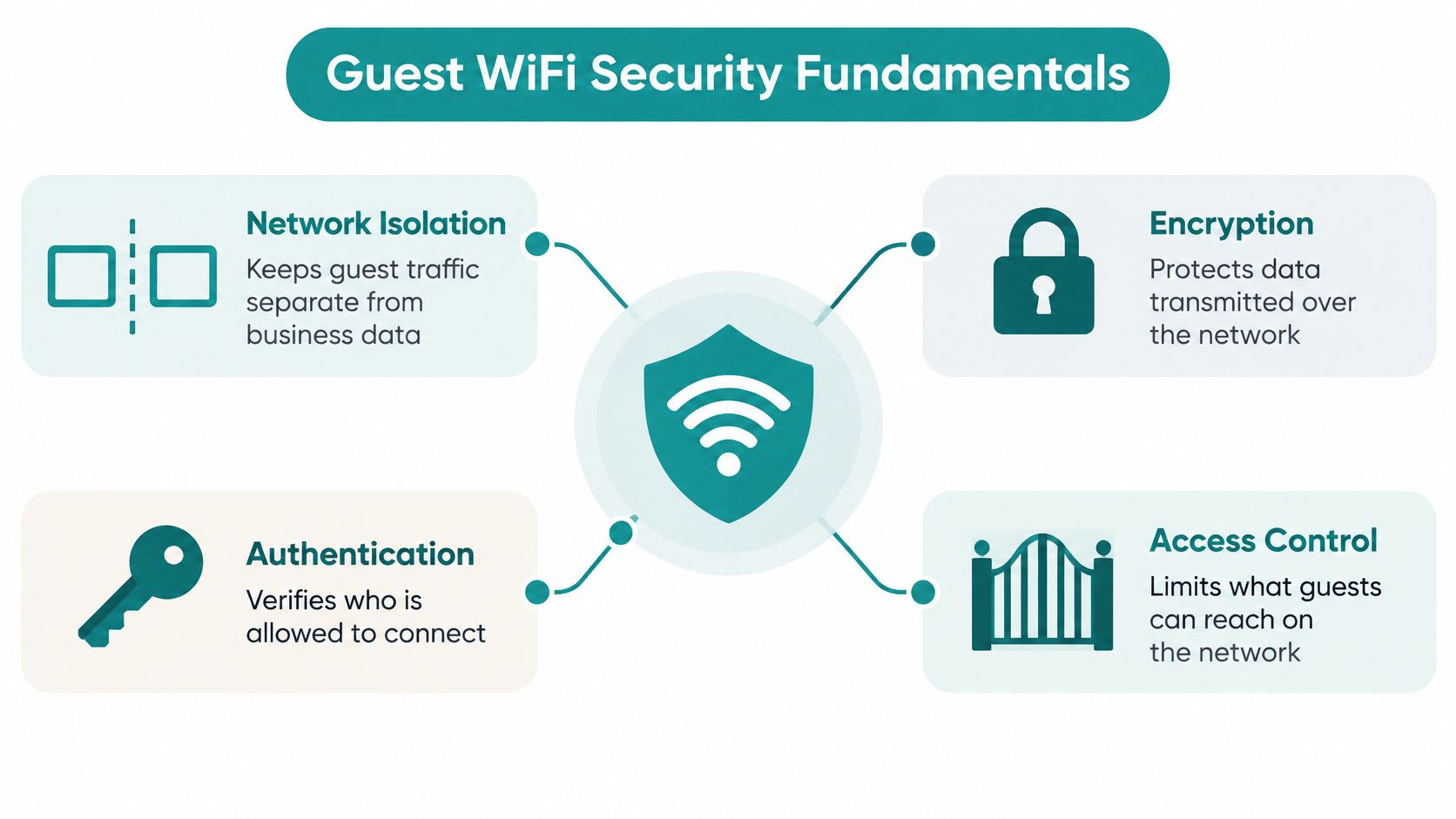
The U.S. Federal Trade Commission guidance on small business cybersecurity recommends enabling WPA2 or WPA3 encryption and creating a distinct public network for guests, employee personal devices, or other public users, implemented with a dedicated SSID mapped to an isolated VLAN. An SSID is the network name people tap on their phone. A VLAN is the separate lane behind that name that carries guest traffic away from business systems.
The four controls working together
- Network isolation: Guest devices reach the internet through the gateway, but firewall rules deny guest to LAN traffic. Printers, point of sale systems, identity services, and internal applications stay unreachable.
- Encryption: WPA2 and WPA3 protect data in the air. Prefer WPA3 where client devices support it, and place older devices on a separately controlled legacy or transition SSID instead of weakening your main networks.
- Authentication: You decide who gets in and for how long, whether that's a captive portal, a voucher, or an individual key.
- Access control: Client isolation limits guest to guest contact, and rate limits stop one person from consuming disproportionate bandwidth.
If you're planning the VLAN side for the first time, this walkthrough on setting up a VLAN for separated networks shows how the lanes fit together in practice. Physical access deserves the same layered thinking, which is why a Wi-Fi vs LTE gate security comparison is a useful companion if your site controls entry points as well as connectivity.
Practical rule: A guest should be able to browse, message, and join a video call, but never discover your printer, your till, or another guest's laptop.
That containment limits the blast radius if a visitor arrives with an infected phone. The device can be unmanaged and still not wander into corporate assets, because the architecture, not the guest's good behavior, does the protecting.
Authentication Options for Guest Access
Authentication answers a simple question. How does someone prove they're allowed online? Your answer shapes security, staff workload, and how welcome people feel. There's no single winner, so match the method to the setting.
A shared WPA2 password is familiar, but it spreads quickly and tells you nothing about individual users. IPSK, or Individual Pre-Shared Keys, gives each person or group their own key. You can revoke one key without changing everyone else's, which suits student housing, long term guests, and corporate visitors. EasyPSK style onboarding simplifies that idea further, helping users generate or receive a personal key through a guided flow rather than copying a shared secret from a notice board.
Guest Authentication Methods Compared
| Method | Best For | Security Level | User Experience |
|---|---|---|---|
| Shared WPA2 password | Small, low risk spaces | Basic | Familiar but password spreads |
| IPSK and EasyPSK | Education, BYOD corporate, longer stays | Stronger, individual revocation | Personal key, less repeated login |
| Captive portal | Retail, hospitality, public venues | Controlled with logging | Browser page with terms |
| Social login and social WiFi | Retail and leisure with opt in marketing | Depends on portal controls | Fast for willing users |
| Vouchers | Staff assisted and temporary access | Controlled and time limited | Code from reception |
A captive portal is the page that appears before internet access begins. It's more than branding. The UK Government wireless security standard requires guest users who successfully authenticate through a captive portal to be logged, and requires guest activity to be monitored against the organisation's acceptable use policy. That gives you an audit trail and a moment to present terms before access starts.
Social login and social WiFi let guests sign in with an existing account. They're quick, and retailers like the optional marketing connection. Don't make social login the only route, though. Some guests don't have those accounts, don't want to link them, or can't receive a verification code without mobile signal. Offer an email, voucher, or click through alternative alongside it.
In Cisco Meraki environments, these methods can sit on different SSIDs with different policies, so a shop floor, a classroom block, and a head office don't have to share one approach. For a deeper look at the options, see this guide to guest WiFi authentication methods and workflows. If your front desk also manages physical check in, this visitor management system guide helps you align the in person sign in with the network sign in, so guests aren't asked for the same details twice.
Choosing the Right Hardware and Platform
Start with coverage and capacity, not just price. Walk your space at its busiest. Where do people gather, queue, or sit with laptops? Thick walls, metal shelving, and crowded classrooms all change how many access points you need and where they belong.
What to look for in the kit
- Multiple SSIDs with VLAN tagging: This lets one access point broadcast guest, staff, and IoT networks while keeping traffic separated behind the scenes.
- Cloud management: A central dashboard helps you update settings, check health, and fix issues across sites without visiting each device.
- Current security support: Look for WPA3 readiness and ongoing firmware updates, with a transition plan for older client devices.
- PoE switching and clean cabling: Access points need reliable power and backhaul, so don't treat the wired network as an afterthought.
Cisco Meraki is a common reference point here because its cloud dashboard ties access points, SSIDs, and traffic rules together in one place. That matters when you follow CISA guidance on securing enterprise wireless networks, which recommends a separate guest Wi-Fi network and advises using multiple SSIDs or wireless isolation features so organisational information cannot be reached by guest traffic. In a Cisco Meraki architecture, that supports mapping guest access to a dedicated SSID and segmented network.
If switch ports and routing feel unfamiliar, this plain language piece on routers and switches explained fills the gap before you talk to an installer. For the wireless side, compare models against your density and roaming needs using this overview of enterprise WiFi access points for business deployments.
Ask vendors direct questions. Can I set per user bandwidth limits? Can I expire a single IPSK without disturbing a whole building? Can I see failed portal logins by location? Clear answers now prevent expensive rework later, especially when you expand from one site to several.
Designing a Seamless Guest Experience
Your captive portal is often the first digital thing a visitor touches. Design it like a helpful receptionist. It should say whose network this is, what to tap next, and what happens if someone says no to optional marketing.
Build the journey step by step
- Name the SSID clearly: Use your venue name plus Guest, so people don't join a lookalike network by mistake.
- Put the essentials first: Show the connect button, the terms, and the privacy summary before any promotional content.
- Separate access from marketing consent: Provide a usable internet only path without marketing opt in. Let interested guests subscribe as a distinct choice.
- State retention plainly: Say what you collect, whether that's an email address or a device identifier, who can access it, and for how long.
- Offer a revoke route: Tell guests how to withdraw consent later, in the portal and in any follow up message.
QR codes on tables, desks, and welcome packs cut typing errors and help guests find the right SSID. They're not a complete solution. Some visitors have no smartphone, a flat battery, no mobile signal for verification, or a disability that makes a small touch target unusable. Keep staff assisted vouchers ready, and test your portal with keyboard navigation and a screen reader before launch.
Session length needs thought too. A coffee shop might allow a short session with easy renewal. A hospital visitor or a conference delegate needs something longer that survives moving between access points. When a session expires, explain why and make reauthentication quick, rather than leaving people staring at a browser that won't load.
Small wording choices build confidence. You're connected, with a note of when the session ends, beats a vague success page. These ideas on how to improve user experience across the guest journey can help you refine each screen. Aim for a flow a tired traveler could complete half asleep. If your own staff need a crib sheet to explain it, simplify the page.
Guest WiFi Analytics and Marketing Integrations
Once guests connect reliably, you can learn from patterns without spying on individuals. Login counts by time of day, return visit patterns, and dwell time ranges help you staff busy periods, judge whether a refurbished area holds attention, and decide if a promotion brought people back.
Connect the data you are allowed to use
Where guests opt in, integrations can send consented contact details to tools such as Mailchimp for email, Twilio for messaging, or your CRM for follow up. Social WiFi can support that journey when it sits inside a clear consent design, not as a toll booth. Keep the exchange honest. A guest who declines marketing should still get online, and a guest who accepts should know what kind of messages to expect.
Splash Access is one platform that provides Cisco Meraki captive portals with authentication options including social login, vouchers, WPA2, IPSK, and EasyPSK style onboarding, plus integrations with marketing tools. Features listed for the platform include voucher printing, geo fenced coupons, and MV Sense camera analytics for footfall and dwell insights. Whichever route you choose, decide in advance which fields flow where, who owns the list, and how quickly opt outs are honored across every connected system.
Camera and location analytics need extra care. Aggregated footfall can show that a Saturday queue needs another till. It shouldn't become a way to track named individuals around a building without a clear, lawful reason. Document whether device identifiers, browsing metadata, location, or camera data are collected, and set different retention periods for operational logs and marketing records.
Start with a short list of questions you want answered, then check the reporting view in this overview of guest WiFi analytics for visitor insight. Fewer, trusted metrics beat a dashboard full of numbers nobody acts on.
Vertical-Specific Guest WiFi Strategies
A school, a shop, and a headquarters don't host the same guests, so don't force them into one template.
Education needs boundaries between student systems, staff administration, and visitors. Parents at an open evening can use a time limited portal, while boarding or dorm style areas often suit IPSK so each resident connects personal devices without sharing a building wide password. Contractors and visiting lecturers can receive vouchers that expire when their work ends.
Retail leans toward a branded portal with optional social login, clear promotions, and analytics on repeat visits. Payment systems must sit on their own segment, never behind the same rules as shopper traffic. Staff handhelds and stock systems need their own SSID and policy as well, so a busy sale day doesn't mix operational traffic with public browsing.
BYOD corporate environments benefit from treating personal devices as untrusted. Employees' phones can use an internet only network for personal use, while managed laptops authenticate separately for internal resources. Visitors and third party suppliers get guest access that cannot reach identity services or file shares.
The strongest setup is not always the right public setup. Save your strictest authentication for managed devices, and keep public onboarding simple and isolated.
That distinction matters with advanced options. The Wi-Fi Alliance overview of Wi-Fi security describes WPA3-Enterprise with an optional 192-bit security mode intended for networks transmitting sensitive information, including government and financial environments. For business guest access, that mode is most appropriate for managed corporate, healthcare, education, or administrative devices, not a universal public SSID, because every client must support the same configuration.
Healthcare and hospitality follow the same logic. Patients, families, and hotel guests need accessible internet with minimal fuss, while clinical, payment, and building systems stay on separate policies with managed authentication.
Best Practices for Ongoing Management and Troubleshooting
Launch day isn't the finish line. Put a short routine in place so small faults surface before guests report them at reception.
A steady management rhythm
- Review logs weekly: Look for repeated failed authentication attempts, unusual session volumes, and access points that keep dropping clients.
- Patch and update: Keep access point and controller firmware current, and retire hardware that no longer receives security fixes.
- Retest isolation after changes: Connect as a guest and confirm you can't reach printers, servers, management pages, or another test guest device.
- Check capacity at peak times: Monitor client counts and channel use during your busiest hour, not on a quiet morning.
Most complaints fall into a few buckets. If the portal doesn't trigger, ask the guest to open a plain browser page or forget and rejoin the SSID, since devices detect portals differently. If speeds feel slow everywhere, check whether one user is consuming heavy bandwidth and whether your per client limits are working. If sessions drop while roaming, test the walk between access points yourself, through stairwells and lifts, and confirm the session survives the handover.
Plan for failure in writing. Keep printed vouchers for portal outages, urgent medical or safeguarding needs, and guests who can't use a smartphone. Train front line staff to issue temporary access without sharing the staff password. Test the portal after every redesign with a keyboard and screen reader, and keep a legacy SSID with tighter limits for older devices that can't handle newer security settings.
When you upgrade toward Wi-Fi 6E or Wi-Fi 7, don't assume new radios fix onboarding. Newer deployments can require WPA3 planning that older guest devices struggle with, so pilot the guest SSID, inventory common client types, and migrate employee, IoT, and guest policies separately. A calm rollout protects the experience you've already built.
Ready to turn that sticky note password into a secure, branded welcome? Splash Access provides Cisco Meraki captive portals with IPSK, EasyPSK, voucher, and social WiFi authentication, plus analytics and marketing integrations for education, retail, hospitality, and BYOD corporate sites. Visit the site to explore the platform and talk through a guest WiFi design that fits your venue.