The handover meeting is tomorrow. The building looks ready, the Cisco Meraki access points are online, and someone has already sent the opening-day invitations. But your notes still include a damaged finish, an untested guest login, and a BYOD device that can't connect. You don't need another casual task list. You need a record that makes clear what remains, who must fix it, and who can accept the result.
The Day Before Handover and Why It Matters
You walk through reception with the owner's representative. They notice a finish that needs attention, while the IT lead asks whether visitors will see the correct captive portal. Neither question sounds especially dramatic until everyone starts asking whether the project is ready to hand over.
That's where a controlled punch list becomes useful. Instead of scattered emails and verbal promises, you maintain an agreed record of outstanding work. Each person should be able to distinguish an unresolved requirement from an observation, a proposed change, or a correction awaiting inspection.
Start with the handover decision
Before asking people to work through the list, establish what you're trying to approve. Building use, network launch, contractual acceptance, and payment aren't interchangeable decisions. Don't let a general statement that everything is nearly ready stand in for a specific approval.
Ask the team:
- What remains outstanding? Record the actual deficiency, not just someone's frustration with it.
- Which requirement applies? Identify the drawing, specification, approved design, or agreed network behavior.
- Who needs to decide? Separate the person making the correction from the person authorized to accept it.
For a business moving premises, Networking2000's relocation tech checklist for businesses offers a useful companion to the closeout conversation. Use a relocation checklist to organize readiness questions, then use the punch list to track unresolved contracted work rather than mixing both documents together.
Bring construction and IT into the same conversation
A building walkthrough and a network acceptance test shouldn't happen in isolation when both affect the opening. Use IT support for construction as a starting point for coordinating the site and technology workstreams.
In a hypothetical handover, the decorating contractor might need access to reception while the network engineer needs the same area for guest Wi-Fi testing. Record that dependency before assigning deadlines that neither person can meet.
Practical rule: Ask what evidence will make the owner comfortable accepting each item before anyone starts correcting it.
You're not trying to make the list impressive. You're trying to make the remaining decisions manageable, with no uncertainty about responsibility or approval.
What a Punch List Really Is
A useful punch list definition is this: a formal construction closeout document recording incomplete, defective, or nonconforming work that needs correction before final completion and usually before final payment. It's normally prepared at substantial completion, when the owner can use the building for its intended purpose despite relatively minor outstanding items, as explained in the construction punch list overview.
Think of it as an acceptance checklist with accountability attached. A general task list might remind you to call the painter. A punch list records the deficient work, the applicable requirement, the assigned correction, and the eventual acceptance.
Usable doesn't mean fully complete
Substantial completion answers a practical contractual question: can the owner use the facility for its intended purpose? Final completion addresses whether the remaining contractual obligations have been satisfied. Don't treat the owner's ability to operate as proof that every obligation has disappeared.
Under the AIA-style closeout framework, the contractor identifies outstanding work and the architect or owner reviews and supplements the list. The contractor then completes the corrections before final acceptance. The contract controls the detailed approval and payment arrangements, so avoid promising that a clean-looking list alone guarantees payment release.
The distinction also matters when applying the same discipline to technology. A Cisco Meraki network might allow connections while an agreed onboarding feature remains unfinished. Operational availability and acceptance against the agreed design are different questions.
Different names, the same closeout purpose
In the United Kingdom and some other markets, you'll hear snag list rather than punch list. The historical name is associated with marking completed items by punching holes beside them on paper, with matching records retained by the architect and contractor.
The modern distinction is about purpose, not stationery:
- A general checklist organizes activities, whether or not they represent deficient contracted work.
- A defect observation identifies a problem but may lack ownership, acceptance criteria, or closeout approval.
- A punch list connects the deficiency to correction and acceptance.
- A recurrence record should preserve the original acceptance evidence and route the issue through the applicable reopen or warranty process.
Don't assume every later problem belongs on the original list. Check what was accepted, what has changed, and which contractual obligation now applies.
Classifying Punch List Items by Risk
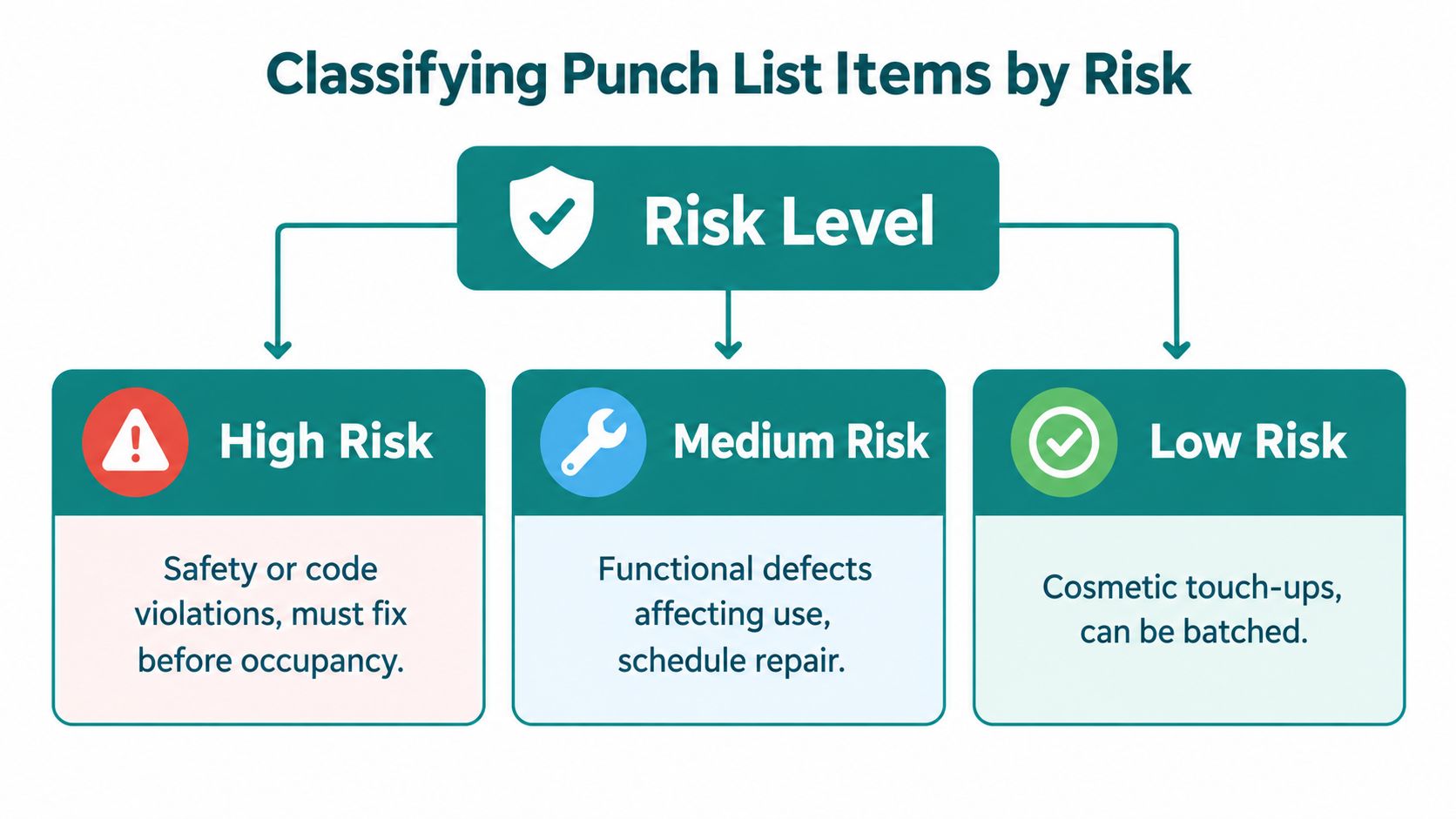
A scratched wall and an unresolved safety concern shouldn't receive identical treatment just because both appear in the same spreadsheet. Classify the consequence of each item before deciding its priority.
Use life-safety and code, operational, contractual, and cosmetic as practical categories. They describe the nature of the issue, not an automatic permission to occupy or launch. A seemingly cosmetic defect can still breach a specification, while a functional problem may also have safety implications.
Let consequences determine the response
| Category | What to establish | Recommended acceptance evidence |
|---|---|---|
| Life-safety and code | Whether the issue prevents required approval or safe use | Relevant inspection, test, and authorized acceptance |
| Operational | Whether users can perform the intended activity | A witnessed functional test under appropriate conditions |
| Contractual | How installed work differs from the agreed requirement | Comparison against the applicable contract document |
| Cosmetic | Whether appearance meets the approved finish standard | Clear photographs and inspection against that standard |
Treat unresolved safety or code questions as an escalation, not an ordinary touch-up. The authorized decision-maker must determine whether use can proceed. Likewise, don't downgrade a functional issue just because the equipment looks finished.
For example, a Cisco Meraki access point that appears installed but hasn't passed the agreed connectivity test should remain operationally unresolved. A proposed change to the guest splash-page appearance may instead require a scope decision.
Write an entry someone else can act on
An actionable entry should identify the exact location, deficiency, governing requirement, responsible trade, due date, status, and objective acceptance condition, consistent with the AIA explanation of substantial completion and final completion.
Compare an instruction to fix lobby paint with this specific example: repair damaged wall finish at Level 2, Grid E-4, match the approved paint system, and verify through the owner's representative. The location and acceptance condition remove the need for someone to guess.
For network work, apply the same structure without pretending every deployment shares identical requirements. A hypothetical entry could identify the reception guest SSID, describe a failed terms-acceptance flow, reference the approved onboarding design, assign the network engineer, and require a witnessed successful login before acceptance.
Risk determines urgency; the governing requirement determines what counts as corrected. Keep those judgments separate. Otherwise, a team can acknowledge that an item is low risk and mistakenly conclude that it no longer needs resolution.
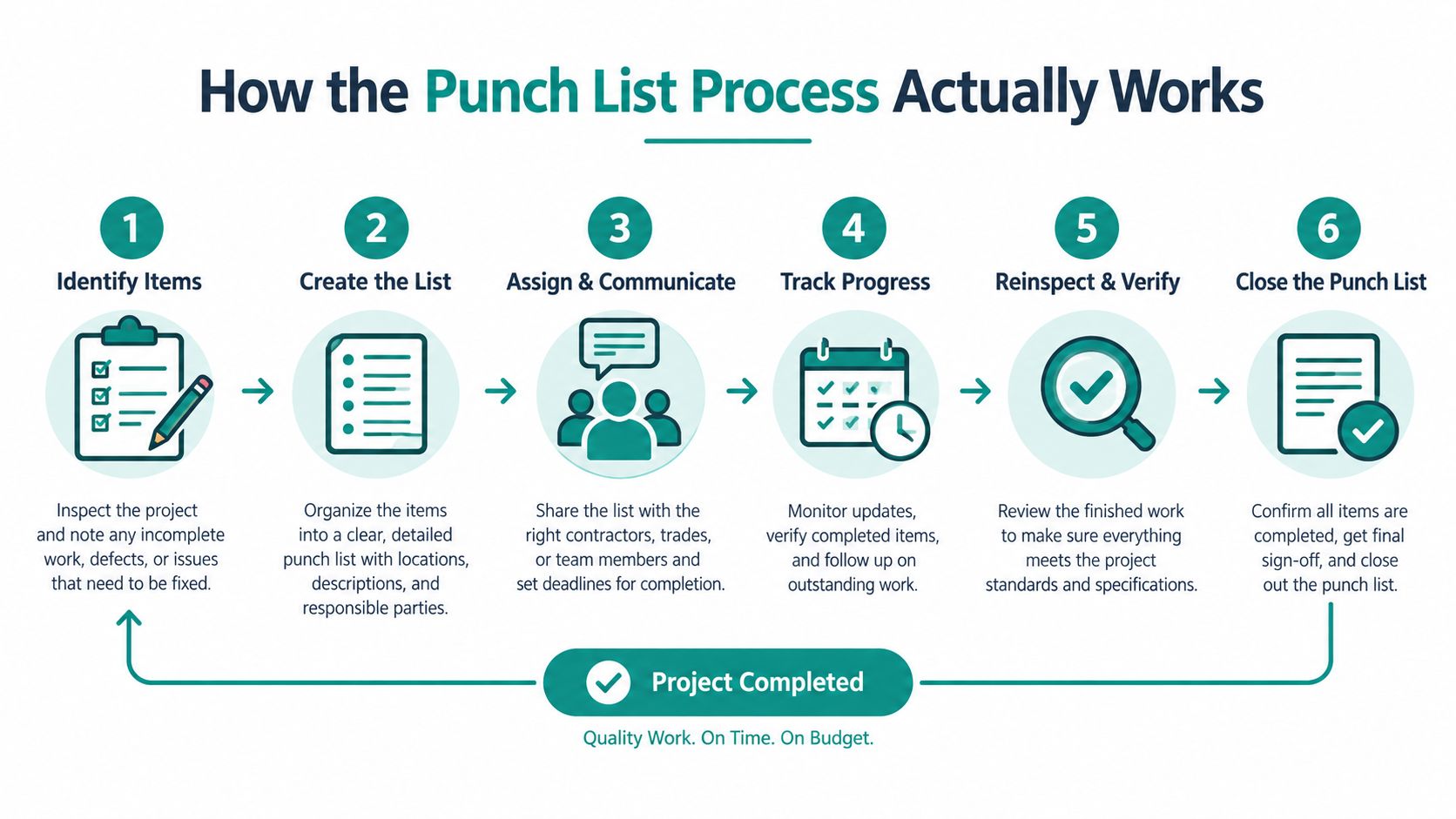
How the Punch List Process Actually Works
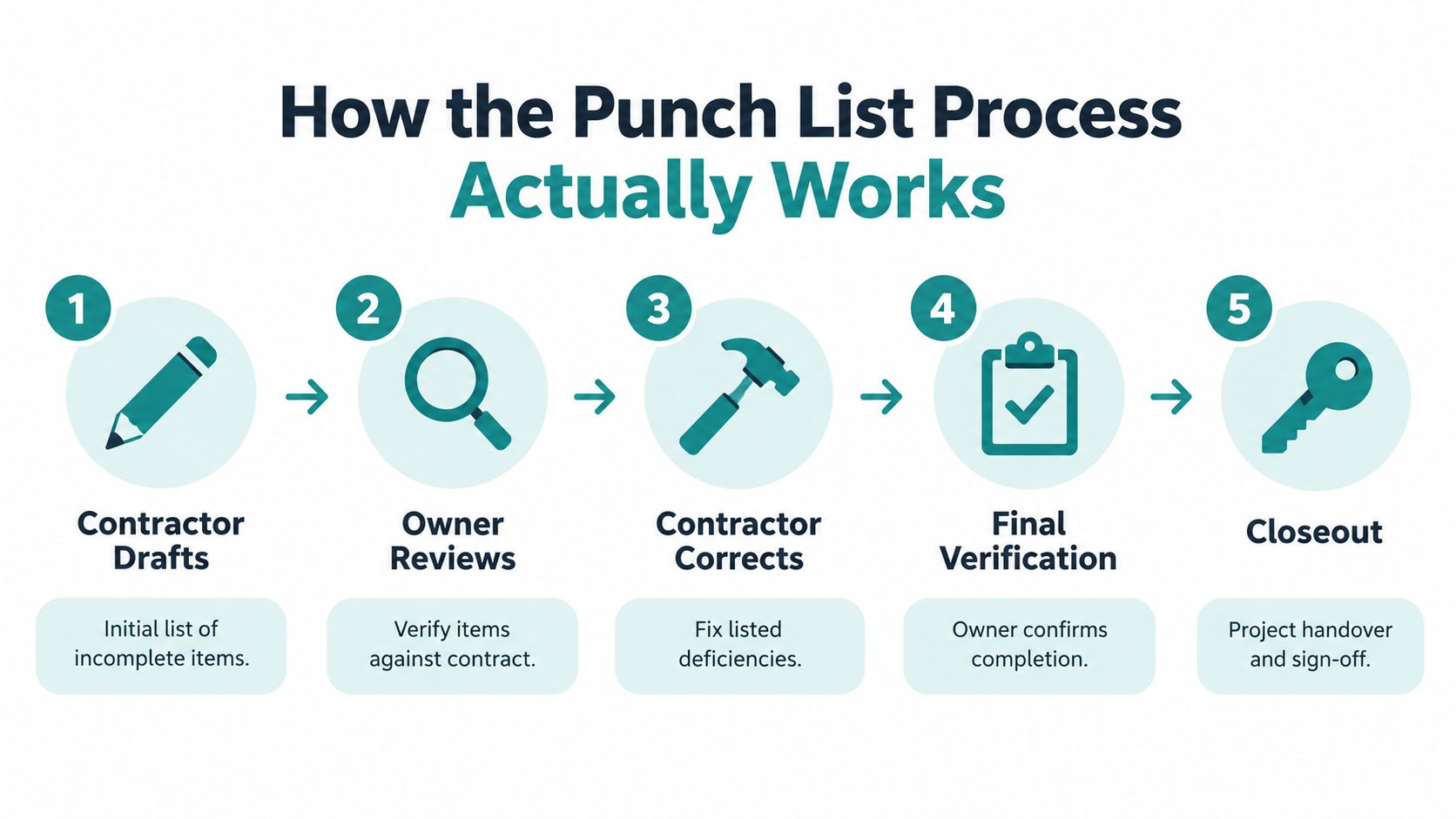
The process starts with the contractor's assessment of outstanding work, not with an owner discovering everything during the final meeting. The architect or owner's representative then reviews and supplements that record. Corrections follow, and the authorized verifier determines whether the work meets the acceptance condition.
That sequence needs visible status changes. A contractor's report that an item is finished should mean ready for verification, not automatically accepted.
Keep correction and acceptance separate
Use a shared record that distinguishes the following actions:
- Identify and review. Capture the deficiency, confirm its relationship to the agreed work, and assign responsibility.
- Correct and submit. The responsible party completes the work and attaches evidence.
- Verify and decide. The named reviewer accepts the result or records why it remains unresolved.
- Close and retain. Preserve the decision and supporting material rather than deleting the item.
A rejected correction needs an explanation. If a repaired finish still doesn't match the approved system, say so. If a guest Wi-Fi test fails at a particular stage, record that stage rather than returning the item with an unhelpful note that it still doesn't work.
Match the evidence to the defect
A stronger evidence standard includes before-and-after photographs for visual defects, test results or commissioning records for relevant systems, a named verifier, a verification date, and a warranty or reopen rule for recurrence. These practices are described in the punch list guidance on evidence and project closeout.
A photograph can establish that a surface looks repaired. It can't, by itself, establish that authentication works or that a network provides the approved access restrictions.
Completed work and accepted work are different statuses. Keep both visible.
Use rolling closeout to review completed corrections in batches rather than leaving every inspection until the final day. Keep high-risk unresolved items escalated while routine corrections move through verification.
For technology projects, a deployment checklist can help organize the tests that support acceptance. Record the test conditions as well as the result, including the user type, connection location, and authentication route. If a result can't be reproduced or traced to the relevant item, ask for better evidence before closing it.
Applying the Punch List to Cisco Meraki Guest Wi-Fi
Start with the user's journey rather than the equipment inventory. Can a visitor join the intended guest Wi-Fi network, complete the agreed onboarding action, and receive only the access they're supposed to have? That's a more useful acceptance question than whether every access point appears online.
A captive portal controls onboarding by requiring an action such as accepting terms, entering an email address, SMS verification, a voucher, or social login before internet access. It can record session events, but it doesn't decrypt modern websites' HTTPS traffic, as the captive portal explanation makes clear. Social WiFi fields should request only information needed for the stated purpose.
Separate onboarding from network protection
For retail, test the guest network against the approved isolation requirements for payment terminals and store operations. For education, check visitor terms acceptance separately from student and operational access. In corporate BYOD environments, establish which personal devices may connect and which business resources they may reach.
Guest and BYOD traffic should be separated from sensitive systems rather than placed on a flat network; the guest Wi-Fi segmentation guidance identifies isolated guest VLANs and separation from payment and operational systems. Portal success isn't evidence that segmentation works. Test both.
When preparing those acceptance questions, the Nerds 2 You Edmonton guest network guide is a companion resource for guest-network planning. Keep the actual closeout criteria tied to your approved design, and use the guest Wi-Fi setup guidance to organize implementation discussions.
Test authentication solutions against the agreed design
Identity PSK, called IPSK or iPSK, replaces a single shared password with unique pre-shared keys assigned to individuals or groups. Cisco describes a RADIUS-backed process that enables individual credential revocation or rotation without changing everyone else's password in its Identity PSK authentication documentation.
Use that principle to define tests for the selected Cisco Meraki configuration. Don't assume the cited controller workflow proves every Meraki deployment behaves identically.
Where EasyPSK is part of the chosen authentication solution, document its approved provisioning, connection, and revocation behavior. Verify the actual implementation rather than treating the product name as an acceptance condition.
Translating Punch List Categories to Wi-Fi Closeout
| Category | Construction Example | Cisco Meraki Guest Wi-Fi Example |
|---|---|---|
| Life-safety and code | An unresolved required safety inspection | Escalate any network dependency affecting an agreed safety-system requirement |
| Operational | Equipment fails its intended-use test | Guest captive portal fails the approved onboarding test |
| Contractual | Installed work differs from the specification | IPSK or EasyPSK workflow differs from the approved design |
| Cosmetic | Finish needs an approved touch-up | Splash-page layout doesn't match the approved presentation |
These are illustrative entries, not reported project results. Each still needs an owner, deadline, test method, and acceptance decision.
Best Practices for Managing a Punch List Without Losing Your Mind
The awkward items deserve the clearest records. Straightforward corrections rarely require a lengthy debate; disputed requirements, inaccessible work, and recurring failures do.
Keep the list useful by recording decisions instead of leaving everyone to reconstruct them from email. An unresolved item should show why it remains open and what must happen next.

Handle exceptions without hiding them
If work can't be completed immediately, document the constraint, interim arrangement, responsible party, future verification, and authorized decision. Don't disguise deferred work as closed work.
For a disputed item, compare the installed result with the governing requirement. A punch list should reconcile contracted work, not become permission to add post-contract preferences. The discussion of punch lists, acceptance, and payment risk%20-%20Punch%20Lists%20(Campbell)%209_27_18.pdf) addresses the distinction between usable facilities, unfinished obligations, and final-payment arrangements.
An owner's preference for a different social login layout may be valid, but first establish whether the delivered layout breaches the approved design. If it doesn't, route the request through change control rather than calling it a defect.
Closeout boundary: Correct the agreed work through the punch list. Approve different work through the appropriate change process.
Make the next action obvious
Use these habits to prevent stalled entries:
- Assign achievable deadlines. Account for site access, dependencies, materials, and reviewer availability.
- Name the verifier. Confirm their authority and availability before scheduling acceptance.
- Explain failed checks. Attach the failed condition and supporting evidence so the correction team can respond.
- Preserve recurring-defect history. Connect a reopened issue to its earlier repair and acceptance record.
- Record financial decisions separately. Have the authorized parties document how unresolved work affects retainage or final payment under the contract.
For captive portals, social WiFi, IPSK, and EasyPSK, test the affected workflow after correction rather than accepting a configuration screenshot alone. Use network troubleshooting steps to structure investigation, then attach the relevant findings to the item.
Keep troubleshooting notes and acceptance evidence distinct. The first explains how someone investigated the problem; the second establishes whether the agreed result now works.
Closing the Loop on Your Punch List
The punch list definition becomes practical when you treat the document as an acceptance-and-risk record, not a collection of reminders. The substantial-completion milestone doesn't remove the remaining obligations. Your job is to keep those obligations understandable and move them toward an authorized decision.
This week, choose the entries that are hardest to act on and improve them:
- Classify the consequence. Identify safety, operational, contractual, and cosmetic concerns.
- Rewrite the ambiguity. Add the missing location, requirement, responsible party, or acceptance condition.
- Check network boundaries. Confirm that guest Wi-Fi and corporate BYOD meet the approved segmentation design.
- Require proof. Keep corrected items awaiting verification until the named reviewer accepts the evidence.
Schedule acceptance work, not just repairs
Use an implementation timeline to make room for review, retesting, and handover decisions alongside installation tasks. A schedule that ends when the engineer leaves site hasn't necessarily allowed time for acceptance.
You don't need a perfect-looking dashboard. You need a record that lets the owner, contractor, and IT team understand what remains and what will resolve it. That's how you turn a tense handover into a manageable set of decisions.
Splash Access offers Cisco Meraki guest Wi-Fi solutions with customizable captive portals, social WiFi integration, and IPSK authentication. Visit Splash Access to discuss your education, retail, or corporate guest-access deployment and bring your onboarding and authentication requirements into a clear closeout plan.