When you glance at your Wi-Fi settings and see WPA2 PSK AES, what does it actually mean? Hey, no worries if it looks like a bunch of tech jargon! Think of it as the complete security package for your wireless connection: the digital lock, the key that opens it, and the secret code that protects everything inside. It’s a powerful trio that has long been the gold standard for securing networks, from the one in your living room to complex systems in major corporations, especially those running on awesome gear from Cisco and Meraki.
Decoding Your Wi-Fi Security
Connecting to a Wi-Fi network means you're trusting a security protocol to shield your personal data from anyone trying to eavesdrop. For well over a decade, that trust has been placed in WPA2 PSK AES. It might sound a bit intimidating, but it’s really just three components working together like a well-oiled machine to keep you safe.
Let's pull back the curtain and look at how each part contributes to a secure connection.
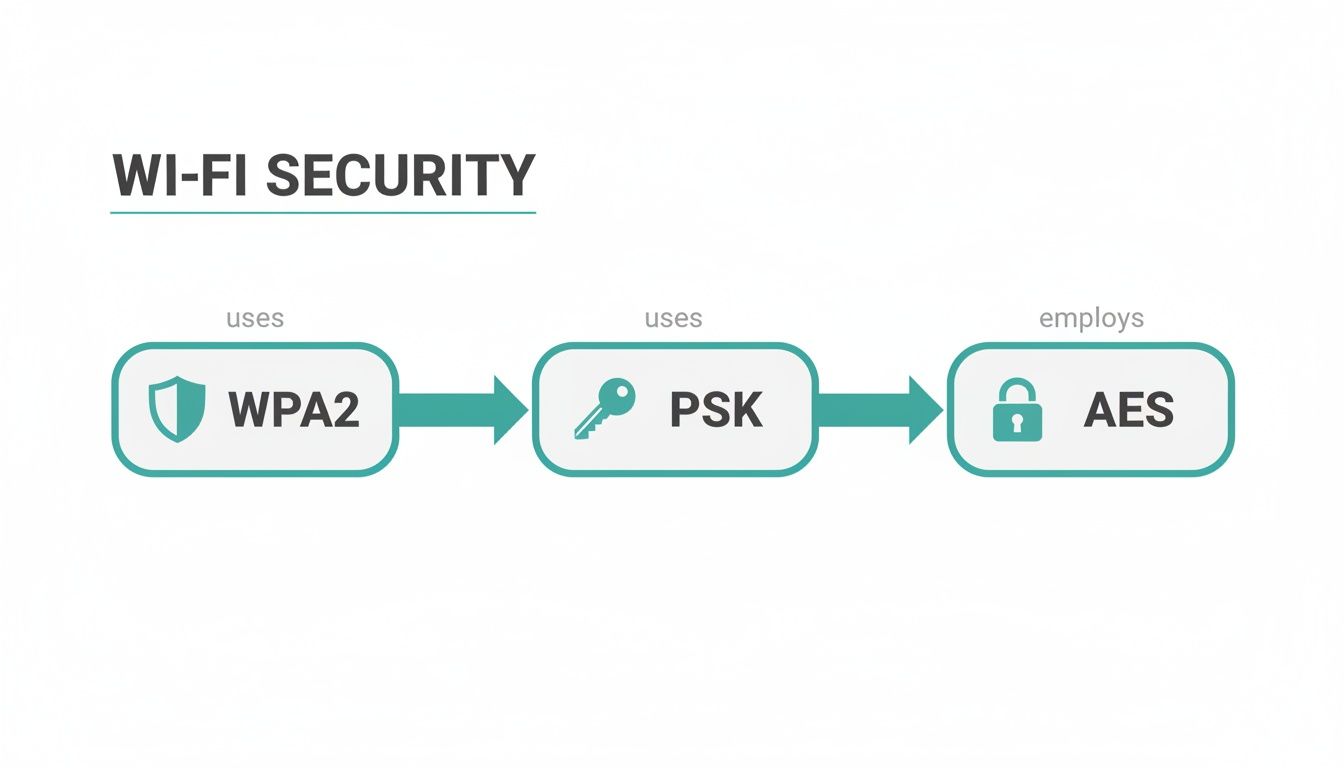
As you can see, it's a logical chain. The WPA2 protocol creates the secure foundation, the PSK acts as the password, and AES does the heavy lifting of encrypting your data.
WPA2: The Security Framework
First up, you have WPA2, which stands for Wi-Fi Protected Access 2. This is the overall security system—the modern, fortified lock on your digital front door. It’s the protocol that dictates the rules for how your phone, laptop, and other devices talk securely to a wireless router.
From its introduction in 2004, WPA2 quickly became the go-to standard. Its adoption skyrocketed when certification became mandatory for all Wi-Fi-trademarked devices between 2006 and 2020, cementing its place in nearly every piece of consumer hardware.
PSK: The Shared Password
Next in line is the PSK, or Pre-Shared Key. This is the part you're most familiar with—it's the password you punch in to get online. Simply put, it's the single key that everyone shares to unlock the Wi-Fi.
This simplicity is great for home use, but it can turn into a real headache in busy places like Retail stores or offices with a BYOD Corporate policy. To learn more about how this works, take a look at our guide on what a pre-shared key is.
A Pre-Shared Key is the most common way to secure home and small business networks because it’s so easy to set up. But it's this "one key for everyone" approach that pushes larger organizations toward more robust Authentication Solutions like IPSK and EasyPSK.
AES: The Unbreakable Encryption
Finally, we have AES, the Advanced Encryption Standard. If WPA2 is the lock and PSK is the key, then AES is the unbreakable code that scrambles all your data while it's in transit.
Once you’re connected, AES converts your information—emails, browsing history, passwords—into a complex cipher that only your device and the router can decode. This is military-grade encryption, ensuring that even if a hacker managed to intercept your Wi-Fi signal, all they would see is unintelligible gibberish.
This powerful encryption is exactly why network hardware from vendors like Cisco Meraki depends on AES to secure networks in demanding environments like Education and Retail chains. It’s the engine that powers everything from basic guest wifi to sophisticated Captive Portals that use social login and social wifi features. Grasping how these three elements—WPA2, PSK, and AES—work together is the first step to building a truly secure wireless network.
Understanding Why AES Is The Only Real Choice For Encryption
When you're setting up a Wi-Fi network, especially with powerful gear like Cisco Meraki access points, you’ll run into a choice between two encryption protocols: AES and TKIP. This might look like a minor technical setting, but trust us, it's one of the most critical security decisions you'll make. The difference isn't subtle—it's night and day.
Think of TKIP as an old, rusty padlock you found in your grandfather's shed. It probably worked fine decades ago, but any modern lock-picker (or hacker) can get through it in no time. AES, on the other hand, is a modern, military-grade digital vault. It’s the same standard governments and security agencies trust to protect classified information.
What’s The Problem With TKIP?
TKIP, which stands for Temporal Key Integrity Protocol, was never meant to be a long-term solution. It was a quick fix designed to patch the massive security holes in its predecessor, WEP. The main goal was to let it run on older hardware that couldn't handle stronger encryption, basically acting as a stopgap measure.
Because it was built on WEP's shaky foundation, TKIP inherited some of the same critical vulnerabilities. It didn't take long for security researchers to find ways to crack it, making it completely obsolete for any modern network. Using TKIP today is like leaving your front door key under the mat—it might deter a casual visitor, but it won’t stop a determined intruder.
This is exactly why you should never use it, especially in places like the Education sector, Retail stores, or BYOD Corporate offices where sensitive data is always on the move.
Why AES Comes Out On Top
AES, or Advanced Encryption Standard, wasn't a patch. It was a total redesign, built from the ground up for serious security. It uses a sophisticated block cipher that, with today's technology, is computationally impossible to crack through brute-force attacks.
To make it clear why AES is the only option you should be looking at, let's break down the key differences in a quick comparison.
AES vs TKIP A Quick Security Comparison
This table highlights the key differences between AES and TKIP encryption protocols to help you understand why AES is the recommended standard.
| Feature | AES (Advanced Encryption Standard) | TKIP (Temporal Key Integrity Protocol) |
|---|---|---|
| Security Strength | Considered highly secure with no known practical vulnerabilities. Adopted by the U.S. government. | Known vulnerabilities and is considered deprecated. Can be cracked with relative ease. |
| Encryption Method | Uses a strong block cipher (Rijndael) that encrypts data in fixed blocks. | Based on the flawed WEP protocol, using the RC4 stream cipher with added "fixes". |
| Performance Impact | Natively supported by modern hardware, offering fast performance without bottlenecks. | Not designed for modern hardware. Can cause network slowdowns as devices fall back to older standards. |
| Industry Standard | The mandatory encryption standard for WPA2 and a core component of WPA3. | Officially deprecated by the Wi-Fi Alliance in 2012. No longer a valid option for secure networks. |
As you can see, the choice is pretty straightforward. AES delivers on all fronts, offering the security and performance that modern networks demand.
Here’s why AES is the clear winner:
- Unbreakable Security: AES has no known practical weaknesses. It gives you robust protection against even the most sophisticated attacks, keeping your data confidential.
- Better Performance: Modern Wi-Fi hardware, including access points from brands like Cisco and Meraki, is built for AES. Forcing it to use TKIP can actually slow your network down, as routers often have to drop to legacy speeds to support the old protocol. With AES, you get both top-tier security and top speed.
- A Modern Standard: AES is required for WPA2 and is a foundational part of its successor, WPA3. When you choose AES, you're aligning your network with current and future Wi-Fi security standards.
Choosing WPA2 PSK AES is the absolute baseline for modern Wi-Fi security. It ensures the connection between a user's device and your network is a locked, secure tunnel, protecting everything from guest logins to sensitive company data.
In environments like schools or businesses with BYOD (Bring Your Own Device) policies, this level of security is non-negotiable. With devices handling everything from student records to payment information, a weak encryption protocol is an unacceptable risk.
This is also where more advanced Authentication Solutions, like Captive Portals for guest wifi and IPSK (Identity Pre-Shared Key) or EasyPSK, become critical layers on top of your rock-solid AES encryption. To get a better handle on this, you can explore more about WPA2 with AES encryption and see how it all fits together.
Ultimately, picking AES isn't just a best practice—it's the only responsible choice for protecting your network and the people who use it.
The Hidden Risks of a Single Wi-Fi Password
We've all done it. Setting up a Wi-Fi network with a single, shared password seems like the easiest way to get everyone online. It's simple to configure, a breeze to remember, and quick to share. But that convenience masks a tangled mess of security risks, especially for busy places like schools (Education), Retail stores, or any office with a Bring-Your-Own-Device (BYOD Corporate) policy.
The standard WPA2 PSK AES setup is built on this very idea of a Pre-Shared Key (PSK). And while its AES encryption is incredibly strong, the "shared" part of the equation is the real weak link. When everyone from the CEO to the summer intern uses the same password, you lose all control and accountability.
The Problem with a Single Point of Failure
Think about the comings and goings in any organization. An employee leaves, a student graduates, or a contractor finishes a project. If they all used that one Wi-Fi password, what do you do?
Your only truly secure option is to change the password and then manually update it on every single device. That means every laptop, smartphone, tablet, printer, and smart TV on the network. For a small office, that’s a headache. For a large Education campus or a multi-location Retail chain, it's a full-blown operational nightmare.
More often than not, this critical security step gets skipped, leaving your network wide open. That former employee could be sitting in the parking lot, still connected to your internal network, long after they've handed in their keys.
A single shared password creates a massive security blind spot. You have no real way of knowing who is on your network at any given time, making it impossible to trace suspicious activity back to a specific person or device.
This complete lack of visibility is a huge gamble. If a data breach happens, you have no audit trail to follow.
How a Leaked Password Compromises Everything
A shared password is only as safe as the least security-conscious person who has it. It can be scribbled on a sticky note, texted to a guest, or just overheard in a conversation. Once it's out, it's out for good.
This isn't just a theoretical problem. An attacker can capture a single 4-way handshake and then run offline dictionary or brute-force attacks to crack weak WPA2-PSK passphrases. Even worse, WPA2-PSK lacks what's called "forward secrecy," meaning a compromised key could potentially be used to decrypt traffic that was captured before the key was stolen. You can read more about these kinds of Wi-Fi access vulnerabilities on Wikipedia.
For BYOD Corporate environments, this is the worst-case scenario. A single leaked password could give an unauthorized user a direct line to sensitive company files—all because of one simple, shared key.
A Smarter Path Forward with IPSK
Thankfully, there’s a much better way to handle network access that doesn't require ripping out your existing infrastructure. This is where Authentication Solutions like Identity Pre-Shared Key (IPSK) step in.
IPSK, sometimes known as EasyPSK, perfectly bridges the gap between the simplicity of a PSK and the robust security of an enterprise-grade system. It operates within the familiar WPA2 PSK AES framework but with a critical difference: it assigns a unique password to every single user or device.
Here’s how it completely changes your security posture:
- Individual Accountability: Every person gets their own key. If a device is lost or an employee leaves, you just revoke their specific key. Nobody else is affected.
- Simplified Management: IT teams can manage thousands of unique keys from a central dashboard, especially with a powerful platform like Cisco Meraki.
- Enhanced Security: The enormous risk of a single, shared, leaked password is gone.
This approach is ideal for securing a diverse mix of devices and users, from students in a dorm and shoppers using guest wifi with a social login, to employees connecting their personal phones. By moving away from a one-key-fits-all model, IPSK closes the dangerous security gaps that a traditional PSK setup leaves wide open.
Modernizing Guest Wi-Fi with Captive Portals
Guest wifi has gone from a nice-to-have perk to a flat-out expectation. Whether it’s in a Retail shop, a university common area, or a corporate lobby, visitors expect to connect easily. But just scrawling a single Wi-Fi password on a whiteboard for everyone to share creates the same security nightmare we've been talking about, turning a helpful amenity into a major risk.
This is where a Captive Portal completely changes the game. Instead of relying on a static WPA2 PSK AES password, a captive portal acts as a friendly gateway. It gives you a controlled, branded, and interactive login experience for every single guest who connects.
When you pair these portals with powerful hardware like Cisco Meraki access points, guest access is no longer just a utility—it becomes a powerful business tool. Think of it as the difference between leaving a door wide open and having a helpful concierge greet every visitor personally.
Beyond the Shared Password
Let's be honest: the old way of managing guest Wi-Fi is broken. A single shared password gets passed around to anyone, it rarely (if ever) gets changed, and it gives you zero visibility into who is actually using your network. Modern Authentication Solutions toss this outdated model aside in favor of far more elegant and secure ways to get people online.
These methods don't just lock down your network; they make the login process faster and more intuitive for your guests. That’s a huge win in busy places like cafes, Retail stores, and on Education campuses where nobody wants to waste time getting connected.
Here are a few of the most popular ways to onboard guests today:
- Social Wi-Fi Login: This lets people connect using their existing social media accounts, like Facebook or Google. It’s incredibly fast for the user and can provide valuable (and anonymized) demographic data for marketing. This is often called social wifi.
- Voucher and QR Code Access: An absolute game-changer for hotels, event venues, or Education campuses. You can generate codes or QR codes that grant Wi-Fi access for a specific amount of time, ensuring only authorized guests can get on.
- Simple Forms: A basic form can ask for an email or phone number in exchange for Wi-Fi. It’s a straightforward way to build a marketing list while keeping the login process simple for everyone.
Creating a Branded and Interactive Experience
Your captive portal is often the very first digital handshake you have with a guest on your property. It's a golden opportunity to make a great first impression. With a customizable splash page, you can put your brand front and center, promote a special offer, or share important info.
For a Retail business, this could be a pop-up coupon for 15% off their purchase. In a BYOD Corporate environment, the portal is the perfect place to present the terms and conditions for using the network. The possibilities are truly endless, turning a simple Wi-Fi connection into a direct channel of communication. You can learn more about how a Wi-Fi captive portal can be built around your specific business needs.
A well-designed captive portal transforms your guest Wi-Fi from a cost center into a strategic asset. It enhances security, gathers marketing insights, and improves the overall visitor experience.
Guest Authentication Methods Compared
A look at different ways to onboard guests onto your Wi-Fi network, balancing security with user experience.
Choosing the right way to get guests online really depends on your environment and what you want to achieve. It’s all about finding the right balance between security, user convenience, and the data you hope to gather.
| Method | Best For | Security Level | User Experience |
|---|---|---|---|
| Social Login | Retail, Hospitality, Cafes | Medium | Excellent (Fast & Easy) |
| Voucher/QR Code | Education, Events, Hotels | High | Good (Requires a code) |
| Email/Form | General Public Venues | Low | Good (Simple data entry) |
| IPSK / EasyPSK | Corporate Guest Access | Very High | Excellent (Seamless reconnect) |
This table shows there’s no single "best" method—it's about picking the right tool for the job.
For organizations already running on Cisco Meraki hardware, rolling out these advanced guest Wi-Fi features is surprisingly simple. You can easily create separate, secure guest networks that are completely walled off from your internal corporate traffic. This setup allows you to offer convenient social wifi to visitors without ever putting your core network at risk. By moving beyond the limitations of a standard WPA2 PSK setup, you build a system that is safer, smarter, and far more valuable to your organization.
How IPSK Secures Corporate BYOD Networks
Managing a Bring-Your-Own-Device (BYOD Corporate) policy can feel like a massive security headache. How do you give network access to a flood of personal smartphones and laptops in a busy corporate or Education setting without opening the floodgates to risk? The answer isn't a better shared password—it's getting rid of them altogether with Identity Pre-Shared Key (IPSK) technology.
IPSK, sometimes called EasyPSK, is a smart evolution of the standard WPA2 PSK AES you already know. Instead of one password for everyone, IPSK generates a completely unique, private key for every single user or device. Think of it like giving each employee their own personal keycard to get into the building, rather than handing out copies of a single master key that could be lost or shared. This simple shift immediately closes the biggest security hole of traditional PSK.
The Power of Individual Credentials
The most immediate benefit of IPSK is the huge jump in security and accountability. When every connection is tied to a specific user or device, your IT team finally has a crystal-clear view of who is on the network at all times. For BYOD Corporate environments, this is a game-changer.
Imagine an employee leaves the company. With one shared password, your only real option is to change it for everyone, causing a major disruption. With IPSK, it's a non-event. You just log into your dashboard and revoke that one person's key. Their access is cut off instantly, and nobody else is affected.
By assigning a unique key to each device, IPSK eliminates the single point of failure that makes a shared password so risky. It brings enterprise-level security principles to the simplicity of a PSK system.
This kind of granular control is what modern security is all about. It ensures only authorized people can access your resources and dramatically lowers the odds of a breach.
Streamlining Management on Cisco Meraki
One of the best things about IPSK is how smoothly it integrates with modern network hardware, especially platforms like Cisco Meraki. From a single dashboard, IT admins can manage thousands of unique keys without breaking a sweat. Onboarding a new employee or a student’s new tablet becomes a quick, automated task instead of a manual chore.
This simplified management works beautifully with various Authentication Solutions. You can generate unique keys for different groups, like staff, students, or long-term contractors. It's a far more secure approach than a typical guest network that relies on a simple social wifi login, as it provides persistent, trusted access. To see how this works behind the scenes, take a look at our guide on IPSK with RADIUS authentication.
A Shield Against Modern Threats
While WPA2 PSK AES offers strong encryption, the protocol itself isn't bulletproof if the password gets compromised. The 2017 KRACK attacks, for example, exposed flaws in the WPA2 handshake that could let an attacker reinstall an old key. That, along with other research, proved that credentials could be lifted from captured network traffic. You can read more about the global state of Wi-Fi security and see why robust authentication is so critical.
IPSK helps neutralize these risks by getting rid of the centralized "key." If one person's key is ever compromised, the damage is contained to that single device, not your entire network. This makes it an essential security layer for any organization—from a busy Retail chain to a sprawling university campus—that needs to balance convenience with rock-solid protection.
Preparing Your Network for the WPA3 Transition
Even though WPA2 PSK AES is still a workhorse for Wi-Fi security, the industry doesn't stand still. The future is undoubtedly WPA3, and smart organizations are already mapping out their transition. This isn't just about adopting the newest standard; it's a strategic move to future-proof your network.
WPA3 delivers some serious security upgrades, particularly for environments like Education, Retail, and BYOD Corporate offices. It introduces stronger defenses against brute-force attacks and even adds a layer of security to open guest networks that rely on a Captive Portal. For any modern network, this upgrade is becoming essential.
Planning a Seamless Migration
Flipping the switch from WPA2 to WPA3 across your entire network isn't a simple overnight job. It demands a clear plan, especially in BYOD Corporate environments where you're juggling a mix of old and new devices. If you just make a hard cutover, you risk stranding users with older laptops or phones, creating a support nightmare.
The secret to a smooth transition lies in what's often called "mixed mode." Modern hardware from vendors like Cisco and Meraki lets you run both WPA2 and WPA3 at the same time, on the same SSID.
This WPA2/WPA3 transitional mode is a lifesaver. Here’s how it works:
- Newer, WPA3-capable devices will automatically negotiate and connect using the more secure protocol.
- Older devices that only understand WPA2 can still connect just as they always have, without a hitch.
This strategy ensures nobody gets left behind while you progressively update your device fleet. It's a practical, real-world solution that prevents user frustration and keeps the network humming. If you want to dive deeper, you can learn more about what WPA3 is and the specific advantages it offers.
The Growing Momentum Behind WPA3
The industry-wide shift to WPA3 is picking up serious speed. For years, WPA2 was the undisputed king, but recent market data shows WPA3 adoption is accelerating. One report pegged the WPA3 market at roughly $1.2 billion in 2024, forecasting a jump to $7.9 billion by 2033 as businesses continue their hardware refresh cycles. You can find more Wi-Fi technology trends and statistics that highlight this growth.
By planning your WPA3 migration now, you’re getting ahead of the curve and staying in front of new threats. The first and most practical step is implementing a mixed-mode strategy on your Cisco Meraki infrastructure, paving the way for a more secure future.
When you pair this forward-looking strategy with powerful Authentication Solutions like IPSK or EasyPSK for secure onboarding, you build a network that’s both resilient and secure—ready to protect everything from a simple social wifi login to your most critical corporate data.
Frequently Asked Questions
Digging into Wi-Fi security can definitely spark a few questions. Let's clear up some of the most common ones about WPA2 PSK AES and modern network setups so you can make the right call for your organization.
Is WPA2 PSK AES Still Secure Enough for My Business?
For most situations, yes. WPA2 PSK with AES encryption is still considered very secure, but there's a catch: its security hinges entirely on a strong, complex password. The AES encryption standard itself is a rock-solid workhorse. The real vulnerability in a PSK setup is that single, shared password.
If you're running a network in Education, Retail, or any BYOD Corporate environment, you should seriously consider upgrading to an IPSK or EasyPSK solution. This approach keeps the familiar WPA2 framework but gives each user or device its own unique key, getting rid of all the problems that come with one password for everyone.
What Is the Main Difference Between WPA2 Personal and Enterprise?
The biggest difference comes down to how users get onto the network. WPA2 PSK (Personal) uses that single Pre-Shared Key for every single person. It’s a breeze to set up but isn't the best choice for organizations where accountability matters.
WPA2 Enterprise, on the other hand, uses the 802.1X standard. This means every user needs their own credentials, which are checked against an authentication server (like RADIUS). While it's much more secure, it can be a real headache to implement and manage. That's where Authentication Solutions like IPSK provide a fantastic middle ground—you get unique keys for each user without the full-blown complexity of a RADIUS server, making it a perfect fit for many businesses using Cisco Meraki.
Can I Use a Captive Portal with an Encrypted WPA2 PSK Network?
Absolutely! In fact, this is a highly effective and popular setup for guest wifi. Think of it as a one-two punch for security and user experience. The WPA2 PSK AES encryption locks down the wireless traffic itself, stopping anyone from snooping on the connection. Then, the Captive Portal adds a second layer for authentication and engagement.
Here’s how it works: after a guest connects using the Wi-Fi password, they are automatically sent to a branded login page. From there, they can get online using a social login, a voucher code, or by filling out a simple form. This combination gives you both top-notch security and a controlled, branded onboarding experience, which can be easily managed through platforms running on Cisco Meraki hardware.
It's a bit shocking, but global research shows just how many networks are still left wide open. One study found that while some countries have great WPA/WPA2 adoption, others have upwards of 40% of their access points running with no security or just flimsy protection. You can dive into the full report on global Wi-Fi security practices to see the data for yourself.
Ready to modernize your Wi-Fi experience with advanced authentication solutions? Splash Access integrates seamlessly with Cisco Meraki to deliver secure, branded, and insightful guest and BYOD networks. Visit us at https://www.splashaccess.com to learn how we can help.