Hey there! Ever wondered why your super-fast Wi-Fi network suddenly feels like it’s wading through mud? You've got full bars, but web pages take forever to load, and video calls are a pixelated mess. The culprit is almost always a poor Wi-Fi Signal-to-Noise Ratio, or SNR.
Frankly, it's the most important metric for a healthy, reliable wireless network. Let's break down what it is and why it's the secret to amazing Wi-Fi.
What is Wi-Fi Signal-to-Noise Ratio (SNR)?
Think of it like trying to have a conversation at a loud concert. Your voice is the Wi-Fi signal, and the concert's roar is the background noise. If the music is blaring, it doesn't matter how loudly you speak; your friend won't hear you clearly. The same thing happens with your Wi-Fi.
Your access point sends out a signal, but it's constantly competing with a sea of background radio frequency (RF) noise. This noise comes from all sorts of things—microwaves, cordless phones, Bluetooth speakers, and even neighboring Wi-Fi networks. When that background noise overpowers the signal from your AP, your connection drops, and speeds plummet.
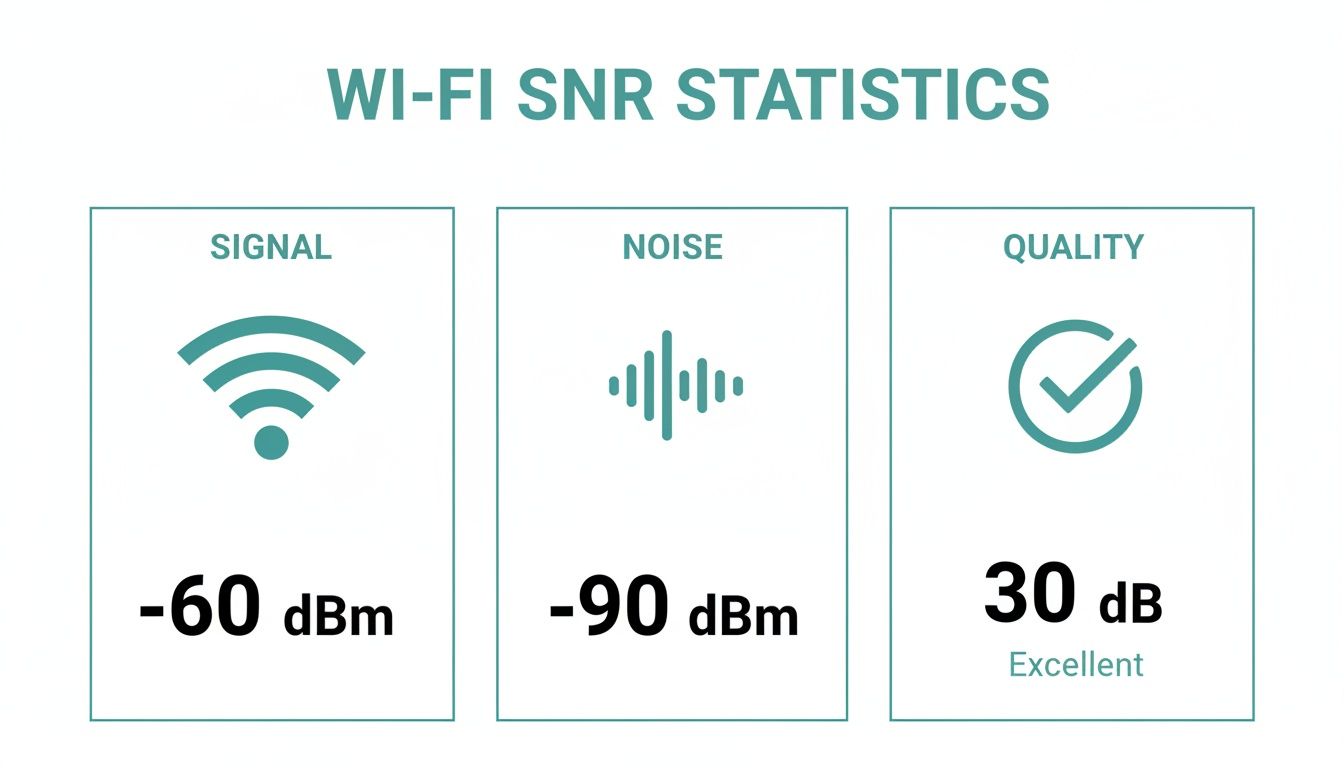
This image nails it: a strong signal is great, but it has to be stronger than the noise to deliver a quality connection. That difference between signal and noise is your SNR.
Why SNR is the Key to Great Wi-Fi
In busy places like a university campus, a bustling retail store, or a corporate office, a stable connection isn't a luxury—it's essential. A student needs to access online course materials without interruption. A shopper expects seamless guest wifi access after a simple social login. And in a modern BYOD corporate environment, employees depend on a reliable connection to get their work done.
A low SNR is the direct cause of dropped connections, frustratingly slow speeds, and unhappy users.
For network admins managing hardware from vendors like Cisco Meraki, understanding SNR is the first step to building a truly great network. It has a direct impact on how well your advanced features work.
- Captive Portals: If the connection is flaky, users might not even be able to load the login page, making your social wifi and data capture efforts useless.
- Authentication Solutions: Secure access methods like IPSK and EasyPSK need a stable link to work properly. A noisy environment can cause authentication to fail, locking users out.
A strong signal in a noisy environment is like shouting into a hurricane. The true measure of a great Wi–Fi network is its ability to deliver a clear signal above the noise, which is exactly what SNR represents.
By shifting your focus to SNR, you move beyond just providing "coverage" and start engineering a genuinely high-performance wireless experience for every single user.
What Is Wi-Fi Signal-to-Noise Ratio, Explained Simply?
Let's cut through the technical jargon and get straight to what the Wi-Fi signal-to-noise ratio (SNR) really is. At its heart, SNR is a simple comparison: it measures how loud your Wi-Fi signal is compared to all the other background radio frequency (RF) noise competing against it. It's the single most important metric for gauging the health and performance of your wireless network.
Think of it like trying to have a conversation in two different places.
First, imagine you're in a quiet library. You can whisper to your friend across the table and they'll hear you perfectly. Your whisper (the signal) is easily distinguished from the faint hum of the library (the noise). This is a great SNR.
Now, picture yourselves at a loud rock concert. Just to be heard, you have to shout directly into your friend's ear. The booming music (the noise) is overwhelming, making it nearly impossible for your voice (the signal) to cut through. This is a poor SNR, and it’s exactly what your Wi-Fi devices experience in a "noisy" RF environment.

This crucial ratio is measured in decibels (dB). When it comes to SNR, a bigger number is always better because it means your signal is cleaner, stronger, and more distinct from the background interference. The result? A faster, more dependable connection for your users.
The Numbers Behind a Great Connection
To find your SNR value, you just do some simple subtraction: Signal Strength – Noise Level = SNR. For instance, if your Cisco Meraki dashboard shows a signal strength of -60 dBm and the noise floor is at -90 dBm, you have a solid SNR of 30 dB. If you want to get more hands-on, our guide shows you how to calculate signal to noise ratio with more examples.
Knowing what these numbers actually mean is critical for anyone managing a network, especially in crowded spaces like a university in the Education sector, a busy Retail store, or a BYOD Corporate office.
A strong signal is only half the battle. The true measure of a high-performing network is how much cleaner that signal is than the surrounding noise. An SNR of 25 dB or higher is really the baseline for reliable, modern Wi-Fi.
This metric has a direct impact on the user journey, right from the first click. A poor SNR can stop a user from even loading your captive portals or authentication solutions. When they can't connect to a social login page or complete an IPSK or EasyPSK authentication, frustration builds and support tickets pile up.
What Makes a Good SNR Level?
Not all SNR values deliver the same experience. Different online activities demand different levels of signal clarity. Here’s a quick guide to the thresholds that matter.
- Excellent (30 dB and above): This is the gold standard. At this level, your network can handle the most demanding applications, like 4K video streams, large file transfers, and flawless voice calls. This should be the target for any enterprise-grade network in Education or Corporate settings.
- Good (25 dB to 29 dB): In this range, things are still running smoothly. Most common activities, such as web browsing, email, and HD video streaming, will work without a hitch. This is often the minimum acceptable level for a quality guest wifi experience in Retail.
- Fair (20 dB to 24 dB): Here's where performance starts to suffer. Users will likely complain about inconsistent connections and slow speeds. Basic web browsing might be okay, but anything more intensive will struggle.
- Poor (Below 20 dB): A connection in this range is unreliable at best. Users will experience constant disconnects and frustratingly slow speeds, even for the simplest tasks. An SNR this low indicates a critical problem that needs immediate attention.
Why SNR Matters More Than Just Signal Strength
Have you ever glanced at your phone, seen full Wi-Fi bars, and yet your internet connection felt like it was moving through molasses? It’s a classic, frustrating scenario that gets right to the heart of a big misunderstanding about wireless networks. Those bars only show you signal strength, which is only half the story. The real key to a solid, fast Wi-Fi experience is the Signal-to-Noise Ratio, or SNR.
Think of it this way: a strong signal in a noisy environment is like trying to have a quiet conversation in the middle of a packed stadium. It doesn't matter how loudly the person next to you is speaking if you can't hear them over the roar of the crowd. The signal gets lost in the noise, leading to dropped connections and painfully slow speeds. This is exactly why focusing on SNR is so much more critical than just chasing a strong signal.
In places packed with people and devices—like a bustling retail store, a university lecture hall, or a modern corporate office—the airwaves are incredibly crowded. This background "noise" is a constant battle for your Wi-Fi, and it comes from all sorts of everyday gadgets.
The Usual Suspects of Wi-Fi Noise
This radio frequency (RF) interference isn't just coming from other Wi-Fi networks. A whole host of common devices are constantly contributing to the problem, making it tough for your access points to get a clear signal through.
Some of the most common sources of this interference include:
- Neighboring Wi-Fi Networks: In dense urban areas or shopping malls, you could have dozens of networks all fighting for the same limited airspace.
- Bluetooth Devices: Everything from wireless headphones to keyboards and smartwatches adds to the chatter, especially on the busy 2.4 GHz band.
- Microwave Ovens: These are notorious for leaking RF energy that can absolutely crush a 2.4 GHz network whenever someone heats up their lunch.
- Cordless Phones and Security Cameras: Many older models also operate on the 2.4 GHz frequency, adding even more congestion.
Getting a handle on these noise sources is your first step toward a healthier SNR. To really get into the weeds on this, you can learn more about how to identify and reduce different kinds of interference with Wi-Fi in our detailed guide.
The Performance Anomaly: When the Slowest Device Wins
One of the most important reasons to obsess over SNR is to avoid a network killer known as the "performance anomaly." This is a maddening phenomenon where a single device with a terrible connection can slow down the entire wireless network for every other user on that same access point.
It’s like a single-lane road during rush hour. If one car slows to a crawl, every single car behind it is forced to slow down, too. Pretty soon, you've got a massive traffic jam. The same thing happens with Wi-Fi. The access point has to spend a huge amount of its time and resources trying to communicate with that one struggling device, which means it has far less time to serve all the other clients with perfectly good connections.
This is a massive headache in high-density environments like those found in Education, Retail, and BYOD corporate sectors. A student in the back of a lecture hall with a poor SNR can degrade the connection for the whole class. Likewise, a shopper in a distant corner of your store trying to connect to the guest wifi could slow down your business-critical point-of-sale systems.
A single device with a poor connection acts like an anchor, dragging down the performance of the entire network. This is why managing SNR isn't just about helping one user—it's about protecting the experience for all users.
This isn't just a theory. A deep dive into modern Wi-Fi deployments showed that a staggering 27% or more of all networks had at least one client with an unreliable signal. That weak signal directly translates to a poor SNR, which is the trigger for this performance-killing anomaly.
For any business that relies on a smooth guest wifi experience, this is a huge risk. It means network-wide slowdowns are practically inevitable during your busiest hours. This is where platforms that integrate with Cisco Meraki access points and use smarter authentication solutions like IPSK can make a real difference. They offer better tools for monitoring the health of every single client in real-time, giving administrators the power to step in before one bad apple spoils the bunch.
At the end of the day, optimizing for SNR is the secret to building a robust, reliable network. Whether you’re managing a BYOD corporate environment or a busy guest network using social login or other captive portals, a clean signal is what ensures one bad connection doesn’t ruin the digital experience for everyone else.
Actionable Strategies to Improve Your SNR
Knowing what a good Wi-Fi signal-to-noise ratio is and why it matters is a great start. But let's be honest, the real question is: what can you actually do about it? It’s time to move from theory to practice. The challenges in a packed university lecture hall are worlds apart from those in a busy retail store, so your approach needs to be just as specific.
Ultimately, our goal is two-fold: boost the signal strength and lower the noise floor. We can get there through a combination of smart network design, the right hardware, and some intelligent software solutions.
Taming the Noise in Education and Corporate BYOD
Walk into any university campus or a large office with a BYOD (Bring Your Own Device) policy, and you'll find the biggest enemy of a clean Wi-Fi signal: device density. Hundreds, sometimes thousands, of smartphones, laptops, and tablets are all fighting for airtime. This chaos creates a massive amount of co-channel interference, which drags the noise floor up for everyone.
This is where advanced authentication solutions come in as an unlikely hero for improving SNR.
-
IPSK and EasyPSK: Think of technologies like Individual Pre-Shared Key (IPSK) or EasyPSK as giving every user their own unique Wi-Fi password. This is a game-changer. It allows you to create a private, secure network segment for every single device. By walling off traffic this way, you stop a "noisy" or malfunctioning device from wrecking the connection for others. It’s a simple, elegant way to protect the SNR across the whole network.
-
Traffic Segmentation: When you combine these tools with platforms like Cisco Meraki and Splash Access, you can take it even further. You can use these secure connections to segment traffic and give business-critical applications priority over less important ones, guaranteeing the most vital services always get the clean signal they need.
By providing a unique key for each device, you're doing more than just boosting security. You're creating isolated communication channels that slash interference. It's like giving every student in a packed lecture hall their own soundproof booth for their Wi-Fi connection.
Boosting Signal Clarity for Retail and Guest Wi-Fi
For retail businesses, a seamless guest wifi experience is non-negotiable. Customers expect to connect instantly through captive portals, often using a quick social login. The problem? Retail environments are notoriously noisy, with interference from POS systems, security sensors, and even the Wi-Fi from the store next door.
Here, the strategy pivots to proactive monitoring and intelligent network management. The Cisco Meraki dashboard is an incredible tool for this, giving you a real-time view of client health, signal strength, and, most importantly, the SNR for every connected device.
When you layer a platform like Splash Access on top, this data becomes even more powerful. An admin can use the insights from Meraki to pinpoint specific areas with poor SNR—maybe near a stockroom microwave or a Bluetooth payment terminal. This allows for targeted fixes, like moving an access point or changing its channel, to solve the problem before it ever affects a customer's experience or a critical payment. The best way to start is often with a professional assessment, which you can learn more about in our guide on wireless site surveys.
Leveraging Data for Proactive Optimization
The best strategy is always a proactive one. Field data shows that while 30 dB is a solid SNR baseline for enterprise reliability, modern standards are much more demanding. Wi-Fi 6, for instance, needs a 35 dB SNR for peak efficiency, and Wi-Fi 7 needs a hefty 40 dB to hit its top speeds. In high-stakes environments like hotels where guests stream 4K video, letting the SNR dip below 25 dB can cause latency to spike by a shocking 200-300%.
This is exactly where combining hardware monitoring with advanced software makes a huge difference. Splash Access can pull historical SNR data from the Meraki API to spot trends, like noise spikes that happen every day during a retail store's afternoon rush. This kind of information empowers administrators to make data-driven decisions, ensuring a consistently high-quality social wifi experience and turning a potentially frustrating connection into a valuable tool for customer engagement.
How to Deliver Superior Wi-Fi with the Right Tools
Achieving an excellent wifi signal noise ratio isn't about guesswork; it’s about having the right tools for the job. You can't just deploy access points and cross your fingers, especially in busy, high-demand environments. This is where the powerful combination of Cisco Meraki’s smart hardware and Splash Access’s intelligent software platform truly shines, creating a far superior wireless experience.
It all begins with the hardware. Meraki access points are built to be self-aware, constantly scanning the radio frequency (RF) environment around them. They automatically tweak their channel and power settings in real-time to dodge interference, which is the first and most critical step in creating the cleanest possible signal and a strong foundation for a high SNR.
Building on a Solid Foundation with Smart Authentication
This intelligent RF management is the perfect starting point for Splash Access to build an even more resilient network. We add a layer of advanced authentication solutions that do more than just secure your network—they actively help maintain its performance. This is a game-changer in high-density areas, like those you’d find in Education and corporate BYOD environments.
By implementing solutions like IPSK and EasyPSK, we make sure every user gets their own private, secure slice of the network. This segmentation is a surprisingly powerful tool for improving SNR. It helps isolate potentially problematic or "noisy" devices, stopping them from dragging down the network performance for everyone else connected to that same AP.
Using Data to Proactively Improve Wi-Fi Quality
Great Wi-Fi isn’t just about fixing problems—it's about preventing them from ever happening. The data we gather through our customizable captive portals unlocks a goldmine of information. When you pair this with the visual analytics from Meraki MV Sense cameras, you gain an incredibly deep understanding of your physical space and how people move through it.
By analyzing foot traffic, device density, and user behavior patterns, you can make smarter decisions about access point placement. This data-driven approach allows you to proactively engineer a network that delivers an optimal WiFi signal to noise ratio right where it’s needed most.
For instance, a Retail store can pinpoint high-traffic zones and ensure their APs are perfectly positioned to handle the load. This guarantees that their guest wifi and social login features work flawlessly, even during the busiest shopping hours. You can learn more about this approach in our guide to network performance monitoring tools.
A Timeless Metric for Modern Networks
Since the earliest days of Wi-Fi, the signal-to-noise ratio (SNR) has been the one metric that consistently separates reliable guest networks from frustrating dead zones. A value of 20-25 dB is the baseline you should always aim for. In dense deployments like shopping centers, noise levels creeping above -60 dBm can cause frequent disconnects and slash throughput in half.
Cisco Meraki’s API allows for historical SNR tracking, a feature that's invaluable for Education dorms or hotels looking to benchmark performance against these standards. This historical view proves SNR's timeless importance and enables platforms like Splash Access to deliver seamless, data-driven Wi-Fi that builds user loyalty.
Ultimately, delivering a superior connection is a team effort. Meraki provides the powerful, self-optimizing hardware, and Splash Access adds the intelligent software layer for secure access, data capture, and actionable insights. Together, they create a complete solution for building a network that’s not just fast, but reliably fast for every single user.
Common Questions About WiFi Signal-to-Noise Ratio
Let's dive into some of the most common questions we hear about WiFi Signal-to-Noise Ratio. Getting a handle on these concepts is the first step to solving those frustrating wireless issues.
What Is a Good SNR Value, Really?
This is the big one, and the honest answer is: it depends entirely on what you're trying to do online. While any SNR above 25 dB is generally solid for a reliable connection, different tasks have very different requirements.
- Basic Browsing & Email: You can usually get away with 20-24 dB. It won't feel lightning-fast, but your pages and emails will load.
- HD Video Streaming & Online Gaming: For these, you need a much cleaner signal. Aim for at least 25-29 dB to keep buffering and lag at bay.
- 4K Streaming & Large File Transfers: These are the heavy hitters. You'll need a pristine connection of 30 dB or higher to ensure everything runs without a hitch.
Why Does My SNR Change So Much?
If your WiFi quality seems to have a mind of its own, you're not wrong. SNR isn't a "set it and forget it" metric; it can change from one minute to the next.
Imagine a Retail store's network. It might be flawless in the quiet morning hours, but once the afternoon rush hits and dozens of shoppers connect to the guest wifi, the noise floor rises and SNR drops.
In a corporate office with a BYOD policy, something as simple as a coworker heating up lunch in a nearby microwave can cause a temporary dip in SNR. Even a neighboring business powering up new equipment can create interference for your Cisco Meraki access points.
Think of your RF environment as a living, breathing space. It’s in constant flux as devices come and go, all competing for the same airwaves. This is why continuous monitoring is so much more valuable than a single spot-check.
How Does This Affect My Guest and Corporate Networks?
For any business, a volatile SNR is a serious headache. In an Education setting, a sudden drop could torpedo an online exam. In a corporate environment, it can lead to frustrating authentication failures for secure systems like IPSK or EasyPSK.
When customers in a café try to use a social login on a captive portal, a poor SNR might prevent the page from even loading, creating a terrible first impression. This is where a robust management system is essential. And while SNR is a fantastic indicator of wireless health, it's not the only factor—things like network latency can also create a poor user experience. For a deeper dive, check out our guide on what jitter in a network is and how to fix it.
Ready to stop guessing and take firm control of your WiFi performance? Splash Access integrates directly with Cisco Meraki, giving you the visibility and tools needed to deliver a flawless connection. Visit us at https://www.splashaccess.com to see how we can help.