Tired of your WiFi network having a single, easily-shared password that feels more like a welcome mat than a security measure? Let's chat about WiFi RADIUS authentication, a system that completely flips that script. It’s a super smart way to check each user's individual credentials against a central server before letting them on your network.
Think of it like a digital bouncer for your network, checking everyone's ID at the door instead of just accepting a secret knock. This is exactly why it’s become the go-to for secure, enterprise-grade WiFi, especially for networks using top-tier hardware from brands like Cisco and Meraki.
Why Your Business Needs a Better WiFi Bouncer
We've all seen the standard WiFi password at a local coffee shop or even in some offices—scribbled on a whiteboard or a scrap of paper for anyone to see. While it seems simple, this shared password approach is a massive security hole. Once that password gets out, anyone can use it. And changing it? That means manually updating every single device, which is a logistical headache nobody wants.
This is where WiFi RADIUS authentication comes in, elevating your network's security from a simple padlock to a full-fledged access control system. Instead of one key for everyone, RADIUS gives each user their own set of credentials.
Here’s how it works: when someone tries to connect, their device doesn't just ask the wireless access point for permission. The access point, like a device from Cisco Meraki, forwards that login attempt to a central RADIUS server. This server is the brains of the operation, checking the user's login against a trusted directory. Only after a successful verification does the server send the green light back to the access point.
Here is a quick comparison showing the key differences between a standard shared password (PSK) and a robust RADIUS authentication setup.
Standard WiFi vs RADIUS Authentication at a Glance
| Feature | Standard WiFi (WPA2-Personal) | WiFi with RADIUS (WPA2-Enterprise) |
|---|---|---|
| Security Method | Single shared password for all users | Individual credentials for each user |
| User Management | Manual password change on all devices | Centralized user management |
| Security Risk | High – a leaked password compromises the entire network | Low – compromised credentials only affect one user |
| Accountability | No way to track individual user activity | Full visibility into who is on the network and when |
| Best For | Home networks, very small offices | Businesses, schools, healthcare, and retail environments |
As you can see, RADIUS provides a much more secure, scalable, and manageable solution for any organization that takes its network security seriously.
Who Benefits from RADIUS Authentication
This method is incredibly valuable across different industries because it offers fine-grained control and a much smoother user experience.
- Education: Schools and universities can easily manage network access for thousands of students, faculty, and staff, making sure only authorized people can get to sensitive academic resources.
- Retail: Stores can offer secure guest wifi through a captive portal. This lets them use options like social login to gather valuable marketing insights while keeping their internal payment and operational systems completely separate and secure.
- BYOD Corporate: RADIUS is a must-have for any business with a Bring-Your-Own-Device policy. It lets employees connect their personal devices securely using their corporate logins, without ever putting the main network at risk.
This technology is increasingly recognized as a critical security enhancement for enterprise Wi-Fi deployments, significantly improving protection mechanisms beyond standard encryption. While WPA2 provides encryption, RADIUS adds an essential layer of security by authenticating individual users, which substantially reduces the risk of unauthorized network access. You can find more information about its security benefits from experts in the field.
Modernizing Access with Advanced Solutions
The real power of RADIUS is that it serves as a foundation for even more advanced authentication solutions like IPSK (Individual Pre-Shared Key) and EasyPSK. These technologies can generate a unique, secure password for every single user or device, completely eliminating the chaos of shared keys.
This is the kind of control that makes wifi radius authentication the gold standard for any organization serious about protecting its network. To get a deeper look into the technical framework, check out our guide on 802.1X authentication.
How The RADIUS Authentication Process Works
So, we know RADIUS acts as a smart bouncer for your network, but how does it actually check IDs? Think of it as a quick, secret conversation happening in the background every time a device tries to connect. This whole exchange is a swift and secure handshake designed to keep everyone’s credentials under lock and key.
The moment you tap on the Wi-Fi network on your phone or laptop, the process kicks off. Your device sends its credentials—like a username and password—to the nearest wireless access point, say, a Cisco Meraki AP. This is where the real work of wifi radius authentication begins.
Now, the access point itself doesn't have the authority to say "yes" or "no." It’s more of a secure go-between. It wraps up your connection request in a layer of encryption and forwards it to the central RADIUS server, which might be a box in your server room or, more often these days, a cloud service. The AP is like a waiter taking your order to the chef (the RADIUS server) who actually makes the call.
The Server's Decision
Once the RADIUS server gets the request, it gets down to business. It checks the submitted credentials against a trusted user database. This "database" can be anything from a simple list of users to a full-blown identity provider like Azure AD or Google Workspace, which is ideal for managing BYOD Corporate environments.
If everything checks out, the server fires back an "Access-Accept" message to the access point. This is the green light. The AP then opens the gate, granting your device full access to the network so you can get online. This entire conversation happens in a flash, usually just a second or two, so the user experience is completely seamless.
But what if the credentials are wrong? Or the user's account is disabled? The server sends an "Access-Reject" message instead. The access point gets the message and immediately drops the connection, keeping the network safe. This instant verification is what makes RADIUS so critical for securing networks in places like Education and Retail.
This flowchart breaks down that back-and-forth conversation step-by-step.
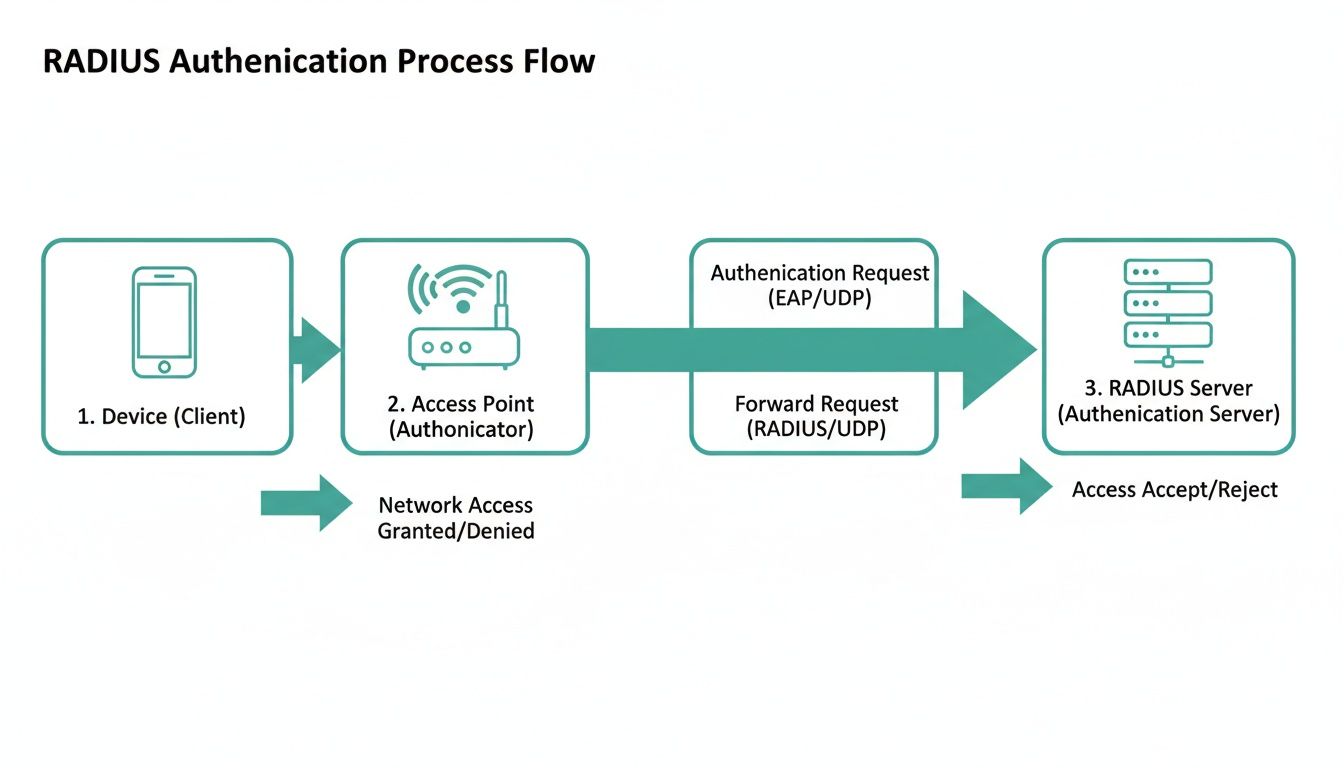
As you can see, the access point is just a secure bridge. The RADIUS server is the single source of truth for every authentication decision.
More Than Just a Password Check
This whole process is about far more than just checking a username and password; it's the bedrock for truly intelligent Authentication Solutions. The RADIUS server can also hand out specific network policies based on who is connecting.
For example, a student could be automatically placed on a network with restricted access to internal servers, while a teacher gets full access. In a shop, a customer using the guest wifi is firewalled off completely from the secure network running the point-of-sale systems.
This is the real power of RADIUS. It unlocks a whole suite of advanced security and management features, including:
- Captive Portals that let guests sign in using social login (social wifi).
- Unique key systems like IPSK and EasyPSK, which can generate a different password for every single device.
- Dynamic VLAN assignments that automatically sort users into different network segments for better security.
This robust framework of authentication, authorization, and accounting gives you incredible oversight. If you want to dive deeper, you can learn more about the crucial role of Authentication, Authorization, and Accounting in our guide. This "AAA" model ensures that users are not only verified, but their permissions are correctly enforced and their activity is logged for security and auditing.
Modern Authentication Solutions for Any Venue
The real magic of Wi-Fi RADIUS authentication isn't just in the technical details, but in what it lets you build. It’s the foundation for creating smart, secure, and user-friendly network experiences pretty much anywhere you can think of. From a sprawling university campus to a local coffee shop, RADIUS gives you the tools to manage access with real intelligence.
For any business, especially those adopting a BYOD (Bring Your Own Device) policy, RADIUS is the engine that makes WPA2-Enterprise work. This setup allows employees to securely connect their personal phones, tablets, and laptops using the same company login they already know. Say goodbye to managing messy spreadsheets of MAC addresses or handing out a shared password that inevitably gets leaked.
Supercharging Guest Wi-Fi with Captive Portals
But the power of RADIUS goes way beyond the corporate office. One of its most common and powerful uses is supercharging guest Wi-Fi networks with Captive Portals. When a customer in a retail store or a student in a common area connects to the guest network, they aren't just asked for a password—they're greeted with a branded login page.
This is where RADIUS opens up a world of possibilities for both security and user engagement. You can offer a whole menu of login methods, tailored perfectly to your audience:
- Social Login: Let guests connect with their social media accounts. This makes for a super smooth experience and can provide valuable, anonymized demographic data to help you understand your visitors. This is the heart of what's often called social wifi.
- Voucher Access: Hosting a conference or event? You can generate unique, time-limited voucher codes that grant access for a specific duration, making sure only registered attendees get online.
- Paid Tiers: For places like hotels or airports, RADIUS can easily manage tiered access. You can offer a basic, free service alongside a premium, high-speed option for paying customers, all handled from one central dashboard.

This level of control, especially when you pair it with top-notch hardware like Cisco Meraki access points, turns your guest Wi-Fi from a simple amenity into a powerful business tool. It also guarantees your main business network stays completely isolated and secure while you provide a great service to your visitors.
The Evolution of the Wi-Fi Password: IPSK and EasyPSK
While WPA2-Enterprise is a fantastic solution for corporate users, what about places with a mix of managed and unmanaged devices? Think about a student dorm in an education setting or a hotel filled with smart TVs, gaming consoles, and streaming sticks. Forcing every user to go through an enterprise login just isn't practical.
This is where newer, RADIUS-powered Authentication Solutions like IPSK (Individual Pre-Shared Key) and EasyPSK really shine. These technologies finally solve the age-old headache of the single, shared password.
Instead of one password for everyone, IPSK generates a unique, secure password for every single user or device. It blends the simplicity of a traditional password with the powerful security of individual credentials.
This approach is a total game-changer. Imagine a university student moving into a dorm. With IPSK, they get their own personal Wi-Fi password that only works for their registered devices. If that password ever gets compromised, or when the student moves out, an admin can simply revoke that one key without disrupting anyone else on the network.
This completely eliminates the security nightmare of a shared key being scrawled on a whiteboard or passed between residents. It gives IT staff granular control and a clear view of exactly which devices are connected and who they belong to. You can learn more about how a security key for WiFi strengthens your network and delivers this next-level control.
This technology is incredibly useful across different industries:
- Hospitality: Give each hotel guest a unique key that works for their room's smart TV and all their personal gadgets.
- Retail: Provide secure, individual keys for IoT devices like scanners, POS systems, and inventory trackers.
- Education: Assign each student a personal key that’s valid for the entire school year.
Ultimately, whether it's through a slick captive portal or a modern IPSK system, RADIUS provides the flexible and secure backbone you need to design the perfect authentication experience for any venue.
Integrating RADIUS with Your Cisco Meraki Network
The real magic of Wi-Fi RADIUS authentication isn't just its security chops; it's how smoothly it plugs into the technology you already use. This is where we go from theory to practice, creating a network experience that's both rock-solid and completely seamless.
Think about a student walking across campus or an employee arriving at the office. They flip open their laptop, and it connects to the Wi-Fi using the exact same username and password they use for everything else. No new credentials to memorize, no confusing setup guides. That’s the reality of a well-integrated RADIUS system.
This single sign-on (SSO) experience happens when you connect your network gear to your central user directory. A service like Splash Access acts as the perfect middleman, linking your powerful Cisco Meraki hardware directly to identity providers like Azure AD or G Suite. This simple connection automates and secures the entire authentication process from start to finish.
The Power of a Centralized Directory
When you tie your Wi-Fi into a central user directory, you instantly simplify network management. A new hire joins the company? Their network access is ready the moment their main account is created. An employee leaves? Access is shut off immediately, closing a huge security hole without IT lifting a finger.
This centralized model is a game-changer, especially for dynamic places like schools, retail stores, or any company with a BYOD policy.
- Simplified Onboarding: New users are good to go, connecting to the secure network right away with their existing login info.
- Instant Offboarding: Since access is tied to their account status, you eliminate the risk of ex-employees lingering on your network.
- Consistent Policies: You can apply network rules based on the groups you already have in your directory, like "Faculty," "Students," or "Sales Team."
This integration stops network access from being a separate IT chore and makes it a natural part of your identity management strategy. It simplifies life for everyone, making the entire system more secure and efficient.
It’s no surprise that organizations are leaning more heavily on wireless solutions. The global Wi-Fi market was valued at USD 25.52 billion in 2025 and is projected to hit USD 27.97 billion in 2026, showing just how critical this infrastructure has become for core business operations.
Extending Functionality Beyond Basic Authentication
Integrating RADIUS with your Cisco Meraki network also opens the door to a whole suite of advanced authentication solutions. You can build out sophisticated captive portals for guest Wi-Fi that let visitors log in with their social media accounts. Suddenly, your guest network becomes a valuable engagement tool, all while your internal network remains completely isolated and secure.
This setup is also the backbone for advanced systems like IPSK and EasyPSK. These technologies use the RADIUS server to automatically generate a unique, secure key for every single user or device. You get the simplicity of a pre-shared key with the security of individual credentials—perfect for managing a mix of devices in a BYOD Corporate setting.
By using an authentication platform, you can pull all of these pieces together right inside the familiar Cisco Meraki dashboard. This gives you a single place to manage user access, enforce security policies, and monitor what’s happening on your network. Complex network management starts to feel surprisingly simple. For a deeper dive into the specifics, check out our guide on Cisco Meraki Active Directory and LDAP server support.
Best Practices for a Secure RADIUS Deployment
Getting a wifi radius authentication system up and running is one thing, but making it truly secure and reliable is another beast entirely. A proper deployment turns your network into a fortress, not just a convenience. Think of this as your essential checklist for getting it right from the very beginning.
First things first: leave outdated protocols in the past. Strong encryption isn't optional, which means you need to choose secure EAP (Extensible Authentication Protocol) types, like EAP-TLS. This ensures the entire conversation between a user's device and your RADIUS server is private and shielded from anyone trying to listen in.
Strengthen Your Core Security
A truly secure foundation isn't built on a single strategy; it's about layering multiple defenses that work together. From managing digital certificates to splitting up your network traffic, each step adds another lock on the door. It's critical to weave these practices into a comprehensive IT security policy.
Here are the non-negotiables:
- Prioritize Secure EAP Types: Don't settle for anything less than certificate-based methods like EAP-TLS. It's the gold standard for WPA2-Enterprise and offers the best possible protection, especially in BYOD Corporate settings.
- Master Certificate Management: Digital certificates are the backbone of trust in a RADIUS environment. You absolutely need a solid process for issuing, renewing, and, just as importantly, revoking them to cut off access when needed.
- Enforce Strong Shared Secrets: This is the password between your network hardware, like Cisco Meraki access points, and the RADIUS server. Make it long, complex, and—this is key—unique for each network device. This prevents rogue hardware from spoofing your own.
This kind of meticulous setup is why confidence in Wi-Fi as a critical business tool is on the rise. In fact, a recent report found that 62% of respondents are more confident about investing in their Wi-Fi infrastructure than they were just a year ago, a clear sign of its growing importance.
Isolate and Conquer with Network Segmentation
One of the most powerful tricks RADIUS has up its sleeve is dynamic network segmentation using VLANs. It's like having virtual velvet ropes that automatically direct users to the right area of your network based on who they are.
For example, a RADIUS server can be set up to place different users onto different VLANs the moment they successfully connect. This is a game-changer for isolating traffic and boosting security.
Think about a retail store. A customer who connects through a social login on your captive portal gets dropped onto a guest VLAN, which is completely walled off from your secure point-of-sale systems. An employee, however, connects with their corporate login and is automatically placed on the internal staff VLAN, giving them access to the tools they need to do their job.
This dynamic assignment is invaluable for education, retail, and corporate environments. It keeps students out of administrative files, prevents shoppers from seeing internal inventory data, and stops contractors from accidentally accessing sensitive company information. It's also the foundation for modern authentication solutions like IPSK and EasyPSK, which lean on RADIUS to enforce these policies for every single user.
If you're looking to dive deeper, check out our guide on the best practices for network security.
Troubleshooting Common RADIUS Issues
Even the best-laid network plans run into hiccups. When your wifi radius authentication system starts acting up, it can be a massive headache for everyone involved. But don't sweat it. Most of the problems you'll encounter are fairly common and can be sorted out with a methodical approach.
Let's walk through some of the usual suspects you might face, whether you're managing a network for a school, a retail space, or a corporate BYOD environment.
The classic "Access Denied" error is probably the most frequent complaint you'll hear, especially when users swear they're typing in the right password. More often than not, the password isn't the problem. The real issue could be a simple typo in the shared secret between your Cisco Meraki access point and the RADIUS server, or maybe the user's account just doesn't have the right permissions in your directory.
Diagnosing Connection Failures
When users can't connect, your first move should always be to check the logs. Both your RADIUS server and your access points are meticulously logging every authentication attempt. These logs are your best friend for pinpointing exactly where the digital handshake is failing.
Keep an eye out for these common culprits:
- Mismatched Shared Secret: Think of this as the secret password your access point and RADIUS server use to trust each other. If they don't match perfectly—and I mean character for character—every single authentication request will be dead on arrival.
- Firewall Blocks: A firewall doing its job a little too well can often be the problem. Double-check that traffic is allowed on the standard RADIUS ports (1812 for authentication and 1813 for accounting) between your APs and the server.
- User Policy Issues: The user might be assigned to the wrong group in your directory, or their account might have expired or been disabled. From the outside, it looks like a failed login, but the system is actually working as designed.
Tackling Certificate Warnings
Another all-too-common headache is that dreaded certificate warning popping up on user devices. This usually means the device doesn't recognize or trust the certificate your RADIUS server is presenting. It’s a crucial security checkpoint, so just telling users to "click accept" is not the answer.
A certificate warning is your network's way of saying, "I'm not sure if I'm talking to the right server." Resolving it properly is essential for preventing man-in-the-middle attacks and ensuring your users' data stays encrypted and secure.
The proper fix is to make sure the root certificate from the authority that issued your RADIUS certificate is installed and trusted on all client devices. In a corporate or school setting, this can usually be pushed out automatically with mobile device management (MDM) tools.
For guest wifi using a captive portal with social login, this is less of a concern since the authentication mechanism is different. But for WPA2-Enterprise or EasyPSK deployments, getting your certificates deployed correctly is non-negotiable for both security and a smooth user experience.
Your Top RADIUS Questions Answered
Let's tackle some of the most common questions we get about Wi-Fi RADIUS authentication. We'll cut through the jargon and give you straight answers, drawing from real-world scenarios in education, retail, and corporate IT.
Can I Use RADIUS for My Guest WiFi Captive Portal?
Yes, and you absolutely should. Pairing RADIUS with a captive portal is one of its best use cases, especially for retail and hospitality businesses. It's the engine that powers all those flexible guest login options you see in the wild, like social WiFi sign-ins, one-time voucher codes, or even paid access.
Behind the scenes, the RADIUS server handles the authentication for whatever method you choose. This gives you granular control over things like session duration and bandwidth limits, all while keeping your guest traffic completely separate from your secure internal network—a non-negotiable security practice. It turns a simple guest network into a smart, manageable system.
What Is the Difference Between IPSK and a Regular WiFi Password?
Think of a regular Wi-Fi password (often called a PSK) as a single key for your entire building. If one person loses it or shares it, everyone is at risk. Your whole network is exposed.
IPSK, or Individual Pre-Shared Key, is a much smarter approach that uses RADIUS to give a unique, private password to every single user or device. It's like having a master locksmith create a different key for each person.
This is a game-changer for student housing in education, hotels, or any BYOD corporate environment. It massively improves security and gives you the power to revoke access for one user instantly without affecting anyone else. Tools like EasyPSK take this concept even further by making it simple to manage thousands of unique keys.
Do I Need a Physical Server to Use RADIUS?
Not these days. The old-school way involved a dedicated server humming away in a closet, but modern authentication solutions have moved to the cloud. A cloud-based RADIUS service means you don't have to buy, set up, or maintain any physical hardware, which saves a ton of time, money, and headaches.
This cloud model is also far more scalable and reliable, particularly for businesses with multiple locations. It slots right into your existing Cisco or Meraki dashboard and plays nicely with cloud identity providers like Azure AD, giving you enterprise-grade security without the traditional IT burden. It’s simply the modern way to handle wifi radius authentication.
At Splash Access, our goal is to make powerful network authentication straightforward and effective for your business. Find out how our solutions can secure your network while creating a better experience for your users.
Learn More About Our Authentication Solutions