Hey there! Dealing with a poor Wi-Fi signal is more than just a minor annoyance, isn't it? For any business, it's a direct line to lost opportunities and frustrated users. Let's be honest, the real culprit is often unreliable signal strength, not just slow internet, and it can impact everything from customer satisfaction to employee productivity.
The Hidden Costs of a Poor Wi–Fi Signal
We've all been there—that spinning wheel on a loading screen is a universal symbol of frustration. When you're running a business, however, a poor Wi-Fi signal shifts from being a simple inconvenience to a serious operational problem. It’s the invisible force that can quietly sabotage your success, whether you're in Education, Retail, or managing a corporate BYOD environment.
The expectation for seamless connectivity is no longer a luxury; it’s the baseline. Today’s students, shoppers, and employees don't just hope for good Wi-Fi. They assume it will be there, ready to support their multiple devices. The core issue isn't always about raw internet speed, but the reliability of the signal itself. Dead zones, dropped connections, and buffering videos all add up to a low-quality experience that reflects poorly on your entire operation.
The Real-World Impact Across Different Sectors
In a busy retail store, a customer trying to use your guest wifi to look up a product review might just give up and leave if the connection is flaky. In a university lecture hall, a student can miss out on critical online resources if the signal keeps dropping. For corporate offices embracing a Bring-Your-Own-Device (BYOD) policy, a patchy network means less productivity and more frustration for employees just trying to do their jobs.
This is exactly where enterprise-grade systems like Cisco Meraki are engineered to shine. They're designed not just for speed, but for stable, managed wireless coverage that can handle high-density environments. When you pair a powerful infrastructure like Meraki with a sophisticated Authentication Solution, you can transform the entire user experience from the moment they connect.

The synergy between robust hardware from brands like Cisco and smart onboarding software is what turns a basic utility into a valuable business tool.
Why Modern Authentication Matters
How users get onto your network is their first digital handshake with your brand. A clunky, slow Captive Portal can make even the strongest Wi-Fi signal feel broken. This is why modern Authentication Solutions focus on making access as frictionless as possible.
- Social Login: Letting users connect with their social media accounts (social wifi) is quick, easy, and gives you valuable marketing insights.
- IPSK and EasyPSK: These technologies provide robust, individual passwords for devices in a BYOD setting, delivering WPA2 security without the usual IT headaches.
- Streamlined Onboarding: Simple voucher codes or QR scans can get users online in seconds, eliminating a common point of frustration.
Weak Wi-Fi has become so damaging precisely because connectivity is now a near-universal expectation. The International Telecommunication Union estimated that about 67% of the world’s population—roughly 5.4 billion people—was online in 2023. In major markets, online usage rates are well over 80–90%, meaning your guests and staff typically arrive with multiple connected devices and expect seamless Wi-Fi as a core part of the experience.
The true cost of a poor signal isn’t just about the technology failing; it’s about the experience failing. Every dropped connection is a potential lost sale, a disrupted lesson, or a moment of lost productivity.
Ultimately, investing in a stable wireless network is not just an IT expense; it's a direct investment in customer satisfaction and operational efficiency. You can see how a well-designed network helps in reducing the total cost of ownership by minimizing support tickets and improving user retention. In the sections ahead, we’ll dive into practical, actionable steps to diagnose and fix your Wi-Fi issues for good.
Diagnosing the Cause of Your Weak Wi-Fi Signal
Before you can fix a poor Wi-Fi signal, you have to play detective. A weak connection isn't just one problem; it's a symptom that can point to a dozen different underlying issues, from the obvious to the completely invisible. Trying to solve it without understanding the root cause is a bit like navigating without a map—you might eventually stumble upon a solution, but you'll probably just get lost.
So, where do you start? The first step is to simply look at the physical world around your access points (APs). Wi-Fi signals are radio waves, and just like sound, they can be blocked, absorbed, or distorted by all sorts of obstacles.
The Usual Physical Suspects
In many business environments, especially places like Retail stores or older Education buildings, the architecture itself is often the biggest villain. Thick concrete walls, metal shelving units, and even dense crowds of people can soak up Wi-Fi signals, creating frustrating dead zones. Imagine a signal trying to push through a concrete wall; it loses a huge chunk of its strength in the process.
This is where having the right tools makes a world of difference. For instance, the Cisco Meraki dashboard offers powerful, built-in diagnostics that take a lot of the guesswork out of the equation. You don't need a Ph.D. in network engineering to use them, either.
With tools like live signal strength monitoring, you can see in real-time how a device’s connection quality changes as it moves around a building. This simple test can quickly reveal that the corner office with the terrible signal is right behind a reinforced concrete pillar. Mystery solved.
Peeking into the Invisible World of RF Interference
If physical barriers aren't the issue, the problem might be something you can't even see. Radio Frequency (RF) interference happens when other electronic devices are "shouting" on the same frequency as your Wi-Fi, which clogs up the airwaves and disrupts your signal. This is an incredibly common problem in dense corporate or Retail environments.
Common sources of RF interference include:
- Other Wi-Fi Networks: In a multi-tenant office building or a shopping mall, dozens of networks can be competing for the same limited airspace.
- Bluetooth Devices: Headsets, keyboards, and other wireless peripherals can cause interference, especially on the crowded 2.4 GHz band.
- Microwave Ovens: That's right—the office microwave can wreak havoc on nearby Wi-Fi signals when it’s heating up someone's lunch.
- Cordless Phones and Security Cameras: Many older wireless devices operate on the same frequencies, adding to all the noise.
Think of it like trying to have a conversation in a crowded, noisy room. The more people talking at once, the harder it is for your message to get through clearly. That’s exactly what your Wi-Fi network experiences with high RF interference.
Common Causes of Poor Wi-Fi Signal in Business Environments
To help you quickly identify what might be going wrong in your specific environment, here's a quick-reference table of common culprits.
| Issue | What It Is | Common in These Sectors |
|---|---|---|
| Architectural Obstruction | Thick walls (concrete, brick), metal studs, or coated glass blocking signals. | Hospitality, Healthcare, Older Education Buildings |
| High Client Density | Too many devices connecting to a single AP, overwhelming its capacity. | Event Venues, Conference Centers, Retail Hotspots |
| RF Interference | Competing signals from other Wi-Fi networks, Bluetooth, or microwaves. | Multi-Tenant Offices, Shopping Malls, Co-working Spaces |
| Poor AP Placement | Access points are hidden, mounted too low, or located in suboptimal areas. | Small Businesses (DIY Setups), Warehouses |
| Outdated Hardware | Using older Wi-Fi standards (e.g., 802.11g/n) that can't handle modern demands. | Organizations with limited IT budgets, Public Venues |
This table isn't exhaustive, of course, but it gives you a solid starting point for your investigation based on where you see the problems most often.
Visualizing Your Network Health with Meraki Heatmaps
One of the most effective ways to diagnose these invisible issues is with a Wi-Fi heatmap. It’s a visual overlay of your building’s floor plan that shows signal strength in different colors, instantly highlighting strong areas and pinpointing those pesky dead zones. The Meraki dashboard can generate these heatmaps, allowing you to see exactly where your coverage is failing without having to walk around with a laptop.
A professional site survey is the gold standard for network diagnosis. It goes beyond simple heatmaps to analyze RF interference, channel utilization, and capacity, giving you a complete picture of your wireless environment. You can explore the benefits by checking out our guide on conducting a professional site survey for your wireless network.
Reliable business-grade Wi-Fi typically requires signal strength between -55 dBm and -70 dBm. Connections that drop below -80 dBm quickly become unstable and unusable. As modern buildings add more devices and use thicker construction materials, parts of a floorplan can easily fall below that critical threshold.
At the same time, Wi-Fi now carries around 31% of all IoT connections worldwide, contributing to an ever-growing density of devices all fighting for airtime. You can read more about the growth of connected devices from Cisco. By understanding these diagnostic steps, you can move from just guessing to truly knowing what's wrong, setting the stage for strategic fixes that create a genuinely robust network.
2. From Diagnosis to Action: Building a Rock-Solid Wi-Fi Network
Okay, so you’ve done the detective work and have a solid theory about what’s dragging down your Wi-Fi signal. Now it’s time to roll up our sleeves and move from diagnosing the problem to actively fixing it. We're getting beyond the classic "turn it off and on again" and into the professional-grade tweaks that build a truly reliable network.
If you're working with a system like Cisco Meraki, you’ve got some powerful tools at your disposal. Let’s walk through the strategic adjustments that make the biggest impact on stamping out those dead zones and giving your guests a smooth, frustration-free connection.
Smart Access Point Placement Is Everything
When you hit a patch of weak Wi-Fi, the first impulse is often to just throw more Access Points (APs) at the problem. But be careful—sometimes, that can actually make things worse by creating more interference and channel congestion. The goal isn't just more coverage; it's smarter coverage.
Effective AP placement is part art, part science. It’s all about understanding how radio waves behave in your specific space—moving through some materials and bouncing off others. For a deep dive, you can check out our guide on proper access point design. Ultimately, you're looking for that sweet spot where APs provide a strong signal right where people need it, without stepping on each other's toes.
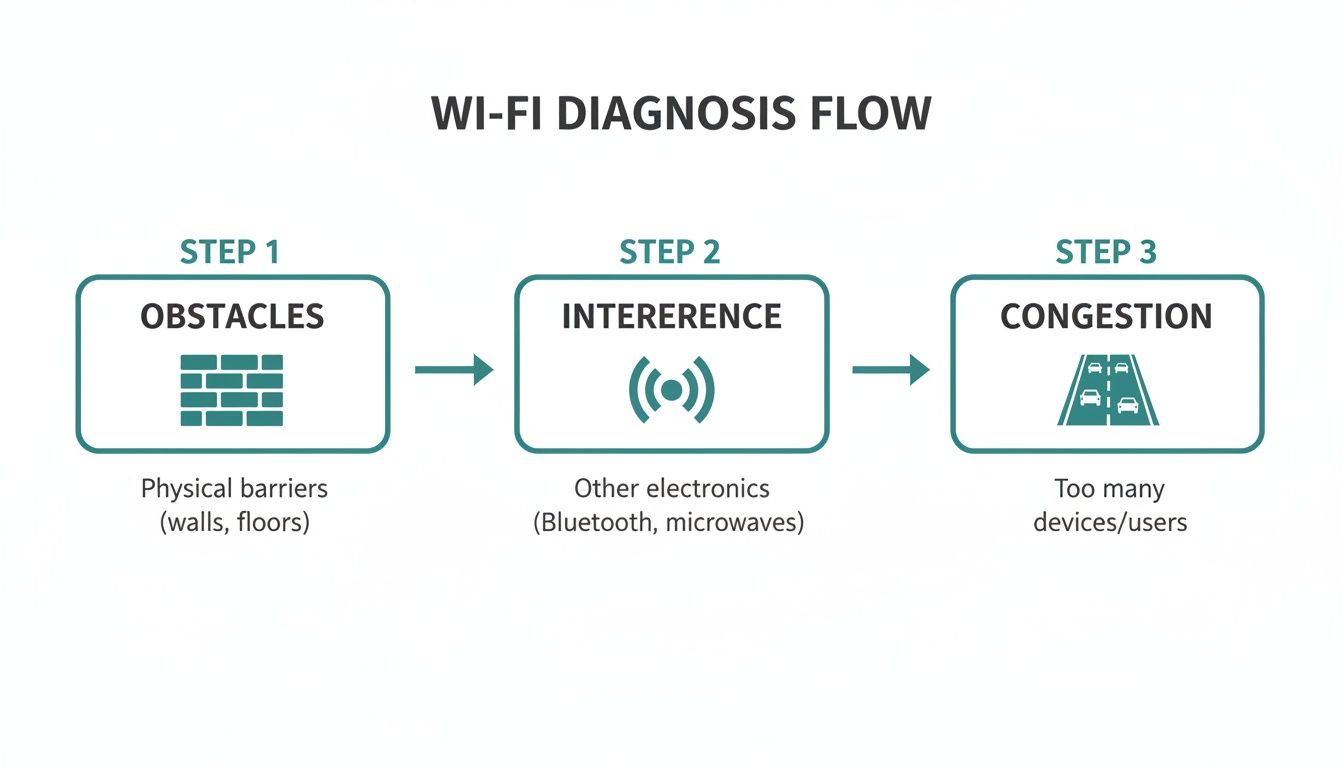
As you can see, the three biggest enemies of a good Wi-Fi signal are physical obstacles, RF interference, and plain old network congestion. Smart placement helps you tackle all three.
Dialing in Transmit Power for Seamless Roaming
Here's another common mistake I see all the time: cranking the transmit power on every AP to 100%. It seems logical, right? Bigger signal, better connection. But this often backfires, creating a "sticky client" problem. This is when a user's phone can "hear" a very distant AP but its own weak signal can't "talk" back effectively. The device stubbornly clings to that far-off AP, even when a much better one is right next to it, leading to a painfully slow experience.
Instead, the real goal is to create correctly sized coverage cells. By carefully tuning the transmit power—often by lowering it slightly—you encourage devices to roam smoothly to the nearest, strongest AP as someone walks through your building. This is absolutely critical in large venues like university campuses, sprawling offices, or big Retail centers.
Channels and Band Steering: The Wi-Fi Superhighway
Think of your Wi-Fi network like a highway system. The 2.4GHz band is like a congested, single-lane road filled with slow-moving traffic—everything from old laptops to microwaves and Bluetooth headsets are competing for space. The 5GHz band, however, is a wide-open, multi-lane superhighway with far less traffic.
Band steering is a fantastic feature that acts like a smart traffic controller, gently nudging capable devices over to the faster, clearer 5GHz band. This one move can dramatically improve performance for everyone by freeing up the crowded 2.4GHz band for the older devices that absolutely need it.
A Quick Note from Experience: While automated tools like Meraki’s Auto RF are incredibly powerful, they aren't a magic wand. In really complex environments—think multi-floor buildings or crowded malls—sometimes you just have to get in there and do some manual tuning to get things perfect.
The global Wi-Fi market is on a massive growth trajectory, projected to jump from $12.3 billion to $31.3 billion by 2027. A lot of that growth is fueled by new Wi-Fi 6/6E hardware. While adoption is happening fast, many networks are still held back by older Wi-Fi 4 equipment that just can't keep up in busy places. This is exactly why using modern, enterprise-grade hardware is so important for beating a poor Wi-Fi signal.
For a more comprehensive look at eliminating dead zones, check out these expert strategies to improve Wi-Fi coverage. By combining smart AP placement, optimized power settings, and intelligent channel management, you can build a guest wifi network that’s not just functional, but truly rock-solid.
How Guest Onboarding Shapes Wi-Fi Perception
Have you ever meticulously planned your network, tuned every access point, and still fielded complaints about a poor Wi-Fi signal? It’s a classic, frustrating scenario. But what if the problem isn’t your RF environment at all?
More often than you’d think, the real culprit is something many IT pros overlook: the guest onboarding experience. A clunky, slow, or confusing login process can make a flawless Wi-Fi signal feel slow and broken to the end-user.
Think about it from their perspective. A guest's very first interaction with your network isn't the signal itself—it's the Captive Portal they have to get through. If that portal is slow to load, demands too much personal information, or just fails on their device, their immediate conclusion is "the Wi-Fi is bad." They don't separate the login page from the network performance; to them, it's all one frustrating package.
This initial digital handshake is absolutely critical in places like Retail, Education, and corporate BYOD environments. A shopper might just give up, a student could miss the start of an online quiz, and a visiting executive might struggle to get online right before a big meeting. The user blames the Wi-Fi, but the real bottleneck was the authentication.
Transforming the First Impression
The good news is you can completely flip this perception by focusing on a smooth and secure onboarding flow. Modern Authentication Solutions are built to eliminate that friction, getting people online quickly and safely. This is where a powerful platform integrated with your existing Cisco or Meraki infrastructure really shines.
Instead of wrestling with complicated forms, you can offer simple, one-click options that people already know and trust.
- Social WiFi Login: Let guests connect instantly using their social media accounts. It’s fast, familiar, and they don't have to create yet another password.
- Voucher Codes: Perfect for events or specific user groups. A simple code provides immediate access without a lengthy registration process.
- QR Code Onboarding: This is the ultimate in simplicity. A user just scans a QR code with their phone and they're on the network, completely bypassing the captive portal.
This screenshot shows how a clean, branded Captive Portal for a Meraki network can offer simple login options, improving the experience from the very first click.
By presenting clear, fast ways to connect, you get rid of that initial hurdle that so often leads to complaints about a poor Wi-Fi signal.
Balancing Security and Simplicity with IPSK
In environments with tons of personal devices—like a university campus or a BYOD corporate office—security is just as crucial as ease of use. This is where traditional guest networks often fall short. A single shared password for everyone is a major security risk, but trying to manage individual credentials for thousands of users is an administrative nightmare.
This is exactly the problem that technologies like IPSK (Individual Pre-Shared Key) and EasyPSK solve so elegantly. They deliver the robust, WPA2-level security of a private network but with the dead-simple management of a guest network.
Each user or device gets its own unique password. This means you can easily grant or revoke access for individuals without disrupting anyone else. It's truly the best of both worlds—strong security without the IT headache.
For instance, a university can automatically issue a unique IPSK to every student for their devices, locking down the dorm network without requiring constant helpdesk tickets. A corporate office can give a unique key to a visiting contractor that automatically expires when their project ends. You can learn more about how these small adjustments can make a big difference and how to improve user experience on your network.
By streamlining how people get online, you eliminate the very first point of failure. A user who connects in two seconds via social login is far less likely to notice a momentary dip in signal strength than someone who just spent five minutes fighting a confusing form. The result? Fewer complaints about a poor Wi-Fi signal and a much happier, more productive user base.
Turning Great Wi-Fi Into a Business Asset
So, you’ve finally stabilized the network and the login process is silky smooth. It's tempting to check that box and move on, but this is where things get interesting. We shift from just fixing a technical headache—like a poor Wi-Fi signal—to creating a real business advantage. A high-performing network isn't just another utility bill; it's the bedrock for a smarter, more connected operation.
Think of your Wi-Fi infrastructure as the digital front door to your business. Every single person who connects, whether it’s a student, a shopper, or a corporate guest, is having a direct interaction with your brand. What if you could make that interaction more meaningful and, at the same time, gather insights to improve your business?
This is exactly where the magic happens between a powerful network backbone, like Cisco Meraki, and an intelligent Authentication Solution. It turns what was once a necessary expense into a powerful tool for engagement and analytics.
From Connectivity to Customer Insights
Let's walk through a real-world example. Imagine a Retail store where you’ve meticulously eliminated every last dead zone. Shoppers are happily browsing online, but what's next? By implementing a modern Captive Portal with features like social login, you can offer much more than just a free internet connection.
When a customer logs in with a social media account, they get online in seconds. On your end, you start to see valuable, anonymized demographic data. You can finally understand visitor foot traffic, pinpoint peak hours, and measure customer loyalty without any creepy tracking. That kind of information is gold for making smarter business decisions.
This isn't about harvesting personal data; it's about understanding broad trends. Knowing that 70% of your weekend shoppers fall into a specific age group can help you tailor promotions and manage inventory far more effectively. Suddenly, your guest wifi has become a powerful market research tool.
A solid Wi-Fi signal is the pipeline that delivers this data, letting you move from guesswork to data-driven strategy.

Driving Engagement in Education and Corporate Sectors
This idea isn't just for Retail. In the Education sector, a university can use its campus-wide network for so much more than facilitating lectures. With secure authentication methods like IPSK or EasyPSK, thousands of student devices in dorms can be managed safely. Each student gets a unique key, keeping the network secure and reliable for everyone in a massive BYOD environment.
The same technology is a game-changer in the corporate world. A business can offer a seamless guest network experience for visitors while locking down internal security. Instead of handing out a generic shared password on a sticky note, you can generate a unique key for a guest that automatically expires after their meeting. Your internal network is never exposed.
Here’s how a strong Wi-Fi signal, paired with the right platform, can be put to work:
- Geo-Fenced Promotions: A shopping mall can send targeted coupons to shoppers who are physically in the building, driving immediate sales.
- Student Services: A university could push notifications about campus events or registration deadlines directly to students connected to the Wi-Fi.
- Visitor Analytics: A corporate office can track how long visitors spend in common areas, helping them optimize meeting room scheduling and facility management.
By layering on these features, your network stops being a passive utility and starts actively participating in your operations. A great starting point for exploring these possibilities is to learn more about what a modern WiFi marketing platform can do.
Ultimately, solving a poor Wi-Fi signal is just the first step. The real opportunity lies in using that strong, reliable connection to build better relationships with your customers, students, and guests. It’s about transforming your Wi-Fi from a simple cost center into a strategic asset that delivers a tangible return.
Got Questions About Your Spotty Guest Wi-Fi? We Have Answers.
Dealing with a poor Wi-Fi signal can be a real headache, especially when it affects your customers or employees. Let's tackle some of the most common questions we hear from people trying to get their guest networks running smoothly.
Why Is My Wi-Fi Slow Even When the Signal Bars Are Full?
This is a classic problem, and the answer usually isn't about the signal strength itself. More often than not, the culprit is a clunky Captive Portal. If your login page is slow, confusing, or asks for too much information, people will naturally blame "the Wi-Fi," even if your Cisco or Meraki access points are working perfectly.
The other big factor is congestion. Think of your Wi-Fi channel as a highway. If too many devices are crammed into one lane, traffic grinds to a halt. This is why having streamlined Authentication Solutions that get users online in a single click is so important for a good first impression.
Can Adding More Access Points Actually Make My Wi-Fi Worse?
You bet it can. It seems counterintuitive, but just throwing more hardware at a poor Wi-Fi signal problem can seriously backfire. When access points (APs) are too close or their power is cranked up too high, they start shouting over each other, creating a ton of RF interference.
This is what network engineers call co-channel interference, and it means your own APs are fighting for the same airtime. The real solution isn't more APs; it's smarter placement and careful power tuning. A well-planned network with fewer, strategically placed APs will always beat a crowded network that’s just creating a lot of noise.
What’s the Best Way to Secure a BYOD Network?
Securing a network filled with personal devices—whether in Education, Retail, or a corporate BYOD setting—is a huge challenge. A single, shared password for your guest wifi is just asking for trouble. This is where modern authentication methods like IPSK (Individual Pre-Shared Key) or EasyPSK completely change the game.
Instead of one password for everyone, this technology generates a unique key for every single user or device.
- For Students: Each student gets their own secure key for their laptop and phone.
- For Staff: Onboarding a new employee's device is simple and secure, with no need to share a master password.
- For Guests: You can issue temporary keys that automatically expire, perfect for visitors or contractors.
This method gives you the robust, WPA2 security of a high-end enterprise network but with the dead-simple management you want for a guest network. It’s the perfect blend of security and ease-of-use for any BYOD environment.
How Can I Make It Easier for Guests to Get Online?
The key is to remove every possible point of friction. Nobody wants to fill out a long, complicated sign-up form just to check their email. The best approach is to offer simple, one-click options that people already use every day.
Social WiFi login is a perfect example. It lets users connect instantly with their existing social media accounts—it's fast, familiar, and they don't have to create yet another password. This one simple change can completely transform the user’s first impression and slash the number of complaints you get about a poor Wi-Fi signal.
Ready to turn your guest Wi-Fi from a source of frustration into a powerful asset? At Splash Access, we specialize in creating seamless, secure, and insightful Wi-Fi experiences for Cisco Meraki networks. Learn how Splash Access can help you today!