Ever walked into your office and found a new door installed that you didn't know about? And it's unlocked? That’s pretty much what a rogue access point (AP) is for your Wi-Fi network. It's an unauthorized device that someone has plugged into your trusted infrastructure, creating a massive, invisible security hole.
The Unseen Threat Hiding in Your Wi-Fi Network
A rogue AP is simply any wireless access point connected to your network without official permission from your IT team. Sometimes it’s a malicious device planted by a hacker looking for a way in. Other times, and more often than you'd think, it’s a well-meaning employee who just wants a stronger signal in their corner of the office and plugs in their own personal router.
Either way, the outcome is the same: a completely unmonitored and unsecured gateway straight into your private network. This is a huge vulnerability, especially in busy places like Retail stores, Education campuses, or corporate offices with BYOD policies.
What Is a Rogue AP?
Here’s a quick breakdown to get us on the same page.
Rogue AP At a Glance
| Concept | Description |
|---|---|
| What It Is | An unauthorized wireless access point physically connected to a secure network. |
| Who Creates It | Can be a malicious attacker or an uninformed employee/user. |
| Primary Threat | It creates an unsecured backdoor, bypassing all established network security controls. |
This simple device, whether bought for $50 online or deployed by a sophisticated attacker, can undo all the hard work you've put into securing your digital environment.
Why Your Network Is at Risk
Think about all the sensitive information that travels across your network every single day. In an Education setting, it's student records. In a Retail store, it's customer credit card numbers. A rogue AP gives anyone nearby a free pass to bypass your firewalls and security layers.
Once that happens, it opens the door to all sorts of trouble:
- Data Interception: Attackers can listen in on all the wireless traffic, grabbing login credentials, financial data, and other confidential information.
- Malware Injection: The rogue device acts as a perfect launchpad to spread viruses or ransomware throughout your entire network.
- Unauthorized Access: It can provide a direct path for bad actors to reach critical internal servers and private company resources.
The problem has been on the radar for a long time. One of the first documented rogue AP incidents was way back in 2001, when security researchers showed just how easy it was to deploy one and steal sensitive data from early Wi-Fi networks.
A Modern Defense Strategy
The good news? You don't have to fight this battle blind. The threat is real, but modern network tools like those from Cisco Meraki give you the power to find and neutralize these devices effectively.
Advanced network management platforms are built to automatically detect and even contain rogue devices broadcasting in your airspace. When you pair this visibility with strong Authentication Solutions, your defenses become rock-solid.
This is where technologies like Captive Portals for guest wifi and advanced security protocols like IPSK (Identity Pre-Shared Key) and EasyPSK come into play. These systems work together to ensure that every single device connecting to your network is properly identified and authorized, turning your Wi-Fi from a potential liability into a secure, controlled environment. If you want to dive deeper into the basics, check out our guide to network security.
Why Rogue APs Are a Nightmare for Network Security
So, we've established that a rogue AP is basically an unlocked, unmarked back door into your network. But what actually happens when a threat actor finds that door and decides to walk through? The consequences can be devastating, turning a simple, forgotten piece of hardware into a full-blown organizational crisis.
The real danger here isn't just the device itself; it’s the direct, unimpeded access it gives an attacker. It's like handing them a front-row seat to all your network's private conversations. From this vantage point, they can eavesdrop on sensitive data, inject malware, or launch attacks against critical internal systems—all without ever physically stepping foot in your building.
The Tangible Impact on Different Sectors
This threat isn't just theoretical. Rogue APs have real, tangible consequences that look different depending on the environment. Every industry has unique vulnerabilities, and a rogue device is often the perfect tool to exploit them, leading to financial loss, reputational ruin, and operational chaos.
Let’s look at a few real-world examples:
-
Retail: Imagine a popular coffee shop inside a large retail store. An attacker plugs a tiny, discreet rogue AP into an unused network jack under a table. They create a Wi-Fi network named "Store_Free_Guest_WiFi," which looks identical to the real thing. Shoppers connect, and just like that, the attacker can capture every credit card number and login credential entered while they browse.
-
Education: At a university, a student in a dorm with a spotty signal plugs in their own router to get better Wi-Fi. It’s an innocent mistake, but that device is now a rogue AP. A hacker scanning for vulnerabilities finds this unsecured entry point and uses it to pivot onto the university's main network, potentially gaining access to student records, research data, and financial systems.
-
Corporate BYOD: In a modern office where employees bring their own devices (BYOD), a rogue AP can be catastrophic. If an attacker plants one, they can use it to jump from an employee's personal laptop right onto the core corporate network. This could easily lead to a massive data breach of company secrets and intellectual property.
In every one of these scenarios, a single unauthorized device becomes the weak link that compromises the entire security chain.
Your First Line of Defense: Guest Wi-Fi Security
This is exactly why securing your guest wifi isn't just a "nice-to-have" feature; it's a non-negotiable security control. A properly configured guest network acts as your first line of defense, ensuring that every connection is identified, authenticated, and managed. This is where modern Authentication Solutions become indispensable.
A Captive Portal is your network's digital gatekeeper. It stops every user trying to connect to your guest Wi-Fi and requires them to prove who they are before granting access.
A robust captive portal, like those managed through systems such as Cisco Meraki, forces users to authenticate. This could be done through a social login (using a Facebook or Google account), a unique voucher code, or a simple registration form. This process does two things: it provides a much smoother user experience with social wifi and, more importantly, it creates a clear audit trail. You know exactly who is on your network and when.
More advanced methods take this security a step further. Solutions like IPSK (Identity Pre-Shared Key) or EasyPSK give each user or device a unique password to access the network. This makes it incredibly difficult for an unauthorized person to hop on, even if they know the network name.
As wireless networks become more complex, rogue APs have become a prime target for attackers, driving huge investments in detection technologies for schools and offices. In fact, cybersecurity forecasts predict that by 2025, the global cost of cybercrime will hit $10.5 trillion annually. Rogue APs often serve as the initial entry point for breaches, playing a major role in that staggering figure. You can learn more about the growing wireless access point market and its security challenges to see just how critical this is.
How to Hunt Down a Rogue AP
Knowing rogue APs are a threat is one thing; actually finding one lurking on your network is another. It can feel like searching for a needle in a haystack, especially across a sprawling university campus, a busy hospital, or a multi-floor office building. The good news is you don’t have to wander the halls with a laptop, hoping to stumble upon it.
Modern network platforms, especially from a vendor like Cisco Meraki, come with powerful, built-in tools that act as your digital security team. They're designed to hunt for these devices 24/7, taking the guesswork out of detection and turning a potential crisis into a simple, manageable alert.
Your Digital Sentry: WIPS
Think of a Wireless Intrusion Prevention System (WIPS) as a security guard constantly patrolling your airwaves. Instead of walking the building, it’s a smart feature within your Meraki network that continuously scans the radio frequency environment. It listens for all Wi-Fi signals in the area—yours, your neighbors', and, most importantly, any potential rogues.
When WIPS spots a new access point, it immediately checks it against the list of your known, trusted devices. If it finds an AP that’s physically plugged into your wired network but isn't on the approved list, it gets flagged. Boom. The Meraki dashboard sends you an alert, giving you instant eyes on the threat.
This kind of automated monitoring isn't a luxury anymore; it's essential. Public Wi-Fi hotspots are projected to explode from 549 million in 2022 to nearly 2 billion by 2028. That explosive growth creates countless opportunities for rogue devices to pop up, a scary thought when you realize 60% of users admit to logging into sensitive accounts on public networks. You can see more stats about Wi-Fi growth on thenetworkinstallers.com to get a sense of the scale we're dealing with.
The Telltale Signs of a Rogue AP
Even with the best tools, it helps to know the classic signs of a rogue AP. Training your team—especially in environments like Education, Retail, and BYOD Corporate offices—can turn your people into an incredibly effective human firewall.
Here are a few red flags to watch for:
- Mysterious Wi-Fi Names (SSIDs): If a new, unexpected network name like "Free_Cafe_WiFi_2" suddenly appears, it needs to be investigated immediately.
- Sudden Performance Dips: A rogue device can be a real bandwidth hog, causing frustrating slowdowns for everyone on the legitimate network.
- Weird Authentication Problems: Are users complaining they can't connect or are being repeatedly prompted for their passwords? That could be a rogue AP trying to intercept their credentials.
A professional assessment is the first step to locking things down. Learn more about the importance of wireless site surveys to make sure your network is built on a secure and optimized foundation.
From Digital Alert to Physical Location
The Cisco Meraki dashboard doesn't just tell you a rogue AP exists; it helps you find its physical location. The system can often pinpoint where the device is broadcasting from by triangulating its signal strength between your legitimate APs. This turns a vague threat into an actionable mission, like "check the network port behind the printer in the third-floor breakroom."
This is where digital security meets the real world. You can take an alert from your screen and use it to find and physically unplug the threat before it causes any real damage.
For an extra layer of precision, Meraki’s smart camera integration is a game-changer. When a rogue AP alert is triggered, you can instantly pull up the live feed from the nearest camera. This lets you visually scan the area for any unauthorized hardware plugged into your network jacks, turning your security cameras into a powerful rogue-hunting tool.
Building Your Defense Against Rogue Devices
Finding a rogue AP is one thing, but building a network that’s inherently resistant to them is the real goal. A solid defense isn't about buying a single piece of hardware or software; it’s a strategy built in layers, combining clear, sensible policies with the right technology. This is how you turn your network from a soft target into a digital fortress.
It all starts with people. You need straightforward policies for employees and guests, especially in busy places like Education campuses or BYOD Corporate offices. Users have to understand that plugging in unauthorized devices is a major no-go. A simple, firm rule—"If IT didn't issue it, don't connect it"—can head off a surprising number of accidental rogue AP situations.
Of course, rules aren't enough on their own. The next, more powerful layer is technology—specifically, authentication that makes sure every single connection is verified. To effectively shield against rogue devices, it is also essential to consider foundational elements like robust security in embedded systems, which helps ensure the integrity of the hardware your network relies on.
The Captive Portal: Your Digital Gatekeeper
For guest wifi, particularly in Retail or hospitality settings, a Captive Portal is your non-negotiable front line. Think of it as a digital bouncer at the club door. Before anyone gets online, they have to stop at the portal and show their "ID." This simple step immediately separates legitimate guests from anonymous, potentially malicious devices.
This is also a great place to offer user-friendly login options like social login, where guests can connect using their existing social media accounts. It secures the connection while also giving you a chance to gather valuable marketing insights. A well-managed captive portal, especially one tied into a system like Cisco Meraki, ensures no device slips onto your guest network unnoticed.
This flowchart breaks down the crucial process of spotting and dealing with a rogue AP.
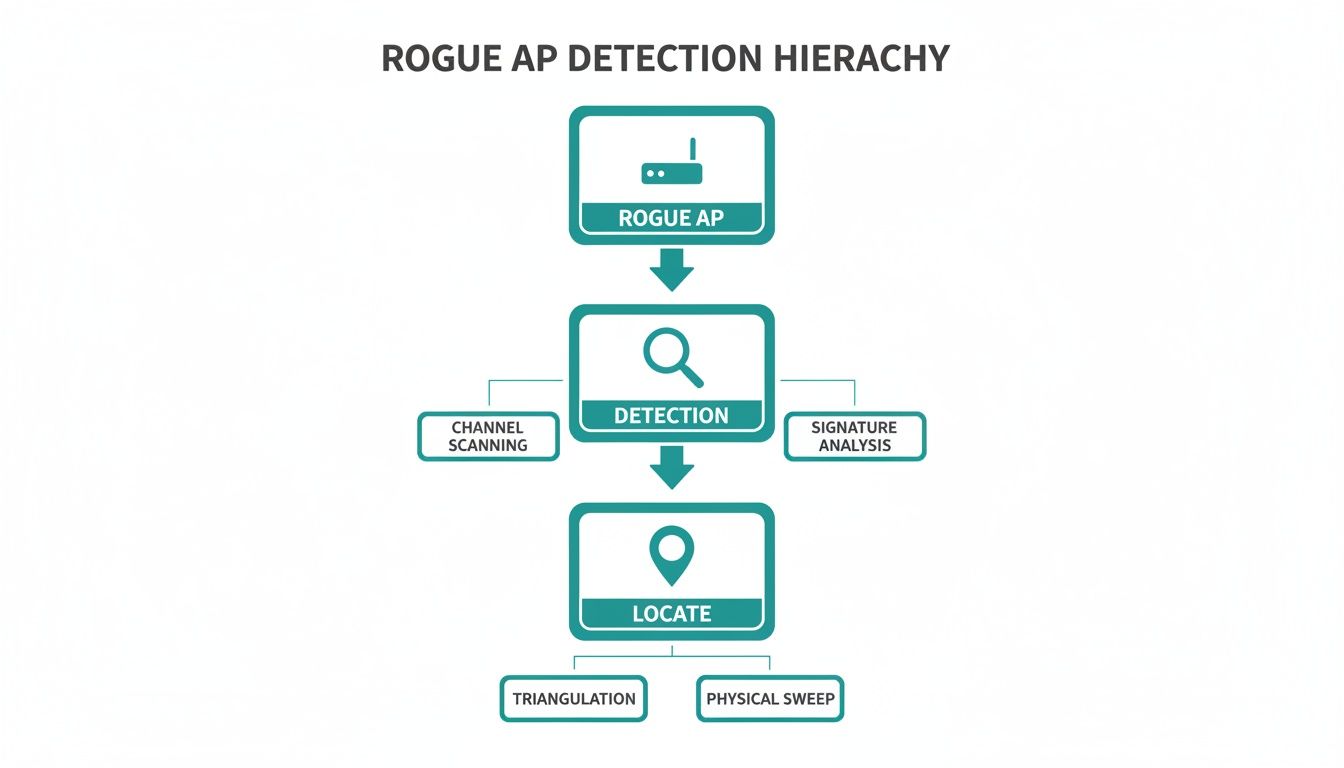
The flow from initial detection to pinpointing the location shows how modern network tools can turn a hidden threat into a solvable problem.
Moving Beyond a Single Password with IPSK
While captive portals are perfect for guests, you need something even more secure for your internal, trusted network. For years, the default has been a single, shared password (known as a Pre-Shared Key, or PSK) for everyone. The glaring problem? If that one password gets out, your entire network is wide open.
This is where truly modern Authentication Solutions like Identity Pre-Shared Keys (IPSK) and EasyPSK change the game completely.
Instead of one password for everyone, IPSK gives every user—and even every single device—its own unique, personal "digital key" to access the Wi-Fi.
This fundamentally alters your security posture. When an employee leaves, you just revoke their individual key without disrupting anyone else. If a company laptop is stolen, its specific key can be instantly shut down. This approach makes unauthorized access incredibly difficult and is a massive security upgrade for any organization, especially those managing complex BYOD environments. For a deeper dive into locking down your network, check out our guide on how to secure a Wi-Fi network.
The difference between a simple shared password and a modern IPSK system is night and day. A quick comparison makes it obvious why the old way just doesn't cut it anymore for professional environments.
Authentication Security WPA2-Personal vs IPSK EasyPSK
| Feature | Traditional WPA2-Personal (Shared Password) | WPA2-Enterprise with IPSK/EasyPSK |
|---|---|---|
| Credential Type | One password shared by all users and devices. | A unique, individual password for each user or device. |
| Security Risk | Very high. If the single password is leaked, the entire network is exposed. | Very low. A compromised key only affects one user/device and can be revoked instantly. |
| Revocation | Difficult. Changing the password requires updating it on every single connected device. | Simple. You just disable the specific key for the individual user or device. |
| User Tracking | Anonymous. You can't tell who is doing what because everyone uses the same password. | Granular. You can tie network activity directly to a specific user or device. |
| Best For | Small home networks with very few trusted users. | Education, Corporate, and Retail environments with many users and devices. |
By adopting these more advanced authentication methods, you create a network where every connection is accounted for. This layered approach—combining smart policies, robust guest management, and powerful per-user authentication—is the most effective way to build a resilient defense against the ever-present threat of rogue APs.
Unifying Your Security with Splash Access and Meraki
Tackling the rogue AP threat isn't just about spotting the problem; it requires a unified security strategy where all your systems work in concert. It helps to think of it like a modern security system for a physical building. Your Cisco Meraki hardware and dashboard are the eyes and ears—the smart cameras and sensors keeping a 24/7 watch. Splash Access, then, acts as the intelligent front door, controlling exactly who gets in and making sure they have the right credentials.
When you pair these two systems, you get a defense that is both seamless and incredibly robust. Meraki’s platform is fantastic at identifying threats in the air, but Splash Access adds the crucial layer of identity and access control. This turns raw network data into real, actionable security. It’s a partnership that locks down your network without sacrificing the user experience for legitimate guests and staff.
Intelligent Access Through Captive Portals
The first line of defense is getting a handle on your guest wifi, which is often a prime target for attackers. Our captive portals create a mandatory checkpoint for every single person trying to connect. Before anyone gets onto your network, they’re directed to a branded splash page where they have to authenticate.
This simple step means no anonymous devices can just slip onto your network. It's an absolute must for public-facing environments like Retail, Education, and busy corporate lobbies.
We keep the process straightforward and secure with several authentication options:
- Social Wi-Fi Login: People can connect in seconds using their social media accounts. This gives them a smooth experience and provides you with valuable, opt-in marketing data, making it a friendly way to offer guest wifi.
- Voucher Codes: You can generate unique, temporary codes for access, which is perfect for conferences, hotel guests, or special events.
- Simple Forms: A basic registration form captures key user details, giving you a clear audit trail of who has been on your network and when.
By enforcing authentication right at the start, you immediately raise your security baseline. It becomes much harder for a rogue AP to trick unsuspecting users into connecting and handing over their data.
Automating Advanced Security with IPSK and EasyPSK
For trusted devices—like those used by employees in a BYOD Corporate setting—you need even tighter security. This is where our deep integration with Cisco Meraki for IPSK and EasyPSK really shines. These advanced authentication solutions help you move past the enormous vulnerability of using a single, shared password for everyone.
Instead of one key for every door, IPSK gives each user their own unique, personal key. If one key is compromised, you simply deactivate it without affecting anyone else on the network.
Splash Access completely automates the rollout of these unique credentials. This makes it surprisingly easy to manage security across a sprawling university campus, a national retail chain, or a large corporate headquarters. Our platform takes care of all the complex work on the backend, letting you issue, manage, and revoke thousands of individual keys from one simple dashboard. You can learn more about how to elevate your Cisco Meraki network with SplashAccess for captive portals and authentication in our detailed guide.
The value of this integration is clear and powerful. You get the world-class network monitoring and rogue AP detection of Cisco Meraki combined with the intelligent, user-friendly, and highly secure access control of Splash Access. The result is a unified solution that doesn't just spot threats—it actively prevents them by making sure every single connection is authenticated and authorized.
Putting Security into Practice: Real-World Scenarios
It's one thing to talk about threats in theory, but it’s another to see how a solid security plan works on the ground. Let's walk through a few common situations to see how a modern, unified defense can shut down the risk of a rogue AP in different environments. Every industry has its own unique security headaches, but the core solution always comes back to one thing: controlling exactly who gets onto your network.
These examples show how smart authentication solutions, especially when powered by a platform like Cisco Meraki, can solve these very distinct challenges.
Education: Locking Down a Sprawling Campus
Picture a large university. You've got thousands of students, and each one brings a laptop, a phone, and a tablet. Providing campus-wide Wi-Fi is non-negotiable, but a single student plugging their own router into a dorm room jack could inadvertently create an entry point to the student records system. This is the classic challenge in Education—the sheer scale and the "bring your own device" (BYOD) reality create a massive surface for attacks.
So, how do you fix it? The university can implement an IPSK (Identity Pre-Shared Key) system. Instead of one generic password for the "Student-WiFi" network that gets shared around, every single student receives a unique, personal key that works for all of their devices.
- When a student connects their laptop, phone, and tablet, the network knows exactly who they are and which devices belong to them.
- If that student plugs in a personal router, creating a rogue AP, the system can immediately spot the unauthorized device on their port.
- Even better, the network is segmented. A security issue on one student's laptop is contained, preventing it from hopping over to the university's critical infrastructure.
This EasyPSK approach makes managing thousands of individual connections both simple and incredibly secure. To see more on this, you can explore our solutions for university Wi-Fi.
Retail: Protecting Shoppers and Your Brand
Now, let's switch gears to a shopping mall in the Retail sector. Offering free guest Wi-Fi is a great way to improve the customer experience for thousands of daily shoppers. But it’s also a magnet for criminals who could set up a fake network named "Free_Mall_WiFi" to steal credit card details and personal data from people who connect by mistake.
To stop this dead in its tracks, the mall uses a secure Captive Portal. When a shopper tries to connect to the official Wi-Fi, they’re automatically sent to a branded landing page first.
Here, they have to authenticate their connection, often using a social login like their Facebook or Google account. This social Wi-Fi approach is quick for the user, but more importantly, it creates a verified, authenticated session for every single person on the network.
This simple checkpoint makes it impossible for an attacker to spoof the network and hoover up data. It protects the shoppers and, just as importantly, the mall's reputation.
Corporate: Taming the BYOD Environment
Finally, think about a modern Corporate office that allows employees to use their personal devices (BYOD). This is great for productivity, but it introduces risk. Guests like clients and contractors also need Wi-Fi, and a compromised device—or a rogue AP plugged into a conference room—could become a backdoor into the company's private network.
The best defense here is a two-pronged strategy, combining Cisco Meraki with intelligent authentication.
- For Employees: The company uses IPSK. Each employee’s devices get a unique key, giving them seamless and secure access to the files and systems they need to do their jobs.
- For Guests: All visitors are routed to a completely separate guest network that’s managed by a Captive Portal. They get temporary access, and their traffic is kept totally isolated from the internal corporate network.
This layered approach gives everyone the access they need without creating security holes. It turns a chaotic BYOD environment into a secure, well-managed, and productive part of the business.
Frequently Asked Questions About Rogue APs
Still have a few questions? You're not alone. When it comes to rogue APs, a few key concerns pop up time and time again. Let's tackle them head-on.
Can a Rogue AP Really Look Exactly Like My Official Network?
Yes, and that’s precisely what makes them so dangerous. This classic attack is often called an "Evil Twin." A rogue AP can broadcast the exact same network name (SSID) as your legitimate one, tricking your devices into connecting automatically if its signal is stronger.
This is where modern authentication solutions become non-negotiable. Methods like IPSK or EasyPSK demand a unique key for each device—a key that an evil twin simply won't have. Even if the network name is a perfect match, the device can't connect, which is a critical safeguard for environments like Education, Retail, and corporate offices with BYOD policies.
Is Changing My Wi-Fi Password Enough to Stop Rogue APs?
Not even close. While changing your Wi-Fi password is a great security habit, it does nothing to stop a rogue AP that's physically plugged into your wired network. That device creates its own wireless bubble, completely sidestepping your Wi-Fi password.
A real defense is multi-layered. It starts with detection tools, like the ones built into the Cisco Meraki dashboard, and combines them with strict authentication policies. The goal is to ensure only authorized users and devices can get a foothold on your network, making any rogue AP an island with no bridge to your data.
How Does a Captive Portal Help Prevent Rogue AP Access?
Think of a captive portal as the mandatory front desk for your guest Wi-Fi. It halts every new connection and forces the user to authenticate—maybe with a social login, a voucher code, or by accepting your terms. This process is how you separate legitimate guests from everyone else.
An attacker’s rogue AP won’t have this checkpoint. But here's the clever part: a well-configured network, especially one managed by a platform like Meraki, can spot traffic that hasn't gone through that official authentication gateway. This makes unauthorized devices stick out like a sore thumb, ready to be flagged and blocked.
Ready to secure your network with a unified solution? Splash Access integrates seamlessly with Cisco Meraki to provide robust captive portals and advanced authentication like IPSK. Discover how we can protect your network today.