Hey there! That spinning wheel on a guest's phone isn't just a minor annoyance; it's a direct hit to your bottom line. A weak wireless internet signal is more than a tech headache—it actively drives away customers, tanks employee productivity, and can seriously tarnish your brand's reputation. For any modern venue, whether it's in the Education sector, a bustling Retail space, or a corporate campus with a BYOD policy, rock-solid Wi-Fi is no longer a "nice-to-have." It's the essential foundation of the user experience.
The Hidden Costs of a Weak Wireless Internet Signal
It’s tempting to brush off a few Wi-Fi complaints as isolated glitches, but the ripple effect is far more damaging than you'd think. Every dropped connection, every failed login, every agonizingly slow download chips away at your business. In a world that runs on connectivity, a consistently poor signal is a major liability.
Connecting Dropped Bars to Lost Dollars
Let's chat about what this looks like in the real world. In a Retail store, a weak signal prevents customers from pulling up product reviews or using mobile pay, often leading to abandoned sales. For a company with a BYOD policy, it means employees are stuck on frozen video calls and can't access critical cloud documents. In an Education setting, like a university, it translates directly into missed deadlines and mounting frustration with online learning platforms.
The problem often starts right at the front door: the Captive Portal. When a guest tries to connect through social wifi and the signal is flimsy, the authentication process times out. That failed social login isn't just an inconvenience for them; it's a lost opportunity for you to gather valuable marketing data.
You might have a blazing-fast internet pipe coming into your building, but that doesn't guarantee a good experience for the person trying to connect. Even as global fixed networks saw a 19% jump in median download speeds in 2023, that speed means nothing if it can't reach the end user. In fact, many businesses unknowingly forfeit 20-30% of potential customer data simply because of logins that fail due to a weak signal.
A weak signal is like having a beautiful, well-stocked store with a locked front door. No matter how great your offerings are, if people can't get in smoothly, they'll simply go elsewhere.
Why Your Current Setup Is Failing
The knee-jerk reaction to coverage gaps is often "just add more access points," but that's a recipe for disaster. Without proper planning, you can actually make things worse. The real culprits behind a weak wireless signal are usually hiding in plain sight.
- Poor Access Point Placement: Tucking APs away in closets or behind thick concrete pillars is a surefire way to create dead zones.
- Signal Interference: Competing Wi-Fi networks from neighbors, office microwaves, and dense building materials can wreak havoc on your signal.
- Outdated Authentication Solutions: Clunky Captive Portals and insecure shared passwords create bottlenecks and user frustration, leading to a flood of support requests.
- Lack of Scalability: The network you designed for 50 users will absolutely crumble when 200 show up for an event. This is a classic growing pain for businesses and schools.
These are precisely the kinds of problems a cohesive, professionally managed system like Cisco Meraki is built to solve. It gives you the tools to not only deploy a powerful network but also to manage it effectively with modern Authentication Solutions like IPSK and EasyPSK. This ensures every user gets secure, seamless access.
Beyond the immediate user complaints, a weak Wi-Fi foundation can also stall innovation and hinder wider business goals, for example, by impacting IoT adoption. Tackling these fundamental signal issues is the first and most critical step toward building a reliable, high-performance wireless network that actually supports your business.
Getting to the Root of Your Wi-Fi Problems
Before you can fix a weak Wi-Fi signal, you have to play detective. Too many people jump straight to solutions without understanding the real problem. It's time to move past a simple speed test and start digging into the metrics that paint the full picture of your network's health.
It's tempting to blame your internet provider, but more often than not, the problem is inside your own building. Physical objects can be absolute signal killers.
- Metal Shelving: A staple in Retail, these act like mirrors, bouncing signals in every direction but where you need them.
- Concrete Walls: The classic culprit in older buildings, hotels, and dorms, essentially acting as a Wi-Fi shield.
- Low-E Glass: Those modern, energy-efficient windows often have a metallic film that reflects wireless signals.
- Water Features: Even a large fish tank or decorative fountain can absorb and weaken Wi-Fi.
The first step is always understanding the physical space. For a really thorough analysis, a professional site survey for a wireless network is your best bet. Getting this blueprint right from the start is non-negotiable for a solid network.
Forget the Signal Bars—Look at What Matters
Those five little bars on your phone? They’re a vague guess at best. To properly diagnose a Wi-Fi issue, you need to look at the same data the experts do. The two most critical metrics are RSSI and SNR.
RSSI (Received Signal Strength Indicator) tells you how clearly a device can hear an access point. It’s measured in negative decibels (dBm), and the closer that number is to zero, the stronger the signal.
Pro Tip: For a reliable connection, you should be aiming for an RSSI of -67 dBm or better. Once you dip into the -70s or -80s, you'll start experiencing dropouts and that dreaded buffering wheel.
SNR (Signal-to-Noise Ratio) is the other half of the puzzle. It measures your clean Wi-Fi signal against background "noise" or interference. A high SNR means the signal is loud and clear. For SNR, a bigger number is always better.
Using the Cisco Meraki Dashboard for Real-Time Insight
This is where a platform like Cisco Meraki becomes your superpower. You stop guessing and start seeing. The Meraki dashboard can generate an RF heat map of your entire venue, giving you an instant visual of your strong green zones and your weak red spots.
Picture a college dorm during finals week. A quick look at the dashboard might show that channel 6 is completely saturated because dozens of students fired up their own personal routers. That’s co-channel interference, a primary cause of a weak wireless internet signal.
Or, in a corporate office with a BYOD policy, you might spot older laptops that are constantly struggling. This is the kind of insight that lets you surgically fix the root cause.
At the end of the day, a strong signal means nothing if the user can’t get online. A slow or buggy captive portal will make even the fastest network feel broken. By diagnosing your signal health first, you can ensure that by the time users get to your login page—whether it's a quick social login for guests or a secure IPSK for staff—the experience is seamless.
Strategic Access Point Placement and Tuning
Once you’ve nailed down the cause of your weak wireless signal, it’s time to get strategic. You wouldn't design a building without a blueprint, and the same thinking applies to your Wi-Fi. Just scattering access points (APs) and hoping for the best is a common mistake that leads to frustration and dead zones.
Thoughtful placement is the foundation of a high-performing wireless network, especially in tricky environments like multi-floor offices with BYOD policies, sprawling Education campuses, or Retail stores filled with signal-blocking metal shelves.
The Art and Science of AP Placement
Think of your APs like lightbulbs. Tucking a Cisco Meraki AP into a wiring closet or mounting it behind a concrete pillar is a surefire way to create coverage black holes.
The real goal is to create overlapping zones of coverage without letting the APs "shout" over each other. It’s a delicate balance. Too few APs, and you get dead zones. Too many, and you create co-channel interference, which is just as damaging as a weak signal.
A quick walk-through can often reveal the most obvious culprits. In a Retail store, for example, getting APs up high and away from metal fixtures is critical. In a school, an AP in the hallway simply won't cut it for a full classroom; it needs to be in the room to handle all those devices.
This whole diagnostic journey really boils down to three key stages.
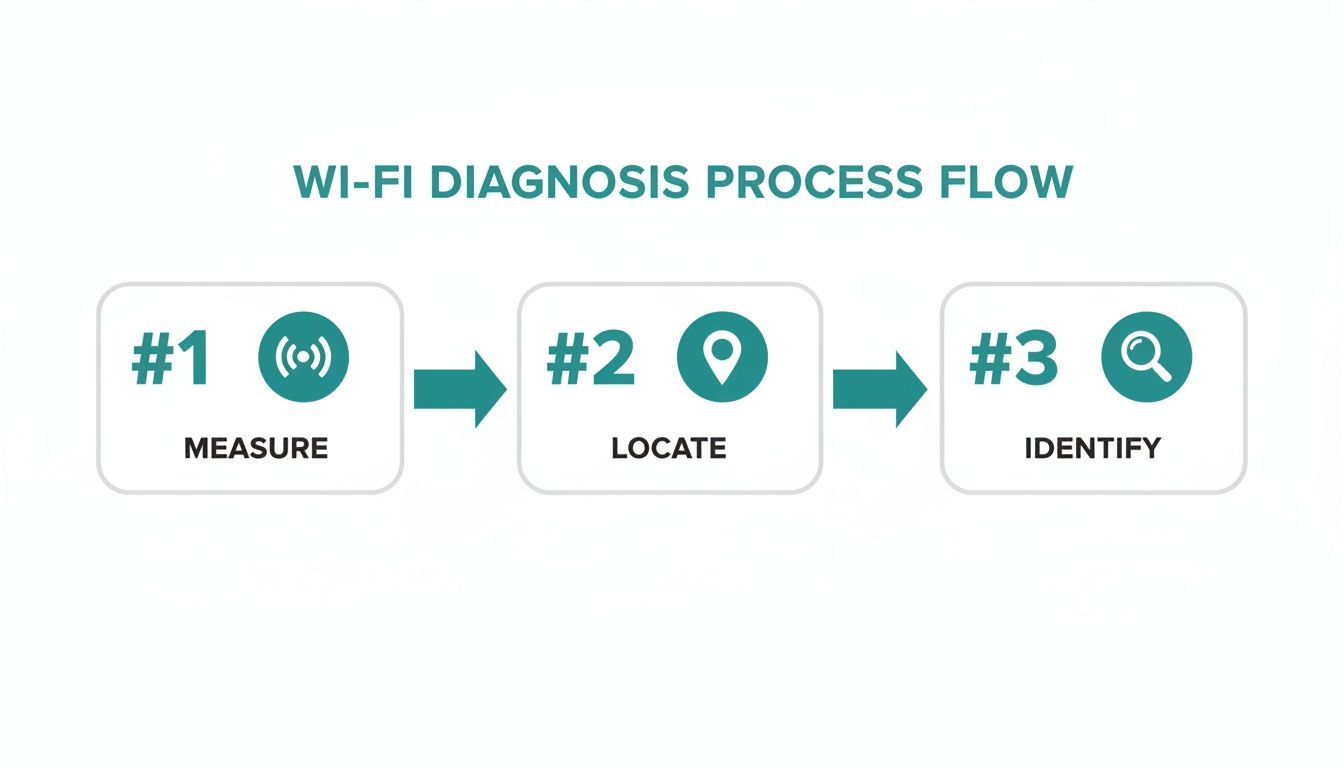
As you can see, fixing a weak signal starts with measuring performance, locating problem areas, and then identifying the specific cause. This process is what should inform your entire placement and tuning strategy.
Fine-Tuning Your Network from the Dashboard
Physical placement is only half the battle. The real magic happens when you start tuning your network's digital settings, and this is where the Meraki dashboard becomes your command center.
- Channel Planning: Take the time to manually assign non-overlapping channels (1, 6, and 11 for 2.4GHz) for adjacent APs. It can dramatically reduce interference.
- Transmit Power Levels: It feels logical to crank the power up to 100%, but this is often a bad move. It encourages "sticky clients." By lowering the power, you actually encourage devices to connect to the nearest, strongest AP.
- Band Steering: The 5GHz band is wider, faster, and much less congested. Enabling band steering in the Meraki dashboard nudges dual-band devices onto the superior 5GHz network.
By intelligently tuning channels and power, you're not just boosting signal; you're creating a smarter, more efficient network. This is essential for delivering a smooth guest wifi experience.
Preparing for High-Density and Seamless Authentication
A well-designed network anticipates how people will use it. In a corporate or Education setting, this means planning for high-density areas like lecture halls. This robust physical and digital setup directly impacts a user's first interaction with your network—the captive portal. A slow, frustrating login process will make even the strongest signal feel broken. Whether you're using a simple social login for social wifi or more advanced authentication solutions like IPSK or EasyPSK, the underlying network must be rock-solid.
For a deeper dive into creating the perfect physical layout, explore our guide on access point design.
Ultimately, strategic AP placement and tuning create a resilient foundation, paving the way for a frictionless experience and finally putting an end to complaints about a weak wireless internet signal.
Streamlining Authentication for a Better User Experience
You can have the strongest signal on the planet, but if logging in is a nightmare, users will still think your Wi-Fi is broken. A powerful signal is just one piece of the puzzle. The other half is a smooth, secure, and fast authentication process—and that’s where the partnership between Cisco Meraki and Splash Access really shines.
A clunky captive portal is often the real culprit behind what people perceive as a weak wireless internet signal. When users are stuck on slow-loading pages, they don't blame the portal. They blame your Wi-Fi. This is a massive friction point, especially in fast-paced Retail or corporate BYOD environments.
Beyond the Traditional Login Page
The good news? Modern Authentication Solutions have evolved far beyond the old-school splash page. For trusted users—think employees or students on a campus—the best login experience is no login experience at all.
This is where technologies like IPSK (Individual Pre-Shared Key) and EasyPSK change the game. Instead of a single, insecure password shared among hundreds of people, IPSK gives a unique key to each person or device.
The beauty of IPSK is its simplicity for the user and its robust security for the network admin. A person connects once, their device is remembered, and they get frictionless, secure access every time they're on-site.
This method is a lifesaver for BYOD scenarios in corporate and Education sectors. It cuts out the constant annoyance of re-entering passwords and dramatically reduces help desk tickets. For IT teams, it offers granular control. If you're managing multiple user types, it's crucial to learn how to implement Single Sign-On.
Smarter Guest Wi-Fi with Social Logins
Guest access is a different beast entirely. Here, the goal is to provide easy connectivity while gathering valuable insights. This is where a well-designed social Wi-Fi login really shines. By letting guests connect with credentials they already use every day, you turn the captive portal into a quick, painless gateway.
- Fast and Frictionless: Users connect with a single click via social login, meeting their expectation for speed.
- Valuable Data Capture: This method allows you to collect anonymized demographic data to better understand your visitors.
- Enhanced Security: It authenticates users through trusted platforms, adding a layer of security over completely open networks.
This approach makes sure the captive portal isn't a bottleneck, keeping the digital traffic flowing.
With fixed-broadband users chewing through an average of 257 GB of data each month, the demand for solid connectivity is only going up. In crowded venues, a weak wireless internet signal just makes things worse, as overcrowding can slash effective speeds by 40-50%. By optimizing your Authentication Solutions, you not only reduce network strain but also ensure every user gets the best possible connection from the moment they join. You can dig deeper into these internet traffic trends at itu.int.
Using Analytics for Continuous Network Improvement
Fixing a weak wireless signal isn't a one-and-done job. It's a constant process of tweaking and tuning. To do this right, you have to lean on data. It’s the only way to shift from just reacting to user complaints to proactively optimizing your network.

Your command center for this is the Cisco Meraki dashboard. It gives you an incredible real-time view of what’s happening across your network. You can spot which apps are eating up bandwidth, see the client load on every AP, and pinpoint devices with poor signal health. This kind of immediate insight is absolutely vital, especially in busy Education or corporate BYOD environments.
From Network Health to Business Intelligence
True network improvement goes beyond just technical stats. When you pair your Meraki network data with Splash Access, you create a powerful business intelligence engine. All of a sudden, you're not just managing Wi-Fi anymore—you're understanding how people move and behave in your physical space.
This integrated setup unlocks insights that were once out of reach. You can finally get solid answers to critical business questions:
- How long are people staying in certain zones? (Dwell time)
- Which entrances see the most activity? (Foot traffic patterns)
- What's the ratio of new visitors to regulars? (Return rates)
This level of detail is a game-changer for Retail and other sectors. Imagine a store noticing that an aisle gets plenty of foot traffic, but dwell times are low. This could point to a problem with product placement or even a weak wireless internet signal that stops shoppers from looking up reviews. Armed with that knowledge, you can make informed decisions.
This approach transforms your network from a cost center into a source of valuable business data. You’re no longer just providing a connection; you’re actively learning from it.
Actionable Insights for a Better Experience
The data you collect has a direct line to improving the user experience. If you notice your captive portal has a high drop-off rate, that's a huge red flag. It might mean the social login is too clunky or the signal is buckling under the load. With that insight, you can start refining your authentication solutions—maybe by streamlining the social wifi process or using IPSK for a faster connection for returning visitors.
This proactive stance is critical. A weak wireless internet signal creates its own kind of digital divide, even indoors. While 5% of the global population still lacks mobile broadband, even areas with strong 5G see signals weaken dramatically inside buildings. This makes reliable guest wifi a must-have. You can read more about global mobile network coverage at itu.int.
Combining network data with analytics helps you fight back. If your dashboard shows a connectivity dip, you can cross-reference it with foot traffic data to see the real business impact. Making smart adjustments based on these insights is what separates a great network from a merely functional one. Explore a range of network performance monitoring tools to build out your analytics stack. By using data for continuous improvement, you ensure your network doesn't just work—it actively contributes to your success.
Answering Your Biggest Wi-Fi Headaches
When you're trying to fix a weak wireless internet signal, you're bound to run into a lot of confusing advice. Let's break down some of the most frequent questions I hear from businesses in Education, Retail, and corporate BYOD environments.
So, How Many Access Points Do I Really Need?
This is the million-dollar question, isn't it? The honest answer is: it depends entirely on your space. For a big, open-plan office, you might get away with one AP for every 2,000 to 2,500 square feet.
But the real world is messy. That rule gets tossed out the window when you factor in concrete walls in a school or metal shelving in a Retail backroom. The only way to know for sure is to do a proper site survey. Using the tools right inside the Cisco Meraki dashboard, you can map out your coverage and pinpoint those dead zones before you start mounting hardware.
Is My Captive Portal Actually Slowing Things Down?
Yes, absolutely. A clunky captive portal is a classic performance killer. It can make your entire network feel sluggish, even when the underlying signal is strong. If your login page is weighed down with huge images or forces users through multiple steps, you're creating a terrible first impression.
This is precisely why a streamlined authentication solution is non-negotiable. The whole point is to get people connected with zero friction, whether that's a quick social login for guest wifi or just bypassing the portal altogether for trusted devices using EasyPSK.
A lightweight, efficient portal, like the kind we build for Meraki, turns that login process into a quick handshake instead of a long, painful conversation.
What's This IPSK Thing and Why Should I Care?
IPSK, which stands for Individual Pre-Shared Key, is a lifesaver for any place juggling personal devices—think corporate BYOD offices and Education campuses. It’s time to move past that single shared password written on a whiteboard, which is a security nightmare.
With a solution like EasyPSK, every single user or device gets its own unique password. The benefits are huge:
- For your users: It’s dead simple. They connect once, and their device is good to go on future visits.
- For your IT team: It gives you surgical control. When an employee leaves or a student loses their tablet, you just revoke that one key. Everyone else is unaffected.
This method strikes the perfect balance between tight security and a smooth user experience, making it the go-to for any modern BYOD policy.
Will Sticking More Antennas on an AP Boost My Signal?
It’s a common misconception, but adding more antennas won't magically blast a stronger signal across your building. What multiple antennas do is make the connection more efficient and reliable. They enable features like beamforming, which intelligently focuses the Wi-Fi signal directly at a connected device.
At the end of the day, the AP's transmit power, where you physically place it, and the environment around it make a much bigger difference to signal strength. A single, well-placed Cisco AP with the right settings will always beat a poorly placed one, no matter how many antennas it has. Getting the fundamentals right is what solves a weak wireless internet signal.
Ready to transform your venue’s connectivity from a source of frustration into a powerful business asset? At Splash Access, we specialize in building intelligent, seamless Wi-Fi experiences on the Cisco Meraki platform.
Learn more about how Splash Access can solve your Wi-Fi challenges