Ever wondered how a sprawling university campus, a massive hotel, or your favorite retail store delivers perfect Wi-Fi to every single corner? Hey, we've all been there, stuck in a Wi-Fi dead zone. The secret sauce is often a mesh networking topology. Instead of one central router trying to shout across a huge space, imagine a smart team of communicators passing the signal seamlessly from one to the next. It's like a powerful, self-healing web of connectivity that just works.
Unpacking Mesh Networking Topology
So, what is a mesh networking topology, really? At its core, it's a setup where multiple access points—we call them nodes—connect to create a single, unified Wi-Fi network. Traditional setups depend entirely on one central router. Mesh systems, on the other hand, blanket an area with coverage by letting data “hop” between these nodes. If one node goes offline or gets too busy, the system is smart enough to automatically find the next best path. Pretty cool, right?
This intelligent, resilient design makes it the go-to solution for challenging environments. For a deeper look at how different network structures stack up, check out this great overview of network topology in computer networks.
Why It Matters for Your Business
In the real world, this means no more dead zones or frustratingly slow Wi-Fi as you move from one room to another. It's a perfect fit for any business where rock-solid connectivity is non-negotiable.
Just think about these common scenarios:
- Education: On a large campus, students and faculty can walk from the library to a lecture hall to the dorms without ever dropping their connection. This is essential for supporting modern learning and campus-wide "Bring Your Own Device" (BYOD) policies.
- Retail: A stable mesh network keeps your point-of-sale systems online and transactions flowing smoothly. It also provides the foundation for an excellent guest wifi experience, enabling features like social login and gathering customer insights through a Captive Portal.
- BYOD Corporate: In a multi-floor office, employees can take their laptops from their desks to a conference room and back again, staying productive with uninterrupted access.
A well-designed mesh network is the foundation for a modern, secure, and user-friendly wireless experience. It moves beyond simple connectivity to enable advanced features that support business goals.
Industry leaders like Cisco Meraki build their powerful Wi-Fi solutions on this very principle, using hardware and cloud management to make deploying these complex networks surprisingly straightforward. This robust foundation is what allows you to implement advanced Authentication Solutions like IPSK (Identity Pre-Shared Key) or EasyPSK. These systems give each user or device a unique key, which is a massive security upgrade from a single, shared password—especially in busy BYOD Corporate or Education settings where securing every connection is a top priority.
How Mesh Networks Actually Work
So, how does a mesh networking topology really operate, once you get past all the technical jargon? At its core, a mesh network gives your data the freedom to "hop" between different access points, or nodes, to find the quickest, most reliable path to its destination. Think of it as a smart navigation system built right into your network.
Here's an easy way to picture it: Imagine your Wi-Fi signal is a delivery truck trying to get across a busy city. In a traditional network, there's just one main highway. If a traffic jam hits, everything grinds to a halt.
A mesh network, on the other hand, is like a city grid with dozens of interconnected streets. If one route is blocked, your data packet instantly reroutes down a side street, ensuring it always gets where it's going without delay. This intelligent, self-healing ability is what makes mesh so resilient and powerful.
The Team Players: Gateways and Nodes
In any mesh setup, you have two main components working together:
- The Mesh Gateway: This is the primary access point connected directly to your internet modem. It acts as the team captain, managing the entire network's connection to the outside world.
- Mesh Nodes: These are the other access points you place around your space. They communicate with the gateway and with each other, weaving together that strong, seamless web of connectivity.
Together, they create a single, unified Wi-Fi network. As you walk through a hotel or across a campus, your phone or laptop automatically connects to the nearest, strongest node. You'll never even notice the handoff—it's that smooth. This is absolutely critical for places that support BYOD (Bring Your Own Device) policies, where people are constantly on the move.
The diagram below gives you a great visual of just how much better a mesh network is at covering a whole area compared to a single, traditional router.
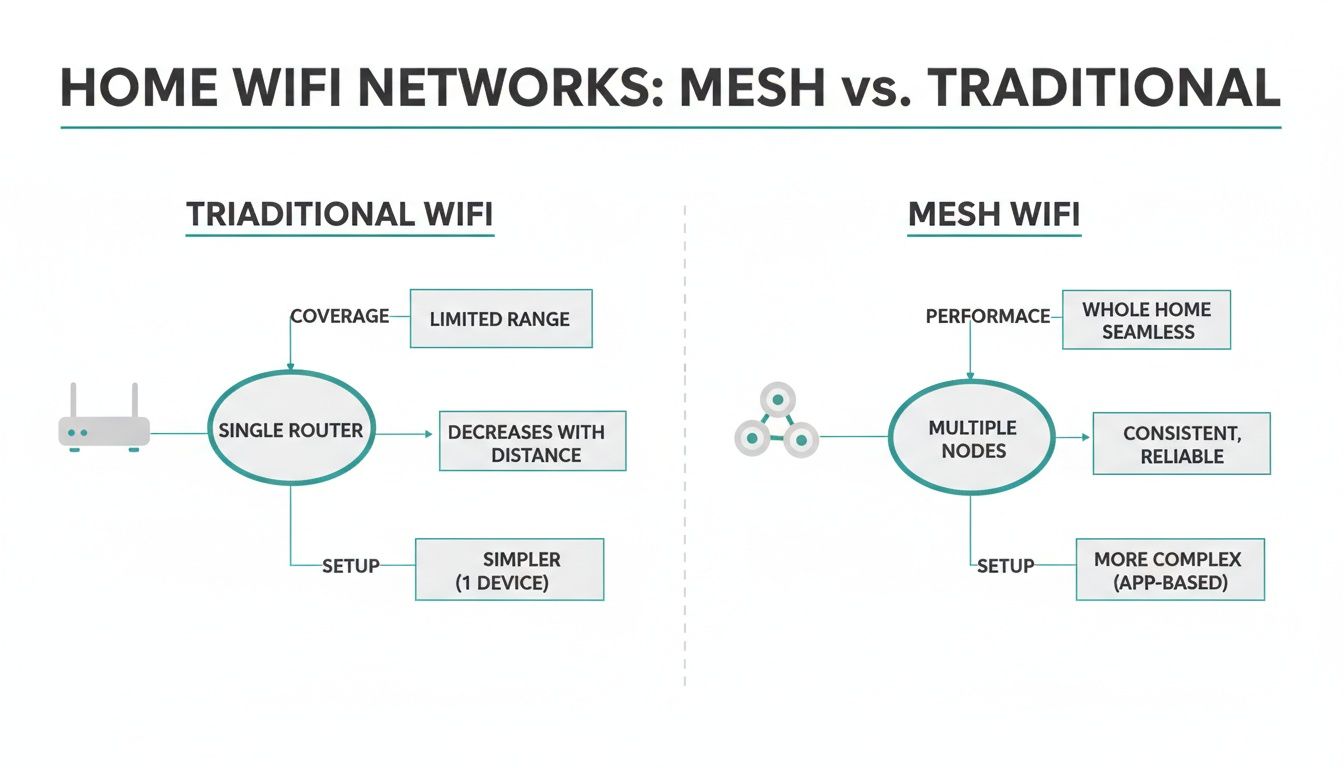
As you can see, the mesh approach blankets the entire space, getting rid of those frustrating dead zones you often find with a single router.
Full Mesh vs. Partial Mesh
It's important to know that not all mesh networks are created equal. They generally come in two main flavors: full mesh and partial mesh. Picking the right one really boils down to your specific needs for reliability and budget.
Let’s take a quick look at how they stack up.
Full Mesh vs Partial Mesh Topology at a Glance
| Feature | Full Mesh Topology | Partial Mesh Topology |
|---|---|---|
| Connectivity | Every node is connected to every other node. | Not all nodes are connected; most connect to just one or two neighbors. |
| Reliability | Extremely high. If one node fails, there are many alternate paths. | Very reliable, but a failure of a key node can impact others. |
| Cost | High. Requires more hardware and complex configuration. | More cost-effective. Balances performance with budget. |
| Best For | Mission-critical networks where zero downtime is the goal (e.g., military, industrial automation). | The vast majority of business uses: hotels, Retail, offices, and Education campuses. |
In short, a full mesh topology is the gold standard for reliability. Every single node talks directly to every other node, creating a massive number of redundant paths for data. While incredibly robust, it’s also more expensive and complex, making it a bit of overkill for most situations.
A partial mesh topology is the far more common and practical choice. In this setup, critical nodes might be fully interconnected, but most peripheral access points only connect to their closest neighbors. This strikes a perfect balance between reliability, scalability, and cost, which is why it's the go-to design for most Education, Retail, and BYOD Corporate environments. This idea of flexible, intelligent network management is a core principle of more advanced concepts, which you can explore in our guide explaining what software-defined networking is.
The industry is clearly betting big on this technology. The global wireless mesh network market was valued at USD 4.8 billion in 2025 and is on track to hit an incredible USD 21.4 billion by 2035. This massive growth signals a major shift toward decentralized, self-managing networks for everything from smart city projects to interactive Retail experiences.
Why Mesh Is a Game Changer for Key Industries
So, we've talked about what a mesh networking topology is in theory. Now, let's get to the good stuff: what does it actually do in the real world? This isn't just about tweaking Wi-Fi signals; it's about solving stubborn, long-standing problems and opening up new possibilities in some of the most demanding environments out there.
From a sprawling university campus to a high-end Retail shop, a mesh network is the invisible backbone that powers seamless, reliable connectivity. The real magic of mesh becomes clear when you see it in action—it’s the difference between a network that just works and one that actively helps you hit your goals.
Powering the Modern Campus in Education
On today's college and university campuses, reliable Wi-Fi isn't a nice-to-have; it's as essential as electricity. We're living in a BYOD (Bring Your Own Device) world, where thousands of students and faculty members expect flawless connectivity on their laptops, tablets, and phones, wherever they happen to be.
A traditional, hub-and-spoke network just can't keep up with that kind of density and constant movement. This is where a mesh networking topology from a provider like Cisco truly shines. It wraps the entire campus—lecture halls, libraries, dorms, even the quad—in a seamless blanket of coverage. When a student walks from their class to the coffee shop, their device hops to the strongest signal automatically, without ever dropping the connection.
This kind of robust backbone is crucial for a few key reasons:
- Uninterrupted Learning: It supports everything from streaming video lectures to online research and group collaboration tools, eliminating frustrating lag and dead zones.
- Secure BYOD Management: IT admins can finally get a handle on thousands of personal devices. Using advanced Authentication Solutions like IPSK or EasyPSK, every student and professor gets a unique key, keeping the entire campus network secure.
- Smart Campus Initiatives: It lays the groundwork for the future, providing the reliable infrastructure needed for IoT sensors, connected security cameras, and other next-gen tech.
Elevating the Customer Experience in Retail
In the cutthroat world of Retail, the in-store experience is everything. It's often the one thing that turns a casual browser into a loyal customer. A mesh network plays a huge role here, supporting both critical back-of-house operations and the front-of-house experience that shoppers see.
For starters, it keeps your point-of-sale (POS) systems online and running smoothly. Nothing kills a sale—and a store's reputation—faster than a spotty connection at the register. Mesh provides the resilient, self-healing network you need to keep transactions flowing.
But it also serves as the foundation for a fantastic guest wifi offering. By integrating a Captive Portal with your Cisco Meraki mesh network, you can:
- Offer Social Login: Let customers connect with their social media accounts. This makes access dead simple for them and provides you with valuable demographic insights. It's the core of what makes social wifi so effective.
- Promote Your Brand: Greet visitors with a beautiful, branded splash page that highlights your latest promotions or in-store events.
- Improve Engagement: A reliable connection encourages shoppers to stick around longer, browse more, and interact with your brand.
For a great example of this in the wild, check out this case study about how a forward-looking network supports a fashion-forward retailer. It’s a perfect illustration of how a great network directly translates to a better customer experience.
Enabling a Flexible Corporate Environment
The modern office is all about flexibility. Employees are constantly on the move, shifting from their desks to huddle rooms to large conference spaces. A corporate BYOD strategy demands a network that can keep up with this fluid environment.
A mesh topology provides the seamless roaming that employees need to stay productive. As they walk between floors or head into a meeting, their connection remains stable and secure—no dropped video calls or interruptions to cloud-based apps.
With a Cisco Meraki mesh network, IT teams get a huge advantage. They can deploy, monitor, and manage the entire wireless infrastructure from a single cloud dashboard, no matter how large or spread out it is. This makes life a lot simpler and frees up valuable IT resources.
This isn't just a niche technology; its adoption is growing globally. The Asia Pacific region, for example, is projected to see the fastest growth, with a CAGR of 10.85% from 2025 to 2032, driven by massive investments in smart city projects. North America still holds a huge piece of the pie, maintaining a 39% revenue share in 2023, partly thanks to the widespread use of the long-range 2.4 GHz band.
Mesh networking is also a foundational technology for many industries because it enables scalable and reliable connectivity for so many aspects of the Internet of Things (IoT).
Deploying Your Cisco Meraki Mesh Network
So, you’ve seen what a mesh networking topology can do, and you’re ready to bring that level of reliability to your venue. The good news is that deploying a system like Cisco Meraki is less about wrestling with code and more about smart, upfront planning. It's all about turning the concept into a high-performing reality.
The absolute most important step is the first one: planning. Don’t just unbox your access points (APs) and start plugging them in. A proper site survey is your best friend here. This means walking the physical space—whether it’s a sprawling hotel, a multi-building campus, or a busy Retail store—to map out the ideal spots for your nodes.
You're searching for that perfect balance: close enough for a rock-solid signal between nodes, yet far enough apart to maximize your coverage area. The goal is to hunt down and eliminate dead zones, ensuring a seamless connection for users as they move around. This is absolutely critical in any modern BYOD Corporate setting.
Planning for Success with a Site Survey
A thorough site survey goes beyond just measuring distances; it’s about sniffing out potential roadblocks before they become headaches. Here’s what you need to be on the lookout for:
- Physical Obstacles: Thick concrete walls, metal shelving, and even large crowds of people can absorb or deflect Wi-Fi signals. Make sure to note these on your floor plan.
- RF Interference: Everything from neighboring Wi-Fi networks to breakroom microwave ovens can cause signal interference. The tools built right into the Cisco Meraki dashboard can help you spot these culprits.
- Node Density: In high-traffic zones like a university lecture hall or a hotel lobby, you’ll need to place APs closer together to handle the sheer number of devices and provide enough bandwidth for everyone.
Once you’ve got a solid plan in place, you can move on to the actual deployment. If you're looking for a deeper dive, our guide on the installation of a wireless network is a fantastic resource for best practices.
Configuration in the Meraki Dashboard
This is where Cisco Meraki truly shines. Instead of logging into each AP one by one, you manage your entire mesh networking topology from a single, clean cloud-based dashboard. After you connect your main gateway AP to the internet, you just need to power on your other mesh nodes to get them online.
The dashboard gives you a visual map of your network, showing how each node is connected and the health of those links. From there, you can set up your SSIDs (the network names your users see) and apply security policies across the entire system with a few clicks. This is also where you'll configure your guest wifi and connect it to your Captive Portals.
One of the biggest wins with Meraki is its 'zero-touch provisioning.' You can ship an AP to a remote retail store or a new office floor, have a non-technical person plug it in, and it will automatically download its configuration from the cloud and join the mesh.
Mesh technology has come a long way. It got its start in the late 1990s for military applications, but it really hit the commercial scene after the IEEE 802.11s standard was ratified in 2007. By 2012, Cisco had deployed mesh networks in over 500 cities, connecting millions of users and cutting infrastructure costs by an estimated 35%.
Today, the 2.4 GHz band still holds a 39% market share thanks to its excellent range, while the 5 GHz band is the top choice for high-speed performance in dense environments like Education and Retail.
Fine-Tuning for a Great User Experience
With your network up and running, the final step is to dial it in for your specific users. Inside the Meraki dashboard, you can create rules to manage different types of traffic. For example, you can prioritize video conferencing for corporate staff while setting up a separate guest wifi network with social login for visitors.
This is also where you’ll lock down your Authentication Solutions. For your secure internal network, you can use IPSK or EasyPSK to give each employee or trusted device its own unique password. This is a massive security upgrade over a single shared key, making it essential for any BYOD environment.
For guests, you can direct them to a branded Captive Portal for a smooth and professional onboarding experience. It’s this combination of robust security and a user-friendly design that turns a good network into a great one.
Securing Your Network with Captive Portals and Authentication
A powerful network is only as good as its security. Once your resilient mesh networking topology is in place, the next crucial step is layering on smart access controls. This is all about separating your trusted internal users from your guests, making sure everyone gets the right level of access without putting your core network at risk.
Thankfully, modern systems like Cisco Meraki make this process remarkably simple. You can easily create different virtual networks (or SSIDs) on the exact same hardware. One SSID can be for your internal team, locked down tight, while another is dedicated entirely to guest wifi, complete with its own rules and a friendly login experience. This separation is a cornerstone of good network security.
Creating a Great Guest Experience with Captive Portals
When a visitor walks into a Retail store, an Education common area, or your corporate lobby, their login experience should be seamless and professional. This is where Captive Portals shine. A captive portal is simply the branded login page users see before they can get online—it’s your network’s digital front door.
Instead of a clunky password prompt, you can greet guests with a beautiful splash page that reflects your brand. It’s a perfect chance to show off promotions, share important info, or just offer a warm welcome. A Cisco Meraki network can be configured to direct all guest traffic to a custom portal with just a few clicks. For a deeper dive into how they function, check out our guide on the WiFi captive portal.
These portals also unlock a variety of flexible Authentication Solutions for your guest wifi.
- Simple Click-Through: The easiest option. Guests just agree to your terms and connect.
- Social Login: A huge crowd-pleaser. Users can log in with their social media accounts, which is fast for them and provides valuable, anonymised demographic data for you. This is the heart of social wifi.
- Form-Based Access: Ask for an email address or other details in exchange for access, giving you a great way to build your marketing lists.
A well-designed captive portal transforms your guest Wi-Fi from a simple utility into a powerful marketing and engagement tool. It’s the first impression many visitors will have of your brand’s digital presence.
This approach is especially powerful in the Education sector. Universities constantly need to provide access to visiting speakers, parents, and prospective students without handing over the keys to the internal kingdom.
Locking Down Internal Access with IPSK and EasyPSK
While guests get a friendly portal, your internal network needs much stronger protection, especially in a BYOD Corporate environment. The old way of using a single shared Wi-Fi password for the whole company is a huge security hole. If just one employee leaves, you’re stuck changing the password for everyone and updating it on hundreds of devices.
This is exactly the problem that modern Authentication Solutions like IPSK (Identity Pre-Shared Key) and EasyPSK were built to solve. These systems are a true game-changer for internal network security.
Instead of one password for everyone, IPSK assigns a unique, private password to every single user or device. Think of it like giving each employee their own personal key to the office Wi-Fi.
This individual approach has massive benefits:
- Granular Control: If a device is lost or an employee leaves the company, you can revoke that one specific key without disrupting anyone else.
- Accountability: Since each key is tied to a user, network activity can be traced back to an individual, which helps discourage misuse.
- BYOD Security: It's the perfect fix for securing personal devices. Each employee's phone, tablet, and laptop can get its own unique key, ensuring only authorized devices connect.
Implementing these security measures on your mesh networking topology creates a robust, multi-layered defence. Of course, a complete security strategy often goes beyond basic authentication. For those interested in going deeper, this excellent network segmentation guide explains how to isolate different parts of your network to contain threats. By combining a resilient mesh foundation with smart, identity-based access controls, you build a network that is both incredibly reliable and fundamentally secure.
Answering Your Top Questions About Mesh Networking
Jumping into the world of mesh networking topology can feel a bit overwhelming, especially if you're used to the simple one-router setup we all have at home. It's a powerful way to build a network, but it definitely works differently. Let's break down some of the most common questions people ask to help you get a clearer picture.
We'll tackle everything from how mesh compares to those little Wi-Fi boosters you see everywhere, to how it holds up when a hundred people try to connect at once. The idea is to cut through the jargon and show how platforms like Cisco Meraki make this powerful technology practical and easy to manage for anyone, from a small boutique to a massive university campus.
What's the Real Difference Between a Mesh Network and a Wi-Fi Extender?
This is probably the most frequent question we hear, and it’s a great one. Think of a Wi-Fi extender as a simple signal repeater. It catches the signal from your main router and just blasts it out again. The big downsides? This process often cuts your internet speed in half for any device connected to the extender, and it creates a totally separate network you have to manually switch to as you move around. It's like having someone shout a message to you from across a field—the sound travels further, but it's faint and distorted.
A mesh networking topology, on the other hand, is a whole different beast. It creates a single, unified smart network where all the nodes talk to each other. They're intelligent. They work together to figure out the fastest and most reliable path for your data to travel. As you walk through a building, your device is seamlessly handed off to the node with the strongest signal, without you ever noticing. This self-healing and optimizing system is far superior for reliable coverage in Education or Retail environments where you just can't afford dead spots or sluggish performance.
How Does Cisco Meraki Make It Easier to Manage a Mesh Network?
Here’s where the magic really happens. The cornerstone of the Cisco Meraki experience is its cloud-based dashboard. Gone are the days of having to log into each individual access point to make a change. Instead, you get a single, clean web interface to configure, monitor, and troubleshoot your entire network, whether it's in one building or spread across hundreds of locations.
The system handles all the heavy lifting for you, like calculating the best data paths and automatically re-routing traffic if a node happens to go offline. Even better is the "zero-touch provisioning." You can literally ship an access point to a new location, have a non-technical person plug it in, and it will automatically download its configuration from the cloud and join the mesh. This is a game-changer for deployments, especially for BYOD Corporate environments that don't have a dedicated IT person at every site.
Can I Use IPSK for Guests and a Captive Portal for Staff?
It's a great question, but you'll actually want to do it the other way around for proper security. This is a critical best practice for any modern network.
You would use IPSK (or EasyPSK) for your trusted staff and their BYOD devices. This approach gives each employee their own unique Wi-Fi password, which provides a high level of individualized security and accountability. Their traffic is kept completely separate from everyone else's.
For visitors, you'd set up a "guest wifi" network (a separate SSID) that funnels them to a Captive Portal. This is that familiar login page where you can offer user-friendly Authentication Solutions like a one-click social login or a simple form to collect an email address.
The great thing about Cisco Meraki hardware is that it’s designed to run these two systems in parallel on the same access points. You can keep your internal network locked down and secure while still offering a welcoming, seamless connection for your guests.
Is Mesh Networking Really a Good Fit for Crowded Environments?
Absolutely. In fact, this is one of its biggest strengths and a key reason it’s the go-to solution for the Education and Retail sectors.
Picture a busy lecture hall, a packed store during a sale, or a crowded conference room. A single, traditional access point would get overwhelmed in seconds, struggling to handle all the connection requests. It just can't keep up.
A mesh network, however, distributes that load across many different nodes. Cisco Meraki access points are specifically engineered for these high-density scenarios. They use smart features like automated load balancing to steer devices toward less congested APs and band steering to push compatible devices onto the faster, less-crowded 5 GHz frequency. The result is that hundreds of users in a BYOD environment can all get online at the same time without seeing their performance tank, keeping everyone happy and connected.
Ready to transform your guest Wi-Fi experience with the power of mesh networking and advanced authentication? Splash Access provides an instantly deployable platform that works seamlessly with your Cisco Meraki hardware. From branded captive portals with social login to secure IPSK solutions, we make it easy to build a network that's both user-friendly and secure.
Learn more at https://www.splashaccess.com.