Improving your guest Wi-Fi starts with one simple idea: your network is the first digital handshake a visitor has with your brand. Think about it! A clunky, frustrating login can sour that initial impression before it even has a chance to form. The goal isn't just to provide internet; it's to transform a technical necessity into a genuinely welcoming experience.
Your Wi-Fi Is Your First Digital Handshake
Think about the last time you tried to connect to a public network. Was it a breeze, or were you stuck jumping through hoops? That single moment shapes perception, whether you're a student trying to connect on campus, a shopper in a store, or a visitor in a corporate lobby.
This is especially true with the "Bring-Your-Own-Device" (BYOD) culture that’s now standard in almost every corporate and education setting. People don’t just want to connect—they expect to connect their personal devices quickly and securely. A frustrating process isn't just an annoyance; it can hit productivity and goodwill hard.
Why a Seamless Connection Matters So Much
A smooth connection process does more than just get people online. It builds trust from the very first click. The data really drives this home: satisfied customers are 4.1x more likely to recommend your brand and 3.8x more likely to trust it. As you can see from customer experience trends published by Qualtrics, that foundation of satisfaction often begins with a simple, hassle-free interaction—like logging into your Wi-Fi.
That initial login is your digital front door. If it’s locked, confusing, or slow to open, people will remember the frustration, not the amazing service you offer inside.
Building a Better Experience with the Right Tools
This is where networking solutions from providers like Cisco Meraki can make a world of difference. They give you the tools to build a guest Wi-Fi experience that is both secure and incredibly user-friendly.
By using features like customizable Captive Portals and modern Authentication Solutions, you can design a login process that feels like a natural extension of your brand, not a generic, third-party hurdle.
We'll get into the nitty-gritty of configuring these systems later, but the goal is always the same: make connecting effortless.
This could mean a few different things in practice:
- Implementing social login (or social Wi-Fi) for retail customers to make access quick and easy.
- Using advanced security like IPSK and EasyPSK to give students and employees unique, secure access keys for all their devices in Education or BYOD Corporate environments.
Each of these methods removes friction and makes the entire user journey feel that much better.
Design a Captive Portal That Welcomes, Not Warns
Think of your guest Wi-Fi captive portal as the digital front door to your business. Is it an inviting welcome mat, or does it feel more like a complex security checkpoint? This splash page is your first real chance to make a great impression, and a clunky, poorly designed one can create immediate frustration for your guests.
Customizing your portal is one of the quickest wins for improving the guest experience. Using a platform like Cisco Meraki, you can easily align the login page with your brand identity. We're talking about incorporating your logo, brand colors, and using friendly, clear language instead of a wall of technical jargon. A simple, on-brand design instantly builds trust and makes the entire process feel like a natural part of visiting your space. You can learn more about how a well-designed captive portal for Wi-Fi can completely transform your guest network.
Make Logging In Effortless
Picture a busy coffee shop or retail store. The last thing a customer wants is to stop and fill out a long, tedious form just to get online. This is exactly where social Wi-Fi becomes such a powerful tool.
By allowing users to connect with their existing social media accounts—a feature often called social login—you turn a multi-step chore into a single click. It's fast, familiar, and gets them connected in seconds. This method doesn't just simplify access; it also provides valuable, consent-based marketing insights that help you understand your customers on a deeper level.
The goal is to strike a perfect balance between essential security and a completely frictionless user journey. Every single person, from a first-time shopper in Retail to a student on campus, should find the process intuitive and fast.
Now, for environments like education or corporate offices with BYOD policies, the focus shifts slightly. Simplicity is still king, but clearly presenting the terms of use becomes a much higher priority. That doesn't mean you have to greet users with an intimidating wall of legal text.
Instead of a long, scary document, try a more user-friendly approach:
- Use a simple checkbox for users to accept the terms.
- Provide a clear link to the full policy for anyone who wants the details.
- Keep the language on the main page concise and straightforward.
This approach respects everyone's time while ensuring you meet your compliance needs. Whether it's a student connecting in their dorm or an employee using their personal laptop, the login should feel secure but never burdensome. Modern authentication solutions like IPSK or EasyPSK are perfect for these scenarios, offering robust security behind a simple user interface—something we'll dive into next.
Simplify Logins with Modern Authentication Methods
Let’s be honest, shared Wi-Fi passwords are a thing of the past. They're clunky, insecure, and a headache to manage. In today's world, especially with so many people bringing their own devices into corporate spaces (BYOD Corporate), users expect a connection process that's both simple and secure. This is where modern authentication really makes a difference.
Nothing kills the user experience faster than a frustrating login. The stats don't lie: a massive 90% of users admit to abandoning an app because it performed poorly. A slow, confusing authentication process is often the very first roadblock they encounter, setting a negative tone for their entire experience.
A Better Way to Connect: IPSK and EasyPSK
This is where technologies like Identity Pre-Shared Keys (IPSK) and Meraki's EasyPSK come into play. Instead of a single, shared password for everyone, these Authentication Solutions generate a unique key for each individual user or device.
Think about the Education sector. An IT admin can onboard hundreds of new student devices at the beginning of the school year, each with its own secure key. Students connect just once, and their devices are remembered for the rest of the year. No more forgotten passwords or login hassles before class.
For an added layer of protection that doesn't complicate things for the user, you might also consider implementing methods like Two-factor authentication (2FA). It's a simple step that significantly boosts security.
Choosing the Right Login for Your Environment
Not all venues are the same, and your login method shouldn't be either. The right approach depends entirely on your goals and your guests' expectations.
This flowchart can help you think through the decision.
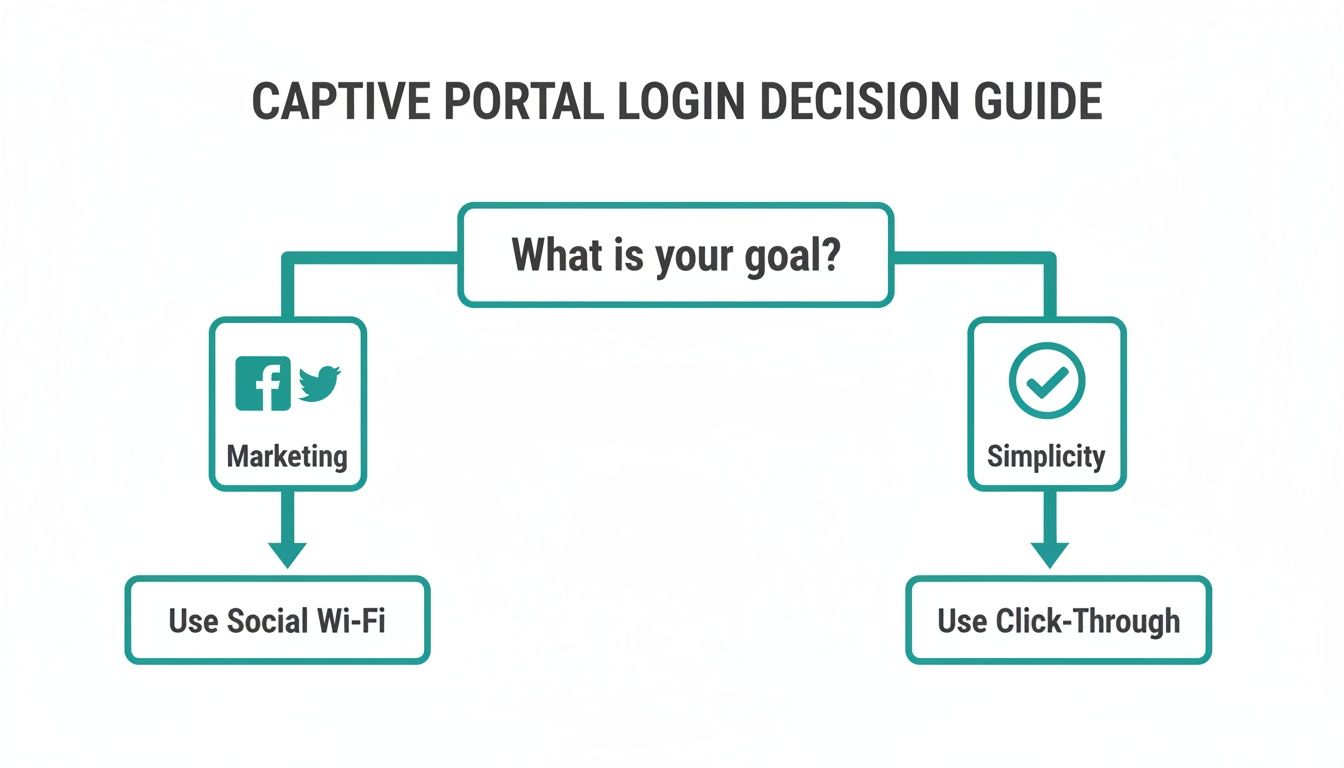
As you can see, if your main goal is to drive marketing engagement, social Wi-Fi is a great choice. But if you just want to get people online with zero fuss, a simple click-through login is the way to go.
This flexibility is incredibly valuable in Retail. A busy cafe might just need a simple click-to-connect guest Wi-Fi to get customers online fast. On the other hand, a high-end boutique could offer loyalty members an exclusive access key printed on their receipt, making the experience feel more premium.
The trick is to match the authentication method to both your business goals and what your users actually need. There are many user authentication techniques out there, so it's worth exploring which one fits your specific situation best.
Choosing the right authentication method is crucial for balancing ease of use with security. The table below breaks down some common options and where they work best.
Guest Wi-Fi Authentication Methods Compared
| Authentication Method | Best For | User Experience | Security Level |
|---|---|---|---|
| Click-Through | Cafes, public squares, quick-service retail | Fastest login, minimal friction | Low |
| Social Login | Restaurants, shopping malls, hotels | Simple for users, great for marketing data | Medium |
| Sponsored Access | Hospitals, corporate lobbies, event venues | Secure and controlled, requires staff approval | High |
| Individual PSK (IPSK) | Corporate BYOD, long-term guest access | Seamless after first login, highly secure | High |
| Voucher/Receipt Code | Hotels, paid Wi-Fi services, retail loyalty | Controlled access, creates exclusivity | Medium |
Ultimately, the best method depends on your priorities. For a coffee shop, speed is everything. For a corporate office, security is paramount.
By using these modern Cisco Meraki features, you’re moving far beyond the old "one-password-for-all" model. You’re creating a secure, personalized, and truly effortless connection experience that your guests will notice and appreciate.
This shift doesn't just improve security and make users happier—it also dramatically cuts down on the support tickets and headaches for your IT team. It’s a true win-win that puts both user convenience and network security right where they belong: at the top of the list.
Optimize Network Performance for a Flawless Connection
You can have the most beautiful splash page and the easiest login process in the world, but if the Wi-Fi itself is sluggish and unreliable, none of it matters. At the end of the day, performance is the absolute bedrock of a great guest experience. A connection that constantly drops or buffers is a far bigger frustration than any minor hiccup on a login screen.
Think of it this way: a fast, smooth connection is the silent hero of the guest Wi-Fi experience. It's what allows a student to stream a lecture in a crowded hall without interruption or a busy retail store to process sales seamlessly.
Get a Clear View of Your Network's Health
You can't fix what you can't see. This is where having clear, real-time visibility into your network’s health becomes a game-changer. Tools like the Cisco Meraki dashboard are invaluable here, especially when you're managing a high-density environment.
Imagine a university campus during finals week or a big-box store on Black Friday. The demand on the network is absolutely massive. The Meraki dashboard gives you a live, intuitive view of everything that's happening, allowing you to spot potential bottlenecks and resolve them before users even notice a problem.
This kind of visual data helps you quickly identify peak usage times, see which applications are hogging bandwidth, and make much smarter decisions about how to allocate your resources.
Engineer a Truly Reliable Connection
Great performance doesn’t just happen by accident; it's engineered through smart planning and proactive management. For anyone managing networks in Education, Retail, or corporate BYOD environments, this means focusing on a few critical areas.
A tiny 100 ms improvement in page response time can lead to a 7% increase in user engagement. That shows just how much every millisecond of optimization matters when you're crafting a better, more engaging experience.
Here are a few practical steps you can take to build that rock-solid network:
- Ensure Adequate Bandwidth: In a lecture hall packed with students on laptops or a busy store with dozens of shoppers online, you need enough bandwidth to handle the load without grinding to a halt.
- Strategize Access Point Placement: The physical placement of your Wi-Fi access points is crucial for eliminating dead zones and ensuring strong, consistent coverage everywhere people need it.
- Analyze Traffic Patterns: Use the analytics in your Cisco dashboard to understand how your network is being used. Are people mostly streaming video, or are they just browsing the web? This insight helps you prioritize traffic and optimize performance where it's needed most.
By focusing on these technical details, you ensure that your investment in a great captive portal and simple authentication solutions actually pays off. For a deeper dive, check out our guide on improving Wi-Fi performance for guest networks. Ultimately, a fast, stable connection is the final, crucial piece of the puzzle.
Use Analytics to Keep Making the Experience Better
So, you've set up your guest Wi-Fi. How do you know if it's actually working for your visitors and making a good first impression? Guessing won't cut it. The real answers are in the data.
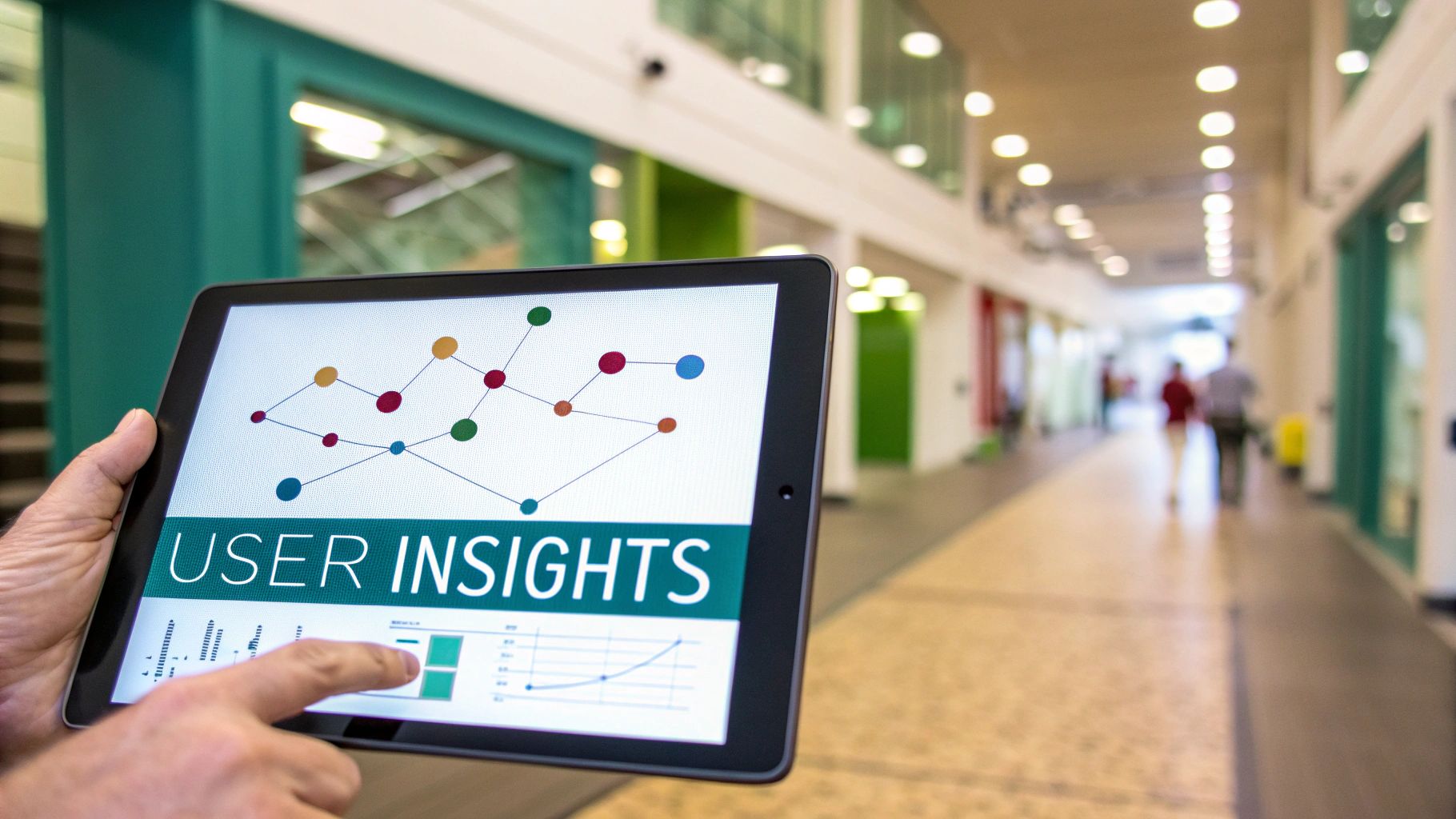
Modern Wi-Fi platforms, like the dashboard in Cisco Meraki, are packed with analytics that show you exactly how people are using your network. This is where you shift from just offering a connection to actively making it better. It's all about turning numbers into real-world improvements.
Digging Into User Data for Real Insights
Think about a busy Retail store. You can use your Wi-Fi analytics to see foot traffic patterns, pinpointing which aisles are magnets for shoppers and at what times of day. This isn't just IT data; it's business intelligence that can help you decide where to place new products or when to schedule more staff.
This kind of insight isn't limited to retail. On an Education campus, you could see which libraries or common areas are swamped with devices during finals week. That knowledge is invaluable for planning network upgrades, ensuring you have enough bandwidth right where students need it most.
By looking deeper into location analytics, you can uncover even more about how people move through and interact with your space.
Your guest Wi-Fi shouldn't be a "set it and forget it" utility. Think of it as a dynamic service that gets better over time by creating a continuous feedback loop. The goal is to spot friction points before they turn into complaints.
Key Metrics to Watch for a Better Experience
If you really want to know how to improve user experience, you need to track the right numbers. It goes way beyond just checking if the network is online.
Here are a few essential things I always keep an eye on:
- Login Methods: Are people logging in with a social media account, or are they just clicking through? This tells you what's easiest for your guests and helps you simplify the login page.
- Session Duration: Are people staying connected for a while, or are sessions suspiciously short? Quick drop-offs could point to performance problems or a frustrating reconnection process.
- Login Drop-Off Rates: How many people start the login process but never finish? A high drop-off rate is a massive red flag that your splash page is too confusing, slow, or asking for too much information.
- Device Types: Is everyone on their phone, or are laptops and tablets common too? Knowing this helps you make sure your captive portal looks great on the screens people are actually using.
Regularly checking this data lets you stop guessing and start making informed decisions. It's a similar mindset to learning how to measure event success that actually matters; you're looking beyond the surface to understand what truly resonates with your audience. When you listen to what the data is telling you, your guest network will constantly evolve to keep your users happy.
Real-World Scenarios in Retail, Education, and Corporate
Theory is one thing, but seeing how these concepts play out in the real world is where the value truly shines. Choosing the right Authentication Solutions for your guest Wi-Fi isn't just a technical decision; it's about solving specific, everyday problems and making life easier for everyone involved.
Let’s walk through a few concrete examples.
Boosting Engagement in Retail Environments
Picture a bustling shopping center. For any Retail brand, a simple social Wi-Fi login on their Captive Portal can be a game-changer. Shoppers get online with a single click using their social media accounts—no tedious forms, no friction.
This effortless connection immediately improves their in-store experience. At the same time, it gives the business valuable, consent-based marketing insights. It’s a classic win-win, turning a basic amenity into a powerful engagement tool.
The best Wi-Fi experience is one that feels invisible to the user but delivers visible results for the business. By removing friction, you encourage longer visits and build brand loyalty.
For retailers ready to explore this further, there are many ways to go beyond free guest Wi-Fi and make the most of wireless deployments.
Securing Connections on Campus and in the Office
Now, let's switch gears to an Education environment. A university can use a system like Cisco Meraki's EasyPSK to issue a unique, secure key to every student for all their devices. This simple move gets rid of the shared password nightmare, dramatically cuts down the IT helpdesk workload, and seriously beefs up network security across campus.
In a BYOD Corporate office, you face a similar challenge but with a professional twist. Here, IPSK is often the perfect fit. It ensures every employee’s personal smartphone, tablet, and laptop can connect securely to the network without ever relying on a single, vulnerable shared password. Better yet, if an employee leaves the company, their access can be revoked in an instant without disrupting anyone else.
These examples show how a thoughtful guest Wi-Fi strategy, powered by platforms like Cisco, solves unique problems in different sectors. The end result is a massively improved experience for everyone—from the person connecting their phone to the network admin keeping it all running smoothly.
Common Questions About Improving Guest Wi-Fi
As you start dialing in your guest Wi-Fi, you're bound to have questions. Getting the user experience right isn't a "set it and forget it" task—it's something you continually refine. We've pulled together some of the most frequent questions we get from folks running Cisco Meraki networks to give you clear, straightforward answers.
These aren't just theoretical; they come from our hands-on experience in Retail, Education, and corporate BYOD setups. The focus is always on making your network easy to use without sacrificing security.
How Can I Make My Guest Wi-Fi Login Faster for Users?
When it comes to login speed, less is always more. You want to get people connected with as few clicks and as little hassle as possible.
The easiest win is to use single-click options on your Captive Portals. This could be a simple "I agree, connect me" button. In a retail setting, offering a social login—often called social wifi—is incredibly popular and quick for shoppers.
For people who come back often, like in a corporate or school environment, look into Authentication Solutions. Something like Cisco Meraki's EasyPSK is a game-changer. It lets trusted devices reconnect automatically without forcing the user to type in a password every single time. And don't forget the basics: make sure your splash page is lightweight with compressed images so it pops up instantly.
What Is the Most Secure Way to Offer Guest Wi-Fi in a BYOD Setting?
In any modern corporate BYOD environment, you're balancing security with a smooth user experience. The best way I’ve found to handle this is with an Identity Pre-Shared Key (IPSK).
Instead of one shared password that everyone knows (and that eventually gets compromised), IPSK gives each user or device its own unique, private passphrase. This is a massive security upgrade that feels just as simple for the person connecting.
The real beauty of this approach is control. If a contractor leaves or a device is lost, you just revoke that one specific key. Nobody else is affected. It gives you strong, individual security that’s perfect for managing tons of personal devices without the headache of a shared password.
Can I Customize the Guest Wi-Fi Experience for Different Users?
Not only can you, but you absolutely should. A generic, one-size-fits-all network just doesn't cut it anymore. Platforms like Cisco's make it surprisingly easy to create different policies and splash pages for specific groups.
Think about the possibilities:
- Retail Customers: They get a branded Captive Portal and a quick social wifi login. Simple, fast, and on-brand.
- University Students: They could use EasyPSK for secure, persistent access on their laptops, phones, and tablets all semester long.
- Corporate Staff (BYOD): They’d use a more robust IPSK to connect to a secure network that grants access to company resources.
Segmenting the experience like this is the secret to figuring out how to improve user experience effectively. It ensures the login is relevant, the security is appropriate, and the process feels right for every single person who connects.
Ready to turn your guest Wi-Fi from a basic amenity into a real asset for engagement and security? At Splash Access, we live and breathe this stuff, building seamless, on-brand experiences specifically for the Cisco Meraki platform.
Discover how Splash Access can help you create the perfect digital handshake.