Ever wondered how a single Wi-Fi network can securely serve guests, staff, and payment systems without them ever crossing paths? Hey, you're in the right place! The magic behind this is the Virtual LAN, or VLAN. Simply put, a VLAN lets you create multiple, separate, virtual networks that all run on the same physical network hardware. This separation is the secret sauce for a secure, organized, and zippy network.
What Are VLANs And Why Should You Care?
Let's get conversational. Think of your physical network switch like an apartment building. All the ethernet ports are individual apartments, connected by the same physical wiring. Without VLANs, it's like a building with no walls between apartments—everyone can wander into anyone else's space. It’s chaotic and definitely not secure.
A VLAN is like building virtual, locked-off floors within that same building. One floor could be exclusively for corporate staff, another for guest Wi-Fi, and a third just for sensitive point-of-sale systems. The residents (your devices) on one floor can't see or access another floor without a special key, which in the networking world is your router. That's the core idea of how VLANs create secure digital boundaries.
To make this crystal clear, here’s a quick breakdown of the core concepts.
VLAN Core Concepts At A Glance
| Concept | Simple Analogy | Key Benefit |
|---|---|---|
| Virtual LAN (VLAN) | Creating private, locked floors in an apartment building. | Divides one physical network into multiple logical networks. |
| Traffic Isolation | Residents on one floor can't access other floors. | Prevents devices in one VLAN from communicating with another, boosting security. |
| Broadcast Domain | A message announced on one floor is only heard on that floor. | Reduces unnecessary network chatter, improving overall performance. |
This table shows just how powerful these simple ideas are when applied to a real network.
Why This Matters in the Real World
This isn't just geeky talk; it's fundamental to managing modern networks, especially in busy sectors like Education, Retail, and Corporate environments. In these places, splitting up network traffic isn't just a good idea—it's essential for both security and performance.
VLANs provide a foundational layer of security by isolating traffic. A security breach on your guest network, for instance, cannot spread to critical internal systems if they are on separate VLANs.
This segmentation powers many features you probably use every day. When you connect to a guest Wi-Fi network at a café and see a login page, that’s a Captive Portal running on a completely isolated guest VLAN. This setup lets businesses offer awesome amenities like social login or gather marketing insights through social wifi without ever putting their main network at risk.
In a corporate or campus setting dealing with BYOD (Bring Your Own Device) policies, VLANs are a lifesaver. Using advanced Authentication Solutions like IPSK or EasyPSK, network hardware from providers like Cisco and Meraki can automatically assign a user's device to the correct VLAN the moment they connect. This ensures students, staff, and guests all get the right level of access, all running seamlessly on the same physical Wi-Fi hardware.
If you want to dig deeper into the broader concept of creating these virtual environments, it’s worth exploring what is network virtualization. At the end of the day, this simple yet powerful tool is what makes a secure, multi-purpose network possible.
How VLANs Actually Communicate
Okay, so we've created these virtual "floors" on our network, but how does the traffic know which floor it belongs to? The secret is a cool process called VLAN tagging.
Think of it like an airport baggage system. When you check your suitcase, the airline slaps a tag on it with your destination city. That little tag is the only thing that ensures your bag gets on the right plane and doesn't end up in the wrong city.
Network traffic works almost exactly the same way. When a chunk of data, known as a frame, leaves a device on a VLAN, the network switch adds a small digital tag to it. This tag, part of the universal 802.1Q standard, includes the VLAN ID—a number that tells every other switch on the network precisely which virtual network that data belongs to.
This diagram shows that simple flow, taking a single network and breaking it into secure, segmented groups.
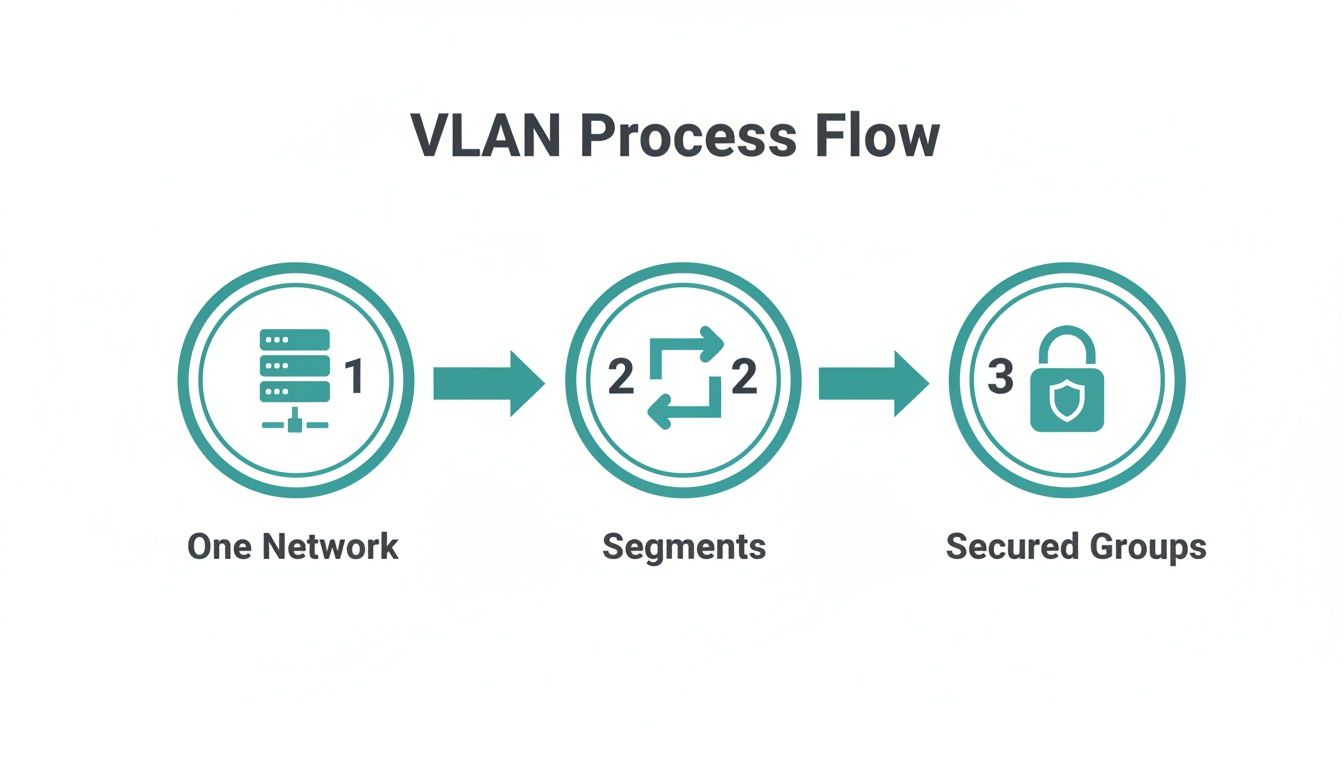
As you can see, a single physical network is effectively carved up into smaller, locked-down virtual ones to keep traffic separate and boost security.
Access vs. Trunk Ports: The Two Port Flavors
To handle all this tagged traffic, switches use two main types of ports, and it's super important to understand the difference.
- Access Ports: These are your standard, everyday ports where you plug in a single device like a Wi-Fi access point, a desktop PC, or a point-of-sale terminal. An access port is assigned to just one VLAN. Think of it as a door to a single apartment—it only leads to one specific place.
- Trunk Ports: These are the network superhighways. They connect switches to other switches or up to a router. A trunk port is special because it's configured to carry traffic for multiple VLANs all at once. It inspects the tag on every single frame to make sure it gets passed along to the correct destination VLAN on the next switch.
Trunk ports are the glue that holds a multi-switch VLAN setup together. Without them, your virtual floors would be stuck on a single switch, completely defeating the purpose of creating a unified, segmented network.
The Special Case: What is a Native VLAN?
You might be wondering, what happens if a switch receives traffic that doesn't have a VLAN tag? This is where the native VLAN comes into play.
On platforms like Cisco and Meraki, you can designate one VLAN on a trunk port as "native." Any untagged traffic that shows up on that trunk port is automatically dumped into this default native VLAN.
This is a handy feature for network management, especially when you need to integrate older devices that don't speak the language of VLAN tags. However, it's also a major security point that requires careful handling.
Grasping how these ports and tags work together is the absolute foundation of managing network traffic. For a deeper look into how all this traffic travels over a single wire, it's worth learning what is VLAN trunking. This knowledge is essential for setting up secure networks in Education, Retail, or any Corporate BYOD environment, especially when building out Authentication Solutions for guest Wi-Fi.
Segmenting Your Network For Better Security And Performance
Alright, we've covered the nuts and bolts of how VLANs work. Now, let's talk about where the rubber meets the road—how these concepts translate into real-world benefits that secure your network and keep it running smoothly.
Think of a bustling university campus. You’ve got students on their laptops, faculty pulling up sensitive academic records, and visitors who just need simple guest Wi-Fi. Throwing them all onto one giant, flat network would be a security disaster waiting to happen. This is where VLANs really shine, allowing you to create separate, logical networks for each user group.
Real-World VLAN Scenarios
At its heart, a VLAN lets you build digital walls between different types of users and devices, even though they're all connected to the same physical switches and Wi-Fi access points.
-
Education: You can put students on a dedicated VLAN with bandwidth limits and content filters. Meanwhile, the faculty VLAN gets priority access to internal servers and resources. The guest network, managed by a Captive Portal, sits on its own completely isolated VLAN, keeping the school's core systems safe.
-
Retail: A retail store can place all its point-of-sale (POS) terminals on a hyper-secure VLAN, completely locked down from any other traffic. At the same time, another VLAN can provide public guest Wi-Fi with social login options for shoppers, creating a great experience without ever putting payment data at risk.
-
Corporate BYOD: In any company that allows employees to "Bring Your Own Device," VLANs are a must-have. When an employee connects their personal phone, an Authentication Solution like IPSK or EasyPSK can automatically place it on the correct corporate VLAN. A visiting contractor, however, can be shuffled onto a restricted guest VLAN with internet-only access. This is the kind of smart, granular control that platforms like Cisco Meraki are built for.
By creating these logical separations, you drastically reduce your network's attack surface. If a guest's device is compromised on the public Wi-Fi VLAN, the infection has no path to travel to your critical internal servers or staff devices.
This idea of separation is a cornerstone of modern networking. It’s all about containing threats and making sure a problem in one area doesn’t cascade and take down your entire operation. Implementing robust network security for small business almost always starts with smart segmentation.
To dive deeper into these strategies, take a look at our guide on network segmentation best practices.
The Future of Network Virtualization
The simple, powerful concept behind VLANs has paved the way for even more advanced virtualization technologies. One of the biggest is Virtual Extensible LAN (VXLAN), which takes the same idea of segmentation and scales it up for massive data centers and sprawling cloud infrastructures.
The global market for VXLAN technology was valued at around $2 billion in 2024 and is projected to rocket past $5 billion by 2032. This incredible growth just goes to show how essential network virtualization has become for businesses of all sizes. It all highlights the constant need for smarter, more scalable ways to organize and secure network traffic—a journey that begins with understanding the power of a VLAN.
How To Connect Different VLANs Securely
So, you’ve set up your virtual networks. Your ‘Guest-WiFi’ VLAN is running smoothly, the ‘Staff’ VLAN is buttoned up, and the ‘Admin’ VLAN is on lockdown. But now, what happens when someone on the Staff network needs to print a document on a printer that lives on the Admin network?
By default, they can’t talk to each other. And honestly, that’s exactly what you want. This isolation is the whole point of using VLANs in the first place—it’s a core security feature.
To let them communicate in a controlled way, we need a process called Inter-VLAN Routing. It’s the secret sauce that lets you have both segmentation and connectivity.
Think of your network switch as a building with multiple, secure floors (your VLANs). To get from one floor to another, you can't just take any staircase. You have to go through the main lobby where the security desk is. That security desk is your inter-VLAN routing point.
This checkpoint has to be a Layer 3 device, meaning it understands IP addresses, not just MAC addresses. This could be a traditional router or, more commonly these days, a powerful modern switch.
When a device on the Staff VLAN wants to reach the Admin VLAN, its traffic travels up to this Layer 3 device. The device acts as a gatekeeper, checking a set of rules—we call these Access Control Lists or ACLs—to decide if that specific communication is allowed to pass.
The Modern Way with Cisco Meraki
Back in the day, you often needed a separate router to do this, a setup known as "router-on-a-stick." It worked, but it wasn't the most efficient.
Today, many modern switches, especially from a vendor like Cisco Meraki, have this routing capability built right in. They're called Layer 3 switches because they can handle both Layer 2 switching and Layer 3 routing internally.
This integration makes everything much faster. Instead of traffic leaving the switch to go to an external router and then coming back, the switch handles it all at hardware speed. This is a game-changer for performance in busy environments like Education, Retail, or any Corporate office where different groups need to access shared resources securely and without delay.
Inter-VLAN routing gives you the best of both worlds: the security of network isolation and the flexibility of controlled communication. You decide exactly who can talk to whom, and what they're allowed to say.
Why This Matters for Your Authentication Solutions
This level of control is absolutely critical when you're using advanced Authentication Solutions. For instance, in a BYOD environment, you might use IPSK or EasyPSK to automatically place employee devices onto different VLANs based on their credentials.
While those devices are now neatly separated, you still need a central place to manage the rules. You might create a rule that allows a device on the ‘BYOD-Staff’ VLAN to access a specific internal server, but block it from reaching anything else.
This routing function is also a cornerstone of managing guest Wi-Fi. Traffic from your Captive Portal VLAN needs a clear path to the internet, but you must make sure it has zero routes to any of your internal company networks. For a deeper dive on setting up these security policies, you can learn more about the crucial role of a Cisco Meraki firewall.
By getting a handle on Inter-VLAN routing, you gain precise, granular control over your entire network's traffic flow.
Using VLANs To Create Secure Guest WiFi
If you're a business offering guest Wi-Fi—whether you're in Retail, Education, or running a Corporate office—VLANs aren't just a "nice-to-have." They are absolutely essential. This is where the theory we've discussed becomes a practical tool for building a secure, reliable wireless experience for your visitors.
The main goal is straightforward: build a digital wall around your internal network. By placing your guest Wi-Fi on its own dedicated VLAN, you're creating an isolated bubble for all public traffic. This simple step means a guest's device, which might be carrying malware, has no way to see or access your sensitive internal servers, payment systems, or employee computers.
This separation is what powers modern guest networks. For example, Captive Portals run entirely inside this guest VLAN. It’s what lets you show a branded splash page, ask users to accept your terms, or provide slick social login options, all without giving them a key to your private network.
Dynamic VLAN Assignment with Advanced Authentication
Now for the really clever part. You can combine VLANs with modern Authentication Solutions to take your network management to the next level. On sophisticated hardware from brands like Cisco or Meraki, you can move past having just one static guest network. Instead, you can automatically assign users to different VLANs based on who they are, even if they all connect to the same Wi-Fi network name (SSID).
This is often done with technologies like IPSK (Individual Pre-Shared Key) or EasyPSK. These allow you to give a unique password to each user or device, and that specific password can be linked to a policy that puts them on the correct VLAN.
Think about how this plays out in the real world:
- Corporate BYOD: An employee connects to the office Wi-Fi with their personal phone. Their unique key places them on the 'Corporate-BYOD' VLAN, giving them access to internal tools. A moment later, a visiting contractor connects to the exact same Wi-Fi network, but their key drops them onto a restricted 'Contractor' VLAN with only internet access.
- University Campus: A student in their dorm connects and gets placed on the 'Student-Residential' VLAN. When they walk over to the library, their device could be seamlessly moved to a 'Library-Access' VLAN with different content filtering rules.
This level of granular control is how you manage complex environments effectively. For a deeper dive, there's a great guide on setting up VLANs for these types of scenarios.
Scaling Segmentation for Global Operations
The basic idea behind a VLAN—network segmentation—is so powerful that it's being rolled out on a massive scale worldwide. As businesses grow, especially into new regions, the need for clean, secure network separation becomes even more critical.
For example, the Asia-Pacific region has emerged as the fastest-growing market for advanced network virtualization, with a projected growth rate of up to 20.7% through 2034. This surge is fueled by the explosion of data centers and digital services in countries like China and India, particularly in hospitality, Retail, and Education. For any international company planning its network infrastructure, recognizing this trend is key to building systems that are both scalable and secure. This growth is a testament to how the simple logic of a VLAN is now shaping network architecture on a global scale.
Common Questions About How VLANs Work
Let's wrap things up by tackling some of the questions that always pop up when people are getting their heads around VLANs. These quick answers should help cement what we've covered and clear up any confusion before you start putting this stuff into practice.
How Many VLANs Can I Create?
The 802.1Q standard technically allows for up to 4,094 usable VLANs, but don't let that number intimidate you. In the real world, most businesses only need a handful to get the job done right.
You might have one for staff, another for guests, a separate one for management, and maybe one for all your IoT devices like security cameras and smart thermostats. The goal isn't to use as many as possible, but to create a logical structure. A simple, well-organized setup is always better than a complex web of hundreds of unnecessary VLANs.
Do VLANs Slow Down The Network?
This is a classic myth. The short answer is no; in fact, VLANs almost always improve network performance. By splitting your network into smaller broadcast domains, they cut down on the noisy, unnecessary traffic that can drag everything to a crawl.
Sure, routing traffic between different VLANs adds a tiny bit of latency, but on modern hardware from a company like Cisco Meraki, we're talking about a delay so small you'd never notice. The performance boost you get from reducing all that network chatter far outweighs it. If you do run into slowdowns, it's more likely a configuration issue, and you might want to check out some tips for VLAN troubleshooting with MS to track it down.
How Do VLANs Work With WiFi Networks?
VLANs and Wi-Fi are a perfect match. A single wireless access point can broadcast multiple Wi-Fi network names (SSIDs), and each of those SSIDs can be tied directly to a different VLAN.
For instance, you could have your "Corporate-WiFi" SSID mapped to VLAN 10 for employees, while your "Public-WiFi" SSID uses VLAN 20 for visitors. This is the secret sauce behind how Captive Portal solutions provide secure guest wifi. They can offer slick features like social login on a completely isolated network segment, keeping your internal traffic safe. This kind of setup is essential for managing BYOD (Bring Your Own Device) policies in Education, Retail, and Corporate environments.
The ability to map different Wi-Fi networks to separate VLANs is the cornerstone of secure, multi-purpose wireless deployments. It allows a single piece of hardware to serve multiple distinct user groups safely.
What's The Difference Between a VLAN and a Subnet?
This is a great question because they're very closely related, but they operate at different layers of the network. Think of it like this:
- A VLAN is a Layer 2 (Data Link) concept. It groups devices together as if they were all plugged into the same physical switch, creating a broadcast domain.
- A subnet is a Layer 3 (Network) concept. It's simply a defined range of IP addresses.
The best practice is to pair them up in a one-to-one relationship. For example, you’d assign VLAN 10 to use the 192.168.10.0/24 subnet. This simple pairing keeps things tidy, makes network management a breeze, and is absolutely crucial for routing traffic correctly between your different network segments.
At Splash Access, we help you use the power of VLANs and Cisco Meraki hardware to create secure, intelligent, and engaging Wi-Fi experiences. From dynamic Authentication Solutions like IPSK and EasyPSK to branded Captive Portals, we provide the tools to manage your network effectively. Visit https://www.splashaccess.com to see how it works.