A hotel lobby is filling up, a campus dorm is streaming lectures, or a retail floor is handling contactless payments. Phones, laptops, printers, cameras, and building devices all want a connection, but they don't all need the same access. A clear Wi-Fi topology keeps those connections organized. A flat network makes it easier for guest, staff, and IoT traffic to bump into one another, complicating both security and troubleshooting.
The most useful examples of network topology show how real users connect, where authentication happens, and which paths lead to internal systems or the internet. Below are eight practical Cisco Meraki patterns for guest Wi-Fi, social login, IPSK, EasyPSK, education, retail, BYOD corporate access, and IoT segmentation, with the trade-offs and setup details that matter.
If you're planning a small-business deployment, this small-business networking guide from We Fix PC Laptop can help you think through the broader network alongside the Wi-Fi design. The examples here focus on replicable patterns, not abstract diagrams.
1. Cisco Meraki Guest Wi-Fi with a Captive Portal Splash Page
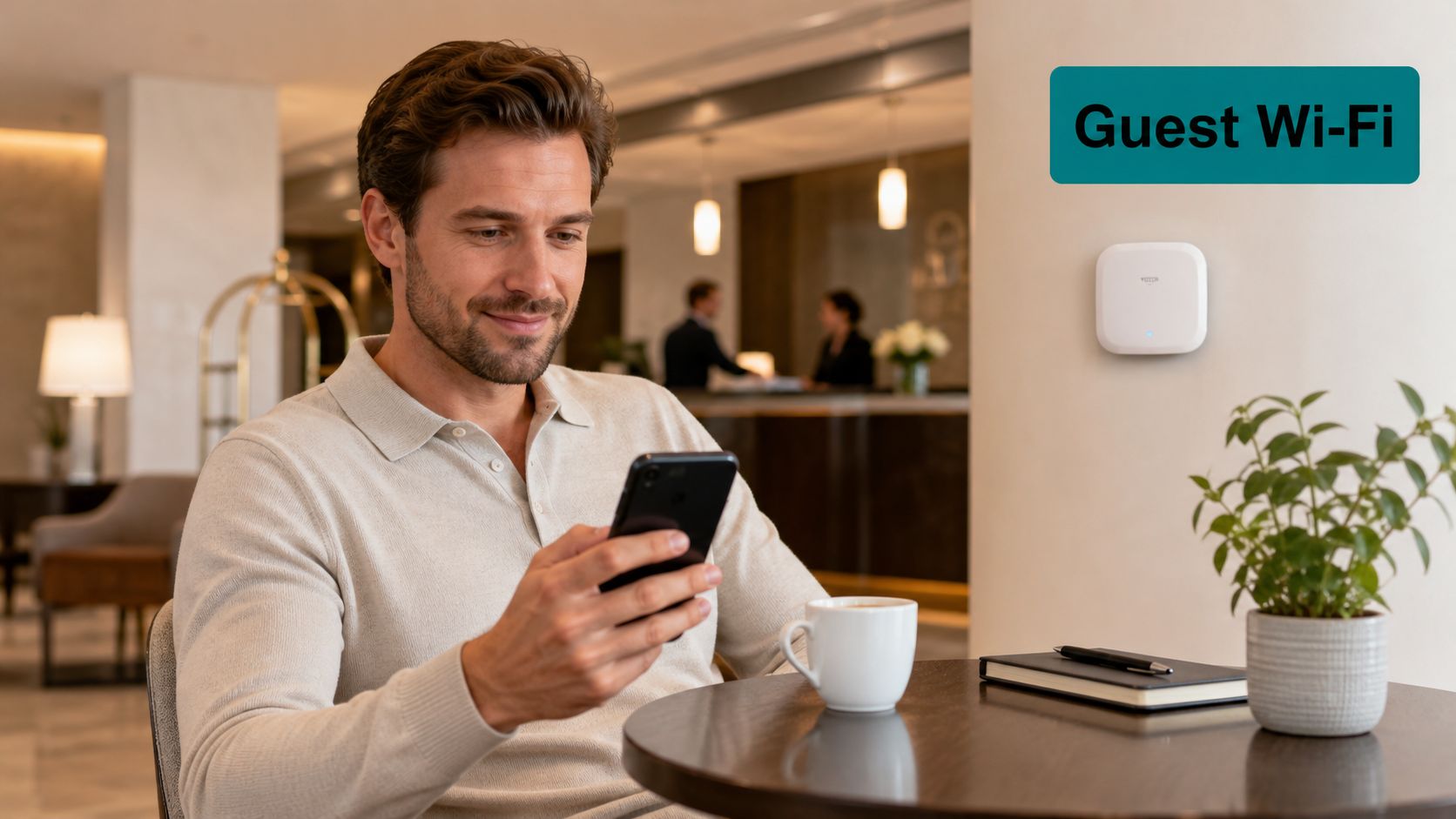
Start with a dedicated guest SSID on Cisco Meraki access points, such as the MR series. A visitor connects to that SSID, lands on a captive portal, and accepts the venue's terms or signs in before reaching the internet. Map guest traffic to its own VLAN and subnet, then apply a Meraki MX policy that keeps the route internet-only and isolates guest clients from one another where appropriate.
This star-like access design is straightforward to operate: each wireless client connects to an AP, and the AP bridges traffic into the switching and routing network. It works well in hotels, cafés, shopping centres, and campus visitor areas because guests get a clear route online without gaining access to staff systems. To connect Cisco Meraki systems with an onboarding platform, keep the AP, VLAN, and portal configuration aligned.
Keep the guest path simple
A boutique hotel can use a branded splash page with a welcome message and a link to restaurant offers. A university visitor centre can provide time-limited access to campus tour guests, while a shopping centre can show its map and current promotions as shoppers connect. Splash Access supports responsive splash pages that work across phones, tablets, and desktop browsers.
Set a session timeout and bandwidth policy that fit the venue. Keep the guest subnet away from internal servers, and test the splash page on a phone with a slow or unstable connection so it still loads smoothly. Plain-language terms help visitors understand what they're accepting.
Practical rule: A captive portal controls onboarding, but VLAN and firewall rules control where guest traffic can go. Configure both.
2. Social Login and Social Wi-Fi on Meraki Splash Pages
A guest Wi-Fi login can do more than open an internet session. With social login, a visitor uses an available social account to sign in, while the splash page can ask for consent before collecting information for follow-up. This is often called social Wi-Fi or social guest Wi-Fi.
On a Cisco Meraki network, the visitor still joins a designated guest SSID and passes through the splash-page workflow before normal internet access. The portal is an access-control step, not a substitute for the separation provided by the guest VLAN and firewall policy. Splash Access can support social Wi-Fi workflows and integrations with marketing tools, subject to the venue's configuration and consent practices.
A café might invite guests to connect through social login and offer a loyalty sign-up after authentication. A retail chain could use an opt-in campaign to share a weekend promotion, while a campus recreation centre might invite students to receive event updates. These examples work best when the offer is useful and the visitor can tell what information is being requested.
Make consent clear
Use a privacy notice that explains what data is collected and why. Keep marketing consent separate from the step required to get online, and offer a non-social option such as email registration for people who prefer it. A short welcome offer can make the connection feel valuable without turning the portal into a wall of promotions.
For a closer look at the workflow, explore social login for wireless guest access. Set a retention policy for collected records and remove data that no longer has a defined purpose. The portal should make access easy, not obscure the visitor's choices.
3. Individual Pre-Shared Keys for Secure Shared Networks
A shared Wi-Fi password is easy to distribute, but it's difficult to manage when one person leaves or a device is lost. Individual pre-shared keys (IPSK) offer a middle ground: users or devices share an SSID but receive distinct keys. If one key needs to be withdrawn, the administrator can revoke that credential without changing the password for everyone else.
Cisco Meraki Identity PSK can support this approach using RADIUS or cloud-based key management. The key can be associated with a policy or VLAN, so a student's device, a printer, and a conference-room display don't have to receive identical network access. Splash Access can combine private IPSK onboarding with a captive portal workflow, including delivery by QR code or email where configured.
A university residence hall might issue a personal key to each student and map residents to an isolated dorm network. An office could give printers and meeting-room displays their own access policies, while a clinic could issue temporary credentials to contractors and revoke them when their engagement ends.
Manage credentials as identities
Create key groups based on department, resident status, or device type, and document who owns each credential. Expire temporary keys and remove keys linked to inactive users or retired devices. A captive portal can reduce manual setup by letting users enrol, but administrators still need a clear process for approval and revocation.
For a plain-language explanation of the method, see how individual pre-shared keys work. IPSK is useful when a single shared password offers too little accountability, but a full enterprise identity deployment isn't practical for every device.
4. Easy PSK for Simple Per-Device Access in BYOD Environments
Some organizations want per-device access control without building a full RADIUS service. EasyPSK can be a practical option for small and mid-sized offices, schools, and co-working spaces using Cisco Meraki. Administrators create individual passphrases in the Meraki Dashboard and can apply a VLAN or policy based on the key used.
The topology remains simple at the access layer: devices associate to a managed SSID, and the network places them into the appropriate logical segment. A co-working operator could issue a personal key to a member and tie the resulting access to the member's policy. A small accounting firm might use distinct keys for staff devices, while a school could give teacher-owned tablets a staff policy and keep student visitors on a separate captive-portal SSID.
Keep keys understandable
Name keys clearly enough that an administrator can identify the owner or device type during an audit. Use separate policies for staff, members, and visitors, and write down how the team requests, issues, and revokes keys. A QR-code onboarding flow can help users join without reading a long setup guide or calling support.
EasyPSK can be easier to operate than a larger identity project, but it still needs lifecycle management. Decide who can issue credentials and what happens when a device is replaced or someone leaves. If the organization's needs grow, review whether identity-based access would provide better control than adding more key groups.
5. Education Campus Topology with Dorm Networks and Visitor Access
A campus Wi-Fi design serves distinct groups at once: students with personal devices, staff accessing internal systems, and visitors who need temporary connectivity. A hierarchical physical network can connect APs to access switches, then link building networks through distribution and core layers. Logically, separate SSIDs and VLANs keep residence traffic, staff access, and visitors from sharing the same policy.
A university dorm can issue each resident an IPSK and place those devices on an isolated residence VLAN. Staff can use WPA2-Enterprise where supported, while prospective students attending an open day connect through a captive-portal guest SSID. A K–12 district can apply a similar separation between student devices, teacher laptops, and administrative systems.
Design around the campus experience
Map each SSID to a VLAN and write down what that VLAN can reach before deployment. Use IPSK for dorm devices where individual credentials suit the onboarding process, and reserve stronger identity-based access for staff who need internal resources. For education-specific network planning, see Wi-Fi access for education.
Different buildings behave very differently. A residence hall often has several streaming and gaming devices per room, so corridor-based APs may need to serve dense indoor coverage through walls. A lecture theatre does the opposite, packing a large client count into one open space at a fixed start time.
Size uplinks and channel planning for peak moments rather than average load: exam periods, move-in weekend, or a full lecture starting at once. Give each building a policy profile that matches how it is used instead of forcing one campus-wide design onto every VLAN.
6. Retail and Shopping Centre Guest Wi-Fi with Analytics and Offers
A retail guest network needs to keep the joining experience quick while protecting payment, staff, and operational systems. Cisco Meraki APs can broadcast a visitor SSID that directs shoppers to a branded captive portal, while a separate VLAN and MX firewall policy limit that network to approved services. The portal can display current offers and provide an opt-in route for follow-up.
A shopping centre might present a food-court promotion after guests connect. A fashion retailer could compare visitor activity across branches using its chosen analytics setup, while a cinema could offer a separate premium access option if its network and business rules support it. Meraki MV Sense analytics and a portal-based campaign are distinct parts of the design, so clarify what each system collects and how the data will be used.
Make the promotion serve the connection
Keep the splash page light and readable on a phone. Publish clear privacy information wherever analytics are used, and make it easy for visitors to understand whether they're accepting terms, consenting to marketing, or both. Voucher codes can help staff identify which campaign prompted a connection, while AP placement near entrances can improve coverage for location-sensitive offers.
For retail-specific examples, see retail Wi-Fi analytics and guest access. A portal can support promotions, vouchers, or paid access where those functions are configured, but it shouldn't be allowed to blur the boundary between guest traffic and store operations. Retail teams can also consider broader protection systems for retail premises as part of site planning.
7. BYOD Corporate Wi-Fi with Azure AD, SAML, and Layered Authentication
A corporate BYOD network needs to distinguish staff-owned devices from guests and from devices that need deeper access to business systems. One practical Cisco Meraki layout uses a protected staff SSID, a policy-controlled BYOD SSID, and a separate guest SSID. Staff can authenticate through an organization's identity provider, while personal devices that don't support the selected enterprise method may use IPSK or EasyPSK on a restricted VLAN.
Azure AD or another SAML identity provider can supply staff identity for an appropriate sign-in workflow. The Meraki wireless layer and MX firewall policies then enforce the network boundaries. Splash Access supports identity integrations including Azure AD and SAML, which can help coordinate sign-in and guest onboarding.
A professional services firm could use Azure AD for staff laptops, IPSK for employee phones, and a captive portal for visitors. A co-working operator might issue member EasyPSK credentials while keeping visitors on a guest network. A law office could use staff sign-in for employees and time-limited vouchers for consultants.
Separate convenience from privilege
Set a BYOD policy that explains which devices can connect and what they can reach. Keep personal devices off the VLAN used for core business servers, and enable MFA through the identity provider where appropriate. When an employee or contractor leaves, revoke the relevant account or key rather than relying on a password change for the whole office.
The Azure AD Wi-Fi authentication overview can help teams explore identity-based onboarding. The central design decision isn't just which login page to use. It's whether each identity and device lands in a segment with only the access it needs.
8. Hybrid Guest, Staff, and IoT Segmentation Topology on Cisco Meraki
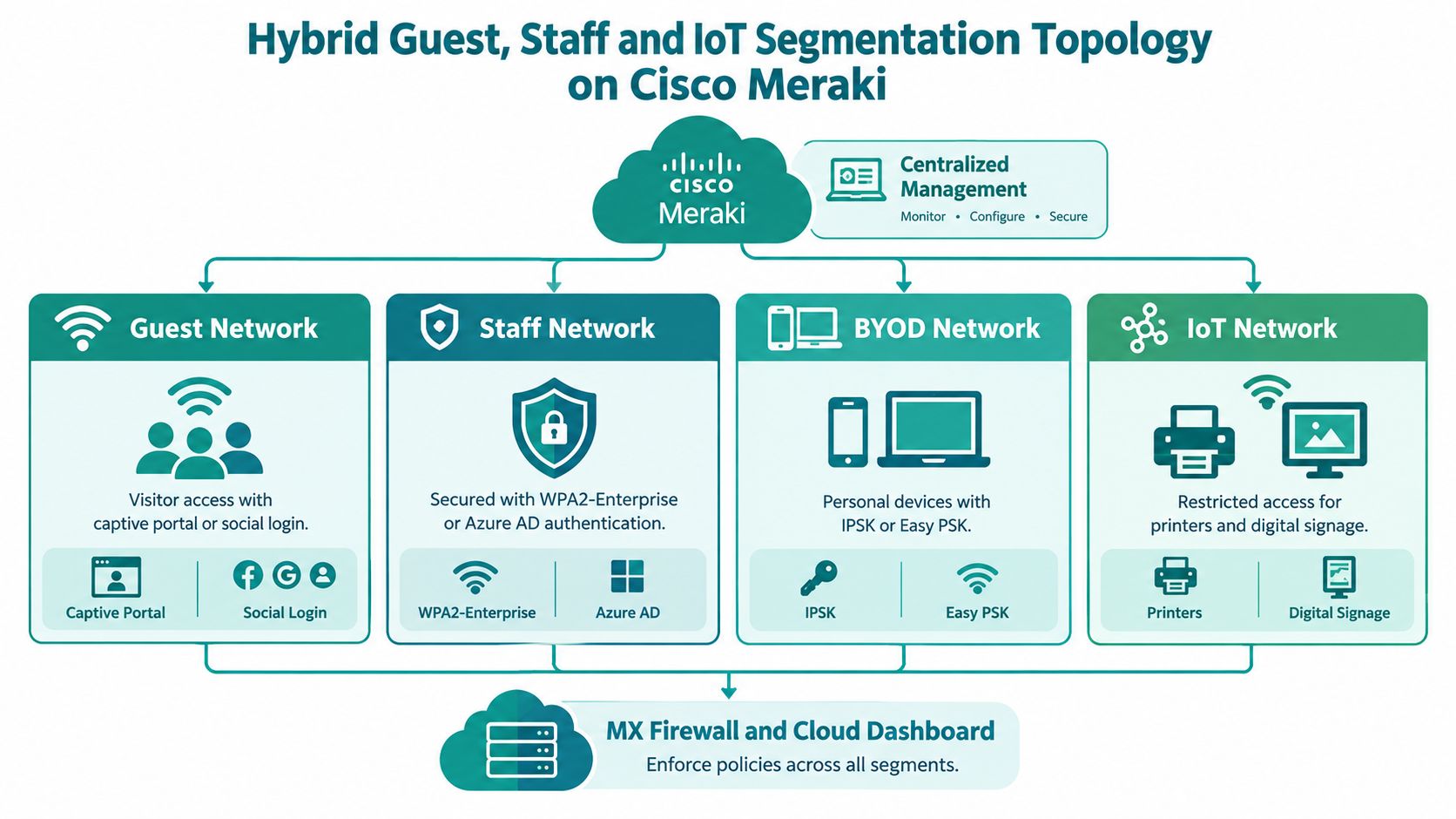
A hybrid design places several logical networks on shared physical infrastructure. Meraki APs broadcast separate SSIDs for guests, staff, and BYOD users, each SSID maps to its own VLAN and policy, and the Meraki MX enforces the rules between segments. A restricted IoT network keeps sensors, printers, signage, and smart locks away from systems they do not need.
A hotel group can run social login on its guest SSID, Azure AD-backed authentication for staff, and a locked-down VLAN for building devices. A healthcare organization can separate visitor access, staff laptops, and medical devices across clinics. A university can place residence devices on IPSK, staff on WPA2-Enterprise, and visitors on a captive portal.
Draw the paths users and devices actually take
Physical and logical topology aren't always the same. An AP may connect to an access switch in a star pattern, while the building's switches form a hierarchy and each SSID places clients in a separate logical segment. Captive portals, VPNs, cloud services, and SD-WAN overlays also shape the path applications take, so a cable diagram alone won't explain every access or failure boundary.
Redundant links don't automatically make a network resilient. Routing, capacity, policy consistency, and monitoring determine whether the backup path is useful when the primary path fails.
Map each SSID to a VLAN and a policy before deployment. One example layout:
| SSID | Who connects | Segment | Access policy |
|---|---|---|---|
| Guest | Visitors on a captive portal or social login | Guest VLAN | Internet only, rate-limited, client isolation on |
| Staff | Employee laptops via SAML sign-in | Staff VLAN | Internal apps allowed through MX rules |
| BYOD | Personal devices holding IPSK or EasyPSK keys | BYOD VLAN | Internet plus selected services, server VLANs denied |
| IoT | Printers, sensors, signage, cameras | IoT VLAN | Outbound to required cloud services only |
Splash Access can run the portal, social login, and per-user key workflows on the guest and BYOD SSIDs while the MX enforces the segmentation underneath.
Keep IoT rules narrow. Permit outbound traffic to the services each device uses, deny client-to-client traffic on the IoT VLAN, and alert on denied attempts so a misbehaving sensor stands out. Then name SSIDs, VLANs, and policies consistently across sites and revisit the map whenever devices or access needs change.
Comparison of 8 Network Topology Examples
| Example | 🔄 Implementation Complexity | ⚡ Resource Requirements | 📊 Expected Outcome | ⭐ Ideal Use Case & Key Advantage |
|---|---|---|---|---|
| Cisco Meraki Guest Wi-Fi with Captive Portal | Low; configure a guest SSID, VLAN, portal, and firewall rules | Meraki access points and MX appliance; portal configuration | Isolated, rate-limited internet access for visitors | Hotels, cafes, and public venues; adds branded access while protecting internal networks |
| Social Login and Social Wi-Fi | Moderate; configure identity providers, consent, and integrations | Meraki splash page; social login provider; optional marketing platform | Easier sign-in and an opt-in visitor contact database | Retail and hospitality; connects guest Wi-Fi to consent-based marketing |
| Individual Pre-Shared Keys (IPSK) | Moderate; create, assign, audit, and revoke individual keys | Meraki Identity PSK; optional RADIUS or cloud key management | Per-user or per-device access and revocation on a shared SSID | Dorms, offices, and IoT devices; improves accountability without requiring 802.1X |
| Easy PSK for BYOD | Low to moderate; manage individual keys and associated policies | Meraki Dashboard; no external RADIUS required for basic deployments | Individual credentials with key-based VLAN or policy assignment | Small offices, schools, and co-working spaces; provides per-device control with minimal infrastructure |
| Education Campus Topology | High; coordinate SSIDs, VLANs, authentication, filtering, and RF design | Meraki access points and MX; identity systems; campus-wide planning | Segregated student, staff, guest, and device access across buildings | Schools and universities; supports scalable access for diverse campus users |
| Retail Guest Wi-Fi with Analytics and Offers | Moderate to high; configure portals, analytics, offers, and privacy controls | Meraki access points; optional MV Sense cameras and marketing tools | Guest engagement, foot-traffic insights, and campaign measurement | Shopping centres and retail chains; turns guest Wi-Fi into a measurable marketing channel |
| BYOD Corporate Wi-Fi with Azure AD, SAML, and Layered Authentication | High; integrate identity providers and define device policies | Meraki infrastructure; Azure AD or another SAML provider; optional MDM | Identity-based staff access with separate BYOD and guest controls | Organizations with employee-owned devices; combines identity control with segmented access |
| Hybrid Guest, Staff, and IoT Segmentation | High; design and maintain multiple SSIDs, VLANs, and firewall policies | Meraki access points and MX; centralized monitoring; ongoing policy reviews | Unified, segmented access for guest, staff, BYOD, and IoT devices | Multi-site organizations; manages varied user groups on one centrally monitored platform |
Turn One Good Pattern into Your Next Deployment
Choose the topology by starting with the people and devices that need access. Guests usually need a straightforward path to the internet, staff need identity-based access to approved business services, and IoT devices often need only a narrow set of connections. Those are different jobs, so they shouldn't be forced onto one flat SSID and VLAN.
Next, match each group to an SSID and authentication method. A captive portal can handle guest terms, sign-in, or social login; IPSK can provide distinct keys for users or devices on a shared SSID; and EasyPSK can offer per-device access without a larger identity project. Staff can use Azure AD or SAML-backed sign-in where the chosen configuration supports it. The method is only part of the design: map each group to a VLAN and apply Meraki MX firewall rules that define what it can reach.
Cisco Meraki provides the wireless and security foundation for these patterns. Splash Access can add captive portals, customizable splash pages, social Wi-Fi, vouchers, and onboarding workflows for IPSK and EasyPSK. The right combination depends on the organization's access policies and how it plans to manage consent, credentials, and support.
Don't stop at a physical AP and switch diagram. Draw the logical path from a user's device through authentication, VLAN assignment, firewall policy, and the services that device is allowed to reach. Include guest, staff, BYOD, and IoT paths, and mark where a failure or misconfiguration could affect multiple groups. That map gives the support team a practical reference during deployment and troubleshooting.
Before rolling out across a campus, hotel group, or retail chain, sketch the SSID-to-VLAN map and define the rules for consent, key expiry, and credential revocation. Pilot the design at one site, test the user experience on common devices, and confirm that segmented traffic behaves as intended. Then document the working configuration so the next site can follow the same pattern without copying mistakes.
Splash Access offers Cisco Meraki guest Wi-Fi features including captive portals, social Wi-Fi, and IPSK and EasyPSK onboarding workflows. Explore Splash Access to see how its options could fit your Wi-Fi topology and guest access plans.