Ever wonder how a single Wi-Fi access point at a coffee shop or a university can serve guests, staff, and maybe even payment systems without everything turning into a chaotic, insecure mess? The secret sauce is something called VLAN tagging. Think of it as creating digital color-coded lanes on your network highway, making sure everyone stays in their designated lane.
This simple but incredibly powerful concept is what ensures that a guest checking their social media never accidentally stumbles upon sensitive staff data, even when they're all connected to the same physical hardware. It’s the absolute bedrock of modern, secure, and multi-purpose Wi-Fi networks, especially in the worlds of Education, Retail, and corporate BYOD.
Understanding VLAN Tagging Without the Jargon
Imagine a huge office building that houses dozens of different companies but only has one central mailroom. If all the mail were just tossed into a single pile, it would be a disaster. Mail for one company could easily end up in the hands of another—a massive security and privacy issue!
VLAN tagging is the system that gives each company its own unique, color-coded label for their mail. Even though all the letters and packages travel through the same hallways and elevators (your network hardware), the tags guarantee that mail for 'Company A' only ever goes to 'Company A'.
In the networking world, this process cleanly separates different groups of users—like guests using a captive portal, internal staff, and crucial payment systems—while letting them all share the same hardware from top-tier brands like Cisco and Meraki. It’s the foundational tech that makes secure, multi-purpose Wi-Fi networks possible.
The Core Idea of Network Segmentation
This method of creating digital walls is governed by a universal rulebook known as the IEEE 802.1Q standard. This standard works by inserting a tiny, 4-byte tag into data packets to identify which virtual LAN (VLAN) they belong to. This allows for a staggering 4,096 unique VLANs on a single network—more than enough for even the most complex setups!
It’s this simple tagging mechanism that allows one physical network to safely juggle traffic for multiple, distinct purposes. To see how this concept scales up with switches and routers, take a look at our guide on what is vlan trunking.
For a quick reference, here are the essential components broken down.
VLAN Tagging Core Concepts at a Glance
This table simplifies the key terms you'll encounter when working with VLANs.
| Component | Simple Analogy | Technical Purpose |
|---|---|---|
| VLAN Tag (802.1Q) | The color-coded label on a package. | A 4-byte header added to an Ethernet frame to identify the VLAN ID. |
| Access Port | The mail slot for a specific company's office. | A switch port assigned to a single VLAN; it doesn't understand tags. |
| Trunk Port | The main elevator that carries all mail. | A switch port that carries traffic for multiple VLANs, using tags to keep them separate. |
| Native VLAN | Mail without a label, assumed to be for the building manager. | The one VLAN on a trunk port that carries untagged traffic. A security consideration. |
These building blocks work together to create a segmented, secure, and highly efficient network environment.
Key Takeaway: VLAN tagging is far more than just an organizational tool; it's a critical security measure. It erects virtual walls between different streams of network traffic, which is absolutely essential for deploying secure guest wifi with captive portals or managing BYOD environments in corporate, Retail, and Education sectors.
Without it, offering guest access using features like social login or managing device connections with authentication solutions like IPSK and EasyPSK would introduce massive security risks. VLANs are what keep guest traffic, corporate data, and specialized devices like point-of-sale systems all safely in their own designated lanes, preventing unauthorized access and keeping your entire network running smoothly.
How VLAN Tagging Powers Modern Wi-Fi Networks
So, how does all this technical theory actually play out in a real-world Wi-Fi setup? It's more straightforward than you might think. Imagine your Cisco Meraki access point is a bustling highway interchange, and VLAN tagging is the system of road signs and lane dividers keeping all the traffic flowing smoothly and safely to the right destinations.
On a network switch, some ports are configured as 'Access Ports'. Think of these as a simple, single-lane exit ramp. They're designed for one specific type of traffic—like a wired printer or a desktop PC—and will only carry data for one single VLAN. No detours allowed.
The port your Meraki AP plugs into, however, is a different beast entirely. It’s set up as a 'Trunk Port'. This isn't an exit ramp; it's the multi-lane superhighway itself, built to handle traffic from many different VLANs all at once. Each SSID you broadcast effectively gets its own dedicated lane on this highway.
This is precisely what allows a single, powerful Meraki AP to broadcast multiple, completely separate Wi-Fi networks (SSIDs) like 'Guest-WiFi', 'Staff-Internal', and 'Point-of-Sale'. The traffic from each SSID is meticulously 'tagged' to keep it locked in its own lane, completely isolated from the others.
The Journey of a Tagged Packet
The real magic kicks in the moment a device connects to your Wi-Fi. Let's say a customer connects to the 'Guest-WiFi' network. The Meraki access point immediately slaps a specific VLAN tag—let's call it VLAN 100—onto every single data packet that comes from that customer's phone.
When that tagged packet hits the network switch, the switch reads the tag and says, "Aha, this is VLAN 100 traffic." It then makes sure that packet only travels along the pathways designated for the guest network, preventing it from ever crossing into the secure corporate lanes.
This diagram breaks down that simple but critical process of a switch adding a VLAN tag to a standard data frame.
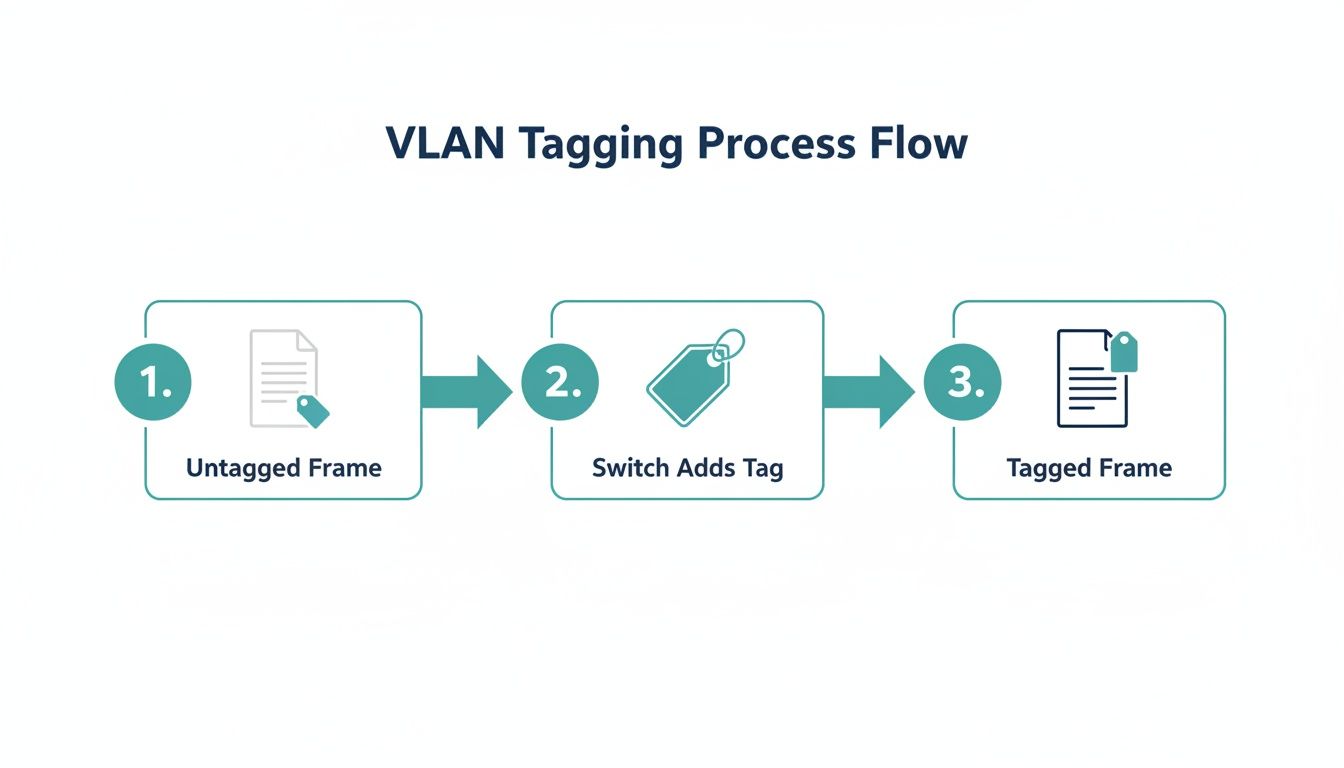
As you can see, the tag is just a small piece of information inserted into the packet, but it provides all the instructions needed to route traffic correctly and keep your network segments walled off from one another.
VLANs in Action with Captive Portals and Authentication
This kind of segmentation is absolutely essential in places like schools, stores, and offices with BYOD policies, where you have all sorts of different users needing different levels of access.
Take a guest wifi network with a captive portal, for example. When a visitor signs in through social login or social wifi, VLAN tagging ensures they are immediately placed onto a quarantined guest network. Their traffic is tagged for the "Guest" VLAN, giving them internet access but blocking them completely from reaching sensitive internal servers or point-of-sale systems.
It’s the same principle behind advanced authentication solutions like IPSK and EasyPSK. An employee connecting their personal phone can be automatically assigned to a specific BYOD VLAN. They get the internet access they need, but they're kept safely partitioned from the main corporate network where confidential data lives. You can learn more about how to choose the best Meraki access points to handle these kinds of advanced features.
Ultimately, it all comes down to creating organized, secure, and distinct virtual networks on top of a single physical infrastructure. Without VLANs, achieving this level of granular control and security just wouldn't be possible.
Where VLANs Shine: Securing Guest Wi-Fi and BYOD
This is where all the technical talk about VLANs pays off in the real world. For any business in Education, Retail, or even a standard corporate office, offering guest wifi without proper network segmentation is like handing out keys to your server room. VLANs are what let you create a secure "bubble" for guest traffic, walling it off completely from sensitive internal systems like payment terminals, staff file servers, and private databases.
This separation is the bedrock of any modern, secure authentication solution. Think about the last time you logged into a coffee shop's Wi-Fi. You likely saw a captive portal page. The moment you logged in—whether with a social login or by filling out a simple form—VLAN tagging kicked in behind the scenes, shunting all your traffic onto a dedicated guest VLAN. That's what ensures your web browsing can never cross paths with their internal network.
From Public Guests to Trusted Staff
The same principle is just as powerful in corporate settings, especially with the rise of Bring Your Own Device (BYOD) policies. More advanced authentication solutions like IPSK (Individual Pre-Shared Key) or EasyPSK rely heavily on VLANs to work their magic. These systems can dynamically assign an employee's personal smartphone to a specific "BYOD VLAN," a network segment that has internet access but can't touch the highly trusted network reserved for company-issued laptops.
This ability to assign devices to different VLANs on the fly is what makes a strong security posture possible. It's how you can provide seamless Wi-Fi for everyone without giving every device the same level of trust.
A properly segmented network is the difference between controlled, secure access and a free-for-all. It's the key to offering a great user experience on your guest wifi without introducing unnecessary risk.
For organizations running on Cisco hardware or similar enterprise-grade gear, this kind of granular control isn't just a "nice-to-have"—it's an absolute necessity for modern network management.
Performance and Security: A Winning Combination
Beyond the obvious security wins, the performance boost is massive. VLAN tagging makes your network far more efficient by containing broadcast traffic within each VLAN. Imagine a crowded room where instead of everyone shouting at once, conversations are kept within small, distinct groups. That's what VLANs do for your network traffic.
In fact, some studies show that well-segmented enterprise networks can achieve a 75% reduction in broadcast traffic, with latency dropping by 50-70%. On huge networks with over 10,000 devices, this can increase throughput by up to 3x, preventing the network-clogging broadcast storms that lead to dropped packets and frustrated users. For a Retail store, this means the busy guest wifi VLAN is capturing customer data via a captive portal without ever slowing down the separate, mission-critical VLAN handling credit card transactions. You can find more details on these performance gains in this strategic network analysis.
This strategic separation is fundamental to many authentication methods. To see how it fits into the bigger picture, you can explore our guide on what 802.1X authentication is and how it works. It's another crucial layer of network security that builds on the same core principle of controlled access. By putting these technologies together, you can design a truly intelligent and secure Wi-Fi experience for any environment.
Real-World VLAN Strategies for Your Industry
Theory is one thing, but seeing how VLAN tagging solves actual problems is where it all clicks. The real power of VLANs lies in their adaptability. That same core principle of network segmentation can be applied in countless ways to solve the unique challenges of just about any industry.
Let's dive into some practical examples. Whether you're running a sprawling university campus or a small coffee shop, the goal is often the same: give different groups of people secure and reliable access using the same physical network hardware. This is where a smart VLAN strategy, especially when deployed on a platform like Cisco Meraki, becomes a game-changer.
Education: Juggling Students, Staff, and Guests
Nowhere is the need for segmentation more obvious than in Education. A typical university network is a whirlwind of activity. You’ve got students in their dorms, faculty accessing sensitive academic records, and visitors who just need to get online for an hour. VLANs are the perfect tool to manage this chaos.
A university could break it down like this:
- Student Dorms (VLAN 20): All student-owned devices in the residential halls land on this VLAN. They get fast internet access, but firewalls keep them completely separate from critical university systems.
- Faculty & Staff (VLAN 30): This is the trusted internal network. All university-owned computers connect here, giving staff the secure access they need for grading systems, administrative databases, and other internal resources.
- Campus Guest Wi-Fi (VLAN 40): This is a dedicated, isolated network for campus visitors, parents, or event attendees. This VLAN is often managed with a captive portal that uses social login for easy access while keeping all guest traffic sandboxed.
This kind of setup means a student binge-watching a show in their dorm has zero chance of ever touching the university's payroll server, even though they're all using the same physical Wi-Fi access points across campus.
Retail: Securing Transactions and Engaging Customers
For a Retail business, network segmentation is all about protecting financial data and creating a better customer experience. Even a single store has several distinct networking needs that absolutely must be kept separate for security and PCI compliance.
Think about a typical clothing store's network:
- Point-of-Sale (PoS) Terminals (VLAN 10): This is the Fort Knox of the store's network. All credit card terminals and payment systems live on this highly restricted VLAN to keep financial data locked down.
- Public Guest Wi-Fi (VLAN 20): This network provides free social wifi for shoppers. It’s a great marketing tool, using a captive portal to engage customers, but it’s completely walled off from the PoS and internal staff networks.
- Inventory Scanners (VLAN 30): Those handheld devices staff use to check stock? They get their own VLAN, giving them access to the inventory database and nothing more.
Corporate: Embracing BYOD with Smarter Authentication
In today's corporate world, Bring Your Own Device (BYOD) is just how things are done. But this creates a huge security headache: how do you let employees, contractors, and guests connect their personal devices without opening up your primary corporate network to risk? This is where advanced authentication solutions like IPSK and EasyPSK come in, dynamically placing users onto the right VLAN based on who they are.
For example, an employee connecting their personal phone via EasyPSK could be automatically assigned to a trusted "Employee BYOD" network (VLAN 50). This VLAN would give them broad internet access but keep them off the main corporate LAN where the servers live. At the same time, a contractor using a temporary IPSK key could be dropped into a far more restricted "Contractor" VLAN (VLAN 60) with very limited access.
It’s all about creating granular, identity-based control. If you're looking to build out a network like this, getting a solid handle on the basics of setting up VLANs is the perfect place to start.
Here's a quick look at how these VLAN strategies can be adapted across different sectors, providing a solid starting point for your own network design.
Sample VLAN Strategy Across Different Sectors
| Sector | Guest Wi-Fi VLAN | Staff/Corporate VLAN | Specialized VLAN (e.g., PoS, IoT) |
|---|---|---|---|
| Hospitality | Hotel guests (VLAN 100) – Isolated, bandwidth-limited access via captive portal. | Hotel staff (VLAN 20) – For property management systems and internal communications. | Point-of-Sale in restaurants/bars (VLAN 30), HVAC/Smart Locks (VLAN 40). |
| Healthcare | Patient/Visitor Wi-Fi (VLAN 200) – Strictly internet-only, fully isolated for privacy. | Clinical Staff (VLAN 10) – Secure access to Electronic Health Records (EHR). | Medical IoT (VLAN 50) – For infusion pumps, heart monitors, etc. Highly restricted. |
| Retail | Shopper Wi-Fi (VLAN 20) – Open access, often with marketing via captive portal. | Store Employees (VLAN 15) – Access to inventory and internal communications. | PCI-compliant PoS terminals (VLAN 10), Security Cameras (VLAN 25). |
| Corporate | Guest/Visitor (VLAN 99) – Internet-only access, completely segregated. | Corporate LAN (VLAN 10) – Full access for company-owned devices. | BYOD (VLAN 50), IoT devices like smart lighting/printers (VLAN 60). |
This table illustrates that while the VLAN numbers change, the core principle of segmentation remains the same: create logical boundaries to enhance security and organize network traffic effectively.
Going Further with Advanced VLAN Concepts
Once you've got the basics of VLANs down, you can start tackling some really complex network challenges. For those of us managing dense environments—think multi-tenant buildings, sprawling corporate campuses, or busy hotels running on Cisco and Meraki gear—these advanced concepts are where the real magic happens.
Think of these as specialized tools for when your network grows beyond simple segmentation. They're designed to solve the high-level problems that pop up when you're juggling hundreds or even thousands of devices, each needing its own specific level of access and isolation.
The Power of Double Tagging with Q-in-Q
One of the most powerful tools in the advanced VLAN toolkit is Q-in-Q, which most engineers simply call "double tagging." The concept is actually pretty straightforward. Imagine you have a box with a label on it (that's a customer's internal VLAN). Now, you put that box inside a larger box and put a new label on the outside (that's the service provider's VLAN).
This technique, officially known as IEEE 802.1ad, is a lifesaver for service providers and anyone managing multi-tenant spaces like co-working offices. It lets them run their own internal VLAN structure while keeping each tenant's network traffic completely separate and private.
For businesses using authentication like IPSK or EasyPSK in a large venue, the same principle applies. On a Meraki AP in a corporate office, for instance, you can use similar segmentation to wrap an individual guest's private key within a broader guest VLAN. This stops any device-to-device "cross-talk," which is critical during high-density events where over 1,000 users might be connecting through social WiFi or other captive portals. You can find some more great info on this double-tagging standard on maplesystems.com.
Private VLANs: Isolation Within an Isolation
Another incredibly useful tool is the Private VLAN (PVLAN). This feature takes security a step further by adding another layer of isolation inside a single VLAN. You can set it up to stop devices on the same guest network—like in a hotel or at a conference—from talking to each other, even though they're technically on the same VLAN.
This client-to-client isolation is a non-negotiable security feature, especially in sectors like Education and Retail where BYOD is the norm. It's what ensures one student's laptop can't try to access another's, drastically cutting down the risk of somebody causing trouble on your public network.
Of course, to pull these strategies off, you need to be comfortable with switch configuration. If you need a refresher, our guide on Cisco switch configuration is a great place to start. These advanced concepts really show how flexible VLANs can be, scaling to meet just about any security or organizational demand you can throw at them.
Putting VLANs to Work for Your Business
So, what's the big takeaway here? VLAN tagging isn't just a technical term buried in a network manual; it's the invisible force that makes modern, secure, and user-friendly Wi-Fi possible. It’s how you can offer a seamless social wifi experience for your guests via a captive portal and, at the same time, keep your mission-critical corporate data completely separate and safe.
Building this kind of smart network starts with a solid foundation. You need reliable hardware from industry leaders like Cisco and Meraki, paired with intelligent authentication solutions that can direct traffic to the right place.
From Technical Feature to Business Advantage
When you combine smart hardware with VLANs, you solve real-world problems across all kinds of industries:
- Education: Effortlessly create distinct networks for students, faculty, and guests, each with its own security rules.
- Retail: Isolate sensitive payment systems from the public guest wifi, which can be used to engage shoppers with social login on a captive portal.
- BYOD Corporate: Implement solutions like IPSK or EasyPSK to automatically place employee devices onto the correct VLAN, securing the network from personal gadgets.
Getting a handle on VLANs means you're no longer just "providing internet." You're architecting a secure, segmented network that actively helps you achieve your goals, whether that’s boosting customer loyalty in a coffee shop or protecting sensitive student records at a university.
At the end of the day, VLAN tagging is what elevates a basic Wi-Fi network into a powerful business tool. When you master it, you can design a network that perfectly aligns with your security policies, meets user expectations, and drives your business forward. It's the secret sauce that makes your captive portals and network infrastructure truly work for you.
Unpacking Common VLAN Questions
Once you get the theory down, a few practical questions almost always pop up when you're ready to deploy. Let's tackle some of the most common ones that bridge the gap between knowing what VLANs are and actually using them on your network.
Can I Run Multiple SSIDs Without VLANs?
Technically, yes, a Cisco Meraki access point will let you broadcast multiple SSIDs without using VLANs. But you really, really shouldn't.
Doing so puts everyone on the same flat network. Your guest using social wifi and your executive on a BYOD corporate device would be in the same digital room. This creates a massive security hole, making it frighteningly easy for a guest to potentially discover and access sensitive internal servers or devices.
VLAN tagging is the industry-standard way to fix this. It’s what truly isolates the traffic from each SSID, building virtual walls that ensure your guest wifi traffic from your captive portal stays completely separate from your secure corporate network.
How Do IPSK and EasyPSK Fit in with VLANs?
This is where things get really powerful. Advanced authentication solutions like IPSK (Individual Pre-Shared Key) and EasyPSK lean on VLANs to create incredibly granular security policies.
These systems work by dynamically assigning a user or their device to a specific VLAN based on the unique Wi-Fi key they use.
Imagine this in a school or office. An employee’s permanent key could automatically land them on the trusted internal VLAN with full resource access. A contractor, on the other hand, could be given a temporary key that places them on a highly restricted VLAN with nothing but internet access. It’s a brilliant way to enforce security policies the moment someone connects.
Do I Need a Special Switch for This to Work?
Absolutely. You can't just use any old switch off the shelf. You need a managed or smart switch that specifically supports the IEEE 802.1Q standard. Your basic unmanaged switch won't understand the VLAN tags and will most likely just discard the tagged traffic, causing connections to fail.
Here’s the critical part: the switch port your Cisco Meraki AP plugs into must be configured as a trunk port. Setting it up as a trunk tells the switch to expect and handle traffic from multiple VLANs over that single cable, keeping all the traffic from your different SSIDs properly sorted.
Ready to build a secure, segmented Wi-Fi network that gives you total control? Splash Access works hand-in-glove with your Cisco Meraki gear, helping you deploy robust captive portals and powerful authentication solutions like IPSK and social logins, all secured with a proper VLAN architecture.
Find out how we can help at https://www.splashaccess.com.