Hey there! Picking the right network hardware can feel like a huge decision, but it doesn't have to be a headache. The core difference between a managed and unmanaged switch really boils down to a single word: control. An unmanaged switch is all about pure plug-and-play simplicity, while a managed switch gives you the power to fine-tune your network's security, performance, and the overall user experience. Let's dive in and figure out which one is right for you.
Understanding the Core Differences
At its most basic, an unmanaged switch is a straightforward device that works right out of the box. Think of it like a power strip for your network—you plug in your devices, and they can all chat with each other. It’s a solid, low-cost choice for a small home office or a temporary setup where basic connectivity is all you need.
A managed switch, on the other hand, is the intelligent nerve center for a modern network. This is where awesome hardware from industry leaders like Cisco and Cisco Meraki really proves its worth. It gives you the tools to configure, manage, and monitor your network, offering you granular control over every aspect of how data moves. This level of control isn't just a nice-to-have; it's essential for any business that relies on a stable, secure, and high-performing network. You can dive deeper into these fundamentals in our guide to computer networking 101.
For instance, in the Education or BYOD Corporate sectors, a managed switch is absolutely non-negotiable. It’s the only way to build secure, separate networks for staff, students, and guests. This segmentation is crucial for deploying advanced authentication solutions like IPSK and EasyPSK, which guarantee only authorized users can access sensitive internal resources.
In a Retail setting, this control is what enables a top-tier guest wifi experience. You can set up a branded captive portal with social login options, transforming your free Wi-Fi into a powerful marketing and analytics engine. An unmanaged switch simply doesn't have the brains to offer this kind of security or sophisticated customization.
To make the choice clearer, here’s a quick breakdown of how they stack up.
Managed vs Unmanaged Switch At a Glance
| Feature | Unmanaged Switch | Managed Switch |
|---|---|---|
| Configuration | Plug-and-Play | Highly Configurable |
| Security | Basic | Advanced (VLANs, ACLs) |
| Guest Wi-Fi | Not Supported | Captive Portals, Social WiFi |
| Authentication | None | IPSK, EasyPSK, 802.1X |
| Best For | Small Offices, Home Use | Education, Retail, Corporate |
Ultimately, while an unmanaged switch gets the job done for simple tasks, a managed switch is the foundation for building a professional-grade network that's secure, efficient, and ready for whatever you throw at it.
The Simplicity of an Unmanaged Switch
Think of an unmanaged switch as the network equivalent of a power strip. Its biggest selling point is sheer simplicity. You unbox it, plug it in, and connect your devices. That’s it—your network is instantly expanded.
There’s no software, no configuration page, and zero need for an IT expert to get it running. This plug-and-play functionality makes it a go-to, budget-friendly option for home offices, small businesses, or any temporary setup that just needs basic connectivity.
Where Plug-and-Play Shines
This "set it and forget it" approach is perfect when all you need are more Ethernet ports. Picture a small office with a handful of employees in one room, or a temporary event kiosk connecting a payment terminal and a laptop.
In these simple scenarios, an unmanaged switch does the job perfectly without any unnecessary complexity. It's the right tool for a straightforward task. But that same simplicity is precisely where its limitations begin.
An unmanaged switch is a blunt instrument in a world that often requires surgical precision. It treats all data the same, which means a non-essential file transfer can easily bog down a critical video conference call.
The Limits of Simplicity
The lack of control becomes a serious handicap as soon as your network demands grow. An unmanaged switch has no way to prioritize traffic, so a single bandwidth-heavy user can degrade performance for everyone else.
More critically, it offers none of the features required for modern security and network segmentation.
For businesses in Retail, Education, or corporate environments with BYOD policies, this is a non-starter. You can't build a secure guest WiFi network with an unmanaged switch. Key features are completely out of reach, including:
- Captive portals for user login and branding
- Social login options for easy guest access
- Advanced authentication solutions to verify users
This means no segmented access for visitors and no way to implement security protocols like IPSK or EasyPSK to shield your internal network from guest devices. It creates an open door where you have no visibility or control. For a look at how a more advanced setup works, you can learn how to configure a Cisco switch to enable these exact features.
While an unmanaged switch is great for basic connectivity, it represents a clear fork in the road. The moment you need to manage who is on your network, guarantee performance for key applications, or secure your data, the difference between a managed and unmanaged switch becomes the most important factor in your decision.
The Power and Control of a Managed Switch
When you move past a simple plug-and-play setup, you enter the world of managed switches—the real command center of a modern, secure network. Unlike its unmanaged cousin, a managed switch puts you in the driver's seat, giving you fine-grained control over every aspect of your network's performance. This is why it's the only serious choice for any business.
This level of control is where high-performance hardware from providers like Cisco and Cisco Meraki really shines. These devices are built not just for basic connectivity, but for intelligent, hands-on management. They give network administrators the tools they need to build a truly resilient and responsive infrastructure.
Building a Smarter, Segmented Network
One of the most powerful tools in a managed switch's arsenal is the ability to create Virtual LANs (VLANs). Think of a VLAN as a way to slice up a single physical switch into multiple, isolated virtual networks. This is absolutely fundamental for security and organization.
For instance, in a school or university, you can easily create separate VLANs for different user groups:
- Faculty and Staff: Their network has secure access to internal servers and administrative tools.
- Student Network: This provides internet access but is walled off from sensitive staff data.
- Guest Wi-Fi: A completely separate network for visitors, ensuring they can't touch any internal resources.
This same logic is crucial in Retail. You can put your payment terminals on their own highly-secured VLAN to meet compliance standards, all while offering a separate guest Wi-Fi network for your shoppers. It’s also the perfect solution for BYOD Corporate sectors, letting you place employee-owned devices on a secure but separate network from company-owned assets.
Prioritizing What Matters Most with QoS
Another game-changing difference between a managed and unmanaged switch is the ability to implement Quality of Service (QoS). In short, QoS lets you tell your network which data traffic gets to go to the front of the line.
Imagine a busy office where one person is downloading a huge software update while the CEO is on a critical video call. On an unmanaged network, it's a free-for-all—both activities fight for bandwidth, and the CEO's video call will likely start stuttering.
With QoS configured on a managed switch, you can prioritize real-time traffic like voice and video. This ensures your most important business communications are always crystal clear and lag-free, no matter what else is happening on the network.
This feature alone is invaluable anywhere reliable communication is non-negotiable, from a school’s remote learning programs to a company's daily video conferences.
The Foundation of Modern Authentication and Guest WiFi
Maybe the most important job of a managed switch today is serving as the foundation for strong security and user authentication. It unlocks a whole suite of tools that are simply impossible to run on an unmanaged device.
This is how you create a professional-grade guest wifi experience. Managed switches, especially from Cisco Meraki, integrate perfectly with platforms like Splash Access to deliver powerful authentication solutions, including:
- Captive Portals: Branded login pages that greet users, present your terms of service, and keep your brand front and center.
- Social Login: Guests can connect in seconds using their social media accounts, giving you a chance to gather valuable, opt-in marketing data.
- IPSK and EasyPSK: These advanced methods provide a unique password for each user or device, offering far greater security than a single, shared Wi-Fi password that always gets leaked.
These tools are essential for managing BYOD policies securely and effectively. You can learn more about how managed switches unlock these capabilities by checking out our guide on managed switches.
The shift toward these more intelligent networks is undeniable. The global managed switches market was valued at US$20.45 billion and is projected to hit US$43.34 billion by 2034. This reflects a massive industry-wide move toward secure, manageable network infrastructures.
Of course, to get the most out of this hardware, you need to know how to maintain it. For example, understanding the steps for resetting a Cisco switch is crucial for troubleshooting or re-deploying a device. Ultimately, a managed switch transforms your network from a simple utility into a powerful asset for security, user management, and business intelligence.
Comparing Key Features That Define Your Network
The real difference between a managed and unmanaged switch becomes obvious once you look past the port count and dig into their core features. These aren't just lines on a spec sheet; they’re the tools that determine how secure, fast, and reliable your network will be.
It’s no surprise that more businesses are opting for managed infrastructure. The network switch market, valued at USD 53.70 billion in 2022, is growing fast, and managed switches already claim the largest piece of the pie at around 32.3% of revenue. This tells us one thing: businesses are willing to invest in the control and security that only a managed switch can deliver.
Security and Authentication Solutions
When it comes to security, there's simply no comparison. An unmanaged switch is basically an open door—it offers no real defense beyond the physical cable connection. A managed switch, on the other hand, is built to be a security gatekeeper.
This is where hardware from vendors like Cisco or Cisco Meraki really shines. A managed switch gives you the power to roll out advanced authentication solutions that are non-negotiable in a professional environment. For instance, in Education or corporate BYOD settings, you can deploy IPSK (Individual Pre-Shared Key) or EasyPSK.
These systems give each user or device its own unique, private password. It's a massive security improvement over a single shared password that could easily be compromised and passed around. An unmanaged switch just doesn't have the brains to handle that kind of granular security.
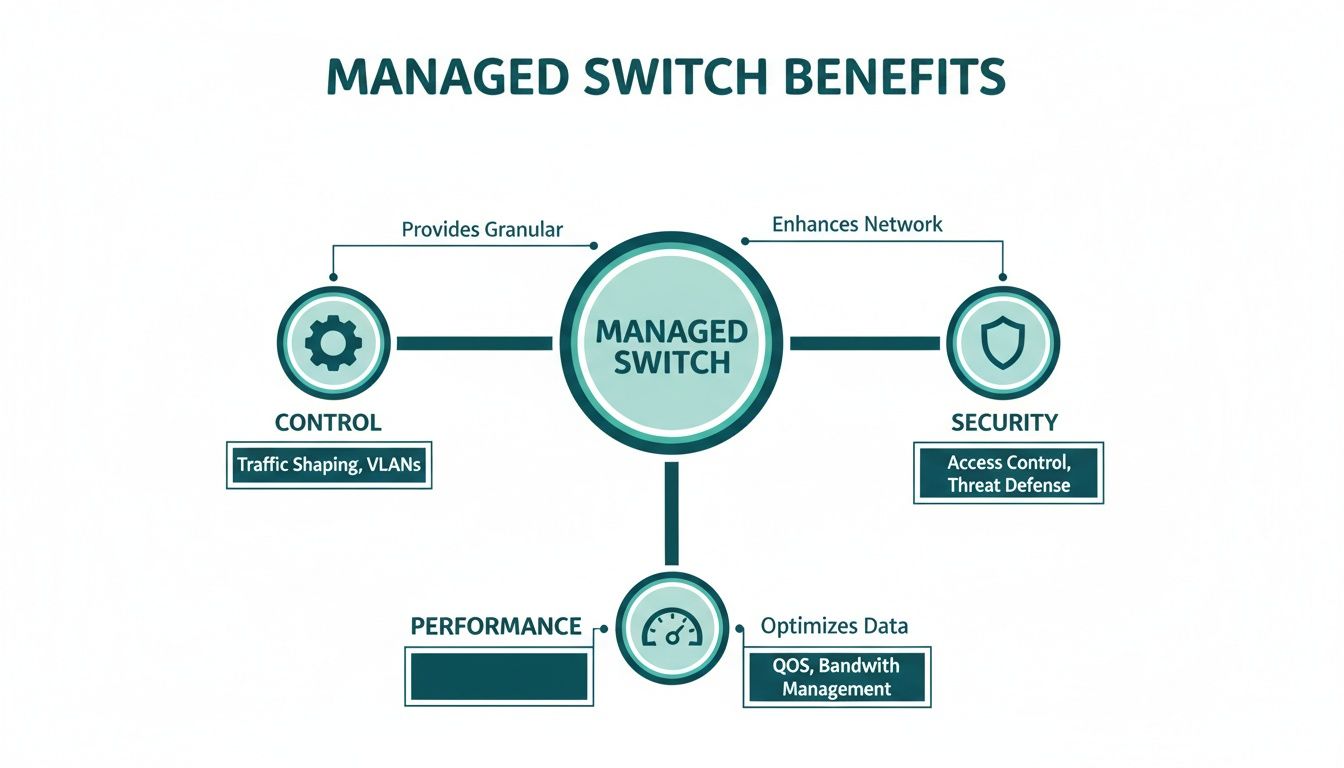
As you can see, control, security, and performance are the three pillars that define what a managed switch brings to your network.
Performance and Quality of Service
Think of your network as a highway. An unmanaged switch is like an on-ramp with no stoplight, letting every car merge at once and causing instant gridlock. A managed switch is the intelligent traffic controller.
It accomplishes this with a feature called Quality of Service (QoS), which lets you prioritize certain types of data. In a retail store, this means you can guarantee that your point-of-sale terminals always have the bandwidth they need, so customer transactions never slow down, even when the public guest wifi is packed.
In an office, you can prioritize video conference calls and VoIP traffic. This keeps critical business communications crystal clear, even if someone in another department is downloading massive files. An unmanaged switch treats all data as equal, making these kinds of performance guarantees impossible.
Network Segmentation with Vlans
One of the single most powerful features of a managed switch is its ability to create Virtual LANs (VLANs). VLANs allow you to slice up a single physical switch into multiple, isolated virtual networks that can’t see or talk to each other.
This is a game-changer for both security and organization. Just look at these real-world examples:
- Retail Store: You can put your secure payment systems on one VLAN, staff devices on another, and the public guest wifi on a third. Shoppers on the guest network have zero access to your sensitive business systems.
- Corporate Office: A dedicated VLAN for guests keeps visitors completely separate from your main corporate network. This is especially critical for BYOD environments, as it safely segments employee-owned devices from company servers.
- Education Campus: You can create separate VLANs for faculty, students, and administrative staff, ensuring academic records are locked down while providing great internet for everyone.
You can learn more about the practical side of this by reading about setting up VLANs to see how this segmentation works in practice. Truly understanding the technical differences between Layer 2 and Layer 3 switches also helps clarify why this feature is exclusive to managed hardware.
Core Feature Comparison Managed vs Unmanaged Switches
To put it all together, here’s a direct comparison of how these two types of switches handle the features that matter most for any business network.
| Core Functionality | Unmanaged Switch Capability | Managed Switch Capability | Impact on Your Business |
|---|---|---|---|
| Security | Basic physical port security only. No traffic control. | Advanced features like 802.1X, port security, and Access Control Lists (ACLs). | Prevents unauthorized access and protects sensitive company and customer data. |
| Performance | All traffic is treated equally, leading to potential congestion. | Quality of Service (QoS) allows for traffic prioritization (e.g., VoIP, video). | Ensures critical applications like payment systems or video calls always perform smoothly. |
| Segmentation | A single, flat network. All devices can communicate with each other. | Can create Virtual LANs (VLANs) to isolate traffic for different groups (e.g., guests, staff). | Dramatically improves security by separating guest traffic from your internal network. |
| Management | "Plug and play." No configuration or monitoring options. | Full remote management, monitoring, and troubleshooting via a web interface or CLI. | Allows for proactive network maintenance, reducing downtime and resolving issues faster. |
This table clearly shows that while an unmanaged switch offers simplicity, a managed switch provides the essential tools needed to build a secure, efficient, and reliable network.
Network Monitoring and Management
Finally, the visibility you get is a night-and-day difference between managed and unmanaged switch models. An unmanaged switch is a black box; when something goes wrong, you're flying blind with no real way to diagnose the problem.
A managed switch, especially from a platform like Cisco Meraki, gives you incredible insight and remote control. From a single dashboard, you can monitor traffic patterns, pinpoint bandwidth-heavy devices, troubleshoot connection problems, and receive alerts if something goes offline. This proactive approach is essential for minimizing downtime and ensuring everyone—from a customer using a social login on a captive portal to an employee on a critical video call—has a great experience.
Picking the Right Switch for Your Industry
There’s no such thing as a one-size-fits-all network switch. The right hardware choice always comes down to your specific operational needs. Sure, a tiny, cash-only retail kiosk with a single payment terminal might scrape by with a basic unmanaged switch, but that’s an increasingly rare exception. For almost every modern business, the investment in managed hardware quickly pays for itself.
The real difference between a managed and an unmanaged switch becomes crystal clear when you look at the demands of specific industries. In these environments, a switch isn’t just a simple box for connecting devices; it’s the backbone of your security, customer experience, and mission-critical operations.
Education: A Grade Above in Connectivity
In the Education sector, from local K-12 schools to massive university campuses, managed switches are the non-negotiable foundation of a modern learning environment. These institutions juggle an incredibly tough mix of high-density device usage, stringent security needs, and the constant influx of personal devices under BYOD policies.
This is exactly where a managed infrastructure, particularly with hardware from a vendor like Cisco Meraki, proves its worth. It gives IT admins the power to segment the network into separate, secure zones. For instance, student Wi-Fi can be completely walled off from the faculty and administrative networks, safeguarding sensitive student records and critical operational data.
In a school, network downtime isn't just an inconvenience—it's a direct disruption to learning. Managed switches provide the remote monitoring and troubleshooting tools needed to keep the digital campus running smoothly, ensuring lecture halls, libraries, and dorms stay reliably connected.
Managed switches are also crucial for deploying robust authentication solutions. By using systems like IPSK or EasyPSK, every student and staff member can get a unique key for network access. This simple step eliminates the massive security hole of a shared password and creates a clear audit trail, which is a must-have for campus security.
Retail: Crafting the Customer Experience
For Retail and Hospitality businesses, the network is now a direct extension of the customer experience. A lagging payment terminal or spotty guest Wi-Fi can frustrate shoppers and directly hurt your bottom line. Managed switches deliver the control you need to ensure everything runs smoothly from the moment a customer walks through the door.
With a managed switch, a retailer can set up a professionally branded captive portal for their guest network. This not only makes a great first impression but also unlocks valuable marketing opportunities. By offering social login or social Wi-Fi options, businesses can ethically gather valuable customer data while giving shoppers convenient, one-click internet access.
Behind the scenes, the security functions are even more critical. Managed switches allow you to build a dedicated, PCI-compliant network segment just for payment systems, completely isolating them from the public Wi-Fi. This network segmentation isn't just a good idea; it's an absolute requirement for protecting sensitive credit card data and avoiding devastating security breaches.
Corporate: Securing the Modern Workspace
In the corporate world, the explosion of BYOD policies and the sheer number of connected devices have made network security more challenging than ever. Managed switches are the only practical way to enforce security rules, manage guest access, and provide secure, seamless connectivity for employees.
With a managed Cisco network, you can automatically place employee-owned devices onto a secure, segmented network. They get the internet access they need, but they can't touch critical internal servers. For visitors, you can spin up a separate guest network with a professional captive portal in minutes, giving them temporary access without putting your corporate data at risk.
Advanced authentication solutions like IPSK are a perfect fit for corporate environments. They make onboarding new devices incredibly simple while maintaining tight security, ensuring every single connection to the network is authorized and accounted for. To dig deeper into how different models can support these setups, take a look at our guide on the best network switches for different business applications.
Ultimately, when you pair a powerful managed switch with a platform like Splash Access, your network transforms from a simple utility into a strategic asset. It becomes a system for locking down security, driving customer engagement with features like social login, and gathering insightful analytics to better understand your users.
Your Questions, Answered
Let's tackle some of the most common questions that pop up when deciding between a managed and unmanaged switch. Getting these answers right can save you a lot of headaches down the road.
Can I Use an Unmanaged Switch for Guest Wi-Fi?
You can plug a Wi-Fi access point into an unmanaged switch and get an internet connection, but that’s where the functionality stops. You'll be missing all the tools that make a guest Wi-Fi network actually useful and secure.
Forget about a professional captive portal, offering social login options, or, most importantly, separating your guest traffic from your internal network. For any business in Retail, Education, or a corporate BYOD setting, a managed switch is non-negotiable. It’s the only way to truly control access and shield your core business operations from guest devices.
Do I Really Need a Managed Switch for My Small Business?
It's a fair question, but these days, most small businesses find a managed switch is a smart investment. If you handle any kind of customer data, process payments, or rely on crystal-clear video calls, a managed switch gives you the security and traffic control you need.
Think of it this way: even a small boutique needs to lock down its payment terminals. A managed switch from a provider like Cisco lets you create a separate, secure VLAN just for those critical devices. An unmanaged switch simply can't do that.
One of the biggest mistakes I see is businesses buying hardware for their size today, not for where they want to be in a year or two. A managed switch is built to scale with you, handling more users, devices, and security demands without forcing a costly network overhaul.
What Are IPSK and EasyPSK, and Why Should I Care?
IPSK (Individual Pre-Shared Key) and EasyPSK are modern authentication solutions that are a world away from a single, shared Wi-Fi password. Instead of one password for everyone, this approach gives a unique key to every single user or device on your network.
This is a game-changer for Education campuses and corporate BYOD environments where you're juggling hundreds or even thousands of different devices. It ensures every connection is authorized and traceable, a level of security that's only possible on a managed network powered by hardware like Cisco Meraki.
Can a Managed Switch Make My Internet Faster?
A managed switch won't change the speed you buy from your internet provider, but it can make a massive difference in how that speed gets used inside your network. This is all thanks to a feature called Quality of Service (QoS), which lets you prioritize what traffic gets to go first.
For instance, you can tell the switch that VoIP phone calls and video conferences are top priority. This ensures they always have the bandwidth for a clear connection, even if someone else is downloading huge files. It stops internal traffic jams from tanking the performance of your most important tools.
Isn't Setting Up a Managed Switch Really Complicated?
They definitely have more going on than their "plug-and-play" cousins, but modern managed switches have become incredibly user-friendly. Cloud-managed hardware, like the lineup from Cisco Meraki, uses intuitive web-based dashboards that take the pain out of configuration and monitoring.
This makes it surprisingly simple to set up VLANs, launch a guest network with social wifi logins, or build out a captive portal without needing a network engineer on standby. The initial setup takes a bit more thought, but the long-term benefits to your security and performance are well worth it.
Ready to build a guest Wi-Fi experience that works for you, not against you? Splash Access integrates directly with Cisco Meraki to deliver secure, branded captive portals, advanced authentication like IPSK, and powerful user analytics. See how you can boost both security and guest engagement by visiting us at https://www.splashaccess.com.