Ever wondered how your network makes sure data gets to the right place, especially in a crowded Wi-Fi hotspot? Let's chat about Dynamic ARP Inspection (DAI). Think of it as a friendly but firm security guard for your network, checking IDs at the door to make sure no imposters get in. It's a critical feature that stops a sneaky type of cyberattack called ARP spoofing.
Your Network's Unsung Security Hero
Imagine your local network is a small, busy town. Every device has a permanent physical address (its MAC address) and a temporary, assigned street address (its IP address). The Address Resolution Protocol (ARP) is the town’s trusty mail carrier, who knows exactly which physical house belongs to which street address, making sure all the mail gets delivered correctly.
But what if a scammer could fool the mail carrier? They could lie and say your street address now points to their house. Suddenly, all your private letters and packages are being delivered straight to them. This is exactly what ARP spoofing does on a network, and it’s a huge risk on any Wi-Fi system.
The Problem in Public Wi-Fi Hotspots
This kind of attack is especially dangerous in places with lots of different users coming and going, like:
- Education: Students and staff connecting their personal laptops and phones across a sprawling campus network.
- Retail: Customers logging into a store’s free Wi-Fi using a quick social login.
- BYOD Corporate sectors: Employees and visitors connecting their own devices to the company network.
Without the right security, an attacker on the same network could easily intercept sensitive traffic, steal login details, or send people to fake websites. That's where Dynamic ARP Inspection steps in. It’s a standard security tool built into professional networking hardware from vendors like Cisco and is a breeze to manage in cloud platforms like the Meraki dashboard. You can also dig deeper into managing network traffic in our guide on understanding network floods and broadcasts.
How DAI Sets the Foundation for Trust
Dynamic ARP Inspection doesn't operate in a vacuum. It works hand-in-hand with its partner, DHCP Snooping, which acts like a meticulous record-keeper. DHCP Snooping carefully monitors the process of devices getting their IP addresses and builds a trusted database of which IP address is legitimately assigned to which MAC address.
DAI uses this trusted database as its single source of truth. It examines every ARP packet and asks a simple question: "Does the information in this packet match my official records?" If it doesn't, the packet is immediately discarded, neutralizing a potential attack before it can cause any harm.
This verification process creates a trustworthy foundation for the entire network. It means that when users connect through Captive Portals or authenticate with secure methods like IPSK or EasyPSK, their connection is protected from the very beginning. By confirming every device's identity at such a fundamental level, DAI upholds the integrity of your whole guest Wi-Fi experience, from a simple social wifi login to a complex corporate BYOD setup.
How DAI Stops Man-in-the-Middle Attacks
To really get a feel for how Dynamic ARP Inspection (DAI) works, think of it as your network’s dedicated security guard. It doesn't just sit in an office; it actively patrols the floor, intercepting and validating every single ARP packet to ensure no imposters can reroute your data.
The whole system hangs on a simple but powerful idea: separating ports into ‘trusted’ and ‘untrusted’ categories.
Imagine your network switch is an exclusive club. The main entrance, connected to your router or another core switch, is a trusted port. Anyone coming through that door is already vetted and assumed to be legitimate. But all the other doors—the ones where guests and employees connect their devices—are designated as untrusted ports. Everyone coming through those gets their ID checked. No exceptions.
This simple designation is the first line of defense. DAI meticulously scrutinizes all ARP traffic coming from these untrusted ports, which is how it stops attackers cold. This is an absolute game-changer in places like Education or Retail environments where countless personal devices connect every single day.
The Source of Truth: The DHCP Snooping Table
So, how does DAI know which IDs are real and which are fake? It works hand-in-hand with another feature, DHCP Snooping, which creates a trusted list of all connected devices. DHCP Snooping quietly watches as devices join your Wi-Fi and legitimately receive an IP address, logging the details into a secure database called the DHCP Snooping binding table.
This table is the cornerstone of the entire validation process. It contains a verified, real-time list of every device's IP address and its corresponding MAC address.
Think of the DHCP Snooping binding table as DAI's official, up-to-the-minute guest list. When a device on an untrusted port sends an ARP packet, DAI checks its credentials against this list. If the IP-to-MAC mapping in the packet doesn't match the binding table, the packet is immediately dropped.
This is precisely what makes authentication solutions like IPSK and EasyPSK so much stronger. Even with a unique Wi-Fi key, DAI adds a crucial layer of protection after a user is already connected, making sure their traffic isn't hijacked by someone else on the same network. To really grasp this, it helps to understand how DHCP Snooping works, and you can learn more about the dangers it prevents in our guide on the risks of a rogue DHCP server.
The diagram below shows exactly how an ARP spoofing attack unfolds and where DAI steps in to stop it.
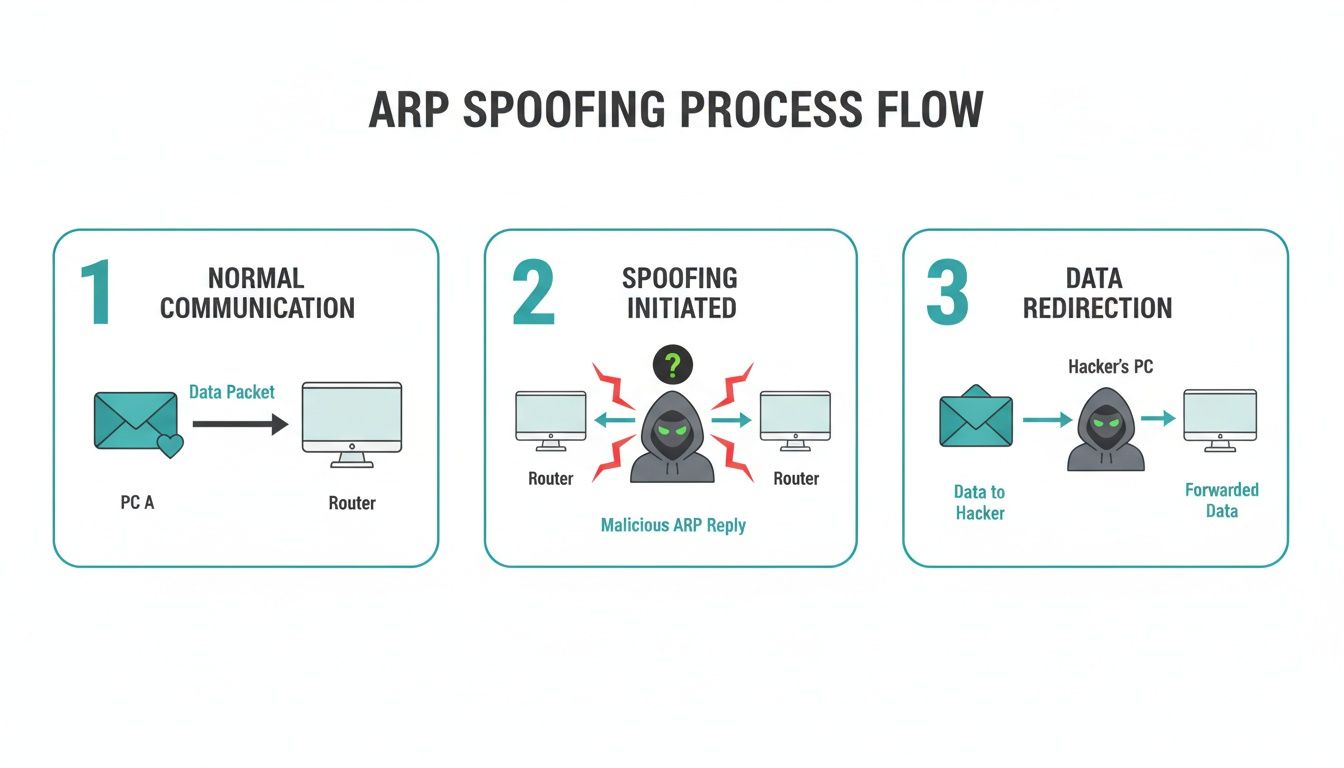
As you can see, an attacker tries to slip into the conversation, but DAI's validation prevents that final, malicious redirection from ever happening.
DAI in High-Turnover Environments
The real power of Dynamic ARP Inspection shines in busy, high-turnover networks, like corporate BYOD policies and public hotspots. In the bustling Wi-Fi networks of modern hotels and resorts, for instance, DAI has become a critical shield. On both Cisco and Meraki hardware, it validates ARP packets by cross-referencing them against the DHCP snooping binding database, ensuring only legitimate MAC-to-IP mappings get a pass.
Without it, networks are wide open. In fact, some studies show that without DAI, ARP spoofing attempts can surge by up to 200% during peak guest check-ins as attackers exploit the chaos of an open network.
This validation is also indispensable for securing guest wifi that uses Captive Portals, especially those with social login options. When users log in with their social media accounts, they're trusting that their credentials are safe. DAI ensures that trust is earned by preventing their data from being secretly funneled to an attacker’s device, protecting both your guests and your business’s reputation.
Getting Hands-On: Configuring DAI on Cisco IOS and Meraki Switches
Alright, we've covered the "why" behind Dynamic ARP Inspection. Now, let's roll up our sleeves and get practical. You'll be happy to know that putting this powerful security feature to work is surprisingly straightforward, whether you're a command-line veteran or you prefer the simplicity of a web dashboard. We'll walk through the setup on two of the most common platforms you'll find out there: traditional Cisco IOS and the cloud-managed Cisco Meraki.
Before you touch a single key, remember the golden rule: DHCP Snooping must be enabled first. It’s non-negotiable. Think of it like this: you can't have a security guard (that's DAI) checking IDs against a guest list if you don't have a doorman (DHCP Snooping) creating that list in the first place. DAI is completely dependent on the trusted binding table that DHCP Snooping builds.
Setting Up DAI in Cisco IOS
For network pros who live in the command-line interface (CLI), setting up DAI on a Cisco IOS switch is a logical, step-by-step affair. It's all about telling the switch which VLANs to protect and, just as importantly, which ports to trust.
Here’s the typical game plan:
- Enable DHCP Snooping Globally: This command is the master switch that activates the feature for the entire device.
- Enable DHCP Snooping on Specific VLANs: Next, you get specific. Tell the switch which virtual networks you want it to watch over, like your guest Wi-Fi or a BYOD segment on a university campus.
- Configure Trusted Ports: This step is absolutely critical. You have to explicitly identify the ports that connect to legitimate DHCP servers or your core network uplinks. By marking them as "trusted," you tell the switch where good DHCP offers come from. Every other port is untrusted by default.
- Enable Dynamic ARP Inspection on Those Same VLANs: With the groundwork laid, you can now flip the switch on DAI for the same VLANs you just configured for DHCP Snooping.
Here’s a quick look at what those commands look like in the real world. The comments break down what each line accomplishes.
// First, enable DHCP Snooping globally
Switch(config)# ip dhcp snooping

// Next, enable it for the VLANs you want to protect (e.g., VLAN 10 for guest wifi)
Switch(config)# ip dhcp snooping vlan 10

// Then, configure your uplink port as a trusted source
Switch(config-if)# interface GigabitEthernet1/0/1
Switch(config-if)# ip dhcp snooping trust

// Finally, turn on Dynamic ARP Inspection for that VLAN
Switch(config)# ip arp inspection vlan 10
With just a few commands, you've built a strong defense for every device in VLAN 10, shutting down ARP-based attacks before they can start. For a deeper look into the CLI, check out our guide on mastering Cisco switch configuration for modern networks.
Enabling DAI on the Cisco Meraki Dashboard
There’s a reason Meraki has become so popular in Retail, Education, and businesses with many locations—its cloud dashboard makes complex tasks incredibly simple. Turning on advanced security like DAI literally takes a few clicks.
The Meraki platform hides all the CLI complexity, presenting powerful features as simple toggles. It even handles the trusted vs. untrusted port logic for you, so you can focus on securing your network, not memorizing commands.
In the Meraki world, the process is incredibly streamlined. When you enable DAI, Meraki is smart enough to automatically trust its own upstream connections and treat all client-facing switch ports as untrusted. This is the exact setup you want for securing a guest wifi network.
Here’s just how easy it is to do on a Meraki MS switch:
- Head to Switching > Switch Settings in your Meraki dashboard.
- Find the ARP Inspection section.
- Just select the "Enabled (Drop ARP packets with invalid IP-to-MAC bindings)" option.
That’s it. One click, and you've deployed Dynamic ARP Inspection across your network. This kind of simplicity is a game-changer for organizations that need to secure dozens or even hundreds of locations without having an engineer on-site. It ensures your Captive Portals, social login features, and advanced Authentication Solutions like IPSK and EasyPSK are all built on a secure foundation, protecting users from the moment they connect.
Securing Guest Wi-Fi and Captive Portals with DAI
This is where robust network security meets a seamless user experience. Dynamic ARP Inspection isn't just a technical feature running in the background; it’s a critical piece of the puzzle for safely managing guest Wi-Fi, especially when you’re using modern Authentication Solutions. It works quietly behind the scenes to protect every connection, whether it's a simple login at a coffee shop or a complex BYOD setup in a corporate office.
Think about a standard guest wifi scenario. A visitor connects, gets a branded welcome page—a Captive Portal—and signs in. They might use a simple access code, a social login with their Facebook account, or even a paid pass. To the user, it’s a simple process. But on your Cisco or Meraki gear, DAI is working from the very first moment to make sure that connection is legitimate and secure.

Upholding Trust with Advanced Authentication
The real magic happens when you combine Dynamic ARP Inspection with advanced authentication methods like IPSK (Individual Pre-Shared Key) or EasyPSK. These technologies give each user or device its own unique Wi-Fi key—a huge security step up from a single shared password. But the protection can't stop there.
This is where DAI steps in. Once a device authenticates with its unique key and is assigned an IP address, DAI locks down that identity. It continuously verifies that the device's traffic matches its assigned IP-to-MAC address binding, stopping any bad actor on the same network from attempting to impersonate it. In essence, each authenticated device gets its own protected bubble, safe from spoofing attacks.
DAI transforms your guest network from a shared, vulnerable space into a collection of privately secured connections. It guarantees that the trust established at the authentication stage with IPSK or a captive portal is maintained throughout the user's entire session.
Real-World Scenarios in Education, Retail, and BYOD
You can really see the impact of DAI in high-density environments where devices are constantly coming and going. Let’s look at a few examples.
Education: Campuses are a prime target for network shenanigans. Studies show they can experience 3x more ARP spoofing attempts than corporate networks, with 40% of those incidents popping up during high-stakes exam periods. One 2023 study covering 50 U.S. universities found that rolling out DAI led to a 55% drop in unauthorized access attempts, significantly improving security for student dorms using WPA2/IPSK networks. You can read more about these findings on network security in education.
Retail: In stores and malls, guest Wi-Fi with social wifi logins is a fantastic marketing tool. DAI’s role here is to protect customers as they enter their credentials, making sure their data isn't snatched by an attacker. This helps build brand trust and encourages more shoppers to log on.
BYOD Corporate Sectors: For any business that allows employees to connect personal devices (BYOD), DAI is non-negotiable. It isolates and secures each device, preventing a potential compromise on one person's laptop from spilling over and threatening the entire corporate guest network.
The following table breaks down how DAI addresses specific challenges across these sectors.
DAI Impact Across Different Sectors
| Sector | Primary Security Challenge | How DAI Helps | Key Business Benefit |
|---|---|---|---|
| Retail | Protecting customer data during social Wi-Fi logins. | Validates every connection to prevent man-in-the-middle attacks that steal credentials. | Builds customer trust, encouraging more sign-ups and engagement with marketing efforts. |
| Hospitality | Securing a high-turnover environment with countless new devices daily. | Creates a secure "bubble" for each guest, ensuring their session is isolated from other users. | Improves guest satisfaction and protects the hotel's brand reputation. |
| Education | Mitigating spoofing attempts in dense student networks (dorms, libraries). | Prevents unauthorized access and session hijacking, especially during critical periods like exams. | Ensures a stable and secure learning environment for students and faculty. |
| Corporate BYOD | Preventing compromised personal devices from attacking others on the guest network. | Enforces strict MAC-to-IP bindings, stopping one insecure device from impacting others. | Enables safe and productive use of personal devices without compromising network integrity. |
Ultimately, by integrating Dynamic ARP Inspection, you deliver on the promise of a network that's both easy to access and fundamentally secure. It’s the invisible guardian that makes modern guest wifi features like captive portals not just convenient, but safe. To learn more about the user-facing side of this technology, check out our guide on how Wi-Fi captive portals work.
Best Practices for a Smooth DAI Implementation
Rolling out any security feature, including Dynamic ARP Inspection, takes a little bit of forethought to avoid accidentally blocking legitimate traffic. If you get it right from the start, your network becomes more secure without creating new headaches for you or your users. A smooth DAI deployment really comes down to being methodical and truly understanding the flow of traffic on your network.
The absolute first thing you need to do is correctly identify and configure all your trusted interfaces. Think of these as the VIP entrances to your network—they're the connections where your switch should accept traffic without question, because you know what’s on the other end.
These typically include:
- Uplinks to other switches in your network.
- Connections to your routers or firewalls.
- Ports plugged directly into your DHCP servers.
By marking these ports as trusted on your Cisco or Meraki switch, you’re telling it that any ARP packets coming from them are legitimate. Every other port, especially those where end-user devices connect, should remain untrusted. This is what forces DAI to do its job and inspect every packet.
Mastering DAI Rate Limiting
Once your trusted ports are squared away, the next step is to set up DAI rate limiting. This is a fantastic defense against denial-of-service (DoS) attacks. Without it, an attacker could try to overwhelm a switch by flooding it with a massive number of ARP packets, eating up CPU resources and potentially crashing the device.
Rate limiting simply puts a cap on how many ARP packets an untrusted port can receive per second. If a device blows past this limit, the switch can automatically shut down the port for a period of time, effectively neutralizing the threat.
It's like a bouncer at a club who sees one person trying to shove hundreds of people through the door all at once. Instead of letting chaos erupt, the bouncer just closes that door. This is a crucial, proactive step for protecting the stability of your guest wifi in busy Retail or Education settings.
In high-traffic malls, for example, unchecked ARP attacks can generate up to 50 invalid packets per minute per access point. DAI's default rate limit of 15 packets per second on untrusted ports is designed to catch this, proactively err-disabling a rogue port. You’d see a log entry like: %SW_DAI-4-PACKET_RATE_EXCEEDED: 16 packets in 157ms on Gi1/0/13. This feature is essential for stopping DoS attacks that could otherwise disrupt guest Wi-Fi and payment systems. For more details, you can find a great write-up about DAI rate-limiting on ipcisco.com.
Handling Common Implementation Challenges
Even with a perfect setup, you might run into a few common snags. Let's walk through how to tackle them.
Legitimate Clients Being Blocked
If a valid user suddenly loses connectivity right after you enable DAI, the first place to check is the switch logs. You'll likely find a "DAI-4-INVALID_ARP" message that tells you exactly which packet was dropped and why. More often than not, this happens when a device's DHCP lease expires, but it stubbornly tries to keep using the old IP address. A quick DHCP lease renewal on the client device almost always fixes it. This is a common situation in BYOD Corporate sectors where devices are constantly joining and leaving the network.
Accommodating Devices with Static IPs
But what about devices that don't use DHCP, like servers or printers with static IP addresses? Since they never request an address from the DHCP server, they won't show up in the DHCP Snooping database. For these cases, you need to create an ARP ACL (Access Control List). This is simply a manual, static list of trusted IP-to-MAC address bindings that you configure on the switch. It tells DAI, "Hey, this specific device is okay, always trust it." This ensures your critical infrastructure can operate right alongside your dynamically protected clients connecting through Captive Portals or using IPSK and EasyPSK. For a broader view on how DAI fits into a larger defense strategy, it's worth exploring network monitoring best practices.
By following these guidelines, you can implement Dynamic ARP Inspection effectively and add a powerful layer of security that works seamlessly with your existing Authentication Solutions. When done right, DAI strengthens your entire network, from a simple social wifi login to a complex enterprise deployment. To further lock down your network, take a look at our guide on network segmentation best practices.
A Few Lingering Questions About Dynamic ARP Inspection
We’ve walked through the what, why, and how of Dynamic ARP Inspection, but it’s completely normal to have a few questions pop up. This is a powerful security feature, and understanding its nuances is key, especially when you think about how it behaves on a real, living network. Let's tackle some of the most common queries to make sure you're totally confident in how DAI is protecting your network.
What’s the Real Difference Between ARP Inspection and DHCP Snooping?
This is an excellent question because these two features are basically a security power couple—one is almost useless without the other. The best way to think about them is as a two-person security team running an exclusive event.
DHCP Snooping is the meticulous doorman at the main entrance. Its entire job is to watch every device asking for an IP address, carefully logging the details of each legitimate guest (their IP and MAC address) onto an official, trusted guest list. This list is the DHCP Snooping binding table.
Dynamic ARP Inspection is the security guard actively patrolling inside the event. This guard is constantly checking everyone's credentials against that official guest list created by the doorman. If someone makes a claim that doesn't match the list—say, trying to impersonate another guest to steal their access—the guard immediately steps in and removes them.
In a nutshell, DHCP Snooping builds the database of trust by watching legitimate connections happen. Dynamic ARP Inspection then actively enforces that trust by validating every single ARP packet against that database.
This teamwork is the bedrock for securing guest Wi-Fi in any Education or Retail environment. It ensures that once a user gets on the network through a Captive Portal or with an IPSK, their digital identity is locked down and protected from impersonation.
Does Dynamic ARP Inspection Slow Down the Network?
For the vast majority of modern enterprise switches, like the ones from Cisco and Meraki, the performance hit from enabling Dynamic ARP Inspection is practically zero. These devices are built with specialized hardware (ASICs) specifically designed to perform these kinds of security checks at line rate. This means they can inspect packets without causing any noticeable lag in your network traffic.
Honestly, you run a much bigger performance risk by not turning on DAI. A single, successful ARP spoofing attack can grind your network to a halt, causing massive disruption, slowdowns, and even complete outages that are far more damaging than the tiny processing overhead DAI adds.
Good configuration also plays a huge part here. For example, using DAI's rate-limiting feature stops an attacker from flooding the switch with thousands of bogus ARP packets, making sure the security feature itself can't be weaponized into a denial-of-service attack. This is especially critical in high-density BYOD Corporate sectors.
How Does DAI Handle Devices with Static IP Addresses?
This is a fantastic and crucial point. Devices with static IPs—like your servers, printers, or core network gear—don't use DHCP, so they never get their details logged in the DHCP Snooping binding table. So, how does DAI avoid blocking them? The solution is an ARP ACL (Access Control List).
Think of an ARP ACL as a manually created VIP list that you hand-deliver to your security guard. This special list contains the specific IP-to-MAC address pairings for your trusted devices that have static IPs.
When DAI sees an ARP packet from a device on this list, it first checks the DHCP Snooping table. Finding nothing, it then consults the ARP ACL. As soon as it finds the matching entry you created, DAI marks the packet as valid and lets the traffic through. This simple but powerful step ensures your critical infrastructure works perfectly alongside all the dynamic clients connecting via social login or other Authentication Solutions like EasyPSK.
Can Attackers Actually Bypass DAI?
While Dynamic ARP Inspection is incredibly effective, its strength depends entirely on your overall network setup. The most common way it gets "bypassed" isn't through a clever hack but through simple human error—a misconfiguration.
For instance, if an attacker can plug their device into a switch port that has been incorrectly set as 'trusted,' DAI will simply ignore all their ARP packets. This gives them a free pass to launch attacks. This is why it’s absolutely critical to follow one golden rule: only set uplink ports to other switches, routers, and DHCP servers as trusted. Any port a user can plug into must always be untrusted.
The other side of this coin is physical security. It sounds basic, but it's fundamental. Preventing unauthorized physical access to network closets and wall ports is a foundational layer of defense that makes DAI's job possible. A locked door can be just as important as a line of code.
At Splash Access, we get that building a Wi-Fi network that is both secure and a pleasure to use is non-negotiable. Our platform works hand-in-glove with Cisco Meraki hardware, letting you roll out powerful security features like Dynamic ARP Inspection right alongside beautiful and effective captive portals. We help you protect your users and your network, turning your Wi-Fi from a utility into a valuable asset. Learn more at https://www.splashaccess.com.