Hey there! Ever connected to the Wi-Fi at a coffee shop or hotel and gotten a "captive portal detected" notification? It might sound like a techy error message, but it's actually the network's way of saying hello. Think of this message as your device telling you it’s found the network's digital welcome mat—a special login page you need to get through before you can start browsing.
It’s basically the digital equivalent of a friendly front desk.
Your Guide to the Wi-Fi Welcome Mat
So, what exactly is a captive portal? It's the webpage that "captures" your device when you first connect to a public network. Instead of letting you straight onto the internet, it intercepts your first browser request and redirects you to a specific login or splash page. This controlled access is a standard practice in modern networking, especially for businesses using robust hardware like Cisco Meraki.
This system acts as a digital gatekeeper, making sure only authorized users get online. It’s an essential tool in a few key sectors:
- Education: Campuses rely on captive portals to manage network access for students and staff, keeping academic resources secure.
- Retail: Stores offer guest Wi-Fi to shoppers, often using a social Wi-Fi login to create a smoother, more engaging customer experience.
- BYOD Corporate: Companies with Bring Your Own Device (BYOD) policies use portals to verify employee devices before they can access internal company systems.
More Than Just a Login Page
The technology has come a long way from just a simple password field. Today's authentication solutions are far more sophisticated and secure. For example, methods like IPSK (Identity Pre-Shared Key) or EasyPSK give each user their very own unique password.
This is a massive leap in security compared to one shared password for everyone. When an employee leaves or a student graduates, an administrator can just revoke that one person's key without affecting hundreds of other users. You can take a closer look at how these Wi-Fi captive portals work in our detailed guide.
The "captive portal detected" message is a sign of a massive and growing market. Valued at over $1 billion in 2023, the global captive portal market is expected to hit $2.3 billion by 2030. This boom is driven by the need for managed guest Wi-Fi everywhere from hotels and airports to retail stores and corporate offices.
How Your Device Knows There's a Login Page
Have you ever connected to a new Wi-Fi network and, like magic, a login screen pops right up on your phone or laptop? It's not magic at all, but a clever little check your device runs the second it connects.
Essentially, your operating system performs a quick test to see if it can reach the wider internet. It does this by trying to ping a specific, non-secure (HTTP) web address it already knows and trusts. Apple devices, for example, will often try to contact captive.apple.com, while Windows machines look for msftconnecttest.com. Your device isn’t trying to load the full website; it's just looking for a simple, expected "yep, you're online!" signal.
The Redirect is the Secret
On a network with a captive portal—think of the Wi-Fi at a coffee shop or hotel, often managed with top-notch gear from Cisco Meraki—that signal gets intercepted. The network's router sees your device's test request and, instead of letting it reach Apple or Microsoft, it hijacks it.
In its place, the router sends back a redirect, pointing your device straight to the network's login page. This is the crucial moment. Your device gets this unexpected response, instantly recognizes it's being "captured," and triggers that familiar "captive portal detected" notification. Just like that, the login page is presented to you, ready for you to sign in.
This whole process is designed for a better user experience. If this didn't happen, your apps would just time out and fail, leaving you scratching your head wondering if the Wi-Fi was broken. That notification is your device's friendly way of explaining exactly what you need to do next.
Why This Detection is So Important
This automatic check-and-redirect system is the backbone of modern guest wifi and secure networks. In a corporate BYOD setting, it's what forces an employee's personal device to authenticate before it can touch sensitive company resources. In retail stores or on education campuses, it’s what enables easy social login or enforces terms of service.
Even more advanced authentication solutions like IPSK and EasyPSK often lean on this initial portal handshake to guide users through the process of getting their unique network key. While the technology is always improving to make this even more seamless, this simple, elegant detection method is what makes for a smooth first impression. You can learn more about how newer standards are evolving this experience and see how Passpoint can fix Wi-Fi connection issues in our guide. It’s all about getting you online with as little friction as possible.
Getting Past Common Captive Portal Roadblocks
Even with a perfectly designed Wi-Fi network, things can sometimes go sideways. You connect, get that little "captive portal detected" alert, and then… nothing. The login page just refuses to show up. It’s a classic moment of tech frustration, but the good news is that for both users and the admins running the network, the fix is usually pretty straightforward.
More often than not, the problem isn't with the Wi-Fi at all—it's something on your own device. Pop-up blockers are a prime suspect; they often see the portal window as just another annoying ad and shut it down before you even see it. Likewise, browsers with beefed-up security settings or features like DNS-over-HTTPS (DoH) can accidentally block the very redirection mechanism the network needs to send you to the login page.
When you're stuck in this digital limbo, the easiest trick is to give the portal a little nudge. Just open any web browser and try to visit a simple, non-encrypted site like http://example.com. Without any encryption to complicate things, the network can easily grab that request and redirect you to the sign-in page it was trying to show you all along.
A Look From the Administrator's Side
For those of you managing Wi-Fi in busy places like schools, stores, or offices with BYOD policies, ongoing connection problems usually trace back to a setting somewhere. If you're working in a Cisco Meraki dashboard, for example, a misconfigured "walled garden" is a very common culprit. The walled garden is supposed to let devices access a few specific websites before logging in, like the servers needed for a social Wi-Fi login.
If you forget to add the right authentication domains to this allowlist, the device can't talk to the login service, and the whole process just stalls out. Digging into those settings is a crucial first step. You also need to make sure DNS is actually working for clients that haven't authenticated yet—another small detail that can bring everything to a halt.
This flow is supposed to be simple: the device connects, it pings the internet to see if it's online, and if not, it gets redirected to the portal.
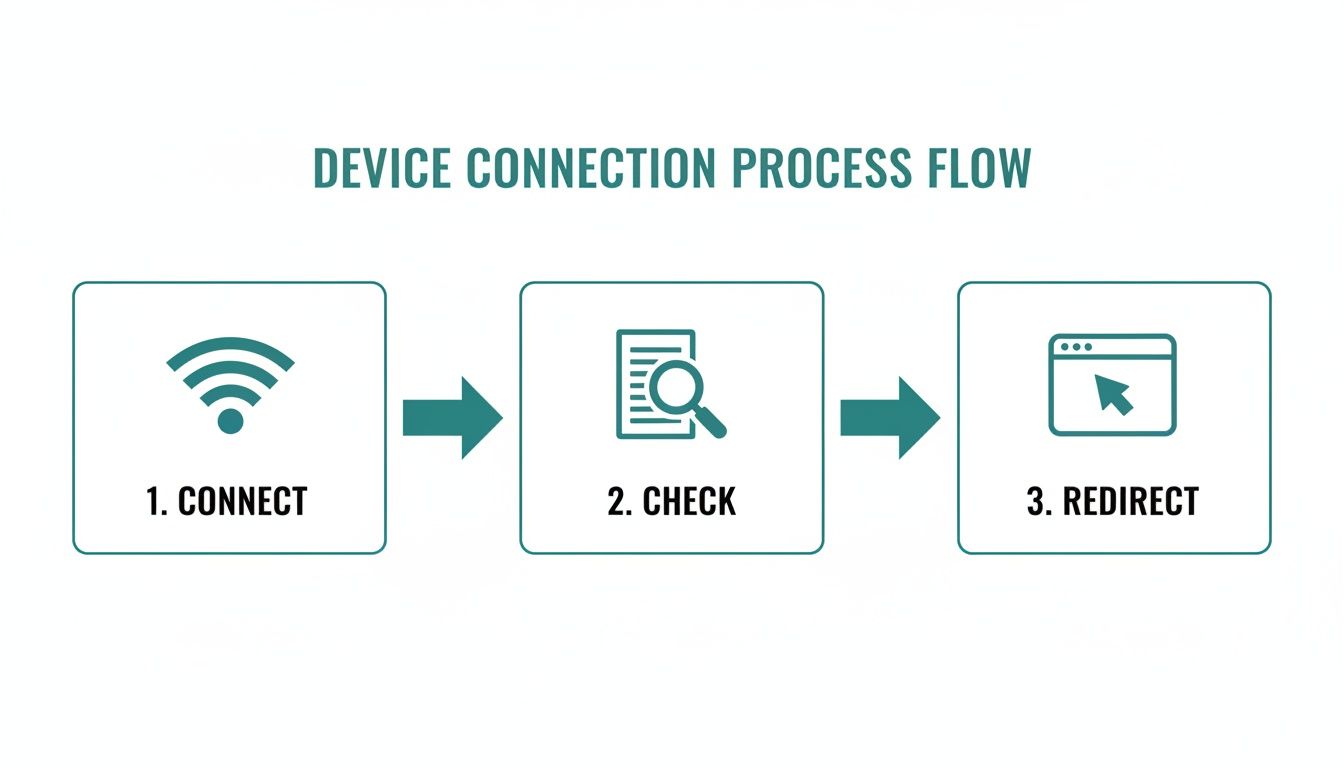
As the visual shows, that final redirect is where a small misconfiguration can cause the biggest headaches.
When Authentication Gets More Advanced
For networks that use more sophisticated authentication solutions like IPSK or EasyPSK, a smooth onboarding experience is everything. These systems often use the captive portal as the friendly front door, guiding users to get their unique security key. If that portal fails to appear, it completely breaks an otherwise secure and user-friendly workflow.
Think of it this way: the connection experience is the first handshake a visitor has with your digital presence. A portal that doesn't load is like a broken doorbell—it creates a frustrating first impression that can sour their view of your entire organization, whether you're a university or a flagship retail store.
Getting these issues ironed out just takes a methodical approach. If you find yourself repeatedly hitting a wall, our detailed guide on fixing common Wi-Fi connectivity issues offers some deeper insights. Ultimately, a little fine-tuning in your Meraki dashboard combined with a good understanding of how devices detect portals will solve the vast majority of "captive portal detected" issues, letting everyone get online without the hassle.
Transforming Guest Wi-Fi with Modern Authentication
When your device flashes that "captive portal detected" message, it's doing more than just asking for a password—it's opening a door. For any business, this is a golden opportunity. A captive portal isn't just a gatekeeper; it’s a powerful tool for beefing up security, showing off your brand, and engaging with customers, especially when you pair it with flexible hardware like Cisco Meraki.
The days of a boring, generic login page are over. Today’s authentication solutions can create a smooth and valuable experience for everyone. Organizations can completely overhaul their guest wifi by ditching the basic password field and embracing modern, user-friendly methods.
Elevating the User Experience in Retail and Education
Think about walking into your favorite store. Instead of hunting for a complicated password, you connect to the retail Wi-Fi with a single click using social login. This social wifi option not only gets customers online faster but gives the business a chance to connect with them on their favorite social platforms. It’s a win-win.
In the education world, security and simplicity are everything. Schools and universities have to manage thousands of devices while keeping their network safe. A modern captive portal can guide students and staff through a seamless onboarding process, ensuring everyone gets connected securely without flooding the IT helpdesk with tickets.
A captive portal isn't just about controlling access—it's about creating a secure, branded, and intelligent entry point to your digital environment. It turns a simple connection into a meaningful interaction.
Advanced Security for the Corporate World
In a BYOD Corporate environment, where employees bring their own devices, security is non-negotiable. A single, shared Wi-Fi password for everyone is a huge security hole waiting to be exploited. If one person leaves the company, you have to change the password for the entire organization, which is a massive headache. This is where advanced authentication solutions like IPSK and EasyPSK change the game.
These technologies fundamentally rethink how network access is managed. Instead of one password for everyone, IPSK (Identity Pre-Shared Key) gives a unique, secure key to each person or device.
- Individual Control: Admins can grant or revoke access for a single user instantly without affecting anyone else on the network.
- Enhanced Security: It completely removes the risks that come with shared passwords, making your entire network more secure.
- User Simplicity: For the user, it feels just as easy as connecting to a regular WPA2 network. They don't have to do anything complicated.
This approach gives you the heavy-duty security of an enterprise solution with the straightforward experience users have come to expect. For organizations wanting to go a step further, you can learn more about how to implement single sign-on to make user access even smoother.
By pairing these modern methods with Cisco Meraki hardware, any organization can build a guest Wi-Fi network that is secure, easy to use, and perfectly aligned with its goals.
Designing a User-Friendly Captive Portal Experience
When that "captive portal detected" message pops up, what happens next is crucial. The user is immediately face-to-face with your login page, and if that experience is clunky, slow, or confusing, it’s more than just a minor annoyance—it’s a direct reflection on your brand. The goal is to turn a necessary security step into a positive, welcoming handshake for anyone joining your network.
The absolute foundation of a great portal experience is a mobile-first design. The vast majority of people connecting to guest Wi-Fi are doing it from their phones, so your portal has to look and work flawlessly on a small screen. Think big fonts, easy-to-tap buttons, and a dead-simple layout. These aren't just nice-to-haves; they're essential.
Making Connections Simple and Secure
For a retail shop or a café, offering a social login or social wifi option is a brilliant move. It lets customers connect with a single click using an account they already have, which is worlds better than making them fill out a tedious form.
But in a corporate BYOD (Bring Your Own Device) or education environment running on hardware like Cisco Meraki, the game changes. Here, the priority is rock-solid security that doesn't overwhelm the user.
Your captive portal is often the very first digital interaction a customer or guest has with your organization. Ensuring it is professional, secure, and easy to navigate is essential for making a strong first impression.
This is where more advanced authentication solutions like IPSK or EasyPSK come into play. The portal can serve as a simple front door, walking the user through a quick, one-time setup to get their own unique key for the network. It’s a powerful way to deliver top-notch security without a complicated login process. If you want some inspiration, you can check out these examples of captive portal web pages to see how different industries handle it.
Another non-negotiable aspect is security, specifically using HTTPS for the portal page itself. An encrypted connection protects any information the user types in, whether it’s just an email or sensitive payment details. This builds trust right from the start.
Best Practices for a Better Portal
Honestly, you should treat your portal page with the same care as your main website. Many of the same website user experience best practices apply directly here. A clean layout and intuitive navigation are just as important on a login page.
Here are a few essential tips to keep in mind:
- Provide Clear Instructions: Never assume people know what to do. Use simple, direct language to walk them through the login steps.
- Be Transparent: Make your terms of service and privacy policy easy to find. Tell people what data you're collecting and why.
- Keep It Brief: Only ask for the information you absolutely need. Every extra field you add to a form will cause some people to give up.
By sweating these details, you can transform your captive portal from a frustrating hurdle into a genuine asset. It becomes a tool that not only secures your network but also boosts engagement and shows everyone that you care about their experience.
Got Questions About Captive Portals? We've Got Answers.
When that "captive portal detected" message pops up, it's natural to have a few questions. Whether you're just trying to get online at a coffee shop or you're the admin in charge of the whole network, let's clear up some of the common confusion.
Why Isn't the Login Page Showing Up?
This is easily the most frequent snag people hit, and surprisingly, the culprit is often on your own device. Your web browser’s pop-up blocker might be a little too aggressive, mistaking the login window for an ad and shutting it down before you even see it.
Another common issue is a DNS hiccup that stops your device from finding the login page's address. A simple but effective trick is to manually open a browser and try navigating to a non-secure website, like http://example.com. This often gives the network the nudge it needs to redirect you properly. For admins running a Cisco Meraki setup, it's always worth double-checking that the "walled garden" rules are correctly configured to let devices reach all the necessary authentication servers before the user logs in.
Is It Safe to Put My Information Into a Captive Portal?
Your security really comes down to who is running the network. Reputable places like hotels, airports, and your office use secure portals to protect everyone. Before you type anything, look for one crucial detail in your browser's address bar: the URL should start with "https://". That 's' is your signal that the connection is secure and encrypted.
Always be cautious on unknown or sketchy-looking public Wi-Fi. For businesses using Cisco Meraki, integrating professional authentication solutions like Splash Access locks down the whole process, protecting both user data and the network itself. Plus, modern security like IPSK adds another powerful layer by getting rid of shared, easy-to-steal passwords.
What's IPSK? How Is It Better Than a Regular Wi-Fi Password?
IPSK, which stands for Identity Pre-Shared Key, is a much smarter and more secure way to handle Wi-Fi access, especially in corporate or education environments with BYOD (Bring Your Own Device) policies. Think about it: with a traditional Wi-Fi password, everyone uses the same one. If an employee leaves or a device is stolen, you have to change the password for everyone, creating a massive headache.
IPSK flips that model on its head. It assigns a unique, personal key to each user or device. This means an admin can grant or revoke access for one person instantly without disrupting anyone else. It gives you the ironclad security of enterprise systems with the simplicity of a password.
This approach, sometimes called EasyPSK, is a total game-changer for network managers.
Can I Use My Social Media Account to Log In to Any Guest Wi-Fi?
That handy option to log in with your Google or Facebook account—often called Social Wi-Fi—is a feature the business has to specifically enable. It isn't a standard part of every guest network. When you see those buttons, it means the venue is using a captive portal system built to support them.
This feature is a huge hit in retail and hospitality because it makes logging on dead simple for customers. In return, the business can gather valuable, permission-based marketing data. So, if you don't see a social login option, it just means the network administrator hasn't turned that feature on for their portal.
Ready to transform your guest Wi-Fi from a simple connection into a powerful tool for security and engagement? With Splash Access, you can deploy a secure, branded, and intelligent captive portal experience on your Cisco Meraki network.
Discover how Splash Access can elevate your guest Wi-Fi today