Think of your regulatory compliance service as your network’s friendly bouncer—it welcomes your guests to connect on your guest Wi-Fi while keeping unwanted traffic at bay. When paired with Cisco Meraki, you get built-in captive portals and authentication solutions like IPSK and EasyPSK to weave audit checkpoints into every login.
Why You and Your Guests Will Love Compliance Safeguards

Whether you’re running a lively Education campus, managing a chain of Retail outlets, or rolling out a BYOD Corporate hotspot zone, compliance shouldn’t feel like juggling flaming torches. You want a solution that locks down your guest Wi-Fi without slowing anyone down.
Captive portals act like airport checkpoints: each device pauses, verifies credentials, and then sails through. Add social login and social wifi, and guests can breeze in using Facebook or Google—no tedious forms required.
- IPSK and EasyPSK hand out one-time or reusable passcodes, giving you total control over who gets access.
- Captive-portal logs feed right into your SIEM dashboards, speeding up incident response.
- Outsourced services handle audit trails and data-retention policies so you can focus on running your network.
Market Growth Trends
The global market for regulatory reporting and compliance services is estimated at USD 4.31 billion in 2025 and projected to grow at a 9.14% CAGR, reaching USD 6.68 billion by 2030. The eGRC segment alone could soar to USD 134.9 billion over the same period. Read the full research on Mordor Intelligence.
Dive into our GDPR requirements guide for Meraki networks for a closer look at data-privacy essentials.
Quick Insight
Compliance isn’t just ticking boxes—it’s about building trust with students, shoppers, and staff on your network.
Splash Access wraps captive-portal setup, IPSK/EasyPSK provisioning, social wifi, and granular audit exports into one managed service for Cisco Meraki. Seamlessly connect compliance and creativity today.
Understanding Core Concepts for Guest Wi-Fi Compliance
Imagine walking up to a hotel reception desk—your ID is checked, and then you’re handed a room key. A captive portal works the same way for Wi-Fi. It greets every user, confirms their identity, and then opens the network door.
A solid compliance service keeps your guest Wi-Fi humming while ticking all the regulatory boxes—from data capture to audit trails.
- Captive Portal checks credentials before granting access
- Social Login (Facebook, Google) speeds onboarding
- Social WiFi auto-populates profile details to cut form-filling in half
- IPSK and EasyPSK issue secure passcodes for one-time or repeat access
Key Terms Explained
Think of the captive portal as the front desk in a hotel lobby where identity is verified and access is granted. On a Cisco Meraki dashboard, you can watch guest sessions, track bandwidth usage, and configure retention settings in real time—so any compliance gaps jump out instantly.
“IPSK is your one-time VIP pass, while EasyPSK hands out reusable keys for trusted devices.”
- IPSK issues single-use keys with precise expiration.
- EasyPSK provides long-term credentials for repeat visitors.
Data Flows and Reports
Automated reports deliver proof of compliance straight into your inbox. On-demand audit logs let you answer regulator questions in minutes, not days.
Whether you’re in Education, Retail, or a BYOD Corporate environment, you can align with CIPA, PCI DSS, or GDPR requirements without breaking a sweat.
Retention Policies in Action
Retention rules govern how long you hold onto guest logs before they’re wiped clean. On Cisco Meraki, choose auto-delete after 30, 60, or 90 days—whatever fits your policy.
- Education often keeps logs for 6 months to satisfy CIPA.
- Retail venues may retain payment data for 1 year under PCI DSS.
- Corporate BYOD networks commonly purge guest records after 90 days for GDPR.
Check out our guide on authentication, authorization, and accounting to dive deeper into these settings.
With these fundamentals locked in, you’re ready to map out sector-specific compliance rules in the next section.
Mapping Compliance Rules Across Education, Retail, and BYOD
Regulations shift from one sector to the next, so a one-size-fits-all plan rarely works. Tailoring your guest Wi-Fi strategy means mapping each rule set to its unique environment.
In Education, the Children’s Internet Protection Act (CIPA) requires age verification and strict content filters. Over in Retail, you must meet PCI DSS standards whenever social login or payment gateways handle card details. Corporate BYOD programs juggle GDPR consent captures and data-minimization policies on every device.

Compliance Requirements by Industry
| Industry | Regulation | Key Requirements |
|---|---|---|
| Education | CIPA | Age verification, content filters, log retention |
| Retail | PCI DSS | Payment encryption, audit logs, session retention |
| Corporate BYOD | GDPR | Consent capture, data minimization, retention |
This side-by-side snapshot highlights where your Cisco Meraki guest Wi-Fi setup needs custom rules.
For instance, Meraki captive portals can enforce 30-day or 60-day retention windows and wrap all traffic in AES encryption. Adding social wifi and IPSK/EasyPSK options boosts security with one-time or reusable passcodes.
- Define data-capture fields for age checks or payment tokens.
- Set retention windows per regulation.
- Automate reporting and audit exports.
“Using a Meraki captive portal is like assigning custom passports for each guest use case,” says our head engineer.
Applying Cisco Meraki Captive Portal Controls
From the Meraki Dashboard, you can schedule automated report deliveries for education audits or financial reviews. Integration with Splash Access ties social wifi, captive portals, IPSK, and EasyPSK workflows together and centralizes logs for easier auditing. The global compliance market is valued at USD 20.43 billion in 2025 and projected to USD 32.63 billion by 2033. Compliance management services could hit USD 75.8 billion by 2031. Check out the Global Growth Insights compliance market trends.
Set up guest Wi-Fi with targeted compliance in mind: Learn how to set up guest Wi-Fi.
Best Practices for Each Sector
- Education: Enforce content filters and age gates via Meraki captive portals.
- Retail: Tokenize payments and schedule retention to meet PCI DSS audits.
- Corporate BYOD: Rotate IPSK/EasyPSK keys and display explicit consent banners for GDPR.
These best practices keep your guest Wi-Fi configurations audit-ready as regulations evolve.
Examples of Sector Use Cases
At a mid-sized university, IT combined Cisco Meraki and Splash Access to enforce age gates and block inappropriate content in dorm networks. They captured student consents and preserved logs for six months.
A specialty retailer blended social wifi with a captive portal and payment tokens so guests could connect in seconds while opt-in data fueled marketing campaigns.
In a corporate headquarters, the security team rolled out EasyPSK for staff devices and IPSK for visitors. Automated reports gave them a clear record of consent banners, proving GDPR compliance at audit time.
With a clear compliance map and Meraki captive portals in your toolkit, you’ll meet CIPA, PCI DSS, and GDPR standards with confidence.
Selecting A Regulatory Compliance Service Provider
Choosing the right compliance partner for guest Wi-Fi feels like picking a Swiss Army knife—each feature must serve a clear purpose, from audit trails to data retention. Your provider needs to slot seamlessly into Cisco Meraki captive portals, offer IPSK and EasyPSK authentication, and support branded social-login and social wifi flows.
Rate vendors on data capture, retention policies, PCI-ready billing, real-time auditing dashboards, and SIEM integrations. Clear scoring criteria help IT teams compare who records guest consent timestamps correctly or who can export a full audit log in seconds.
Key Features Checklist
Before diving into demos, make sure each vendor ticks these boxes:
- Captive Portal Integration
Hosts branded splash pages and consent forms on Meraki SSIDs. - Authentication Solutions
Issues IPSK one-time codes and EasyPSK reusable keys. - Social Login and Social WiFi
Automates Facebook and Google signups while capturing consent. - Data Retention Controls
Sets deletion schedules for CIPA, PCI DSS, or GDPR mandates. - Real-Time Auditing
Streams session details into dashboards and SIEM platforms.
Feature Comparison for Compliance Services
| Feature | Why It Matters | Cisco Meraki Example |
|---|---|---|
| Captive Portal Flexibility | Ensures guest consent and branding consistency | Meraki splash pages with custom CSS |
| IPSK Authentication | Limits access with single-use WPA2 keys | Unique keys issued per device via API |
| EasyPSK Authentication | Simplifies recurring access with reusable keys | Group policies in Meraki Dashboard |
| Social Login Integration | Speeds onboarding while capturing consent | Integrates Facebook login in splash flows |
Use a consistent rating scale to quantify each feature’s compliance impact. Explore branded portals: Learn more about Captive Portal Solutions.
Performance and Integration Example
It pays to run load tests against your chosen workflows. Simulating peak traffic shows whether IPSK, EasyPSK, and social wifi flows hold up under pressure.
This screenshot highlights the Meraki Dashboard’s live view of guest sessions, authentication methods, and retention settings. Spot anomalies in real time to head off compliance gaps before auditors arrive.
Scoring Your Options
A structured scorecard removes guesswork. Rate each feature by:
- Integration Depth – How well do captive portals and APIs mesh with Meraki?
- Authentication Range – Are IPSK, EasyPSK, and social logins fully supported?
- Audit Exports – Can you pull logs with a single click or stream to SIEM?
- Cost and Support – Factor in license fees, scale limits, and SLA terms.
“A scorecard brings clarity when regulations and budgets collide.”
Once scores are in, have your legal team vet the results, document every step, and review SLA fine print. Next up: pilot testing in your environment and laying out a vendor negotiation timeline.
Implementation Roadmap for Cisco Meraki Guest Wi-Fi Compliance
Rolling out a guest network that ticks every regulatory box needs a clear path. Think of it as a compass guiding you through captive portals, IPSK/EasyPSK authentication flows, and social wifi sign-ins—all while staying on the right side of policies.
Follow this five-phase plan—tailored for Education, Retail, and Corporate BYOD environments—from initial blueprints to full launch.
For example, 85% of executives report growing regulatory headaches over the last three years, and three-quarters of businesses have bumped up their compliance budgets. Breaches cost an average of USD 4.61 million, with noncompliance adding roughly USD 174,000. See PwC’s global compliance survey for more.
Planning Phase
Identify must-follow regulations, sketch guest journeys, and map data needs. Involving legal and security teams early prevents last-minute surprises.
- List rules per location (CIPA, PCI DSS, GDPR).
- Draft user flows for captive portals and social logins.
- Set data-retention periods and reporting checkpoints in the Meraki Dashboard.
- Agree on uptime targets and audit-readiness milestones.
- Validate every step with IT, legal, and ops stakeholders.
Design Phase
Turn requirements into smooth user experiences. Choose one-time IPSK codes or reusable EasyPSK groups based on your audience, then mock up branded splash pages that collect consent without overwhelming visitors.
- Configure single-use IPSK for quick retail visits.
- Group EasyPSK keys for repeat users, like students.
- Build social login forms with clear permissions and opt-ins.
- Wrap each splash page in Cisco Meraki branding and legal banners.
- Test designs with a small user cohort to catch hiccups early.
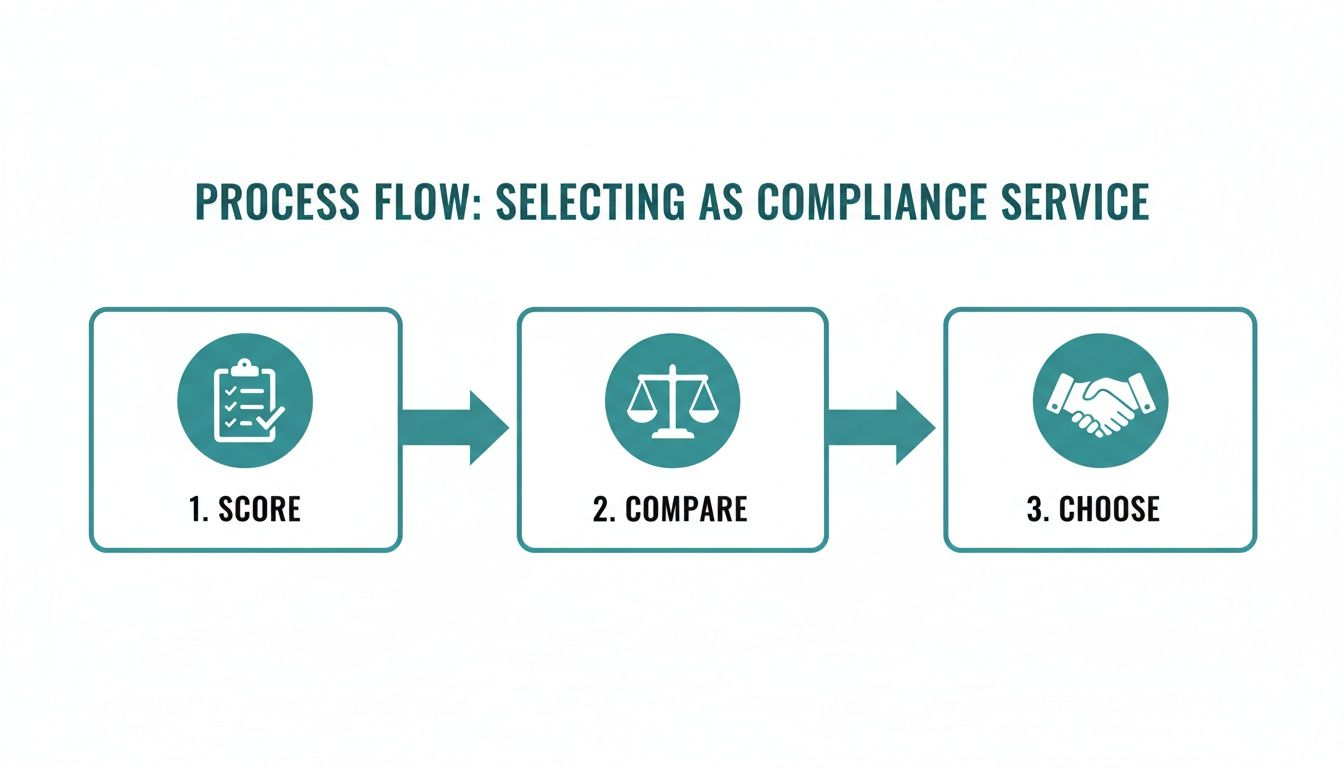
- Score providers on integration scope.
- Compare features like captive portals, authentication options, and auditing tools.
- Pick the vendor that aligns best with your Meraki roadmap.
Configuration Phase
Head into the Meraki Dashboard to bring your design to life. Build captive portals, lock in encryption settings, and enforce data-retention rules. Then hook into Splash Access for central logs and scheduled purges.
- Define portal timeouts, session lengths, and encryption standards.
- Assign log-keeping durations for CIPA, PCI DSS, and GDPR.
- Use Splash Access APIs to manage IPSK/EasyPSK policies.
- Map social-login data into your CRM or marketing platform.
- Automate monthly audit-report exports to stakeholders.
“Well-documented configuration is your compliance backbone,” says one of our lead network engineers.
Testing Phase
Before you flip the switch, simulate peak usage, verify failover processes, and inspect reporting outputs. Troubleshooting early saves headaches later.
- Stress-test IPSK/EasyPSK logins under heavy load.
- Confirm captive portal redirects and social sign-ons work flawlessly.
- Export logs to check retention windows and timestamp accuracy.
- Capture any issues and refine policies.
- Run failover drills to ensure backup routines kick in.
Launch Phase
With green lights on testing, go live and monitor traffic closely. Regular reviews will keep you compliant as regulations evolve.
- Watch for session anomalies using Meraki alerts.
- Leverage dashboard views for real-time compliance oversight.
- Schedule quarterly policy reviews with legal teams.
- Pilot rolls at new campuses or store locations.
- Review audit logs with compliance officers every quarter.
- Celebrate each milestone to boost team morale.
Document every change—future auditors will thank you. Learn more about integrating RADIUS in our detailed guide on setting up a RADIUS server.
By following this five-step journey, your Cisco Meraki guest Wi-Fi will be audit-ready, scalable, and compliant from day one.
Real World Scenarios and Next Steps
Moving from plans on paper to real-life deployments often uncovers twists you didn’t see coming. That’s when a solid regulatory compliance service, tied into Cisco Meraki captive portals, really proves its worth.
Below are three environments—Education, Retail, and Corporate BYOD—each relying on Splash Access and Meraki tools to satisfy CIPA, PCI DSS, and GDPR requirements. You’ll pick up practical takeaways, key metrics, and ROI insights to tailor your next move.
- Education uses CIPA compliance checks with Cisco Meraki captive portals and social wifi gates.
- Retail blends social wifi and IPSK for PCI compliance at checkout.
- Corporate applies EasyPSK and automated reporting for GDPR audits.
Real events often unearth hidden compliance gaps—planning alone doesn’t catch everything.
Education Case Study
On a university campus, IT enforced CIPA rules for any guest on dorm networks. They rolled out Cisco Meraki captive portals alongside Splash Access to verify ages and apply content filters.
Results: policy violations dropped 90%, and audit logs auto-stored for six months—making CIPA inspections a breeze.
Key steps:
- Age gates and content filters via captive portals
- Azure AD integration for back-end security
- Automated log deletion after 180 days
Retail Case Study
A specialty retail chain needed PCI compliance at checkout. They introduced social wifi portals with one-time IPSK vouchers—like handing out digital tickets at the register.
This setup captured marketing opt-ins, routed transactions securely, and stayed within PCI DSS rules. Customer engagement soared: promo redemptions rose 25%, and repeat visits climbed 30%.
“IPSK vouchers at the point of sale felt like digital receipts customers trust,” said the retail IT manager.
Highlights:
- One-time IPSK codes for secure payments
- Facebook social login for fast onboarding
- Geo-fenced coupons triggered automatically
Corporate Case Study
In a global office, GDPR compliance was top priority for guests and contractors. Security set up EasyPSK for staff and IPSK for visitors under Meraki’s authentication suite.
Automated reports delivered daily audit logs to the privacy team, slashing manual work by 80% and freeing up 15 hours per week previously spent on log reviews.
Lessons:
- Group pre-shared keys by department
- Craft clear consent notices
- Link to SIEM for instant alerts
| Metric | Before Splash Access | After Implementation |
|---|---|---|
| Manual Audit Hours | 50 per week | 10 per week |
| Policy Violation Rate | 15% | 2% |
| Authentication | Two-step forms | Single-click social login |
Next Steps for Scaling Compliance
Your roadmap starts with a pilot—think of it as a test kitchen: try Cisco Meraki and Splash Access at one location, then refine your recipe.
- Run a pilot proof of concept
- Tweak compliance policies using real user feedback
- Roll out across all sites and access points
Once your pilot’s solid, expand policies around IPSK, EasyPSK, and social wifi. Keep audit schedules on track, and celebrate the day your guest Wi-Fi sails through CIPA, PCI DSS, and GDPR checks with ease.
FAQ
What Is a Regulatory Compliance Service?
Picture a busy intersection without any lights—chaos, right? A regulatory compliance service acts like those traffic signals, directing guest Wi-Fi traffic so you stay on the right side of the law.
It’s essential for Education, Retail, and BYOD environments, helping you meet CIPA, PCI DSS, and GDPR requirements. By integrating with Cisco Meraki, it automatically creates audit-ready trails whenever someone logs on.
Key functions include:
- Retention windows enforced by policy
- Automated consent records captured at every step
How Authentication and Captive Portals Work
Think of captive portals as a reception desk for your network. Visitors pause at the door until they prove who they are.
Tools like IPSK and EasyPSK issue one-time or reusable passcodes, timestamp each login, and save visitor logs. You can even offer social login via Facebook or Google for a smoother check-in.
Captive portals paired with IPSK and EasyPSK deliver a flexible, audit-ready network.
Key Features for Cisco Meraki Compliance
When you evaluate vendors, look for:
- Branded splash pages that match your identity
- Authentication workflows using IPSK and EasyPSK
- Social login options like Facebook or Google
- PCI modules to secure payment flows
- Real-time dashboards and SIEM export tools
These capabilities leverage the Meraki API, giving you full control to customize every captive portal.
Benefits of Splash Access Integration
Integrating Splash Access with Cisco Meraki transforms months of audit prep into minutes. 90% of customers say their compliance checks speed up dramatically.
Here’s a quick setup roadmap:
- Configure custom dashboards in the Meraki Dashboard
- Automate log collection through the Splash Access API
- Generate audit-ready reports in a single click
Get Splash Access https://www.splashaccess.com