When you hear "Wi-Fi," you probably think of the router sitting in your living room. But in a business setting, that's just not going to cut it. Let's have a friendly chat about business wifi solutions. These are a different beast altogether—they're powerful, managed systems built to deliver secure, reliable, and intelligent connectivity for your entire organization.
These aren't just about getting online. They're designed from the ground up to handle dozens, hundreds, or even thousands of users at once, all while keeping sensitive data locked down and giving you incredible insights into how your network is being used.
What Are Modern Business WiFi Solutions?
Let's get one thing straight: a business Wi-Fi solution is a complete ecosystem, not just a souped-up version of your home router. Think of it as the digital backbone of your operation. It’s what keeps your point-of-sale terminals running in a bustling retail store, your team collaborating on video calls without a stutter, and your guests happily browsing while they wait.
This is where you see enterprise-grade hardware from companies like Cisco and their cloud-managed platform, Meraki, paired with smart, cloud-based software. This combination is specifically engineered to handle the chaos of a modern workplace—high-density areas, a sea of different devices, and the ever-present security threats that come with a BYOD (Bring Your Own Device) policy in corporate sectors. When your reputation and revenue are on the line, a one-size-fits-all approach is a recipe for disaster.
To understand just how different these systems are, it helps to see a direct comparison.
Business WiFi vs Home WiFi At a Glance
The table below breaks down the fundamental differences between the simple setup you have at home and what a professional solution brings to the table.
| Feature | Home WiFi | Business WiFi Solution |
|---|---|---|
| Number of Users | Designed for a handful of devices (5-10) | Built to support hundreds or thousands of concurrent users |
| Security | Basic WPA2/WPA3 password protection | Advanced Authentication Solutions, firewalls, and user segmentation |
| Management | Simple web interface, often "set it and forget it" | Centralized, cloud-based management dashboard for all access points |
| Hardware | Single all-in-one router/modem unit | Multiple dedicated Access Points (APs), switches, and gateways |
| Guest Access | A simple, often unsecured, guest network | Secure, branded Captive Portals with data capture capabilities |
| Analytics & Insights | Little to no data on usage | Detailed analytics on user behavior, traffic patterns, and device types |
| Scalability | Limited; adding more users degrades performance | Highly scalable; easy to add more Access Points to expand coverage |
As you can see, it's not just a matter of speed. A true business solution is about control, security, and the ability to grow with you.
Core Pillars of Professional WiFi
A great Wi-Fi solution doesn't just happen. It's built on three critical pillars: ironclad security, rock-solid performance, and effortless centralized control. You can’t sacrifice one for the others; they all have to work in harmony.
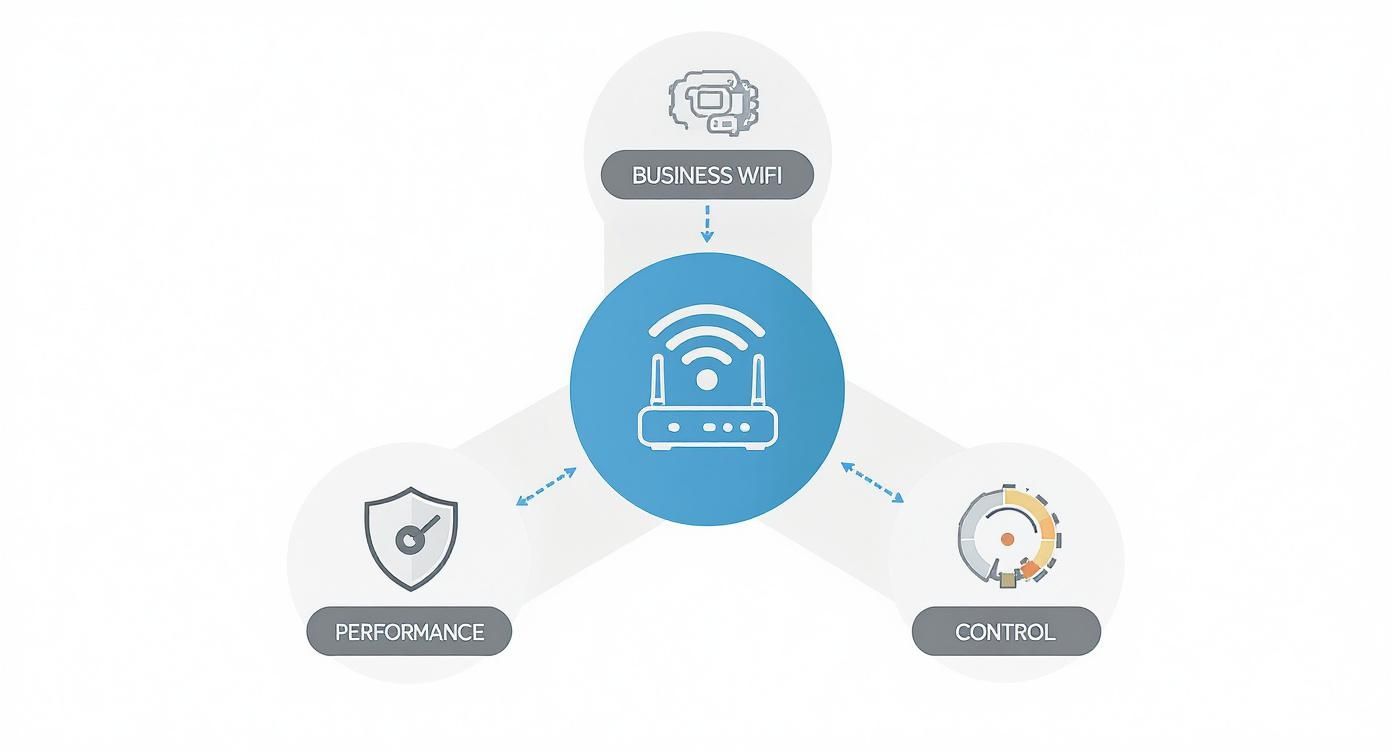
This simple diagram really drives the point home. A successful network isn't just about being fast—it’s about creating a secure, manageable, and high-performing environment that you can actually rely on.
Smart Authentication and Guest Access
One of the biggest game-changers with professional Wi-Fi is how it handles who gets on the network. We’ve moved far beyond a single password scribbled on a whiteboard. Modern systems use sophisticated authentication solutions to manage access intelligently.
You've probably seen Captive Portals in action at airports or hotels. They present a branded login page where guests might agree to your terms or log in using their social media accounts—a great example of social wifi. Just like that, your "free Wi-Fi" becomes a powerful marketing and engagement tool.
For your internal team, security gets even more granular. In a BYOD Corporate environment, technologies like IPSK (Identity Pre-Shared Key) are a lifesaver. Instead of one shared password for everyone, IPSK assigns a unique key to every single device. If an employee's phone is lost or compromised, you just revoke its key without disrupting anyone else. The rest of the network remains secure.
This level of control is made possible by powerful cloud management platforms. To see how industry leaders make this happen, you can dive deeper into our guide on what is Cisco Meraki. This kind of fine-grained security is no longer a "nice-to-have"—it's essential for any organization that takes its data seriously.
It’s Time to Ditch the Shared Password
We’ve all seen it: the single Wi-Fi password scribbled on a sticky note, taped under the counter, or endlessly forwarded in emails. It's simple, sure, but it's also a ticking security time bomb. Once that password is out in the wild, anyone can use it. If a single device on your network gets compromised, the entire system is exposed.
Think of it like this: a shared password is like giving everyone the same master key to your building. If one person loses their key or leaves the company, you're faced with the massive headache of changing the locks and reissuing keys to everyone. It’s just not a scalable or secure way to operate.
So, what's the alternative? Instead of one master key, what if you could give every single person and device a unique, personal key that you control? That’s exactly what modern business wifi solutions are designed to do.
A Smarter Key for Everyone: Identity Pre-Shared Keys (IPSK)
One of the most powerful tools for securing a modern network is the Identity Pre-Shared Key, or IPSK. The name sounds a bit technical, but the idea is straightforward and brilliant. Instead of one password for everyone, IPSK technology lets you generate a unique, individual key for every user or device.
This approach completely changes the game, especially in a corporate BYOD (Bring Your Own Device) environment where employees connect with personal phones, laptops, and tablets.
- Pinpoint Security: If an employee leaves or a device is lost, you just revoke its specific key. The rest of the network keeps running securely, completely unaffected.
- Clear Visibility: With IPSK, you see exactly who and what is connected to your network at all times. This kind of accountability is simply impossible with a shared password.
- Granular Control: You can set specific rules for each key. Think time limits for contractors or bandwidth restrictions for certain devices. You're in total command.
This method is leagues ahead of older, less secure practices. For those who want to dive deeper into the nuts and bolts of enterprise-grade security, you can learn more about 802.1X authentication and how it lays the foundation for this kind of secure access.
Making Advanced Security Feel Easy
Now, you might be thinking that managing thousands of unique keys sounds like a logistical nightmare for any IT team. That’s where systems like EasyPSK—a feature often found in platforms from industry leaders like Cisco and Meraki—step in. These tools automate the entire lifecycle of creating, distributing, and revoking individual keys, making a high-security network surprisingly simple to manage.
Imagine an IT manager in an Education setting. They can instantly generate thousands of unique keys for students at the start of the semester and set them to expire automatically at the end. With EasyPSK, there are no manual password changes and no shared secrets to leak.
This automation turns a complex security protocol into a smooth, streamlined process. Whether you're onboarding new hires in a corporate office, connecting students in a school, or deploying IoT devices in a Retail store, EasyPSK simplifies secure access for everyone involved.
The Digital Welcome Mat: The Captive Portal
When it comes to guest networks, the approach is a little different but just as powerful. This is where the Captive Portal takes center stage. You’ve definitely used one before—it’s that branded login page that pops up when you connect to Wi-Fi at a hotel, coffee shop, or airport.
But a Captive Portal is so much more than just a login screen; it’s a strategic asset. It acts as the digital front door to your guest wifi, and it lets you do a few key things:
- Showcase Your Brand: Greet visitors with your logo, colors, and key messages right from the start.
- Set the Rules: Require users to accept your terms of service before they connect—a crucial step for legal compliance.
- Gain Valuable Insights: Offer easy connection options like social login (social wifi), where guests can use their social media profiles to get online. This not only makes their life easier but can also provide you with valuable, anonymized demographic data to better understand your audience.
For businesses in Retail, Education, or BYOD Corporate environments, a well-designed Captive Portal transforms a basic amenity into an interactive experience that delivers security, branding, and powerful insights—all while giving visitors a seamless way to connect.
Creating a Guest WiFi Experience That Works for Everyone
Guest WiFi isn't just a nice-to-have anymore. It's moved way beyond a simple password on a chalkboard. Today, a well-thought-out guest network is a serious tool for security, marketing, and making a killer first impression. When you get it right, that free internet connection becomes a strategic asset, turning a basic amenity into a meaningful interaction with your visitors.
The whole process kicks off the second someone tries to connect. That’s where a Captive Portal comes in. Think of it as your digital welcome mat—the branded login page that greets every visitor. It's your first chance to engage, and instead of making them hunt for a complicated password, you can offer modern, simple authentication solutions that make their life easier and your business smarter.

Making a Lasting Impression with Social WiFi
One of the best ways to get people online smoothly is with social login, sometimes called social wifi. This lets visitors connect using their existing social media accounts, which is a massive win for both sides. Guests skip the pain of filling out another form, and you get valuable, anonymous demographic data to help you understand who’s walking through your doors.
It plays out differently depending on where you are:
- Retail: A shopper logs into your store's WiFi with their Facebook profile. You now have anonymous data showing that your peak hours for customers aged 25-34 are Saturday afternoons.
- Education: A prospective parent visits for a campus tour, connects to the guest network to pull up a map, and immediately gets a tech-savvy, helpful impression of the school.
- Corporate: A client arrives for a big meeting, connects instantly and securely to your guest network, and sees your company as professional and buttoned-up.
A smooth connection is the first step in building a positive relationship. A great guest network is a key part of the modern visitor journey, and you can learn more about how to improve customer experience through these kinds of thoughtful digital touchpoints.
Security First: Protecting Your Network and Theirs
Providing a great experience is one thing, but security is the absolute baseline. The golden rule of guest wifi is network segmentation. You have to build a virtual wall between your guest traffic and your internal, mission-critical network. This way, guests can browse all they want without ever getting a peek at your sensitive company data, like file servers or point-of-sale systems.
A properly segmented guest network ensures that even if a visitor's device is compromised, your internal network remains completely safe and isolated. It's the digital equivalent of giving guests a key to the lobby but not to your office safes.
Platforms from industry leaders like Cisco Meraki make this incredibly straightforward, letting you manage both networks from a single dashboard while keeping their traffic completely separate. This is vital for any organization, but it's especially critical in BYOD corporate sectors where tons of personal devices are connecting every day.
This focus on using data to improve experiences is also driving massive market growth. The global Wi-Fi analytics market was valued at $8.16 billion and is projected to skyrocket to $14.58 billion by 2032. This shows a huge demand from businesses to use WiFi-based data for everything from optimizing store layouts to fine-tuning marketing campaigns. You can dig into the numbers on WiFi analytics market growth trends from Fortune Business Insights.
Ultimately, a well-designed guest network strikes the perfect balance between a welcoming, easy-to-use experience and ironclad security. By using tools like Captive Portals and social login, you can turn your guest WiFi from a line-item expense into a powerful asset that boosts security, delivers insights, and leaves every visitor impressed.
Tailoring Wi-Fi to Your Industry: It’s Not One-Size-Fits-All
Let's be honest: a cookie-cutter approach to networking just doesn't cut it. The Wi-Fi needs of a bustling high school campus are worlds apart from a luxury retail store or a secure corporate headquarters. To get a real return on your investment, your business Wi-Fi solutions have to be built for the unique challenges and opportunities of your industry.
This is about shifting your perspective—seeing Wi-Fi not just as a utility, but as a strategic tool that actively drives your goals. Whether you’re trying to build a more dynamic classroom, boost sales on the shop floor, or lock down sensitive data, the right setup can be a game-changer. Let's look at what this means in a few key sectors.
Education: The Smart Campus Network
Schools and universities are the ultimate stress test for any Wi-Fi network. You’ve got thousands of students, each with multiple devices, all trying to connect at once in high-density spots like lecture halls, common areas, and libraries. Throw in the absolute necessity for strict content filtering, and you have a seriously complex puzzle.
In the Education sector, everything boils down to reliability and control. A network built on robust hardware from a provider like Cisco can handle that immense device load, ensuring digital learning tools, online exams, and video lectures run without a single hiccup.
But the real magic lies in powerful authentication solutions.
- Seamless Onboarding: Using a technology like EasyPSK, your IT team can give every student and staff member their own unique, secure network key for the year. This simple step eliminates password sharing and guarantees only authorized users are on the network.
- Content Filtering: A professional-grade system gives administrators granular control to create and enforce filtering policies, which keeps students safe and focused.
- High-Density Performance: You need access points specifically designed for crowded spaces. These prevent the network from grinding to a halt the moment a big lecture lets out and everyone pulls out their phone.
Retail: The Connected Customer Experience
In the Retail world, Wi-Fi has evolved from a simple courtesy into a powerful engine for marketing and customer engagement. The moment a shopper connects to your network, you have a golden opportunity to interact with them, and it all starts with a branded Captive Portal that makes a great first impression.
By offering social login options (often called social Wi-Fi), you give customers a dead-simple way to connect. In return, you gain valuable, anonymized demographic data that can help you understand foot traffic, pinpoint your busiest hours, and fine-tune your marketing efforts.
A well-designed retail Wi-Fi network can reveal which parts of your store are most popular, how long customers linger near certain displays, and how often they return. This is the kind of data that helps you optimize store layouts and create a better shopping experience from the ground up.
Cloud-managed platforms, like those from Meraki, provide the analytics dashboards to translate that raw connection data into business intelligence you can actually use. While retail is a classic example, this data-driven approach works elsewhere, too. For example, you can see how this same mindset creates a Wi-Fi fit for healthcare communications to vastly improve patient and visitor experiences.
Corporate: The Secure BYOD Environment
For any BYOD corporate environment, the name of the game is security. With employees connecting their personal laptops, tablets, and smartphones, the traditional network perimeter has all but vanished. A single compromised personal device could expose your entire internal network if you don't have the right protections in place.
This is where advanced security features become completely non-negotiable.
- IPSK for Every Device: By assigning an IPSK (Identity Pre-Shared Key) to each employee's personal devices, you create a secure, individual tunnel to the network. If an employee leaves the company, their access can be revoked with a single click, affecting no one else.
- Directory Integration: Tying your Wi-Fi directly to a directory like Azure AD means an employee's network access is linked to their corporate login. This dramatically simplifies management for IT.
- Network Segmentation: This is critical. You must keep guest Wi-Fi traffic completely walled off from the internal corporate network. This ensures visitors get the connectivity they need without ever posing a risk to sensitive company data.
By shaping your business Wi-Fi solutions to your industry's specific DNA, you transform your network from a background utility into a core piece of your operational strategy.
Choosing the Right Business Wi-Fi Solution
Okay, so we've walked through how different industries—from schools to shops—have their own unique Wi-Fi needs. Now comes the big question: How do you pick the perfect business Wi-Fi solution for your organization? This isn't just about grabbing the hardware with the biggest numbers on the box. It’s about finding a system that lines up with your security policies, your day-to-day operations, and where you see your business heading in the future.
Think of it like being an architect for your digital space. You need to design a network that’s not only strong but also flexible enough to adapt. How many people will be using it? What will they be doing online? And how can you manage all of this without creating a constant headache for your IT team? A solid checklist is your best friend here, guiding you toward a smart, lasting investment.

On-Premise Power vs. Cloud Simplicity
One of the first forks in the road is deciding between a cloud-managed system and a traditional on-premise setup. There's no one-size-fits-all answer here; it really boils down to your company's resources and what you need the network to do.
-
Cloud-Managed Platforms: There's a reason solutions like Meraki have become so popular. They give you a single, web-based dashboard to manage hundreds of access points across different locations, all from your browser. For businesses with a small (or non-existent) IT department—think multi-site Retail stores or Education districts—this is a lifesaver.
-
On-Premise Solutions: On the other hand, traditional on-premise hardware from vendors like Cisco puts you in the driver's seat with deep, granular control over every network setting. This is the go-to for large enterprises, universities, or any organization with a dedicated IT department that needs to build a highly customized, complex network architecture.
For a growing number of businesses, the sheer simplicity of cloud management seals the deal. The power to deploy, monitor, and troubleshoot your entire Wi-Fi network from one screen saves an incredible amount of time and money.
Your Essential Wi-Fi Evaluation Checklist
As you start looking at different vendors and platforms, this checklist will help you cut through the noise and ask the questions that really matter.
-
Authentication and Security: How are you going to control who gets on your network? You need robust authentication solutions. Look for features like IPSK or EasyPSK to securely handle all those "bring your own" devices and a customizable Captive Portal to manage guest Wi-Fi. Does it make it easy for guests with social login options?
-
Scalability: Will this system grow with you, or will it hold you back? Make sure adding new access points is a simple plug-and-play affair, not a project that requires a complete network teardown.
-
Management Interface: Is the dashboard actually easy to use? A great interface, like the ones you find in Meraki systems, should give you a crystal-clear view of your network's health, who's using it, and any security red flags—without needing a PhD in network engineering.
-
Hardware and Performance: Does the vendor offer a good range of enterprise WiFi access points? You'll need different hardware for different situations, from a crowded lecture hall to an outdoor patio.
-
Total Cost of Ownership (TCO): Don't just look at the upfront price tag on the hardware. You have to factor in the recurring costs like licensing fees, support contracts, and, most importantly, the time your IT staff will spend managing it.
This structured approach helps you move beyond flashy marketing claims and focus on what will genuinely work for your business.
The need for powerful, reliable business Wi-Fi isn't slowing down. In fact, the global enterprise WLAN market soared to $2.3 billion in just the first quarter of one year, marking a 10.6% jump from the previous year. This growth is fueled by new standards like Wi-Fi 6E and Wi-Fi 7 taking hold. To dive deeper, check out the full research on enterprise WLAN market trends.
Ultimately, choosing the right business Wi-Fi solution is about more than just technology. It's about finding a partner who understands your goals and can provide a platform that will be the bedrock of your organization's connectivity for years to come.
Frequently Asked Business Wi-Fi Questions
Diving into the world of business Wi-Fi solutions always brings up a few questions. As you get closer to making a decision, practical concerns about security, day-to-day management, and whether your investment will last are completely normal. We’ve pulled together some of the most common questions we hear to give you clear, straightforward answers.
How Is IPSK Different From a Regular WPA2 Password?
This is a fantastic and really important question. The easiest way to think about it is with a simple analogy. A standard WPA2 password is like having one master key for an entire office building. You give a copy to every single employee. If one person loses their key or leaves the company, you have a huge security problem—you'd have to change the locks for the entire building.
IPSK (Identity Pre-Shared Key) flips that model on its head. Instead of one key for everyone, IPSK gives each person and every device its own unique, personal key.
- Regular WPA2: One password for the whole network. If it gets out, everyone is exposed.
- IPSK: A unique key for each user or device. If one key is compromised, you just revoke that single key. Nobody else is affected.
This is a massive advantage in BYOD Corporate environments. When an employee moves on, IT can instantly disable their keys, locking down network access without disrupting anyone else. Solutions like EasyPSK, built into systems from providers like Cisco and Meraki, even automate this, making top-tier security surprisingly simple to manage.
What’s the Real Point of a Captive Portal?
A Captive Portal is so much more than a simple login screen. It’s a powerful strategic tool for your guest Wi-Fi, serving three key functions all at once.
- Security and Compliance: It forces guests to accept your terms of service before getting online. This isn't just a formality; it's a critical legal safeguard for your business.
- Branding and Engagement: This is the very first digital interaction a visitor has with your brand on-site. You can showcase your logo, run a promotion, or share an important announcement. It sets a professional tone right away.
- Data and Onboarding: By offering simple authentication solutions like social login (often called social Wi-Fi), you make it incredibly easy for guests to connect. In exchange, you can gather valuable, anonymous demographic data to better understand who your visitors are—a goldmine for businesses in the Retail sector.
A Captive Portal turns free Wi-Fi from a basic amenity into a secure, branded experience that delivers real business insights while keeping the connection process smooth for your guests.
Can I Easily Manage Wi-Fi Across Multiple Locations?
Absolutely. In fact, this is one of the biggest reasons businesses move to modern business Wi-Fi solutions. Cloud-managed platforms, like those from Meraki, were built from the ground up to solve this exact problem. They give you a single dashboard that you can log into from any web browser, anywhere in the world.
From that one screen, you can see your network's health, roll out updates, tweak security settings, and even troubleshoot issues for every single one of your locations—it doesn't matter if you have two or two hundred. This is a game-changer for businesses like multi-site retail chains or school districts in the Education sector because it means you don't need dedicated IT staff at every single site.
How Do I Know When It’s Time to Upgrade My Wi-Fi?
You'll know it's time when the little frustrations become big problems that start getting in the way of business. The signs are usually pretty clear:
- Frequent Slowdowns: If the network crawls to a halt during your busiest hours, your hardware probably can't handle the sheer number of devices trying to connect.
- Constant Dropouts: Are people constantly complaining about losing their connection? That’s a telltale sign of an unreliable or overloaded network.
- Security Gaps: If you're still relying on a single shared password and don't have features like network segmentation, your business data is genuinely at risk.
- Inability to Support New Tech: The network chokes on video calls, struggles with cloud apps, or can't keep up with all the devices in a modern BYOD Corporate setting.
The market itself is also sending a strong signal. The global Wi-Fi market, valued at around $22 billion, is projected to double by 2030, and a lot of that growth is being driven by new standards like Wi-Fi 7, which is being adopted nearly three times faster than previous generations. You can learn more about the rapid pace of Wi-Fi technology adoption to see just how quickly things are moving.
When it comes down to it, if your Wi-Fi feels more like a roadblock than a tool for productivity, it's time to start looking at a modern business Wi-Fi solution that can actually support your goals.
Ready to turn your guest Wi-Fi from a simple utility into a powerful tool for security and engagement? Splash Access provides instantly deployable captive portals and advanced authentication solutions designed for Cisco Meraki hardware. Discover how we can help you create a secure, branded, and insightful network experience for your visitors.