Hey there! Picture this: you walk into your favorite coffee shop, the airport terminal, or a client's office, and your phone just connects to the Wi-Fi. No searching for network names, no fumbling for passwords, and definitely no annoying pop-up login pages. It just works—securely and instantly. That's the simple, powerful promise of Passpoint.
The End of Annoying Wi-Fi Logins
We've all been stuck in that frustrating loop of trying to connect to public Wi-Fi. You find the network name, tap to connect, and then wait for the clunky login page to appear. This system, known as a captive portal, forces you to enter an email address, accept terms, or watch an ad before you can actually get online.
This process isn't just a hassle for users. It’s a recurring headache for network managers in busy places like Retail centers, BYOD Corporate sectors handling guest access, or large university campuses in the Education sector. In a world where we expect everything to be seamless, this manual login method feels stuck in the past. If you want a deeper dive into these traditional login pages, check out our guide on what a captive portal is.
The old way was a barrier. The new way is invisible.
Passpoint completely gets rid of that friction. The connection just happens in the background, securely and without a single tap.
To really understand the shift, it helps to see the two approaches side-by-side. Traditional guest wifi puts all the work on the user, whereas Passpoint handles everything automatically behind the scenes.
Passpoint vs Traditional Guest Wi-Fi
| Feature | Traditional Guest Wi-Fi | Passpoint-Enabled Wi-Fi |
|---|---|---|
| Connection Process | Manual: Find SSID, open captive portal, enter details | Automatic: Device connects seamlessly in the background |
| User Experience | Interruptive and often frustrating | Completely seamless and invisible to the user |
| Security | Open network until login; vulnerable to "evil twin" attacks | Always encrypted with WPA2/WPA3-Enterprise security |
| Authentication | Based on simple forms (email, social login) or shared keys | Certificate-based; uses SIM card or credential profile |
| Roaming | No; requires re-authentication at each new location | Yes; roam between trusted networks without reconnecting |
This table makes it clear: Passpoint isn't just a minor improvement. It represents a fundamental upgrade in how we think about wireless connectivity, prioritizing both security and user convenience.
A Modern Solution for Today's Networks
Passpoint, which you'll also hear called Hotspot 2.0, essentially gives your device a digital passport. Once your phone or laptop has a Passpoint profile installed, it can automatically recognize and authenticate with any participating network around the world. No user interaction is needed.
This is a game-changer across many industries:
- Education: Students and staff can walk from the library to a lecture hall without ever losing their connection. It’s uninterrupted Wi-Fi that modern learning demands.
- Retail: Shoppers get online the moment they walk in, improving their experience and opening the door for better engagement.
- Corporate: Simplifies guest access and BYOD onboarding. Employees and visitors can use their devices on the network securely and without help from IT.
Passpoint isn't just a concept; it's a mature, powerful authentication standard that works hand-in-glove with enterprise-grade hardware from leaders like Cisco and Cisco Meraki. It’s built to support robust security protocols, ensuring every automatic connection is also a fully encrypted and verified one.
The industry is already well on its way to adopting this standard. A recent industry report found that 81% of global executives are planning to implement Passpoint. Even more telling, 62% of service providers and businesses have either already deployed it or have active plans to do so. This momentum signals a clear shift: the era of the frustrating login page is finally ending, making way for a smarter, more secure, and far more user-friendly alternative.
How Passpoint Creates a Seamless Wi-Fi Handshake
So, what’s the secret behind Passpoint's magic? How does it connect you to Wi-Fi automatically, without you lifting a finger? It all boils down to a clever and secure "digital handshake" that happens completely behind the scenes. Forget manually showing your ID at a security desk—this is more like having an all-access pass that opens the door for you.
At the heart of it all is a technology called the Access Network Query Protocol (ANQP). Before your device even thinks about connecting, it uses ANQP to have a quick chat with the Wi-Fi network. Think of it like your phone scouting ahead, asking the network crucial questions like, "Who are you?" and "Can I trust you?"
This initial query is the key. It lets your device gather vital information about the network—like who owns it and what security it uses—before committing to a connection. This simple step prevents your phone from blindly connecting to a potentially sketchy or malicious network, which is a common risk with traditional public Wi-Fi.
The Secure Handshake in Action
Once your device uses that ANQP information to confirm the network is a trusted partner (based on the Passpoint profile installed on your phone), the real connection begins. This isn't your typical password exchange. Instead, Passpoint uses the rock-solid security of WPA2 or WPA3-Enterprise.
This is where the digital passport analogy really clicks. Your device presents its pre-approved credentials, often stored securely in a profile or even linked to your SIM card. The network, managed by a system like Cisco Meraki, quickly verifies this "passport" and immediately grants access.
Here's a simple way to visualize that secure exchange between a device and the network.
This visual captures the core idea of Passpoint: a pre-approved, secure exchange that makes connecting both invisible and incredibly safe.
This authentication method is a massive leap forward from the shared passwords we're all used to. Every single connection is individually encrypted, creating a private, secure tunnel just for your device. This is absolutely critical for corporate BYOD policies where protecting company data is non-negotiable. Instead of one weak link (a shared password), every user has a unique, strong credential. To dig deeper into the security framework, you can learn more about how 802.1X authentication underpins this entire process.
Beyond the Handshake: Flexible Authentication
One of the best things about Passpoint is its flexibility. It can handle different types of users, which is essential for places like universities, retail stores, and big corporate offices. Network administrators can lean on advanced Authentication Solutions to manage all of this without any headaches.
For example, a university can use Passpoint to automatically connect students and faculty, while still having a separate, easy-to-use login for campus visitors. In an office, employees get that seamless Passpoint experience, while guests are handled through a completely different system.
This is where technologies like IPSK (Identity Pre-Shared Key) or EasyPSK come into play. These tools let IT teams issue unique keys for different users or groups, all on the same network.
- Corporate Users: Get a Passpoint profile for automatic, secure access.
- Guest Users: Can be managed with a simple IPSK or a one-time portal that uses social login or email.
- BYOD Devices: Are easily onboarded with a unique EasyPSK, making sure they meet security policies without a complicated setup.
By blending Passpoint's automatic handshake with flexible methods like IPSK, organizations can build a smart, tiered access system. This gets rid of the login friction for trusted users while keeping total control and security over the network.
This approach transforms Wi-Fi from a basic utility into a smart, secure, and user-friendly service. It solves the number one complaint—frustrating logins—while simultaneously boosting the network's security. It’s a true win-win for both the people using the Wi-Fi and the IT teams keeping it running.
Unlocking Benefits for Venues and Users
The real magic of Passpoint is that it creates a genuine win-win. For users, the payoff is immediate and obvious: they get secure, high-speed Wi-Fi that just works, with zero fuss. This is a game-changer in busy, multi-location environments like corporate campuses, sprawling retail centers, or university grounds where people are always on the move.
For the organizations managing these networks, especially those using powerful platforms like Cisco Meraki, the advantages run much deeper than user convenience. Passpoint fundamentally changes how you can manage and leverage your network, turning a simple utility into a strategic asset.
Transforming the IT and User Experience
Think about one of the biggest time-sinks for any IT department: troubleshooting Wi-Fi connectivity problems. Passpoint slashes these issues by automating the single most common point of failure—the login process. This hands-off onboarding is invaluable in BYOD Corporate sectors, where employees and guests show up with every device imaginable.
Instead of fielding endless help desk tickets like "I can't get the login page to load," IT teams can focus on what really matters. It creates a more professional and efficient environment for everyone. A happy user is one who doesn't even have to think about connecting to the Wi-Fi.
This flow chart shows just how simple the Passpoint handshake is from the user's side—it all happens in the background.
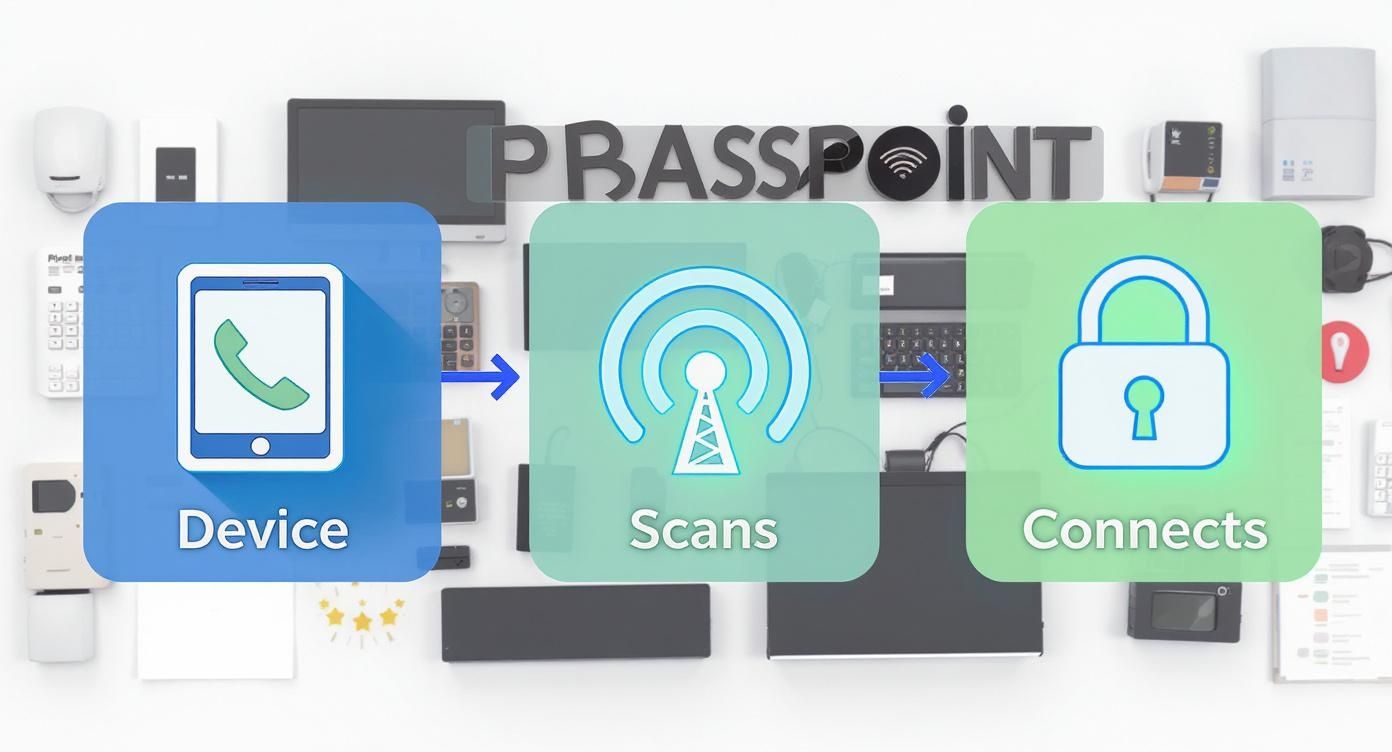
As you can see, the device discovers the network, scans for its credentials, and establishes a secure connection automatically. The user does nothing.
From Cost Center to Business Intelligence Tool
Getting rid of the disruptive Captive Portals doesn't mean you lose the ability to engage with your guests. In fact, it makes that engagement smarter. By pairing Passpoint with advanced Authentication Solutions, venues can create a one-time onboarding experience that installs the Passpoint profile onto the user's device.
This first touchpoint can still include options like a social login or a simple registration form. But once they're in, they're in for good. On every future visit, their device connects automatically, delivering the best of both worlds.
- Seamless Re-engagement: The network recognizes returning visitors instantly, opening the door for personalized greetings or offers without another login screen.
- Rich Analytics: Venues can still gather valuable, anonymized data on foot traffic, dwell times, and visit frequency, turning the network into a powerful source of business intelligence.
- Reduced Friction: In the Retail sector, making the login a one-and-done event dramatically improves the in-store experience, a key driver of customer loyalty. Our guide offers more insights on how to improve the customer experience with better connectivity.
Passpoint lets businesses stop seeing Wi-Fi as just an operational cost. It becomes a platform for building better relationships with customers and understanding their behavior—all while providing a superior, secure service.
Proven Success in High-Density Environments
This isn't just theory; the impact is being proven at a massive scale in some of the world's busiest places. For a great case study, look at New York City's LinkNYC initiative. Its 1,800 kiosks process up to 20 million sessions weekly, many powered by Passpoint. It’s also been a huge success at major international hubs like Mobile World Congress in Barcelona and El Prat International Airport, allowing travelers to roam seamlessly without logging in over and over.
This success translates directly to the Education sector. On a university campus, Passpoint can be combined with flexible Authentication Solutions like IPSK or EasyPSK. Administrators can issue unique, secure credentials to students and faculty for automatic access, while still maintaining separate, controlled access for short-term visitors. It’s a brilliant way to manage a complex environment without sacrificing security or the user experience.
Deploying Passpoint with Cisco Meraki
So, you understand the "what" and "why" of Passpoint. Now, let's get practical. How do you actually roll this out? For many, the answer lies within the Cisco Meraki ecosystem, which does a fantastic job of turning a complex technology into a manageable project. Getting started is more about smart network design than just flipping a few switches in a dashboard.
At the heart of a good deployment is a solid authentication strategy. While Passpoint is the gold standard for your trusted users, you'll almost always have other people who need to get online—guests, contractors, or temporary visitors. The beauty of the Cisco Meraki platform is that it lets you handle everyone without needing separate networks.
Building a Tiered Access Strategy
A great way to think about this is creating different "tiers" of Wi-Fi access. Your most important users—think employees, students, or loyal customers—get the premium Passpoint experience. For them, connecting is effortless and totally secure. But what about everybody else?
This is where you can blend Passpoint with other authentication methods on the very same infrastructure. It’s all about matching the right user with the right experience.
- For Corporate Users: In a BYOD Corporate environment, you can tie Passpoint directly to your Identity Provider. This means only verified employees with company accounts get that instant, encrypted connection.
- For Managed Devices: In an Education setting, every school-issued laptop or tablet can be pre-configured with a Passpoint profile. The result? Students and staff are always securely connected as they move around campus—no login pages, no hassle.
- For Guest Access: Visitors can be directed to a separate, controlled onboarding process that gets them online quickly without ever touching your core network.
The screenshot below from the Cisco Meraki dashboard shows exactly where the magic begins.

This is where you enable Hotspot 2.0 (the technology behind Passpoint) and define your operator name and roaming agreements. These are the first crucial steps that allow Passpoint-ready devices to discover and trust your network.
Leveraging IPSK and EasyPSK for Flexible Control
One of the most powerful tools in the Meraki chest for building out these tiers is IPSK (Identity Pre-Shared Key), often called EasyPSK. Instead of one password for everyone (a massive security headache), IPSK lets you create a unique pre-shared key for every single user or device.
This approach works hand-in-glove with Passpoint. You can reserve the seamless Passpoint connection for your core users and use IPSK to manage everyone else with precision.
Let’s look at a Retail example:
- Loyalty Members: Get onboarded to a Passpoint profile just once. From then on, they connect automatically and securely every time they walk into any of your stores.
- General Shoppers: Are guided to a guest wifi portal that uses social wifi or a simple form. Once they sign up, the system can issue a temporary EasyPSK that’s good only for their shopping trip.
- Staff Devices: Each gets its own unique IPSK, keeping staff traffic totally separate and secure from the public network.
By combining Passpoint with IPSK, network admins get incredibly granular control. You can decide exactly who is on your network, what they can do, and for how long. Best of all, you eliminate the friction of Captive Portals for your most important people.
This hybrid model truly offers the best of both worlds: a premium, invisible experience where it matters most, and simple, managed access for everyone else. It’s a framework that you can mold to fit your organization's unique needs.
Ultimately, deploying Passpoint with Cisco Meraki is about more than the tech—it's about designing a smarter, more intuitive journey for your users. Whether they’re students in Education, shoppers in Retail, or employees in a BYOD Corporate setting, the goal is always the same: make connecting to Wi-Fi secure, seamless, and completely invisible.
How Do Users and Their Devices Get on Board?
A brilliant Passpoint setup is only as good as the devices that can actually use it. The good news? The ecosystem is more than ready. Whether you're running a BYOD Corporate network, a sprawling university campus, or a multi-location retail chain, a successful deployment hinges on client devices being prepared—and thankfully, the vast majority of modern smartphones, tablets, and laptops already have Passpoint support baked right in.
This widespread compatibility is a huge win for IT administrators. It means that whether your users are on iOS, Android, or Windows, their devices are likely equipped to handle the seamless, secure handshake that makes Passpoint so powerful. The main task isn't wrestling with device limitations; it's getting a small configuration file, known as a Passpoint profile, onto the device in the first place.
Getting the Profile on the Device: The "Provisioning" Step
"Provisioning" sounds technical, but it’s really just the process of installing that profile. Think of it like giving a user a digital passport for your network. Once they have it, they're set for good. This can be done in several ways, each suited to different environments and user types.
The whole point is to make this a one-time event. Whether it's pushed from an IT department, downloaded from a portal, or installed via an app, the goal is to get the user profiled and authenticated so they never have to think about logging in again. If you're managing initial sign-ups today, you might find our guide on how to set up guest WiFi a useful point of comparison.
This flowchart shows the common paths a user might take to get their device provisioned and ready for Passpoint.
As you can see, the provisioning method can be tailored to the user, from a completely automated push for corporate devices to a simple, one-time portal for guests.
The Passpoint device landscape has matured significantly, with well over 75 Passpoint-certified devices now on the market. Most modern mobile devices support at least Passpoint Release 1 (R1), giving network operators a solid foundation to build on. While the Wi-Fi Alliance eventually removed Release 2 (R2) from the standard, the industry didn't stand still. New provisioning methods have filled the gap, including over-the-air configuration, mobile apps, and portal-based systems that use Captive Portal APIs to get the job done.
Onboarding Methods for Every Scenario
Different environments call for different onboarding strategies. A corporate office has different security and management needs than a public retail space, and flexible platforms like Cisco Meraki are built to handle them all.
Let's look at a few common ways to get that profile onto a device.
Getting the Passpoint profile onto a user's device is the critical first step. The method you choose depends entirely on your environment and who your users are—employees, students, or the general public. Below is a breakdown of the most common provisioning methods.
Table: Passpoint Profile Provisioning Methods
| Provisioning Method | How It Works | Best For |
|---|---|---|
| Mobile Device Management (MDM) | IT administrators push the profile directly and silently to all managed devices. | Corporate, Education, and any BYOD environment with managed devices. |
| Onboarding Portal | A one-time captive portal prompts users to authenticate (e.g., via social login or a form), then provides a link to download and install the profile. | Guest WiFi in retail, hospitality, and public venues. |
| Dedicated App | An organization-specific app (e.g., from a carrier or large venue) handles the entire provisioning and authentication process for the user. | Large public venues, service providers, and transportation hubs. |
| Direct Configuration File | Users are sent a link via email or text to download a simple .mobileconfig (Apple) or similar file that installs the profile when clicked. |
Situations where you have a direct communication channel with the user. |
Each of these paths leads to the same outcome: a user whose device is ready to connect automatically and securely, every single time.
The key takeaway here is that user onboarding for Passpoint is a flexible, one-and-done process. By choosing the right method, you can effectively eliminate the daily frustration of traditional Captive Portals. You get to deliver a premium, seamless experience without ever sacrificing control over your network.
Got Questions About Passpoint Wi-Fi?
As you start looking into a wireless network upgrade, a few questions always seem to surface. Let's walk through the most common ones to clear things up and help you figure out if Passpoint is the right move for your venue.
We'll tackle the big questions that IT managers and business owners usually have.
Getting straight answers is the best way to understand what this technology is all about and see how it can help you in the real world.
Is Passpoint the Same as Hotspot 2.0?
Yes, they're essentially two sides of the same coin. Hotspot 2.0 is the technical specification developed by the Wi-Fi Alliance. Passpoint is simply the official certification program—the brand name, if you will—that guarantees networks and devices actually meet that standard.
So, when a device is Passpoint-certified, you know it's built on Hotspot 2.0 technology and will work as expected.
Can I Still Have a Branded Guest Portal?
Absolutely. This is a common point of confusion. While Passpoint gets rid of the annoying, recurring captive portal for returning users, you can still use a branded, one-time portal for initial sign-up.
This is actually a huge advantage for guest Wi-Fi in places like Retail. A customer can connect through a familiar social login on their first visit, you get the data you need, and they walk away with a permanent Passpoint profile for seamless future connections.
Is Passpoint Secure Enough for Corporate BYOD?
Without a doubt. In fact, it's a significant security step-up from typical guest networks. Passpoint relies on WPA2 or WPA3-Enterprise encryption, which is the industry's gold standard.
This is perfect for environments like BYOD Corporate sectors and Education campuses running on Cisco Meraki hardware. Unlike the shared keys used in many IPSK or EasyPSK setups, every single user connection is individually and strongly encrypted.
Ready to turn your guest Wi-Fi from a frustrating login screen into a seamless, secure, and insightful connection experience? With Splash Access, you can roll out a modern, Passpoint-ready network on your existing Cisco Meraki gear. Learn more at Splash Access.